instrument panel CADILLAC ESCALADE EXT 2011 3.G Owners Manual
[x] Cancel search | Manufacturer: CADILLAC, Model Year: 2011, Model line: ESCALADE EXT, Model: CADILLAC ESCALADE EXT 2011 3.GPages: 508, PDF Size: 7.6 MB
Page 1 of 508

Black plate (1,1)Cadillac Escalade EXT Owner Manual - 2011
2011 Cadillac Escalade EXT Owner ManualM
In Brief. . . . . . . . . . . . . . . . . . . . . . . . 1-1
Instrument Panel . . . . . . . . . . . . . . 1-2
Initial Drive Information . . . . . . . . 1-4
Vehicle Features . . . . . . . . . . . . . 1-15
Performance and Maintenance . . . . . . . . . . . . . . . . 1-20
Keys, Doors and Windows . . . 2-1
Keys and Locks . . . . . . . . . . . . . . . 2-2
Doors . . . . . . . . . . . . . . . . . . . . . . . . . . 2-9
Vehicle Security . . . . . . . . . . . . . . 2-16
Exterior Mirrors . . . . . . . . . . . . . . . 2-19
Interior Mirrors . . . . . . . . . . . . . . . . 2-21
Windows . . . . . . . . . . . . . . . . . . . . . 2-22
Roof . . . . . . . . . . . . . . . . . . . . . . . . . . 2-25
Seats and Restraints . . . . . . . . . 3-1
Head Restraints . . . . . . . . . . . . . . . 3-2
Front Seats . . . . . . . . . . . . . . . . . . . . 3-3
Rear Seats . . . . . . . . . . . . . . . . . . . . 3-8
Safety Belts . . . . . . . . . . . . . . . . . . 3-10
Airbag System . . . . . . . . . . . . . . . . 3-25
Child Restraints . . . . . . . . . . . . . . 3-40 Storage
. . . . . . . . . . . . . . . . . . . . . . . 4-1
Storage Compartments . . . . . . . . 4-1
Luggage/Load Locations . . . . . . . 4-2
Additional Storage
Features . . . . . . . . . . . . . . . . . . . . . 4-6
Roof Rack System . . . . . . . . . . . 4-12
Instruments and Controls . . . . 5-1
Controls . . . . . . . . . . . . . . . . . . . . . . . 5-2
Warning Lights, Gauges, and Indicators . . . . . . . . . . . . . . . . . . . . 5-9
Information Displays . . . . . . . . . . 5-23
Vehicle Messages . . . . . . . . . . . . 5-27
Vehicle Personalization . . . . . . . 5-35
Universal Remote System . . . . 5-44
Lighting . . . . . . . . . . . . . . . . . . . . . . . 6-1
Exterior Lighting . . . . . . . . . . . . . . . 6-1
Interior Lighting . . . . . . . . . . . . . . . . 6-8
Lighting Features . . . . . . . . . . . . . 6-10
Infotainment System . . . . . . . . . 7-1
Introduction . . . . . . . . . . . . . . . . . . . . 7-1
Radio . . . . . . . . . . . . . . . . . . . . . . . . . . 7-9
Audio Players . . . . . . . . . . . . . . . . 7-17 Rear Seat Infotainment . . . . . . . 7-31
Navigation . . . . . . . . . . . . . . . . . . . . 7-42
Voice Recognition . . . . . . . . . . . . 7-80
Phone . . . . . . . . . . . . . . . . . . . . . . . . 7-83
Climate Controls . . . . . . . . . . . . . 8-1
Climate Control Systems . . . . . . 8-1
Air Vents . . . . . . . . . . . . . . . . . . . . . . . 8-6
Driving and Operating . . . . . . . . 9-1
Driving Information . . . . . . . . . . . . . 9-2
Starting and Operating . . . . . . . 9-30
Engine Exhaust . . . . . . . . . . . . . . 9-37
Automatic Transmission . . . . . . 9-38
Drive Systems . . . . . . . . . . . . . . . . 9-43
Brakes . . . . . . . . . . . . . . . . . . . . . . . 9-43
Ride Control Systems . . . . . . . . 9-45
Cruise Control . . . . . . . . . . . . . . . . 9-49
Object Detection Systems . . . . 9-52
Fuel . . . . . . . . . . . . . . . . . . . . . . . . . . 9-58
Towing . . . . . . . . . . . . . . . . . . . . . . . 9-64
Conversions and Add-Ons . . . 9-75
Page 7 of 508
Black plate (1,1)Cadillac Escalade EXT Owner Manual - 2011
In Brief 1-1
In Brief
Instrument Panel
Instrument Panel . . . . . . . . . . . . . . 1-2
Initial Drive Information
Initial Drive Information . . . . . . . . 1-4
Remote Keyless Entry (RKE)System . . . . . . . . . . . . . . . . . . . . . . 1-4
Remote Vehicle Start . . . . . . . . . 1-4
Door Locks . . . . . . . . . . . . . . . . . . . 1-5
Midgate
®. . . . . . . . . . . . . . . . . . . . . . 1-5
Tailgate . . . . . . . . . . . . . . . . . . . . . . . 1-5
Windows . . . . . . . . . . . . . . . . . . . . . . 1-6
Seat Adjustment . . . . . . . . . . . . . . 1-6
Memory Features . . . . . . . . . . . . . 1-7
Second Row Seats . . . . . . . . . . . 1-8
Heated and Ventilated Seats . . . . . . . . . . . . . . . . . . . . . . . . 1-9
Head Restraint Adjustment . . . . 1-9 Safety Belts . . . . . . . . . . . . . . . . . . . 1-9
Sensing System for
Passenger Airbag . . . . . . . . . . 1-10
Mirror Adjustment . . . . . . . . . . . . 1-10
Steering Wheel Adjustment . . . . . . . . . . . . . . . . . 1-11
Throttle and Brake Pedal Adjustment . . . . . . . . . . . . . . . . . 1-11
Interior Lighting . . . . . . . . . . . . . . 1-12
Exterior Lighting . . . . . . . . . . . . . 1-12
Windshield Wiper/Washer . . . . 1-13
Climate Controls . . . . . . . . . . . . . 1-14
Transmission . . . . . . . . . . . . . . . . 1-14
Vehicle Features
Radio(s) . . . . . . . . . . . . . . . . . . . . . 1-15
Satellite Radio . . . . . . . . . . . . . . . 1-15
Portable Audio Devices . . . . . . 1-15
Bluetooth
®. . . . . . . . . . . . . . . . . . . 1-16
Steering Wheel Controls . . . . . 1-16
Cruise Control . . . . . . . . . . . . . . . 1-17 Navigation System . . . . . . . . . . . 1-17
Driver Information
Center (DIC) . . . . . . . . . . . . . . . 1-18
Rear Vision Camera (RVC) . . . . . . . . . . . . . 1-19
Ultrasonic Parking Assist . . . . 1-19
Power Outlets . . . . . . . . . . . . . . . 1-19
Universal Remote System . . . . . . . . . . . . . . . . . . . . . 1-20
Performance and Maintenance
StabiliTrak®System . . . . . . . . . 1-20
Tire Pressure Monitor . . . . . . . . 1-21
Engine Oil Life System . . . . . . 1-21
Fuel E85 (85% Ethanol) . . . . . 1-21
Driving for Better Fuel Economy . . . . . . . . . . . . . . . . . . . 1-22
Roadside Service . . . . . . . . . . . . 1-22
OnStar
®. . . . . . . . . . . . . . . . . . . . . 1-23
Page 8 of 508
Black plate (2,1)Cadillac Escalade EXT Owner Manual - 2011
1-2 In Brief
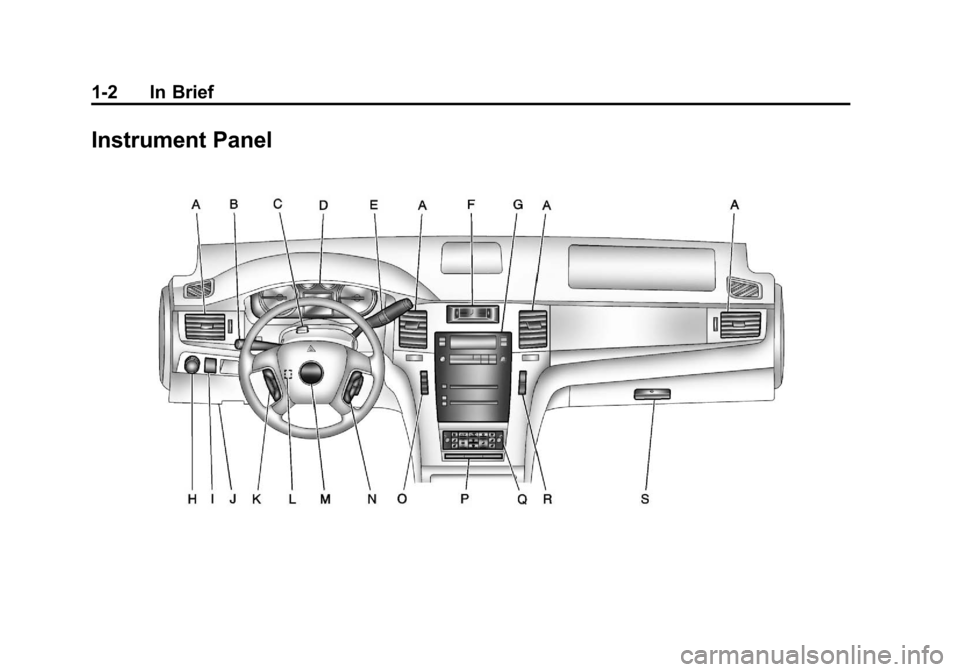
Instrument Panel
Page 18 of 508
Black plate (12,1)Cadillac Escalade EXT Owner Manual - 2011
1-12 In Brief
Interior Lighting
Dome Lamps
The dome lamps are located in the
overhead console.
They come on when any door is
opened and turn off after all the
doors are closed.
Turn the instrument panel
brightness knob located below
the dome lamp override button,
clockwise to the farthest position to
manually turn on the dome lamps.
The dome lamps remain on until the
knob is turned counterclockwise.
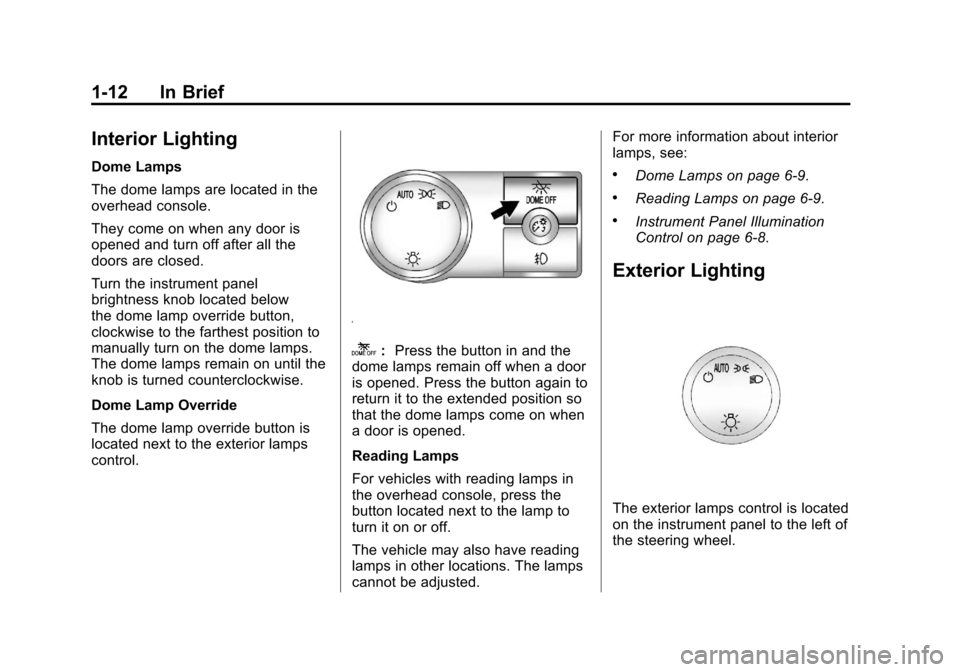
Dome Lamp Override
The dome lamp override button is
located next to the exterior lamps
control.
k:Press the button in and the
dome lamps remain off when a door
is opened. Press the button again to
return it to the extended position so
that the dome lamps come on when
a door is opened.
Reading Lamps
For vehicles with reading lamps in
the overhead console, press the
button located next to the lamp to
turn it on or off.
The vehicle may also have reading
lamps in other locations. The lamps
cannot be adjusted. For more information about interior
lamps, see:
.Dome Lamps on page 6‑9.
.Reading Lamps on page 6‑9.
.Instrument Panel Illumination
Control on page 6‑8.
Exterior Lighting
The exterior lamps control is located
on the instrument panel to the left of
the steering wheel.
Page 19 of 508
Black plate (13,1)Cadillac Escalade EXT Owner Manual - 2011
In Brief 1-13
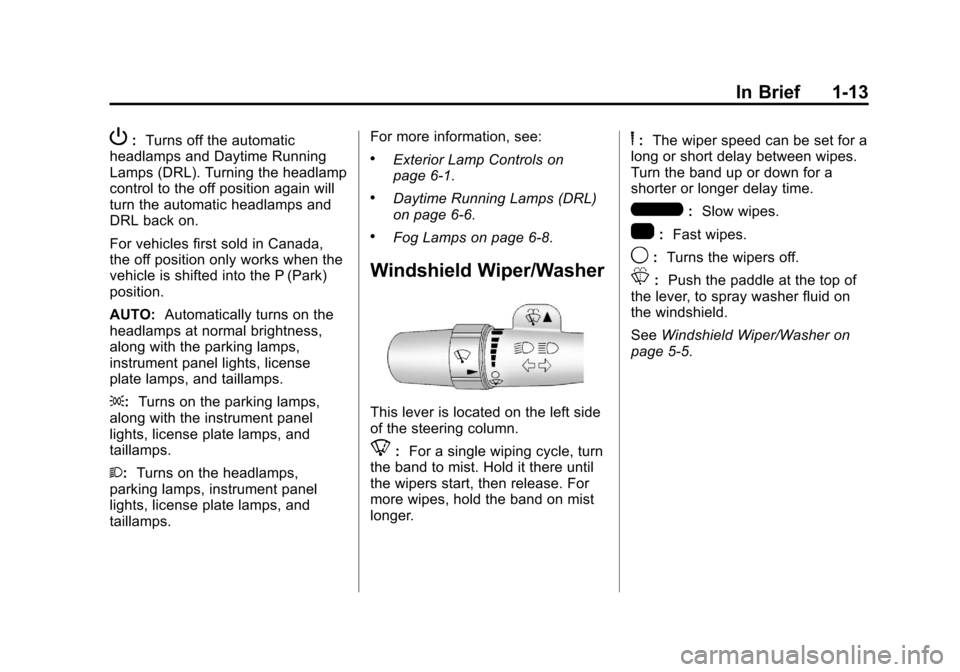
P:Turns off the automatic
headlamps and Daytime Running
Lamps (DRL). Turning the headlamp
control to the off position again will
turn the automatic headlamps and
DRL back on.
For vehicles first sold in Canada,
the off position only works when the
vehicle is shifted into the P (Park)
position.
AUTO: Automatically turns on the
headlamps at normal brightness,
along with the parking lamps,
instrument panel lights, license
plate lamps, and taillamps.
;: Turns on the parking lamps,
along with the instrument panel
lights, license plate lamps, and
taillamps.
2: Turns on the headlamps,
parking lamps, instrument panel
lights, license plate lamps, and
taillamps. For more information, see:.Exterior Lamp Controls on
page 6‑1.
.Daytime Running Lamps (DRL)
on page 6‑6.
.Fog Lamps on page 6‑8.
Windshield Wiper/Washer
This lever is located on the left side
of the steering column.
8:
For a single wiping cycle, turn
the band to mist. Hold it there until
the wipers start, then release. For
more wipes, hold the band on mist
longer.
6: The wiper speed can be set for a
long or short delay between wipes.
Turn the band up or down for a
shorter or longer delay time.
6: Slow wipes.
1: Fast wipes.
9:Turns the wipers off.
L: Push the paddle at the top of
the lever, to spray washer fluid on
the windshield.
See Windshield Wiper/Washer on
page 5‑5.
Page 21 of 508
Black plate (15,1)Cadillac Escalade EXT Owner Manual - 2011
In Brief 1-15
This is the highest attainable
range with all lower gears
accessible. As an example,
when 5 (Fifth) gear is selected,
1 (First) through 5 (Fifth) gears
are available.
Press the plus/minus buttons,
located on the steering column shift
lever, to select the desired range of
gears for current driving conditions.
SeeManual Mode on page 9‑41.
While using DSC, cruise control and
the tow/haul mode can be used.
Grade Braking is not available when
DSC is active. See Tow/Haul Mode
on page 9‑42.Vehicle Features
Radio(s)
This vehicle's radio is part of the
navigation system. See AM-FM
Radio on page 7‑9 later in this
manual.
Satellite Radio
XM is a satellite radio service
that is based in the 48 contiguous
United States and 10 Canadian
provinces. XM satellite radio has
a wide variety of programming
and commercial-free music,
coast-to-coast, and in digital-quality
sound. A fee is required to receive the XM
service.
For more information, refer to:
.www.xmradio.com or call
1-800-929-2100 (U.S.)
.www.xmradio.ca or call
1-877-438-9677 (Canada)
Also, see Satellite Radio on
page 7‑15.
Portable Audio Devices
This vehicle has an auxiliary input,
located on the audio faceplate,
and a USB port located on the
instrument panel or in the center
console. External devices such
as iPod
®, laptop computers,
MP3 players, CD changers,
USB storage device, etc. can be
connected to the auxiliary port using
a 3.5 mm (1/8 in) input jack or the
USB port depending on the audio
system.
See Auxiliary Devices on page 7‑29
for further information.
Page 24 of 508
Black plate (18,1)Cadillac Escalade EXT Owner Manual - 2011
1-18 In Brief
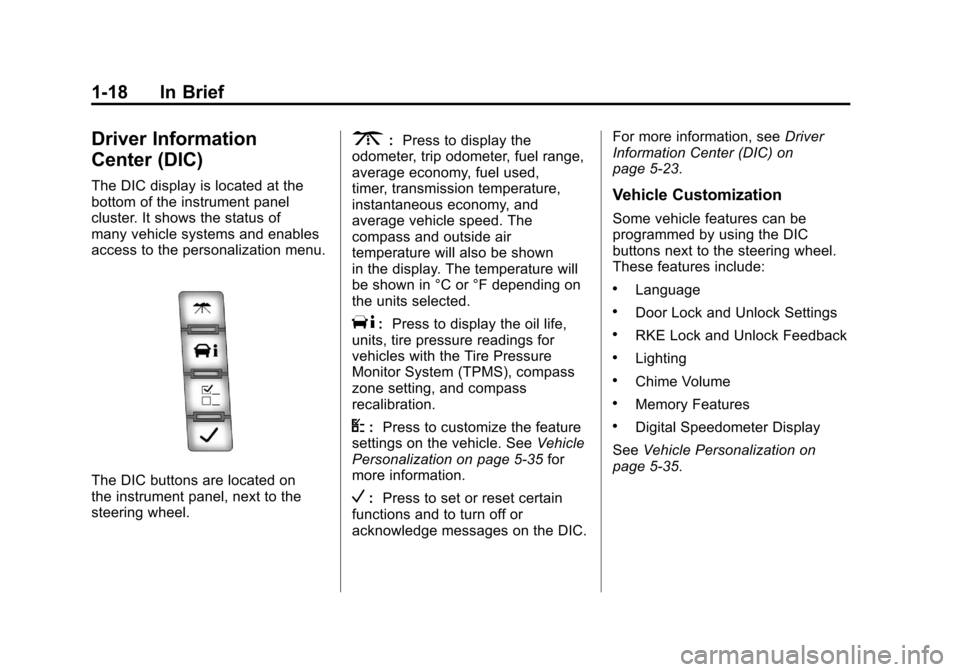
Driver Information
Center (DIC)
The DIC display is located at the
bottom of the instrument panel
cluster. It shows the status of
many vehicle systems and enables
access to the personalization menu.
The DIC buttons are located on
the instrument panel, next to the
steering wheel.
3:Press to display the
odometer, trip odometer, fuel range,
average economy, fuel used,
timer, transmission temperature,
instantaneous economy, and
average vehicle speed. The
compass and outside air
temperature will also be shown
in the display. The temperature will
be shown in °C or °F depending on
the units selected.
T: Press to display the oil life,
units, tire pressure readings for
vehicles with the Tire Pressure
Monitor System (TPMS), compass
zone setting, and compass
recalibration.
U: Press to customize the feature
settings on the vehicle. See Vehicle
Personalization on page 5‑35 for
more information.
V: Press to set or reset certain
functions and to turn off or
acknowledge messages on the DIC. For more information, see
Driver
Information Center (DIC) on
page 5‑23.
Vehicle Customization
Some vehicle features can be
programmed by using the DIC
buttons next to the steering wheel.
These features include:
.Language
.Door Lock and Unlock Settings
.RKE Lock and Unlock Feedback
.Lighting
.Chime Volume
.Memory Features
.Digital Speedometer Display
See Vehicle Personalization on
page 5‑35.
Page 26 of 508
Black plate (20,1)Cadillac Escalade EXT Owner Manual - 2011
1-20 In Brief
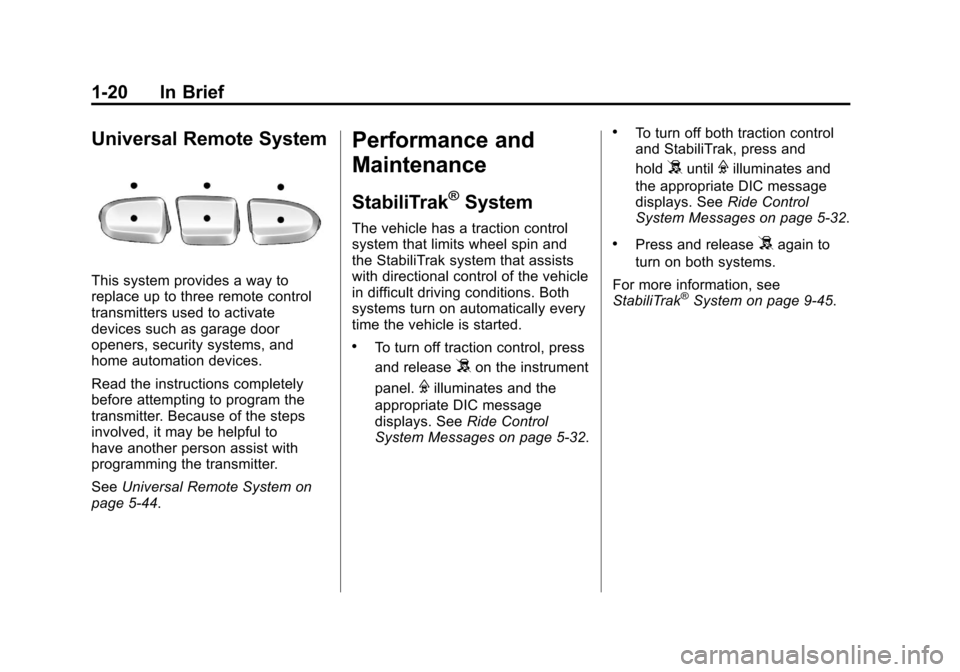
Universal Remote System
This system provides a way to
replace up to three remote control
transmitters used to activate
devices such as garage door
openers, security systems, and
home automation devices.
Read the instructions completely
before attempting to program the
transmitter. Because of the steps
involved, it may be helpful to
have another person assist with
programming the transmitter.
SeeUniversal Remote System on
page 5‑44.
Performance and
Maintenance
StabiliTrak®System
The vehicle has a traction control
system that limits wheel spin and
the StabiliTrak system that assists
with directional control of the vehicle
in difficult driving conditions. Both
systems turn on automatically every
time the vehicle is started.
.To turn off traction control, press
and release
5on the instrument
panel.
Filluminates and the
appropriate DIC message
displays. See Ride Control
System Messages on page 5‑32.
.To turn off both traction control
and StabiliTrak, press and
hold
5untilFilluminates and
the appropriate DIC message
displays. See Ride Control
System Messages on page 5‑32.
.Press and release5again to
turn on both systems.
For more information, see
StabiliTrak
®System on page 9‑45.
Page 39 of 508
Black plate (9,1)Cadillac Escalade EXT Owner Manual - 2011
Keys, Doors and Windows 2-9
Doors
Midgate®
{WARNING
It can be dangerous to drive with
the cargo area covered and the
tailgate and the Midgate
®open
because carbon monoxide (CO)
gas can come into your vehicle.
You can not see or smell CO.
It can cause unconsciousness
and even death. If you must drive
with the cargo covers on and the
tailgate and Midgate open or if
electrical wiring or other cable
connections must pass through
the seal between the body and
the Midgate:
.Make sure all windows
are shut.
.Turn the fan on your heating
or cooling system to its
highest speed on the setting
(Continued)
WARNING (Continued)
that brings in outside air. This
will force outside air into your
vehicle. SeeDual Automatic
Climate Control System on
page 8‑1.
.If you have air outlets on or
under the instrument panel,
open them all the way.
See Engine Exhaust on
page 9‑37.
Midgate Operation
This vehicle is equipped with a
Midgate and a removable rear glass
panel. The Midgate allows you to
extend the length of the vehicle's
cargo area.
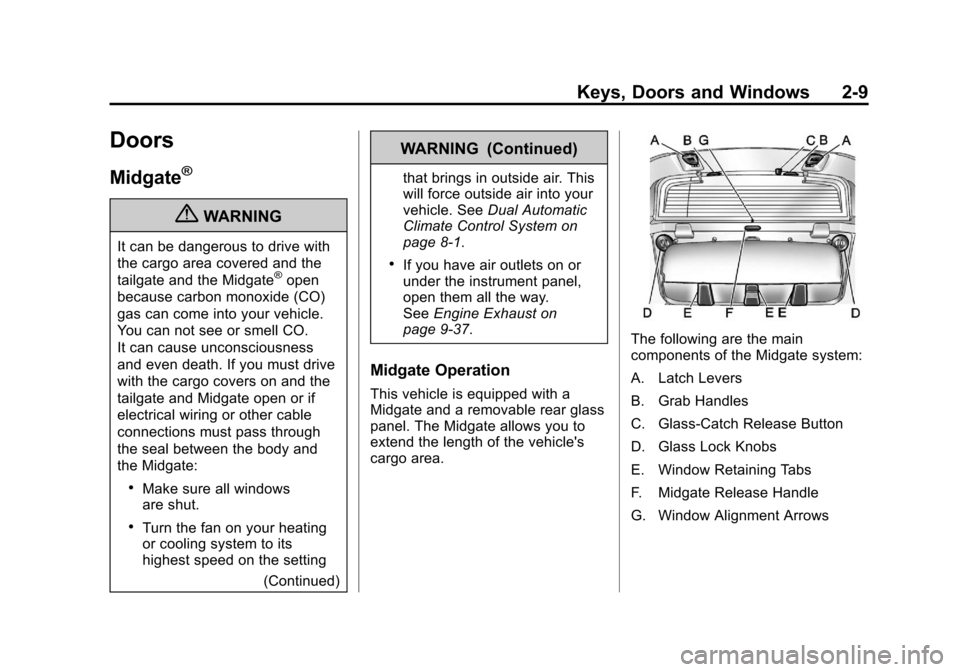
The following are the main
components of the Midgate system:
A. Latch Levers
B. Grab Handles
C. Glass-Catch Release Button
D. Glass Lock Knobs
E. Window Retaining Tabs
F. Midgate Release Handle
G. Window Alignment Arrows
Page 47 of 508

Black plate (17,1)Cadillac Escalade EXT Owner Manual - 2011
Keys, Doors and Windows 2-17
If you set off the alarm by accident,
press unlock on the RKE transmitter
or place the key in the ignition and
turn it to START to turn off the
alarm. The alarm will not stop if you
try to unlock a door any other way.
Testing the Alarm
To test the alarm:
1. From inside the vehicle, lowerthe driver window and open the
driver door.
2. Activate the system by locking the doors with the power door
lock switch while the door is
open, or with the RKE
transmitter.
3. Get out of the vehicle, close the door and wait for the security
light to go out.
4. Then reach in through the window, unlock the door with the
manual door lock and open the
door. This should set off the
alarm. While the alarm is set, the power
door unlock switch will not work.
If the alarm does not sound when it
should but the headlamps flash,
check to see if the horn works. The
horn fuse may be blown. To replace
the fuse, see
Instrument Panel Fuse
Block on page 10‑46 andEngine
Compartment Fuse Block on
page 10‑41.
If the alarm does not sound or the
headlamps do not flash, the vehicle
should be serviced by your dealer.
Immobilizer
See Radio Frequency Statement on
page 13‑20 for information
regarding Part 15 of the Federal
Communications Commission (FCC)
rules and Industry Canada
Standards RSS-210/220/310.
Immobilizer Operation
This vehicle has PASS-Key®III+
(Personalized Automotive Security
System) theft-deterrent system.
PASS-Key III+ is a passive
theft-deterrent system.
The system is automatically armed
when the key is removed from the
ignition.
The system is automatically
disarmed when the key is turned
to ON/RUN, ACC/ACCESSORY,
or START from the LOCK/OFF
position.
You do not have to manually arm or
disarm the system.
The security light will come on if
there is a problem with arming or
disarming the theft-deterrent
system.