ECO mode CADILLAC ESCALADE EXT 2013 3.G User Guide
[x] Cancel search | Manufacturer: CADILLAC, Model Year: 2013, Model line: ESCALADE EXT, Model: CADILLAC ESCALADE EXT 2013 3.GPages: 476, PDF Size: 7.55 MB
Page 161 of 476

Black plate (47,1)Cadillac Escalade EXT Owner Manual - 2013 - CRC - 4/5/12
Instruments and Controls 5-47
to right, into the Universal
Home Remote, when
completing Step 4.
3. From inside your vehicle, first firmly press all three buttons at
the same time for about
three seconds. Release the
buttons to put the Universal
Home Remote into
programming mode.
A. Left Button (Up, +, or On)
B. Middle Button (Middle, 0,or Neutral) C. Right Button (Down,
−,
or Off)
4. The indicator lights will blink slowly. Enter each switch setting
from Step 2 into your vehicle's
Universal Home Remote. You
will have two and one-half
minutes to complete Step 4. Now
press one button on the
Universal Home Remote for
each switch setting as follows:
.If you wrote “Left,”press
the left button (A) in the
vehicle.
.If you wrote “Right,”press
the right button (C) in the
vehicle.
.If you wrote “Middle,”press
the middle button (B) in the
vehicle.
5. After entering all of the switch positions, once again firmly
press and release all three
buttons at the same time. The
indicator lights will turn on. 6. Press and hold the button that
will be used to control the
garage door until the garage
door moves. The indicator light
above the selected button
should slowly blink. This button
may need to be held for up to
55 seconds.
7. Immediately release the button when the garage door moves.
The indicator light will blink
rapidly until programming is
complete.
8. Press and release the same button again. The garage door
should move, confirming that
programming is successful and
complete.
To program another Fixed Code
device such as an additional garage
door opener, a security device,
or home automation device, repeat
Steps 1-8, choosing a different
button in Step 6 than what was used
for the garage door opener.
Page 169 of 476

Black plate (7,1)Cadillac Escalade EXT Owner Manual - 2013 - CRC - 4/5/12
Lighting 6-7
not operating, these lamps turn off.
Move the exterior lamp control to
P
or;to disable this feature.
Hazard Warning Flashers
|(Hazard Warning Flashers):
Press this button to make the front
and rear turn signal lamps flash on
and off. Press again to turn the
flashers off.
When the hazard warning flashers
are on, the vehicle's turn signals will
not work.
Turn and Lane-Change
Signals
An arrow on the instrument cluster
flashes in the direction of the turn or
lane change.
Move the turn signal lever all the
way up or down to signal a turn.
Raise or lower the lever until the
arrow starts to flash to signal a lane
change. The turn signals
automatically flash three times.
It will flash six times if the tow-haul
mode is active. Holding the turn
signal lever for more than
one second causes the turn signals
to flash until the lever is released.
The lever returns to its starting
position when it is released. If after signaling a turn or a lane
change the arrows flash rapidly or
do not come on, a signal bulb may
be burned out.
Have any burned out bulbs
replaced. If the bulb is not burned
out, check the fuse. See
Instrument
Panel Fuse Block on page 10‑37
and Engine Compartment Fuse
Block on page 10‑32.
Turn Signal On Chime
If the turn signal is left on for more
than 1.2 km (0.75 mi), a chime
sounds at each flash of the turn
signal and the message TURN
SIGNAL ON also appears in the
DIC. See Lamp Messages on
page 5‑30. To turn the chime and
message off, move the turn signal
lever to the off position.
Fog Lamps
For vehicles with fog lamps, they
can be used for better vision in
foggy or misty conditions. The
Page 184 of 476
Black plate (12,1)Cadillac Escalade EXT Owner Manual - 2013 - CRC - 4/5/12
7-12 Infotainment System
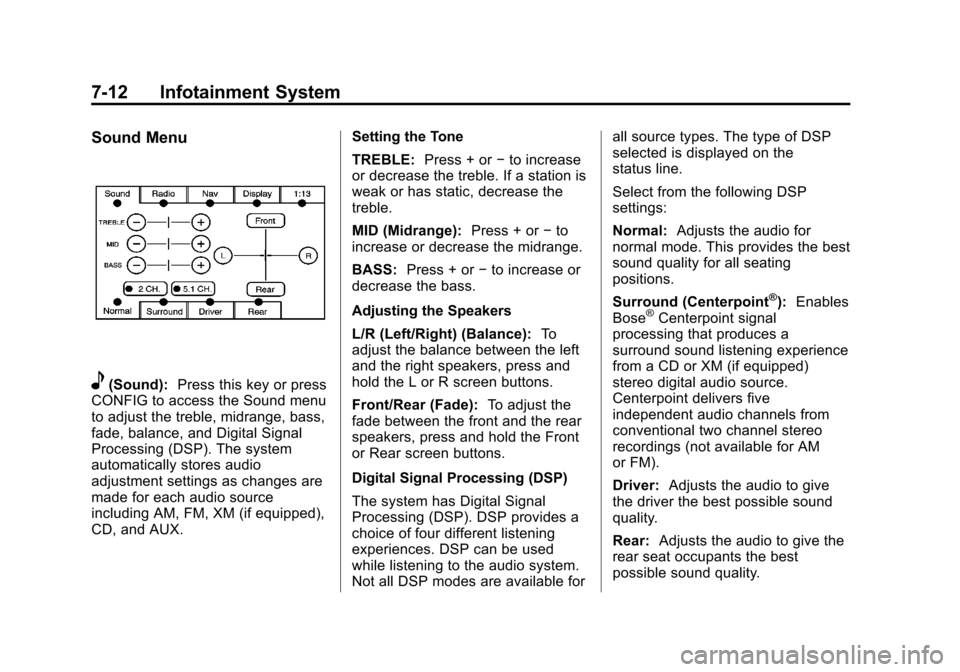
Sound Menu
e(Sound):Press this key or press
CONFIG to access the Sound menu
to adjust the treble, midrange, bass,
fade, balance, and Digital Signal
Processing (DSP). The system
automatically stores audio
adjustment settings as changes are
made for each audio source
including AM, FM, XM (if equipped),
CD, and AUX. Setting the Tone
TREBLE:
Press + or−to increase
or decrease the treble. If a station is
weak or has static, decrease the
treble.
MID (Midrange): Press + or−to
increase or decrease the midrange.
BASS: Press + or −to increase or
decrease the bass.
Adjusting the Speakers
L/R (Left/Right) (Balance): To
adjust the balance between the left
and the right speakers, press and
hold the L or R screen buttons.
Front/Rear (Fade): To adjust the
fade between the front and the rear
speakers, press and hold the Front
or Rear screen buttons.
Digital Signal Processing (DSP)
The system has Digital Signal
Processing (DSP). DSP provides a
choice of four different listening
experiences. DSP can be used
while listening to the audio system.
Not all DSP modes are available for all source types. The type of DSP
selected is displayed on the
status line.
Select from the following DSP
settings:
Normal:
Adjusts the audio for
normal mode. This provides the best
sound quality for all seating
positions.
Surround (Centerpoint
®): Enables
Bose®Centerpoint signal
processing that produces a
surround sound listening experience
from a CD or XM (if equipped)
stereo digital audio source.
Centerpoint delivers five
independent audio channels from
conventional two channel stereo
recordings (not available for AM
or FM).
Driver: Adjusts the audio to give
the driver the best possible sound
quality.
Rear: Adjusts the audio to give the
rear seat occupants the best
possible sound quality.
Page 206 of 476
Black plate (34,1)Cadillac Escalade EXT Owner Manual - 2013 - CRC - 4/5/12
7-34 Infotainment System
control does not seem to be
working, the batteries might need to
be replaced. See“Battery
Replacement” later in this section.
Objects blocking the line of sight
could also affect the function of the
remote control.
If a CD or DVD is in the Radio DVD
slot, the remote control
O(power)
button can be used to turn on the
video screen display and start the
disc. The radio can also turn on the
video screen display. See CD/DVD
Player on page 7‑17 for more
information.
Notice: Storing the remote
control in a hot area or in direct
sunlight can damage it, and the
repairs will not be covered by the
warranty. Storage in extreme cold
can weaken the batteries. Keep
the remote control stored in a
cool, dry place.
If the remote control becomes lost
or damaged, a new universal
remote control can be purchased. If this happens, make sure the
universal remote control uses a
code set of Toshiba®.
Remote Control Buttons
O(Power):
Press to turn the video
screen on and off.
P(Illumination): Press to turn the
remote control backlight on. The
backlight automatically times out
after 7 to 10 seconds if no other
button is pressed while the backlight
is on.
v(Title): Press to return the DVD
to the main menu of the DVD. This
function could vary for each disc.
y(Main Menu): Press to access
the DVD or MP3 menu. The DVD
menu is different on every DVD.
Use the navigation arrows to move
the cursor around the DVD menu.
After making a selection press the
enter button. This button only
operates when using a DVD or
MP3 disc.
n,q,p,o(Menu Navigation
Arrows): Use the arrow buttons to
navigate through a menu.
r(Enter): Press to select the
choice that is highlighted in
any menu.
z(Display Menu): Press to adjust
the brightness, screen display mode
(normal, full, or zoom), and display
the language menu. This function
could vary for each disc.
q(Return): Press to exit the
current active menu and return to
the previous menu. This button
operates only when the display
menu or a DVD menu is active.
c(Stop): Press to stop playing,
fast reversing, or fast forwarding a
DVD. Press this button twice to
return to the beginning of the DVD.
s(Play/Pause): Press to start
playing a DVD. Press this button
while a DVD is playing to pause it.
Press it again to continue playing
the DVD.
Page 207 of 476

Black plate (35,1)Cadillac Escalade EXT Owner Manual - 2013 - CRC - 4/5/12
Infotainment System 7-35
While the DVD is playing, the DVD
can be played slowly by pressing
the play/pause button then pressing
the fast forward button. The DVD
continues playing in a slow play
mode. Also, reverse can be played
slowly by pressing the play/pause
button and then pressing the fast
reverse button. To cancel slow play
mode, press the play/pause button.
t(Previous Track/Chapter):
Press to return to the start of the
current track or chapter. Press this
button again to go to the previous
track or chapter. This button might
not work when the DVD is playing
the copyright information or the
previews.
u(Next Track/Chapter): Press to
go to the beginning of the next
chapter or track. This button might
not work while the DVD is playing
the copyright information or the
previews.
r(Fast Reverse): Press to
quickly reverse the DVD or CD. To
stop fast reversing a DVD video, press the play/pause button. To stop
fast reversing a DVD audio or CD,
release the fast reverse button. This
button might not work when the
DVD is playing the copyright
information or the previews.
[(Fast Forward):
Press to fast
forward the DVD or CD. To stop fast
forwarding a DVD video, press the
play/pause button. To stop fast
forwarding a DVD audio or CD,
release the fast forward button. This
button might not work while the
DVD is playing the copyright
information or the previews.
e(Audio): Press to change audio
tracks on DVDs that have this
feature when the DVD is playing.
The format and content of this
function vary for each disc.
{(Subtitles): Press to turn on or
off subtitles and to move through
subtitle options when a DVD is
playing. The format and content of
this function vary for each disc. AUX (Auxiliary):
Press to switch
the system between the DVD player
and an auxiliary source. When the
front auxiliary or USB port is the
source, the remote control does not
control this source. The rear seat
audio controls must be used.
2(Camera): Press to change
camera angles on DVDs that have
this feature while a DVD is playing.
The format and content of this
function vary for each disc.
1 through 0 (Numeric Keypad):
The numeric keypad provides the
capability of direct chapter or track
number selection.
\(Clear): Press within
three seconds after entering a
numeric selection, to clear all
numerical inputs.
}10 (Double Digit Entries): Press
to select chapter or track numbers
greater than nine. Press this button
before entering the number.
Page 209 of 476
Black plate (37,1)Cadillac Escalade EXT Owner Manual - 2013 - CRC - 4/5/12
Infotainment System 7-37
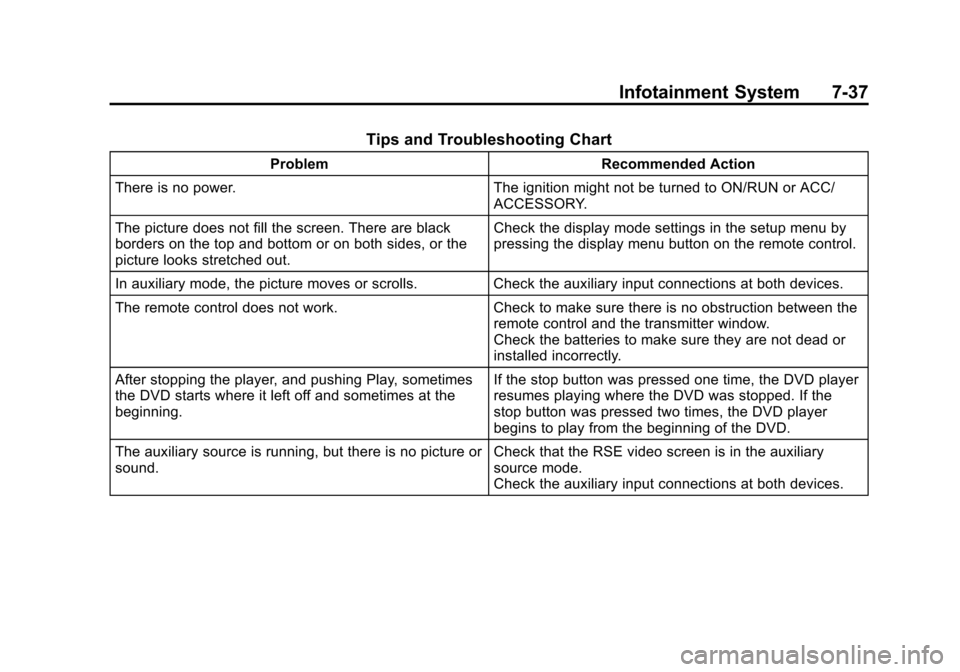
Tips and Troubleshooting Chart
ProblemRecommended Action
There is no power. The ignition might not be turned to ON/RUN or ACC/
ACCESSORY.
The picture does not fill the screen. There are black
borders on the top and bottom or on both sides, or the
picture looks stretched out. Check the display mode settings in the setup menu by
pressing the display menu button on the remote control.
In auxiliary mode, the picture moves or scrolls. Check the auxiliary input connections at both devices.
The remote control does not work. Check to make sure there is no obstruction between the
remote control and the transmitter window.
Check the batteries to make sure they are not dead or
installed incorrectly.
After stopping the player, and pushing Play, sometimes
the DVD starts where it left off and sometimes at the
beginning. If the stop button was pressed one time, the DVD player
resumes playing where the DVD was stopped. If the
stop button was pressed two times, the DVD player
begins to play from the beginning of the DVD.
The auxiliary source is running, but there is no picture or
sound. Check that the RSE video screen is in the auxiliary
source mode.
Check the auxiliary input connections at both devices.
Page 251 of 476

Black plate (79,1)Cadillac Escalade EXT Owner Manual - 2013 - CRC - 4/5/12
Infotainment System 7-79
If not currently driving on a route,
the system automatically creates the
voice tag destination as the final
destination. If driving on a route, the
system automatically creates the
voice tag destination as a stopover.
Up to three stopovers can be
created.
Storing Voice Tags
From the address book entry
information page, press the Add
Voice tag screen button. The
system responds“Name Please?”
and you will have four seconds to
record a name. The system asks for
confirmation of the name before
saving it as a voice tag.
Navigation Help
This command instructs the system
to assist with navigation commands.
Display Commands
Use the following display commands
to set the display mode.
Display [set] day [mode]: Sets the
display to daytime mode. Display [set] night [mode]:
Sets
the display to night mode.
Display [set] auto [mode]: Sets
the display to automatic mode. The
system changes between day and
night mode automatically.
System help: Instructs the system
to assist with display commands.
Radio Commands
The following are radio commands
that can be accessed by clearly
stating the commands exactly as
they are written.
Radio [band] [select] AM, radio
[band] [select] FM, radio [band]
[select] XM (if equipped), radio
[band] [select] satellite (if
equipped): Instructs the system to
go to either the AM, FM, or XM (if
equipped).
Radio [select] (frequency) AM,
radio [select] (frequency) FM:
Instructs the system to go to a
specific frequency on either AM
or FM. Radio [select] (channel) XM (if
equipped), radio [select]
(channel) satellite (if equipped):
Instructs the system to go to a
specific channel on the XM band (if
equipped).
Radio help:
Instructs the system to
assist with radio commands.
CD Commands
The following are CD, MP3, and
DVD commands that can be
accessed by clearly stating the
commands exactly as they are
written.
CD, DVD, Disc: Use this command
to select a CD, DVD, or disc that is
currently loaded.
CD, DVD, Disc, [select] track (one,
two, three, etc.): Instructs the
system to select a specific track
number.
CD, DVD, Disc select next
folder: Use this command to select
the next folder on the MP3 or
audio DVD.
Page 252 of 476

Black plate (80,1)Cadillac Escalade EXT Owner Manual - 2013 - CRC - 4/5/12
7-80 Infotainment System
CD, DVD, Disc select previous
folder:Use this command to select
the previous folder on the MP3 or
audio DVD.
CD help, DVD help, Disc help:
Instructs the system to assist with
CD and DVD commands.
Auxiliary Commands
The following auxiliary commands
can be accessed by clearly stating
the commands exactly as they are
written. The commands are
available when the auxiliary source
is available.
Aux, Auxiliary: Use this command
to select the auxiliary device, when
a device is connected.
Voice Help
Provides a description of help
commands that can be used.Phone
Bluetooth
For vehicles equipped with
Bluetooth capability, the system can
interact with many cell phones,
allowing:
.Placement and receipt of calls in
a hands-free mode.
.Sharing of the cell phone’s
address book or contact list with
the vehicle.
To minimize driver distraction,
before driving, and with the vehicle
parked:
.Become familiar with the
features of the cell phone.
Organize the phone book and
contact lists clearly and delete
duplicate or rarely used entries.
If possible, program speed dial
or other shortcuts.
.Review the controls and
operation of the infotainment
system.
.Pair cell phone(s) to the vehicle.
The system may not work with
all cell phones. See “Pairing”in
this section for more information.
.If the cell phone has voice
dialing capability, learn to use
that feature to access the
address book or contact list. See
“Voice Pass-Thru” in this section
for more information.
.See “Storing and Deleting Phone
Numbers” in this section for
more information.
{WARNING
When using a cell phone, it can
be distracting to look too long or
too often at the screen of the
phone or the infotainment
(navigation) system. Taking your
eyes off the road too long or too
often could cause a crash
resulting in injury or death. Focus
your attention on driving.
Page 263 of 476

Black plate (3,1)Cadillac Escalade EXT Owner Manual - 2013 - CRC - 4/5/12
Climate Controls 8-3
When in defrost mode the
passenger temperature setting
cannot be changed.
Automatic Operation
AUTO (Automatic):When
automatic operation is active the
system will control the inside
temperature, the air delivery, and
the fan speed.
Use the steps below to place the
entire system in automatic mode:
1. Press the AUTO button.
When AUTO is selected, the
display will change to show the
current temperature(s) and
AUTO will appear. The current
delivery mode and fan speed will
also be displayed for
approximately five seconds.
When AUTO is selected, the air
conditioning operation and air
inlet will be automatically
controlled. The air conditioning
compressor will run when the
outside temperature is over
about 4°C (40°F). The air inlet will normally be set to outside
air. If it is hot outside, the air
inlet may automatically switch to
recirculate inside air to help
quickly cool down the vehicle.
The light on the button comes on
in recirculation.
2. Set the driver and passenger temperature.
To find your comfort setting, start
with a 23°C (74°F) temperature
setting and allow about
20 minutes for the system to
regulate. Use the driver or
passenger temperature buttons
to adjust the temperature setting
as necessary. If a temperature
setting of 15°C (60°F) is chosen,
the system remains at the
maximum cooling setting. If a
temperature setting of 32°C
(90°F) is chosen, the system
remains at the maximum heat
setting. Choosing either
maximum setting will not cause
the vehicle to heat or cool any
faster. Do not to cover the sensor located
on the top of the instrument panel
near the windshield. This sensor
regulates air temperature based on
sun load and also turns on the
headlamps.
To avoid blowing cold air in cold
weather, the system will delay
turning on the fan until warm air is
available. The length of delay
depends on the engine coolant
temperature. Pressing the fan
switch will override this delay and
change the fan to a selected speed.
Manual Operation
You may manually adjust the air
delivery mode or fan speed.
y 9 z(Fan Control):
Press the
up or down arrows to increase or
decrease the fan speed
Pressing this button when the
system is off will turn the system on.
Pressing either arrow while using
automatic operation will place the
fan in manual operation. The fan
Page 264 of 476

Black plate (4,1)Cadillac Escalade EXT Owner Manual - 2013 - CRC - 4/5/12
8-4 Climate Controls
setting will display and the AUTO
light will turn off. The air delivery will
remain in automatic operation.
yNz(Air Delivery Mode
Control): Press to change the
direction of the airflow in the vehicle.
Repeatedly press the button until
the desired mode appears on the
display.
When the system is turned off, the
display goes blank after displaying
the current status of the system.
H(Vent): Air is directed to the
instrument panel outlets.
)(Bi-Level): Air is divided
between the instrument panel and
floor outlets. Some air is directed
towards the windshield and side
window outlets. Cooler air is
directed to the upper vents and
warmer air to the floor vents.
6(Floor): Air is directed to the
floor outlets, with some to the
windshield, side window outlets, and second row floor outlets. In this
mode, the system automatically
selects outside air.
-(Defog):
This mode clears the
windows of fog or moisture. Air is
directed to the windshield, floor
outlets, and side window vents. In
this mode, the system turns off
recirculation and runs the air
conditioning compressor unless the
outside temperature is close to
freezing. The recirculation mode
cannot be selected while in the
defog mode.
0(Defrost): This mode removes
fog or frost from the windshield
more quickly. Air is directed to the
windshield and side window vents,
with some directed to the floor
vents. In this mode, the system
automatically forces outside air into
the vehicle and runs the air
conditioning compressor unless the
outside temperature is close to
freezing. The recirculation mode
cannot be selected while in the
defrost mode. The passenger temperature control
cannot be activated while in defrost
mode. If the passenger control knob
is pressed, the passenger
temperature flashes three times and
will not work. If the passenger
control knob is adjusted, the driver
temperature indicator changes. The
passenger temperature will not be
displayed.
If vent, bi-level, or floor mode is
selected again, the climate control
system displays the previous
temperature settings.
Do not drive the vehicle until all the
windows are clear.
#(Air Conditioning):
Press to
turn the air conditioning (A/C)
compressor on and off. An indicator
light comes on to show that the air
conditioning is on.
Pressing this button when the
outside temperature is too cool for
air conditioning will make the air
conditioning indicator flash three
times and then turn off indicating the
air conditioning mode is not