warning CADILLAC ESCALADE EXT 2013 3.G Repair Manual
[x] Cancel search | Manufacturer: CADILLAC, Model Year: 2013, Model line: ESCALADE EXT, Model: CADILLAC ESCALADE EXT 2013 3.GPages: 476, PDF Size: 7.55 MB
Page 146 of 476

Black plate (32,1)Cadillac Escalade EXT Owner Manual - 2013 - CRC - 4/5/12
5-32 Instruments and Controls
SeeStabiliTrak®System on
page 9‑36 for more information.
If this message continues to be
displayed for multiple ignition cycles
and on different road surfaces, see
your dealer for service.
TRACTION XX
STABILITRAK XX
This message displays when the
traction control and/or StabiliTrak
systems have been turned on or off.
Adjust your driving accordingly. To
limit wheel spin and realize the full
benefits of the stability
enhancement system, you should
normally leave StabiliTrak on.
However, you should turn
StabiliTrak off if the vehicle gets
stuck in sand, mud, ice, or snow
and you want to rock the vehicle to
attempt to free it, or if you are
driving in extreme off-road
conditions and require more wheel
spin. See If the Vehicle Is Stuck on
page 9‑13. To turn the StabiliTrak
system on or off, see StabiliTrak
®
System on page 9‑36. STABILITRAK OFF may also
display when the stability control
has been automatically disabled.
There are several conditions that
can cause this message to appear.
.One condition is overheating,
which could occur if StabiliTrak
activates continuously for an
extended period of time.
.The message also displays if the
brake system warning light is on.
See
Brake System Warning
Light on page 5‑17.
.The message could display if the
stability system takes longer
than usual to complete its
diagnostic checks due to driving
conditions.
.The message displays if an
engine or vehicle related
problem has been detected and
the vehicle needs service. See
your dealer. The message turns off as soon as
the conditions that caused the
message to be displayed are no
longer present.
Airbag System Messages
SERVICE AIR BAG
This message displays if there is a
problem with the airbag system.
Have your dealer inspect the
system for problems. See
Airbag
Readiness Light on page 5‑13 and
Airbag System on page 3‑17 for
more information.
Security Messages
SERVICE THEFT DETERRENT
SYSTEM
This message displays when there
is a problem with the theft-deterrent
system. The vehicle may or may not
restart so you may want to take the
vehicle to your dealer before turning
off the engine. See Immobilizer
Operation on page 2‑17 for more
information.
Page 147 of 476
Black plate (33,1)Cadillac Escalade EXT Owner Manual - 2013 - CRC - 4/5/12
Instruments and Controls 5-33
Tire Messages
SERVICE TIRE MONITOR
SYSTEM
On vehicles with the Tire Pressure
Monitor System (TPMS), this
message displays if a part on the
TPMS is not working properly. The
tire pressure light also flashes and
then remains on during the same
ignition cycle. SeeTire Pressure
Light on page 5‑20. Several
conditions may cause this message
to appear. See Tire Pressure
Monitor Operation on page 10‑49 for
more information. If the warning
comes on and stays on, there may
be a problem with the TPMS. See
your dealer.
TIRE LEARNING ACTIVE
On vehicles with the Tire Pressure
Monitor System (TPMS), this
message displays when the TPMS
is re-learning the tire positions on
your vehicle. The tire positions must
be re-learned after rotating the tires
or after replacing a tire or sensor. See
Tire Inspection on page 10‑52,
Tire Rotation on page 10‑52, Tire
Pressure Monitor System on
page 10‑48, and Tire Pressure on
page 10‑46 for more information.
TIRE LOW ADD AIR TO TIRE
On vehicles with the Tire Pressure
Monitor System (TPMS), this
message displays when the
pressure in one or more of the
vehicle's tires needs to be checked.
This message also displays LEFT
FRT (left front), RIGHT FRT (right
front), LEFT RR (left rear),
or RIGHT RR (right rear) to indicate
the location of the low tire. The low
tire pressure warning light will also
come on. See Tire Pressure Light
on page 5‑20. You can receive more
than one tire pressure message at a
time. To read the other messages
that may have been sent at the
same time, press the set/reset
button or the trip odometer reset
stem. If a tire pressure message
appears on the DIC, stop as soon
as you can. Have the tire pressures checked and set to those shown on
the Tire Loading Information label.
See
Tires on page 10‑39, Vehicle
Load Limits on page 9‑14, and Tire
Pressure on page 10‑46. The DIC
also shows the tire pressure values.
See Driver Information Center (DIC)
on page 5‑22.
Transmission Messages
GRADE BRAKING DISABLED
This message displays when the
grade braking has been disabled
with the tow/haul mode button on
the end of the shift lever. See Tow/
Haul Mode on page 9‑32, Automatic
Transmission on page 9‑29, and
Cruise Control on page 9‑39.
GRADE BRAKING ENABLED
This message displays when the
grade braking has been enabled
with the tow/haul mode button on
the end of the shift lever. See Tow/
Haul Mode on page 9‑32, Automatic
Transmission on page 9‑29, and
Cruise Control on page 9‑39.
Page 148 of 476

Black plate (34,1)Cadillac Escalade EXT Owner Manual - 2013 - CRC - 4/5/12
5-34 Instruments and Controls
GRADE BRAKING ON
This message displays when the
grade braking has been activated
while driving on downhill grades.
This message will only appear the
first time the feature is activated in
an ignition cycle. SeeTow/Haul
Mode on page 9‑32, Automatic
Transmission on page 9‑29, and
Cruise Control on page 9‑39.
MANUAL SHIFT
This message displays when the
automatic transmission is in manual
mode. See Manual Mode on
page 9‑31 for more information.
TRANSMISSION HOT IDLE
ENGINE
Notice:Do not drive the vehicle
while the transmission fluid is
overheating and the transmission
temperature warning is displayed
on the instrument panel cluster
and/or DIC, or the transmission
can be damaged. This could lead
to costly repairs that would not
be covered by the warranty. This message displays along with
four chimes if the transmission fluid
in the vehicle gets hot. Driving with
the transmission fluid temperature
high can cause damage to the
vehicle. Stop the vehicle and let it
idle to allow the transmission to
cool. This message clears and the
chime stops when the fluid
temperature reaches a safe level.
Vehicle Reminder
Messages
ICE POSSIBLE DRIVE
WITH CARE
This message displays when ice
conditions are possible.
Washer Fluid Messages
WASHER FLUID LOW ADD
FLUID
This message displays when the
windshield washer fluid is low. Fill
the windshield washer fluid reservoir
as soon as possible. See
EngineCompartment Overview on
page 10‑5
for the location of the
windshield washer fluid reservoir.
Also, see Washer Fluid on
page 10‑20 for more information.
Page 163 of 476

Black plate (1,1)Cadillac Escalade EXT Owner Manual - 2013 - CRC - 4/5/12
Lighting 6-1
Lighting
Exterior Lighting
Exterior Lamp Controls . . . . . . . . 6-1
Exterior Lamps OffReminder . . . . . . . . . . . . . . . . . . . . 6-5
Headlamp High/Low-Beam Changer . . . . . . . . . . . . . . . . . . . . . 6-5
Flash-to-Pass . . . . . . . . . . . . . . . . . 6-5
Daytime Running Lamps (DRL) . . . . . . . . . . . . . . . . 6-5
Automatic Headlamp System . . . . . . . . . . . . . . . . . . . . . . 6-6
Hazard Warning Flashers . . . . . 6-7
Turn and Lane-Change Signals . . . . . . . . . . . . . . . . . . . . . . 6-7
Fog Lamps . . . . . . . . . . . . . . . . . . . . 6-7
Exterior Cargo Lamps . . . . . . . . . 6-8
Interior Lighting
Instrument Panel Illumination Control . . . . . . . . . . . . . . . . . . . . . . 6-8
Dome Lamps . . . . . . . . . . . . . . . . . 6-9
Reading Lamps . . . . . . . . . . . . . . . 6-9
Lighting Features
Entry/Exit Lighting . . . . . . . . . . . . . 6-9
Battery Load Management . . . . 6-9
Battery Power Protection . . . . 6-10Exterior Lighting
Exterior Lamp Controls
The exterior lamps control is located
on the instrument panel to the left of
the steering wheel.
It controls the following systems:
.Headlamps
.Taillamps
.Parking Lamps
.Instrument Panel Lights
.License Plate Lamps
.Rear Fog Lamps
Page 169 of 476

Black plate (7,1)Cadillac Escalade EXT Owner Manual - 2013 - CRC - 4/5/12
Lighting 6-7
not operating, these lamps turn off.
Move the exterior lamp control to
P
or;to disable this feature.
Hazard Warning Flashers
|(Hazard Warning Flashers):
Press this button to make the front
and rear turn signal lamps flash on
and off. Press again to turn the
flashers off.
When the hazard warning flashers
are on, the vehicle's turn signals will
not work.
Turn and Lane-Change
Signals
An arrow on the instrument cluster
flashes in the direction of the turn or
lane change.
Move the turn signal lever all the
way up or down to signal a turn.
Raise or lower the lever until the
arrow starts to flash to signal a lane
change. The turn signals
automatically flash three times.
It will flash six times if the tow-haul
mode is active. Holding the turn
signal lever for more than
one second causes the turn signals
to flash until the lever is released.
The lever returns to its starting
position when it is released. If after signaling a turn or a lane
change the arrows flash rapidly or
do not come on, a signal bulb may
be burned out.
Have any burned out bulbs
replaced. If the bulb is not burned
out, check the fuse. See
Instrument
Panel Fuse Block on page 10‑37
and Engine Compartment Fuse
Block on page 10‑32.
Turn Signal On Chime
If the turn signal is left on for more
than 1.2 km (0.75 mi), a chime
sounds at each flash of the turn
signal and the message TURN
SIGNAL ON also appears in the
DIC. See Lamp Messages on
page 5‑30. To turn the chime and
message off, move the turn signal
lever to the off position.
Fog Lamps
For vehicles with fog lamps, they
can be used for better vision in
foggy or misty conditions. The
Page 174 of 476

Black plate (2,1)Cadillac Escalade EXT Owner Manual - 2013 - CRC - 4/5/12
7-2 Infotainment System
.Set up the audio by presetting
favorite stations, setting the
tone, and adjusting the
speakers.
.Set up the navigation features,
such as entering an address or a
preset destination.
.Set up phone numbers in
advance so they can be called
easily by pressing a single
button or a single voice
command for navigation systems
equipped with phone capability.
{WARNING
Taking your eyes off the road too
long or too often while using the
navigation system could cause a
crash and you or others could be
injured or killed. Focus your
attention on driving and limit
glances at the moving map on the
navigation screen. Use voice
guidance whenever possible.Use the navigation system to:
.Plan a route.
.Select a destination using
various methods and choices.
.Follow turn-by-turn route and
map guidance with voice
prompts, only if permitted by
traffic laws, controls, and
conditions.
.Receive RDS broadcast
announcements.
Always be alert and obey traffic and
roadway laws and instructions,
regardless of the guidance from the
navigation system. Because the
navigation system uses street map
information that does not include all
traffic restrictions or the latest road
changes, it may suggest using a
road that is now closed for
construction or a turn that is
prohibited by signs at the
intersection. Always evaluate
whether following the system's
directions is safe and legal for the
current conditions. When the navigation system is
turned on, a screen may appear
with information that must be read
and acknowledged before accessing
some navigation features.
After acknowledging the start up
information, the NAV (Navigation)
and DEST (Destination) functions
are accessible. Information can now
be entered or deleted, and other
functions accessed. See
instructions later in this section.
Every 50 times the vehicle is started
and the navigation system is turned
on, the Caution screen appears.
After reading the caution, select OK
to load the map DVD information.
If OK is not selected, all control
buttons except for NAV (Navigation)
and DEST (Destination) can be
accessed.
When getting started, set your
preferences or delete information in
the navigation system using various
options.
Page 197 of 476

Black plate (25,1)Cadillac Escalade EXT Owner Manual - 2013 - CRC - 4/5/12
Infotainment System 7-25
or press the top or bottom arrow
to jump 10 percent up or down
the list.
6. Press the Back button to go back to the previous screen.
7. Press the Exit button to go back to the main audio screen.
8. Press the left or right arrow toselect desired Category such as:
Artist, Album, Genre, etc. A list
of that category will display. The iPod or USB storage device
should not be pulled out from the
USB dock. To safely remove it,
press Eject.
A warning message will display for a
few seconds.
A message to safely remove the
device displays.
MP3
Using an MP3 CD
MP3 Format
There are guidelines that must be
met, when creating an MP3 disc.
If the guidelines are not met when
recording a CD-R(W), the CD may
not play. The guidelines are:
.Sampling rate: 16 kHz,
22.05 kHz, 24 kHz, 32 kHz, and
44.1 kHz.
Page 229 of 476

Black plate (57,1)Cadillac Escalade EXT Owner Manual - 2013 - CRC - 4/5/12
Infotainment System 7-57
Destination Map Screen
Low Fuel Warning
When the fuel in the vehicle
becomes low, a pop-up displays
“Fuel is low. Search for nearby Gas
station?”
1. Press OK to show a list of nearby gas stations. 2. Press GO next to the desired
gas station for location
information.
3. Press Cancel if the list of Near Gas Station is not needed.
For more information, see Driver
Information Center (DIC) on
page 5‑22.
OnStar®Destination Download
(US and Canada)
OnStar Destination Download (if
equipped) is a service available for
OnStar subscribers that makes
operating your navigation system
much simpler. It allows subscribers
to request and receive navigation
assistance on-the-go.
Using OnStar®Destination
Download (US and Canada)
Press the blue OnStar button and
an Advisor can locate a
point-of-interest or an address and
download the necessary information
or coordinates to your navigation
system. Once the destination is downloaded, the navigation system
will search for the address in the
mapping disc's database. When the
address is found, it will be shown on
your navigation system's screen
along with the buttons described
below.
OnStar Destination Download
Screen
.Press GO, the navigation system
calculates route(s). Select a
route (i.e. Shortest Route), and
Start Guidance.
Page 242 of 476
Black plate (70,1)Cadillac Escalade EXT Owner Manual - 2013 - CRC - 4/5/12
7-70 Infotainment System
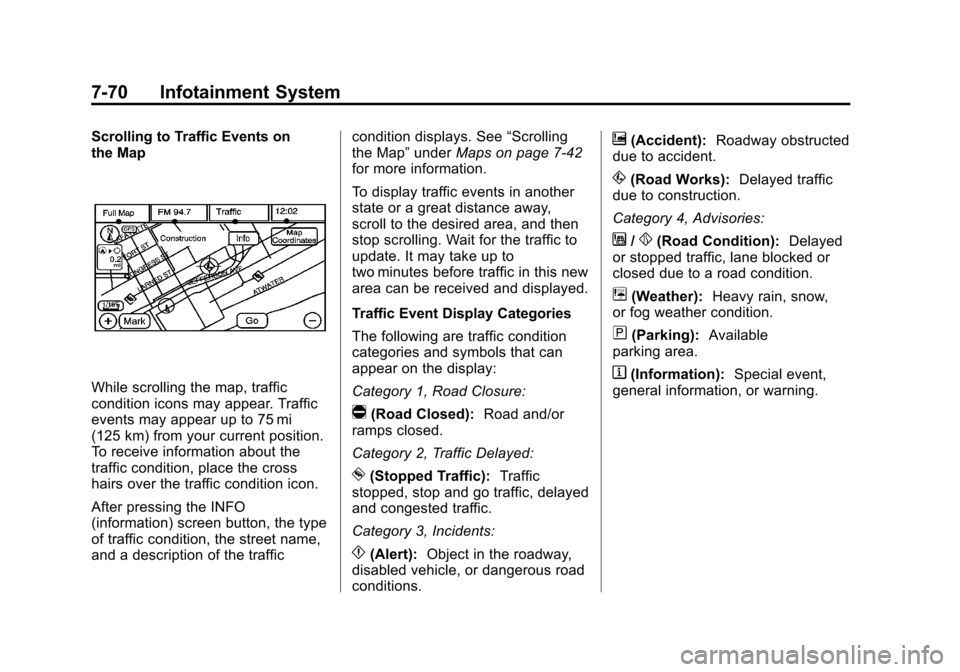
Scrolling to Traffic Events on
the Map
While scrolling the map, traffic
condition icons may appear. Traffic
events may appear up to 75 mi
(125 km) from your current position.
To receive information about the
traffic condition, place the cross
hairs over the traffic condition icon.
After pressing the INFO
(information) screen button, the type
of traffic condition, the street name,
and a description of the trafficcondition displays. See
“Scrolling
the Map” underMaps on page 7‑42
for more information.
To display traffic events in another
state or a great distance away,
scroll to the desired area, and then
stop scrolling. Wait for the traffic to
update. It may take up to
two minutes before traffic in this new
area can be received and displayed.
Traffic Event Display Categories
The following are traffic condition
categories and symbols that can
appear on the display:
Category 1, Road Closure:
q(Road Closed): Road and/or
ramps closed.
Category 2, Traffic Delayed:
o(Stopped Traffic): Traffic
stopped, stop and go traffic, delayed
and congested traffic.
Category 3, Incidents:
p(Alert): Object in the roadway,
disabled vehicle, or dangerous road
conditions.
t(Accident): Roadway obstructed
due to accident.
s(Road Works): Delayed traffic
due to construction.
Category 4, Advisories:
j/r(Road Condition): Delayed
or stopped traffic, lane blocked or
closed due to a road condition.
k(Weather): Heavy rain, snow,
or fog weather condition.
m(Parking): Available
parking area.
l(Information): Special event,
general information, or warning.
Page 244 of 476
Black plate (72,1)Cadillac Escalade EXT Owner Manual - 2013 - CRC - 4/5/12
7-72 Infotainment System
prompts. During a traffic voice
prompt, if RPT is pressed, the
current prompt playback cancels.
Traffic prompts are disabled during
OnStar (if equipped) or Voice
Recognition activity.
XM Weather (If Equipped)
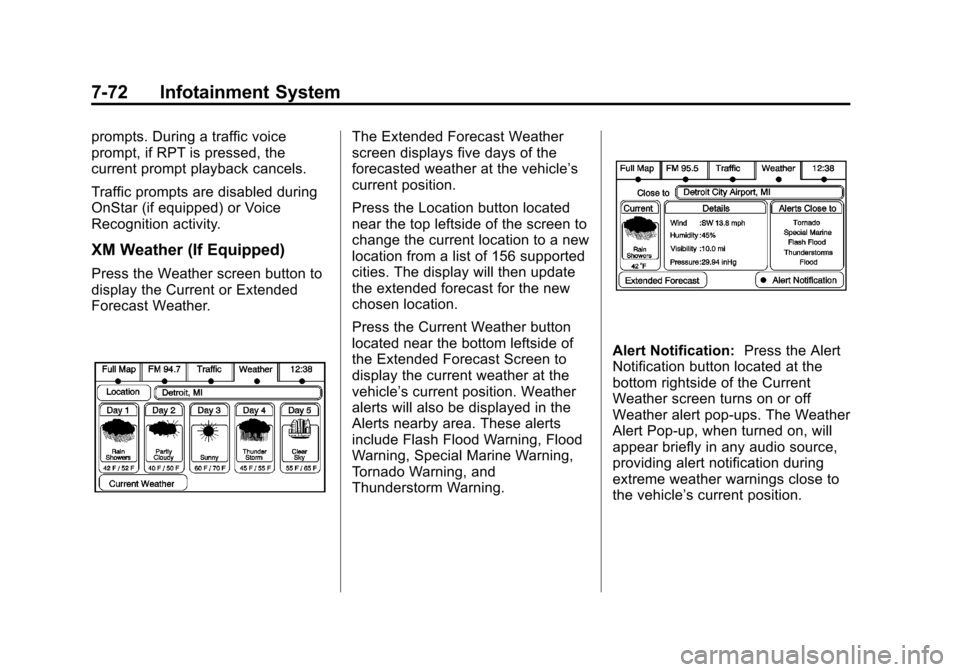
Press the Weather screen button to
display the Current or Extended
Forecast Weather.
The Extended Forecast Weather
screen displays five days of the
forecasted weather at the vehicle’s
current position.
Press the Location button located
near the top leftside of the screen to
change the current location to a new
location from a list of 156 supported
cities. The display will then update
the extended forecast for the new
chosen location.
Press the Current Weather button
located near the bottom leftside of
the Extended Forecast Screen to
display the current weather at the
vehicle’s current position. Weather
alerts will also be displayed in the
Alerts nearby area. These alerts
include Flash Flood Warning, Flood
Warning, Special Marine Warning,
Tornado Warning, and
Thunderstorm Warning.
Alert Notification:Press the Alert
Notification button located at the
bottom rightside of the Current
Weather screen turns on or off
Weather alert pop-ups. The Weather
Alert Pop-up, when turned on, will
appear briefly in any audio source,
providing alert notification during
extreme weather warnings close to
the vehicle’ s current position.