light CADILLAC ESCALADE HYBRID 2012 User Guide
[x] Cancel search | Manufacturer: CADILLAC, Model Year: 2012, Model line: ESCALADE HYBRID, Model: CADILLAC ESCALADE HYBRID 2012Pages: 90, PDF Size: 1.62 MB
Page 35 of 90
Black plate (11,1)Cadillac Escalade Hybrid - 2012
Driving and Operating 9-11
Drive Systems Four-Wheel Drive If the vehicle has four-wheel drive,
you can send the engine's driving
power to all four wheels for extra
traction. Read the following before
using four-wheel drive.
Notice: Driving on clean, dry
pavement in Four-Wheel Drive
High or Four-Wheel Drive Low for
an extended period of time may
cause premature wear on the
vehicle's powertrain. Do not
drive on clean, dry pavement
in Four-Wheel Drive High or
Four-Wheel Drive Low for
extended periods of time. While driving on clean dry pavement
and during tight turns, you may
experience a vibration in the
steering system.
The vehicle has StabiliTrak. Shifting
into Four-Wheel Drive Low will turn
Traction Control and StabiliTrak off.
See “ StabiliTrak System ” in the
owner manual.
Front Axle The front axle engages and
disengages automatically when you
shift the transfer case. Some delay
for the axle to engage or disengage
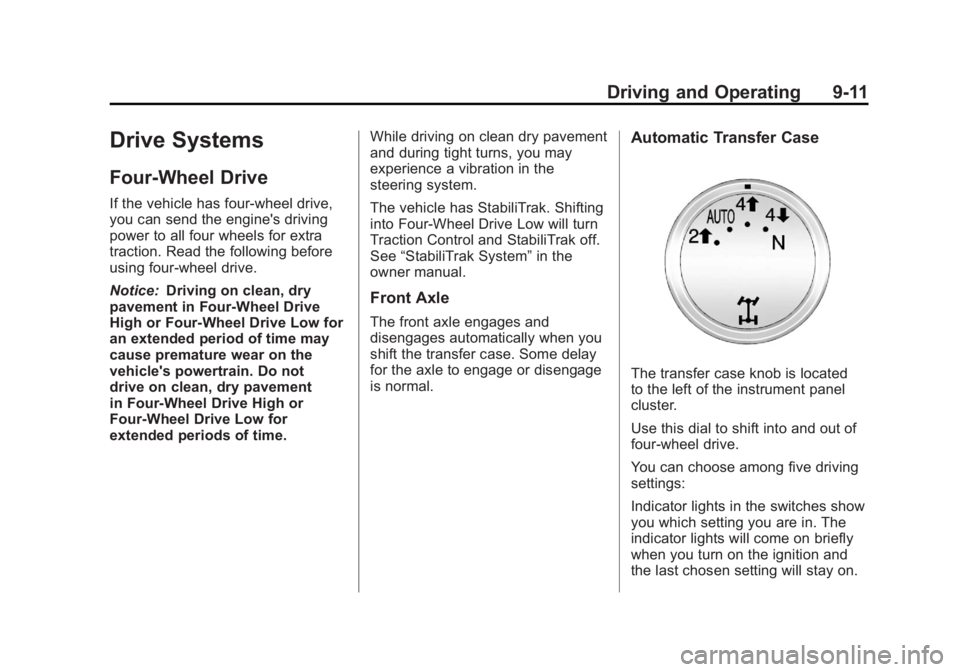
is normal. Automatic Transfer Case
The transfer case knob is located
to the left of the instrument panel
cluster.
Use this dial to shift into and out of
four-wheel drive.
You can choose among five driving
settings:
Indicator lights in the switches show
you which setting you are in. The
indicator lights will come on briefly
when you turn on the ignition and
the last chosen setting will stay on.
Page 36 of 90

Black plate (12,1)Cadillac Escalade Hybrid - 2012
9-12 Driving and Operating If the lights do not come on, you
should take the vehicle to your
dealer for service. An indicator light
will flash while shifting. It will stay on
when the shift is completed. If for
some reason the transfer case
cannot make a requested shift, it will
return to the last chosen setting.
2
m (Two-Wheel Drive High): This
setting is used for driving in most
street and highway situations.
The front axle is not engaged in
two-wheel drive. This setting also
provides the best fuel economy.
AUTO (Automatic Four-Wheel
Drive): This setting is ideal for
use when road surface traction
conditions are variable. When
driving your vehicle in AUTO, the
front axle is engaged, but the
vehicle's power is primarily sent to
the rear wheels. When the vehicle's
software determines a need for
more traction, the system will
transfer more power to the front wheels. Driving in this mode results
in slightly lower fuel economy than
Two-Wheel Drive High.
4
m (Four-Wheel Drive High): Use
the four-wheel high position when
you need extra traction, such as
on snowy or icy roads or in most
off-road situations. This setting also
engages the front axle to help drive
the vehicle. This is the best setting
to use when plowing snow.
4
n (Four-Wheel Drive Low): This
setting also engages the front axle
and delivers extra torque. You may
never need this setting. It sends
maximum power to all four wheels.
You might choose Four-Wheel Drive
Low if you are driving off-road in
deep sand, deep mud, deep snow,
and while climbing or descending
steep hills.
The vehicle has StabiliTrak. Shifting
into Four-Wheel-Drive Low will turn
Traction Control and StabiliTrak off.
See “ StabiliTrak System ” in the
owner manual. { WARNINGShifting the transfer case to
N (Neutral) can cause the vehicle
to roll even if the transmission is
in P (Park). You or someone else
could be seriously injured. Be
sure to set the parking brake
before placing the transfer case in
N (Neutral). See “ Parking Brake ”
in the owner manual for more
information.
N (Neutral): Shift the vehicle's
transfer case to N (Neutral) only
when towing the vehicle. See
“ Recreational Vehicle Towing ” or
“ Towing Your Vehicle ” in the owner
manual.
If the SERVICE 4 WHEEL DRIVE
message stays on, you should
take the vehicle to your dealer
for service. See Transmission
Messages on page 5 ‑ 7 .
Page 37 of 90
Black plate (13,1)Cadillac Escalade Hybrid - 2012
Driving and Operating 9-13Shifting Into Four-Wheel Drive
High or AUTO (Automatic
Four-Wheel Drive)
Turn the knob to the Four-Wheel
High or AUTO position. This can be
done at any speed, except when
shifting from Four-Wheel Drive Low.
The indicator light will flash while
shifting. It will remain on when the
shift is completed.
Shifting Into Two-Wheel
Drive High
Turn the knob to the Two-Wheel
High position. This can be done at
any speed, except when shifting
from Four-Wheel Drive Low.
See “ Shifting Out of Four-Wheel
Drive Low ” in this section for more
information.
Shifting Into Four-Wheel
Drive Low
When Four-Wheel Low is engaged,
vehicle speed should be kept below
64 km/h (40 mph). Extended high-speed operation in 4L may
damage or shorten the life of the
drivetrain.
To shift to the Four-Wheel Drive
Low position, the ignition must be in
ON/RUN and the vehicle must be
stopped or moving less than 5 km/h
(3 mph) with the transmission in
N (Neutral). The preferred method
for shifting into Four-Wheel Drive
Low is to have the vehicle moving
1.6 to 3.2 km/h (1 to 2 mph). Turn
the knob to the Four-Wheel Drive
Low position. You must wait for the
Four-Wheel Drive Low indicator
light to stop flashing and remain on
before shifting the transmission
into gear.
Notice: Shifting the transmission
into gear before the requested
mode indicator light has stopped
flashing could damage the
transfer case. To help avoid
damaging the vehicle, always wait
for the mode indicator lights to
stop flashing before shifting the
transmission into gear. The vehicle may have significant
engagement noise and bump when
shifting between Four-Wheel Drive
Low and Four-Wheel Drive High
ranges or from N (Neutral) while the
engine is running.
If the knob is turned to the
Four-Wheel Drive Low position
when the vehicle is in gear and/or
moving more than 5 km/h (3 mph),
the Four-Wheel Drive Low indicator
light will flash for 30 seconds
and not complete the shift. After
30 seconds the transfer case
will shift to Four-Wheel Drive
High mode.
Shifting Out of Four-Wheel
Drive Low
To shift from Four-Wheel Drive
Low to Four-Wheel Drive High,
AUTO, or Two-Wheel Drive High,
the vehicle must be stopped or
moving less than 5 km/h (3 mph)
with the transmission in N (Neutral)
and the ignition in ON/RUN.
Page 38 of 90
Black plate (14,1)Cadillac Escalade Hybrid - 2012
9-14 Driving and Operating The preferred method for shifting
out of Four-Wheel Drive Low is to
have your vehicle moving 1.6 to
3.2 km/h (1 to 2 mph). Turn the knob
to the Four-Wheel Drive High,
AUTO, or Two-Wheel Drive High
position. You must wait for the
Four-Wheel Drive High, AUTO,
or Two-Wheel Drive High indicator
light to stop flashing and remain on
before shifting the transmission
into gear.
Notice: Shifting the transmission
into gear before the requested
mode indicator light has stopped
flashing could damage the
transfer case. To help avoid
damaging the vehicle, always wait
for the mode indicator lights to
stop flashing before shifting the
transmission into gear.
The vehicle may have significant
engagement noise and bump when
shifting between Four-Wheel Drive
Low and Four-Wheel Drive High
ranges or from N (Neutral) while the
engine is running. If the knob is turned to the
Four-Wheel Drive High, AUTO,
or Two-Wheel Drive High switch
position when the vehicle is in gear
and/or moving more than 5 km/h
(3 mph), the Four-Wheel Drive
High, AUTO or Two-Wheel Drive
High indicator light will flash for
30 seconds but will not complete the
shift.
Shifting into Neutral
To shift the transfer case into
N (Neutral):
1. Make sure the vehicle is parked
so that it will not roll.
2. Set the parking brake and apply
the regular brake pedal. See
“ Parking Brake ” in the owner
manual.
3. Start the vehicle or turn the
ignition to ON/RUN.
4. Put the transmission in
N (Neutral).
5. Shift the transfer case to
Two-Wheel Drive High. 6. Turn the transfer case dial
clockwise to N (Neutral) until
it stops and hold it there until
the N (Neutral) light starts
blinking. This will take at least
10 seconds. Then slowly release
the dial to the Four ‐ Wheel Drive
Low position. The N (Neutral)
light will come on when the
transfer case shift to N (Neutral)
is complete.
7. If the engine is running, verify
that the transfer case is in
N (Neutral) by shifting the
transmission to R (Reverse)
for one second, then shift the
transmission to D (Drive) for
one second.
8. Turn the ignition to ACC/
ACCESSORY, which will turn
the engine off.
9. Place the transmission shift
lever in P (Park).
10. Release the parking brake prior
to moving the vehicle.
11. Turn the ignition to LOCK/OFF.
Page 39 of 90

Black plate (15,1)Cadillac Escalade Hybrid - 2012
Driving and Operating 9-15Shifting Out of Neutral
To shift the transfer case out of
N (Neutral):
1. Set the parking brake and apply
the regular brake pedal.
2. Turn the ignition to ON/RUN with
the engine off, and shift the
transmission to N (Neutral).
3. Turn the transfer case dial to the
desired transfer case shift
position (Two-Wheel Drive High,
Four-Wheel Drive High, AUTO).
After the transfer case has
shifted out of N (Neutral), the
N (Neutral) light will go out.
4. Release the parking brake prior
to moving the vehicle. Notice: Shifting the transmission
into gear before the Four-Wheel
Drive Low indicator light has
stopped flashing could damage
the transfer case. To help avoid
damaging the vehicle, always wait
for the Four-Wheel Drive Low
indicator light to stop flashing
before shifting the transmission
into gear.
5. Start the engine and shift the
transmission to the desired
position.
Excessively shifting the transfer
case into or out of the different
modes may cause the transfer case
to enter the shift protection mode.
This will protect the transfer case
from possible damage and will only
allow the transfer case to respond
to one shift per 10 seconds. The
transfer case may stay in this mode
for up to three minutes. Brakes Regenerative Braking Regenerative braking is a hybrid
technology that enables the electric
drive motor to operate as a
generator when coasting or braking.
Energy from the moving vehicle
recharges the hybrid battery.
The hydraulic disc brakes work with
the regenerative braking to insure
effective braking, such as when a
high braking demand is requested.
The braking system is computer
controlled and blends the
regenerative braking with the
conventional hydraulic disc brakes
to meet any requirements for
deceleration. The controller
interprets the braking request
and uses regenerative braking,
conventional hydraulic braking or a
combination of both as necessary.
Page 55 of 90
Black plate (13,1)Cadillac Escalade Hybrid - 2012
Vehicle Care 10-13When to Change Lubricant
See “ Scheduled Maintenance ” in the
owner manual to determine how
often to change the lubricant.
What to Use
Refer to the Recommended Fluids
and Lubricants on page 11 ‑ 2 to
determine what kind of lubricant
to use.
Electrical System High Voltage Devices and
Wiring
{ WARNINGExposure to high voltage can
cause shock, burns, and even
death. The high voltage
components in the vehicle can
only be serviced by technicians
with special training.
High voltage components are
identified by labels. Do not
remove, open, take apart,
or modify these components.
High voltage cable or wiring has
orange covering. Do not probe,
tamper with, cut, or modify high
voltage cable or wiring. Fuses and Circuit
Breakers The wiring circuits in the vehicle
are protected from short circuits
by a combination of fuses, circuit
breakers and fusible thermal links.
This greatly reduces the chance of
fires caused by electrical problems.
Be sure you replace a bad fuse with
a new one of the identical size and
rating.
If you ever have a problem on the
road and do not have a spare fuse,
you can borrow one that has the
same amperage. Just pick some
feature of the vehicle that you can
get along without, like the radio or
cigarette lighter, and use its fuse,
if it is the correct amperage.
Replace it as soon as you can.
Page 59 of 90

Black plate (17,1)Cadillac Escalade Hybrid - 2012
Vehicle Care 10-17If the inflation pressure is low, add
air until the recommended pressure
is reached. If the inflation pressure
is high, press on the metal stem in
the center of the tire valve to
release air.
Re-check the tire pressure with the
tire gauge.
Return the valve caps on the valve
stems to prevent leaks and keep out
dirt and moisture.
Tire Pressure Monitor
Operation This vehicle may have a Tire
Pressure Monitor System (TPMS).
The TPMS is designed to warn the
driver when a low tire pressure
condition exists. TPMS sensors are
mounted onto each tire and wheel
assembly. The TPMS sensors
monitor the air pressure in the tires
and transmit the tire pressure
readings to a receiver located in the
vehicle. When a low tire pressure condition
is detected, the TPMS will illuminate
the low tire pressure warning
symbol located on the instrument
cluster. If the warning light comes
on, stop as soon as possible and
inflate the tires to the recommended
pressure shown on the tire loading
information label. See “ Vehicle Load
Limits ” in the owner manual for
more information.
A message to check the pressure in
a specific tire displays in the Driver
Information Center (DIC). The low
tire pressure warning light and the
DIC warning message come on at
each ignition cycle until the tires
are inflated to the correct inflation pressure. Using the DIC, tire
pressure levels can be viewed. For
additional information and details
about the DIC operation and
displays see Driver Information
Center (DIC) on page 5 ‑ 5 .
The low tire pressure warning light
may come on in cool weather when
the vehicle is first started, and then
turn off as the vehicle is driven. This
could be an early indicator that the
air pressure is getting low and
needs to be inflated to the proper
pressure.
A Tire and Loading Information
label shows the size of the original
equipment tires and the correct
inflation pressure for the tires when
they are cold. See “ Vehicle Load
Limits ” for an example of the Tire
and Loading Information label and
its location. Also see Tire Pressure
on page 10 ‑ 16 .
Page 60 of 90

Black plate (18,1)Cadillac Escalade Hybrid - 2012
10-18 Vehicle Care The TPMS can warn about a
low tire pressure condition but
it does not replace normal tire
maintenance. See “ Tire Inspection, ”
“ Tire Rotation ” and “ Tires ” in the
owner manual for more information.
Notice: Tire sealant materials are
not all the same. A non-approved
tire sealant could damage the
TPMS sensors. TPMS sensor
damage caused by using an
incorrect tire sealant is not
covered by the vehicle
warranty. Always use only
the GM-approved tire sealant
available through your dealer or
included in the vehicle.
Factory-installed Tire Inflator Kits
use a GM approved liquid tire
sealant. Using non-approved tire
sealants could damage the TPMS
sensors. See Tire Sealant and
Compressor Kit on page 10 ‑ 22 for
information regarding the inflator kit
materials and instructions. TPMS Malfunction Light and
Message The TPMS will not function properly
if one or more of the TPMS sensors
are missing or inoperable. When the
system detects a malfunction, the
low tire warning light flashes for
about one minute and then stays on
for the remainder of the ignition
cycle. A DIC warning message also
displays. The malfunction light and
DIC warning message come on at
each ignition cycle until the problem
is corrected. Some of the conditions
that can cause these to come
on are: .
The TPMS sensor matching
process was not done or
not completed successfully
after rotating the tires. The
malfunction light and the DIC
message should go off after
successfully completing the
sensor matching process. See
"TPMS Sensor Matching
Process" later in this section. .
One or more TPMS sensors
are missing or damaged. The
malfunction light and the DIC
message should go off when the
TPMS sensors are installed and
the sensor matching process is
performed successfully. See
your dealer for service. .
Replacement tires or wheels do
not match the original equipment
tires or wheels. Tires and wheels
other than those recommended
could prevent the TPMS from
functioning properly. See
“ Buying New Tires ” in the owner
manual. .
Operating electronic devices or
being near facilities using radio
wave frequencies similar to the
TPMS could cause the TPMS
sensors to malfunction.
If the TPMS is not functioning
properly, it cannot detect or signal a
low tire condition. See your dealer
for service if the TPMS malfunction
light and DIC message comes on
and stays on.
Page 61 of 90

Black plate (19,1)Cadillac Escalade Hybrid - 2012
Vehicle Care 10-19TPMS Sensor Matching
Process Each TPMS sensor has a unique
identification code. The identification
code needs to be matched to a new
tire/wheel position after rotating the
vehicle ’ s tires or replacing one or
more of the TPMS sensors. Also,
the TPMS sensor matching process
should be performed after replacing
a spare tire with a road tire
containing the TPMS sensor. The
malfunction light and the DIC
message should go off at the next
ignition cycle. The sensors are
matched to the tire/wheel positions,
using a TPMS relearn tool, in the
following order: driver side front tire,
passenger side front tire, passenger
side rear tire, and driver side rear.
See your dealer for service or to
purchase a relearn tool.
There are two minutes to match
the first tire/wheel position, and
five minutes overall to match all
four tire/wheel positions. If it takes
longer, the matching process stops
and must be restarted. The TPMS sensor matching
process is:
1. Set the parking brake.
2. Turn the ignition to ON/RUN with
the engine off.
3. Press
Q and
K on the
Remote Keyless Entry (RKE)
transmitter at the same time for
approximately five seconds. The
horn sounds twice to signal the
receiver is in relearn mode and
TIRE LEARNING ACTIVE
message displays on the DIC
screen.
4. Start with the driver side
front tire.
5. Place the relearn tool against
the tire sidewall, near the valve
stem. Then press the button to
activate the TPMS sensor.
A horn chirp confirms that the
sensor identification code has
been matched to this tire and
wheel position. 6. Proceed to the passenger
side front tire, and repeat the
procedure in Step 5.
7. Proceed to the passenger side
rear tire, and repeat the
procedure in Step 5.
8. Proceed to the driver side rear
tire, and repeat the procedure
in Step 5. The horn sounds
two times to indicate the sensor
identification code has been
matched to the driver side rear
tire, and the TPMS sensor
matching process is no longer
active. The TIRE LEARNING
ACTIVE message on the DIC
display screen goes off.
9. Turn the ignition to LOCK/OFF.
10. Set all four tires to the
recommended air pressure
level as indicated on the Tire
and Loading Information label.
Page 62 of 90

Black plate (20,1)Cadillac Escalade Hybrid - 2012
10-20 Vehicle Care
Tire Rotation Tires should be rotated every
12 000 km (7,500 mi).
Any time unusual wear is
noticed, rotate the tires as
soon as possible and check the
wheel alignment. Also check for
damaged tires or wheels. See
“ When It Is Time for New Tires ”
and “ Wheel Replacement ” in
the owner manual for more
information.
The purpose of regular rotation
is to achieve more uniform
wear for all tires on the vehicle.
The first rotation is the most
important. See “ Maintenance
Schedule ” in the owner manual. Use this rotation pattern when
rotating the tires.
Adjust the front and rear tires
to the recommended inflation
pressure on the Tire and
Loading Information label after
the tires have been rotated. See
“ Vehicle Load Limits ” in the
owner manual for an example of
the label and its location on your
vehicle. Reset the Tire Pressure Monitor
System (TPMS). See Tire
Pressure Monitor Operation on
page 10 ‑ 17 .
Check that all wheel nuts are
properly tightened. See “ Wheel
Nut Torque ” under “ Capacities
and Specifications ” in the owner
manual.
Lightly coat the center of the
wheel hub with wheel bearing
grease after a wheel change or
tire rotation to prevent corrosion
or rust build-up. Do not get
grease on the flat wheel
mounting surface or on the
wheel nuts or bolts.
If a Tire Goes Flat This vehicle has a tire inflator kit.
There is no spare tire, no tire
changing equipment, and no place
to store a tire.