reset CADILLAC LYRIC 2023 User Guide
[x] Cancel search | Manufacturer: CADILLAC, Model Year: 2023, Model line: LYRIC, Model: CADILLAC LYRIC 2023Pages: 424, PDF Size: 4.76 MB
Page 135 of 424
Cadillac Lyriq Owner Manual (GMNA-Localizing-U.S./Canada-15644413) -
2023 - CRC - 2/23/22
134 Instruments and Controls
Tires :Tire Pressure card
displays the approximate
pressures of all four tires. Tire
pressure is displayed in either
kilopascal (kPa) or in pounds
per square inch (psi). If the
pressure is low, the value for
that tire is shown in amber.
See Tire Pressure Monitor
System 0343 and
Tire Pressure Monitor
Operation 0344.
When selected, the following
options may be chosen in the
dialog: Relearn Tire Pressure,
Reset Leak Detection, Turn
Off/On Leak Detection, and
Show in Cluster. When
enabled, you will receive alerts
when a fast and/or slow tire
leak is detected. The Leak
Detection speeds shown are
either Tire Leak or Fast Leak.
When disabled, you will still
receive low tire pressure
alerts. However, you will stop
receiving additional alerts
when a tire is leaking air. Energy Info :
Energy Usage
card displays how energy is
being used for the current
drive since the last time the
vehicle was started.
Percentages of the Driving,
Remote Start, Climate and
Conditioning vehicle systems
as overall vehicle energy use
are shown. When selected,
distance driven, total energy,
energy usage bar diagram, and
selectable categories are
displayed. Select a category to
learn more about how your
vehicle uses energy from the
battery.
Energy Efficiency card
displays a graph showing the
energy efficiency that has
been used by the vehicle over
the last 48 km (30 mi). When
selected, regenerated range,
and instant efficiency is shown
along with average efficiency
in the dialog.Vehicle Messages
Messages displayed on the
Driver Information Center
(DIC) indicate the status of the
vehicle or some action that
may be needed to correct a
condition. Multiple messages
may appear one after another.
Vehicle status notifications
are also sent to the
infotainment display. Touching
Uon the bottom right corner
of the infotainment display
opens the notification drawer
where all the active vehicle
messages can be viewed.
Depending on the message,
you can schedule a service,
find the nearest dealer, or find
the nearest charging station.
When there are active
messages that can be viewed,
a red dot appears on top of
the notification icon on the
infotainment display.
The messages that do not
require immediate action can
be acknowledged and cleared
Page 152 of 424
Cadillac Lyriq Owner Manual (GMNA-Localizing-U.S./Canada-15644413) -
2023 - CRC - 2/23/22
Infotainment System 151
features are also available
through the instrument cluster
and steering wheel controls.
Before driving:
.Become familiar with the
operation, center stack
controls, steering wheel
controls, and infotainment
display.
.Set up the audio by
presetting favorite stations,
setting the tone, and
adjusting the speakers.
.Set up phone numbers in
advance so they can be
called easily by pressing a
single control or by using a
single voice command.
See Distracted Driving 0195.
Overview
Infotainment System
The infotainment system is
controlled by using the
infotainment display,
multifunction controller (MCF) on the center console,
steering wheel controls, and
voice recognition, if available.
Infotainment Controls on the
Multifunction
Controler (MFC)
1. Primary Knob
.Turn to highlight a
feature. Press to
activate the highlighted
feature.
.Move right/left or up/
down to change the
highlighted area on the
display screen.
2. Selection Area
.e(Radio/Audio)
Press to open the
active audio
source page.
.6(Phone)
Press to access the
phone menu.
.l(Navigation)
Press to access the
navigation screen (if
equipped).
.0(Back)
Press to return to the
previous display in
a menu.
.{(Home Page)
Press to access the
Home Page. See “Home
Page” later in this
section.
3.n(Power/Volume)
Scroll Wheel
.Press to turn the
power on.
Page 172 of 424
Cadillac Lyriq Owner Manual (GMNA-Localizing-U.S./Canada-15644413) -
2023 - CRC - 2/23/22
Infotainment System 171
7. Start the pairing process onthe cell phone to be paired
to the vehicle. See the cell
phone manufacturer's user
guide for information on this
process. Once the cell
phone is paired, it will show
as Connected.
8. If the vehicle name does not appear on your cell phone,
there are a few ways to
start the pairing
process over:
.Make sure there is not an
entry for the vehicle
under the previously
connected list. If the
vehicle and cell phone
were previously paired
and one still remembers
the other, it will not
identify as a new device
when searching.
.Turn the Bluetooth off
and on the device.
.Go back to the beginning
of the Phone menus on
the infotainment display
and restart the pairing
process.
.Turn the cell phone off
and then back on.
.Reset the cell phone, but
this step should be done
as a last effort.
9. If the cell phone prompts to accept connection or allow
phone book download,
touch Always Accept and
Allow. The phone book may
not be available if not
accepted.
10. To pair additional cell phones, touch Settings,
Connections, and then
Phones.
First to Connect Paired
Phones
If multiple paired cell phones
are within range of the
system, the system connects
to the paired cell phone that is set as First to Connect. To
enable a paired cell phone as
the First to Connect phone:
1. Make sure the cell phone is turned on.
2. Touch the Settings icon on the home page.
3. Touch Connections.
4. Touch Phones.
5. Touch Options under the connected phone.
6. Touch First to Connect from the cell phone’s
settings menu. The settings
will be enabled for that
device.
Cell phones and mobile
devices can be added,
removed, connected, and
disconnected. A sub-menu will
display whenever a request is
made to add or manage cell
phones and mobile devices.
Accessing the Device List
Screen
There are two ways to access
the device list screen:
Page 179 of 424
Cadillac Lyriq Owner Manual (GMNA-Localizing-U.S./Canada-15644413) -
2023 - CRC - 2/23/22
178 Infotainment System
Keyboard & speech
Touch to change keyboard
and speech settings.
Units
Touch to change units
settings.
Reset Options
Touch to change reset
settings.
About
Touch to view the
infotainment system software
information.
Legal Information
Touch to view legal and
license information.
Updates
This menu allows adjustment
of the vehicle update settings.
Google
This menu allows adjustment
of the Google settings.
Teen Driver
If equipped, this allows
multiple keys to be registered
for beginner drivers to
encourage safe driving habits.
When the vehicle is started
with a Teen Driver key, it will
automatically activate certain
safety systems, allow setting
of some features, and limit the
use of others. The Report
Card will record vehicle data
about driving behavior that
can be viewed later. When the
vehicle is started with a Teen
Driver key, the Driver
Information Center (DIC)
displays a message that Teen
Driver is active.
To access:1. Touch Settings on the Home Page, then touch
Vehicle, and then Teen
Driver.
2. Create a Personal Identification Number (PIN)
by choosing a four-digit PIN. Re-enter the PIN to confirm.
To change the PIN, touch
Change PIN.
The PIN is required to:
.Set up/Add or remove keys.
.Change Teen Driver
settings.
.Change or clear the Teen
Driver PIN.
.Access or delete Report
Card data.
Set up/Add keys to activate
Teen Driver and assign
restrictions to the key:
Any vehicle key can be
registered, up to a maximum
of eight keys. Label the Teen
Driver key to tell it apart from
the other keys.
For a pushbutton start
system: 1. Start the vehicle.
2. The vehicle must be in P (Park).
3. From the Settings menu, touch Vehicle and then
Teen Driver.
Page 182 of 424
Cadillac Lyriq Owner Manual (GMNA-Localizing-U.S./Canada-15644413) -
2023 - CRC - 2/23/22
Infotainment System 181
a registered Teen Driver key.
There is one Report Card per
vehicle. Data is only recorded
when a registered Teen Driver
key is used to operate the
vehicle.
The Report Card data is
collected from the time Teen
Driver is activated or the last
time the Report Card was
reset. The following items may
be recorded:
.Distance Driven–the total
distance driven.
.Maximum Speed –the
maximum vehicle speed
detected.
.Overspeed Warnings –the
number of times the speed
warning setting was
exceeded.
.Wide Open Throttle –the
number of times the
accelerator pedal was
pressed nearly all the
way down.
.Forward Collision Alerts (if
equipped) –the number of
times the driver was notified when approaching a vehicle
ahead too quickly and at
potential risk for a crash.
.Forward Automatic Braking,
also called Automatic
Emergency Braking (if
equipped)
–the number of
times the vehicle detected
that a forward collision was
imminent and applied the
brakes.
.Reverse Automatic Braking
(if equipped) –the number of
times the vehicle detected
that a rearward collision was
imminent and applied the
brakes.
.Traction Control –the
number of times the
Traction Control System
activated to reduce wheel
spin or loss of traction.
.Stability Control –the
number of events which
required the use of
electronic stability control.
.Antilock Braking System
Active –The number of
Antilock Brake System
activations.
.Tailgating Alerts (if
equipped) –the number of
times the driver was alerted
for following a vehicle ahead
too closely.
Report Card Data
Cumulative Data is saved for
all trips until the Report Card
is reset or until the maximum
count is exceeded. If the
maximum count is exceeded
for a Report Card line item,
that item will no longer be
updated in the Report Card
until it is reset. Each item will
report a maximum of
1,000 counts. The distance
driven will report a maximum
of 64,374 km (40,000 mi).
To delete Report Card data,
do one of the following:
.From the Report Card
display, touch Reset.
Page 183 of 424
Cadillac Lyriq Owner Manual (GMNA-Localizing-U.S./Canada-15644413) -
2023 - CRC - 2/23/22
182 Infotainment System
.Touch Clear PIN and All
Teen Driver Keys from the
Teen Driver menu. This will
also unregister any Teen
Driver keys and delete
the PIN.
Forgotten PIN
See your dealer to reset
the PIN.
Trademarks and
License
Agreements
FCC Information
See Radio Frequency
Statement 0395.
If you decide to continue
service after your trial, your
selected subscription plan will
automatically renew thereafter. You will be
charged at then-current rates.
Fees and taxes apply. Please
see the SiriusXM Customer
Agreement at siriusxm.com for
complete terms and how to
cancel, which includes calling
SiriusXM at 1-866-635-2349.
All fees and programming are
subject to change.
Fees and Taxes: Subscription
fee, taxes, one time activation
fee, and other fees may apply.
Subscription fee is consumer
only. All fees and programming
subject to change.
Subscriptions subject to
Customer Agreement available
at www.siriusxm.com. SiriusXM
service is only available in the
48 contiguous United States
and Canada.
In Canada: Some deterioration
of service may occur in
extreme northern latitudes.
This is beyond the control of
SiriusXM Satellite Radio.
Explicit Language Notice:
Channels with frequent
explicit language are indicated
with an
“XL”preceding the
channel name. Channel
blocking is available for
SiriusXM Satellite Radio
receivers by notifying
SiriusXM:
.USA Customers —See
www.siriusxm.com or call
1-888-601–6296.
.Canada Customers —See
www.siriusxm.ca or call
1-877-438-9677.
It is prohibited to copy,
decompile, disassemble,
reverse engineer, hack,
manipulate, or otherwise make
available any technology or
software incorporated in
receivers compatible with the
SiriusXM Satellite Radio
System or that support the
SiriusXM website, the Online
Service or any of its content.
Furthermore, the AMBER
voice compression software
included in this product is
Page 188 of 424
Cadillac Lyriq Owner Manual (GMNA-Localizing-U.S./Canada-15644413) -
2023 - CRC - 2/23/22
Climate Controls 187
y/z:The temperature can
be adjusted separately for the
driver and the passenger.
Press to decrease or lift to
increase the temperature.
Press or lift and hold to rapidly
increase or decrease the
temperature. Press SYNC on
the Climate Display to reset
the Passenger Temperature
to the Driver Temperature.
Manual Operation
z 9 y: Press to decrease or
lift to increase the fan speed.
Press or lift and hold the fan
controls to adjust speed more
quickly. The fan speed setting
displays. Any adjustment of
the fan speed cancels
automatic fan control and the
fan can be controlled manually.
Press AUTO to return to
automatic operation.
To turn off the fan and climate
control system, press OFF on
the center stack climate
controls. The airflow will be blocked from entering in all air
delivery modes, except
defrost.
The maximum automatic fan
speed can be set to low,
medium, or high. To adjust
Auto Fan Speed, select
Settings > Climate and Air
Quality > Auto Fan Speed.
Air Delivery Mode Control :
When the climate information
is displayed, press the desired
air delivery mode on the
climate control display to
change the direction of the
airflow. The selected air
delivery mode button is lit.
Pressing any of the air
delivery buttons cancels
automatic air delivery control
and the direction of the airflow
can be controlled manually.
Press AUTO to return to
automatic operation.
To change the current mode,
select one or more of the
following:
z:
Air is directed to the
windshield, outboard a/c
outlets, and side window
outlets.
Y: Air is directed to the
instrument panel outlets.
[: Air is directed to the floor
outlets.
vHEAT : Touch to turn the
automatic heater on or off. An
indicator light comes on to
show that the heater is
enabled. If the fan is turned
off, the heater will not run.
Press AUTO to return to
automatic operation.
d: Clears the windshield of
fog or frost more quickly. Air is
directed to the windshield.
Press
dto turn on or off.
Changing the air delivery
mode also turns the
defrost off.
A/C : Touch AC to turn the
automatic air conditioning on
or off. If the fan is turned off,
the air conditioner will not run.
Page 211 of 424
Cadillac Lyriq Owner Manual (GMNA-Localizing-U.S./Canada-15644413) -
2023 - CRC - 2/23/22
210 Driving and Operating
After pressing the P (Park)
button, hold down the regular
brake pedal. If you cannot see
the P (Park) indicator in the
instrument cluster, it means
that the vehicle has not
shifted to P (Park).
Shifting out of Park
This vehicle is equipped with
an electric drive unit. To shift
out of P (Park) the vehicle
must be on, the brake pedal
applied, and the charge cord
unplugged.
Parking the vehicle in extreme
cold for several days without
the charge cord connected
may cause the vehicle not to
start. Plug the vehicle in to
allow the high voltage battery
to be warmed sufficiently.
To shift out of P (Park):1. Apply the brake pedal.
2. Press POWER
Oto turn the
vehicle on. 3. Verify that the vehicle is
unplugged and the vehicle
ready light is on.
4. Move the shift lever to the desired position.
After releasing the shift lever,
it will return to the center
position.
The P indicator will turn white
and the gear indicator on the
shift lever will turn red when
the vehicle is no longer in
P (Park).
If the vehicle cannot shift from
P (Park), a Driver Information
Center (DIC) message may be
displayed. Check that the
vehicle is on, the vehicle ready
light is on, and the brake pedal
is applied when you are
attempting to shift out of
P (Park). If all of these are met
but the vehicle will not shift
out of P (Park), see your dealer
for service. If equipped, the Buckle to
Drive feature may prevent
shifting from P (Park). See
Buckle To Drive
051.
Extended Parking
It is best not to park with the
propulsion system on. If the
vehicle is left on, be sure it will
not move.
See Shifting Into Park 0209.
If the vehicle is left parked and
on with the remote key
outside the vehicle, it will
remain on for up to one hour.
If the vehicle is left parked and
on with the remote key inside
the vehicle, it will remain on for
up to two hours.
The timer will reset if the
vehicle is taken out of P (Park)
while it is on.
See Remote Key Operation 08
and Digital Key 020.
Page 225 of 424
Cadillac Lyriq Owner Manual (GMNA-Localizing-U.S./Canada-15644413) -
2023 - CRC - 2/23/22
224 Driving and Operating
mode improves vehicle
handling and acceleration on
dry pavement. When active,
Sport mode modifies steering
efforts, pedal tuning, electric
vehicle sound enhancement
(EVSE), adaptive cruise
control, and suspension
tuning, if equipped.
Snow/Ice Mode :Snow/Ice
mode improves vehicle
acceleration on snow covered
roads. When active, Snow/Ice
mode adjusts pedal tuning to
optimize traction on slippery
surfaces. This can affect the
acceleration on dry asphalt.
Snow/Ice mode also modifies
electric All-Wheel Drive
(eAWD) and steering.
My Mode : My mode is used to
personalize everyday driving.
This mode allows the driver to
configure the vehicle
subsystem settings to their
driving preferences. My mode
remains active across on/off
cycles. Through the infotainment
display, the following vehicle
subsystems may be available
for customization in this mode:
Acceleration Feel :
Relaxed,
Tour, Sport
Brake Feel : Tour, Sport
Steering : Tour, Sport
Motor Sound : Tour, Sport
For a more detailed
description of each selectable
option, refer to “Drive Mode
Customization.”
Drive Mode Customization
The vehicle is equipped to
modify the following settings
based on vehicle content.
Through the infotainment
home screen, select Settings >
Vehicle > Drive Mode
Customization to personalize
My mode. These settings will
be retained over each on/off
cycle, and do not have to be
reset each time the vehicle is
started. Acceleration Feel :
Choose
how responsive you want
acceleration to feel. You can
adjust the accelerator pedal to
provide increased power.
Brake Feel : Brake response
settings adjust the brake
pedal response. Brake pedal
feel is less sensitive at lower
settings and more sensitive at
higher settings.
Motor Sound : Customize how
your vehicle sounds when you
are accelerating. Your electric
motor remains quiet outside
but the sound you hear inside
changes as you drive faster or
slower.
Steering : Choose how
responsive you want the
steering to feel. You can set
the steering wheel to provide
more feedback, which requires
more steering effort.
Page 323 of 424
Cadillac Lyriq Owner Manual (GMNA-Localizing-U.S./Canada-15644413) -
2023 - CRC - 2/23/22
322 Vehicle Care
Warning (Continued)
trunk/liftgate, do not
operate. Have the vehicle
serviced.
Caution
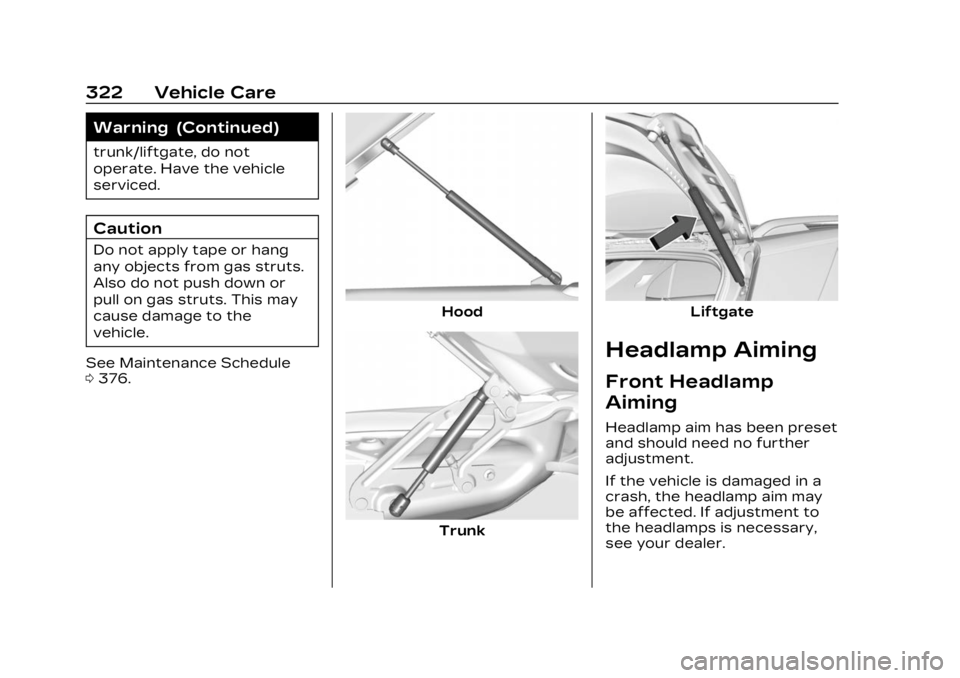
Do not apply tape or hang
any objects from gas struts.
Also do not push down or
pull on gas struts. This may
cause damage to the
vehicle.
See Maintenance Schedule
0 376.
Hood
Trunk
Liftgate
Headlamp Aiming
Front Headlamp
Aiming
Headlamp aim has been preset
and should need no further
adjustment.
If the vehicle is damaged in a
crash, the headlamp aim may
be affected. If adjustment to
the headlamps is necessary,
see your dealer.