sunroof CADILLAC SRX 2004 1.G Owners Manual
[x] Cancel search | Manufacturer: CADILLAC, Model Year: 2004, Model line: SRX, Model: CADILLAC SRX 2004 1.GPages: 468, PDF Size: 2.92 MB
Page 1 of 468
Seats and Restraint Systems........................... 1-1
Front Seats
............................................... 1-2
Rear Seats
............................................... 1-7
Safety Belts
.............................................. 1-9
Child Restraints
.......................................1-29
Air Bag Systems
......................................1-50
Restraint System Check
............................1-61
Features and Controls..................................... 2-1
Keys
........................................................ 2-3
Doors and Locks
....................................... 2-8
Windows
.................................................2-13
Theft-Deterrent Systems
............................2-17
Starting and Operating Your Vehicle
...........2-20
Mirrors
....................................................2-35
OnStar
®System
......................................2-40
HomeLink®Transmitter
.............................2-41
Storage Areas
.........................................2-45
Sunroof
..................................................2-48
Vehicle Personalization
.............................2-52
Instrument Panel............................................. 3-1
Instrument Panel Overview
.......................... 3-4
Climate Controls
......................................3-26
Warning Lights, Gages, and Indicators
........3-35
Driver Information Center (DIC)
..................3-51
Audio System(s)
.......................................3-93Driving Your Vehicle....................................... 4-1
Your Driving, the Road, and Your Vehicle
........ 4-2
Towing
...................................................4-45
Service and Appearance Care.......................... 5-1
Service
..................................................... 5-3
Fuel
......................................................... 5-5
Checking Things Under the Hood
...............5-10
All-Wheel Drive
........................................5-51
Rear Axle
...............................................5-52
Front Axle
...............................................5-53
Bulb Replacement
....................................5-54
Windshield Wiper Blade Replacement
.........5-59
Tires
......................................................5-61
Appearance Care
.....................................5-94
Vehicle Identication
...............................5-101
Electrical System
....................................5-102
Capacities and Specications
...................5-111
Maintenance Schedule..................................... 6-1
Maintenance Schedule
................................ 6-2
Customer Assistance and Information.............. 7-1
Customer Assistance and Information
........... 7-2
Reporting Safety Defects
...........................7-10
Index.................................................................1
2004 Cadillac SRX Owner ManualM
Page 67 of 468
Adding Equipment to Your Air
Bag-Equipped Vehicle
Q:If I add a luggage carrier or sunroof to the roof
of my vehicle, will it keep the roof-mounted side
impact air bags from working properly?
A:As long as the luggage carrier or sunroof is
properly installed so that the vehicle’s basic
structure isn’t changed, it’s not likely to keep the
roof-mounted side impact air bags from working
properly in a crash.
Restraint System Check
Checking Your Restraint Systems
Now and then, make sure the safety belt reminder light
and all your belts, buckles, latch plates, retractors
and anchorages are working properly. Look for any other
loose or damaged safety belt system parts. If you see
anything that might keep a safety belt system from doing
its job, have it repaired.
Torn or frayed safety belts may not protect you in a
crash. They can rip apart under impact forces. If a belt
is torn or frayed, get a new one right away.
Also look for any opened or broken air bag covers, and
have them repaired or replaced. (The air bag system
does not need regular maintenance.)
1-61
Page 70 of 468
Storage Areas................................................2-45
Glove Box...................................................2-45
Cupholder(s)................................................2-45
Cell Phone Storage Area...............................2-45
Center Console Storage Area.........................2-46
Map Pocket.................................................2-46
Assist Handles.............................................2-46
Garment Hooks............................................2-46
Luggage Carrier...........................................2-46Convenience Net..........................................2-47
Cargo Cover................................................2-47
Cargo Management System...........................2-48
Sunroof.........................................................2-48
Sunroof (UltraView).......................................2-48
Sunroof (UltraView Plus)................................2-50
Vehicle Personalization...................................2-52
Memory Seat and Mirrors..............................2-52
Section 2 Features and Controls
2-2
Page 90 of 468
Steering Column Ignition Lock Release
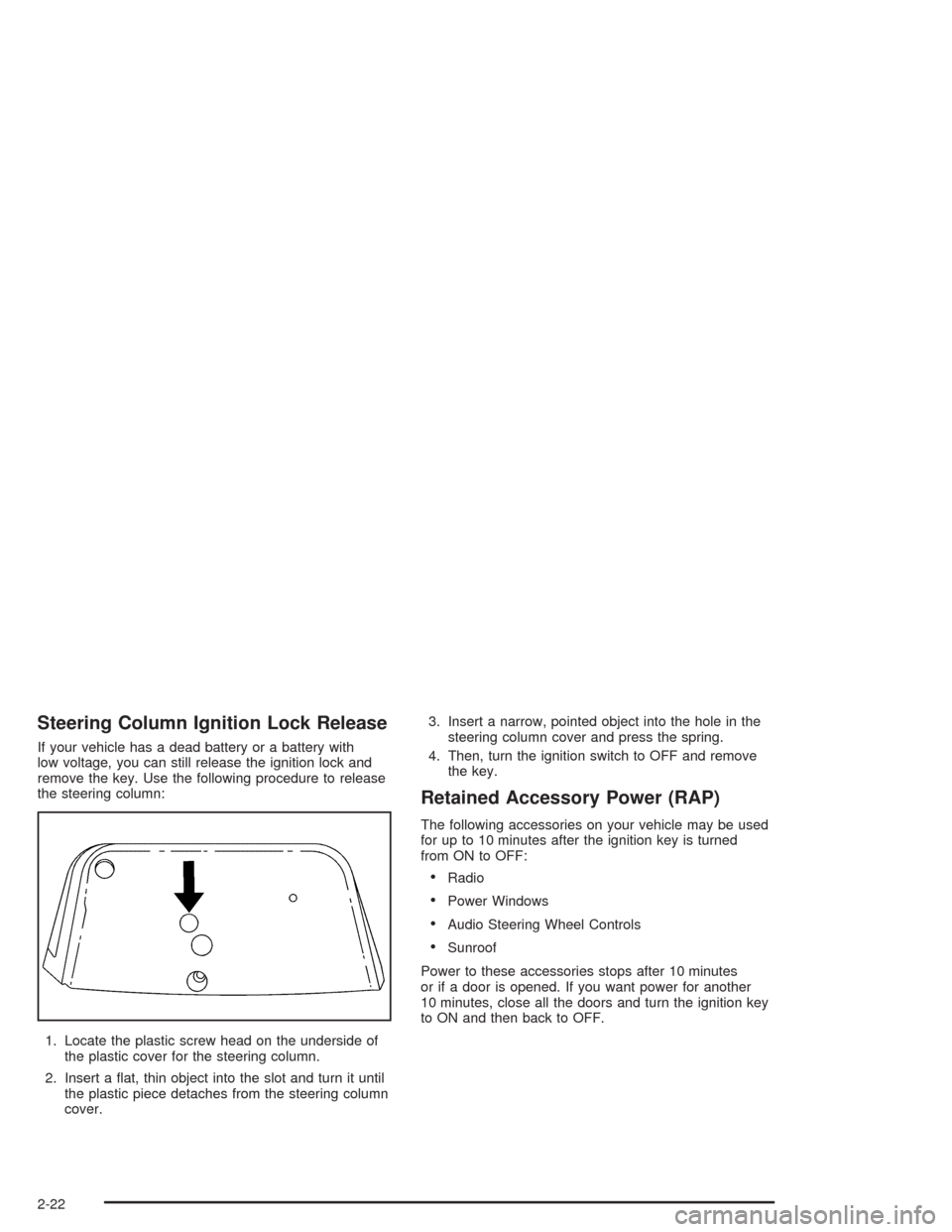
If your vehicle has a dead battery or a battery with
low voltage, you can still release the ignition lock and
remove the key. Use the following procedure to release
the steering column:
1. Locate the plastic screw head on the underside of
the plastic cover for the steering column.
2. Insert a at, thin object into the slot and turn it until
the plastic piece detaches from the steering column
cover.3. Insert a narrow, pointed object into the hole in the
steering column cover and press the spring.
4. Then, turn the ignition switch to OFF and remove
the key.
Retained Accessory Power (RAP)
The following accessories on your vehicle may be used
for up to 10 minutes after the ignition key is turned
from ON to OFF:
Radio
Power Windows
Audio Steering Wheel Controls
Sunroof
Power to these accessories stops after 10 minutes
or if a door is opened. If you want power for another
10 minutes, close all the doors and turn the ignition key
to ON and then back to OFF.
2-22
Page 116 of 468
Cargo Management System
Your vehicle may have a cargo management system.
It provides extra storage space for the rear of the
vehicle.
The cargo management system has three compartments.
The one closest to the front of the vehicle opens from
behind the second row. The center compartment has a
divider. The compartment closest to the rear of the
vehicle has a removable storage bin.
Sunroof
Sunroof (UltraView)
{CAUTION:
People who are in a crash and not wearing a
safety belt properly can suffer much worse
injuries. They can hit things inside the vehicle
or be ejected from it, and be seriously injured
or killed. This is true for any vehicle occupant,
in any motor vehicle, but if you have the
Ultraview roof it is, if anything, even more
important. In a rollover or other crash, the
Ultraview roof can be damaged or destroyed.
People who are unbelted would then be at
even greater risk of being ejected from the
vehicle. Always fasten your safety belt, and
check that your passengers’ belts are fastened
properly too.
Your vehicle may have a single sunroof over the rst
two rows of seats.
2-48
Page 117 of 468

The sunroof/sunshade
switches are located in the
headliner between the
driver and front passenger.
One switch operates the sunroof and the other switch
operates the sunshade.
Press the back of the sunroof switch to open the
sunroof. If you press the switch to the rst detent the
sunroof will express open to a comfort stop. Press
the switch to the second detent to express open the roof
all of the way. Press the front of the switch to close
the sunroof. The rst detent will close it manually and
the second detent will express close the roof.
Press the back of the sunshade switch to open the
sunshade. Press the front of the switch to close
the sunshade. The sunshade can not be closed further
than the glass panel.Anti-Pinch Feature
If an object is in the path of the sunroof when it is
closing, the anti-pinch feature will detect the object and
stop the sunroof from closing at the point of the
obstruction. The sunroof will then reverse. To close the
sunroof once it has re-opened, remove the obstruction
and press the front of the sunroof switch.
Resynchronization
To resynchronize the glass and sunshade, do the
following.
1. With the engine running, press and hold the
sunroof switch in the open position and the
sunshade switch in the close position for six
seconds.
2. Release both buttons.
3. Press the sunshade switch in the close position
until the motor stalls in the closed position.
4. Press the sunroof switch in the close position until
the motor stalls in the closed position.
2-49
Page 118 of 468
Sunroof (UltraView Plus)
{CAUTION:
People who are in a crash and not wearing a
safety belt properly can suffer much worse
injuries. They can hit things inside the vehicle
or be ejected from it, and be seriously injured
or killed. This is true for any vehicle occupant,
in any motor vehicle, but if you have the
Ultraview roof it is, if anything, even more
important. In a rollover or other crash, the
Ultraview roof can be damaged or destroyed.
People who are unbelted would then be at
even greater risk of being ejected from the
vehicle. Always fasten your safety belt, and
check that your passengers’ belts are fastened
properly too.
Your vehicle may have a single sunroof over the rst
two rows of seats and a smaller sunroof over the
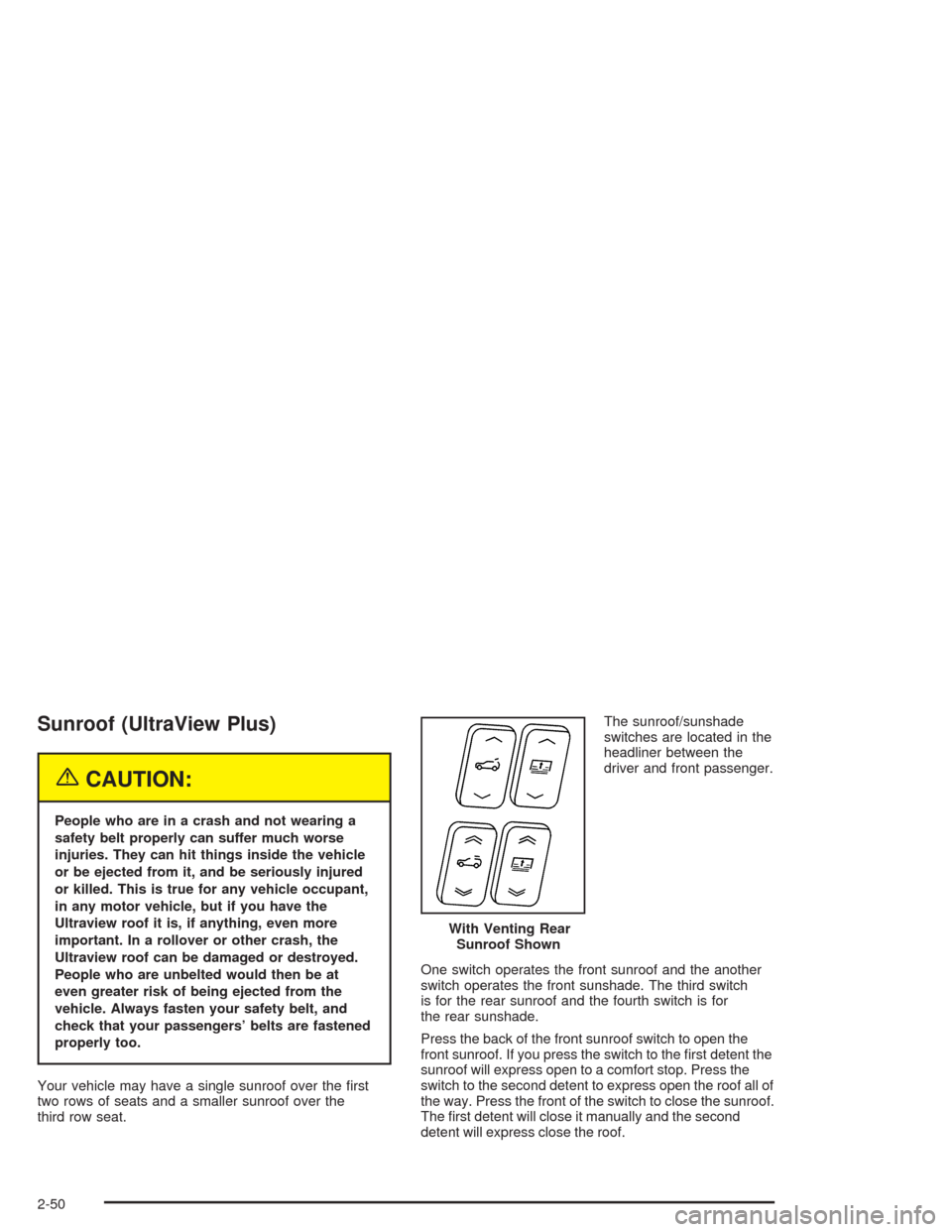
third row seat.The sunroof/sunshade
switches are located in the
headliner between the
driver and front passenger.
With Venting Rear
Sunroof Shown
One switch operates the front sunroof and the another
switch operates the front sunshade. The third switch
is for the rear sunroof and the fourth switch is for
the rear sunshade.
Press the back of the front sunroof switch to open the
front sunroof. If you press the switch to the rst detent the
sunroof will express open to a comfort stop. Press the
switch to the second detent to express open the roof all of
the way. Press the front of the switch to close the sunroof.
The rst detent will close it manually and the second
detent will express close the roof.
2-50
Page 119 of 468
Press the back of the front sunshade switch to open the
front sunshade. Press the front of the switch to close
the sunshade. The sunshade can not be closed further
than the glass panel.
On some vehicles the rear sunroof vents. Press the rear
of the switch to vent the roof. Press the front of the
switch to close it.
Press the back of the rear sunshade switch to open the
rear sunshade. Press the front of the switch to close
the rear sunshade. The sunshade cannot be closed
completely when the glass is open.
Anti-Pinch Feature
If an object is in the path of the sunroof when it is
closing, the anti-pinch feature will detect the object and
stop the sunroof from closing at the point of the
obstruction. The sunroof will then reverse. To close the
sunroof once it has re-opened, remove the obstruction
and press the front of the sunroof switch.
Resynchronization
To resynchronize the front and rear glass and sunshade,
do the following.
1. With the engine running, press and hold the rear
sunroof switch in the open position and the rear
sunshade switch in the close position for six
seconds.
2. Release both buttons.
3. Press the rear sunroof switch in the closed position
until the motor stalls in the closed position.
4. Press the rear sunshade switch in the closed
position until the motor stalls in the closed position.
5. Press and hold the front sunroof switch in the open
position and the front sunshade switch in the close
position for six seconds.
6. Release both buttons.
7. Press the front sunshade switch in the close
position until the motor stalls in the closed position.
8. Press the front sunroof switch in the close position
until the motor stalls in the closed position.
2-51
Page 249 of 468
Notice:Do not try to clear frost or other material
from the inside of the front windshield and rear
window with a razor blade or anything else that is
sharp. This may damage the rear window defogger
grid and affect your radio’s ability to pickup
stations clearly. The repairs wouldn’t be covered by
your warranty.
If static is heard on the radio, when the rear window
defogger is turned on, it could mean that a defogger grid
line has been damaged. If this is true, the grid line
must be repaired.
If adding an aftermarket cellular telephone to your
vehicle, and the antenna needs to be attached to the
glass, make sure that the grid lines for the AM-FM
antennas are not damaged. Make sure the cellular
telephone antenna does not touch a grid line.XM™ Satellite Radio Antenna
System
The XM™ Satellite Radio antenna is located on the roof
of your vehicle. Keep this antenna clear of snow and
ice build up for clear radio reception.
The performance of the XM™ system may be affected if
the sunroof is open.
Loading items onto the roof of your vehicle can interfere
with the performance of the XM™ system. Make sure
that the XM™ satellite antenna is not obstructed.
3-127
Page 418 of 468
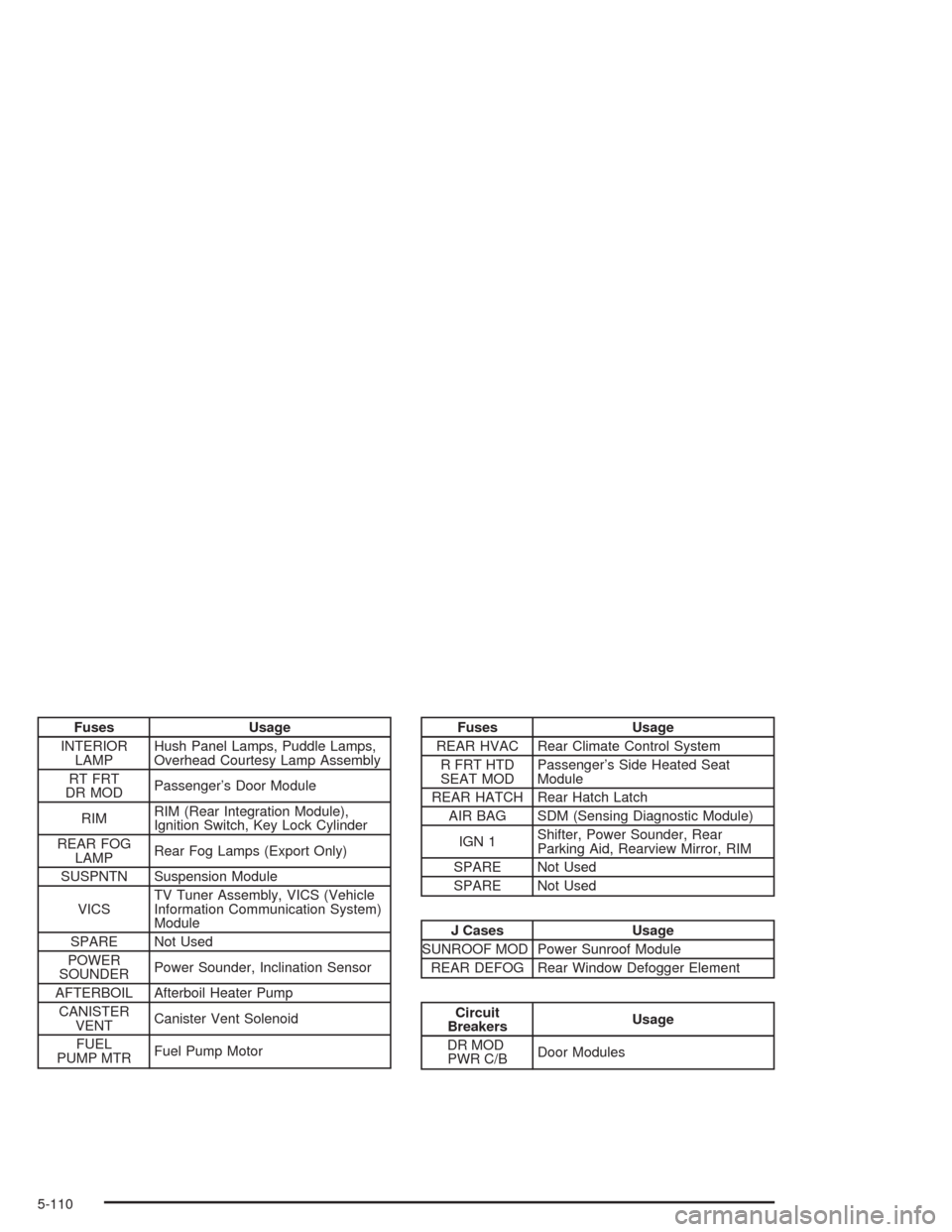
Fuses Usage
INTERIOR
LAMPHush Panel Lamps, Puddle Lamps,
Overhead Courtesy Lamp Assembly
RT FRT
DR MODPassenger’s Door Module
RIMRIM (Rear Integration Module),
Ignition Switch, Key Lock Cylinder
REAR FOG
LAMPRear Fog Lamps (Export Only)
SUSPNTN Suspension Module
VICSTV Tuner Assembly, VICS (Vehicle
Information Communication System)
Module
SPARE Not Used
POWER
SOUNDERPower Sounder, Inclination Sensor
AFTERBOIL Afterboil Heater Pump
CANISTER
VENTCanister Vent Solenoid
FUEL
PUMP MTRFuel Pump MotorFuses Usage
REAR HVAC Rear Climate Control System
R FRT HTD
SEAT MODPassenger’s Side Heated Seat
Module
REAR HATCH Rear Hatch Latch
AIR BAG SDM (Sensing Diagnostic Module)
IGN 1Shifter, Power Sounder, Rear
Parking Aid, Rearview Mirror, RIM
SPARE Not Used
SPARE Not Used
J Cases Usage
SUNROOF MOD Power Sunroof Module
REAR DEFOG Rear Window Defogger Element
Circuit
BreakersUsage
DR MOD
PWR C/BDoor Modules
5-110