climate control CADILLAC SRX 2005 1.G User Guide
[x] Cancel search | Manufacturer: CADILLAC, Model Year: 2005, Model line: SRX, Model: CADILLAC SRX 2005 1.GPages: 442, PDF Size: 2.52 MB
Page 147 of 442
z9y(Fan):Press this switch to increase or
decrease the fan speed. Pressing this switch cancels
automatic operation and places the system in manual
mode. Press AUTO to return to automatic operation.
If the airow seems low when the fan speed is at
the highest setting, the passenger compartment air lter
may need to be replaced. For more information, see
Passenger Compartment Air Filter on page 3-32
andScheduled Maintenance on page 6-4.
h(Recirculation):This mode keeps outside air from
coming in the vehicle. It can be used to prevent outside
air and odors from entering your vehicle or to help heat or
cool the air inside your vehicle more quickly. Press this
button to turn the recirculation mode on or off. The
air-conditioning compressor also comes on.
Recirculation is not available in the defrost mode and will
automatically turn off after 10 minutes when defog is
selected.
Using recirculation for long periods of time may cause the
air inside your vehicle to become too dry or stuffy. To
prevent this from happening, after the air in your vehicle
has cooled, turn the recirculation mode off.
QPWRR(Power/Driver’s Temperature):Press the
PWR button located on the driver’s side of the
climate control panel to turn the entire climate control
system on or off. Press the up or down arrow on
the switch to increase or decrease the temperature
inside your vehicle.
QPWRR(Power/Passenger’s Temperature):Press
the PWR button located on the passenger’s side of
the climate control panel to turn the passenger’s climate
control system on. Press the up or down arrow on
the switch to increase or decrease the temperature for
the front passenger.
A/C OFF (Air Conditioning):Press this button to
manually turn off the air conditioning compressor. Press
AUTO to return to automatic operation or press the
A/C OFF button again.
3-27
Page 148 of 442
Sensors
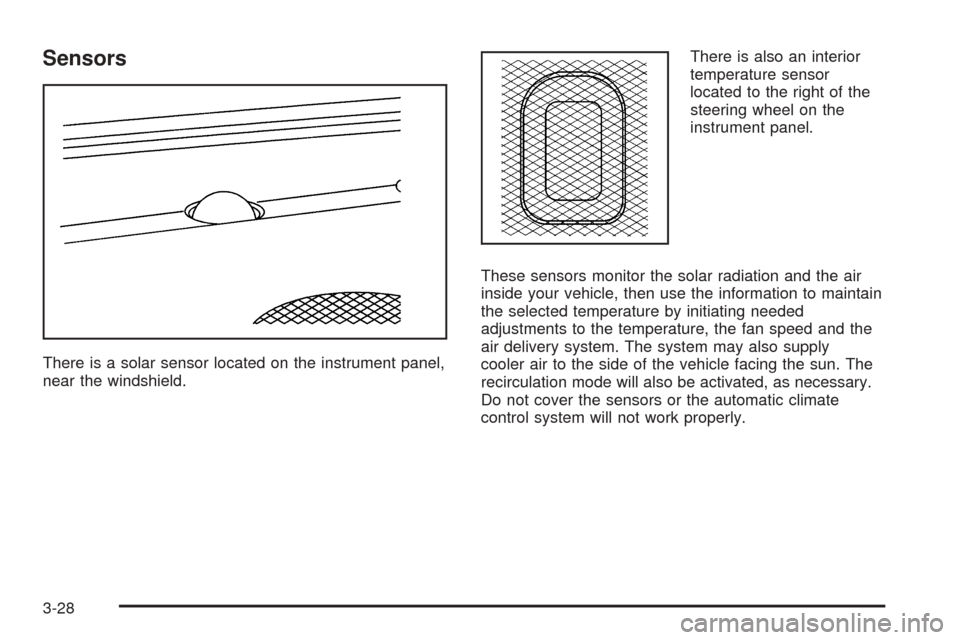
There is a solar sensor located on the instrument panel,
near the windshield.There is also an interior
temperature sensor
located to the right of the
steering wheel on the
instrument panel.
These sensors monitor the solar radiation and the air
inside your vehicle, then use the information to maintain
the selected temperature by initiating needed
adjustments to the temperature, the fan speed and the
air delivery system. The system may also supply
cooler air to the side of the vehicle facing the sun. The
recirculation mode will also be activated, as necessary.
Do not cover the sensors or the automatic climate
control system will not work properly.
3-28
Page 149 of 442
Defogging and Defrosting
Fog on the inside of windows is a result of high humidity
(moisture) condensing on the cool window glass. This
can be minimized if the climate control system is
used properly. There are two modes to clear fog from
your windshield. Use the defog mode to clear the
windows of fog or moisture and warm the passengers.
Use the defrost mode to remove fog or frost from
the windshield more quickly.
zNy(Mode):Press this button until defog appears
on the display.
-(Defog):This mode directs the air between the
windshield, oor outlets and side windows. When you
select this mode, the system turns off recirculation
and runs the air-conditioning compressor unless
the outside temperature is at or below freezing. The
recirculation mode is cancelled when you enter defog
mode. If you select recirculation while in defog mode, it
will be cancelled after 10 minutes.If you have fogging on the side windows, turn the
thumbwheel on the outboard outlets to the side window
defog position. SeeOutlet Adjustment on page 3-30
for more information.
0(Defrost):Pressing defrost directs most of the air
to the windshield, with some air directed to the side
windows. In this mode, the system will automatically turn
off recirculation and run the air-conditioning compressor,
unless the outside temperature is at or below freezing.
Recirculation cannot be selected while in the
defrost mode.
This mode may also cause the fan speed and air
temperature to increase.
If you have fogging on the side windows, turn the
thumbwheel on the outboard outlets to the side window
defog position. SeeOutlet Adjustment on page 3-30
for more information. Do not drive the vehicle until all the
windows are clear.
3-29
Page 176 of 442

9(English/Metric Units):Use this menu item to
adjust the measurement units.
You can choose between ENGLISH UNITS and
METRIC UNITS. To switch between the two, press the
TUNE/SEL knob. Once your choice is displayed,
turn the knob to set your choice and continue scrolling
through the main menu.
The measurement units that you choose will be reected
on all the vehicle system displays, not just the DIC
information. For example, the climate control panel will
display degrees Celsius if you choose METRIC UNITS.
TCS (Traction Control System):You can enable or
disable the traction control system using this menu item.
Press the TUNE/SEL knob to switch between on
and off.
You can also turn the traction control system off using
the traction control button located near the shift lever.
When you disable the traction control system, the
Traction Suspended message will appear on the DIC
and the traction control system warning light on the
instrument panel cluster will come on. SeeDIC
Warnings and Messages on page 3-57andTraction
Control System (TCS) Warning Light on page 3-40for
more information.8(Clock):Use this menu item to set the time on the
vehicle’s clock.
SeeSetting the Time on page 3-80for more information.
8/4(Clock/Information Display):Use this menu
item to toggle between the clock display and the XM™
Information (Song, Artist, Title), if available.
SeeRadio with CD on page 3-81for more information.
SETUP:When you select this menu item, the
following submenu is available:
Personalization
Language
Congure Display Keys
To change the language displayed on the radio, select
LANGUAGE by pressing the TUNE/SEL knob. Turn the
TUNE/SEL knob to scroll through the available languages
and press the knob to make your selection.
If you accidentally select a language that you did not
want, ENGLISH is always at the top of the language list.
For more information on the other items in the SETUP
menu, seeDIC Vehicle Personalization on page 3-66.
3-56
Page 177 of 442

DIC Warnings and Messages
These messages will appear if there is a problem
sensed in one of your vehicle’s systems.
You must acknowledge a message to clear it from the
screen for further use. To clear a message, press
the CLR button.
Be sure to take any message that appears on the
screen seriously and remember that clearing the
message will only make the message disappear,
not the problem.
Battery Saver Active
This message appears when the system detects that
the battery voltage is dropping beyond a reasonable
level. The battery saver system will start reducing certain
features of the vehicle that you may not be able to
notice. At the point that the features are disabled, this
message is displayed. It means that the vehicle is trying
to save the charge in the battery.Turn off all unnecessary accessories to allow the battery
to recharge.
The normal battery voltage range is 11.5 to 15.5 volts.
You can monitor battery voltage on the DIC by pressing
the INFO button until you nd BATTERY VOLTS.
Battery Voltage High
This message indicates that the electrical charging
system is overcharging the battery. When the system
detects that the battery voltage is above approximately
16 volts, this message will be displayed.
To reduce the charging overload, use the vehicle’s
accessories. Turn on the exterior lamps and radio, set
the climate control on AUTO and the fan speed on
the highest setting, and turn the rear window
defogger on.
The normal battery voltage range is 11.5 to 15.5 volts
when the engine is running. You can monitor battery
voltage on the DIC by pressing the INFO button until you
nd BATTERY VOLTS.
3-57
Page 182 of 442
Service AC (Air Conditioning) System
This message appears when the electronic sensors that
control the air conditioning and heating systems are
no longer working. Have the climate control system
serviced by your GM dealer if you notice a drop
in heating and air conditioning efficiency.
Service Air Bag
There is a problem with the air bag system when this
message appears. Have your vehicle serviced at
your GM dealer immediately. SeeAirbag Readiness
Light on page 3-37for more information.
Service Charging System
This message will display when a problem with the
charging system has been detected. Have your vehicle
serviced at your GM dealer.
Service Electrical System
This message will display if an electrical problem has
occurred within the Powertrain Control Module (PCM) or
the ignition switch. Have your vehicle serviced at your
GM dealer.
Service Fuel System
The Powertrain Control Module (PCM) has detected a
problem within the fuel system when this message
appears. Have your vehicle serviced at your GM dealer.
Service Idle Control
A problem with the idle control has occurred when this
message displays. Have your vehicle serviced at
your GM dealer.
Service Stability System Message
Your vehicle is equipped with a vehicle stability
enhancement system called StabiliTrak®.
SeeStabiliTrak
®System on page 4-11. The Service
Stability System message will be displayed if there has
been a problem detected with StabiliTrak
®.
If the Service Stability System message comes on while
you are driving, pull off the road as soon as possible
and stop carefully. Try resetting the system by turning
the ignition off then back on. If the Service Stability
System message still stays on or comes back on again
while you are driving, your vehicle needs service.
Have the StabiliTrak
®System inspected at your
GM dealer as soon as possible.
3-62
Page 186 of 442

DIC Vehicle Personalization
Your vehicle is equipped with personalization that allows
you to program certain features to a preferred setting
for up to two people. The number of programmable
features varies depending upon which model of
the vehicle is purchased.
On all vehicles, features such as climate control
settings, radio preset settings, exterior lighting at unlock,
remote lock and unlock conrmation, and automatic
door locks have already been programmed for
your convenience.
Some vehicles are equipped with additional features
that can be programmed including the seat and outside
rearview mirror position.
If your vehicle is equipped with the ability to program
additional personalization features, the driver’s
preferences are recalled by pressing the unlock button
on the remote keyless entry transmitter, 1 or 2, or
by pressing the appropriate memory button, 1 or 2,
located on the driver’s door. Certain features can
be programmed not to recall until the key is placed in
the ignition. To change feature preferences, see
“Entering the Personalization Menu” following.
Entering the Personalization Menu
To enter the feature programming mode, use the
following procedure:
1. Turn the ignition to ON, but do not start the engine.
Make sure the vehicle is in PARK (P).
2. If your vehicle has memory settings, press the
appropriate memory button, 1 or 2, located on
the driver’s door armrest. The DIC display will show
either Driver 1 or 2 depending on which button
was selected.
3. Press the TUNE/SEL knob once to access the main
menu of the DIC.
4. Turn the TUNE/SEL knob until SETUP is highlighted.
5. Press the TUNE/SEL knob once to access the
SETUP menu.
6. Scroll to the feature you want to change, and press
the TUNE/SEL knob to turn the feature on or off.
If the feature is turned on, a check mark will appear
next to the feature name.
If none of the personalization items are turned on,
turn on the personalization menu by pressing the
TUNE/SEL knob. The list of features will then appear,
and you can repeat Step 6.
3-66
Page 321 of 442
If Steam Is Coming From Your Engine
{CAUTION:
Steam from an overheated engine can burn
you badly, even if you just open the hood. Stay
away from the engine if you see or hear steam
coming from it. Just turn it off and get
everyone away from the vehicle until it cools
down. Wait until there is no sign of steam or
coolant before you open the hood.
If you keep driving when your engine is
overheated, the liquids in it can catch re. You
or others could be badly burned. Stop your
engine if it overheats, and get out of the
vehicle until the engine is cool.
SeeOverheated Engine Protection Operating
Mode on page 5-28for information on driving
to a safe place in an emergency.
Notice:If your engine catches re because you
keep driving with no coolant, your vehicle can
be badly damaged. The costly repairs would not be
covered by your warranty. SeeOverheated EngineProtection Operating Mode on page 5-28for
information on driving to a safe place in an
emergency.
If No Steam Is Coming From Your
Engine
An overheat warning, along with a Check Coolant Level
message, can indicate a serious problem.
If you get an engine overheat warning with no Check
Coolant Level message, but see or hear no steam, the
problem may not be too serious. Sometimes the
engine can get a little too hot when you:
Climb a long hill on a hot day.
Stop after high-speed driving.
Idle for long periods in traffic.
Tow a trailer.
If you get the overheat warning with no sign of steam,
try this for a minute or so:
1. In heavy traffic, let the engine idle in NEUTRAL (N)
while stopped. If it is safe to do so, pull off the road,
shift to PARK (P) or NEUTRAL (N) and let the
engine idle.
2. Set the climate controls to the highest heat setting
and fan speed and open the windows, as necessary.
5-27
Page 360 of 442

Uniform Tire Quality Grading
Quality grades can be found where applicable on the
tire sidewall between tread shoulder and maximum
section width. For example:
Treadwear 200 Traction AA Temperature A
The following information relates to the system
developed by the United States National Highway
Traffic Safety Administration, which grades tires by
treadwear, traction and temperature performance. (This
applies only to vehicles sold in the United States.)
The grades are molded on the sidewalls of most
passenger car tires. The Uniform Tire Quality Grading
system does not apply to deep tread, winter-type
snow tires, space-saver or temporary use spare tires,
tires with nominal rim diameters of 10 to 12 inches
(25 to 30 cm), or to some limited-production tires.
While the tires available on General Motors passenger
cars and light trucks may vary with respect to these
grades, they must also conform to federal safety
requirements and additional General Motors Tire
Performance Criteria (TPC) standards.
Treadwear
The treadwear grade is a comparative rating based on
the wear rate of the tire when tested under controlled
conditions on a specied government test course.
For example, a tire graded 150 would wear one and
a half (1.5) times as well on the government course as
a tire graded 100. The relative performance of tires
depends upon the actual conditions of their use,
however, and may depart signicantly from the norm
due to variations in driving habits, service practices and
differences in road characteristics and climate.
Traction – AA, A, B, C
The traction grades, from highest to lowest, are AA, A,
B, and C. Those grades represent the tire’s ability
to stop on wet pavement as measured under controlled
conditions on specied government test surfaces of
asphalt and concrete. A tire marked C may have poor
traction performance. Warning: The traction grade
assigned to this tire is based on straight-ahead braking
traction tests, and does not include acceleration,
cornering, hydroplaning, or peak traction characteristics.
5-66
Page 392 of 442
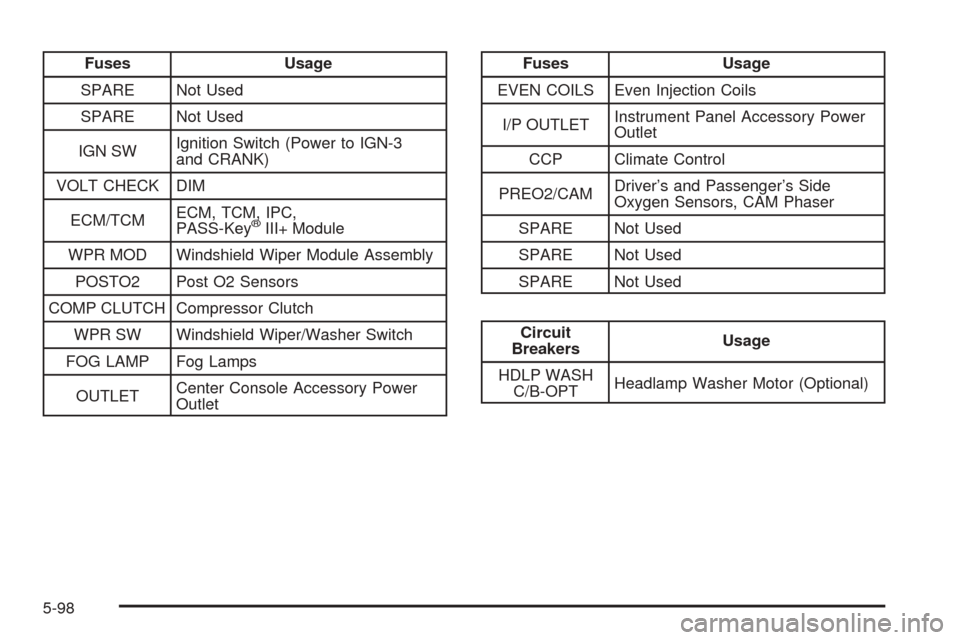
Fuses Usage
SPARE Not Used
SPARE Not Used
IGN SWIgnition Switch (Power to IGN-3
and CRANK)
VOLT CHECK DIM
ECM/TCMECM, TCM, IPC,
PASS-Key
®III+ Module
WPR MOD Windshield Wiper Module Assembly
POSTO2 Post O2 Sensors
COMP CLUTCH Compressor Clutch
WPR SW Windshield Wiper/Washer Switch
FOG LAMP Fog Lamps
OUTLETCenter Console Accessory Power
Outlet
Fuses Usage
EVEN COILS Even Injection Coils
I/P OUTLETInstrument Panel Accessory Power
Outlet
CCP Climate Control
PREO2/CAMDriver’s and Passenger’s Side
Oxygen Sensors, CAM Phaser
SPARE Not Used
SPARE Not Used
SPARE Not Used
Circuit
BreakersUsage
HDLP WASH
C/B-OPTHeadlamp Washer Motor (Optional)
5-98