warning CADILLAC SRX 2005 1.G Owner's Manual
[x] Cancel search | Manufacturer: CADILLAC, Model Year: 2005, Model line: SRX, Model: CADILLAC SRX 2005 1.GPages: 442, PDF Size: 2.52 MB
Page 167 of 442
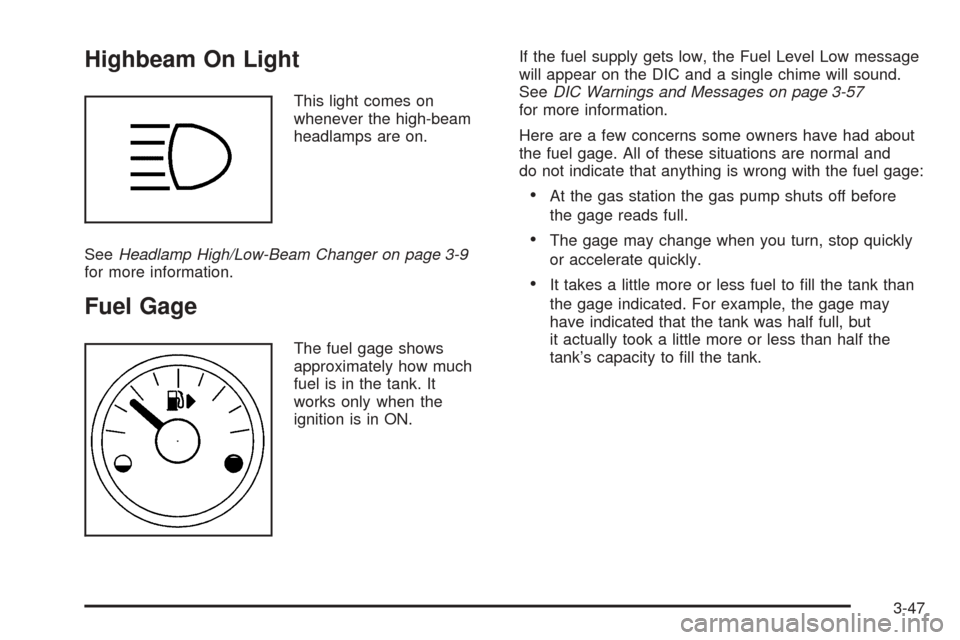
Highbeam On Light
This light comes on
whenever the high-beam
headlamps are on.
SeeHeadlamp High/Low-Beam Changer on page 3-9
for more information.
Fuel Gage
The fuel gage shows
approximately how much
fuel is in the tank. It
works only when the
ignition is in ON.If the fuel supply gets low, the Fuel Level Low message
will appear on the DIC and a single chime will sound.
SeeDIC Warnings and Messages on page 3-57
for more information.
Here are a few concerns some owners have had about
the fuel gage. All of these situations are normal and
do not indicate that anything is wrong with the fuel gage:
At the gas station the gas pump shuts off before
the gage reads full.
The gage may change when you turn, stop quickly
or accelerate quickly.
It takes a little more or less fuel to ll the tank than
the gage indicated. For example, the gage may
have indicated that the tank was half full, but
it actually took a little more or less than half the
tank’s capacity to ll the tank.
3-47
Page 168 of 442
Driver Information Center (DIC)
The DIC gives you the status of many of your vehicle’s
systems. It is also used to display driver personalization
features and warning/status messages.
If your vehicle has the base audio system, use the
information contained in this manual for instructions on
operating the DIC for your vehicle.
If your vehicle has the Navigation system, see the SRX
Navigation System manual for instructions on operating
the DIC for your vehicle.
System Controls
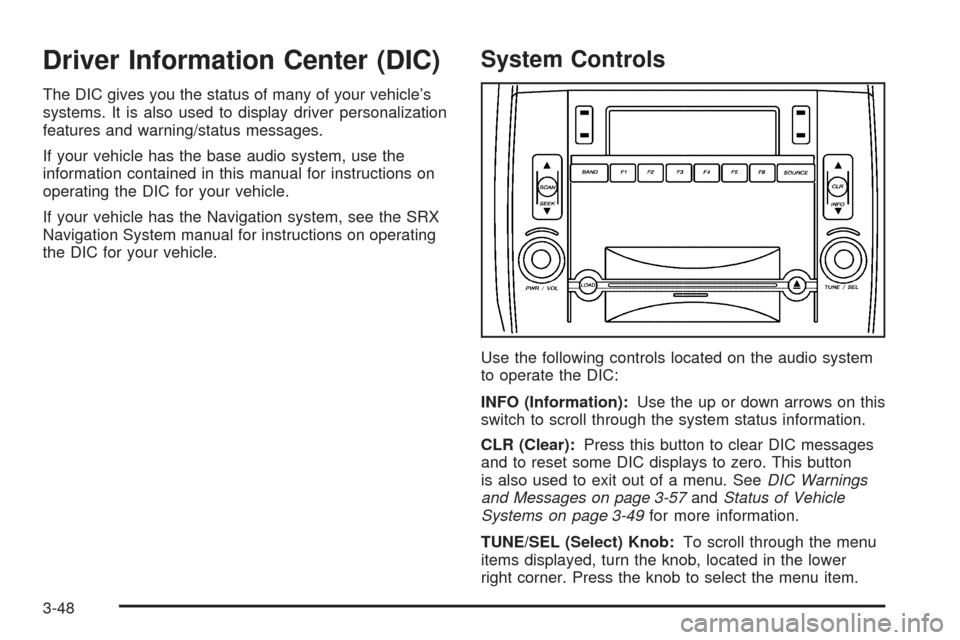
Use the following controls located on the audio system
to operate the DIC:
INFO (Information):Use the up or down arrows on this
switch to scroll through the system status information.
CLR (Clear):Press this button to clear DIC messages
and to reset some DIC displays to zero. This button
is also used to exit out of a menu. SeeDIC Warnings
and Messages on page 3-57andStatus of Vehicle
Systems on page 3-49for more information.
TUNE/SEL (Select) Knob:To scroll through the menu
items displayed, turn the knob, located in the lower
right corner. Press the knob to select the menu item.
3-48
Page 170 of 442
Vehicle Information Menu Item
Descriptions
The following paragraphs contain a more detailed
description of each menu item:
OUTSIDE TEMP:If you select this item, the current
outside temperature is displayed at the top of the
screen. It will be in either degrees Fahrenheit or degrees
Celsius depending upon whether the system is set for
English or metric units. If you wish to change the
units, seeDIC Main Menu on page 3-53.
MI TRIP A and B:For information on the trip
odometers, seeTrip Odometers on page 3-35.
MILES RANGE:If you select this item, the approximate
number of remaining miles or kilometers you can
drive without refueling is displayed. This estimate is
based on the current driving conditions and will change
if the driving conditions change. For example, if you
are driving in traffic making frequent stops, the display
may read one number, but if you enter the freeway,
the number may change even though you still have the
same amount of gas in the gas tank. This is because
different driving conditions produce different fuel
economies. Generally, freeway driving produces better
fuel economy than city driving.If your vehicle is low on fuel, the Fuel Level Low
message will be displayed. See “Fuel Level Low” under
DIC Warnings and Messages on page 3-57for more
information.
MPG AVG:If you select this item, the approximate
average miles per gallon (mpg) or Liters per
100 kilometers (L/100km) is displayed. This number is
calculated based on the number of mpg (L/100km)
recorded since the last time this menu item was reset.
To reset the MPG AVG, press the CLR button located to
the right of the screen. The display will return to zero.
MPG INST:If you select this item, the current fuel
economy is displayed. This number reects only the fuel
economy that the vehicle has right now and will
change frequently as driving conditions change. Unlike
average fuel economy, this menu item cannot be
reset.
GAL FUEL USED:If you select this item, the number
of gallons or liters of fuel used since the last reset of this
menu item is displayed.
To reset GAL FUEL USED, press the CLR button
located to the right of the screen. The display will
return to zero.
3-50
Page 171 of 442

AVG MPH:If you select this item, the average speed of
the vehicle is displayed in miles per hour (mph) or
kilometers per hour (km/h). This average is calculated
based on the various vehicle speeds recorded since the
last reset of this menu item.
To reset AVG MPH, press the CLR button located to
the right of the screen. The display will return to zero.
TIMER:If you select this item, a timing feature is
displayed. The timer functions like a stopwatch in that
you can record the time it takes to travel from one point
to another.
To turn on the timer, press the CLR button located to
the right of the screen once. To turn off the timer, press
the CLR button again.
When the timer is off, the display will show the timer
value and TIMER OFF. The timing feature will stop.
To reset the timer, turn off the timer and then press and
hold the CLR button. The display will return to zero.
BATTERY VOLTS:If you select this item, the current
battery voltage is displayed. If the voltage is in the normal
range, the display will have OK after it. For example, the
display may read 13.2 Battery Volts OK.If there is a problem with the battery charging system,
there are four possible DIC messages that may be
displayed. SeeDIC Warnings and Messages on
page 3-57for more information.
ENGINE OIL LIFE:If you select this item, the
percentage of remaining oil life is displayed. If you see
99% Oil Life on the display, that means that 99% of
the current oil life remains.
When the oil life is depleted, the Change Engine Oil
message will appear on the display. See your GM dealer
for service. In addition to the engine oil life system
monitoring the oil life, additional maintenance is
recommended in the Maintenance Schedule in this
manual. SeeScheduled Maintenance on page 6-4and
Engine Oil on page 5-16for more information.
When you reset the Change Engine Oil message by
clearing it from the display, you still must reset the
engine oil life system separately. For more information
on resetting the engine oil life system, see “How to
Reset the Engine Oil Life System and the Oil Life
Indicator” underEngine Oil Life System on page 5-19.
3-51
Page 176 of 442

9(English/Metric Units):Use this menu item to
adjust the measurement units.
You can choose between ENGLISH UNITS and
METRIC UNITS. To switch between the two, press the
TUNE/SEL knob. Once your choice is displayed,
turn the knob to set your choice and continue scrolling
through the main menu.
The measurement units that you choose will be reected
on all the vehicle system displays, not just the DIC
information. For example, the climate control panel will
display degrees Celsius if you choose METRIC UNITS.
TCS (Traction Control System):You can enable or
disable the traction control system using this menu item.
Press the TUNE/SEL knob to switch between on
and off.
You can also turn the traction control system off using
the traction control button located near the shift lever.
When you disable the traction control system, the
Traction Suspended message will appear on the DIC
and the traction control system warning light on the
instrument panel cluster will come on. SeeDIC
Warnings and Messages on page 3-57andTraction
Control System (TCS) Warning Light on page 3-40for
more information.8(Clock):Use this menu item to set the time on the
vehicle’s clock.
SeeSetting the Time on page 3-80for more information.
8/4(Clock/Information Display):Use this menu
item to toggle between the clock display and the XM™
Information (Song, Artist, Title), if available.
SeeRadio with CD on page 3-81for more information.
SETUP:When you select this menu item, the
following submenu is available:
Personalization
Language
Congure Display Keys
To change the language displayed on the radio, select
LANGUAGE by pressing the TUNE/SEL knob. Turn the
TUNE/SEL knob to scroll through the available languages
and press the knob to make your selection.
If you accidentally select a language that you did not
want, ENGLISH is always at the top of the language list.
For more information on the other items in the SETUP
menu, seeDIC Vehicle Personalization on page 3-66.
3-56
Page 177 of 442

DIC Warnings and Messages
These messages will appear if there is a problem
sensed in one of your vehicle’s systems.
You must acknowledge a message to clear it from the
screen for further use. To clear a message, press
the CLR button.
Be sure to take any message that appears on the
screen seriously and remember that clearing the
message will only make the message disappear,
not the problem.
Battery Saver Active
This message appears when the system detects that
the battery voltage is dropping beyond a reasonable
level. The battery saver system will start reducing certain
features of the vehicle that you may not be able to
notice. At the point that the features are disabled, this
message is displayed. It means that the vehicle is trying
to save the charge in the battery.Turn off all unnecessary accessories to allow the battery
to recharge.
The normal battery voltage range is 11.5 to 15.5 volts.
You can monitor battery voltage on the DIC by pressing
the INFO button until you nd BATTERY VOLTS.
Battery Voltage High
This message indicates that the electrical charging
system is overcharging the battery. When the system
detects that the battery voltage is above approximately
16 volts, this message will be displayed.
To reduce the charging overload, use the vehicle’s
accessories. Turn on the exterior lamps and radio, set
the climate control on AUTO and the fan speed on
the highest setting, and turn the rear window
defogger on.
The normal battery voltage range is 11.5 to 15.5 volts
when the engine is running. You can monitor battery
voltage on the DIC by pressing the INFO button until you
nd BATTERY VOLTS.
3-57
Page 179 of 442
Check Brake Fluid
This message will display if the ignition is in ON to
inform the driver that the brake uid level is low. Have
the brake system serviced by your GM dealer as
soon as possible. SeeBrake System Warning Light on
page 3-38andBrakes on page 5-36for more
information.
Check Coolant Level
This message will appear when there is a low level of
engine coolant. Have the cooling system serviced
by your GM dealer as soon as possible. SeeEngine
Coolant on page 5-23for more information.
Notice:If your engine catches re because you
keep driving with no coolant, your vehicle can
be badly damaged. The costly repairs would not be
covered by your warranty. SeeOverheated Engine
Protection Operating Mode on page 5-28for
information on driving to a safe place in an
emergency.
Check Gas Cap
When this message appears on the display, the gas cap
has not been fully tightened. You should recheck the
gas cap to ensure that it is on and tightened properly.
SeeMalfunction Indicator Lamp on page 3-42for
more information.
Check Oil Level
This message indicates that the oil level is low. See
Engine Oil on page 5-16for more information on
checking you engine oil.
Check Tire Pressure
This message indicates that one or more of the vehicle’s
tires are low. SeeStatus of Vehicle Systems on
page 3-49for information on checking your vehicle’s tire
pressures. Also, seeTire Pressure Monitor System
on page 5-61andInation - Tire Pressure on page 5-58
for more information.
Check Washer Fluid
When this message appears on the display, it means
that your vehicle is low on windshield washer uid. You
should rell the tank as soon as possible. See
Windshield Washer Fluid on page 5-35for more
information.
Driver Door Ajar
When this message appears on the display, it means
that the driver’s door was not closed completely.
You should make sure that the driver’s door is closed
completely.
3-59
Page 180 of 442

Engine Coolant Hot – AC
(Air Conditioning) Off
This message displays when the engine coolant
becomes hotter than the normal operating temperature.
To avoid added strain on a hot engine, the air
conditioning compressor is automatically turned off.
When the coolant temperature returns to normal, the air
conditioning compressor will turn back on. You can
continue to drive your vehicle.
If this message continues to appear, have the system
repaired by your GM dealer as soon as possible to avoid
compressor damage.
Engine Coolant Hot – Idle Engine
This message will appear when the engine coolant
temperature is too hot. Stop and allow the vehicle to idle
until it cools down.
Notice:If you drive your vehicle while the engine is
overheating, severe engine damage may occur. If
an overheat warning appears on the instrument
panel cluster and/or DIC, stop the vehicle as soon
as possible. Do not increase the engine speed above
normal idling speed. SeeEngine Overheating on
page 5-26for more information.
Engine Overheated – Stop Engine
This message will appear when the engine has
overheated. Stop the vehicle and turn the engine off
immediately to avoid severe engine damage. See
Engine Overheating on page 5-26. A chime will also
sound when this message is displayed.
Notice:If you drive your vehicle while the engine is
overheating, severe engine damage may occur. If
an overheat warning appears on the instrument
panel cluster and/or DIC, stop the vehicle as soon
as possible. Do not increase the engine speed above
normal idling speed. SeeEngine Overheating on
page 5-26for more information.
Engine Power Reduced
This message informs you that the vehicle is reducing
engine power because the transmission is being
placed in gear under conditions that may cause damage
to the vehicle’s engine or transmission. This also can
affect the vehicle’s ability to accelerate.
Fuel Level Low
When this message appears on the display, it means
that your vehicle is low on fuel. You should rell the tank
as soon as possible. A single chime will sound when
this message is displayed.
3-60
Page 181 of 442
Headlamps Suggested
This message will appear when the amount of available
light outside the vehicle is low and the exterior lamp
control is off. This message informs the driver that
turning on the exterior lamps is recommended even
though the daytime running lamps (DRL) are still
illuminated and it has become dark enough outside to
require the headlamps and/or other exterior lamps.
This message will also appear when the windshield
wipers have been on for more than six seconds and the
exterior lamp control is off or in the parking lamp position.
Ice Possible
This message appears when the outside temperature is
cold enough to create icy road conditions.
Left Rear Door Ajar
When this message appears on the display, it means
that the driver’s side rear door was not closed
completely. You should make sure that the door is
closed completely.
Lift Gate Ajar
When this message appears on the display, it means
that the liftgate was not closed completely. You
should make sure that the liftgate is closed completely.
Oil Pressure Low – Stop Engine
A multiple chime will sound when this message is
displayed.
Notice:If you drive your vehicle while the engine
oil pressure is low, severe engine damage may
occur. If a low oil pressure warning appears on the
instrument panel cluster and/or DIC, stop the
vehicle as soon as possible. Do not drive the vehicle
until the cause of the low oil pressure is corrected.
SeeEngine Oil on page 5-16for more information.
Passenger Door Ajar
When this message appears on the display, it means
that the passenger’s side front door was not closed
completely. You should make sure that the door
is closed completely.
Right Rear Door Ajar
When this message appears on the display, it means
that the passenger’s side rear door was not closed
completely. You should check to make sure that
the door is closed completely.
3-61
Page 199 of 442
Enhanced Chime Volume
This feature allows you to adjust the volume level of the
vehicle’s warning chimes. The chime volume cannot
be turned off, only adjusted.
Programmable Modes
Mode 1:NORMAL
Mode 2:LOUD
Before your vehicle was shipped from the factory, it was
programmed to Mode 1. The mode to which the
vehicle was programmed may have been changed since
it left the factory.To program the vehicle to a different mode, use the
following procedure:
1. Enter the personalization portion of the SETUP
menu following the instructions listed previously.
2. Scroll to ENHANCED CHIME VOLUME using the
TUNE/SEL knob to highlight it.
3. Press the TUNE/SEL knob to switch back and forth
between the normal and loud settings.
The mode you selected is now set. You can either exit
the programming mode by following the instructions
later in this section or program the next feature available
on your vehicle.
Exiting the Personalization Menu
Once you have nished making your selections, you will
return to the main audio screen.
3-79