ignition CADILLAC SRX 2005 1.G Workshop Manual
[x] Cancel search | Manufacturer: CADILLAC, Model Year: 2005, Model line: SRX, Model: CADILLAC SRX 2005 1.GPages: 442, PDF Size: 2.52 MB
Page 213 of 442
Using the Single CD Player
Insert a CD partway into the slot, label side up. The
player will pull it in. If the ignition and the radio are on the
CD will begin playing. A CD may be loaded with the radio
off but it will not start playing until the radio is on.
If the ignition or radio is turned off with a CD in the
player, it will stay in the player. When the ignition
or radio is turned on, the CD will start to play where it
stopped, if it was the last selected audio source.
When the CD is inserted, CD will appear on the display.
As each new track starts to play, the track number
will appear on the display.
The CD player can play the smaller 3 inch (8 cm) single
CDs with an adapter ring. Full-size CDs and the
smaller CDs are loaded in the same manner.
If playing a CD-R the sound quality may be reduced
due to CD-R quality, the method of recording, the quality
of the music that has been recorded, and the way the
CD-R has been handled. There may be an increase
in skipping, difficulty in nding tracks, and/or difficulty in
loading and ejecting. If these problems occur try a
known good CD.Do not add paper labels to CDs, they could get caught
in the CD player.
If an error appears on the display, see “CD Messages”
later in this section.
When a CD is inserted the CD functions will appear on
the display above the pushbuttons, in place of the
preset stations (if programmed).
F1 PREV (Previous):Press this pushbutton to go to
the previous track. Press and hold this pushbutton
to reverse quickly within a track. Release the pushbutton
to play the passage. The elapsed time of the track will
appear on the display.
F2 NEXT:Press this pushbutton to go to the next track.
Press and hold this pushbutton to advance quickly
within a track. Release the pushbutton to play the
passage. The elapsed time of the track will appear on
the display.
F3 RDM (Random):Press this pushbutton to listen to
the tracks in random, rather than sequential, order.
RANDOM will appear on the display. Press RDM again
to turn off random play. RANDOM will disappear
from the display.
3-93
Page 214 of 442
F4 RPT (Repeat):Press this pushbutton to hear a track
over again. REPEAT will appear on the display. Press
RPT again to turn off repeat play. REPEAT will
disappear from the display.
F6 DISP (Display):Press this pushbutton to display the
time of the track. Press this pushbutton again to
remove the time of the track from the display.
QSEEKR:Press the up or the down arrow to go to
the next or to the previous track on the CD.
QSCANR:Press this button to listen to each track
for 10 seconds. The CD will go to a track, play for
10 seconds, then go on to the next track. Press this
button again to stop scanning.
X(Eject):Press this button to stop a CD when it is
playing or to eject a CD when it is not playing. Eject may
be activated with the ignition and the radio off.
Using the Six-Disc CD Changer
The CD player can play the smaller 3 inch (8 cm) single
CDs with an adapter ring. Full-size CDs and the
smaller CDs are loaded in the same manner.
If playing a CD-R the sound quality may be reduced
due to CD-R quality, the method of recording, the quality
of the music that has been recorded, and the way the
CD-R has been handled. There may be an increase
in skipping, difficulty in nding tracks, and/or difficulty in
loading and ejecting. If these problems occur try a
known good CD.
Do not add paper labels to CDs, they could get caught
in the CD player.
If an error appears on the display, see “CD Messages”
later in this section.
When a CD is inserted the CD functions will appear on
the display above the pushbuttons, in place of the
preset stations (if programmed).
3-94
Page 215 of 442
LOAD:Press the LOAD button to load CDs into the CD
player. This CD player will hold up to six CDs.
To insert one CD, do the following:
1. The ignition and the radio can be on or off.
2. Press and release the LOAD button. Please Wait
will appear on the display.
3. Load the CD, when INSERT appears on the
display, insert a CD partway into the slot, label side
up. The player will pull the CD in.
When a CD is inserted, CD will appear on the display,
the number of the CD and the track number will
appear on the display if the radio is on.
If the radio is on, the CD will begin to play automatically.
To insert multiple CDs, do the following:
1. The ignition and the radio can be on or off.
2. Press and hold the LOAD button for two seconds.
Please Wait will appear on the display and you will
hear a beep.3. Load the CD, when INSERT appears on the
display, insert a CD partway into the slot, label side
up. The player will pull the CD in.
Do not load a CD until INSERT appears on the
display. The CD player will take up to six CDs. Do
not try to load more than six. If you want to load
less than six CDs, load the desired amount. The CD
player will time out when it does not receive any
more CDs and the last CD loaded will begin to play.
If the radio is on, the last CD loaded will begin to play
automatically.
F1 CD
n(Down):Press this pushbutton to go to the
previous CD.
F2 CD
m(Up):Press this pushbutton to go to the
next CD.
CD REV
{(Reverse):Press this pushbutton to go to
the previous track. Press and hold this pushbutton to
reverse quickly within the track. Release the pushbutton
to play the passage. The elapsed time of the track
will appear on the display.
3-95
Page 216 of 442
CD FWD|(Forward):Press this pushbutton to go to
the next track. Press and hold this pushbutton to
advance quickly within the track. Release the pushbutton
to play the passage. The elapsed time of the track will
appear on the display.
F5 MODE:Press this pushbutton to select from
NORMAL, RPT TRCK (Repeat Track), RPT CD (Repeat
CD), RDM TRK (Random Track), and RDM ALL
(Random All CDs).
NORMAL:Sets the system for normal play of the
CD(s). NORMAL will not appear on the display
when in this mode.
RPT TRCK (Repeat Track):Repeats the track over
again. RPT TRCK will appear on the display. Press
the MODE pushbutton again to turn off repeat
play. RPT TRCK will disappear from the display.
RPT CD (Repeat CD):Repeats the CD over again.
RPT DISC will appear on the display. Press the
MODE pushbutton again to turn off repeat play. RPT
DISC will disappear from the display.
RDM TRK (Random Track):Plays the tracks on
the current CD in random, rather than sequential,
order. RDM TRK will appear on the display.
Press the MODE pushbutton again to turn off
random play. RDM TRK will disappear from
the display.
RDM ALL (Random All CDs):Plays all of the CDs
loaded in random, rather than sequential, order.
RDM ALL will appear on the display. Press
the MODE pushbutton again to turn off random
play. RDM ALL will disappear from the display.
F6 DISP (Display):Press this pushbutton to display the
time of the track. Press this pushbutton again to
display CD PLAY and press this pushbutton once more
to clear the display.
QSEEKR:Press the up or the down arrow to go to
the next or to the previous track on the CD.
QSCAN:Press this button to listen to each track for
10 seconds. The CD will go to a track, play for
10 seconds, then go on to the next track. Press this
button again to stop scanning.
X(Eject):Press this button to eject the CD that is
currently playing, or press and hold this button to eject
all of the CDs loaded. You will hear a beep. Eject
may be activated with the ignition or radio off.
3-96
Page 222 of 442
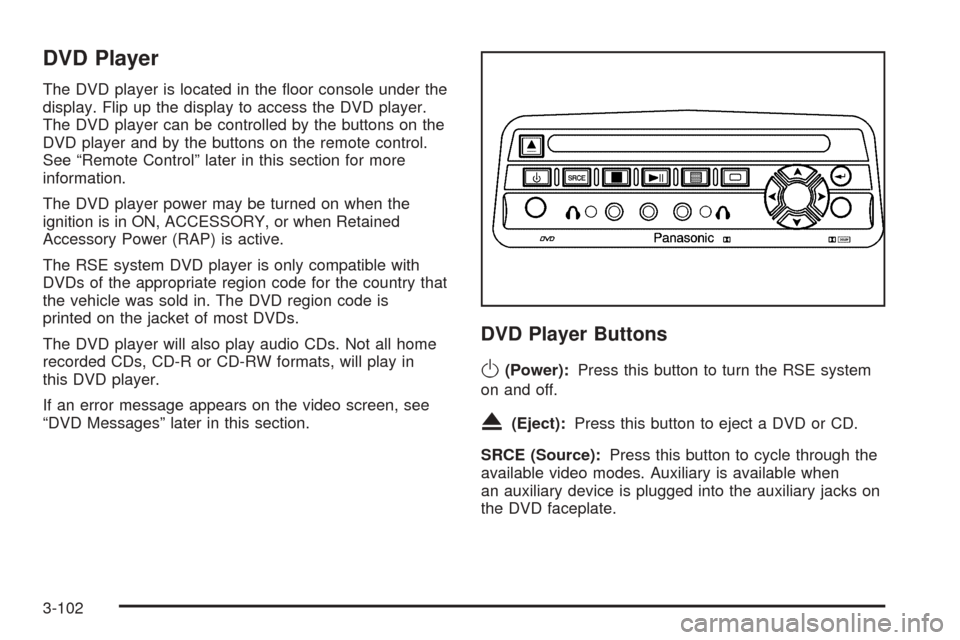
DVD Player
The DVD player is located in the oor console under the
display. Flip up the display to access the DVD player.
The DVD player can be controlled by the buttons on the
DVD player and by the buttons on the remote control.
See “Remote Control” later in this section for more
information.
The DVD player power may be turned on when the
ignition is in ON, ACCESSORY, or when Retained
Accessory Power (RAP) is active.
The RSE system DVD player is only compatible with
DVDs of the appropriate region code for the country that
the vehicle was sold in. The DVD region code is
printed on the jacket of most DVDs.
The DVD player will also play audio CDs. Not all home
recorded CDs, CD-R or CD-RW formats, will play in
this DVD player.
If an error message appears on the video screen, see
“DVD Messages” later in this section.
DVD Player Buttons
O(Power):Press this button to turn the RSE system
on and off.
X(Eject):Press this button to eject a DVD or CD.
SRCE (Source):Press this button to cycle through the
available video modes. Auxiliary is available when
an auxiliary device is plugged into the auxiliary jacks on
the DVD faceplate.
3-102
Page 228 of 442
Battery Replacement
To change the batteries, do the following:
1. Remove the battery compartment door located on
the bottom of the remote control.
2. Replace the two AA batteries in the compartment.
Make sure that they are installed correctly, using
the diagram on the inside of the battery
compartment.
3. Close the battery door securely.
If the remote control is to be stored for a long period of
time, remove the batteries and keep them in a cool,
dry place.
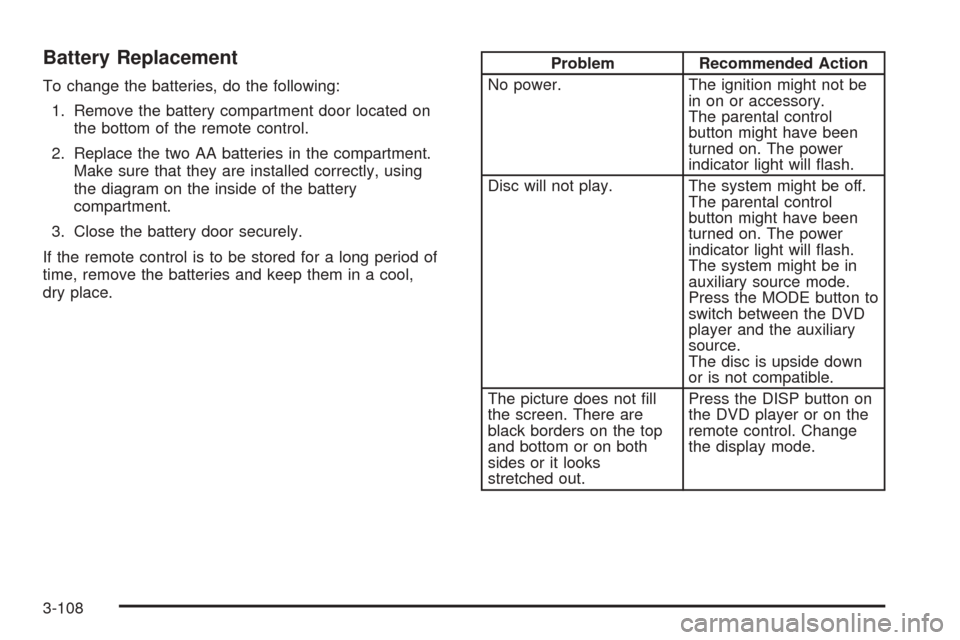
Problem Recommended Action
No power. The ignition might not be
in on or accessory.
The parental control
button might have been
turned on. The power
indicator light will ash.
Disc will not play. The system might be off.
The parental control
button might have been
turned on. The power
indicator light will ash.
The system might be in
auxiliary source mode.
Press the MODE button to
switch between the DVD
player and the auxiliary
source.
The disc is upside down
or is not compatible.
The picture does not ll
the screen. There are
black borders on the top
and bottom or on both
sides or it looks
stretched out.Press the DISP button on
the DVD player or on the
remote control. Change
the display mode.
3-108
Page 241 of 442
Anti-Lock Brake System (ABS)
Your vehicle has anti-lock brakes. ABS is an advanced
electronic braking system that will help prevent a
braking skid.
When you start your engine and begin to drive away,
your anti-lock brake system will check itself. You
may hear a momentary motor or clicking noise while
this test is going on. This is normal.
If there is a problem with
the anti-lock brake system,
this warning light will
stay on. SeeAnti-Lock
Brake System Warning
Light on page 3-39.
Along with ABS, your vehicle has a Dynamic Rear
Proportioning (DRP) system. If there is a DRP problem,
both the brake and ABS warning lights will come on
accompanied by a 10-second chime. The lights
and chime will come on each time the ignition is turned
on until the problem is repaired. See your dealer for
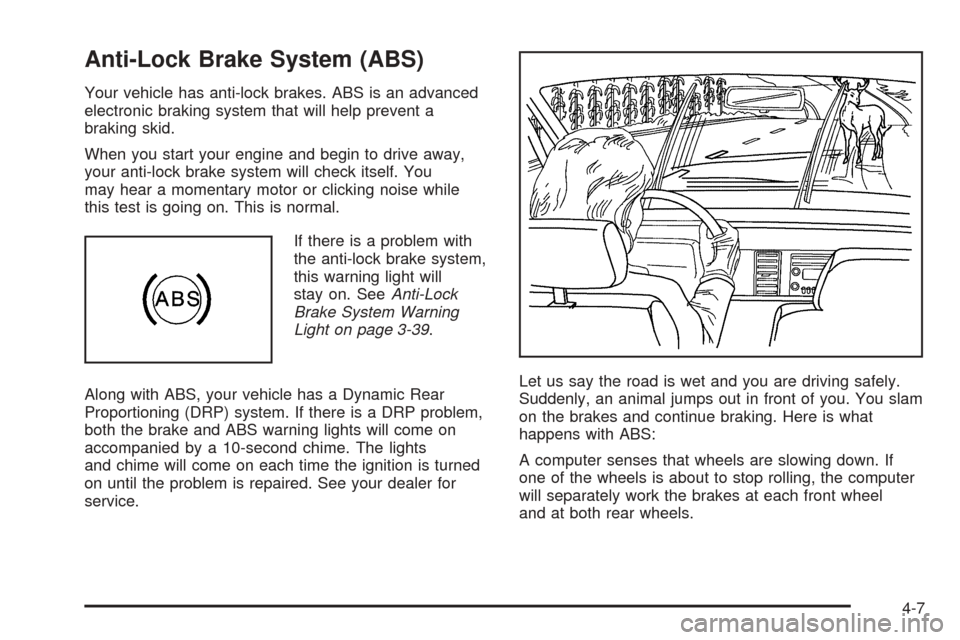
service.Let us say the road is wet and you are driving safely.
Suddenly, an animal jumps out in front of you. You slam
on the brakes and continue braking. Here is what
happens with ABS:
A computer senses that wheels are slowing down. If
one of the wheels is about to stop rolling, the computer
will separately work the brakes at each front wheel
and at both rear wheels.
4-7
Page 263 of 442

Driving in Water
Heavy rain can mean ash ooding, and ood waters
demand extreme caution.
Find out how deep the water is before you drive through
it. If it is deep enough to cover your wheel hubs,
axles or exhaust pipe, do not try it — you probably will
not get through. Also, water that deep can damage
your axle and other vehicle parts.
If the water is not too deep, drive slowly through it. At
faster speeds, water splashes on your ignition
system and your vehicle can stall. Stalling can also
occur if you get your tailpipe under water. And, as long
as your tailpipe is under water, you will never be
able to start your engine. When you go through water,
remember that when your brakes get wet, it may
take you longer to stop.{CAUTION:
Driving through rushing water can be
dangerous. Deep water can sweep your vehicle
downstream and you and your passengers
could drown. If it is only shallow water, it can
still wash away the ground from under your
tires, and you could lose traction and roll the
vehicle over. Do not drive through rushing
water.
SeeDriving in Rain and on Wet Roads on page 4-32for
more information on driving through water.
4-29
Page 272 of 442
If you drive regularly in steep country, or if you are
planning to visit there, here are some tips that can make
your trips safer and more enjoyable. SeeOperating
Your All-Wheel-Drive Vehicle Off Paved Roads on
page 4-17for information about driving off-road.
Keep your vehicle in good shape. Check all uid
levels and also the brakes, tires, cooling system,
and transmission. These parts can work hard
on mountain roads.
Know how to go down hills. The most important
thing to know is this: let your engine do some of
the slowing down. Shift to a lower gear when you go
down a steep or long hill.
{CAUTION:
If you do not shift down, your brakes could get
so hot that they would not work well. You
would then have poor braking or even none
going down a hill. You could crash. Shift down
to let your engine assist your brakes on a
steep downhill slope.
{CAUTION:
Coasting downhill in NEUTRAL (N) or with the
ignition off is dangerous.Your brakes will have
to do all the work of slowing down. They could
get so hot that they would not work well. You
would then have poor braking or even none
going down a hill. You could crash. Always
have your engine running and your vehicle in
gear when you go downhill.
Know how to go uphill. You may want to shift down to
a lower gear. The lower gears help cool your engine
and transmission, and you can climb the hill better.
Stay in your own lane when driving on two-lane
roads in hills or mountains. Do not swing wide or cut
across the center of the road. Drive at speeds that let
you stay in your own lane.
As you go over the top of a hill, be alert. There could
be something in your lane, like a stalled car or an
accident.
You may see highway signs on mountains that warn
of special problems. Examples are long grades,
passing or no-passing zones, a falling rocks area, or
winding roads. Be alert to these and take appropriate
action.
4-38
Page 335 of 442
Notice:If the other vehicle’s system is not a 12-volt
system with a negative ground, both vehicles can
be damaged. Only use vehicles with 12-volt systems
with negative grounds to jump start your vehicle.
2. Get the vehicles close enough so the jumper cables
can reach, but be sure the vehicles are not touching
each other. If they are, it could cause a ground
connection you do not want. You would not be able
to start your vehicle and the bad grounding could
damage the electrical systems.
To avoid the possibility of the vehicles rolling, set
the parking brake rmly on both vehicles involved in
the jump start procedure. Put an automatic
transmission in PARK (P) or a manual transmission
in NEUTRAL before setting the parking brake.
Notice:If you leave your radio or other accessories
on during the jump starting procedure, they could
be damaged. The repairs would not be covered
by your warranty. Always turn off your radio and
other accessories when jump starting your vehicle.
3. Turn off the ignition on both vehicles. Unplug
unnecessary accessories plugged into the cigarette
lighter or the accessory power outlets. Turn off
the radio and all lamps that are not needed. This
will avoid sparks and help save both batteries. And
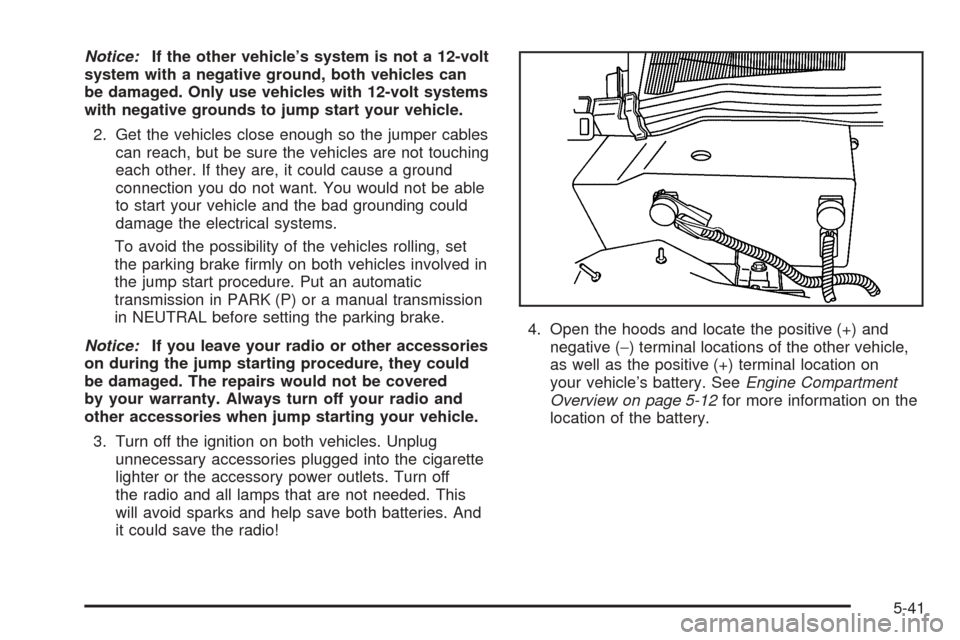
it could save the radio!4. Open the hoods and locate the positive (+) and
negative (−) terminal locations of the other vehicle,
as well as the positive (+) terminal location on
your vehicle’s battery. SeeEngine Compartment
Overview on page 5-12for more information on the
location of the battery.
5-41