remote control CADILLAC SRX 2005 1.G Owners Manual
[x] Cancel search | Manufacturer: CADILLAC, Model Year: 2005, Model line: SRX, Model: CADILLAC SRX 2005 1.GPages: 442, PDF Size: 2.52 MB
Page 67 of 442
Keys...............................................................2-3
Remote Keyless Entry System.........................2-5
Remote Keyless Entry System Operation...........2-6
Doors and Locks.............................................2-8
Central Door Unlocking System........................2-9
Power Door Locks..........................................2-9
Delayed Locking.............................................2-9
Programmable Automatic Door Locks..............2-10
Rear Door Security Locks..............................2-10
Lockout Protection........................................2-11
Liftgate........................................................2-12
Windows........................................................2-13
Power Windows............................................2-14
Sun Visors...................................................2-16
Theft-Deterrent Systems..................................2-17
Theft-Deterrent System..................................2-17
Immobilizer..................................................2-18
Immobilizer Operation....................................2-19
Starting and Operating Your Vehicle................2-20
New Vehicle Break-In....................................2-20
Ignition Positions..........................................2-21
Retained Accessory Power (RAP)...................2-22Starting the Engine.......................................2-23
Adjustable Throttle and Brake Pedal................2-23
Engine Coolant Heater..................................2-24
Automatic Transmission Operation...................2-25
All-Wheel Drive............................................2-28
Parking Brake..............................................2-28
Shifting Into Park (P).....................................2-30
Shifting Out of Park (P).................................2-32
Parking Over Things That Burn.......................2-33
Engine Exhaust............................................2-33
Running the Engine While Parked...................2-34
Mirrors...........................................................2-35
Automatic Dimming Rearview Mirror
with OnStar
®............................................2-35
Automatic Dimming Rearview Mirror
with OnStar
®and Compass........................2-35
Outside Power Heated Mirrors........................2-38
Outside Automatic Dimming Mirror..................2-39
Outside Curb View Assist Mirror.....................2-39
Outside Convex Mirror...................................2-39
OnStar
®System.............................................2-40
HomeLink®Wireless Control System...............2-42
HomeLink®Wireless Control System
Operation.................................................2-43
Section 2 Features and Controls
2-1
Page 78 of 442

Liftgate
To unlock the liftgate from the outside, turn the key in the
driver’s door cylinder counterclockwise or use the remote
keyless entry transmitter. To lock the liftgate using the
key, turn the key clockwise in the driver’s door.
Open the liftgate using the handle located below the
license plate. Once slightly opened, the liftgate will rise
by itself.{CAUTION:
It can be dangerous to drive with the liftgate
open because carbon monoxide (CO) gas can
come into your vehicle. You can not see or
smell CO. It can cause unconsciousness and
even death. If you must drive with the liftgate
open or if electrical wiring or other cable
connections must pass through the seal
between the body and the liftgate:
Make sure all other windows are shut.
Turn the fan on your heating or cooling
system to its highest speed and select the
control setting that will force outside air
into your vehicle. SeeDual Climate Control
System on page 3-25.
If you have air outlets on or under the
instrument panel, open them all the way.
SeeEngine Exhaust on page 2-33.
To close the liftgate, pull down on the handle, then
rmly shut the liftgate. Don’t drive with the liftgate open,
even slightly. SeeEngine Exhaust on page 2-33.
2-12
Page 120 of 442
The vehicle must be in PARK (P) to recall the stored
driving positions.
Press one of the numbered memory buttons to recall
the stored setting. Each time a memory button is
pressed, a single beep will sound.
Three chimes will sound and the setting will not be
recalled if you press button 1 or 2 when the vehicle is
not in PARK (P).
If you would like the stored driving positions to be
recalled when unlocking your vehicle with the remote
keyless entry transmitter or when you place the
key in the ignition, seeDIC Vehicle Personalization on
page 3-66.
To stop recall movement of the memory feature at any
time, press one of the power seat or mirror controls.
Two personalized exit positions can also be
programmed. Use the following steps to program exit
positions:
1. Press memory seat button 1 or the button with the
unlock symbol on the remote keyless entry
transmitter with the number 1 on the back to recall
the driving position.
2. Adjust the driver’s seat to the desired exit position.3. Press and hold the exit button located above
buttons 1 and 2 on the driver’s door armrest
for at least three seconds.
Two beeps will sound to conrm that the exit
position has been saved.
4. Repeat the procedure for a second driver using
memory seat button 2 or the remote keyless
entry transmitter with the number 2 on the back.
To recall the stored exit positions, press and release the
exit button. One beep will sound, and the seat will
move to the previously stored exit position for the
currently identied driver. If an exit position has not
been stored for this driver, the seat will move all the way
back. The position of the outside mirrors is not stored
or recalled for the exit position.
The vehicle must be in PARK (P) to recall the exit
positions.
Three chimes will sound and the exit setting will not be
recalled if you press the exit button when the vehicle
is not in PARK (P).
If you would like your stored exit position to be recalled
when unlocking the vehicle with the remote keyless
entry transmitter or when the ignition is turned off and
the driver’s door is opened, seeDIC Vehicle
Personalization on page 3-66.
2-54
Page 139 of 442
Exterior Lighting Battery Saver
If the parking lamps or headlamps have been left on,
the exterior lamps will turn off about 10 minutes after the
ignition is turned to OFF. This protects against draining
the battery in case you have accidentally left the
headlamps or parking lamps on. The battery saver does
not work if the headlamps are turned on after the
ignition is turned to OFF.
If you need to leave the lamps on for more than
10 minutes, use the exterior lamp control to turn the
lamps back on.
Instrument Panel Brightness
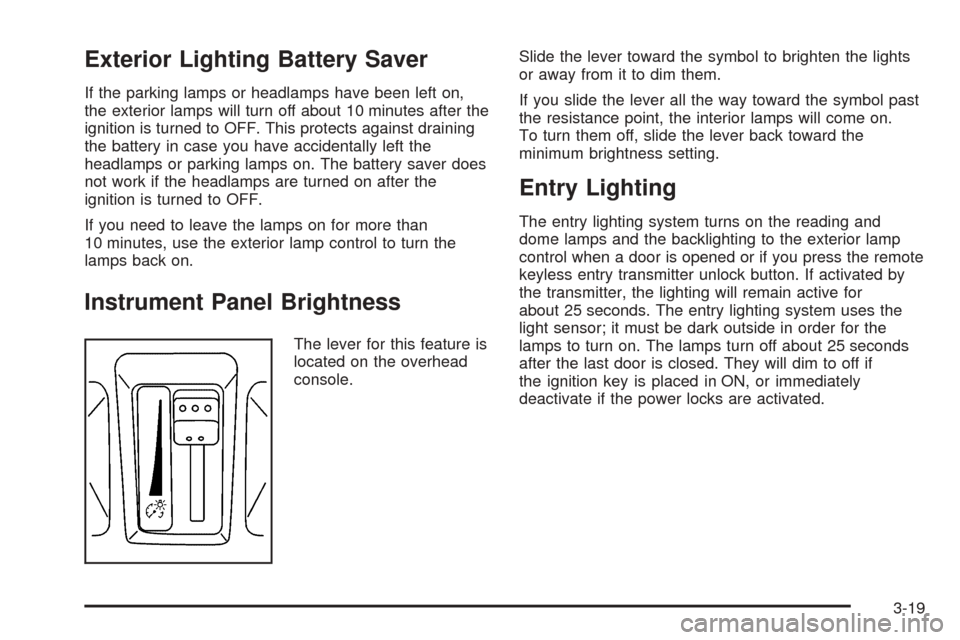
The lever for this feature is
located on the overhead
console.Slide the lever toward the symbol to brighten the lights
or away from it to dim them.
If you slide the lever all the way toward the symbol past
the resistance point, the interior lamps will come on.
To turn them off, slide the lever back toward the
minimum brightness setting.
Entry Lighting
The entry lighting system turns on the reading and
dome lamps and the backlighting to the exterior lamp
control when a door is opened or if you press the remote
keyless entry transmitter unlock button. If activated by
the transmitter, the lighting will remain active for
about 25 seconds. The entry lighting system uses the
light sensor; it must be dark outside in order for the
lamps to turn on. The lamps turn off about 25 seconds
after the last door is closed. They will dim to off if
the ignition key is placed in ON, or immediately
deactivate if the power locks are activated.
3-19
Page 186 of 442

DIC Vehicle Personalization
Your vehicle is equipped with personalization that allows
you to program certain features to a preferred setting
for up to two people. The number of programmable
features varies depending upon which model of
the vehicle is purchased.
On all vehicles, features such as climate control
settings, radio preset settings, exterior lighting at unlock,
remote lock and unlock conrmation, and automatic
door locks have already been programmed for
your convenience.
Some vehicles are equipped with additional features
that can be programmed including the seat and outside
rearview mirror position.
If your vehicle is equipped with the ability to program
additional personalization features, the driver’s
preferences are recalled by pressing the unlock button
on the remote keyless entry transmitter, 1 or 2, or
by pressing the appropriate memory button, 1 or 2,
located on the driver’s door. Certain features can
be programmed not to recall until the key is placed in
the ignition. To change feature preferences, see
“Entering the Personalization Menu” following.
Entering the Personalization Menu
To enter the feature programming mode, use the
following procedure:
1. Turn the ignition to ON, but do not start the engine.
Make sure the vehicle is in PARK (P).
2. If your vehicle has memory settings, press the
appropriate memory button, 1 or 2, located on
the driver’s door armrest. The DIC display will show
either Driver 1 or 2 depending on which button
was selected.
3. Press the TUNE/SEL knob once to access the main
menu of the DIC.
4. Turn the TUNE/SEL knob until SETUP is highlighted.
5. Press the TUNE/SEL knob once to access the
SETUP menu.
6. Scroll to the feature you want to change, and press
the TUNE/SEL knob to turn the feature on or off.
If the feature is turned on, a check mark will appear
next to the feature name.
If none of the personalization items are turned on,
turn on the personalization menu by pressing the
TUNE/SEL knob. The list of features will then appear,
and you can repeat Step 6.
3-66
Page 188 of 442
Remote Recall Memory
If your vehicle has the optional memory package, you
will have this feature. When this feature is turned on, you
can recall any previously programmed seat, adjustable
pedals and mirror controls when the unlock button
on the remote keyless entry transmitter is pressed.
Programmable Modes
Mode 1:ON
Mode 2:OFF
Before your vehicle was shipped from the factory, it was
programmed to Mode 2. The mode to which the
vehicle was programmed may have been changed since
it left the factory.
To program the vehicle to a different mode, the following
procedure:
1. Enter the personalization portion of the SETUP
menu following the instructions listed previously.
2. Scroll to REMOTE RECALL MEMORY to
highlight it.
3. Press the TUNE/SEL knob to switch back and forth
between on and off.
When the mode is turned on, a check mark will
appear next to the feature name.The mode you selected is now set. You can either exit
the programming mode by following the instructions
later in this section or program the next feature available
on your vehicle.
Remote Exit Recall
If your vehicle has the optional memory package, you
will have this feature. When this feature is turned on, you
can recall any previously programmed exit position for
the driver’s seat when the unlock button on the
remote keyless entry transmitter is pressed.
Programmable Modes
Mode 1:ON
Mode 2:OFF
Before your vehicle was shipped from the factory, it was
programmed to Mode 2. The mode to which the
vehicle was programmed may have been changed since
it left the factory.
3-68
Page 218 of 442

7. Press the TUNE/SEL knob to select the congurable
key to change.
8. Turn the TUNE/SEL knob to nd the feature that
you would like to store to the key.
9. Press the TUNE/SEL knob when you have found
the feature to be stored. The display will update,
by showing the symbol of the feature that you
selected next to the congurable key.
10. Repeat the previous steps for each congurable key.
Once a feature is programmed to a key, the feature will
not appear on the display when programming the
remaining congurable keys. The congurable keys can
be changed at any time.
Navigation/Radio System
Your vehicle may have a navigation radio system that
includes Radio Data System (RDS) with Program Type
(PTY) selections that will seek out the kind of music you
want to listen to and XM™ Satellite Radio Service
capabilities (if equipped). The radio can also
communicate with the navigation system to broadcast
announcements on traffic, weather, and emergency alert
communications. For information on how to use this
system, see the “Navigation System” manual.
Rear Seat Entertainment System
Your vehicle may have the DVD Rear Seat
Entertainment (RSE) system. The RSE system includes
a DVD player, a video display screen, two sets of
wireless headphones, and a remote control.
RSE is available in a base and an uplevel version. The
uplevel version is provided with the navigation radio
(if equipped). The uplevel RSE system offers the rear
seat passengers to have shared control of FM1,
FM2, AM, weather, CDC, and XM™ Satellite Radio
Service (if equipped).
Before You Drive
The RSE system is for rear seat passengers only. The
driver cannot safely view the video screen while
driving and should not try to do so.
Headphones
The RSE system includes two sets of wireless
headphones.
Each set of headphones has an ON/OFF control.
An indicator light will illuminate on the headphones when
they are on. If the light does not illuminate, the batteries
may need to be replaced. See “Battery Replacement”
later in this section for more information. To turn the
headphones OFF activate the ON/OFF control.
3-98
Page 219 of 442
Each set of headphones has a volume knob. To adjust
the volume, adjust this knob.
The transmitters are located below the video display
screen. The headphones will shut off to save battery
power if they lose the signal from the system after about
four minutes. The signal may be lost if the system is
turned off or if the headphones are out of range of the
signal transmitters.
Notice:Do not store the headphones in heat or
direct sunlight. This could damage the headphones
and repairs would not be covered by your warranty.
Keep the headphones stored in a cool, dry place.
Battery Replacement
To change the batteries, do the following:
1. Loosen the screw on the battery compartment door
located on the left side of the headphone earpiece.
2. Replace the two AAA batteries in the compartment.
Make sure that they are installed correctly, using
the diagram on the inside of the battery
compartment.
3. Tighten the screws to close the compartment door.
If the headphones are to be stored for a long period
of time, remove the batteries and keep them in a cool,
dry place.
Stereo RCA Jacks
The RCA jacks are located on the front of the DVD player
faceplate. These jacks allow audio and video signals to
be connected from an auxiliary device such as a
camcorder or a video game unit to the RSE system. The
L jack is for left audio input, the R jack is for right audio
input, and the V jack is used for video input. The system
requires standard RCA cables, not included, to connect
the auxiliary device to the RCA jacks. Refer to the
manufacturer’s instructions for proper usage.
To use the auxiliary audio and video inputs, connect an
external auxiliary device such as a camcorder to the RCA
jacks and turn on both the auxiliary device power and the
power on the front of the RSE player. To have use of
these jacks, select AUX using the MODE button on the
DVD player faceplate or the remote control.
3-99
Page 220 of 442
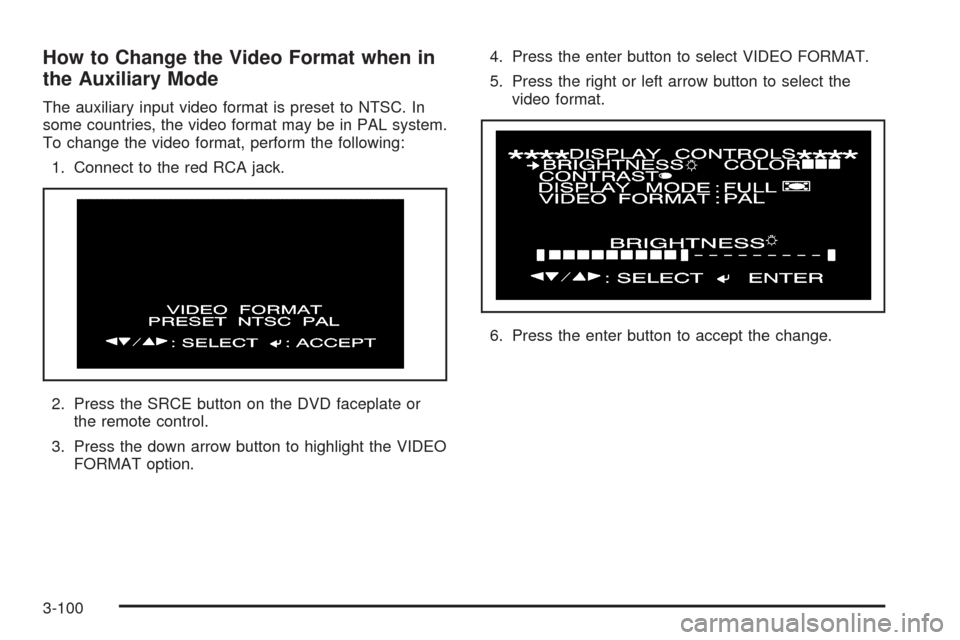
How to Change the Video Format when in
the Auxiliary Mode
The auxiliary input video format is preset to NTSC. In
some countries, the video format may be in PAL system.
To change the video format, perform the following:
1. Connect to the red RCA jack.
2. Press the SRCE button on the DVD faceplate or
the remote control.
3. Press the down arrow button to highlight the VIDEO
FORMAT option.4. Press the enter button to select VIDEO FORMAT.
5. Press the right or left arrow button to select the
video format.
6. Press the enter button to accept the change.
3-100
Page 221 of 442
Audio Output
Audio from the DVD player or auxiliary inputs may be
heard through the following possible sources:
Wireless Headphones
Vehicle Speakers
Wired Headphones (not included)
The RSE system will always transmit the audio signal
by infrared to the wireless headphones, if there is audio
available. See “Headphones” previously for more
information.
The RSE system is capable of outputting audio to the
vehicle speakers by using the radio. The RSE
system may be selected as an audio source on the
radio if the RSE system power is on. Once the
RSE system is selected as an audio source on the
radio, adjust the speaker volume on the radio, if
necessary. If the RSE system power is not on, the RSE
system will not be an available source on the radio.
Refer to the radio information for the radio that
your vehicle has for more information.
Video Screen
The video screen is located in the oor console. Lift up
the screen by the top or the sides into the full open
position. Adjust the screen’s position as desired. When
the video screen is not in use, close the screen.
The DVD player and display will continue to operate
when the screen is in the up or the down position. The
video screen contains the transmitters for the wireless
headphones and the remote control. If the screen is in the
closed position, the signals will not be available for the
operation of the headphones and the remote control.
Notice:Directly touching the video screen may
damage it. Do not touch the screen. See “Cleaning
the Video Screen” later in this section for more
information.
3-101