fuel CADILLAC SRX 2007 1.G User Guide
[x] Cancel search | Manufacturer: CADILLAC, Model Year: 2007, Model line: SRX, Model: CADILLAC SRX 2007 1.GPages: 522, PDF Size: 2.71 MB
Page 214 of 522

All of the following situations are normal and do
not indicate that anything is wrong with the
fuel gage:
At the gas station the gas pump shuts off
before the gage reads full.
The gage may change when you turn, stop
quickly or accelerate quickly.
It takes a little more or less fuel to ll the tank
than the gage indicated. For example, the gage
may have indicated that the tank was half full,
but it actually took a little more or less than half
the tank’s capacity to ll the tank.
Driver Information Center (DIC)
The Driver Information Center (DIC) gives you the
status of many of your vehicle’s systems. The DIC
is also used to display warning/status messages.
All messages will appear in the DIC display located
at the bottom of the instrument panel cluster, below
the tachometer and speedometer. The DIC buttons
are located on the instrument panel, to the left of
the steering wheel.
The DIC comes on when the ignition is on. After a
short delay, the DIC will display the information
that was last displayed before the engine was
turned off.
The top line of the DIC display shows the vehicle
system information and the warning/status
messages. The bottom line of the DIC display
shows the odometer on the left side, the outside
air temperature on the right side, and the shift
position indicator in the center. For more
information on the shift position indicator, see
Automatic Transmission Operation on page 122.
214
Page 215 of 522
When the sport mode is active, an S will appear
next to the shift position indicator on the center of
the DIC display. When the manual mode is
active, an M will appear on the DIC display. When
the normal mode is active, only the shift position
indicator will appear. While the Driver Shift Control
(DSC) feature is active, the DIC will change to
show the selected gear. See″Driver Shift Control
(DSC)″underAutomatic Transmission Operation
on page 122for more information.
If a problem is detected, a warning message will
appear on the display. Be sure to take any
message that appears on the display seriously
and remember that clearing the message will only
make the message disappear, not correct the
problem.DIC Controls and Displays
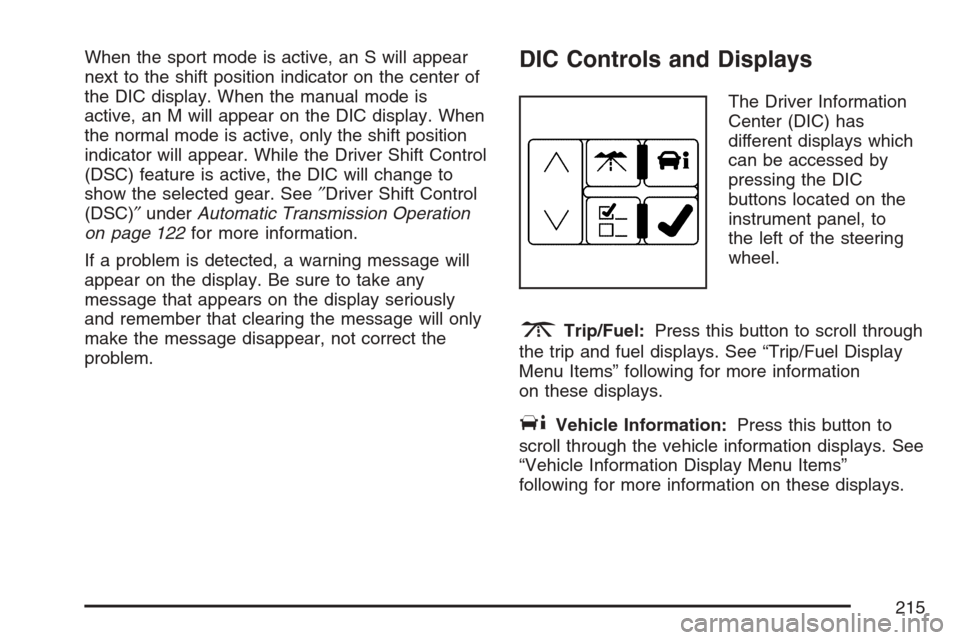
The Driver Information
Center (DIC) has
different displays which
can be accessed by
pressing the DIC
buttons located on the
instrument panel, to
the left of the steering
wheel.
3Trip/Fuel:Press this button to scroll through
the trip and fuel displays. See “Trip/Fuel Display
Menu Items” following for more information
on these displays.
TVehicle Information:Press this button to
scroll through the vehicle information displays. See
“Vehicle Information Display Menu Items”
following for more information on these displays.
215
Page 216 of 522

UCustomization:Press this button to scroll
through each of the customization features. See
DIC Vehicle Customization on page 231for
more information on the customization features.
VSet/Reset:Press this button to reset
certain DIC features and to acknowledge DIC
warning messages and clear them from the DIC
display.
yzMenu Up/Down:Press this button to scroll
up and down the menu items.
Trip/Fuel Display Menu Items
3
(Trip/Fuel):The following display menu
items can be displayed by pressing the trip/fuel
button:
TRIP A or TRIP B
These displays show the current distance traveled
since the last reset for each trip odometer in
either miles (mi) or kilometers (km). Both
odometers can be used at the same time. Each
trip odometer can be reset to zero separately
by pressing and holding the set/reset button for a
few seconds while the desired trip odometer is
displayed.
FUEL RANGE
This display shows the approximate number of
remaining miles (mi) or kilometers (km) you
can drive without relling your fuel tank. This
estimate is based on the current driving conditions
and will change if the driving conditions change.
For example, if you are driving in traffic and
making frequent stops, the display may read one
number, but if you enter the freeway, the
number may change even though you still have
the same amount of fuel in the fuel tank. This
is because different driving conditions produce
different fuel economies. Generally, freeway
driving produces better fuel economy than city
driving.
Once the range drops below about 30 miles
(48 km) remaining, the display will show FUEL
RANGE LOW.
If your vehicle is low on fuel, the FUEL LEVEL
LOW message will be displayed. See “FUEL
LEVEL LOW” underDIC Warnings and Messages
on page 220for more information.
216
Page 217 of 522
AVERAGE ECONOMY (AFE)
This display shows the approximate average
miles per gallon (mpg) or liters per
100 kilometers (L/100 km). This number is
calculated based on the number of mpg (L/100 km)
recorded since the last time this display was
reset. To reset this display, press the set/reset
button. The display will return to zero.
INST (Instantaneous) ECONOMY (IFE)
This display shows the current fuel economy in
either miles per gallon (mpg) or liters per
100 kilometers (L/100 km). This number reects
only the fuel economy that the vehicle has
right now and will change frequently as driving
conditions change. Unlike average economy, this
display cannot be reset.
FUEL USED
This display shows the number of gallons (gal) or
liters (L) of fuel used since the last reset of this
display. To reset this display, press the set/reset
button. The display will return to zero.
TIMER ON/OFF
This display can be used like a stopwatch. You
can record the time it takes to travel from one point
to another. To access the timer, press the
trip/fuel button until 00:00:00 TIMER OFF displays.
To turn on the timer, press the set/reset button
until TIMER ON displays. The timer will then start.
To turn off the timer, press the set/reset button
again until TIMER OFF displays. The timer
will stop and display the end timing value.
To reset the timer, press and hold the set/reset
button after the timer has been stopped. The
display will return to zero.
AVERAGE SPEED
This display shows the average speed of the
vehicle in either miles per hour (mph) or kilometers
per hour (km/h). This average is calculated
based on the various vehicle speeds recorded
since the last reset of this display. To reset
this display, press the set/reset button. The display
will return to zero.
217
Page 221 of 522

AUTOMATIC LIGHT CONTROL OFF
This message displays when the automatic
headlamps are turned off.
AUTOMATIC LIGHT CONTROL ON
This message displays when the automatic
headlamps are turned on.
BATTERY SAVER ACTIVE
This message displays when the system detects
that the battery voltage is dropping below expected
levels. The battery saver system starts reducing
certain features of the vehicle that you may be able
to notice. At the point that the features are disabled,
this message is displayed. It means that the vehicle
is trying to save the charge in the battery.
Turn off all unnecessary accessories to allow the
battery to recharge.
The normal battery voltage range is
11.5 to 15.5 volts. You can monitor battery voltage
on the Driver Information Center (DIC) by
pressing the trip/fuel button until BATTERY
VOLTAGE is displayed.
CHANGE ENGINE OIL SOON
When this message displays, it means that service
is required for your vehicle. See your dealer.
SeeEngine Oil on page 360andScheduled
Maintenance on page 471for more information.
When you reset the CHANGE ENGINE OIL SOON
message by clearing it from the display, you still
must reset the engine oil life system separately.
For more information on resetting the engine oil life
system, seeEngine Oil Life System on page 363.
CHECK TIRE PRESSURE
If your vehicle has a Tire Pressure Monitor (TPM)
system, this message displays when the tire
pressure in one of the tires needs to be checked.
This message also displays LEFT FRONT,
RIGHT FRONT, LEFT REAR, or RIGHT REAR to
indicate which tire needs to be checked. You
can receive more than one tire pressure message
at a time. To read the other messages that
may have been sent at the same time, press the
set/reset button. If a tire pressure message
appears on the DIC, stop as soon as you can.
Have the tire pressures checked and set to those
shown on the Tire Loading Information label.
221
Page 223 of 522
This message displays when the engine coolant
temperature is too hot. Stop and allow the vehicle
to idle until it cools down. SeeEngine Coolant
Temperature Warning Light on page 206.
SeeOverheated Engine Protection Operating
Mode on page 374for information on driving to a
safe place in an emergency.
ENGINE POWER REDUCED
This message displays when the engine power is
being reduced to protect the engine from damage.
There could be several malfunctions that might
cause this message. Reduced engine power can
affect the vehicle’s ability to accelerate. If this
message is on, but there is no reduction in
performance, proceed to your destination. The
performance may be reduced the next time the
vehicle is driven. The vehicle may be driven at a
reduced speed while this message is on, but
acceleration and speed may be reduced. Anytime
this message stays on, the vehicle should be taken
to your dealer for service as soon as possible.
FUEL LEVEL LOW
This symbol appears
with this message.
This message displays when your vehicle is low
on fuel. Rell the fuel tank as soon as possible. A
single chime sounds when this message is
displayed. SeeFilling the Tank on page 352.
ICE POSSIBLE DRIVE WITH CARE
This message displays when the outside
temperature is cold enough to create icy road
conditions. Adjust your driving accordingly.
LEFT REAR DOOR OPEN
This message displays when the driver’s side rear
door is not closed completely. Make sure that
the door is closed completely.
223
Page 230 of 522
TIGHTEN GAS CAP
This message displays when the fuel cap has not
been fully tightened. Recheck the fuel cap to
ensure that it is on and tightened properly.
TIRE LEARNING ACTIVE
If your vehicle has a Tire Pressure Monitor (TPM)
system, this message displays when the system
is re-learning the tire positions on your vehicle.
SeeTire Pressure Monitor System on page 410.
The tire positions must be re-learned after rotating
the tires or after replacing a tire or sensor. See
Tire Inspection and Rotation on page 414
andInation - Tire Pressure on page 407for more
information.
TRACTION CONTROL OFF
This message displays when the Traction Control
System (TCS) is turned off. Adjust your driving
accordingly. SeeTraction Control System
(TCS) on page 281for more information.
TRACTION CONTROL ON
This message displays when the Traction Control
System (TCS) is turned on. SeeTraction
Control System (TCS) on page 281for more
information.
TRANSMISSION HOT IDLE ENGINE
This message displays when the transmission uid
in your vehicle is too hot. Stop the vehicle and
allow it to idle until the transmission cools down or
until this message is removed.
TURN SIGNAL ON
This message displays as a reminder to turn off
the turn signal if you drive your vehicle for
more than about 1 mile (1.6 km) with a turn signal
on. A multiple chime sounds when this message
is displayed.
230
Page 240 of 522
Exiting the Feature Settings Menu
The feature settings menu will be exited when any
of the following occurs:
The vehicle is shifted out of PARK (P).
The ignition is no longer in ON.
The trip/fuel or vehicle information DIC buttons
are pressed.
The end of the feature settings menu is
reached.
A 40 second time period has elapsed with no
selection made.
Audio System(s)
Determine which radio your vehicle has and then
read the pages following to familiarize yourself
with its features.
Driving without distraction is a necessity for a
safer driving experience. SeeDefensive Driving on
page 274. By taking a few moments to read this
manual and get familiar with your vehicle’s
audio system, you can use it with less effort, as
well as take advantage of its features. While your
vehicle is parked, set up your audio system by
presetting your favorite radio stations, setting the
tone and adjusting the speakers. Then, when
driving conditions permit, you can tune to
your favorite stations using the presets and
steering wheel controls if the vehicle has them.
240
Page 291 of 522

Off-Road Driving
This off-road guide is for vehicles that have
all-wheel drive. If your vehicle does not have
all-wheel drive, you should not drive off-road unless
you are on a level, solid surface.
Many of the same design features that help make
your vehicle responsive on paved roads during
poor weather conditions — features like all-wheel
drive — help make it much better suited for
off-road use. Its higher ground clearance also
helps your vehicle step over some off-road
obstacles. But your vehicle does not have features
like special underbody shielding and a transfer
case low gear range, things that are usually
thought necessary for extended or severe off-road
service.
Also, seeBraking on page 278.
The airbag system is designed to work properly
under a wide range of conditions, including off-road
usage. Observe safe driving speeds, especially
on rough terrain. As always, wear your safety belt.
Off-road driving can be great fun. But it does
have some denite hazards. The greatest of these
is the terrain itself.“Off-roading” means you have left the North
American road system behind. Traffic lanes are
not marked. Curves are not banked. There are no
road signs. Surfaces can be slippery, rough,
uphill, or downhill. In short, you have gone right
back to nature.
Off-road driving involves some new skills. And that
is why it is very important that you read this
guide. You will nd many driving tips and
suggestions. These will help make your off-road
driving safer and more enjoyable.
Before You Go Off-Roading
There are some things to do before you go out.
For example, be sure to have all necessary
maintenance and service work done. Check to
make sure all underbody shields, if the vehicle has
them, are properly attached. Is there enough
fuel? Is the spare tire fully inated? Are the uid
levels up where they should be? What are
the local laws that apply to off-roading where you
will be driving? If you do not know, you should
check with law enforcement people in the
area. Will you be on someone’s private land? If
so, be sure to get the necessary permission.
291
Page 306 of 522

After Off-Road Driving
Remove any brush or debris that has collected on
the underbody, chassis, or under the hood.
These accumulations can be a re hazard.
After operation in mud or sand, have the brake
linings cleaned and checked. These substances
can cause glazing and uneven braking. Check the
body structure, steering, suspension, wheels,
tires, and exhaust system for damage. Also, check
the fuel lines and cooling system for any leakage.
Your vehicle will require more frequent service
due to off-road use. Refer to the Maintenance
Schedule for additional information.
Driving at Night
Night driving is more dangerous than day driving.
One reason is that some drivers are likely to
be impaired — by alcohol or drugs, with night
vision problems, or by fatigue.
Here are some tips on night driving.
Drive defensively.
Do not drink and drive.
Adjust the inside rearview mirror to reduce the
glare from headlamps behind you.
Since you cannot see as well, you may need
to slow down and keep more space between
you and other vehicles.
Slow down, especially on higher speed roads.
Your vehicle’s headlamps can light up only so
much road ahead.
In remote areas, watch for animals.
If you are tired, pull off the road in a safe
place and rest.
306