light CADILLAC SRX 2009 1.G User Guide
[x] Cancel search | Manufacturer: CADILLAC, Model Year: 2009, Model line: SRX, Model: CADILLAC SRX 2009 1.GPages: 442, PDF Size: 2.42 MB
Page 78 of 442
Restraint System Check
Checking the Restraint Systems
Safety Belts
Now and then, check the safety belt reminder light,
safety belts, buckles, latch plates, retractors, and
anchorages are all working properly.
Look for any other loose or damaged safety belt system
parts that might keep a safety belt system from doing
its job. See your dealer/retailer to have it repaired.
Torn or frayed safety belts may not protect you
in a crash. They can rip apart under impact forces.
If a belt is torn or frayed, get a new one right away.
Make sure the safety belt reminder light is working.
SeeSafety Belt Reminders on page 3-31for more
information.
Keep safety belts clean and dry. SeeCare of Safety
Belts on page 5-92.
Airbags
The airbag system does not need regularly scheduled
maintenance or replacement. Make sure the airbag
readiness light is working. SeeAirbag Readiness Light
on page 3-32for more information.
Notice:If an airbag covering is damaged, opened,
or broken, the airbag may not work properly.
Do not open or break the airbag coverings. If there
are any opened or broken airbag covers, have
the airbag covering and/or airbag module replaced.
For the location of the airbag modules, seeWhat
Makes an Airbag Inflate? on page 1-63. See your
dealer/retailer for service.
1-72
Page 79 of 442
Replacing Restraint System Parts
After a Crash
{CAUTION:
A crash can damage the restraint systems in your
vehicle. A damaged restraint system may not
properly protect the person using it, resulting in
serious injury or even death in a crash. To help
make sure your restraint systems are working
properly after a crash, have them inspected and
any necessary replacements made as soon as
possible.If the vehicle has been in a crash, do you need new
safety belts or LATCH system (if equipped) parts?
After a very minor crash, nothing may be necessary.
But the safety belt assemblies that were used during any
crash may have been stressed or damaged. See your
dealer/retailer to have the safety belt assemblies
inspected or replaced.
If the vehicle has the LATCH system and it was
being used during a crash, you may need new LATCH
system parts.
New parts and repairs may be necessary even if the
safety belt or LATCH system (if equipped), was not
being used at the time of the crash.
If an airbag inates, you will need to replace airbag
system parts. See the part on the airbag system earlier
in this section.
Have the safety belt pretensioners checked if the
vehicle has been in a crash, if the airbag readiness light
stays on after the vehicle is started, or while you are
driving. SeeAirbag Readiness Light on page 3-32.
1-73
Page 87 of 442
Remote Vehicle Start
The remote vehicle starting feature allows you to start
the engine from outside of the vehicle. It also starts up
the vehicle’s automatic climate control system. When the
remote start system is active, the climate control system
will heat and cool the inside of the vehicle according to
the previous settings of the system before turning the
vehicle off. The rear window defogger will be turned on
by the climate control system when it is cold outside.
If the vehicle has heated seats, they will also turn on.
SeeHeated Seats on page 1-4for additional information.
Normal operation of the climate control system will return
after the key is turned to ON/RUN. SeeDual Climate
Control System on page 3-22.
Laws in some communities may restrict the use of
remote starters. For example, some laws may require
a person using remote start to have the vehicle in
view when doing so. Check local regulations for any
requirements on remote starting of vehicles.
Do not use the remote start feature if your vehicle is low
on fuel. Your vehicle may run out of fuel.
If the vehicle has the remote start feature, the RKE
transmitter functions will have an increased range
of operation. However, the range may be less while
the vehicle is running.There are other conditions which can affect the
performance of the transmitter, seeRemote Keyless
Entry (RKE) System Operation on page 2-4for
additional information.
/(Remote Start):This button will be on the RKE
transmitter if you have remote start.
To start the vehicle using the remote start feature:
1. Aim the transmitter at the vehicle.
2. Press and release the transmitter’s lock button, then
immediately press and hold the transmitter’s remote
start button until the turn signal lights ash or if the
vehicle’s lights are not visible, press and hold the
remote start button for at least four seconds. The
vehicle’s doors will lock. Pressing the remote start
button again after the vehicle has started will turn off
the vehicle.
When the vehicle starts, the parking lamps will turn
on and remain on while the vehicle is running.
3. If it is the rst remote start since the vehicle has
been driven, repeat these steps, while the engine is
still running, to extend the engine running time by
10 minutes. Remote start can be extended one time.
After entering the vehicle during a remote start, insert
and turn the key to ON/RUN to drive the vehicle.
If the vehicle is left running it will automatically shut off
after 10 minutes unless a time extension has been done.
2-7
Page 93 of 442
If the transmission is shifted out of P (Park) while the
power function is in progress, the liftgate power function
will continue to completion. If the transmission is shifted
out of P (Park) and accelerate before the power liftgate
latches closed, the liftgate may reverse to the open
position. Cargo could fall out of the vehicle. Always
make sure the power liftgate is closed and latched
before you drive away.
If you power open the liftgate and the liftgate support
struts have lost pressure, the lights will ash and a
chime will sound. The liftgate will hold open temporarily,
then slowly close. See your dealer for service before
using the liftgate.
Obstacle Detection Features
The vehicle has an obstacle detection sensor located
on the rear edge of the rear quarter panel windows.
If an object is caught between the liftgate and the
window and presses against this sensor, the liftgate
will reverse direction and open fully. The liftgate
will remain open until it is activated again or closed
manually.If the liftgate encounters an obstacle during a power
open or close cycle, a warning chime will sound and the
liftgate will automatically reverse direction to the fully
closed or open position. After removing the obstruction,
the liftgate may be power opened or closed normally.
If the liftgate encounters multiple obstacles on the
same power cycle, the power function will deactivate,
and the liftgate will switch to manual operation. The
REAR ACCESS OPEN warning message in the Driver
Information Center (DIC) will indicate that the liftgate is
open. After removing the obstructions, manually open the
liftgate to the fully open position or close the liftgate to the
fully closed and latched position. The liftgate will now
resume normal power operation.
2-13
Page 98 of 442
Express Window Anti-Pinch Override
{CAUTION:
If express override is activated, the window will
not reverse automatically. You or others could be
injured and the window could be damaged. Before
you use express override, make sure that all people
and obstructions are clear of the window path.
In an emergency, the anti-pinch feature can be
overridden in a supervised mode. Pull the window
switch all the way up to the second position. The window
will rise for as long as the switch is held. Once the
switch is released, the express mode is re-activated.
In this mode, the window can still close on an object in
its path. Use care when using the override mode.
Window Lockout
o
(Window Lockout):The rear window lockout
button is located on the driver door armrest near the
window switches.
Press the right side of the button to disable the rear
window controls. The light on the button will illuminate,
indicating the feature is in use. The rear windows
still can be raised or lowered using the driver window
switches when the lockout feature is active.
To restore power to the rear windows, press the button
again. The light on the button will go out.
Sun Visors
Swing down the primary visor to block out glare. It can
also be detached from the center mount and moved
to the side to block glare from that direction.
The driver sunshade may also have buttons for a
built-in garage door opener. SeeUniversal Home
Remote System on page 2-47for more information.
Lighted Visor Vanity Mirror
Pull the visor down and lift the cover. The light will
automatically come on. The light will go out when the
cover is closed.
2-18
Page 99 of 442
Theft-Deterrent Systems
Vehicle theft is big business, especially in some cities.
This vehicle has theft-deterrent features, however,
they do not make it impossible to steal.
Theft-Deterrent System
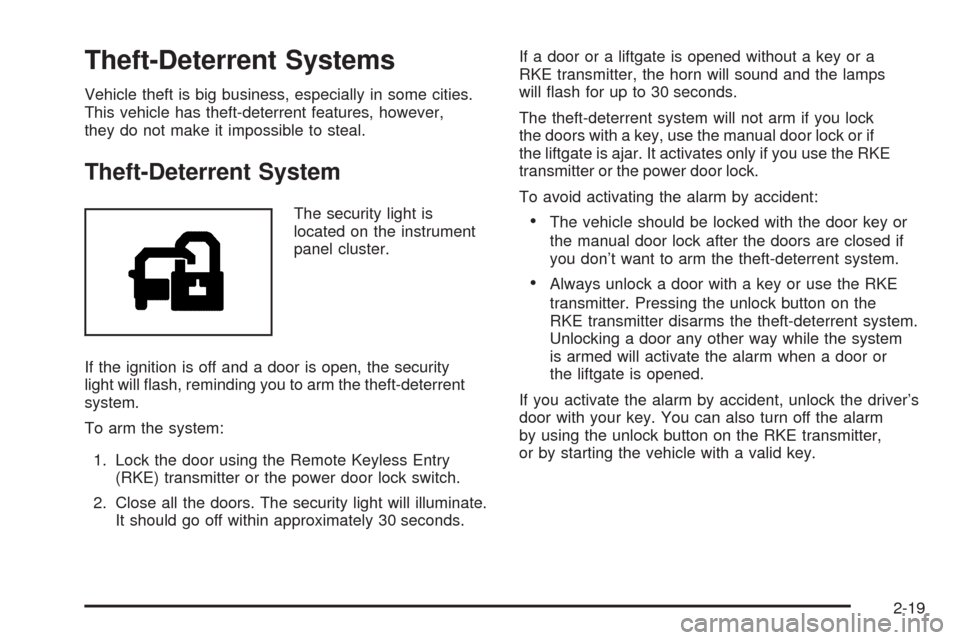
The security light is
located on the instrument
panel cluster.
If the ignition is off and a door is open, the security
light will ash, reminding you to arm the theft-deterrent
system.
To arm the system:
1. Lock the door using the Remote Keyless Entry
(RKE) transmitter or the power door lock switch.
2. Close all the doors. The security light will illuminate.
It should go off within approximately 30 seconds.If a door or a liftgate is opened without a key or a
RKE transmitter, the horn will sound and the lamps
will ash for up to 30 seconds.
The theft-deterrent system will not arm if you lock
the doors with a key, use the manual door lock or if
the liftgate is ajar. It activates only if you use the RKE
transmitter or the power door lock.
To avoid activating the alarm by accident:The vehicle should be locked with the door key or
the manual door lock after the doors are closed if
you don’t want to arm the theft-deterrent system.
Always unlock a door with a key or use the RKE
transmitter. Pressing the unlock button on the
RKE transmitter disarms the theft-deterrent system.
Unlocking a door any other way while the system
is armed will activate the alarm when a door or
the liftgate is opened.
If you activate the alarm by accident, unlock the driver’s
door with your key. You can also turn off the alarm
by using the unlock button on the RKE transmitter,
or by starting the vehicle with a valid key.
2-19
Page 100 of 442
Testing the Alarm
1. From inside the vehicle, roll down the window, then
get out of the vehicle, keeping the door open.
2. From outside of the vehicle, with the door open,
lock the vehicle using the power door lock switch
or the RKE transmitter and close the door. Wait
approximately 30 seconds until the security
light goes off.
3. Reach in and unlock the door using the manual
lock and open the door. The horn will sound and
the exterior lamps will ash.
You can turn off the alarm by unlocking the driver’s
door with your key, using the unlock button on the RKE
transmitter or by starting the car with a valid key.
If the alarm does not sound when it should, check to
see if the horn works. The horn fuse may be blown.
To replace the fuse, seeFuses and Circuit Breakers
on page 5-99. If the fuse does not need to be replaced,
you may need to have your vehicle serviced.
To reduce the possibility of theft, always arm the
theft-deterrent system when leaving your vehicle.
PASS-Key®III+ Electronic
Immobilizer
The PASS-Key III+ system operates on a radio
frequency subject to Federal Communications
Commission (FCC) Rules and with Industry Canada.
This device complies with Part 15 of the FCC Rules.
Operation is subject to the following two conditions:
1. This device may not cause harmful interference.
2. This device must accept any interference received,
including interference that may cause undesired
operation.
This device complies with RSS-210 of Industry Canada.
Operation is subject to the following two conditions:
1. This device may not cause interference.
2. This device must accept any interference received,
including interference that may cause undesired
operation of the device.
Changes or modications to this system by other than
an authorized service facility could void authorization to
use this equipment.
PASS-Key III+ uses a radio frequency transponder in
the key that matches a decoder in the vehicle.
2-20
Page 101 of 442
PASS-Key®III+ Electronic
Immobilizer Operation
Your vehicle has PASS-Key®III+ (Personalized
Automotive Security System) theft-deterrent system.
PASS-Key
®III+ is a passive theft-deterrent system.
The system is automatically armed when the key
is removed from the ignition.
The system is automatically disarmed when the key
is turned to ON/RUN, ACC/ACCESSORY or START
from the LOCK/OFF position.
You do not have to manually arm or disarm the system.
The security light will come on if there is a problem
with arming or disarming the theft-deterrent system.
When the PASS-Key
®III+ system senses that someone
is using the wrong key, it prevents the vehicle from
starting. Anyone using a trial-and-error method to start
the vehicle will be discouraged because of the high
number of electrical key codes.If the engine does not start and the security light on
the instrument panel cluster comes on when trying to
start the vehicle, there may be a problem with your
theft-deterrent system. Turn the ignition off and try again.
If the engine still does not start, and the key appears
to be undamaged, try another ignition key. At this time,
you may also want to check the fuse, seeFuses
and Circuit Breakers on page 5-99. If the engine still
does not start with the other key, your vehicle needs
service. If your vehicle does start, the rst key may
be faulty. See your dealer/retailer who can service
the PASS-Key
®III+ to have a new key made.
In an emergency, contact Roadside Assistance.
It is possible for the PASS-Key
®III+ decoder to learn
the transponder value of a new or replacement key. Up to
eight additional keys may be programmed for the vehicle.
The following procedure is for programming additional
keys only. If all the currently programmed keys are lost
or do not operate, you must see your dealer/retailer or a
locksmith who can service PASS-Key
®III+ to have keys
made and programmed to the system.
2-21
Page 102 of 442
See your dealer/retailer or a locksmith who can service
PASS-Key®III+ to get a new key blank that is cut
exactly as the ignition key that operates the system.
To program the new additional key:
1. Verify that the new key has a
1stamped on it.
2. Insert the original, already programmed, key in the
ignition and start the engine. If the engine will not
start, see your dealer/retailer for service.
3. After the engine has started, turn the key to
LOCK/OFF, and remove the key.
4. Insert the new key to be programmed and turn it to
ON/RUN within ve seconds of the original key
being turned to LOCK/OFF.
The security light will turn off once the key has
been programmed.
5. Repeat Steps 1 through 4 if additional keys are to
be programmed.
If you lose or damage your PASS-Key
®III+ key, see
your dealer/retailer or a locksmith who can service
PASS-Key
®III+ to have a new key made.
Do not leave the key or device that disarms or
deactivates the theft deterrent system in the vehicle.
Starting and Operating Your
Vehicle
New Vehicle Break-In
Notice:Your vehicle does not need an elaborate
break-in. But it will perform better in the long
run if you follow these guidelines for the rst
500 miles (805 km):
Do not drive at any one constant speed,
fast or slow.
Do not exceed 70 mph (113 km/h).
Do not make full-throttle starts; also refrain
from using the full throttle while driving.
Avoid downshifting to brake or slow the vehicle.
If these procedures are not followed, the engine,
axle, or other parts could be damaged.
Avoid making hard stops for the rst 200 miles
(322 km) or so. During this time the new brake linings
are not yet broken in. Hard stops with new linings
can mean premature wear and earlier replacement.
Follow this break-in guideline every time you get
new linings.
2-22
Page 103 of 442
Do not tow a trailer during break-in. SeeTowing a
Trailer on page 4-39for the trailer towing capabilities
of your vehicle and more information.
Following break-in, engine speed and load can be
gradually increased.
Ignition Positions
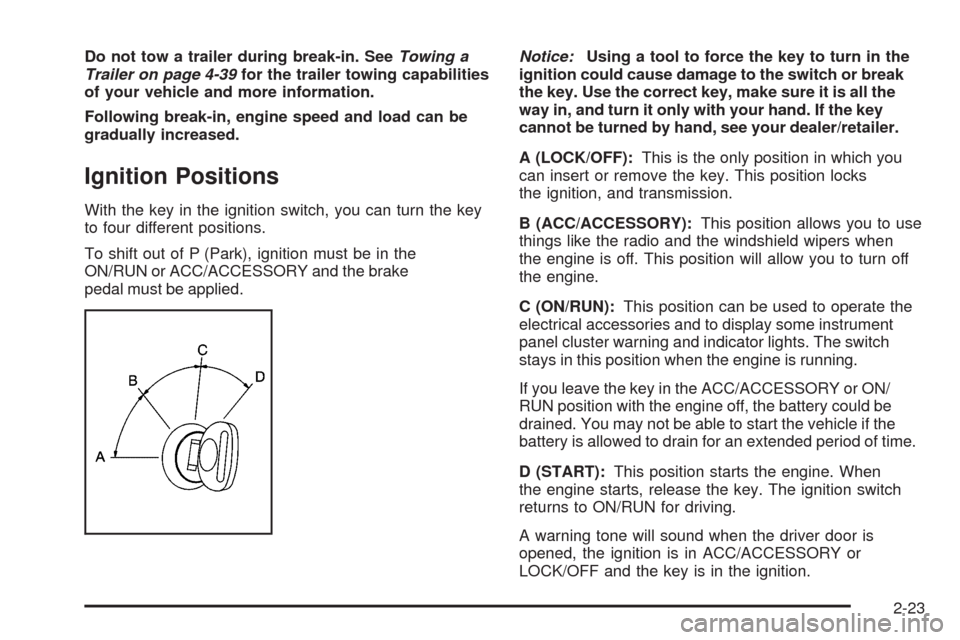
With the key in the ignition switch, you can turn the key
to four different positions.
To shift out of P (Park), ignition must be in the
ON/RUN or ACC/ACCESSORY and the brake
pedal must be applied.Notice:Using a tool to force the key to turn in the
ignition could cause damage to the switch or break
the key. Use the correct key, make sure it is all the
way in, and turn it only with your hand. If the key
cannot be turned by hand, see your dealer/retailer.
A (LOCK/OFF):This is the only position in which you
can insert or remove the key. This position locks
the ignition, and transmission.
B (ACC/ACCESSORY):This position allows you to use
things like the radio and the windshield wipers when
the engine is off. This position will allow you to turn off
the engine.
C (ON/RUN):This position can be used to operate the
electrical accessories and to display some instrument
panel cluster warning and indicator lights. The switch
stays in this position when the engine is running.
If you leave the key in the ACC/ACCESSORY or ON/
RUN position with the engine off, the battery could be
drained. You may not be able to start the vehicle if the
battery is allowed to drain for an extended period of time.
D (START):This position starts the engine. When
the engine starts, release the key. The ignition switch
returns to ON/RUN for driving.
A warning tone will sound when the driver door is
opened, the ignition is in ACC/ACCESSORY or
LOCK/OFF and the key is in the ignition.
2-23