lock CADILLAC SRX 2009 1.G Repair Manual
[x] Cancel search | Manufacturer: CADILLAC, Model Year: 2009, Model line: SRX, Model: CADILLAC SRX 2009 1.GPages: 442, PDF Size: 2.42 MB
Page 207 of 442

Notice:Contact your dealer/retailer before adding
any equipment.
Adding audio or communication equipment could
interfere with the operation of the vehicle’s engine,
radio, or other systems, and could damage them.
Follow federal rules covering mobile radio and
telephone equipment.
The vehicle has Retained Accessory Power (RAP).
With RAP, the audio system can be played even after
the ignition is turned off. SeeRetained Accessory
Power (RAP) on page 2-24for more information.
Setting the Clock
Radio with a Single CD or a Six-Disc
CD Player
Vehicles equipped with a Bose®sound system,
have an analog clock as well as the digital radio clock.
At the time of new vehicle delivery, the digital radio
clock display should be disabled. If you decide to
use the digital radio clock as well as the analog
clock, you can change the setting to enable the
radio clock display.
Enabling/Disabling the Digital
Radio Clock
For the Single CD Player
To turn the radio clock display on or off:
1. Turn the radio on.
2. Press the
Hbutton until the clock and date setting
menus appear.
3. Press the pushbutton located under the forward
arrow label until the menu for default clock and
date settings appear.
4. Press the pushbutton located under the currently
displayed status of either ON or OFF. The ON
display indicates the radio clock display is disabled
and the OFF display indicates the radio clock
display is enabled. Press this pushbutton to toggle
the radio clock display on or off.
If the radio clock display is turned on, the screen
displays Radio Clock ON for 10 seconds, then
returns to the original clock display menu.
If the radio clock display is turned off, the screen
displays Radio Clock OFF for 10 seconds.
The menus for clock and date settings are removed,
and ON displays as a current status indicating
that the clock display can be turned on, if desired.
The radio clock and analog clock are not synchronized.
Occasionally you might need to set the digital radio clock
using the procedure below to synchronize both clocks.
3-69
Page 208 of 442
For a Six-Disc CD Player
To turn the radio clock display on or off:
1. Turn the radio on.
2. Press the MENU button until the
Hlabel option
is displayed.
3. Press the pushbutton located under the
Hlabel
until the clock and date settings appear.
4. Press the pushbutton located under the forward
arrow label until the menu for default clock and
date settings appear.
5. Press the pushbutton located under the currently
displayed status of either ON or OFF. The ON
display indicates the radio clock display is disabled
and the OFF display indicates the radio clock
display is enabled. Press this pushbutton to toggle
the radio clock display on or off.
If the radio clock display is turned on, the screen
displays Radio Clock ON for 10 seconds, then
returns to the original clock display menu.
If the radio clock display is turned off, the screen
displays Radio Clock OFF for 10 seconds.
The menus for clock and date settings are removed,
and ON displays as a current status indicating
that the clock display can be turned on, if desired.
Setting the Time and Date
For the Single CD Player
This type of radio has aHbutton for setting the time
and date. To set the time and date:
1. Turn the radio on.
2. Press the
Hbutton and HR, MIN, MM, DD, YYYY
(hour, minute, month, day, and year) displays.
3. Press the pushbutton located under any one of the
labels that you want to change. Every time the
pushbutton is pressed again, the time or the date if
selected, increases by one.
Another way to increase the time or date,
is to press the right SEEK arrow or the
\FWD button.
To decrease the time or date, press the
left SEEK arrow or the
sREV button.
You can also turn the
aknob, located on the
upper right side of the radio faceplate, to adjust
the selected setting.
3-70
Page 209 of 442

For a Six-Disc CD Player
This type of radio has a MENU button for setting the
time and date. To set the time and date:
1. Turn the radio on.
2. Press the MENU button until the
Hlabel option is
displayed.
3. Press the pushbutton located under the
Hlabel
and the HR, MIN, MM, DD, YYYY (hour, minute,
month, day, and year) displays.
4. Press the pushbutton located under any one of the
labels that you want to change. Every time the
pushbutton is pressed again, the time or the date if
selected, increases by one.
Another way to increase the time or date,
is to press the right SEEK arrow or the
\FWD button.
To decrease the time or date, press the
left SEEK arrow or the
sREV button. You can
also turn the
a(tune) knob, located on the
upper right side of the radio faceplate, to adjust
the selected setting.
Changing the Time and Date
Default Setting
For the Single CD Player
To change the time and date default setting:
1. Change the time default setting from 12 hour
to 24 hour or the date default setting from
month/day/year to day/month/year, by pressing
the
Hbutton.
2. Once the clock and date settings display along with
the forward arrow, press the pushbutton located
under the forward arrow until the time 12H and 24H,
and the date MM/DD/YYYY (month, day, and
year) and DD/MM/YYYY (day, month, and year)
displays.
3. Press the pushbutton located under the desired
option, then press the
Hbutton again to apply
the selected default, or let the screen time out.
3-71
Page 211 of 442

Playing the Radio
O
(Power/Volume):Press to turn the system on
and off.
Turn clockwise or counterclockwise to increase or
decrease the volume.
Speed Compensated Volume (SCV):Radios with
Speed Compensated Volume (SCV) automatically
adjusts radio volume to compensate for road and wind
noise as driving speed changes. That way, the
volume level should sound about the same as you
drive. To activate SCV:
1. Set the radio volume to the desired level.
2. Press the MENU button to display the radio
setup menu.
3. Press the pushbutton under the AUTO VOLUM
(volume) label on the radio display.
4. Press the pushbutton under the desired Speed
Compensated Volume setting (OFF, Low, Med
(medium), or High) to select the level of radio
volume compensation. The display times out after
approximately 10 seconds. Each higher setting
allows for more radio volume compensation at faster
vehicle speeds.
Finding a Station
BAND:Press to switch between AM, FM, or XM™.
The display shows the selection.
a(Tune):Turn to select radio stations.
©SEEK¨:Press the arrows to go to the previous or
to the next station and stay there.
To scan stations, press and hold either arrow for
three seconds until a beep sounds. The radio goes to a
station, plays for a few seconds, then goes to the
next station. Press either arrow again to stop scanning.
The radio only seeks and scan stations with a strong
signal that are in the selected band.
4(Information) (XM Satellite Radio Service,
MP3/WMA, and RDS Features):Press to
simultaneously display the Channel Number, Song Title,
and Artist information while in XM mode. Press to
display additional text information related to the current
FM-RDS, or MP3/WMA song, if available.
When information is not available, No Info displays.
3-73
Page 213 of 442

Setting the Tone
(Bass/Midrange/Treble)
BASS/MID/TREB (Bass, Midrange, or Treble):
To adjust bass, midrange, or treble, press the
aknob
until the tone control labels display. Continue pressing to
highlight the desired label, or press the pushbutton
positioned under the desired label. Turn this knob
clockwise or counterclockwise to adjust the highlighted
setting. The highlighted setting can also be adjusted
by pressing either SEEK arrow,
\FWD, orsREV
button until the desired levels are obtained. If a
station’s frequency is weak, or if there is static, decrease
the treble.
To quickly adjust bass, midrange, or treble to the middle
position, press the
aknob for more than two seconds.
A beep sounds and the level adjusts to the middle
position. Pressing this knob for more than two seconds
also centers the fade and balance settings to the
factory default positions.
Finding a Category (CAT) Station
CAT (Category):The CAT button is used to nd
XM stations when the radio is in the XM mode.
To nd XM channels within a desired category:
1. Press the BAND button until the XM frequency
displays. Press the CAT button to display the
category labels on the radio display. Continue
pressing the CAT button until the desired category
name displays.
2. Press either of the two buttons below the desired
category label to immediately tune to the rst
XM station associated with that category.
3. Turn the
aknob, press the buttons below the right
or left arrows displayed, or press either SEEK arrow
to go to the previous or to the next XM station
within the selected category.
4. To exit the category search mode, press the
FAV button or BAND button to display your
favorites again.
3-75
Page 214 of 442
Undesired XM categories can be removed through the
setup menu. To remove an undesired category:
1. Press the MENU button to display the radio
setup menu.
2. Press the pushbutton located below the XM CAT
label.
3. Turn the
aknob to display the category you want
removed.
4. Press the pushbutton located under the Remove
label until the category name along with the word
Removed displays.
5. Repeat the steps to remove more categories.
Removed categories can be restored by pressing the
pushbutton under the Add label when a removed
category displays or by pressing the pushbutton under
the Restore All label.
The radio does not let you remove or add categories
while the vehicle is moving faster than 5 mph (8 km/h).
The CAT button also toggles between compressed
and uncompressed audio when a mixed disc is present.
See “Compressed Audio” later in this section.
Radio Message
Locked:This message displays when the
THEFTLOCK®system has locked up the radio.
Take the vehicle to your dealer/retailer for service.
If any error occurs repeatedly or if an error cannot be
corrected, contact your dealer/retailer.
XM Satellite Radio Service
XM is a satellite radio service that is based in the
48 contiguous United States and 10 Canadian
provinces. XM Satellite Radio has a wide variety
of programming and commercial-free music,
coast-to-coast, and in digital-quality sound. During your
trial or when you subscribe, you will get unlimited
access to XM Radio Online for when you are not in
the vehicle. A service fee is required to receive the
XM service. For more information, contact XM at
xmradio.com or call 1-800-929-2100 in the U.S. and
xmradio.ca or call 1-877-438-9677 in Canada.
Radio Messages for XM Only
SeeXM Radio Messages on page 3-87later in this
section for further detail.
3-76
Page 216 of 442

a(Tune):Turn to select tracks on the CD currently
playing.
©SEEK¨:Press the left arrow to go to the start of the
current track, if more than ten seconds have played.
Press the right arrow to go to the next track. If either
arrow is held or pressed multiple times, the player
continues moving backward or forward through the CD.
sREV (Fast Reverse):Press and hold to reverse
playback quickly within a track. Sound is heard at
a reduced volume. Release to resume playing the track.
The elapsed time of the track displays.
\FWD (Fast Forward):Press and hold to advance
playback quickly within a track. Sound is heard at a
reduced volume. Release to resume playing the track.
The elapsed time of the track displays.
RDM (Random):With the random setting, CD tracks
can be played in random, rather than sequential
order. This feature is not available in playlist mode.
To use random:
1. To play tracks from the CD you are listening to in
random order, press the pushbutton positioned
under the RDM label. The random icon displays.
2. Press the same pushbutton again to turn off random
play. The random icon disappears from the display.RDM (Random):For the Radio with Six-Disc CD
player, the tracks can be listened to in random, rather
than sequential order, on one CD or all CDs in the
six-disc CD player. To use random:
To play the tracks from the CD you are listening to
in random order, press the pushbutton positioned
under the RDM label until Randomize Current
Disc displays. Press the pushbutton again to turn
off random play.
To play tracks from all CDs loaded in a six-disc CD
player in random order, press the pushbutton
positioned under the RDM label until Randomize All
Discs displays. Press the same pushbutton again
to turn off random play.
4(Information):Press to switch the display between
the track number, elapsed time of the track, and
the time. When the ignition is off, press to display the
time, if the clock display is enabled.
BAND:Press to listen to the radio when a CD is
playing. The CD remains inside the radio for future
listening.
3-78
Page 219 of 442
To use a portable audio player, connect a 3.5 mm
(1/8 inch) cable to the radio’s front auxiliary input jack.
When a device is connected, press the radio CD/AUX
button to begin playing audio from the device over
the vehicle speakers.
O(Power/Volume):Turn clockwise or counterclockwise
to increase or decrease the volume of the portable player.
You might need to do additional volume adjustments
from the portable device if the volume is not loud or soft
enough.
BAND:Press to listen to the radio when a portable
audio device is playing. The portable audio device
continues playing, so you might want to stop it or
power it off.
CD/AUX (CD/Auxiliary):Press to play a CD when a
portable audio device is playing. Press again and
the system begins playing audio from the connected
portable audio player. If a portable audio player is
not connected, No Aux Input Device displays.
Using an MP3
MP3/WMA CD-R or CD-RW Disc
The radio plays MP3 and WMA les that were recorded
on a CD-R or CD-RW disc. The les can be recorded
with the following xed bit rates: 32 kbps, 40 kbps,
56 kbps, 64 kbps, 80 kbps, 96 kbps, 112 kbps,
128 kbps, 160 kbps, 192 kbps, 224 kbps, 256 kbps, and
320 kbps or a variable bit rate. Song title, artist name,
and album can display when les are recorded
using ID3 tags version 1 and 2.
Compressed Audio
The radio also plays discs that contain both
uncompressed CD audio (.CDA les) and MP3/WMA
les. By default the radio reads only the uncompressed
audio and ignores the MP3/WMA les. Pressing the
CAT button toggles between compressed and
uncompressed audio format.
3-81
Page 225 of 442
XM Radio Messages
XL (Explicit Language Channels):These channels, or
any others, can be blocked at a customer’s request,
by calling 1-800-852-XMXM (9696).
XM Updating:The encryption code in the receiver is
being updated, and no action is required. This process
should take no longer than 30 seconds.
No XM Signal:The system is functioning correctly, but
the vehicle is in a location that is blocking the XM™
signal. When the vehicle is moved into an open area,
the signal should return.
Loading XM:The audio system is acquiring and
processing audio and text data. No action is needed.
This message should disappear shortly.
Channel Off Air:This channel is not currently in service.
Tune in to another channel.
Channel Unauth:This channel is blocked or cannot be
received with your XM Subscription package.
Channel Unavail:This previously assigned channel is
no longer assigned. Tune to another station. If this
station was one of the presets, choose another station
for that preset button.
No Artist Info:No artist information is available at this
time on this channel. The system is working properly.No Title Info:No song title information is available at
this time on this channel. The system is working properly.
No CAT Info:No category information is available at this
time on this channel. The system is working properly.
No Information:No text or informational messages are
available at this time on this channel. The system is
working properly.
CAT Not Found:There are no channels available for
the selected category. The system is working properly.
XM Theftlocked:The XM™ receiver in your vehicle
could have previously been in another vehicle. For
security purposes, XM™ receivers cannot be swapped
between vehicles. If this message is received after having
your vehicle serviced, check with your dealer/retailer.
XM Radio ID:If tuned to channel 0, this message
alternates with the XM™ Radio 8 digit radio ID label.
This label is needed to activate the service.
Unknown:If this message is received when tuned to
channel 0, there could be a receiver fault. Consult with
your dealer/retailer.
Check XM Receivr:If this message does not clear
within a short period of time, the receiver could have a
fault. Consult with your dealer/retailer.
XM Not Available:If this message does not clear
within a short period of time, the receiver could have a
fault. Consult with your dealer/retailer.
3-87
Page 228 of 442
PROG (Program):Press this button to go to the next
preset radio station or channel set on the main
radio. This function is inactive, with some radios, if the
front seat passengers are listening to the radio.
When a CD or DVD audio disc is playing, press this
button to go to the beginning of the CD or DVD audio.
This function is inactive, with some radios, if the
front seat passengers are listening to the CD or
DVD audio.
When a disc is playing in the CD or DVD changer,
press this button to select the next disc, if multiple discs
are loaded. This function is inactive, with some radios,
if the front seat passengers are listening to the disc.
When a DVD video menu is being displayed, press the
PROG button to perform the menu function, enter.
Theft-Deterrent Feature
THEFTLOCK®is designed to discourage theft of the
vehicle’s radio by learning a portion of the Vehicle
Identication Number (VIN). The radio does not operate
if it is stolen or moved to a different vehicle.
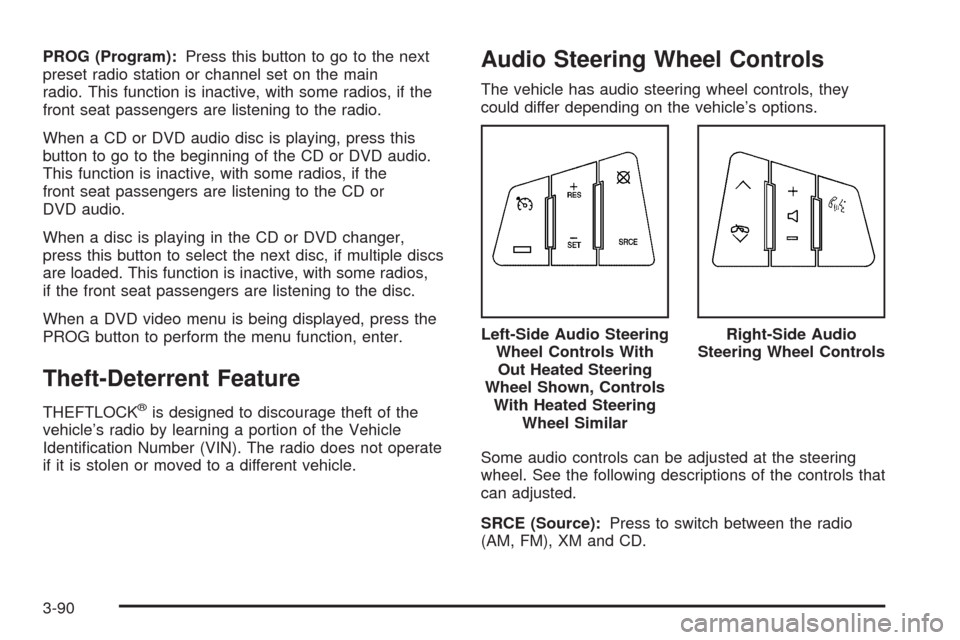
Audio Steering Wheel Controls
The vehicle has audio steering wheel controls, they
could differ depending on the vehicle’s options.
Some audio controls can be adjusted at the steering
wheel. See the following descriptions of the controls that
can adjusted.
SRCE (Source):Press to switch between the radio
(AM, FM), XM and CD.Left-Side Audio Steering
Wheel Controls With
Out Heated Steering
Wheel Shown, Controls
With Heated Steering
Wheel Similar
Right-Side Audio
Steering Wheel Controls
3-90