keyless entry CADILLAC SRX 2011 2.G User Guide
[x] Cancel search | Manufacturer: CADILLAC, Model Year: 2011, Model line: SRX, Model: CADILLAC SRX 2011 2.GPages: 498, PDF Size: 7.62 MB
Page 44 of 498

Black plate (10,1)Cadillac SRX Owner Manual - 2011
2-10 Keys, Doors and Windows
3. Remove the old battery. Do notuse a metal object.
4. Insert the new battery, positive side facing down. Replace with a
CR2032 or equivalent battery.
5. Snap the transmitter back together.
Remote Vehicle Start
If available, this feature allows you
to start the engine from outside the
vehicle.
/(Remote Vehicle Start):
This button will be on the RKE
transmitter if the vehicle has
remote start.
Vehicles with an automatic climate
control system will automatically
change to a heating or cooling mode depending on the outside
temperature during a remote start.
When the ON/RUN/START ignition
mode is selected , the climate
control system will return to its
setting from when the vehicle
was last turned off.
Laws in some local communities
may restrict the use of remote
starters. For example, some laws
may require a person using remote
start to have the vehicle in view.
Check local regulations for any
requirements.
There are other conditions which
can affect the performance of the
transmitter, see
Remote Keyless
Entry (RKE) System on page 2‑3
for additional information. Starting the Engine Using Remote
Start
To start the engine using the remote
start feature:
1. Press
Qon the RKE transmitter.
2. Within two seconds, press and hold
/until the turn signal
lamps flash. This confirms
the request to remote start the
vehicle has been received. If the
vehicle' s lamps are not visible,
press and hold
/for at least
two seconds.
During the remote start the
vehicle's doors will be locked
and the parking lamps will
remain on as long as the engine
is running.
3. Press the brake pedal and select the ON/RUN/START ignition
mode to drive the vehicle.
The engine will shut off after
10 minutes unless a time
extension is done or the ignition
is put in ON/RUN/START.
Page 46 of 498
Black plate (12,1)Cadillac SRX Owner Manual - 2011
2-12 Keys, Doors and Windows
Door Locks
{WARNING
Unlocked doors can be
dangerous.
.Passengers, especially
children, can easily open the
doors and fall out of a moving
vehicle. The chance of being
thrown out of the vehicle in
a crash is increased if the
doors are not locked. So,
all passengers should wear
safety belts properly and
the doors should be locked
whenever the vehicle is
driven.(Continued)
WARNING (Continued)
.Young children who get into
unlocked vehicles may be
unable to get out. A child can
be overcome by extreme heat
and can suffer permanent
injuries or even death from
heat stroke. Always lock the
vehicle whenever leaving it.
.Outsiders can easily enter
through an unlocked door
when slowing or stopping
the vehicle. Lock the doors
to help prevent this from
happening.
To lock or unlock a door, use the
Remote Keyless Entry (RKE)
transmitter from the outside.
From inside the vehicle with the
doors locked, pull once on the door
handle to unlock it, and a second
time to open it.
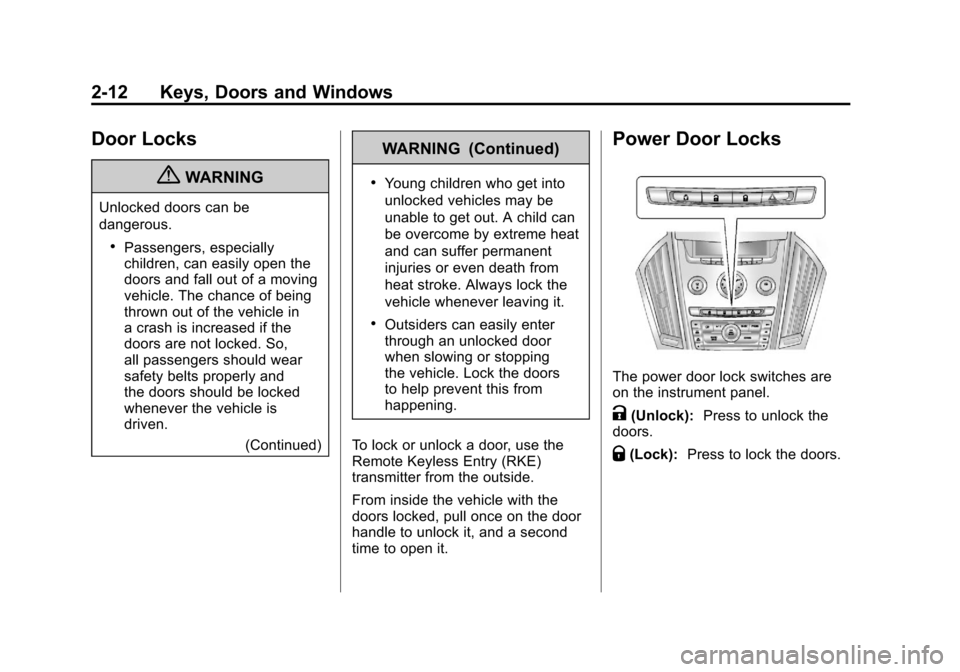
Power Door Locks
The power door lock switches are
on the instrument panel.
K(Unlock): Press to unlock the
doors.
Q(Lock): Press to lock the doors.
Page 50 of 498
Black plate (16,1)Cadillac SRX Owner Manual - 2011
2-16 Keys, Doors and Windows
use the power feature.
The taillamps flash when the
power liftgate moves.
{WARNING
You or others could be injured if
caught in the path of the power
liftgate. Make sure there is no one
in the way of the liftgate as it is
opening and closing.
Notice: If you open the liftgate
without checking for overhead
obstructions such as a garage
door, you could damage the
liftgate or the liftgate glass.
Always check to make sure
the area above and behind the
liftgate is clear before opening it. Choose the power liftgate mode
by turning the dial on the switch
until the indicator lines up with
the desired position.
The three modes are:
MAX :
The liftgate opens to the full
open height.
3/4 : The liftgate opens to a
reduced open height that can be set
by the vehicle operator in a range
of approximately 3/4 open to full
open. Use this setting to prevent the
liftgate from opening into overhead
obstructions such as a garage door
or roof mounted cargo during power
operation. The liftgate can still be
opened fully manually.
OFF: The liftgate only operates
manually in this position.
Manual operation of a liftgate that
also has power operation requires
more effort than with a standard
manual liftgate. In either the MAX or the 3/4 mode,
the liftgate can be power opened
and closed by:
.Pressing&on the Remote
Keyless Entry (RKE) transmitter
until the liftgate starts moving.
See Remote Keyless Entry
(RKE) System Operation on
page 2‑4.
.Pressing&on the center of
the mode switch on the driver
door, with the driver door
unlocked.
.Pressing the touchpad switch on
the liftgate outside handle, with
all doors unlocked, to open the
liftgate.
Page 55 of 498
Black plate (21,1)Cadillac SRX Owner Manual - 2011
Keys, Doors and Windows 2-21
The system has one or more
keyless entry transmitters that are
matched to an immobilizer control
unit in your vehicle. Only a correctly
matched keyless entry transmitter
will start the vehicle. If the keyless
entry transmitter is ever damaged,
you may not be able to start your
vehicle.
When trying to start the vehicle, the
security light comes on briefly when
the ignition is turned on.
If the engine does not start and
the security light stays on there is a
problem with the system. Turn the
ignition off and try again.
If the vehicle will not change
ignition modes (ACC/ACCESSORY,
ON/RUN/START, OFF), and the
keyless entry transmitter appears to
be undamaged, try another keyless
entry transmitter. Or, you may
try placing the transmitter in the
transmitter pocket located in the
center console. See“No Remote
Detected” underKey and Lock
Messages on page 5‑36. If the ignition modes will not
change with the other transmitter,
your vehicle needs service. If the
ignition does change modes, the
first transmitter may be faulty.
See your dealer who can service
the theft-deterrent system and have
a new keyless entry transmitter
programmed to the vehicle.
It is possible for the immobilizer
system to learn new or replacement
keyless entry transmitters. Up to
eight keyless entry transmitters
can be programmed for the vehicle.
To program additional transmitters,
see
“Programming Transmitters
to the Vehicle” Remote Keyless
Entry (RKE) System Operation on
page 2‑4.
Do not leave the key or device that
disarms or deactivates the theft
deterrent system in the vehicle.Exterior Mirrors
Convex Mirrors
{WARNING
A convex mirror can make things,
like other vehicles, look farther
away than they really are. If you
cut too sharply into the right lane,
you could hit a vehicle on the
right. Check the inside mirror or
glance over your shoulder before
changing lanes.
The passenger side mirror is convex
shaped. A convex mirror's surface is
curved so more can be seen from
the driver seat.
Page 69 of 498
Black plate (5,1)Cadillac SRX Owner Manual - 2011
Seats and Restraints 3-5
To adjust the lumbar support, see
Lumbar Adjustment on page 3‑7.
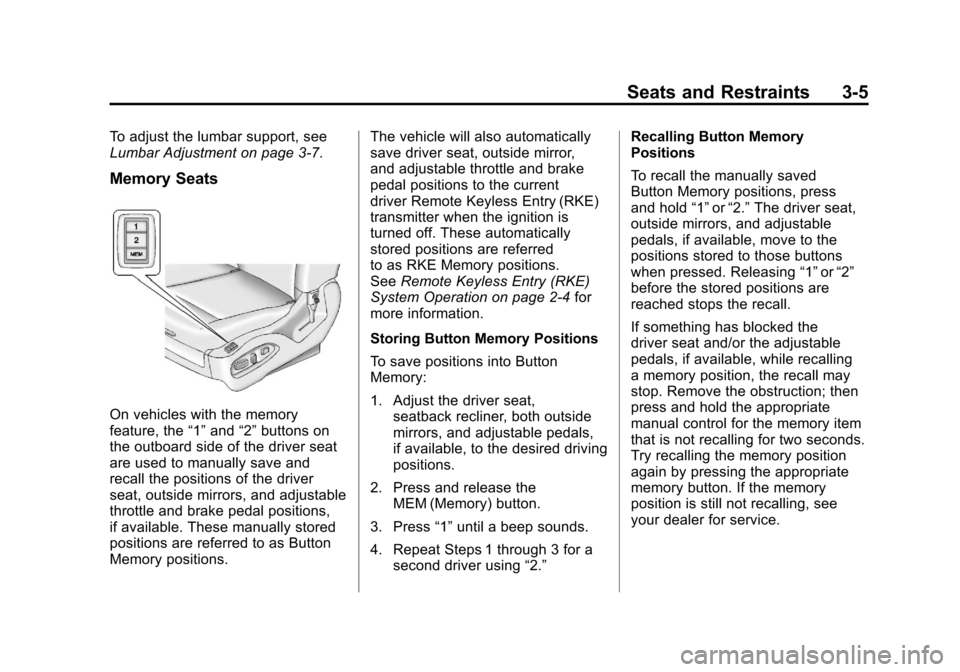
Memory Seats
On vehicles with the memory
feature, the“1”and “2”buttons on
the outboard side of the driver seat
are used to manually save and
recall the positions of the driver
seat, outside mirrors, and adjustable
throttle and brake pedal positions,
if available. These manually stored
positions are referred to as Button
Memory positions. The vehicle will also automatically
save driver seat, outside mirror,
and adjustable throttle and brake
pedal positions to the current
driver Remote Keyless Entry (RKE)
transmitter when the ignition is
turned off. These automatically
stored positions are referred
to as RKE Memory positions.
See
Remote Keyless Entry (RKE)
System Operation on page 2‑4 for
more information.
Storing Button Memory Positions
To save positions into Button
Memory:
1. Adjust the driver seat, seatback recliner, both outside
mirrors, and adjustable pedals,
if available, to the desired driving
positions.
2. Press and release the MEM (Memory) button.
3. Press “1”until a beep sounds.
4. Repeat Steps 1 through 3 for a second driver using “2.”Recalling Button Memory
Positions
To recall the manually saved
Button Memory positions, press
and hold
“1”or“2.” The driver seat,
outside mirrors, and adjustable
pedals, if available, move to the
positions stored to those buttons
when pressed. Releasing “1”or“2”
before the stored positions are
reached stops the recall.
If something has blocked the
driver seat and/or the adjustable
pedals, if available, while recalling
a memory position, the recall may
stop. Remove the obstruction; then
press and hold the appropriate
manual control for the memory item
that is not recalling for two seconds.
Try recalling the memory position
again by pressing the appropriate
memory button. If the memory
position is still not recalling, see
your dealer for service.
Page 182 of 498
Black plate (36,1)Cadillac SRX Owner Manual - 2011
5-36 Instruments and Controls
Engine Power Messages
ENGINE POWER IS REDUCED
This message displays when the
vehicle's engine power is reduced.
Reduced engine power can affect
the vehicle's ability to accelerate.
If this message is on, but there
is no reduction in performance,
proceed to your destination.
The performance may be reduced
the next time the vehicle is driven.
The vehicle may be driven at a
reduced speed while this message
is on, but maximum acceleration
and speed may be reduced.
Anytime this message stays on,
the vehicle should be taken to
your dealer for service as soon
as possible.
Fuel System Messages
FUEL LEVEL LOW
This message displays when the
vehicle is low on fuel. Refuel as
soon as possible
TIGHTEN GAS CAP
This message displays when the
fuel cap is not on tight. Tighten the
fuel cap.
Key and Lock Messages
NO REMOTE DETECTED
This message displays when trying
to start the vehicle if the keyless
access system does not detect a
RKE transmitter. The transmitter
battery may be weak. See“Starting
the Vehicle with a Low Transmitter
Battery” underRemote Keyless
Entry (RKE) System Operation on
page 2‑4.
NO REMOTE PRESS BRAKE
TO RESTART
This message is displayed if the
remote is no longer detected in the
vehicle. Press the brake pedal to
restart the vehicle.
NUMBER OF KEYS
PROGRAMMED
This message displays when
programming new keys to the
vehicle.
REMOTE LEFT IN VEHICLE
This message displays when
leaving the vehicle with the RKE
transmitter still inside.
REPLACE BATTERY IN
REMOTE KEY
This message displays when the
battery in the RKE transmitter needs
to be replaced.
Page 203 of 498
Black plate (7,1)Cadillac SRX Owner Manual - 2011
Lighting 6-7
Reading Lamps
There are reading lamps located on
the overhead console and over the
rear passenger doors. These lamps
come on automatically when any
door is opened.
To manually turn the reading lamps
on or off:
For the overhead console reading
lamps, press the button next to
each lamp.
For the rear passenger reading
lamps, press the lamp lens.
Lighting Features
Entry Lighting
The headlamps, taillamps, license
plate lamps, reverse lamps, dome
lamps, and most of the interior lights
turn on briefly, when the Remote
Keyless Entry (RKE)
Kis pressed,
or when the door handle is pulled.
See Ignition Positions on page 9‑18.
After about 30 seconds the exterior
lamps turn off, and then the dome
and remaining interior lights will dim
to off. Entry lighting can be disabled
manually by changing the ignition
out of the OFF position, or by
pressing the Remote Keyless
Entry (RKE)
Qbutton.
This feature can be changed.
See Vehicle Personalization on
page 5‑40.
Exit Lighting
The headlamps, taillamps, parking
lamps, reverse lamps, and license
plate lamps come on at night, or in
areas with limited lighting, when a
door is opened after the ignition is
turned off. The dome lamps also
come on when a door is opened
after the ignition is turned to off.
See Ignition Positions on page 9‑18.
The exterior lights and dome lamps
remain on after the door is closed
for a set amount of time, then
automatically turn off.
The exterior lights turn off
immediately by turning the exterior
lamps control to OFF.
This feature can be changed.
See Vehicle Personalization on
page 5‑40.
Page 294 of 498
Black plate (18,1)Cadillac SRX Owner Manual - 2011
9-18 Driving and Operating
Adjust the throttle and brake pedals
while the vehicle is in P (Park)
without pressing on the pedals.
The pedals cannot be adjusted
while the vehicle is in R (Reverse)
or when cruise control is engaged.
The throttle and brake pedals can
also be adjusted while driving.
Ignition Positions
The vehicle has an electronic
keyless ignition with push‐button
start.Pressing the button cycles it through
three modes, ACC/ACCESSORY,
ON/RUN/START and STOPPING
THE ENGINE/OFF.
If the push-button start is not
working, the vehicle may be near a
strong radio antenna signal causing
interference to the keyless entry
system. See
Driver Information
Center (DIC) on page 5‑28 for
more information.
To shift out of P (Park), the vehicle
must be in ACC/ACCESSORY or
ON/RUN mode and the brake pedal
must be applied.
STOPPING THE ENGINE/OFF
(No LED Lights): When the
vehicle is stopped, press the engine
START/STOP button once to turn
the engine off. If the vehicle is in P (Park), the
ignition will turn OFF, and Retained
Accessory Power (RAP) will remain
active. See
Retained Accessory
Power (RAP) on page 9‑22 for
more information.
If the vehicle is not in P (Park),
the ignition will return to ACC/
ACCESSORY and display the
message SHIFT TO PARK in the
Driver Information Center (DIC).
See Driver Information Center (DIC)
on page 5‑28 for more information.
When the vehicle is shifted into
P (Park), the ignition system will
switch to OFF.
Do not turn the engine off when the
vehicle is moving. This will cause
a loss of power assist in the brake
and steering systems and disable
the airbags.
Page 296 of 498
Black plate (20,1)Cadillac SRX Owner Manual - 2011
9-20 Driving and Operating
To start the vehicle:
Starting Procedure
1. With the brake pedal applied,press the START button located
on the instrument panel. See
Ignition Positions on page 9‑18.
2. When the engine begins cranking, let go of the button and
the engine cranks automatically
until it starts.
If the transmitter is not in
the vehicle or something is
interfering with the transmitter,
the Driver Information Center
(DIC) will display NO REMOTE
DETECTED. See Driver
Information Center (DIC) on
page 5‑28 for more information.
If the battery in the keyless
access transmitter needs
replacing, the DIC displays
Replace Battery In Remote Key.
The vehicle can still be driven.
See Remote Keyless Entry
(RKE) System Operation on
page 2‑4 for more information. 3. Do not race the engine
immediately after starting
it. Operate the engine and
transmission gently until the
oil warms up and lubricates
all moving parts.
4. If the engine does not start and no DIC message is displayed,
wait 15 seconds before trying
again to let the cranking motor
cool down.
If the engine does not start
after 5-10 seconds, especially
in very cold weather (below
−18°C or 0°F), it could be
flooded with too much gasoline.
Try pushing the accelerator
pedal all the way to the floor
while cranking for up to
15 seconds. Notice:
Cranking the engine for
long periods of time, by pressing
the START button immediately
after cranking has ended,
can overheat and damage the
cranking motor, and drain the
battery. Wait at least 15 seconds
between each try, to allow the
cranking motor to cool down.
When the engine starts, let go of
the accelerator. If the vehicle starts
briefly but then stops again, do the
same thing. This clears the extra
gasoline from the engine.
The vehicle has a
Computer-Controlled Cranking
System. This feature assists in
starting the engine and protects
components. Once cranking has
been initiated, the engine continues
cranking for a few seconds or until
the vehicle starts. If the engine does
not start, cranking automatically
stops after 15 seconds to prevent
cranking motor damage. To prevent
gear damage, this system also
prevents cranking if the engine is
already running.
Page 491 of 498

Black plate (7,1)Cadillac SRX Owner Manual - 2011
INDEX i-7
I
Ignition Positions . . . . . . . . . . . . . . 9-18
Ignition Transmission LockCheck . . . . . . . . . . . . . . . . . . . . . . . 10-30
Immobilizer . . . . . . . . . . . . . . . . . . . . 2-20
Infants and Young Children, Restraints . . . . . . . . . . . . . . . . . . . . 3-49
Instrument Cluster . . . . . . . . . . . . . 5-11
Introduction . . . . . . . . . . . . . . . . . . .iii, 7-1
J
Jump Starting . . . . . . . . . . . . . . . . . 10-94
K
Key and Lock Messages . . . . . . . 5-36
Keyless Entry Remote (RKE) System . . . . . . . . 2-4
Keyless Entry System . . . . . . . . . . 2-3
Keys . . . . . . . . . . . . . . . . . . . . . . . . . . . . 2-2
L
Labeling, Tire Sidewall . . . . . . . . 10-55
Lamp Messages . . . . . . . . . . . . . . . 5-37
Lamps Cargo . . . . . . . . . . . . . . . . . . . . . . . . . . 6-6
Courtesy . . . . . . . . . . . . . . . . . . . . . . . 6-6
Daytime Running (DRL) . . . . . . . 6-3
Dome . . . . . . . . . . . . . . . . . . . . . . . . . . 6-6
Exterior Controls . . . . . . . . . . . . . . . 6-1
Front Fog . . . . . . . . . . . . . . . . . . . . . . 6-6
License Plate . . . . . . . . . . . . . . . 10-44
Malfunction Indicator . . . . . . . . . 5-19
On Reminder . . . . . . . . . . . . . . . . . 5-28
Reading . . . . . . . . . . . . . . . . . . . . . . . 6-7
Lap-Shoulder Belt . . . . . . . . . . . . . 3-24
LATCH System Replacing Parts After aCrash . . . . . . . . . . . . . . . . . . . . . . . 3-64
Latch, Lower Anchors and Tethers for Children . . . . . . . . . . 3-56
Liftgate Carbon Monoxide . . . . . . . 2-14, 2-15 Light
Adaptive Forward Lighting
(AFL) Light . . . . . . . . . . . . . . . . . . 5-27
Brake System Warning . . . . . . . 5-22
Electric Parking Brake . . . . . . . . 5-23
StabiliTrak
®OFF . . . . . . . . . . . . . 5-24
Lighter, Cigarette . . . . . . . . . . . . . . . 5-9
Lighting
Adaptive Forward . . . . . . . . . . . . . . 6-3
Entry . . . . . . . . . . . . . . . . . . . . . . . . . . 6-7
Exit . . . . . . . . . . . . . . . . . . . . . . . . . . . . 6-7
Illumination Control . . . . . . . . . . . . 6-6
Lights Airbag Readiness . . . . . . . . . . . . . 5-17
Antilock Brake System(ABS) Warning . . . . . . . . . . . . . . 5-23
Charging System . . . . . . . . . . . . . 5-19
Cruise Control . . . . . . . . . . . . . . . . 5-28
Engine Oil Pressure . . . . . . . . . . 5-26
Flash-to-Pass . . . . . . . . . . . . . . . . . . 6-2
Front Fog Lamps . . . . . . . . . . . . . 5-28
Fuel Economy . . . . . . . . . . . . . . . . 5-26