maintenance CADILLAC SRX 2011 2.G User Guide
[x] Cancel search | Manufacturer: CADILLAC, Model Year: 2011, Model line: SRX, Model: CADILLAC SRX 2011 2.GPages: 498, PDF Size: 7.62 MB
Page 177 of 498
Black plate (31,1)Cadillac SRX Owner Manual - 2011
Instruments and Controls 5-31
Turn by Turn
This display is used for the OnStar
or Navigation System Turn-by-Turn
guidance. See the OnStar Owner's
Guide or the Navigation manual,
if the vehicle has navigation, for
more information.
Speed and Curve Assist
This display will show the speed
limit or the advised speed as
determined by the information
provided by the navigation system.
If the map disc loaded in the
navigation system is out of date, this
display may not provide accurate
information. See the Navigation
manual for more information.
Digital Speedometer
The speedometer shows how
fast the vehicle is moving in either
kilometers per hour (km/h) or miles
per hour (mph). The speedometer
cannot be reset.
Blank Display
This display shows no information.Vehicle Information Menu
Items
Press the MENU button on the
turn signal lever until Vehicle
Information Menu is displayed.
Use the thumbwheel to scroll
through the following menu items:
.Tire Pressure
.Remaining Oil Life
.Battery Voltage
.Unit
.Blank
Tire Pressure
The display will show a vehicle
with the approximate pressures
of all four tires. Tire pressure is
displayed in either kilopascal (kPa)
or in pounds per square inch (psi).
See Tire Pressure Monitor System
on page 10‑63 andTire Pressure
Monitor Operation on page 10‑64
for more information. Remaining Oil Life
This display shows an estimate
of the oil's remaining useful life.
If REMAINING OIL LIFE 99% is
displayed, that means 99% of the
current oil life remains.
When the remaining oil life is low,
the CHANGE ENGINE OIL SOON
message will appear on the display.
See
Engine Oil Messages on
page 5‑35. The oil should be
changed as soon as possible.
See Engine Oil on page 10‑10.
In addition to the engine oil life
system monitoring the oil life,
additional maintenance is
recommended in the Maintenance
Schedule in this manual. See
Scheduled Maintenance on
page 11‑2 for more information.
Remember, the Oil Life display
must be reset after each oil
change. It will not reset itself.
Also, be careful not to reset
the Oil Life display accidentally
at any time other than when
the oil has just been changed.
Page 181 of 498
Black plate (35,1)Cadillac SRX Owner Manual - 2011
Instruments and Controls 5-35
ENGINE
OVERHEATED—IDLE
ENGINE
This message displays when the
engine coolant temperature is too
hot. Stop and allow the vehicle to
idle until it cools down.
ENGINE
OVERHEATED —STOP
ENGINE
This message displays and a
continuous chime sounds if the
engine cooling system reaches
unsafe temperatures for operation.
Stop and turn off the vehicle as
soon as it is safe to do so to avoid
severe damage. This message
clears when the engine has cooled
to a safe operating temperature.
HIGH COOLANT
TEMPERATURE
This message displays if the coolant
temperature is hot. See Engine
Overheating on page 10‑22.
Engine Oil Messages
CHANGE ENGINE OIL SOON
This message displays when the
engine oil needs to be changed.
When you change the engine oil,
be sure to reset the Oil Life System.
See Engine Oil Life System on
page 10‑14 andDriver Information
Center (DIC) on page 5‑28 for
information on how to reset the
system. See Engine Oil on
page 10‑10 andScheduled
Maintenance on page 11‑2
for more information.
ENGINE OIL HOT, IDLE
ENGINE
This message displays when the
engine oil temperature is too hot.
Stop and allow the vehicle to idle
until it cools down.
ENGINE OIL LOW —ADD OIL
This message displays when the
engine oil level is too low. Check
the oil level. See Engine Oil on
page 10‑10.
OIL PRESSURE LOW —STOP
ENGINE
This message displays if low oil
pressure levels occur. Stop the
vehicle as soon as safely possible
and do not operate it until the cause
of the low oil pressure has been
corrected. Check the oil as soon
as possible and have the vehicle
serviced by your dealer.
Page 269 of 498
Black plate (1,1)Cadillac SRX Owner Manual - 2011
Climate Controls 8-1
Climate Controls
Climate Control Systems
Dual Automatic Climate ControlSystem . . . . . . . . . . . . . . . . . . . . . . 8-1
Rear Climate Control System . . . . . . . . . . . . . . . . . . . . . . 8-5
Air Vents
Air Vents . . . . . . . . . . . . . . . . . . . . . . 8-6
Maintenance
Passenger Compartment AirFilter . . . . . . . . . . . . . . . . . . . . . . . . . 8-6
Climate Control Systems
Dual Automatic Climate Control System
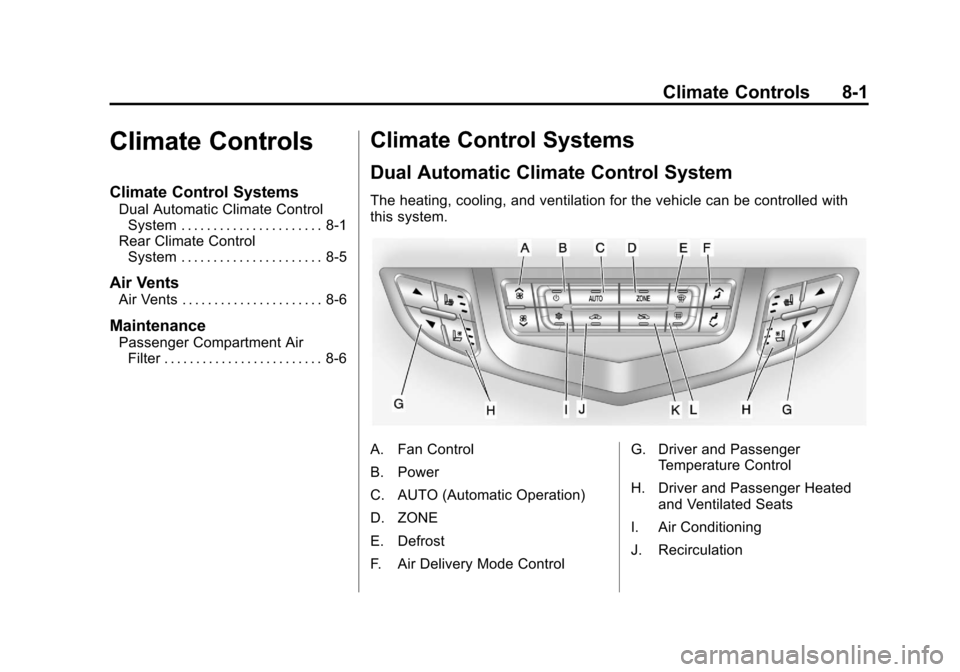
The heating, cooling, and ventilation for the vehicle can be controlled with
this system.
A. Fan Control
B. Power
C. AUTO (Automatic Operation)
D. ZONE
E. Defrost
F. Air Delivery Mode Control G. Driver and Passenger
Temperature Control
H. Driver and Passenger Heated and Ventilated Seats
I. Air Conditioning
J. Recirculation
Page 274 of 498
Black plate (6,1)Cadillac SRX Owner Manual - 2011
8-6 Climate Controls
Automatic Operation
AUTO:Press
Nuntil the AUTO
setting is selected to control the rear
temperature, air delivery, and fan
speed automatically.
Manual Operation
D C(Fan Control): Press these
buttons on the rear seat audio
control panel to increase or
decrease the airflow. Pressing
the fan up button when the system
is off will turn the system on. The
air delivery mode remains in its
previous setting.
+/− (Temperature Control):
Press these buttons to adjust
the temperature of the air flowing
into the passenger area. Press the
+ button for warmer air and press
the −button for cooler air.
N(Air Delivery Mode Control):
Press the mode button to change
the direction of the airflow in the
vehicle. Multiple presses will cycle
through the delivery selections.
Air Vents
Move the sliding knob on the air
outlets up and down or left and
right to direct the airflow. Use the
thumbwheels near the air outlets to
open or close off the airflow.
Operation Tips
.Clear away any ice, snow,
or leaves from air inlets at the
base of the windshield that could
block the flow of air into the
vehicle.
.Keep the path under the front
seats clear of objects to help
circulate the air inside the
vehicle more effectively.
.Use of non‐GM approved hood
deflectors can adversely affect
the performance of the system.
Check with your dealer before
adding equipment to the outside
of the vehicle.
Maintenance
Passenger Compartment
Air Filter
The filter removes dust, pollen, and
other airborne irritants from outside
air that is pulled into the vehicle.
The filter should be replaced as part
of routine scheduled maintenance.
To find out what type of filter to use,
see Maintenance Replacement
Parts on page 11‑9.
1. Open the glove box completely and remove the four screws
along the upper portion of the
glovebox.
2. When released, lower the upper portion of the glovebox.
3. Locate the service door for the passenger compartment air filter.
Page 323 of 498
Black plate (47,1)Cadillac SRX Owner Manual - 2011
Driving and Operating 9-47
Fuel
Use of the recommended fuel
is an important part of the proper
maintenance of this vehicle. To help
keep the engine clean and maintain
optimum vehicle performance, we
recommend the use of gasoline
advertised as TOP TIER Detergent
Gasoline.
Look for the TOP TIER label on the
fuel pump to ensure gasoline meets
enhanced detergency standards
developed by auto companies. A list
of marketers providing TOP TIER
Detergent Gasoline can be found at
www.toptiergas.com.
The 8th digit of the Vehicle
Identification Number (VIN) shows
the code letter or number that
identifies the vehicle's engine.
The VIN is at the top left of the
instrument panel. SeeVehicle
Identification Number (VIN) on
page 12‑1. Vehicles that have a FlexFuel badge
and a yellow fuel cap can use either
unleaded gasoline or ethanol fuel
containing up to 85% ethanol (E85).
See
Fuel E85 (85% Ethanol) on
page 9‑50. For all other vehicles,
use only the unleaded gasoline
described under Recommended
Fuel on page 9‑47.
Recommended Fuel
If the vehicle has the 3.0L V6 engine
(VIN Code Y), use regular unleaded
gasoline with a posted octane
rating of 87 or higher. If the octane
rating is less than 87, an audible
knocking noise, commonly referred
to as spark knock, might be heard
when driving. If this occurs, use
a gasoline rated at 87 octane or
higher as soon as possible. If heavy
knocking is heard when using
gasoline rated at 87 octane or
higher, the engine needs service.
Page 334 of 498
Black plate (58,1)Cadillac SRX Owner Manual - 2011
9-58 Driving and Operating
Maintenance When Trailer
Towing
The vehicle needs service more
often when pulling a trailer. See this
manual's Maintenance Schedule or
index for more information. Things
that are especially important in
trailer operation are automatic
transmission fluid, engine oil, axle
lubricant, belts, cooling system and
brake system. Inspect these before
and during the trip.
Check periodically to see that all
hitch nuts and bolts are tight.
Engine Cooling When Trailer
Towing
The cooling system may temporarily
overheat during severe operating
conditions. SeeEngine Overheating
on page 10‑22.
Trailer Towing
Before pulling a trailer, there are
three important considerations that
have to do with weight:
.The weight of the trailer
.The weight of the trailer tongue
.The total weight on the vehicle's
tires
Weight of the Trailer
How heavy can a trailer safely be?
It depends on how the rig is used.
For example, speed, altitude, road
grades, outside temperature and
how much the vehicle is used to
pull a trailer are all important. It can
depend on any special equipment on the vehicle, and the amount of
tongue weight the vehicle can carry.
See
“Weight of the Trailer Tongue”
later in this section for more
information.
Maximum trailer weight is calculated
assuming only the driver is in
the tow vehicle and it has all the
required trailering equipment.
The weight of additional optional
equipment, passengers and cargo in
the tow vehicle must be subtracted
from the maximum trailer weight.
Use the following chart to determine
how much the vehicle can weigh,
based upon the vehicle model and
options.
Page 342 of 498
Black plate (4,1)Cadillac SRX Owner Manual - 2011
10-4 Vehicle Care
Vehicle Checks
Doing Your Own
Service Work
{WARNING
You can be injured and the
vehicle could be damaged if you
try to do service work on a vehicle
without knowing enough about it.
.Be sure you have sufficient
knowledge, experience,
the proper replacement
parts, and tools before
attempting any vehicle
maintenance task.(Continued)
WARNING (Continued)
.Be sure to use the proper
nuts, bolts, and other
fasteners. English and
metric fasteners can be
easily confused. If the wrong
fasteners are used, parts
can later break or fall off.
You could be hurt.
If doing some of your own service
work, use the proper service
manual. It tells you much more
about how to service the vehicle
than this manual can. To order the
proper service manual, see Service
Publications Ordering Information
on page 13‑15. This vehicle has an airbag system.
Before attempting to do your own
service work, see
Servicing the
Airbag-Equipped Vehicle on
page 3‑44.
Keep a record with all parts receipts
and list the mileage and the date
of any service work performed.
See Maintenance Records on
page 11‑10.
Page 354 of 498
Black plate (16,1)Cadillac SRX Owner Manual - 2011
10-16 Vehicle Care
Change the fluid and filter at
the intervals listed inScheduled
Maintenance on page 11‑2, and
be sure to use the fluid listed in
Recommended Fluids and
Lubricants on page 11‑7.
Engine Air Cleaner/Filter
See Engine Compartment Overview
on page 10‑6 for the location of the
engine air cleaner/filter.
When to Inspect the Engine Air
Cleaner/Filter
Inspect the air cleaner/filter at
the scheduled maintenance
intervals and replace it at the first
oil change after each 80 000 km
(50,000 mi) interval. See Scheduled
Maintenance on page 11‑2 for more
information. If driving in dusty/dirty
conditions, inspect the filter at
each engine oil change.
How to Inspect the Engine Air
Cleaner/Filter
To inspect the air cleaner/filter,
remove the filter from the vehicle
and lightly shake the filter to release
loose dust and dirt. If the filter
remains caked with dirt, a new filter
is required. Never use compressed
air to clean the filter.
To inspect or replace the engine air
cleaner/filter:
1. Open the hood. See Hood on
page 10‑5.
2. Locate the air filter housing on the front of the passenger side
of the engine compartment.
See Engine Compartment
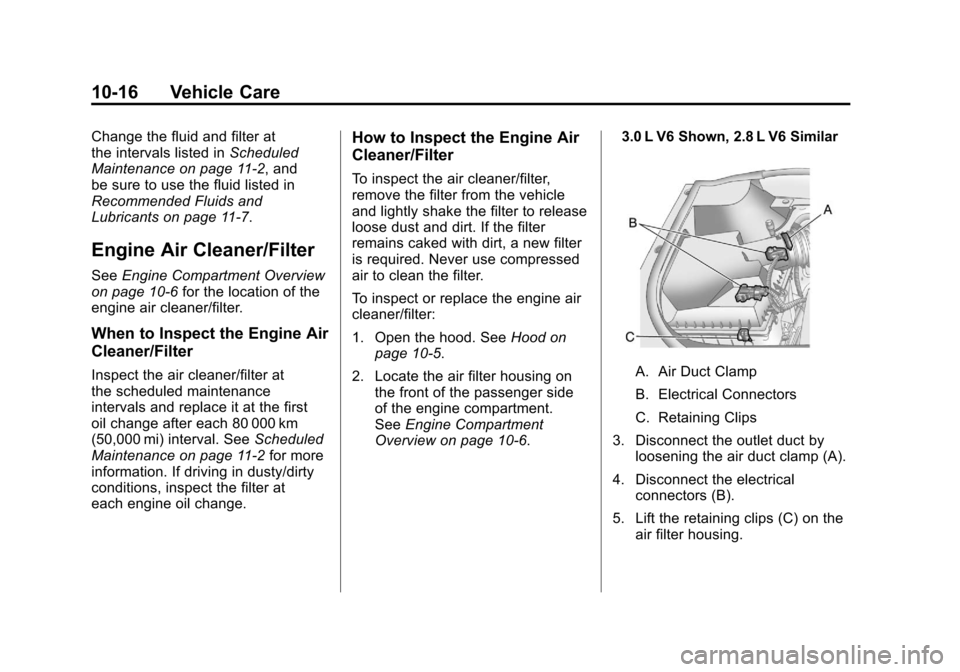
Overview on page 10‑6. 3.0 L V6 Shown, 2.8 L V6 Similar
A. Air Duct Clamp
B. Electrical Connectors
C. Retaining Clips
3. Disconnect the outlet duct by loosening the air duct clamp (A).
4. Disconnect the electrical connectors (B).
5. Lift the retaining clips (C) on the air filter housing.
Page 355 of 498
Black plate (17,1)Cadillac SRX Owner Manual - 2011
Vehicle Care 10-17
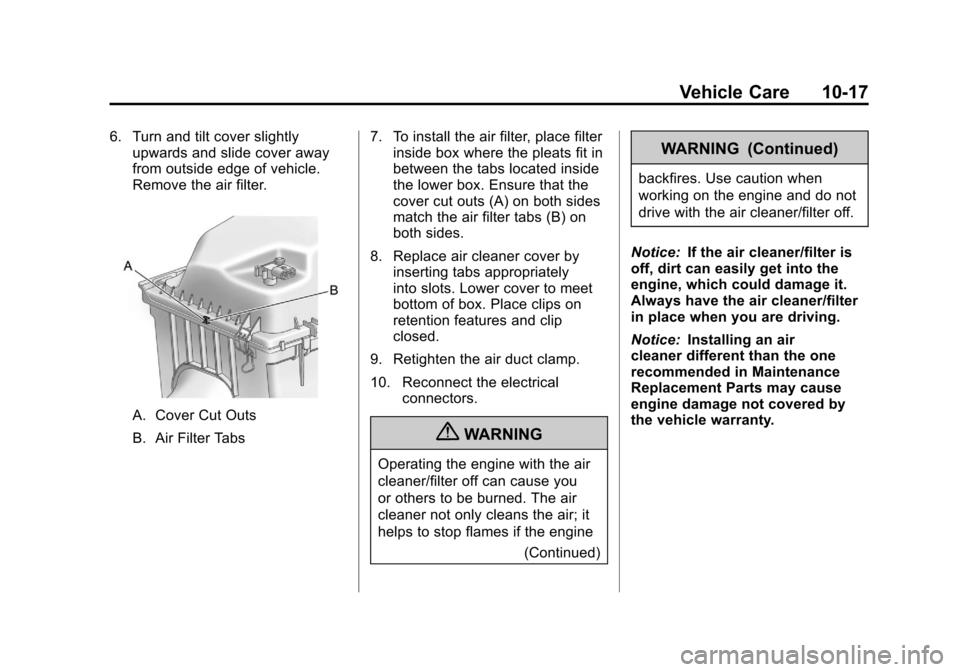
6. Turn and tilt cover slightlyupwards and slide cover away
from outside edge of vehicle.
Remove the air filter.
A. Cover Cut Outs
B. Air Filter Tabs 7. To install the air filter, place filter
inside box where the pleats fit in
between the tabs located inside
the lower box. Ensure that the
cover cut outs (A) on both sides
match the air filter tabs (B) on
both sides.
8. Replace air cleaner cover by inserting tabs appropriately
into slots. Lower cover to meet
bottom of box. Place clips on
retention features and clip
closed.
9. Retighten the air duct clamp.
10. Reconnect the electrical connectors.
{WARNING
Operating the engine with the air
cleaner/filter off can cause you
or others to be burned. The air
cleaner not only cleans the air; it
helps to stop flames if the engine
(Continued)
WARNING (Continued)
backfires. Use caution when
working on the engine and do not
drive with the air cleaner/filter off.
Notice: If the air cleaner/filter is
off, dirt can easily get into the
engine, which could damage it.
Always have the air cleaner/filter
in place when you are driving.
Notice: Installing an air
cleaner different than the one
recommended in Maintenance
Replacement Parts may cause
engine damage not covered by
the vehicle warranty.
Page 369 of 498
Black plate (31,1)Cadillac SRX Owner Manual - 2011
Vehicle Care 10-31
Wiper Blade Replacement
Windshield wiper blades should
be inspected for wear or cracking.
SeeScheduled Maintenance on
page 11‑2 for more information.
It is a good idea to clean or replace
the wiper blade assembly on a
regular basis or when worn.
For proper windshield wiper blade
length and type, see Maintenance
Replacement Parts on page 11‑9.
Notice: Allowing the wiper blade
arm to touch the windshield
when no wiper blade is installed
could damage the windshield.
Any damage that occurs would
not be covered by your warranty.
Do not allow the wiper blade arm
to touch the windshield.
Front Wiper Blade
Replacement
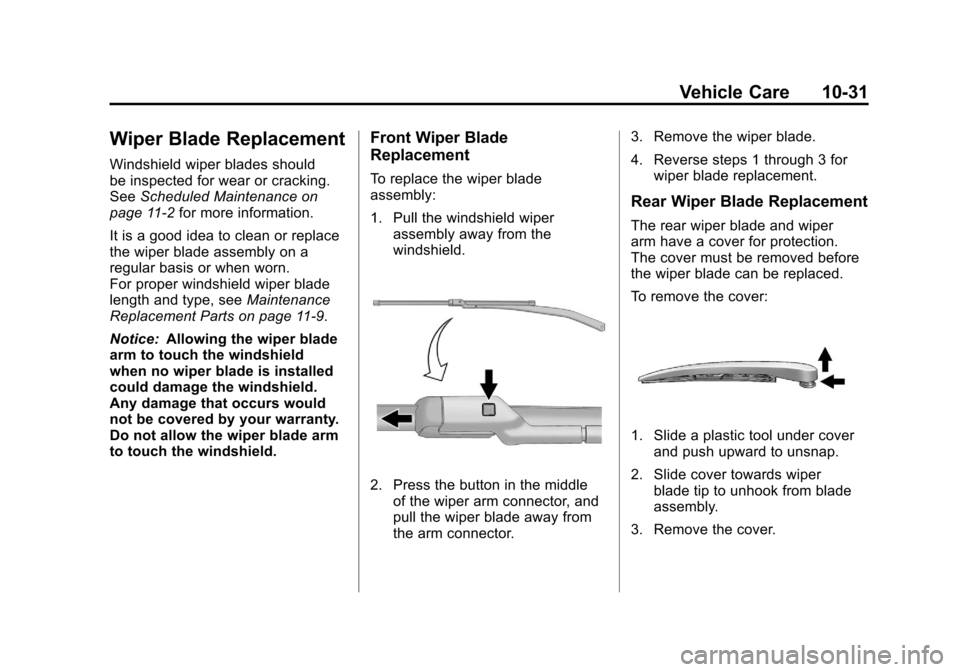
To replace the wiper blade
assembly:
1. Pull the windshield wiper assembly away from the
windshield.
2. Press the button in the middle
of the wiper arm connector, and
pull the wiper blade away from
the arm connector. 3. Remove the wiper blade.
4. Reverse steps 1 through 3 for
wiper blade replacement.
Rear Wiper Blade Replacement
The rear wiper blade and wiper
arm have a cover for protection.
The cover must be removed before
the wiper blade can be replaced.
To remove the cover:
1. Slide a plastic tool under coverand push upward to unsnap.
2. Slide cover towards wiper blade tip to unhook from blade
assembly.
3. Remove the cover.