radio controls CADILLAC SRX 2011 2.G User Guide
[x] Cancel search | Manufacturer: CADILLAC, Model Year: 2011, Model line: SRX, Model: CADILLAC SRX 2011 2.GPages: 498, PDF Size: 7.62 MB
Page 192 of 498
Black plate (46,1)Cadillac SRX Owner Manual - 2011
5-46 Instruments and Controls
Universal Remote
System
SeeRadio Frequency
Statement on page 13‑20 for
information regarding Part 15
of the Federal Communications
Commission (FCC) rules and
Industry Canada Standards
RSS-210/220/310.
Universal Remote System
Programming
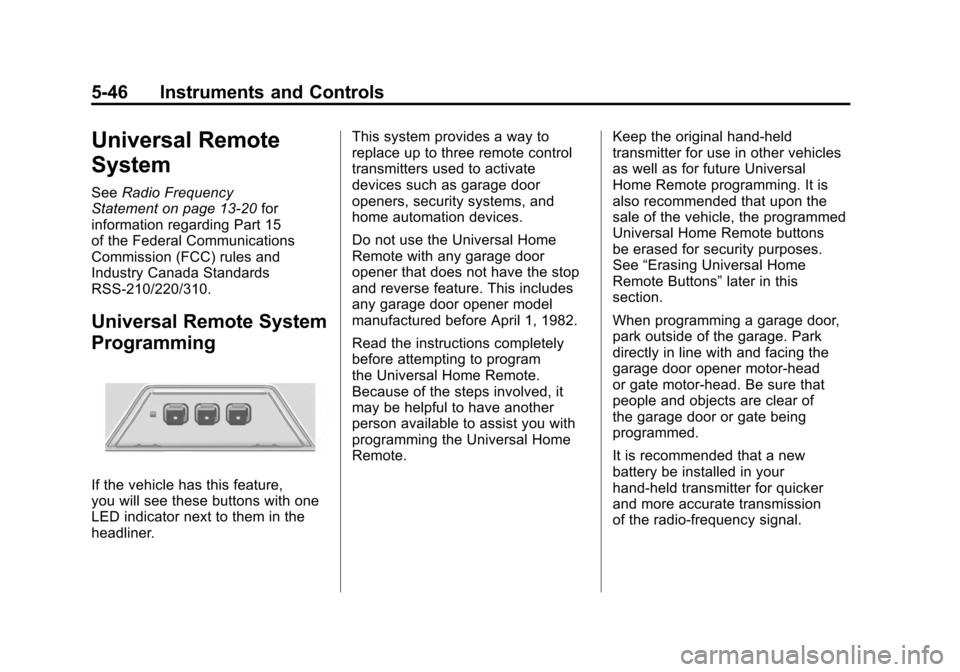
If the vehicle has this feature,
you will see these buttons with one
LED indicator next to them in the
headliner. This system provides a way to
replace up to three remote control
transmitters used to activate
devices such as garage door
openers, security systems, and
home automation devices.
Do not use the Universal Home
Remote with any garage door
opener that does not have the stop
and reverse feature. This includes
any garage door opener model
manufactured before April 1, 1982.
Read the instructions completely
before attempting to program
the Universal Home Remote.
Because of the steps involved, it
may be helpful to have another
person available to assist you with
programming the Universal Home
Remote.
Keep the original hand-held
transmitter for use in other vehicles
as well as for future Universal
Home Remote programming. It is
also recommended that upon the
sale of the vehicle, the programmed
Universal Home Remote buttons
be erased for security purposes.
See
“Erasing Universal Home
Remote Buttons” later in this
section.
When programming a garage door,
park outside of the garage. Park
directly in line with and facing the
garage door opener motor-head
or gate motor-head. Be sure that
people and objects are clear of
the garage door or gate being
programmed.
It is recommended that a new
battery be installed in your
hand-held transmitter for quicker
and more accurate transmission
of the radio-frequency signal.
Page 194 of 498
Black plate (48,1)Cadillac SRX Owner Manual - 2011
5-48 Instruments and Controls
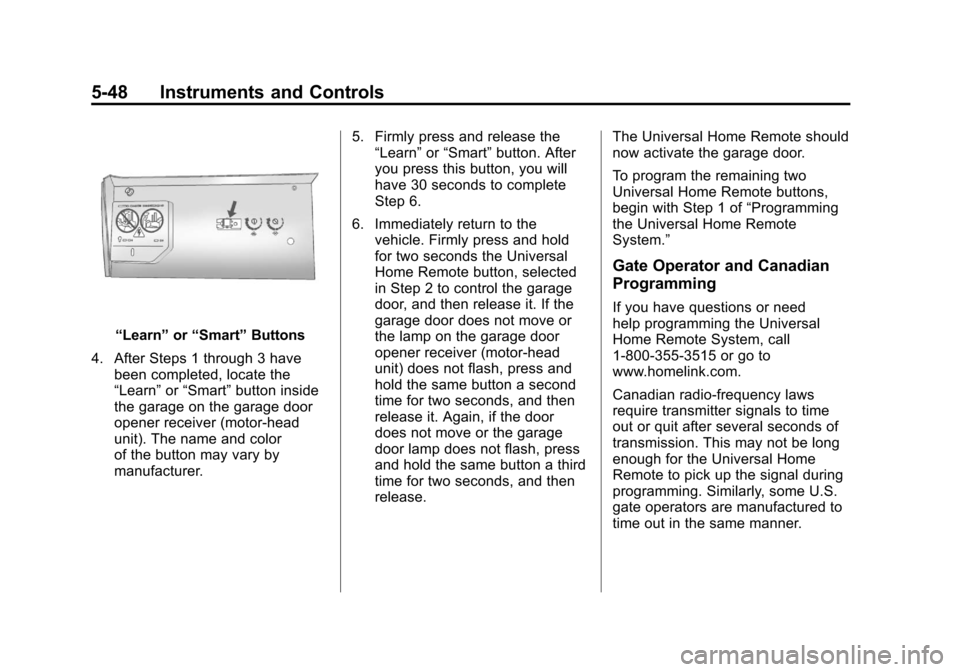
“Learn”or“Smart” Buttons
4. After Steps 1 through 3 have been completed, locate the
“Learn” or“Smart” button inside
the garage on the garage door
opener receiver (motor-head
unit). The name and color
of the button may vary by
manufacturer. 5. Firmly press and release the
“Learn” or“Smart” button. After
you press this button, you will
have 30 seconds to complete
Step 6.
6. Immediately return to the vehicle. Firmly press and hold
for two seconds the Universal
Home Remote button, selected
in Step 2 to control the garage
door, and then release it. If the
garage door does not move or
the lamp on the garage door
opener receiver (motor-head
unit) does not flash, press and
hold the same button a second
time for two seconds, and then
release it. Again, if the door
does not move or the garage
door lamp does not flash, press
and hold the same button a third
time for two seconds, and then
release. The Universal Home Remote should
now activate the garage door.
To program the remaining two
Universal Home Remote buttons,
begin with Step 1 of
“Programming
the Universal Home Remote
System.”
Gate Operator and Canadian
Programming
If you have questions or need
help programming the Universal
Home Remote System, call
1‐800‐355‐3515 or go to
www.homelink.com.
Canadian radio-frequency laws
require transmitter signals to time
out or quit after several seconds of
transmission. This may not be long
enough for the Universal Home
Remote to pick up the signal during
programming. Similarly, some U.S.
gate operators are manufactured to
time out in the same manner.
Page 205 of 498
Black plate (1,1)Cadillac SRX Owner Manual - 2011
Infotainment System 7-1
Infotainment
System
Introduction
Introduction . . . . . . . . . . . . . . . . . . . 7-1
Theft-Deterrent Feature . . . . . . . 7-2
Overview (Radio with CD) . . . . . 7-3
Overview (Radio with CD/DVDand MEM) . . . . . . . . . . . . . . . . . . . 7-5
Operation . . . . . . . . . . . . . . . . . . . . . 7-7
Radio
AM-FM Radio . . . . . . . . . . . . . . . . 7-12
Satellite Radio . . . . . . . . . . . . . . . 7-15
Radio Reception . . . . . . . . . . . . . 7-19
Multi-Band Antenna . . . . . . . . . . 7-19
Audio Players
CD Player (Radio with CD) . . . . . . . . . . . . . . . . . . . . 7-20
CD/DVD Player . . . . . . . . . . . . . . 7-22
Mass Storage Media (MEM) . . . . . . . . . . . . . . . 7-27
Auxiliary Devices (Radio with CD) . . . . . . . . . . . . . . . . . . . . 7-30
Auxiliary Devices (Radio with CD/DVD and MEM) . . . . . . . . 7-36
Rear Seat Infotainment
Rear Seat Entertainment(RSE) System . . . . . . . . . . . . . . 7-38
Rear Seat Audio (RSA) System . . . . . . . . . . . . . . . . . . . . . 7-49
Phone
Bluetooth (Overview) . . . . . . . . 7-51
Bluetooth (InfotainmentControls) . . . . . . . . . . . . . . . . . . . 7-52
Bluetooth (Voice Recognition) . . . . . . . . . . . . . . . 7-57
Introduction
Read the following pages to
become familiar with the audio
system's features.
{WARNING
Taking your eyes off the road
for extended periods could
cause a crash resulting in injury
or death to you or others. Do not
give extended attention to
entertainment tasks while driving.
This system provides access to
many audio and non‐audio listings.
Page 206 of 498
Black plate (2,1)Cadillac SRX Owner Manual - 2011
7-2 Infotainment System
To minimize taking your eyes off the
road while driving, do the following
while the vehicle is parked:
.Become familiar with the
operation and controls of the
audio system.
.Set up the tone, speaker
adjustments, and preset radio
stations.
For more information, see Defensive
Driving on page 9‑2.
This vehicle's infotainment system
may be equipped with a noise
reduction system which can work
improperly if the audio amplifier,
engine calibrations, exhaust system,
microphones, radio, or speakers are
modified or replaced. This could
result in more noticeable engine
noise at certain speeds. Notice:
Contact your dealer
before adding any equipment.
Adding audio or communication
equipment could interfere with
the operation of the vehicle's
engine, radio, or other systems,
and could damage them. Follow
federal rules covering mobile
radio and telephone equipment.
The vehicle has Retained
Accessory Power (RAP). With RAP,
the audio system can be played
even after the ignition is turned off.
See Retained Accessory Power
(RAP) on page 9‑22 for more
information.
Navigation System
For vehicles with a navigation
system, see the separate Navigation
System Manual.
Theft-Deterrent Feature
The theft-deterrent feature works
by learning a portion of the Vehicle
Identification Number (VIN)
to the infotainment system.
The infotainment system does
not operate if it is stolen or moved
to a different vehicle.
Page 234 of 498
Black plate (30,1)Cadillac SRX Owner Manual - 2011
7-30 Infotainment System
Saving MEM Tracks as
Favorites
Favorites can be saved by pressing
and holding one of the 1 to 6
buttons. Favorites can be stored
according to the following list:
Playlist:Adds currently playing
track to the playlist selected.
Artist: Saves the artist associated
with the currently playing track in
the indicated favorites position.
Album: Saves the album
associated with the currently
playing track in the indicated
favorites position.
Genre: Saves the genre associated
with the currently playing track in
the indicated favorites position. Creating Playlists
To create a playlist using tracks
stored in MEM:
1. Select Playlist from the MEM
favorites.
2. Select the track to be stored in the playlist.
3. Press and hold one of the 1 to 6 buttons until the track can be
heard again to store the track.
4. Repeat steps 1 though 3 to store additional tracks in the playlist.
Auxiliary Devices
(Radio with CD)
The optional AUX input allows
portable devices to connect to the
vehicle using the 3.5 mm (1/8 in)
input jack, the USB port or
Bluetooth
®wireless technology,
if equipped.
Portable devices are controlled by
using the menu system described in
Operation on page 7‑7.
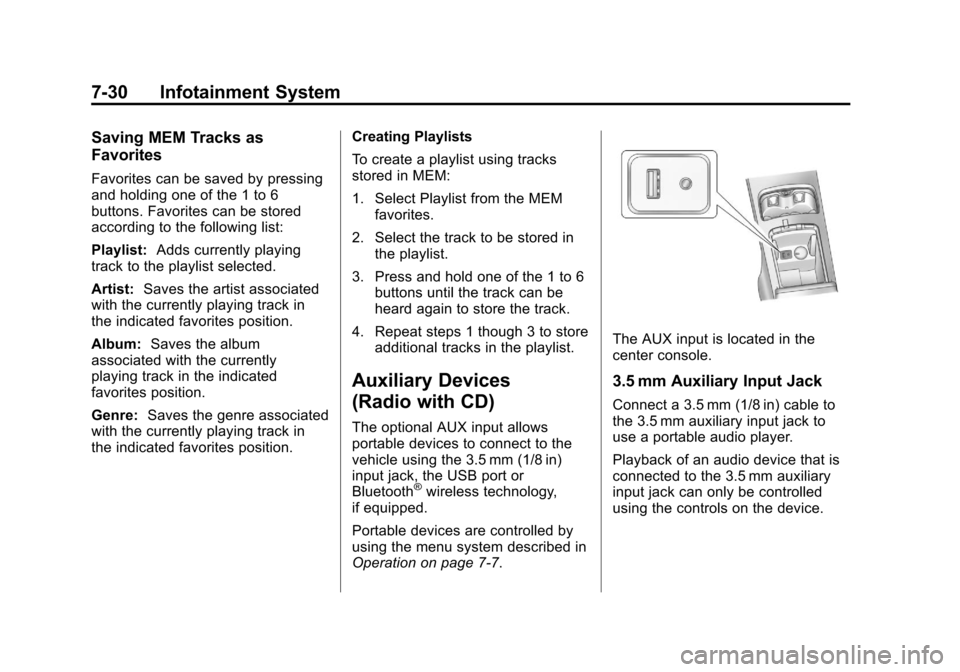
The AUX input is located in the
center console.
3.5 mm Auxiliary Input Jack
Connect a 3.5 mm (1/8 in) cable to
the 3.5 mm auxiliary input jack to
use a portable audio player.
Playback of an audio device that is
connected to the 3.5 mm auxiliary
input jack can only be controlled
using the controls on the device.
Page 240 of 498
Black plate (36,1)Cadillac SRX Owner Manual - 2011
7-36 Infotainment System
Auxiliary Devices (Radio
with CD/DVD and MEM)
The optional AUX input allows
portable devices to be connected
using the 3.5 mm (1/8 in) input jack
or the USB port.
Portable devices are controlled by
using the menu system described in
Operation on page 7‑7.
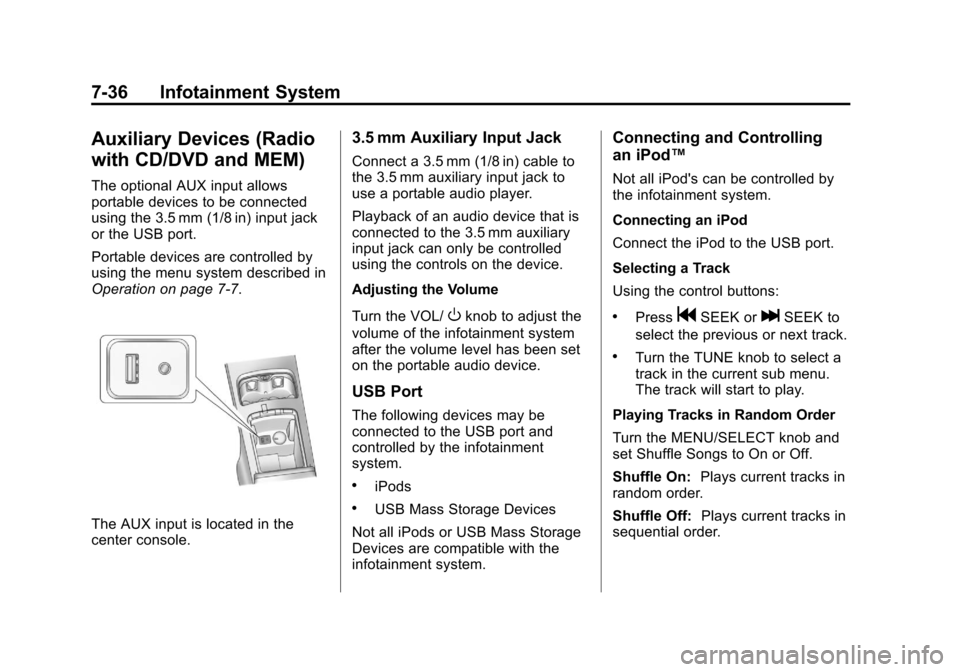
The AUX input is located in the
center console.
3.5 mm Auxiliary Input Jack
Connect a 3.5 mm (1/8 in) cable to
the 3.5 mm auxiliary input jack to
use a portable audio player.
Playback of an audio device that is
connected to the 3.5 mm auxiliary
input jack can only be controlled
using the controls on the device.
Adjusting the Volume
Turn the VOL/
Oknob to adjust the
volume of the infotainment system
after the volume level has been set
on the portable audio device.
USB Port
The following devices may be
connected to the USB port and
controlled by the infotainment
system.
.iPods
.USB Mass Storage Devices
Not all iPods or USB Mass Storage
Devices are compatible with the
infotainment system.
Connecting and Controlling
an iPod™
Not all iPod's can be controlled by
the infotainment system.
Connecting an iPod
Connect the iPod to the USB port.
Selecting a Track
Using the control buttons:
.PressgSEEK orlSEEK to
select the previous or next track.
.Turn the TUNE knob to select a
track in the current sub menu.
The track will start to play.
Playing Tracks in Random Order
Turn the MENU/SELECT knob and
set Shuffle Songs to On or Off.
Shuffle On: Plays current tracks in
random order.
Shuffle Off: Plays current tracks in
sequential order.
Page 254 of 498
Black plate (50,1)Cadillac SRX Owner Manual - 2011
7-50 Infotainment System
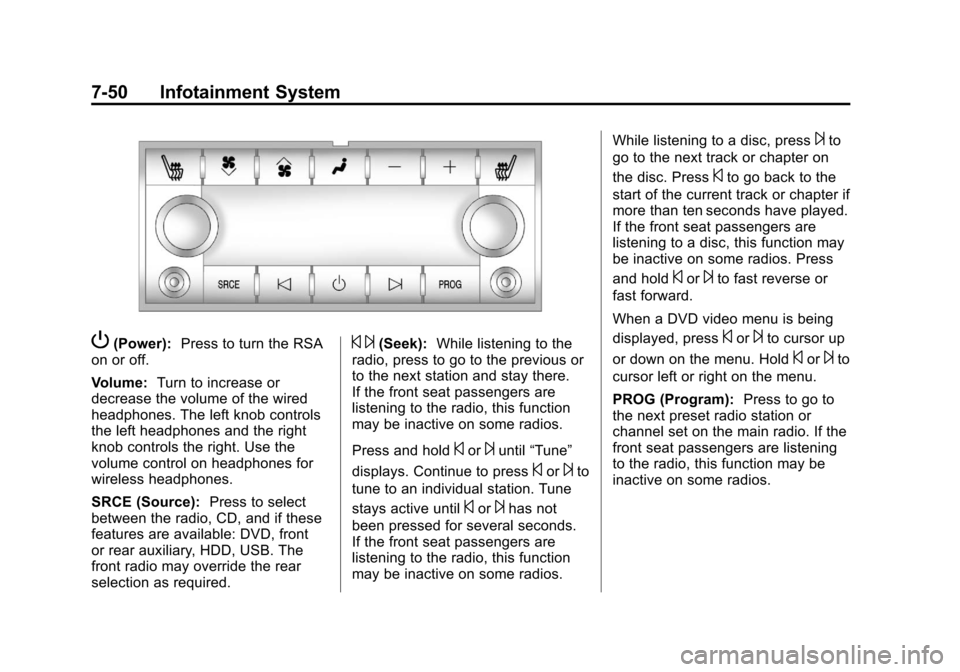
P(Power):Press to turn the RSA
on or off.
Volume: Turn to increase or
decrease the volume of the wired
headphones. The left knob controls
the left headphones and the right
knob controls the right. Use the
volume control on headphones for
wireless headphones.
SRCE (Source): Press to select
between the radio, CD, and if these
features are available: DVD, front
or rear auxiliary, HDD, USB. The
front radio may override the rear
selection as required.© ¨(Seek): While listening to the
radio, press to go to the previous or
to the next station and stay there.
If the front seat passengers are
listening to the radio, this function
may be inactive on some radios.
Press and hold
©or¨until “Tune”
displays. Continue to press
©or¨to
tune to an individual station. Tune
stays active until
©or¨has not
been pressed for several seconds.
If the front seat passengers are
listening to the radio, this function
may be inactive on some radios. While listening to a disc, press
¨to
go to the next track or chapter on
the disc. Press
©to go back to the
start of the current track or chapter if
more than ten seconds have played.
If the front seat passengers are
listening to a disc, this function may
be inactive on some radios. Press
and hold
©or¨to fast reverse or
fast forward.
When a DVD video menu is being
displayed, press
©or¨to cursor up
or down on the menu. Hold
©or¨to
cursor left or right on the menu.
PROG (Program): Press to go to
the next preset radio station or
channel set on the main radio. If the
front seat passengers are listening
to the radio, this function may be
inactive on some radios.
Page 255 of 498
Black plate (51,1)Cadillac SRX Owner Manual - 2011
Infotainment System 7-51
When a CD or DVD audio disc is
playing, press PROG to go to the
beginning of the disc or display disc
info. If the front seat passengers are
listening to a disc, this function may
be inactive on some radios.
When a disc is playing in the CD
or DVD changer, press and hold
PROG to select the next disc,
if multiple discs are loaded. If the
front seat passengers are listening
to a disc, this function may be
inactive on some radios.
The PROG button may be used to
access the menu of an MP3. Once
in the menu, use
©or¨to make
selections.
When a DVD video menu is
displayed, press PROG, or press
and hold PROG to perform the
menu function, ENTER.
Phone
Bluetooth (Overview)
Vehicles with a Bluetooth system
can use a Bluetooth capable cell
phone with a Hands Free Profile
to make and receive phone calls.
The infotainment system and voice
recognition are used to control
the system. The system can be
used while in ON/RUN or ACC/
ACCESSORY. The range of the
Bluetooth system can be up to
9.1 m (30 ft). Not all phones support
all functions and not all phones
work with the Bluetooth system.
See www.gm.com/bluetooth for
more information about compatible
phones.
Bluetooth Controls
Use the buttons located on the
infotainment system and the
steering wheel to operate the
Bluetooth system.
Steering Wheel Controls
b/g(Push To Talk): Press to
answer incoming calls, confirm
system information, and start voice
recognition.
$/c(End Call / Mute): Press to
end a call, reject a call, or to cancel
an operation.
Infotainment System Controls
For information about how to
navigate the menu system using the
infotainment controls, see Operation
on page 7‑7.
PHONE: Press to enter the Phone
main menu.
Page 256 of 498
Black plate (52,1)Cadillac SRX Owner Manual - 2011
7-52 Infotainment System
Voice Recognition
The voice recognition system uses
commands to control the system
and dial phone numbers.
Noise:The system may not
recognize voice commands if there
is too much background noise.
When to Speak: A tone sounds to
indicate that the system is ready for
a voice command. Wait for the tone
and then speak.
How to Speak: Speak clearly in a
calm and natural voice.
Audio System
When using the Bluetooth system,
sound comes through the vehicle's
front audio system speakers
and overrides the audio system. Use the VOL/
Oknob during a
call to change the volume level.
The adjusted volume level
remains in memory for later
calls. The system maintains a
minimum volume level.
Other Information
The Bluetooth®word mark and
logos are owned by the Bluetooth®
SIG, Inc. and any use of such marks
by General Motors is under license.
Other trademarks and trade names
are those of their respective owners.
See Radio Frequency
Statement on page 13‑20 for
Federal Communications
Commission and Industry
Canada Standards information.
Bluetooth (Infotainment
Controls)
For information about how to
navigate the menu system using the
infotainment controls, see Operation
on page 7‑7.
Pairing
A Bluetooth‐enabled cell phone
must be paired to the Bluetooth
system first and then connected to
the vehicle before it can be used.
See the cell phone manufacturer
user guide for Bluetooth functions
before pairing the cell phone. If a
Bluetooth phone is not connected,
calls will be made using OnStar
®
Hands‐Free Calling, if available.
Refer to the OnStar Owner's Guide
for more information.
A Bluetooth phone with MP3
capability can not be connected to
the vehicle as a phone and an MP3
player at the same time.
Page 272 of 498
Black plate (4,1)Cadillac SRX Owner Manual - 2011
8-4 Climate Controls
Rear Window Defogger
=(Rear Window Defogger):
Press to turn the rear window
defogger on or off.
The rear window defogger turns
off automatically after about
10 minutes. If turned on again it
runs for about 5 minutes before
turning off. At higher speeds, the
rear window defogger may stay
on continuously.
The rear window defogger can
be set to automatic operation,
see Climate and Air Quality
under Vehicle Personalization on
page 5‑40. When auto rear defog is
selected, the rear window defogger
turns on automatically when the
interior temperature is cold and the
outside temperature is about 40°F
and below. The auto rear defogger
turns off automatically after about
10 minutes. At higher speeds, the
rear window defogger may stay on
continuously. The heated outside rearview mirrors
turn on when the rear window
defogger button is on and helps to
clear fog or frost from the surface of
the mirror. See
Heated Mirrors on
page 2‑23.
Notice: Do not try to clear frost
or other material from the inside
of the front windshield and rear
window with a razor blade or
anything else that is sharp.
This may damage the rear
window defogger grid and affect
your radio's ability to pick up
stations clearly. The repairs
wouldn't be covered by your
warranty.
Heated and Ventilated Seats:
Press to heat or ventilate the seat.
See Heated and Ventilated Front
Seats on page 3‑11. Remote Start Climate Control
Operation:
For vehicles with the
remote vehicle start feature, the
climate control system may run
when the vehicle is started remotely.
The system uses the driver's
previous settings to heat or cool the
inside of the vehicle. See Remote
Vehicle Start on page 2‑10.
The rear window defogger turns on
if it is cold outside.
Sensors
The solar sensor located on top
of the instrument panel near the
windshield, monitors the solar heat.
The climate control system
uses the sensor information to
adjust the temperature, fan speed,
recirculation, and air delivery mode
for best comfort.
If the sensor is covered the
automatic climate control system
may not work properly.