clock CADILLAC SRX 2011 2.G Owner's Manual
[x] Cancel search | Manufacturer: CADILLAC, Model Year: 2011, Model line: SRX, Model: CADILLAC SRX 2011 2.GPages: 498, PDF Size: 7.62 MB
Page 427 of 498
Black plate (89,1)Cadillac SRX Owner Manual - 2011
Vehicle Care 10-89
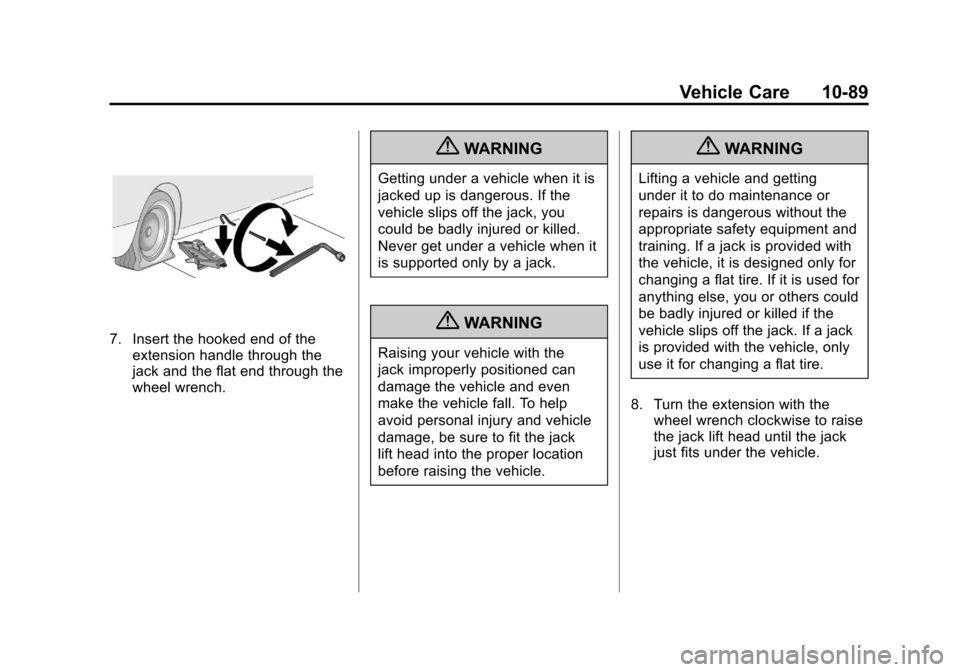
7. Insert the hooked end of theextension handle through the
jack and the flat end through the
wheel wrench.
{WARNING
Getting under a vehicle when it is
jacked up is dangerous. If the
vehicle slips off the jack, you
could be badly injured or killed.
Never get under a vehicle when it
is supported only by a jack.
{WARNING
Raising your vehicle with the
jack improperly positioned can
damage the vehicle and even
make the vehicle fall. To help
avoid personal injury and vehicle
damage, be sure to fit the jack
lift head into the proper location
before raising the vehicle.
{WARNING
Lifting a vehicle and getting
under it to do maintenance or
repairs is dangerous without the
appropriate safety equipment and
training. If a jack is provided with
the vehicle, it is designed only for
changing a flat tire. If it is used for
anything else, you or others could
be badly injured or killed if the
vehicle slips off the jack. If a jack
is provided with the vehicle, only
use it for changing a flat tire.
8. Turn the extension with the wheel wrench clockwise to raise
the jack lift head until the jack
just fits under the vehicle.
Page 428 of 498
Black plate (90,1)Cadillac SRX Owner Manual - 2011
10-90 Vehicle Care
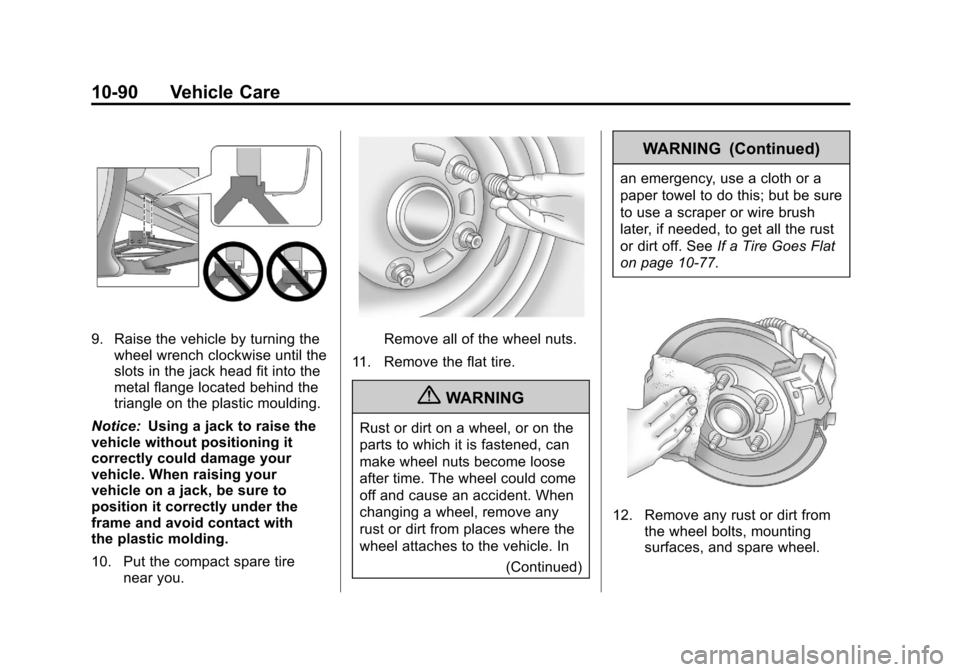
9. Raise the vehicle by turning thewheel wrench clockwise until the
slots in the jack head fit into the
metal flange located behind the
triangle on the plastic moulding.
Notice: Using a jack to raise the
vehicle without positioning it
correctly could damage your
vehicle. When raising your
vehicle on a jack, be sure to
position it correctly under the
frame and avoid contact with
the plastic molding.
10. Put the compact spare tire near you.Remove all of the wheel nuts.
11. Remove the flat tire.
{WARNING
Rust or dirt on a wheel, or on the
parts to which it is fastened, can
make wheel nuts become loose
after time. The wheel could come
off and cause an accident. When
changing a wheel, remove any
rust or dirt from places where the
wheel attaches to the vehicle. In (Continued)
WARNING (Continued)
an emergency, use a cloth or a
paper towel to do this; but be sure
to use a scraper or wire brush
later, if needed, to get all the rust
or dirt off. SeeIf a Tire Goes Flat
on page 10‑77.
12. Remove any rust or dirt from the wheel bolts, mounting
surfaces, and spare wheel.
Page 429 of 498
Black plate (91,1)Cadillac SRX Owner Manual - 2011
Vehicle Care 10-91
13. Place the compact spare tireon the wheel-mounting surface.
{WARNING
Never use oil or grease on bolts
or nuts because the nuts might
come loose. The vehicle's wheel
could fall off, causing a crash.
14. Reinstall the wheel nuts. Tighten each nut by hand until
the wheel is held against
the hub.
15. Lower the vehicle by turning the jack handle
counterclockwise.
{WARNING
Wheel nuts that are improperly or
incorrectly tightened can cause
the wheels to become loose or
come off. The wheel nuts should
be tightened with a torque wrench
(Continued)
WARNING (Continued)
to the proper torque specification
after replacing. Follow the torque
specification supplied by the
aftermarket manufacturer when
using accessory locking wheel
nuts. SeeCapacities and
Specifications on page 12‑2 for
original equipment wheel nut
torque specifications.
Notice: Improperly tightened
wheel nuts can lead to brake
pulsation and rotor damage.
To avoid expensive brake repairs,
evenly tighten the wheel nuts
in the proper sequence and to
the proper torque specification.
See Capacities and Specifications
on page 12‑2 for the wheel nut
torque specification.
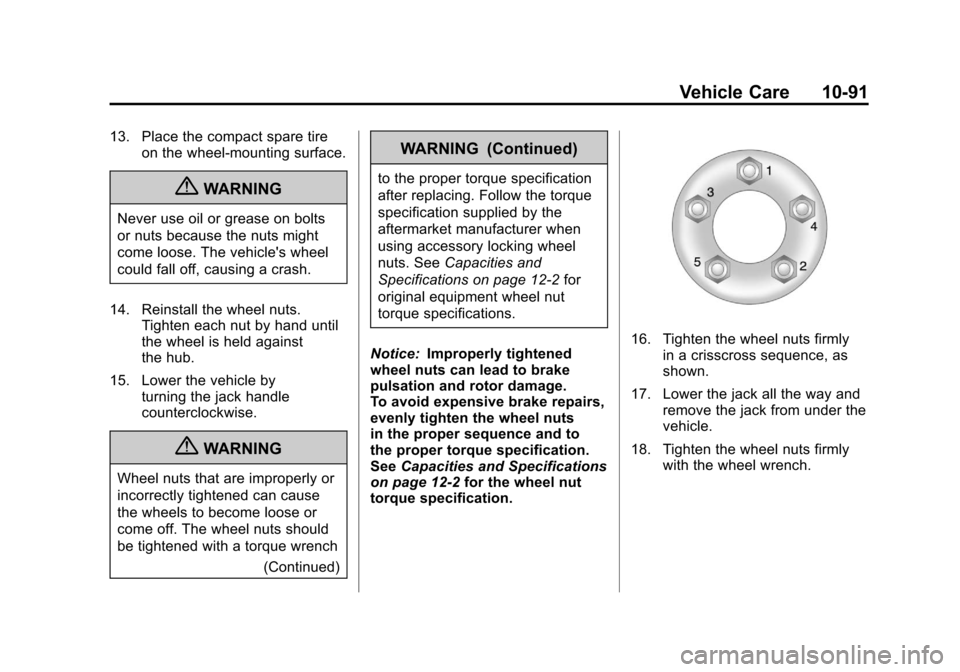
16. Tighten the wheel nuts firmly
in a crisscross sequence, as
shown.
17. Lower the jack all the way and remove the jack from under the
vehicle.
18. Tighten the wheel nuts firmly with the wheel wrench.
Page 487 of 498

Black plate (3,1)Cadillac SRX Owner Manual - 2011
INDEX i-3
CDDVD Player . . . . . . . . . . . . . . . . . . . 7-22
CD Player . . . . . . . . . . . . . . . . . . . . . 7-20
Center Console Storage . . . . . . . . 4-2
Chains, Tire . . . . . . . . . . . . . . . . . . 10-76
Charging System Light . . . . . . . . 5-19
Check Engine Light . . . . . . . . . . . . . . . . . . 5-19
IgnitionTransmission Lock . . . . . . . . 10-30
Child Restraints
Infants and YoungChildren . . . . . . . . . . . . . . . . . . . . . 3-49
Lower Anchors and Tethers for Children . . . . . . . . . 3-56
Older Children . . . . . . . . . . . . . . . . 3-47
Securing . . . . . . . . . . . . . . . . 3-64, 3-66
Systems . . . . . . . . . . . . . . . . . . . . . . 3-51
Cigarette Lighter . . . . . . . . . . . . . . . . 5-9
Circuit Breakers . . . . . . . . . . . . . . 10-46 Cleaning
Exterior Care . . . . . . . . . . . . . . 10-101
Interior Care . . . . . . . . . . . . . . . 10-106
Climate Control Systems Dual Automatic . . . . . . . . . . . . . . . . 8-1
Rear . . . . . . . . . . . . . . . . . . . . . . . . . . . 8-5
Clock . . . . . . . . . . . . . . . . . . . . . . . 5-7, 5-8
Cluster, IP . . . . . . . . . . . . . . . . . . . . . 5-11
Collision Damage Repair . . . . . 13-13
Compact Spare Tire . . . . . . . . . . 10-93
Compass . . . . . . . . . . . . . . . . . . . . . . . 5-7
Compass Messages . . . . . . . . . . . 5-34
Compressor Kit, Tire
Sealant . . . . . . . . . . . . . . . . . . . . . . 10-79
Control of a Vehicle . . . . . . . . . . . . . 9-3
Convenience Net . . . . . . . . . . . . . . 4-10
Convex Mirrors . . . . . . . . . . . . . . . . 2-21
Coolant Engine . . . . . . . . . . . . . . . . . . . . . . 10-19
Engine TemperatureGauge . . . . . . . . . . . . . . . . . . . . . . 5-15 Cooling System . . . . . . . . . . . . . . . 10-18
Engine Messages . . . . . . . . . . . . 5-34
Courtesy Lamps . . . . . . . . . . . . . . . . 6-6
Courtesy Transportation Program . . . . . . . . . . . . . . . . . . . . . 13-11
Covers Cargo . . . . . . . . . . . . . . . . . . . . . . . . . . 4-3
Engine . . . . . . . . . . . . . . . . . . . . . . . . 10-9
Cruise Control . . . . . . . . . . . . . . . . . 9-38 Light . . . . . . . . . . . . . . . . . . . . . . . . . . 5-28
Messages . . . . . . . . . . . . . . . . . . . . 5-34
Cupholders . . . . . . . . . . . . . . . . . . . . . 4-2
Customer Assistance . . . . . . . . . . 13-6 Text Telephone (TTY)Users . . . . . . . . . . . . . . . . . . . . . . . 13-6
Customer Assistance
Offices . . . . . . . . . . . . . . . . . . . . . . . 13-5
Customer Information Service PublicationsOrdering Information . . . . . . 13-15
Customer Satisfaction
Procedure . . . . . . . . . . . . . . 13-1, 13-3