keyless CADILLAC SRX 2011 2.G Owner's Manual
[x] Cancel search | Manufacturer: CADILLAC, Model Year: 2011, Model line: SRX, Model: CADILLAC SRX 2011 2.GPages: 498, PDF Size: 7.62 MB
Page 69 of 498
Black plate (5,1)Cadillac SRX Owner Manual - 2011
Seats and Restraints 3-5
To adjust the lumbar support, see
Lumbar Adjustment on page 3‑7.
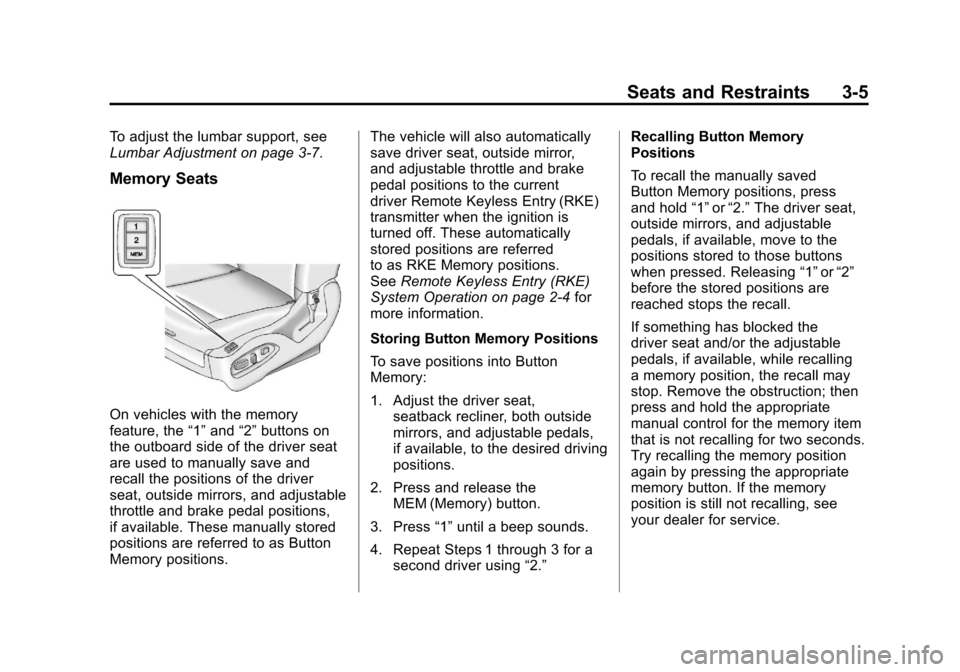
Memory Seats
On vehicles with the memory
feature, the“1”and “2”buttons on
the outboard side of the driver seat
are used to manually save and
recall the positions of the driver
seat, outside mirrors, and adjustable
throttle and brake pedal positions,
if available. These manually stored
positions are referred to as Button
Memory positions. The vehicle will also automatically
save driver seat, outside mirror,
and adjustable throttle and brake
pedal positions to the current
driver Remote Keyless Entry (RKE)
transmitter when the ignition is
turned off. These automatically
stored positions are referred
to as RKE Memory positions.
See
Remote Keyless Entry (RKE)
System Operation on page 2‑4 for
more information.
Storing Button Memory Positions
To save positions into Button
Memory:
1. Adjust the driver seat, seatback recliner, both outside
mirrors, and adjustable pedals,
if available, to the desired driving
positions.
2. Press and release the MEM (Memory) button.
3. Press “1”until a beep sounds.
4. Repeat Steps 1 through 3 for a second driver using “2.”Recalling Button Memory
Positions
To recall the manually saved
Button Memory positions, press
and hold
“1”or“2.” The driver seat,
outside mirrors, and adjustable
pedals, if available, move to the
positions stored to those buttons
when pressed. Releasing “1”or“2”
before the stored positions are
reached stops the recall.
If something has blocked the
driver seat and/or the adjustable
pedals, if available, while recalling
a memory position, the recall may
stop. Remove the obstruction; then
press and hold the appropriate
manual control for the memory item
that is not recalling for two seconds.
Try recalling the memory position
again by pressing the appropriate
memory button. If the memory
position is still not recalling, see
your dealer for service.
Page 70 of 498
Black plate (6,1)Cadillac SRX Owner Manual - 2011
3-6 Seats and Restraints
Recalling RKE Memory Positions
(Memory Remote Recall)
The Memory Remote Recall feature
can recall the driver seat, outside
mirrors, and adjustable pedals,
if available, to previously stored
RKE Memory positions when
entering the vehicle.
Every time the ignition is
placed in OFF, the positions
of the driver seat, outside mirrors,
and adjustable pedals, if available,
are automatically stored to the RKE
transmitter that was used to start
the vehicle. These positions are
called RKE Memory positions and
may be different than the previously
mentioned Button Memory positions
saved to the“1”or“2” buttons. To automatically recall RKE
Memory positions, unlock the driver
door with the RKE transmitter, and
open the driver door. On vehicles
with Keyless Access, opening the
driver door when an RKE transmitter
is present will activate the RKE
Memory recall. If the driver door
is already open, pressing the
RKE transmitter
Kbutton will also
activate the RKE Memory recall.
The driver seat, outside mirrors,
and pedals, if available, will move to
the previously saved RKE Memory
positions.
This feature is turned on or off using
the vehicle personalization menu.
See “Memory Remote Recall”
under Vehicle Personalization on
page 5‑40 for more information. To stop recall movement, press
one of the memory, power mirror,
or power seat controls, or the
adjustable pedal switch, if available.
If something has blocked the
driver seat and/or the adjustable
pedals, if available, while recalling
a memory position, the recall
may stop. Remove the obstruction;
then press and hold the appropriate
manual control for the memory item
that is not recalling for two seconds.
Try recalling the memory position
again by opening the driver door
and pressing the RKE transmitter
K
button. If the memory position is
still not recalling, see your dealer
for service.
Page 182 of 498
Black plate (36,1)Cadillac SRX Owner Manual - 2011
5-36 Instruments and Controls
Engine Power Messages
ENGINE POWER IS REDUCED
This message displays when the
vehicle's engine power is reduced.
Reduced engine power can affect
the vehicle's ability to accelerate.
If this message is on, but there
is no reduction in performance,
proceed to your destination.
The performance may be reduced
the next time the vehicle is driven.
The vehicle may be driven at a
reduced speed while this message
is on, but maximum acceleration
and speed may be reduced.
Anytime this message stays on,
the vehicle should be taken to
your dealer for service as soon
as possible.
Fuel System Messages
FUEL LEVEL LOW
This message displays when the
vehicle is low on fuel. Refuel as
soon as possible
TIGHTEN GAS CAP
This message displays when the
fuel cap is not on tight. Tighten the
fuel cap.
Key and Lock Messages
NO REMOTE DETECTED
This message displays when trying
to start the vehicle if the keyless
access system does not detect a
RKE transmitter. The transmitter
battery may be weak. See“Starting
the Vehicle with a Low Transmitter
Battery” underRemote Keyless
Entry (RKE) System Operation on
page 2‑4.
NO REMOTE PRESS BRAKE
TO RESTART
This message is displayed if the
remote is no longer detected in the
vehicle. Press the brake pedal to
restart the vehicle.
NUMBER OF KEYS
PROGRAMMED
This message displays when
programming new keys to the
vehicle.
REMOTE LEFT IN VEHICLE
This message displays when
leaving the vehicle with the RKE
transmitter still inside.
REPLACE BATTERY IN
REMOTE KEY
This message displays when the
battery in the RKE transmitter needs
to be replaced.
Page 184 of 498
Black plate (38,1)Cadillac SRX Owner Manual - 2011
5-38 Instruments and Controls
SERVICE TRACTION
CONTROL
This message displays when
there is a problem with the
Traction Control System (TCS).
SeeTraction Control System (TCS)
on page 9‑34.
SPORT MODE ON
This message displays when
Sport Mode has been activated.
See Selective Ride Control on
page 9‑37 andManual Mode on
page 9‑28 for more information.
Airbag System Messages
SERVICE AIRBAG
This message displays if there is
a problem with the airbag system.
Take the vehicle to your dealer for
service.
Safety Belt Messages
BUCKLE SEATBELT
This message displays as a
reminder when the safety belt
is not buckled.
Anti-Theft Alarm System
Messages
THEFT ATTEMPTED
This message displays if the vehicle
detects a tamper condition.
Service Vehicle Messages
SERVICE AC SYSTEM
This message is displayed if there is
a problem with the air conditioning
system. Take the vehicle to your
dealer for service.
SERVICE POWER STEERING
This message is displayed if there is
a problem with the power steering
system. Take the vehicle to your
dealer for service.
SERVICE VEHICLE SOON
This message is displayed if there is
a problem with the vehicle. Take the
vehicle to your dealer for service.
Starting the Vehicle
Messages
PRESS BRAKE TO START
VEHICLE
This message is displayed when
attempting to start the vehicle
without first pressing the brake
pedal.
SERVICE KEYLESS START
SYSTEM
This message is displayed if there
is a problem with the keyless start
system. Take the vehicle to your
dealer for service.
Page 191 of 498
Black plate (45,1)Cadillac SRX Owner Manual - 2011
Instruments and Controls 5-45
Door Unlock Options
This allows selection of which doors
will unlock when pressing the unlock
button on the RKE transmitter.
Press the MENU / SELECT knob
when Door Unlock Options is
highlighted. Turn the knob to
select All Doors or Driver Door Only.
When set to Driver Door Only, the
driver door will unlock the first time
the unlock button is pressed and all
doors will unlock when the button is
pressed a second time. When set
to All Doors, all of the doors will
unlock at the first press of the
unlock button. Press the knob
to confirm and go back to the
last menu.
Passive Door Lock
If the vehicle has the keyless
access system, when enabled,
this feature allows the doors to
lock after several seconds if all
doors are closed and at least one
keyless access transmitter has been
removed from the interior of thevehicle. It does not matter how far
away that the transmitter is from the
vehicle. This feature can also be
configured to chirp the horn when
the doors are passively locked.
Press the MENU/SELECT knob
when Passive Door Lock is
highlighted. Turn the knob to select
On With Chirp, On, or Off. Press the
knob to confirm and go back to the
last menu.
Passive Door Unlock
If the vehicle has the keyless
access system, this feature allows
you to select which doors will
automatically unlock when you open
the driver
’s door with the keyless
access transmitter present.
Press the MENU/SELECT knob
when Passive Door Unlock is
highlighted. Turn the knob to select
All Doors or Driver Door. Press the
knob to confirm and go back to the
last menu. Memory Remote Recall
This allows the Memory Remote
Recall feature to be turned on or off.
Press the MENU / SELECT knob
when Memory Remote Recall is
highlighted. Turn the knob to select
On or Off. Press the knob to confirm
and go back to the last menu.
Return to Factory Settings
Select Return to Factory
Settings to return all of the vehicle
personalization to the default
settings. Turn the knob to select
Yes or No. Press the knob to
confirm and go back to the
last menu.
Page 203 of 498
Black plate (7,1)Cadillac SRX Owner Manual - 2011
Lighting 6-7
Reading Lamps
There are reading lamps located on
the overhead console and over the
rear passenger doors. These lamps
come on automatically when any
door is opened.
To manually turn the reading lamps
on or off:
For the overhead console reading
lamps, press the button next to
each lamp.
For the rear passenger reading
lamps, press the lamp lens.
Lighting Features
Entry Lighting
The headlamps, taillamps, license
plate lamps, reverse lamps, dome
lamps, and most of the interior lights
turn on briefly, when the Remote
Keyless Entry (RKE)
Kis pressed,
or when the door handle is pulled.
See Ignition Positions on page 9‑18.
After about 30 seconds the exterior
lamps turn off, and then the dome
and remaining interior lights will dim
to off. Entry lighting can be disabled
manually by changing the ignition
out of the OFF position, or by
pressing the Remote Keyless
Entry (RKE)
Qbutton.
This feature can be changed.
See Vehicle Personalization on
page 5‑40.
Exit Lighting
The headlamps, taillamps, parking
lamps, reverse lamps, and license
plate lamps come on at night, or in
areas with limited lighting, when a
door is opened after the ignition is
turned off. The dome lamps also
come on when a door is opened
after the ignition is turned to off.
See Ignition Positions on page 9‑18.
The exterior lights and dome lamps
remain on after the door is closed
for a set amount of time, then
automatically turn off.
The exterior lights turn off
immediately by turning the exterior
lamps control to OFF.
This feature can be changed.
See Vehicle Personalization on
page 5‑40.
Page 294 of 498
Black plate (18,1)Cadillac SRX Owner Manual - 2011
9-18 Driving and Operating
Adjust the throttle and brake pedals
while the vehicle is in P (Park)
without pressing on the pedals.
The pedals cannot be adjusted
while the vehicle is in R (Reverse)
or when cruise control is engaged.
The throttle and brake pedals can
also be adjusted while driving.
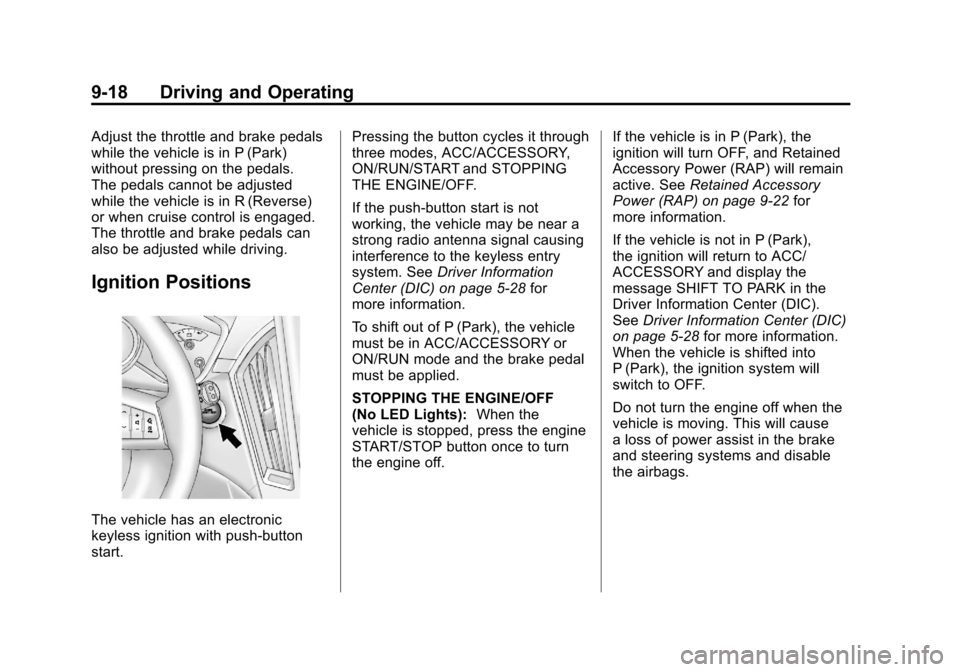
Ignition Positions
The vehicle has an electronic
keyless ignition with push‐button
start.Pressing the button cycles it through
three modes, ACC/ACCESSORY,
ON/RUN/START and STOPPING
THE ENGINE/OFF.
If the push-button start is not
working, the vehicle may be near a
strong radio antenna signal causing
interference to the keyless entry
system. See
Driver Information
Center (DIC) on page 5‑28 for
more information.
To shift out of P (Park), the vehicle
must be in ACC/ACCESSORY or
ON/RUN mode and the brake pedal
must be applied.
STOPPING THE ENGINE/OFF
(No LED Lights): When the
vehicle is stopped, press the engine
START/STOP button once to turn
the engine off. If the vehicle is in P (Park), the
ignition will turn OFF, and Retained
Accessory Power (RAP) will remain
active. See
Retained Accessory
Power (RAP) on page 9‑22 for
more information.
If the vehicle is not in P (Park),
the ignition will return to ACC/
ACCESSORY and display the
message SHIFT TO PARK in the
Driver Information Center (DIC).
See Driver Information Center (DIC)
on page 5‑28 for more information.
When the vehicle is shifted into
P (Park), the ignition system will
switch to OFF.
Do not turn the engine off when the
vehicle is moving. This will cause
a loss of power assist in the brake
and steering systems and disable
the airbags.
Page 295 of 498
Black plate (19,1)Cadillac SRX Owner Manual - 2011
Driving and Operating 9-19
In an emergency:
1. Brake using a firm and steadypressure. Do not pump the
brakes repeatedly. This may
deplete power assist, requiring
increased brake pedal force.
2. Shift the vehicle to N (Neutral). This can be done while the
vehicle is moving. After shifting
to N (Neutral), firmly apply the
brakes and steer the vehicle to
a safe location.
3. Come to a complete stop, shift to P (Park), and turn the ignition
to OFF. On vehicles with an
automatic transmission, the shift
lever must be in P (Park) to turn
the ignition switch to the OFF
position.
4. Set the parking brake. See Parking Brake on page 9‑31.
ACC/ACCESSORY (Amber LED
Light): This mode allows you to
use some electrical accessories
when the engine is off. With the ignition off, pressing the
button one time without the brake
pedal applied, will place the ignition
system in ACC/ACCESSORY.
The ignition will switch from
ACC/ACCESSORY to OFF after
five minutes to prevent battery
run down.
ON/RUN/START (Green LED
Light):
This mode is for driving and
starting. With the ignition off, and
the brake pedal applied, pressing
the button once will place the
ignition system in ON/RUN/START.
Once engine cranking begins,
release the button. Engine cranking
will continue until the engine starts.
See Starting the Gasoline Engine
on page 9‑19 for more information.
The ignition will then remain in
ON/RUN.Starting the Gasoline
Engine
Place the transmission in the proper
gear by moving the shift lever to
P (Park) or N (Neutral). To restart
the engine when the vehicle is
already moving, use N (Neutral).
Notice: Do not try to shift to
P (Park) if the vehicle is moving.
If you do, you could damage the
transmission. Shift to P (Park)
only when the vehicle is stopped.
The keyless access transmitter must
be inside the vehicle for the ignition
to work.
Cell phone chargers can interfere
with the operation of the Keyless
Access System. Battery chargers
should not be plugged in when
starting or turning off the engine.
Page 296 of 498
Black plate (20,1)Cadillac SRX Owner Manual - 2011
9-20 Driving and Operating
To start the vehicle:
Starting Procedure
1. With the brake pedal applied,press the START button located
on the instrument panel. See
Ignition Positions on page 9‑18.
2. When the engine begins cranking, let go of the button and
the engine cranks automatically
until it starts.
If the transmitter is not in
the vehicle or something is
interfering with the transmitter,
the Driver Information Center
(DIC) will display NO REMOTE
DETECTED. See Driver
Information Center (DIC) on
page 5‑28 for more information.
If the battery in the keyless
access transmitter needs
replacing, the DIC displays
Replace Battery In Remote Key.
The vehicle can still be driven.
See Remote Keyless Entry
(RKE) System Operation on
page 2‑4 for more information. 3. Do not race the engine
immediately after starting
it. Operate the engine and
transmission gently until the
oil warms up and lubricates
all moving parts.
4. If the engine does not start and no DIC message is displayed,
wait 15 seconds before trying
again to let the cranking motor
cool down.
If the engine does not start
after 5-10 seconds, especially
in very cold weather (below
−18°C or 0°F), it could be
flooded with too much gasoline.
Try pushing the accelerator
pedal all the way to the floor
while cranking for up to
15 seconds. Notice:
Cranking the engine for
long periods of time, by pressing
the START button immediately
after cranking has ended,
can overheat and damage the
cranking motor, and drain the
battery. Wait at least 15 seconds
between each try, to allow the
cranking motor to cool down.
When the engine starts, let go of
the accelerator. If the vehicle starts
briefly but then stops again, do the
same thing. This clears the extra
gasoline from the engine.
The vehicle has a
Computer-Controlled Cranking
System. This feature assists in
starting the engine and protects
components. Once cranking has
been initiated, the engine continues
cranking for a few seconds or until
the vehicle starts. If the engine does
not start, cranking automatically
stops after 15 seconds to prevent
cranking motor damage. To prevent
gear damage, this system also
prevents cranking if the engine is
already running.
Page 341 of 498
Black plate (3,1)Cadillac SRX Owner Manual - 2011
Vehicle Care 10-3
California Perchlorate
Materials Requirements
Certain types of automotive
applications, such as airbag
initiators, seat belt pretensioners,
and lithium batteries contained
in remote keyless transmitters,
may contain perchlorate materials.
Special handling may be necessary.
For additional information, see
www.dtsc.ca.gov/hazardouswaste/
perchlorate.
Accessories and
Modifications
Adding non‐dealer accessories
to the vehicle can affect vehicle
performance and safety, including
such things as airbags, braking,
stability, ride and handling,
emissions systems, aerodynamics,
durability, and electronic systems
like antilock brakes, traction control,
and stability control. Some of these
accessories could even cause
malfunction or damage not covered
by the vehicle warranty.
Damage to vehicle components
resulting from the installation or use
of non‐GM certified parts, including
control module modifications, is notcovered under the terms of the
vehicle warranty and may affect
remaining warranty coverage for
affected parts.
GM Accessories are designed to
complement and function with other
systems on the vehicle. Your GM
dealer can accessorize the vehicle
using genuine GM Accessories.
When you go to your GM dealer
and ask for GM Accessories, you
will know that GM-trained and
supported service technicians will
perform the work using genuine
GM Accessories.
Also, see
Adding Equipment to
the Airbag-Equipped Vehicle on
page 3‑44.