ECU CADILLAC SRX 2011 2.G Workshop Manual
[x] Cancel search | Manufacturer: CADILLAC, Model Year: 2011, Model line: SRX, Model: CADILLAC SRX 2011 2.GPages: 498, PDF Size: 7.62 MB
Page 379 of 498
Black plate (41,1)Cadillac SRX Owner Manual - 2011
Vehicle Care 10-41
Front Turn Signal Lamp
(Base and Up-Level)
To replace the Front Turn
Signal Lamp:
1. Remove the turn signal lampbulb socket from the headlamp
assembly.
2. Remove the turn signal lamp bulb from the socket.
3. Replace the bulb in the bulb socket.
4. Install the bulb socket in the headlamp assembly.
5. For driver side, reinstall the underhood electrical center
cover by latching three clips.
6. For passenger side, reinstall the air filter/cleaner assembly base
by pushing to seat. Verify the
base is seated securely, then
install the engine air filter/
cleaner assembly.
Fog Lamps
To replace the fog lamp bulb:
1. Locate the bulb assembly underthe front fascia.
2. Disconnect the electrical connector from the bulb
assembly.
3. Remove the bulb by turning it counterclockwise and pulling it
straight out of the assembly.
4. Install the new bulb by turning it clockwise into the assembly.
5. Reconnect the electrical connector to the bulb assembly.
Turn Signal Lamps
To replace one of these bulbs:
1. Open the liftgate. See Liftgate
(Manual) on page 2‑14 or
Liftgate (Power) on page 2‑15.
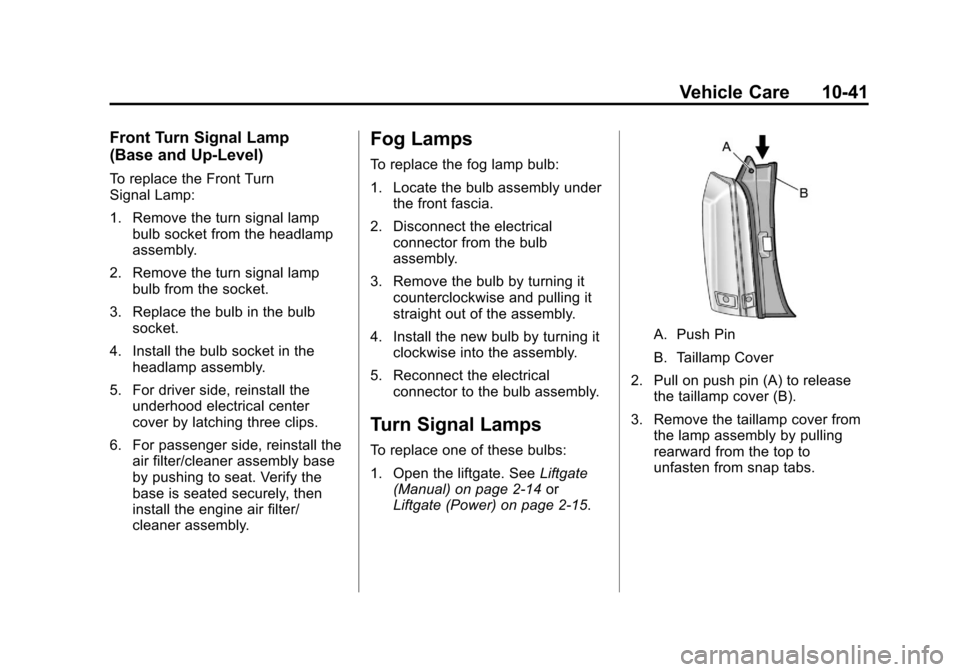
A. Push Pin
B. Taillamp Cover
2. Pull on push pin (A) to release the taillamp cover (B).
3. Remove the taillamp cover from the lamp assembly by pulling
rearward from the top to
unfasten from snap tabs.
Page 380 of 498
Black plate (42,1)Cadillac SRX Owner Manual - 2011
10-42 Vehicle Care
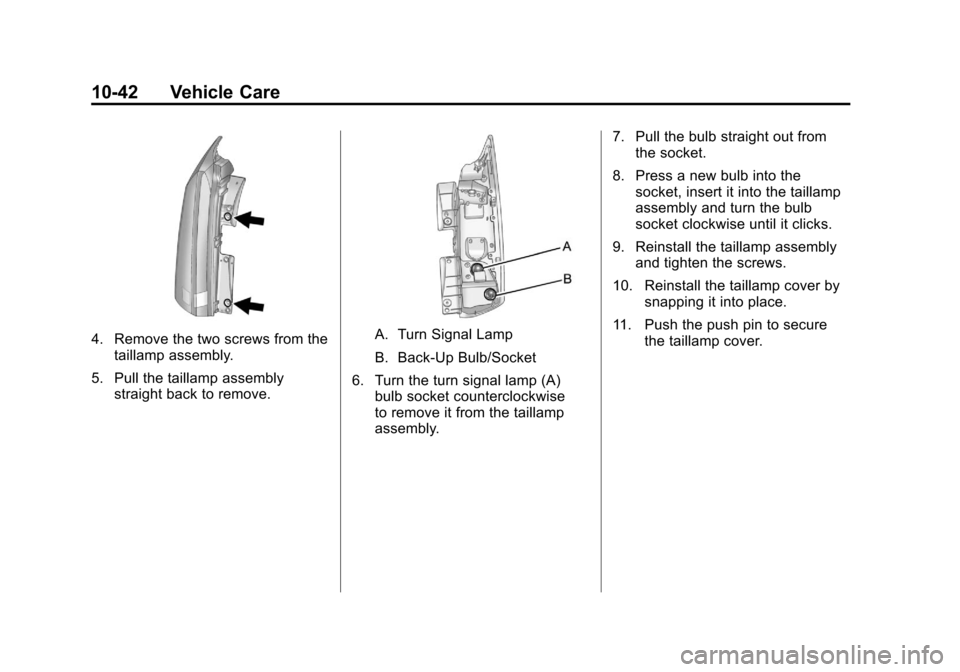
4. Remove the two screws from thetaillamp assembly.
5. Pull the taillamp assembly straight back to remove.A. Turn Signal Lamp
B. Back-Up Bulb/Socket
6. Turn the turn signal lamp (A) bulb socket counterclockwise
to remove it from the taillamp
assembly. 7. Pull the bulb straight out from
the socket.
8. Press a new bulb into the socket, insert it into the taillamp
assembly and turn the bulb
socket clockwise until it clicks.
9. Reinstall the taillamp assembly and tighten the screws.
10. Reinstall the taillamp cover by snapping it into place.
11. Push the push pin to secure the taillamp cover.
Page 382 of 498
Black plate (44,1)Cadillac SRX Owner Manual - 2011
10-44 Vehicle Care
8. Press a new bulb/socket into thetaillamp assembly and turn the
bulb/socket clockwise until it
clicks.
9. Reinstall the taillamp assembly and tighten the screws.
10. Reinstall the taillamp cover by snapping it into place.
11. Push the push pin to secure the taillamp cover.
License Plate Lamp
To replace one of these bulbs:
1. Open the liftgate. See Liftgate
(Manual) on page 2‑14 or
Liftgate (Power) on page 2‑15
for more information.
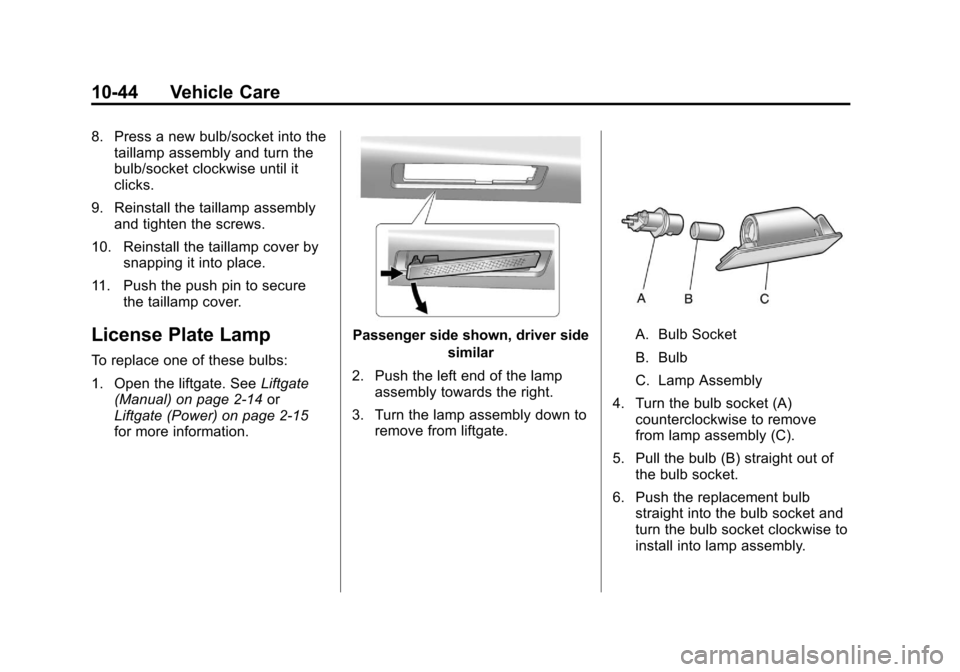
Passenger side shown, driver side
similar
2. Push the left end of the lamp assembly towards the right.
3. Turn the lamp assembly down to remove from liftgate.A. Bulb Socket
B. Bulb
C. Lamp Assembly
4. Turn the bulb socket (A) counterclockwise to remove
from lamp assembly (C).
5. Pull the bulb (B) straight out of the bulb socket.
6. Push the replacement bulb straight into the bulb socket and
turn the bulb socket clockwise to
install into lamp assembly.
Page 391 of 498
Black plate (53,1)Cadillac SRX Owner Manual - 2011
Vehicle Care 10-53
FusesUsage
RDM Rear Drive Module PRK
LPS TRLR Trailer Park Lamps
FUEL
PUMP Fuel Pump
* SEC Security
INFOTMNT Infotainment
* TRLR EXP Trailer Export WPR REAR Rear Wiper
MIR
WDO MDL Mirror Window
Module
* SPARE Not Used CNSTR VENT Canister Vent
LGM
LOGIC Lift Gate Module
Logic Fuses
Usage
CAMERA Rear Vision Camera FRT
VENT SEAT Front Ventilated
Seats
TRLR MDL Trailer Module
SADS MDL Semi Active
Damping System
Module
RR
HTD SEAT Rear Heated Seats
FRT
HTD SEAT Front Heated Seats
THEFT HORN Theft Horn
* LGATE Liftgate SHUNT Shunt REAR
DEFOG Rear Defog
* BCM
THEFT Body Control
Module Theft Fuses
Usage
* TRLR 2 Trailer 2
UGDO Universal Garage
Door Opener
RT WDO Right Window PRK
BRK MDL Park Brake Module
SPARE Not Used
LT WDO Left Window IGN/
THEFT 1 Ignition/Theft 1
LGATE MDL Liftgate Module
IGN/
THEFT 2 Ignition/Theft 2
SPARE Not Used
HTD MIR Heated Mirror
AUX PWR Auxiliary Power
Outlet
Page 437 of 498
Black plate (99,1)Cadillac SRX Owner Manual - 2011
Vehicle Care 10-99
Vehicles with an 2.8 L V 6 engine
can be dinghy towed only for
service and are restricted to a
maximum distance of 100 km
(60 miles) and not to exceed
80 km/h (50 mph).
Vehicles with the 3.0 L V 6 engine
can be dinghy towed without
distance restrictions.
Notice:If 105 km/h (65 mph)
is exceeded while towing the
vehicle, it could be damaged.
Never exceed 105 km/h (65 mph)
while towing the vehicle.
For vehicles being dinghy towed,
the vehicle should be run at the
beginning of each day and at each
RV fuel stop for about five minutes.
This will ensure proper lubrication
of transmission components.
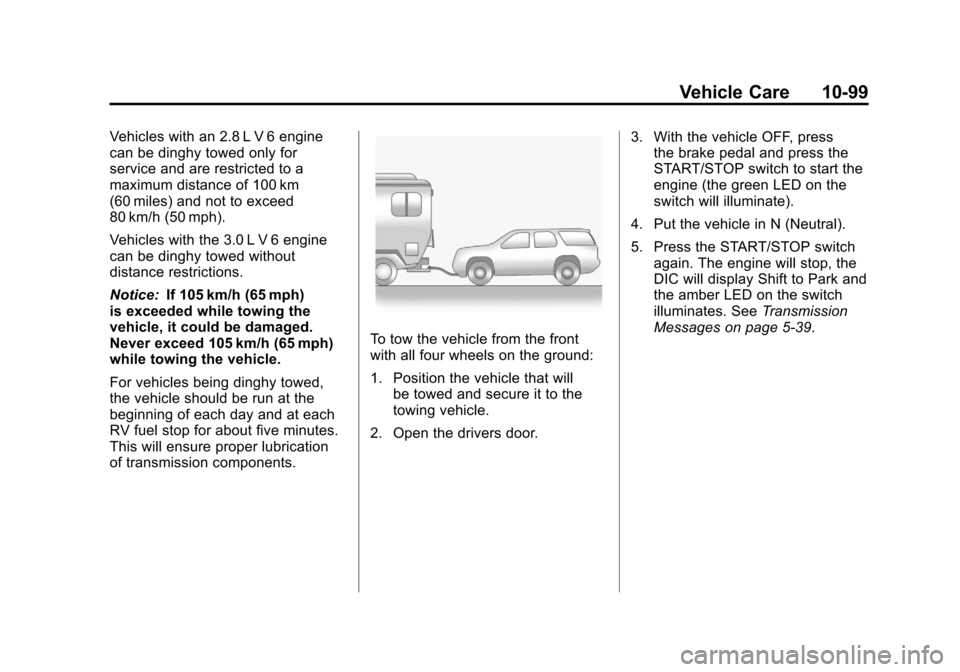
To tow the vehicle from the front
with all four wheels on the ground:
1. Position the vehicle that will be towed and secure it to the
towing vehicle.
2. Open the drivers door. 3. With the vehicle OFF, press
the brake pedal and press the
START/STOP switch to start the
engine (the green LED on the
switch will illuminate).
4. Put the vehicle in N (Neutral).
5. Press the START/STOP switch again. The engine will stop, the
DIC will display Shift to Park and
the amber LED on the switch
illuminates. See Transmission
Messages on page 5‑39.
Page 439 of 498
Black plate (101,1)Cadillac SRX Owner Manual - 2011
Vehicle Care 10-101
4. Secure the vehicle to the dolly.
5. Follow the dolly manufacturer'sinstructions for preparing the
vehicle and dolly for towing.
6. Release the parking brake.
Towing the Vehicle From
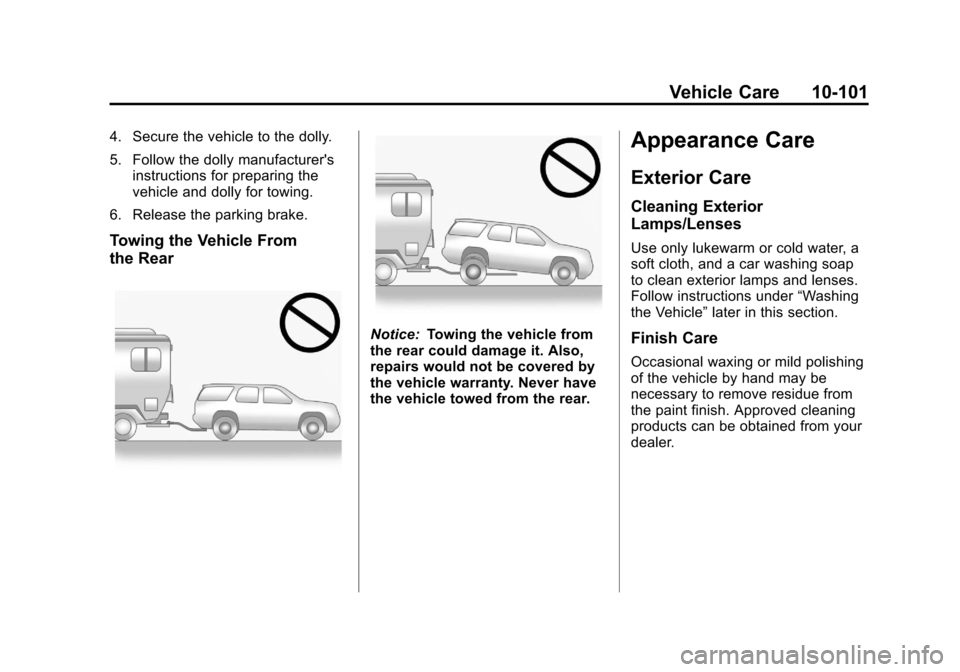
the Rear
Notice: Towing the vehicle from
the rear could damage it. Also,
repairs would not be covered by
the vehicle warranty. Never have
the vehicle towed from the rear.
Appearance Care
Exterior Care
Cleaning Exterior
Lamps/Lenses
Use only lukewarm or cold water, a
soft cloth, and a car washing soap
to clean exterior lamps and lenses.
Follow instructions under “Washing
the Vehicle” later in this section.
Finish Care
Occasional waxing or mild polishing
of the vehicle by hand may be
necessary to remove residue from
the paint finish. Approved cleaning
products can be obtained from your
dealer.
Page 447 of 498
Black plate (109,1)Cadillac SRX Owner Manual - 2011
Vehicle Care 10-109
Use the following guidelines for
proper floor mat usage.
.The original equipment floor
mats were designed for your
vehicle. If the floor mats need
replacing, it is recommended
that GM certified floor mats be
purchased. Non-GM floor mats
may not fit properly and may
interfere with the accelerator or
brake pedal. Always check that
the floor mats do not interfere
with the pedals.
.Use the floor mat with the
correct side up. Do not turn
it over.
.Do not place anything on top of
the driver side floor mat.
.Use only a single floor mat on
the driver side.
.Do not place one floor mat on
top of another.
Removing and Replacing the
Floor Mats
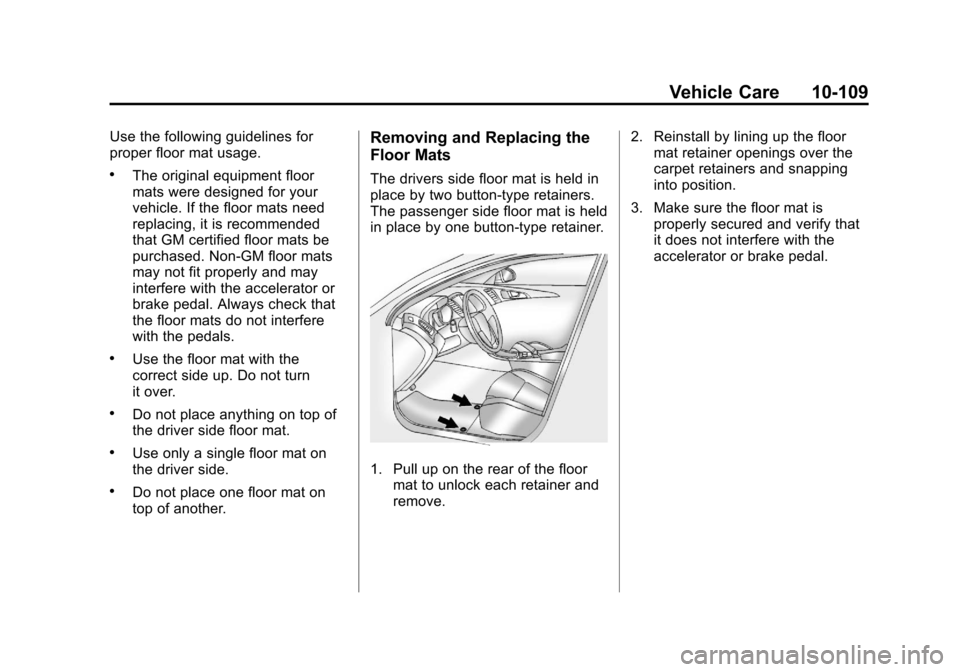
The drivers side floor mat is held in
place by two button-type retainers.
The passenger side floor mat is held
in place by one button-type retainer.
1. Pull up on the rear of the floormat to unlock each retainer and
remove. 2. Reinstall by lining up the floor
mat retainer openings over the
carpet retainers and snapping
into position.
3. Make sure the floor mat is properly secured and verify that
it does not interfere with the
accelerator or brake pedal.
Page 469 of 498
Black plate (5,1)Cadillac SRX Owner Manual - 2011
Customer Information 13-5
SeeCustomer Assistance Offices
(U.S. and Canada) on page 13‑5
or Customer Assistance Offices
(Mexico) on page 13‑5 for more
information.
Customer Assistance
Offices (U.S. and Canada)
Cadillac encourages customers
to call the toll-free number for
assistance. However, if a customer
wishes to write or e-mail Cadillac,
the letter should be addressed to:
United States
Cadillac Customer Assistance
Center
Cadillac Motor Car Division
P.O. Box 33169
Detroit, MI 48232-5169
www.Cadillac.com
1-800-458-8006
1-800-833-2622 (For Text
Telephone devices (TTYs))
Roadside Assistance:
1-800-882-1112 From Puerto Rico:
1-800-496-9992 (English)
1-800-496-9993 (Spanish)
From U.S. Virgin Islands:
1-800-496-9994
Canada
General Motors of Canada Limited
Canadian Cadillac Customer
Communication Centre, Mail Code:
CA1-163-005
1908 Colonel Sam Drive
Oshawa, Ontario L1H 8P7
www.gm.ca
1-888-446-2000
1-800-263-3830 (For Text
Telephone devices (TTYs))
Roadside Assistance:
1-800-882-1112
Overseas
Please contact the local
General Motors Business Unit.
Mexico, Central America and
Caribbean Islands/Countries
(Except Puerto Rico and
U.S. Virgin Islands)
General Motors de Mexico,
S. de R.L. de C.V.
Customer Assistance Center
Av. Ejercito Nacional #843
Col. Granada
C.P. 11520, Mexico, D.F.
01-800-466-0805
Long Distance: 011-52-53 29 0805
Customer Assistance
Offices (Mexico)
To contact the Customer Assistance
Center (CAC), use the phone
numbers listed in this section.
Customer assistance is available
Monday through Friday, 08:00 to
20:00 hours, and Saturdays from
08:00 to 15:00 hours.
All e-mail inquiries to the Customer
Assistance Center (CAC) should be
sent to: [email protected].
Page 473 of 498
Black plate (9,1)Cadillac SRX Owner Manual - 2011
Customer Information 13-9
Cadillac Owner Privileges™
.Emergency Fuel Delivery:
Delivery of enough fuel for the
vehicle to get to the nearest
service station.
.Lock‐Out Service:Service to
unlock the vehicle if you are
locked out. A remote unlock may
be available if you have OnStar.
For security reasons, the driver
must present identification
before this service is given.
.Emergency Tow From a Public
Road or Highway: Tow to
the nearest Cadillac dealer for
warranty service, or if the vehicle
was in a crash and cannot be
driven. Assistance is also given
when the vehicle is stuck in the
sand, mud, or snow.
.Flat Tire Change: Service to
change a flat tire with spare tire.
The spare tire, if equipped,
must be in good condition and properly inflated. It is your
responsibility for the repair or
replacement of the tire if it is not
covered by the warranty.
.Battery Jump Start:
Service to
jump start a dead battery.
.Trip Routing Service: Detailed
maps of North America are
provided when requested
either with the most direct
route or the most scenic route.
Additional travel information
is also available. Allow three
weeks for delivery.
.Trip Interruption Benefits
and Service: If your trip is
interrupted due to a warranty
failure, incidental expenses
may be reimbursed during
the 5 years/160 000 km
(100,000 miles) Powertrain
warranty period. Items
considered are hotel, meals,
and rental car.
Cadillac Technician Roadside
Service (U.S. only)
Cadillac's exceptional Roadside
Service is more than an auto club
or towing service. It provides every
Cadillac owner in the United States
with the advantage of contacting
a Cadillac advisor and, where
available, a Cadillac trained dealer
technician who can provide on-site
service.
A dealer technician will travel to
your location within a 30 mile
radius of a participating Cadillac
dealership. If beyond this radius, we
will arrange to have your car towed
to the nearest Cadillac dealership.
Each technician travels with a
specially equipped service vehicle
complete with the necessary
Cadillac parts and tools required
to handle most roadside repairs.
Page 483 of 498
Black plate (19,1)Cadillac SRX Owner Manual - 2011
Customer Information 13-19
GM will not access this data or
share it with others except: with the
consent of the vehicle owner or,
if the vehicle is leased, with the
consent of the lessee; in response
to an official request by police or
similar government office; as part
of GM's defense of litigation through
the discovery process; or, as
required by law. Data that GM
collects or receives may also be
used for GM research needs or may
be made available to others for
research purposes, where a need is
shown and the data is not tied to a
specific vehicle or vehicle owner.OnStar®
If your vehicle is equipped with
an active OnStar system, that
system may also record data in
crash or near crash‐like situations.
The OnStar Terms and Conditions
provides information on data
collection and use and is available
in the OnStar glove box kit,
at www.onstar.com (U.S.) or
www.onstar.ca (Canada), or
by pressing the
Qbutton and
speaking to an advisor.
Navigation System
If the vehicle has a navigation
system, use of the system may
result in the storage of destinations,
addresses, telephone numbers, and
other trip information. Refer to the
navigation system operating manual
for information on stored data and
for deletion instructions.
Radio Frequency
Identification (RFID)
RFID technology is used in some
vehicles for functions such as tire
pressure monitoring and ignition
system security, as well as in
connection with conveniences
such as key fobs for remote door
locking/unlocking and starting, and
in-vehicle transmitters for garage
door openers. RFID technology in
GM vehicles does not use or record
personal information or link with
any other GM system containing
personal information.