alarm CADILLAC SRX 2011 2.G Owners Manual
[x] Cancel search | Manufacturer: CADILLAC, Model Year: 2011, Model line: SRX, Model: CADILLAC SRX 2011 2.GPages: 498, PDF Size: 7.62 MB
Page 10 of 498
Black plate (4,1)Cadillac SRX Owner Manual - 2011
1-4 In Brief
Initial Drive
Information
This section provides a brief
overview about some of the
important features that may or may
not be on your specific vehicle.
For more detailed information, refer
to each of the features which can be
found later in this owner manual.
Remote Keyless
Entry (RKE) System
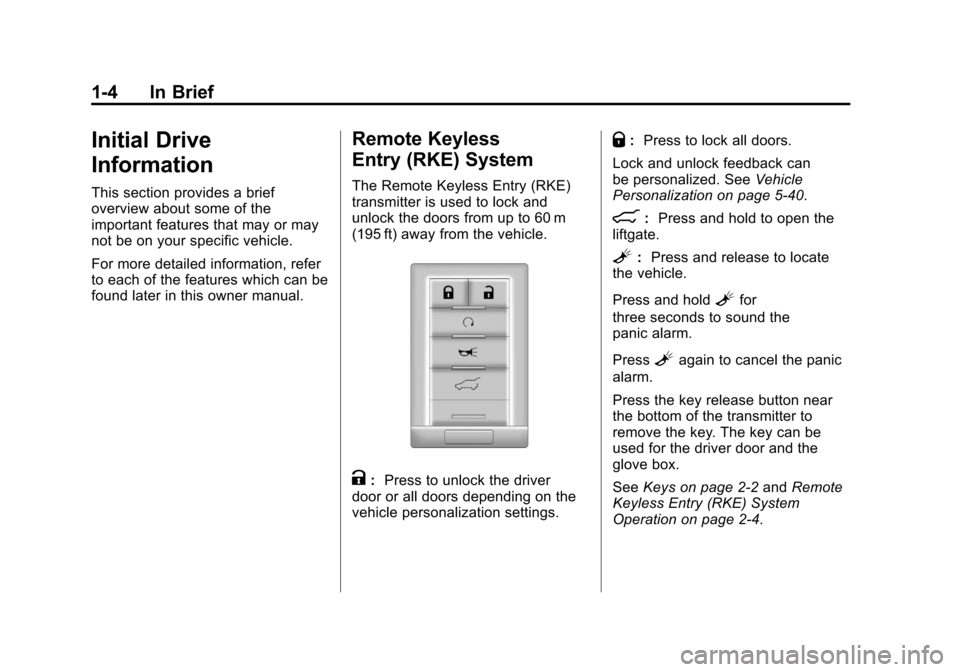
The Remote Keyless Entry (RKE)
transmitter is used to lock and
unlock the doors from up to 60 m
(195 ft) away from the vehicle.
K:Press to unlock the driver
door or all doors depending on the
vehicle personalization settings.
Q: Press to lock all doors.
Lock and unlock feedback can
be personalized. See Vehicle
Personalization on page 5‑40.
&: Press and hold to open the
liftgate.
L: Press and release to locate
the vehicle.
Press and hold
Lfor
three seconds to sound the
panic alarm.
Press
Lagain to cancel the panic
alarm.
Press the key release button near
the bottom of the transmitter to
remove the key. The key can be
used for the driver door and the
glove box.
See Keys on page 2‑2 andRemote
Keyless Entry (RKE) System
Operation on page 2‑4.
Page 35 of 498
Black plate (1,1)Cadillac SRX Owner Manual - 2011
Keys, Doors and Windows 2-1
Keys, Doors and
Windows
Keys and Locks
Keys . . . . . . . . . . . . . . . . . . . . . . . . . . 2-2
Remote Keyless Entry (RKE)System . . . . . . . . . . . . . . . . . . . . . . 2-3
Remote Keyless Entry (RKE) System Operation . . . . . . . . . . . 2-4
Remote Vehicle Start . . . . . . . . 2-10
Door Locks . . . . . . . . . . . . . . . . . . 2-12
Power Door Locks . . . . . . . . . . . 2-12
Safety Locks . . . . . . . . . . . . . . . . . 2-13
Doors
Liftgate (Manual) . . . . . . . . . . . . . 2-14
Liftgate (Power) . . . . . . . . . . . . . . 2-15
Vehicle Security
Vehicle Security . . . . . . . . . . . . . . 2-19
Anti-Theft Alarm System . . . . . 2-19
Immobilizer . . . . . . . . . . . . . . . . . . 2-20
Immobilizer Operation . . . . . . . 2-20
Exterior Mirrors
Convex Mirrors . . . . . . . . . . . . . . 2-21
Power Mirrors . . . . . . . . . . . . . . . . 2-22
Folding Mirrors . . . . . . . . . . . . . . . 2-22
Heated Mirrors . . . . . . . . . . . . . . . 2-23
Automatic Dimming Mirror . . . 2-23
Reverse Tilt Mirrors . . . . . . . . . . 2-23
Interior Mirrors
Manual Rearview Mirror . . . . . . 2-23
Automatic Dimming Rearview Mirror . . . . . . . . . . . . . . . . . . . . . . . 2-24
Windows
Windows . . . . . . . . . . . . . . . . . . . . . 2-24
Power Windows . . . . . . . . . . . . . 2-25
Sun Visors . . . . . . . . . . . . . . . . . . . 2-27
Roof
Sunroof . . . . . . . . . . . . . . . . . . . . . . 2-28
Page 38 of 498
Black plate (4,1)Cadillac SRX Owner Manual - 2011
2-4 Keys, Doors and Windows
Remote Keyless Entry
(RKE) System Operation
The Remote Keyless Entry (RKE)
transmitter functions will work up to
60 m (195 ft) away from the vehicle.
Keep in mind that other conditions,
such as those previously stated,
can impact the performance of the
transmitter.
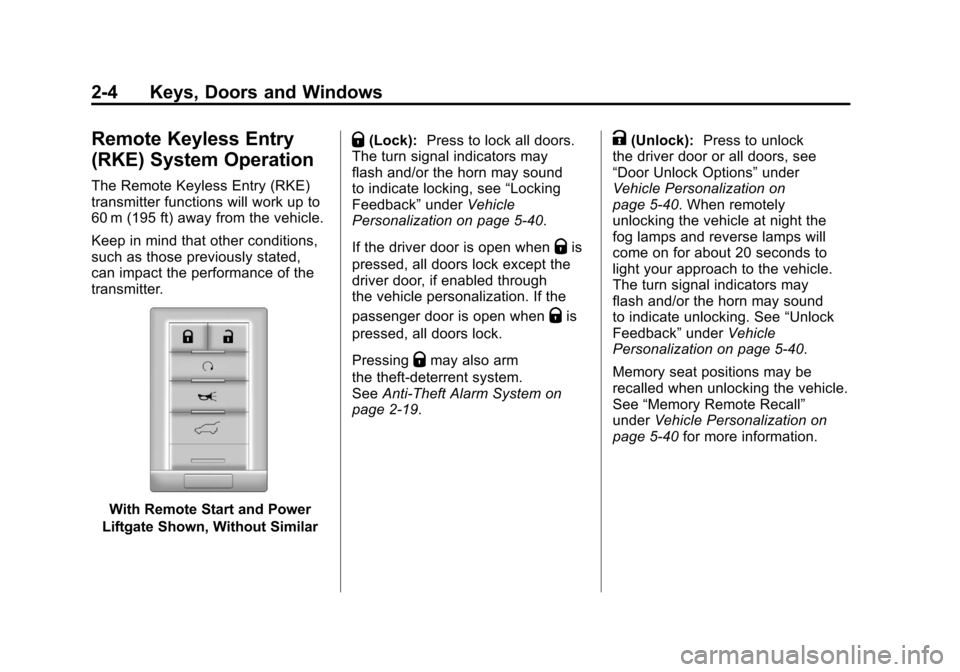
With Remote Start and Power
Liftgate Shown, Without Similar
Q(Lock): Press to lock all doors.
The turn signal indicators may
flash and/or the horn may sound
to indicate locking, see “Locking
Feedback” underVehicle
Personalization on page 5‑40.
If the driver door is open when
Qis
pressed, all doors lock except the
driver door, if enabled through
the vehicle personalization. If the
passenger door is open when
Qis
pressed, all doors lock.
Pressing
Qmay also arm
the theft-deterrent system.
See Anti-Theft Alarm System on
page 2‑19.
K(Unlock): Press to unlock
the driver door or all doors, see
“Door Unlock Options” under
Vehicle Personalization on
page 5‑40. When remotely
unlocking the vehicle at night the
fog lamps and reverse lamps will
come on for about 20 seconds to
light your approach to the vehicle.
The turn signal indicators may
flash and/or the horn may sound
to indicate unlocking. See “Unlock
Feedback” underVehicle
Personalization on page 5‑40.
Memory seat positions may be
recalled when unlocking the vehicle.
See “Memory Remote Recall”
under Vehicle Personalization on
page 5‑40 for more information.
Page 39 of 498
Black plate (5,1)Cadillac SRX Owner Manual - 2011
Keys, Doors and Windows 2-5
PressingKwill disarm
the theft-deterrent system.
See Anti-Theft Alarm System on
page 2‑19.
/(Remote Start): For vehicles
with this feature, press
Qand
then press and hold
/within
two seconds to start the engine
from outside the vehicle using the
RKE transmitter. See Remote
Vehicle Start on page 2‑10 for
additional information.
L(Vehicle Locator/Panic
Alarm): Press and release
one time to locate the vehicle.
The exterior lamps flash and the
horn chirps. Press and hold
Lfor
three seconds to sound the panic
alarm. The horn sounds and
the turn signal lamps flash for
30 seconds, or until
Lis pressed
again or the vehicle is started.
&(Remote Liftgate Release):
Press until the liftgate begins to
move to open or close the power
liftgate.
Keyless Access Operation
Some vehicles have the keyless
access system that lets you lock
and unlock the doors and access
the liftgate without removing the
remote transmitter from your pocket,
purse, briefcase, etc. The keyless
entry transmitter must be within 1 m
(3 ft) of the door being opened.
If the vehicle has this feature, there
will be a body colored touch pad on
the outside front door handles.
Keyless Unlocking
With the transmitter within 1 m (3 ft),
approach the front door and pull
the handle. If the transmitter is
recognized, the door will unlock
and open.
Entering any door other than the
driver door will always cause all
of the doors to unlock. This is not
customizable.
To customize which doors unlock
when the driver ’s door is opened,
see “Passive Unlock” underVehicle
Personalization on page 5‑40. Keyless Locking
If the vehicle has the keyless
access system, this feature
allows you to select whether the
doors automatically lock during
normal vehicle exit. When the
vehicle is turned off and all doors
become closed, the vehicle will
determine how many keyless
access transmitters remain in the
vehicle interior. If at least one
keyless access transmitter has
been removed from the interior
of the vehicle, the doors will lock
after eight seconds.
If there are two keyless access
transmitters in the vehicle and
one is removed, the other will be
locked in. A person approaching
the outside of the locked vehicle
without an authorized keyless
access transmitter will not be able
to open the door, even with the
transmitter in the vehicle.
Page 53 of 498
Black plate (19,1)Cadillac SRX Owner Manual - 2011
Keys, Doors and Windows 2-19
Vehicle Security
This vehicle has theft-deterrent
features; however, they do not make
it impossible to steal.
Anti-Theft Alarm System
This vehicle has an anti-theft alarm
system.
The LED light, located on
the instrument panel near the
windshield, indicates the status
of the system.
Arming the System
To arm the system,
1. Close all doors, liftgateand hood.
2. Lock the vehicle using the transmitter, or the power door
lock button. The LED on the
instrument panel should come
on and stay on for about
30 seconds.
3. After 30 seconds, the alarm system will arm, and the
LED will begin to slowly flash
indicating the alarm is operating. If a door, the hood, or liftgate is
opened without first unlocking with
the transmitter, the vehicle’s turn
signals will flash and the horn
will sound for about 30 seconds.
The alarm system will then re-arm
to monitor for the next unauthorized
event.
The theft-deterrent alarm system will
not activate if the doors are locked
with the vehicle's key. You can
start the vehicle with a recognized
transmitter in the vehicle if the alarm
has been set off.
Page 54 of 498
Black plate (20,1)Cadillac SRX Owner Manual - 2011
2-20 Keys, Doors and Windows
Disarming the System
To disarm the system, either
unlock the doors using the
transmitter, or start the vehicle
with a recognized transmitter in
the vehicle.
To avoid setting off the alarm by
accident:
.Lock the vehicle with the
transmitter after all occupants
have left the vehicle and all
doors are closed.
.Always unlock a door with the
transmitter. Unlocking a door any
other way will not disarm the
alarm.
If you set off the alarm by accident,
turn off the alarm by pressing the
unlock button on the transmitter.
The alarm will not stop if you try
to unlock a door any other way.
How to Detect a Tamper
Condition
IfKis pressed and the horn chirps
three times, an attempted break-in
has occurred while the system was
armed.
If the alarm has been activated,
the “Theft Attempted” message will
appear on the DIC. See Key and
Lock Messages on page 5‑36 for
additional information.
Immobilizer
See Radio Frequency
Statement on page 13‑20 for
information regarding Part 15
of the Federal Communications
Commission (FCC) rules and
Industry Canada Standards
RSS-210/220/310.
Immobilizer Operation
This vehicle has a passive
theft-deterrent system.
The system does not have to be
manually armed or disarmed.
The vehicle is automatically
immobilized when the vehicle
is turned off.
The immobilization system is
disarmed when the pushbutton
start is activated to enter the
ACC/ACCESSORY mode or the
ON/RUN/START mode and a valid
transmitter is present in the vehicle.
The security light, located in the
instrument panel cluster, comes on
if there is a problem with arming
or disarming the theft-deterrent
system.
Page 148 of 498
Black plate (2,1)Cadillac SRX Owner Manual - 2011
5-2 Instruments and Controls
Airbag System Messages . . . . 5-38
Safety Belt Messages . . . . . . . 5-38
Anti-Theft Alarm SystemMessages . . . . . . . . . . . . . . . . . . 5-38
Service Vehicle Messages . . . 5-38
Starting the Vehicle
Messages . . . . . . . . . . . . . . . . . . 5-38
Tire Messages . . . . . . . . . . . . . . . 5-39
Transmission Messages . . . . . 5-39
Vehicle Reminder Messages . . . . . . . . . . . . . . . . . . 5-40
Washer Fluid Messages . . . . . 5-40
Vehicle Personalization
Vehicle Personalization . . . . . . 5-40
Universal Remote System
Universal Remote System . . . 5-46
Universal Remote System Programming . . . . . . . . . . . . . . . 5-46
Universal Remote System Operation . . . . . . . . . . . . . . . . . . 5-49
Controls
Steering Wheel
Adjustment
To adjust the steering wheel:
1. Pull the lever down.
2. Move the steering wheel up
or down. 3. Pull or push the steering wheel
closer or away from you.
4. Pull the lever up to lock the steering wheel in place.
Do not adjust the steering wheel
while driving.
Steering Wheel Controls
Use these controls, if equipped, to
make audio adjustments at the
steering wheel.
Page 184 of 498
Black plate (38,1)Cadillac SRX Owner Manual - 2011
5-38 Instruments and Controls
SERVICE TRACTION
CONTROL
This message displays when
there is a problem with the
Traction Control System (TCS).
SeeTraction Control System (TCS)
on page 9‑34.
SPORT MODE ON
This message displays when
Sport Mode has been activated.
See Selective Ride Control on
page 9‑37 andManual Mode on
page 9‑28 for more information.
Airbag System Messages
SERVICE AIRBAG
This message displays if there is
a problem with the airbag system.
Take the vehicle to your dealer for
service.
Safety Belt Messages
BUCKLE SEATBELT
This message displays as a
reminder when the safety belt
is not buckled.
Anti-Theft Alarm System
Messages
THEFT ATTEMPTED
This message displays if the vehicle
detects a tamper condition.
Service Vehicle Messages
SERVICE AC SYSTEM
This message is displayed if there is
a problem with the air conditioning
system. Take the vehicle to your
dealer for service.
SERVICE POWER STEERING
This message is displayed if there is
a problem with the power steering
system. Take the vehicle to your
dealer for service.
SERVICE VEHICLE SOON
This message is displayed if there is
a problem with the vehicle. Take the
vehicle to your dealer for service.
Starting the Vehicle
Messages
PRESS BRAKE TO START
VEHICLE
This message is displayed when
attempting to start the vehicle
without first pressing the brake
pedal.
SERVICE KEYLESS START
SYSTEM
This message is displayed if there
is a problem with the keyless start
system. Take the vehicle to your
dealer for service.
Page 485 of 498

Black plate (1,1)Cadillac SRX Owner Manual - 2011
INDEX i-1
A
Accessories andModifications . . . . . . . . . . . . . . . . . 10-3
Accessory Power . . . . . . . . . . . . . . 9-22
Adaptive Forward Lighting (AFL) . . . . . . . . . . . . . . . . . 6-3
Adaptive Forward Lighting
(AFL) Light . . . . . . . . . . . . . . . . . . . 5-27
Add-On Electrical Equipment . . . . . . . . . . . . . . . . . . . 9-62
Adding Equipment to the
Airbag-Equipped Vehicle . . . . . 3-44
Adjustable Throttle and Brake Pedal . . . . . . . . . . . . . . . . . . 9-17
Adjustments Lumbar, Front Seats . . . . . . . . . . . 3-7
Thigh Support . . . . . . . . . . . . . . . . . 3-8
Air Cleaner/Filter, Engine . . . . . 10-16
Air Filter, Passenger Compartment . . . . . . . . . . . . . . . . . 8-6
Air Vents . . . . . . . . . . . . . . . . . . . . . . . 8-6 Airbag System
Check . . . . . . . . . . . . . . . . . . . . . . . . 3-46
How Does an Airbag
Restrain? . . . . . . . . . . . . . . . . . . . 3-36
Passenger Sensing System . . . . . . . . . . . . . . . . . . . . . . 3-39
What Makes an Airbag
Inflate? . . . . . . . . . . . . . . . . . . . . . . 3-36
What Will You See After an Airbag Inflates? . . . . . . . . . . 3-37
When Should an Airbag
Inflate? . . . . . . . . . . . . . . . . . . . . . . 3-34
Where Are the Airbags? . . . . . . 3-33
Airbags Adding Equipment to theVehicle . . . . . . . . . . . . . . . . . . . . . . 3-44
Passenger Status Indicator . . . 5-18
Readiness Light . . . . . . . . . . . . . . 5-17
Servicing Airbag-Equipped Vehicles . . . . . . . . . . . . . . . . . . . . . 3-44
System Check . . . . . . . . . . . . . . . . 3-30 Alarm System
Anti-Theft . . . . . . . . . . . . . . . . . . . . . 2-19
All-Wheel Drive . . . . . . . . . 10-28, 9-30
AM-FM Radio . . . . . . . . . . . . . . . . . . 7-12
Antenna Multi-Band . . . . . . . . . . . . . . . . . . . . 7-19
Anti-Theft
Alarm System . . . . . . . . . . . . . . . . 2-19
Alarm System Messages . . . . . 5-38
Antilock Brake System (ABS) . . . . . . . . . . . . . . . . 9-30
Warning Light . . . . . . . . . . . . . . . . . 5-23
Appearance Care Exterior . . . . . . . . . . . . . . . . . . . . 10-101
Interior . . . . . . . . . . . . . . . . . . . . . 10-106
Armrest Storage . . . . . . . . . . . . . . . . 4-2
Ashtrays . . . . . . . . . . . . . . . . . . . . . . . 5-10
Audio Players . . . . . . . . . . . . . . . . . 7-20
CD . . . . . . . . . . . . . . . . . . . . . . . . . . . 7-20
CD/DVD . . . . . . . . . . . . . . . . . . . . . . 7-22
Page 492 of 498

Black plate (8,1)Cadillac SRX Owner Manual - 2011
i-8 INDEX
Lights (cont.)High-Beam On . . . . . . . . . . . . . . . . 5-27
High/Low Beam Changer . . . . . . 6-2
Low Fuel Warning . . . . . . . . . . . . 5-27
Safety Belt Reminders . . . . . . . . 5-15
Security . . . . . . . . . . . . . . . . . . . . . . 5-27
Tire Pressure . . . . . . . . . . . . . . . . . 5-25
Traction Control System
(TCS)/StabiliTrak
®. . . . . . . . . . 5-25
Traction Off . . . . . . . . . . . . . . . . . . . 5-24
Limited-Slip Rear Axle . . . . . . . . . 9-37
Locks Door . . . . . . . . . . . . . . . . . . . . . . . . . . 2-12
Power Door . . . . . . . . . . . . . . . . . . . 2-12
Safety . . . . . . . . . . . . . . . . . . . . . . . . 2-13
Loss of Control . . . . . . . . . . . . . . . . . 9-6
Low Fuel Warning Light . . . . . . . . 5-27
Lower Anchors and Tethers for Children (LATCH
SYSTEM) . . . . . . . . . . . . . . . . . . . . 3-56
Lumbar Adjustment . . . . . . . . . . . . . 3-7 Front Seats . . . . . . . . . . . . . . . . . . . . 3-7
M
MaintenanceRecords . . . . . . . . . . . . . . . . . . . . .11-10
Maintenance Schedule Recommended Fluids andLubricants . . . . . . . . . . . . . . . . . . . 11-7
Scheduled Maintenance . . . . . . 11-2
Malfunction Indicator Lamp . . . . 5-19
Manual Mode . . . . . . . . . . . . . . . . . . 9-28
Mass Storage Media (MEM) . . . 7-27
Memory Features . . . . . . . . . . . . . . . 1-8
Messages Airbag System . . . . . . . . . . . . . . . . 5-38
Anti-Theft Alarm System . . . . . . 5-38
Battery Voltage andCharging . . . . . . . . . . . . . . . . . . . . 5-33
Brake System . . . . . . . . . . . . . . . . 5-33
Compass . . . . . . . . . . . . . . . . . . . . . 5-34
Door Ajar . . . . . . . . . . . . . . . . . . . . . 5-34
Engine Cooling System . . . . . . . 5-34
Engine Oil . . . . . . . . . . . . . . . . . . . . 5-35
Engine Power . . . . . . . . . . . . . . . . 5-36
Fuel System . . . . . . . . . . . . . . . . . . 5-36
Key and Lock . . . . . . . . . . . . . . . . . 5-36
Lamp . . . . . . . . . . . . . . . . . . . . . . . . . 5-37
Object Detection System . . . . . 5-37 Messages (cont.)
Ride Control System . . . . . . . . . . 5-37
Safety Belt . . . . . . . . . . . . . . . . . . . . 5-38
Service Vehicle . . . . . . . . . . . . . . . 5-38
Starting the Vehicle . . . . . . . . . . . 5-38
Tire . . . . . . . . . . . . . . . . . . . . . . . . . . . 5-39
Transmission . . . . . . . . . . . . . . . . . 5-39
Vehicle . . . . . . . . . . . . . . . . . . . . . . . 5-32
Vehicle Reminder . . . . . . . . . . . . . 5-40
Washer Fluid . . . . . . . . . . . . . . . . . 5-40
Mirrors Automatic Dimming . . . . . . . . . . . 2-23
Automatic DimmingRearview . . . . . . . . . . . . . . . . . . . . 2-24
Convex . . . . . . . . . . . . . . . . . . . . . . . 2-21
Folding . . . . . . . . . . . . . . . . . . . . . . . 2-22
Heated . . . . . . . . . . . . . . . . . . . . . . . 2-23
Manual Rearview . . . . . . . . . . . . . 2-23
Power . . . . . . . . . . . . . . . . . . . . . . . . 2-22
Tilt in Reverse . . . . . . . . . . . . . . . . 2-23
Monitor System, Tire Pressure . . . . . . . . . . . . . . . . . . . . 10-63
Multi-Band Antenna . . . . . . . . . . . . 7-19