key battery CADILLAC SRX 2011 2.G Owners Manual
[x] Cancel search | Manufacturer: CADILLAC, Model Year: 2011, Model line: SRX, Model: CADILLAC SRX 2011 2.GPages: 498, PDF Size: 7.62 MB
Page 37 of 498
Black plate (3,1)Cadillac SRX Owner Manual - 2011
Keys, Doors and Windows 2-3
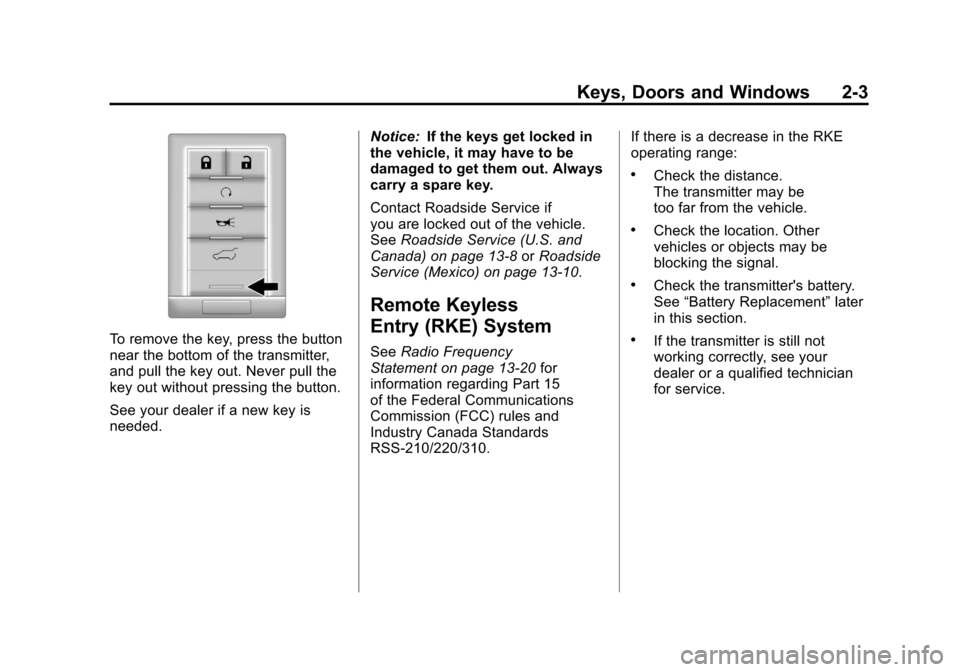
To remove the key, press the button
near the bottom of the transmitter,
and pull the key out. Never pull the
key out without pressing the button.
See your dealer if a new key is
needed.Notice:
If the keys get locked in
the vehicle, it may have to be
damaged to get them out. Always
carry a spare key.
Contact Roadside Service if
you are locked out of the vehicle.
See Roadside Service (U.S. and
Canada) on page 13‑8 orRoadside
Service (Mexico) on page 13‑10.
Remote Keyless
Entry (RKE) System
See Radio Frequency
Statement on page 13‑20 for
information regarding Part 15
of the Federal Communications
Commission (FCC) rules and
Industry Canada Standards
RSS-210/220/310. If there is a decrease in the RKE
operating range:
.Check the distance.
The transmitter may be
too far from the vehicle.
.Check the location. Other
vehicles or objects may be
blocking the signal.
.Check the transmitter's battery.
See
“Battery Replacement” later
in this section.
.If the transmitter is still not
working correctly, see your
dealer or a qualified technician
for service.
Page 43 of 498
Black plate (9,1)Cadillac SRX Owner Manual - 2011
Keys, Doors and Windows 2-9
5. Press the ignition. When thetransmitter is learned the DIC
display will show that it is ready
to program the next transmitter.
6. Remove the transmitter from the transmitter pocket and
press
Kon the transmitter.
To program additional
transmitters, repeat Steps 4
through 6.
When all additional transmitters
are programmed, press and hold
the ignition for 10 seconds to
exit programming mode.
Starting the Vehicle with a Low
Transmitter Battery
If the transmitter battery is weak,
the DIC may display NO REMOTE
DETECTED when you try to
start the vehicle. The REPLACE
BATTERY IN REMOTE KEY
message may also be displayed
at this time. To start the vehicle:
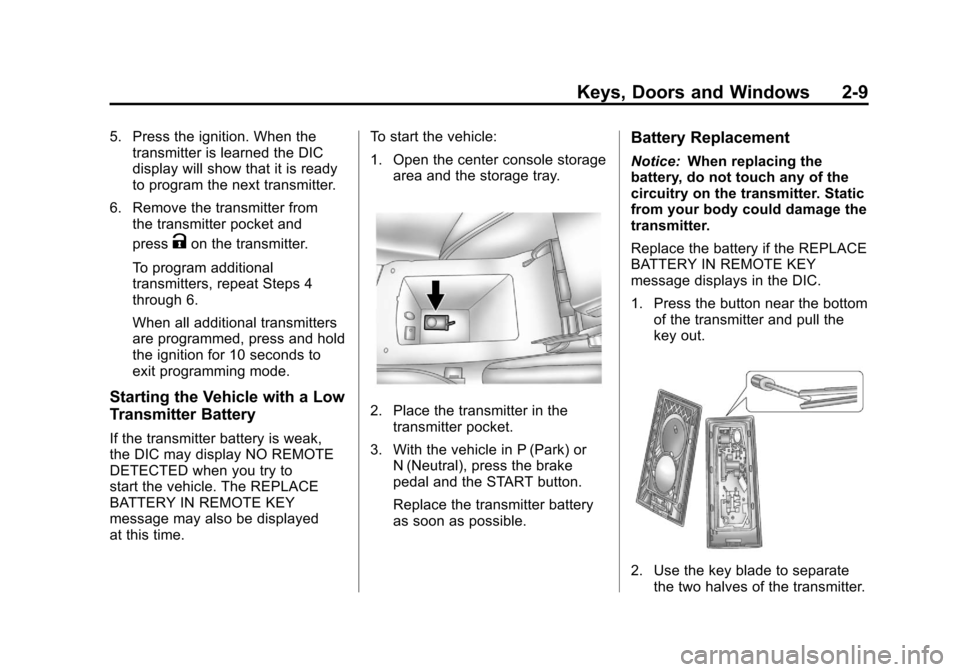
1. Open the center console storage
area and the storage tray.
2. Place the transmitter in thetransmitter pocket.
3. With the vehicle in P (Park) or N (Neutral), press the brake
pedal and the START button.
Replace the transmitter battery
as soon as possible.
Battery Replacement
Notice: When replacing the
battery, do not touch any of the
circuitry on the transmitter. Static
from your body could damage the
transmitter.
Replace the battery if the REPLACE
BATTERY IN REMOTE KEY
message displays in the DIC.
1. Press the button near the bottom of the transmitter and pull the
key out.
2. Use the key blade to separatethe two halves of the transmitter.
Page 44 of 498

Black plate (10,1)Cadillac SRX Owner Manual - 2011
2-10 Keys, Doors and Windows
3. Remove the old battery. Do notuse a metal object.
4. Insert the new battery, positive side facing down. Replace with a
CR2032 or equivalent battery.
5. Snap the transmitter back together.
Remote Vehicle Start
If available, this feature allows you
to start the engine from outside the
vehicle.
/(Remote Vehicle Start):
This button will be on the RKE
transmitter if the vehicle has
remote start.
Vehicles with an automatic climate
control system will automatically
change to a heating or cooling mode depending on the outside
temperature during a remote start.
When the ON/RUN/START ignition
mode is selected , the climate
control system will return to its
setting from when the vehicle
was last turned off.
Laws in some local communities
may restrict the use of remote
starters. For example, some laws
may require a person using remote
start to have the vehicle in view.
Check local regulations for any
requirements.
There are other conditions which
can affect the performance of the
transmitter, see
Remote Keyless
Entry (RKE) System on page 2‑3
for additional information. Starting the Engine Using Remote
Start
To start the engine using the remote
start feature:
1. Press
Qon the RKE transmitter.
2. Within two seconds, press and hold
/until the turn signal
lamps flash. This confirms
the request to remote start the
vehicle has been received. If the
vehicle' s lamps are not visible,
press and hold
/for at least
two seconds.
During the remote start the
vehicle's doors will be locked
and the parking lamps will
remain on as long as the engine
is running.
3. Press the brake pedal and select the ON/RUN/START ignition
mode to drive the vehicle.
The engine will shut off after
10 minutes unless a time
extension is done or the ignition
is put in ON/RUN/START.
Page 51 of 498
Black plate (17,1)Cadillac SRX Owner Manual - 2011
Keys, Doors and Windows 2-17
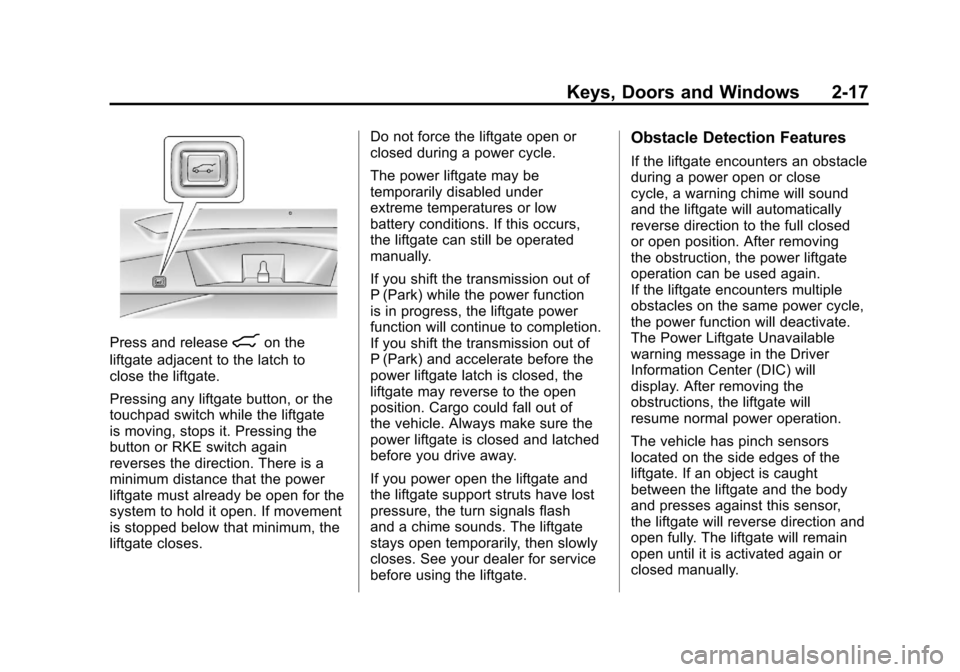
Press and release&on the
liftgate adjacent to the latch to
close the liftgate.
Pressing any liftgate button, or the
touchpad switch while the liftgate
is moving, stops it. Pressing the
button or RKE switch again
reverses the direction. There is a
minimum distance that the power
liftgate must already be open for the
system to hold it open. If movement
is stopped below that minimum, the
liftgate closes. Do not force the liftgate open or
closed during a power cycle.
The power liftgate may be
temporarily disabled under
extreme temperatures or low
battery conditions. If this occurs,
the liftgate can still be operated
manually.
If you shift the transmission out of
P (Park) while the power function
is in progress, the liftgate power
function will continue to completion.
If you shift the transmission out of
P (Park) and accelerate before the
power liftgate latch is closed, the
liftgate may reverse to the open
position. Cargo could fall out of
the vehicle. Always make sure the
power liftgate is closed and latched
before you drive away.
If you power open the liftgate and
the liftgate support struts have lost
pressure, the turn signals flash
and a chime sounds. The liftgate
stays open temporarily, then slowly
closes. See your dealer for service
before using the liftgate.
Obstacle Detection Features
If the liftgate encounters an obstacle
during a power open or close
cycle, a warning chime will sound
and the liftgate will automatically
reverse direction to the full closed
or open position. After removing
the obstruction, the power liftgate
operation can be used again.
If the liftgate encounters multiple
obstacles on the same power cycle,
the power function will deactivate.
The Power Liftgate Unavailable
warning message in the Driver
Information Center (DIC) will
display. After removing the
obstructions, the liftgate will
resume normal power operation.
The vehicle has pinch sensors
located on the side edges of the
liftgate. If an object is caught
between the liftgate and the body
and presses against this sensor,
the liftgate will reverse direction and
open fully. The liftgate will remain
open until it is activated again or
closed manually.
Page 52 of 498
Black plate (18,1)Cadillac SRX Owner Manual - 2011
2-18 Keys, Doors and Windows
Setting the Power Liftgate
3/4 Mode
To change the liftgate stop position:
1. Turn the liftgate switch to eitherthe MAX, or the 3/4 mode
position and power open the
liftgate.
2. Stop the liftgate movement at the desired height by pressing
any liftgate switch. Manually
adjust the liftgate position if
required.
3. Press and hold the button on the liftgate adjacent to the latch until
the turn signals flash and a beep
sounds to indicate that the new
setting is recorded.
When power opened with the
3/4 mode selected, the liftgate
stops at the new set position. If you do not hear the audible and
visual feedback when setting the
intermediate stop position, you are
attempting to set the height below
the 3/4 open height minimum
(approximately 5 feet). The liftgate
cannot be set below that minimum
and the new setting will not be
recorded.
Manual Operation of Power
Liftgate
To change the liftgate to manual
operation, turn the mode switch to
the OFF position.
With the power liftgate disabled
and all of the doors unlocked, the
liftgate can be manually opened
and closed. Manual efforts of a
vehicle equipped with a power
liftgate will be higher than a
standard non-power liftgate.To open the liftgate, press the
touchpad on the handle on the
outside of the liftgate, and lift the
gate open. To close the liftgate,
use the pull cup to lower the liftgate
and close. With the power liftgate
disabled, the liftgate electric latch
will still power latch once contact is
made with the striker. Always close
the liftgate before driving.
If the RKE button is pressed while
power operation is disabled, the turn
signals flash and the liftgate will
not move.
The liftgate has an electric latch.
If the battery is disconnected or
has low voltage, the liftgate will
not open. The liftgate will resume
operation when the battery is
reconnected and charged.
Page 60 of 498
Black plate (26,1)Cadillac SRX Owner Manual - 2011
2-26 Keys, Doors and Windows
Express‐Down/Up Windows
Windows that have the
express‐down/up feature
allow the windows to be lowered
and raised fully without holding
the window switch. Press the
window switch fully and release it to
activate the express‐down feature.
Pull the window switch fully up and
release it to activate the express‐up
feature. The express mode can be
canceled at any time by briefly
pressing, or pulling the switch.
Programming the Power
Windows
Programming the power windows
may be necessary if the vehicle's
battery has been disconnected or
discharged.
If the window will not express up
after power has been restored and
a message is displayed in the Driver
Information Center:
1. Close all doors
2. Place the ignition inACC/ACCESSORY or
ON/RUN/START.
3. From any partial open position, close the window and continue
to pull the switch briefly after the
window has fully closed.
Obstacle Detection Feature
The Obstacle Detection Feature is
part of the express-up feature and is
active:
1. In the middle and upper portionsof the window opening.
2. During window up movements.
3. In ignition OFF during all window up movements and during
express-up window movements
in ignition ON/RUN/START.
If there is something blocking the
window during automatic closing,
the window will reverse direction
for a short distance. Weather
conditions such as extreme cold
and/or ice may cause the window to
auto-reverse. The window will return
to normal operation once the object
or condition is removed.
Page 147 of 498
Black plate (1,1)Cadillac SRX Owner Manual - 2011
Instruments and Controls 5-1
Instruments and
Controls
Controls
Steering Wheel Adjustment . . . 5-2
Steering Wheel Controls . . . . . . 5-2
Horn . . . . . . . . . . . . . . . . . . . . . . . . . . 5-3
Windshield Wiper/Washer . . . . . 5-3
Rear Window Wiper/Washer . . . . . . . . . . . . . . . . . . . . . . 5-5
Headlamp Washer . . . . . . . . . . . . 5-6
Compass . . . . . . . . . . . . . . . . . . . . . 5-7
Clock (Analog Clock) . . . . . . . . . . 5-7
Clock (Digital Clock) . . . . . . . . . . 5-8
Power Outlets . . . . . . . . . . . . . . . . . 5-9
Cigarette Lighter . . . . . . . . . . . . . . 5-9
Ashtrays . . . . . . . . . . . . . . . . . . . . . 5-10
Warning Lights, Gauges, and
Indicators
Warning Lights, Gauges, and Indicators . . . . . . . . . . . . . . . . . . 5-10
Instrument Cluster . . . . . . . . . . . 5-11
Speedometer . . . . . . . . . . . . . . . . 5-12
Odometer . . . . . . . . . . . . . . . . . . . . 5-12
Tachometer . . . . . . . . . . . . . . . . . . 5-12
Fuel Gauge . . . . . . . . . . . . . . . . . . 5-12 Fuel Economy Gauge
(3.0L Only) . . . . . . . . . . . . . . . . . 5-13
Turbo Gauge (2.8L Only) . . . . 5-14
Engine Coolant Temperature Gauge . . . . . . . . . . . . . . . . . . . . . . 5-15
Safety Belt Reminders . . . . . . . 5-15
Airbag Readiness Light . . . . . . 5-17
Passenger Airbag Status Indicator . . . . . . . . . . . . . . . . . . . . 5-18
Charging System Light . . . . . . 5-19
Malfunction Indicator Lamp . . . . . . . . . . . . . 5-19
Brake System Warning Light . . . . . . . . . . . . . . . . . . . . . . . 5-22
Electric Parking Brake Light . . . . . . . . . . . . . . . . . . . . . . . 5-23
Antilock Brake System (ABS) Warning Light . . . . . . . . . . . . . . 5-23
Traction Off Light . . . . . . . . . . . . 5-24
StabiliTrak
®OFF Light . . . . . . . 5-24
Traction Control System (TCS)/StabiliTrak
®Light . . . . 5-25
Tire Pressure Light . . . . . . . . . . 5-25
Engine Oil Pressure Light . . . . 5-26
Fuel Economy Light . . . . . . . . . 5-26
Low Fuel Warning Light . . . . . . 5-27
Security Light . . . . . . . . . . . . . . . . 5-27
High-Beam On Light . . . . . . . . . 5-27 Adaptive Forward Lighting
(AFL) Light . . . . . . . . . . . . . . . . . 5-27
Front Fog Lamp Light . . . . . . . . 5-28
Lamps On Reminder . . . . . . . . . 5-28
Cruise Control Light . . . . . . . . . 5-28
Information Displays
Driver Information Center (DIC) . . . . . . . . . . . . . . . 5-28
Vehicle Messages
Vehicle Messages . . . . . . . . . . . 5-32
Battery Voltage and ChargingMessages . . . . . . . . . . . . . . . . . . 5-33
Brake System Messages . . . . 5-33
Compass Messages . . . . . . . . . 5-34
Cruise Control Messages . . . . 5-34
Door Ajar Messages . . . . . . . . . 5-34
Engine Cooling System Messages . . . . . . . . . . . . . . . . . . 5-34
Engine Oil Messages . . . . . . . . 5-35
Engine Power Messages . . . . 5-36
Fuel System Messages . . . . . . 5-36
Key and Lock Messages . . . . . 5-36
Lamp Messages . . . . . . . . . . . . . 5-37
Object Detection System Messages . . . . . . . . . . . . . . . . . . 5-37
Ride Control System Messages . . . . . . . . . . . . . . . . . . 5-37
Page 182 of 498
Black plate (36,1)Cadillac SRX Owner Manual - 2011
5-36 Instruments and Controls
Engine Power Messages
ENGINE POWER IS REDUCED
This message displays when the
vehicle's engine power is reduced.
Reduced engine power can affect
the vehicle's ability to accelerate.
If this message is on, but there
is no reduction in performance,
proceed to your destination.
The performance may be reduced
the next time the vehicle is driven.
The vehicle may be driven at a
reduced speed while this message
is on, but maximum acceleration
and speed may be reduced.
Anytime this message stays on,
the vehicle should be taken to
your dealer for service as soon
as possible.
Fuel System Messages
FUEL LEVEL LOW
This message displays when the
vehicle is low on fuel. Refuel as
soon as possible
TIGHTEN GAS CAP
This message displays when the
fuel cap is not on tight. Tighten the
fuel cap.
Key and Lock Messages
NO REMOTE DETECTED
This message displays when trying
to start the vehicle if the keyless
access system does not detect a
RKE transmitter. The transmitter
battery may be weak. See“Starting
the Vehicle with a Low Transmitter
Battery” underRemote Keyless
Entry (RKE) System Operation on
page 2‑4.
NO REMOTE PRESS BRAKE
TO RESTART
This message is displayed if the
remote is no longer detected in the
vehicle. Press the brake pedal to
restart the vehicle.
NUMBER OF KEYS
PROGRAMMED
This message displays when
programming new keys to the
vehicle.
REMOTE LEFT IN VEHICLE
This message displays when
leaving the vehicle with the RKE
transmitter still inside.
REPLACE BATTERY IN
REMOTE KEY
This message displays when the
battery in the RKE transmitter needs
to be replaced.
Page 250 of 498
Black plate (46,1)Cadillac SRX Owner Manual - 2011
7-46 Infotainment System
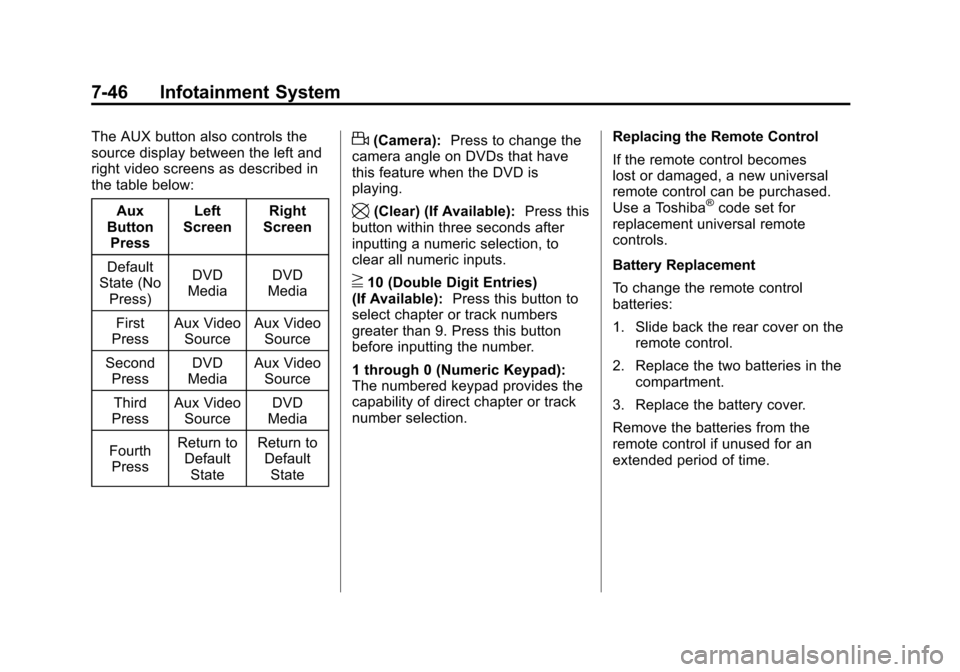
The AUX button also controls the
source display between the left and
right video screens as described in
the table below:Aux
Button
Press Left
Screen Right
Screen
Default
State (No
Press) DVD
Media DVD
Media
First
Press Aux Video
Source Aux Video
Source
Second Press DVD
Media Aux Video
Source
Third
Press Aux Video
Source DVD
Media
Fourth Press Return to
DefaultState Return to
DefaultStated(Camera): Press to change the
camera angle on DVDs that have
this feature when the DVD is
playing.
\(Clear) (If Available): Press this
button within three seconds after
inputting a numeric selection, to
clear all numeric inputs.
}10 (Double Digit Entries)
(If Available): Press this button to
select chapter or track numbers
greater than 9. Press this button
before inputting the number.
1 through 0 (Numeric Keypad):
The numbered keypad provides the
capability of direct chapter or track
number selection. Replacing the Remote Control
If the remote control becomes
lost or damaged, a new universal
remote control can be purchased.
Use a Toshiba
®code set for
replacement universal remote
controls.
Battery Replacement
To change the remote control
batteries:
1. Slide back the rear cover on the remote control.
2. Replace the two batteries in the compartment.
3. Replace the battery cover.
Remove the batteries from the
remote control if unused for an
extended period of time.
Page 295 of 498
Black plate (19,1)Cadillac SRX Owner Manual - 2011
Driving and Operating 9-19
In an emergency:
1. Brake using a firm and steadypressure. Do not pump the
brakes repeatedly. This may
deplete power assist, requiring
increased brake pedal force.
2. Shift the vehicle to N (Neutral). This can be done while the
vehicle is moving. After shifting
to N (Neutral), firmly apply the
brakes and steer the vehicle to
a safe location.
3. Come to a complete stop, shift to P (Park), and turn the ignition
to OFF. On vehicles with an
automatic transmission, the shift
lever must be in P (Park) to turn
the ignition switch to the OFF
position.
4. Set the parking brake. See Parking Brake on page 9‑31.
ACC/ACCESSORY (Amber LED
Light): This mode allows you to
use some electrical accessories
when the engine is off. With the ignition off, pressing the
button one time without the brake
pedal applied, will place the ignition
system in ACC/ACCESSORY.
The ignition will switch from
ACC/ACCESSORY to OFF after
five minutes to prevent battery
run down.
ON/RUN/START (Green LED
Light):
This mode is for driving and
starting. With the ignition off, and
the brake pedal applied, pressing
the button once will place the
ignition system in ON/RUN/START.
Once engine cranking begins,
release the button. Engine cranking
will continue until the engine starts.
See Starting the Gasoline Engine
on page 9‑19 for more information.
The ignition will then remain in
ON/RUN.Starting the Gasoline
Engine
Place the transmission in the proper
gear by moving the shift lever to
P (Park) or N (Neutral). To restart
the engine when the vehicle is
already moving, use N (Neutral).
Notice: Do not try to shift to
P (Park) if the vehicle is moving.
If you do, you could damage the
transmission. Shift to P (Park)
only when the vehicle is stopped.
The keyless access transmitter must
be inside the vehicle for the ignition
to work.
Cell phone chargers can interfere
with the operation of the Keyless
Access System. Battery chargers
should not be plugged in when
starting or turning off the engine.