power steering CADILLAC SRX 2011 2.G Owners Manual
[x] Cancel search | Manufacturer: CADILLAC, Model Year: 2011, Model line: SRX, Model: CADILLAC SRX 2011 2.GPages: 498, PDF Size: 7.62 MB
Page 5 of 498

Black plate (5,1)Cadillac SRX Owner Manual - 2011
Introduction v
Vehicle Symbol Chart
Here are some additional symbols
that may be found on the vehicle
and what they mean. For more
information on the symbol, refer
to the Index.
0:Adjustable Pedals
9:Airbag Readiness Light
#:Air Conditioning
!:Antilock Brake System (ABS)
g:Audio Steering Wheel Controls
or OnStar®
$: Brake System Warning Light
":Charging System
I:Cruise Control
B: Engine Coolant Temperature
O:Exterior Lamps
#:Fog Lamps
.: Fuel Gauge
+:Fuses
3: Headlamp High/Low-Beam
Changer
j: LATCH System Child
Restraints
*: Malfunction Indicator Lamp
::Oil Pressure
g:Outside Power Foldaway
Mirrors
}: Power
/:Remote Vehicle Start
>:Safety Belt Reminders
7:Tire Pressure Monitor
d:Traction Control/StabiliTrak
M:Windshield Washer Fluid
Page 7 of 498
Black plate (1,1)Cadillac SRX Owner Manual - 2011
In Brief 1-1
In Brief
Instrument Panel
Instrument Panel . . . . . . . . . . . . . . 1-2
Initial Drive Information
Initial Drive Information . . . . . . . . 1-4
Remote Keyless Entry (RKE)System . . . . . . . . . . . . . . . . . . . . . . 1-4
Remote Vehicle Start . . . . . . . . . 1-5
Door Locks . . . . . . . . . . . . . . . . . . . 1-5
Liftgate . . . . . . . . . . . . . . . . . . . . . . . . 1-6
Windows . . . . . . . . . . . . . . . . . . . . . . 1-7
Seat Adjustment . . . . . . . . . . . . . . 1-7
Memory Features . . . . . . . . . . . . . 1-8
Heated and Ventilated Seats . . . . . . . . . . . . . . . . . . . . . . . 1-10
Head Restraint Adjustment . . . . . . . . . . . . . . . . . 1-10
Safety Belts . . . . . . . . . . . . . . . . . . 1-10
Sensing System for Passenger Airbag . . . . . . . . . . 1-11
Mirror Adjustment . . . . . . . . . . . . 1-11
Steering Wheel Adjustment . . . . . . . . . . . . . . . . . 1-12 Throttle and Brake Pedal
Adjustment . . . . . . . . . . . . . . . . . 1-13
Interior Lighting . . . . . . . . . . . . . . 1-13
Exterior Lighting . . . . . . . . . . . . . 1-14
Windshield Wiper/Washer . . . . 1-14
Climate Controls . . . . . . . . . . . . . 1-16
Transmission . . . . . . . . . . . . . . . . 1-16Vehicle Features
Radio(s) . . . . . . . . . . . . . . . . . . . . . 1-17
Satellite Radio . . . . . . . . . . . . . . . 1-19
Portable Audio Devices . . . . . . 1-19
Bluetooth
®. . . . . . . . . . . . . . . . . . . 1-19
Steering Wheel Controls . . . . . 1-20
Cruise Control . . . . . . . . . . . . . . . 1-20
Navigation System . . . . . . . . . . . 1-21
Driver Information Center (DIC) . . . . . . . . . . . . . . . 1-21
Vehicle Personalization . . . . . . 1-21
Rear Vision Camera (RVC) . . . . . . . . . . . . . 1-22
Ultrasonic Parking Assist . . . . 1-22
Storage Compartments . . . . . . 1-22
Power Outlets . . . . . . . . . . . . . . . 1-23
Universal Remote System . . . 1-23
Performance and Maintenance
Traction Control System (TCS) . . . . . . . . . . . . . . 1-23
StabiliTrak
®System . . . . . . . . . 1-24
Tire Pressure Monitor . . . . . . . . 1-24
Tire Sealant and Compressor Kit . . . . . . . . . . . . . 1-24
Engine Oil Life System . . . . . . 1-25
Fuel E85 (85% Ethanol) . . . . . 1-25
Driving for Better Fuel Economy . . . . . . . . . . . . . . . . . . . 1-25
Roadside Service . . . . . . . . . . . . 1-26
OnStar
®. . . . . . . . . . . . . . . . . . . . . 1-26
Page 9 of 498

Black plate (3,1)Cadillac SRX Owner Manual - 2011
In Brief 1-3
A.Air Vents on page 8‑6.
B. Turn and Lane‐Change Lever. See Turn and Lane-Change
Signals on page 6‑5.
Driver Information Center (DIC)
Controls. See Driver Information
Center (DIC) on page 5‑28.
C. Cruise Control on page 9‑38.
D. Instrument Cluster on
page 5‑11.
E. Steering Wheel Controls on
page 5‑2.
F. AM-FM Radio on page 7‑12.
Navigation System
(If Equipped). See Navigation
System Manual.
G. Driver Information Center (DIC) Display. See Driver Information
Center (DIC) on page 5‑28.
H. Clock (Analog Clock) on
page 5‑7 orClock (Digital
Clock) on page 5‑8. I.
Safety Locks on page 2‑13.
Power Door Locks on
page 2‑12.
Hazard Warning Flashers on
page 6‑5.
J. Exterior Lamp Controls on
page 6‑1.
Front Fog Lamps on page 6‑6
(If Equipped).
Instrument Panel Illumination
Control on page 6‑6.
K. Data Link Connector (DLC). See Malfunction Indicator Lamp
on page 5‑19.
L. Steering Wheel Adjustment on
page 5‑2.
M. Horn on page 5‑3.
N. Adjustable Pedal Control (If Equipped). See Adjustable
Throttle and Brake Pedal on
page 9‑17.
O. Start/Stop Button. See Ignition
Positions on page 9‑18. P.
Windshield Wiper/Washer on
page 5‑3.
Rear Window Wiper/Washer on
page 5‑5.
Q. Heated Front Seats on
page 3‑10 (If Equipped).
Heated and Ventilated
Front Seats on page 3‑11
(If Equipped).
R. Parking Brake on page 9‑31.
S. Shift Lever. See Shifting Into
Park on page 9‑22.
T. StabiliTrak
®System on
page 9‑35.
Ultrasonic Parking Assist on
page 9‑40 (If Equipped).
Economy Mode (If Equipped).
See Fuel Economy Mode on
page 9‑29.
U. Dual Automatic Climate Control
System on page 8‑1.
V. Glove Box on page 4‑1.
Page 18 of 498
Black plate (12,1)Cadillac SRX Owner Manual - 2011
1-12 In Brief
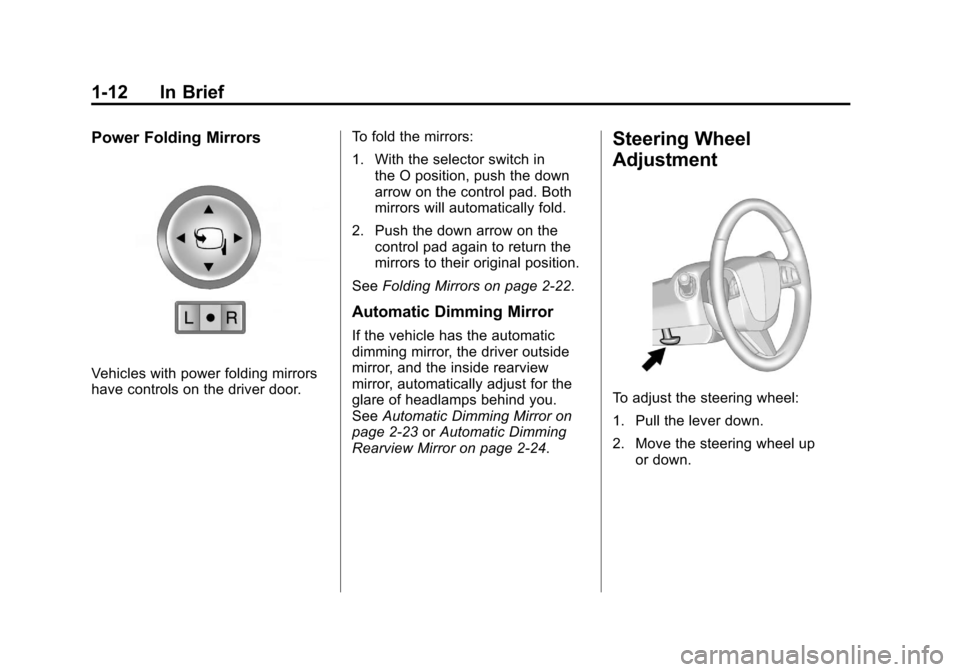
Power Folding Mirrors
Vehicles with power folding mirrors
have controls on the driver door.To fold the mirrors:
1. With the selector switch in
the O position, push the down
arrow on the control pad. Both
mirrors will automatically fold.
2. Push the down arrow on the control pad again to return the
mirrors to their original position.
See Folding Mirrors on page 2‑22.
Automatic Dimming Mirror
If the vehicle has the automatic
dimming mirror, the driver outside
mirror, and the inside rearview
mirror, automatically adjust for the
glare of headlamps behind you.
SeeAutomatic Dimming Mirror on
page 2‑23 orAutomatic Dimming
Rearview Mirror on page 2‑24.
Steering Wheel
Adjustment
To adjust the steering wheel:
1. Pull the lever down.
2. Move the steering wheel up or down.
Page 147 of 498
Black plate (1,1)Cadillac SRX Owner Manual - 2011
Instruments and Controls 5-1
Instruments and
Controls
Controls
Steering Wheel Adjustment . . . 5-2
Steering Wheel Controls . . . . . . 5-2
Horn . . . . . . . . . . . . . . . . . . . . . . . . . . 5-3
Windshield Wiper/Washer . . . . . 5-3
Rear Window Wiper/Washer . . . . . . . . . . . . . . . . . . . . . . 5-5
Headlamp Washer . . . . . . . . . . . . 5-6
Compass . . . . . . . . . . . . . . . . . . . . . 5-7
Clock (Analog Clock) . . . . . . . . . . 5-7
Clock (Digital Clock) . . . . . . . . . . 5-8
Power Outlets . . . . . . . . . . . . . . . . . 5-9
Cigarette Lighter . . . . . . . . . . . . . . 5-9
Ashtrays . . . . . . . . . . . . . . . . . . . . . 5-10
Warning Lights, Gauges, and
Indicators
Warning Lights, Gauges, and Indicators . . . . . . . . . . . . . . . . . . 5-10
Instrument Cluster . . . . . . . . . . . 5-11
Speedometer . . . . . . . . . . . . . . . . 5-12
Odometer . . . . . . . . . . . . . . . . . . . . 5-12
Tachometer . . . . . . . . . . . . . . . . . . 5-12
Fuel Gauge . . . . . . . . . . . . . . . . . . 5-12 Fuel Economy Gauge
(3.0L Only) . . . . . . . . . . . . . . . . . 5-13
Turbo Gauge (2.8L Only) . . . . 5-14
Engine Coolant Temperature Gauge . . . . . . . . . . . . . . . . . . . . . . 5-15
Safety Belt Reminders . . . . . . . 5-15
Airbag Readiness Light . . . . . . 5-17
Passenger Airbag Status Indicator . . . . . . . . . . . . . . . . . . . . 5-18
Charging System Light . . . . . . 5-19
Malfunction Indicator Lamp . . . . . . . . . . . . . 5-19
Brake System Warning Light . . . . . . . . . . . . . . . . . . . . . . . 5-22
Electric Parking Brake Light . . . . . . . . . . . . . . . . . . . . . . . 5-23
Antilock Brake System (ABS) Warning Light . . . . . . . . . . . . . . 5-23
Traction Off Light . . . . . . . . . . . . 5-24
StabiliTrak
®OFF Light . . . . . . . 5-24
Traction Control System (TCS)/StabiliTrak
®Light . . . . 5-25
Tire Pressure Light . . . . . . . . . . 5-25
Engine Oil Pressure Light . . . . 5-26
Fuel Economy Light . . . . . . . . . 5-26
Low Fuel Warning Light . . . . . . 5-27
Security Light . . . . . . . . . . . . . . . . 5-27
High-Beam On Light . . . . . . . . . 5-27 Adaptive Forward Lighting
(AFL) Light . . . . . . . . . . . . . . . . . 5-27
Front Fog Lamp Light . . . . . . . . 5-28
Lamps On Reminder . . . . . . . . . 5-28
Cruise Control Light . . . . . . . . . 5-28
Information Displays
Driver Information Center (DIC) . . . . . . . . . . . . . . . 5-28
Vehicle Messages
Vehicle Messages . . . . . . . . . . . 5-32
Battery Voltage and ChargingMessages . . . . . . . . . . . . . . . . . . 5-33
Brake System Messages . . . . 5-33
Compass Messages . . . . . . . . . 5-34
Cruise Control Messages . . . . 5-34
Door Ajar Messages . . . . . . . . . 5-34
Engine Cooling System Messages . . . . . . . . . . . . . . . . . . 5-34
Engine Oil Messages . . . . . . . . 5-35
Engine Power Messages . . . . 5-36
Fuel System Messages . . . . . . 5-36
Key and Lock Messages . . . . . 5-36
Lamp Messages . . . . . . . . . . . . . 5-37
Object Detection System Messages . . . . . . . . . . . . . . . . . . 5-37
Ride Control System Messages . . . . . . . . . . . . . . . . . . 5-37
Page 184 of 498
Black plate (38,1)Cadillac SRX Owner Manual - 2011
5-38 Instruments and Controls
SERVICE TRACTION
CONTROL
This message displays when
there is a problem with the
Traction Control System (TCS).
SeeTraction Control System (TCS)
on page 9‑34.
SPORT MODE ON
This message displays when
Sport Mode has been activated.
See Selective Ride Control on
page 9‑37 andManual Mode on
page 9‑28 for more information.
Airbag System Messages
SERVICE AIRBAG
This message displays if there is
a problem with the airbag system.
Take the vehicle to your dealer for
service.
Safety Belt Messages
BUCKLE SEATBELT
This message displays as a
reminder when the safety belt
is not buckled.
Anti-Theft Alarm System
Messages
THEFT ATTEMPTED
This message displays if the vehicle
detects a tamper condition.
Service Vehicle Messages
SERVICE AC SYSTEM
This message is displayed if there is
a problem with the air conditioning
system. Take the vehicle to your
dealer for service.
SERVICE POWER STEERING
This message is displayed if there is
a problem with the power steering
system. Take the vehicle to your
dealer for service.
SERVICE VEHICLE SOON
This message is displayed if there is
a problem with the vehicle. Take the
vehicle to your dealer for service.
Starting the Vehicle
Messages
PRESS BRAKE TO START
VEHICLE
This message is displayed when
attempting to start the vehicle
without first pressing the brake
pedal.
SERVICE KEYLESS START
SYSTEM
This message is displayed if there
is a problem with the keyless start
system. Take the vehicle to your
dealer for service.
Page 211 of 498
Black plate (7,1)Cadillac SRX Owner Manual - 2011
Infotainment System 7-7
P. DEL
.MEM: Delete the current
track from MEM.
Q.
OREC
.CD/DVD: Records content
from audio CDs and
MP3/WMA CDs.
.AUX: Records content
from USB mass storage
devices.
R. PHONE
.Opens the phone
main menu.
.Mutes the audio system.
Operation
Controls
The infotainment system is
operated by using the pushbuttons,
multifunction knobs, menus that are
shown on the display, and steering
wheel controls, if equipped.
Turning the System On or Off
VOL/O(Volume/Power): Press to
turn the system on and off.
Automatic Switch‐Off
If the infotainment system has
been turned on after the ignition is
turned off, the system will turn off
automatically after ten minutes.
Volume Control
VOL/O(Volume/Power): Turn to
adjust the volume.
PHONE: For vehicles with
OnStar
®, press and hold PHONE
to mute the infotainment system.
Press and hold PHONE again,
or turn the VOL/
Oknob to
cancel mute.
For vehicles without OnStar
®, press
PHONE to mute the infotainment
system. Press PHONE again,
or turn the VOL/
Oknob to
cancel mute.
Page 243 of 498
Black plate (39,1)Cadillac SRX Owner Manual - 2011
Infotainment System 7-39
Global Off
Depending on the infotainment
system, the RSE system may
have a Global Off feature.
The Global Off feature disables
all RSE system features. Press
and hold the radio power button for
more than three seconds for Global
Off to disable the RSE features.
A padlock icon may display on
the infotainment screen when the
Global Off feature is on. On some
infotainment systems, the Global
Off feature can be turned off by
performing one of the following:
.Press and hold the radio
power button for more than
three seconds.
.Insert or eject any disc.
.Insert a DVD video disc.
.Press the Remote Control power
button.
.Press the MEM/DVD/AUX button
or the
kbutton when a DVD
video disc is in the player.
.Press the SRC button on the
steering wheel when a DVD
video disc is in the player.
.Cycle the ignition.
Headphones
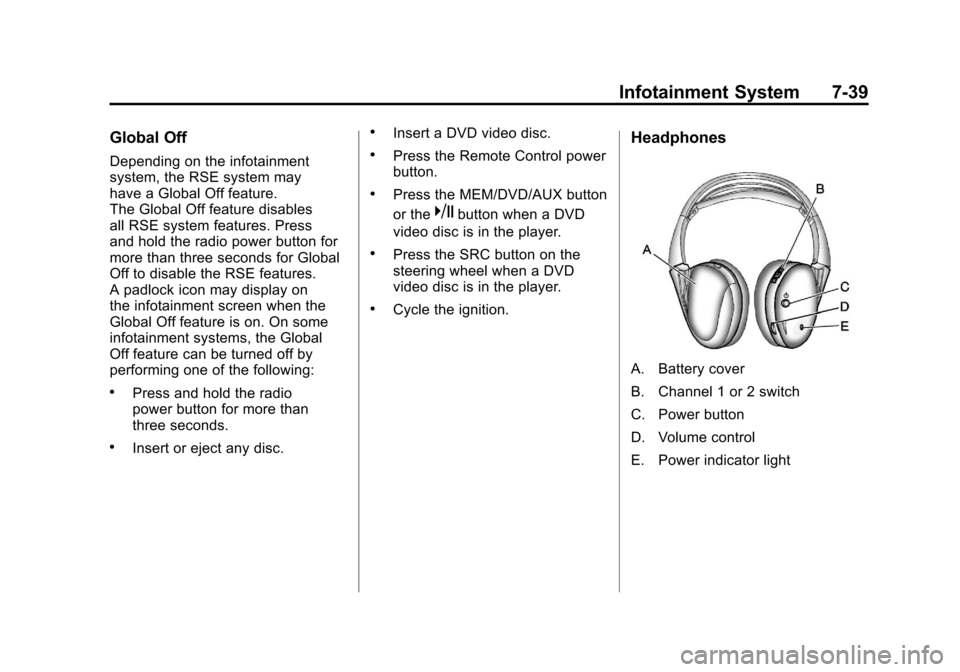
A. Battery cover
B. Channel 1 or 2 switch
C. Power button
D. Volume control
E. Power indicator light
Page 277 of 498
Black plate (1,1)Cadillac SRX Owner Manual - 2011
Driving and Operating 9-1
Driving and
Operating
Driving Information
Defensive Driving . . . . . . . . . . . . . 9-2
Drunk Driving . . . . . . . . . . . . . . . . . 9-3
Control of a Vehicle . . . . . . . . . . . 9-3
Braking . . . . . . . . . . . . . . . . . . . . . . . 9-4
Steering . . . . . . . . . . . . . . . . . . . . . . . 9-5
Off-Road Recovery . . . . . . . . . . . . 9-6
Loss of Control . . . . . . . . . . . . . . . . 9-6
Driving on Wet Roads . . . . . . . . . 9-7
Highway Hypnosis . . . . . . . . . . . . 9-8
Hill and Mountain Roads . . . . . . 9-8
Winter Driving . . . . . . . . . . . . . . . . . 9-9
If the Vehicle is Stuck . . . . . . . . 9-11
Vehicle Load Limits . . . . . . . . . . 9-12
Starting and Operating
New Vehicle Break-In . . . . . . . . 9-17
Adjustable Throttle and BrakePedal . . . . . . . . . . . . . . . . . . . . . . . 9-17
Ignition Positions . . . . . . . . . . . . 9-18
Starting the Gasoline Engine . . . . . . . . . . . . . . . . . . . . . 9-19 Engine Heater . . . . . . . . . . . . . . . 9-21
Retained Accessory
Power (RAP) . . . . . . . . . . . . . . . 9-22
Shifting Into Park . . . . . . . . . . . . 9-22
Shifting Out of Park . . . . . . . . . . 9-24
Parking Over Things That Burn . . . . . . . . . . . . . . . . . . 9-24
Engine Exhaust
Engine Exhaust . . . . . . . . . . . . . . 9-24
Running the Vehicle WhileParked . . . . . . . . . . . . . . . . . . . . . 9-25
Automatic Transmission
Automatic Transmission . . . . . 9-26
Manual Mode . . . . . . . . . . . . . . . . 9-28
Fuel Economy Mode . . . . . . . . . 9-29
Drive Systems
All-Wheel Drive . . . . . . . . . . . . . . 9-30
Brakes
Antilock BrakeSystem (ABS) . . . . . . . . . . . . . . 9-30
Parking Brake . . . . . . . . . . . . . . . 9-31
Brake Assist . . . . . . . . . . . . . . . . . 9-33
Hill Start Assist (HSA) . . . . . . . 9-33
Ride Control Systems
Traction Control System (TCS) . . . . . . . . . . . . . . 9-34
StabiliTrak
®System . . . . . . . . . 9-35
Limited-Slip Rear Axle . . . . . . . 9-37
Selective Ride Control . . . . . . . 9-37
Cruise Control
Cruise Control . . . . . . . . . . . . . . . 9-38
Object Detection Systems
Ultrasonic Parking Assist . . . . 9-40
Rear Vision Camera (RVC) . . . . . . . . . . . . . 9-43
Fuel
Fuel . . . . . . . . . . . . . . . . . . . . . . . . . 9-47
Recommended Fuel . . . . . . . . . 9-47
Gasoline Specifications . . . . . . 9-48
California FuelRequirements . . . . . . . . . . . . . . 9-48
Fuels in Foreign Countries . . . 9-49
Fuel Additives . . . . . . . . . . . . . . . 9-49
Fuel E85 (85% Ethanol) . . . . . 9-50
Filling the Tank . . . . . . . . . . . . . . 9-52
Filling a Portable Fuel Container . . . . . . . . . . . . . . . . . . . 9-53
Page 281 of 498
Black plate (5,1)Cadillac SRX Owner Manual - 2011
Driving and Operating 9-5
Steering
Power Steering
If power steering assist is lost
because the engine stops or the
power steering system is not
functioning, the vehicle can be
steered but it will take more effort.
Steering Tips
It is important to take curves at a
reasonable speed.
Traction in a curve depends on
the condition of the tires and the
road surface, the angle at which the
curve is banked, and vehicle speed.
While in a curve, speed is the one
factor that can be controlled.
If there is a need to reduce speed,
do it before entering the curve, while
the front wheels are straight.
Try to adjust the speed so you can
drive through the curve. Maintain a
reasonable, steady speed. Wait to
accelerate until out of the curve,
and then accelerate gently into the
straightaway.
Steering in Emergencies
There are times when steering
can be more effective than braking.
For example, you come over a hill
and find a truck stopped in your
lane, or a car suddenly pulls out
from nowhere, or a child darts out
from between parked cars and stops
right in front of you. These problems
can be avoided by braking—if you
can stop in time. But sometimes you
cannot stop in time because there
is no room. That is the time for
evasive action —steering around
the problem.
The vehicle can perform very well
in emergencies like these. First
apply the brakes. See Braking on
page 9‑4. It is better to remove
as much speed as possible from
a collision. Then steer around
the problem, to the left or right
depending on the space available.
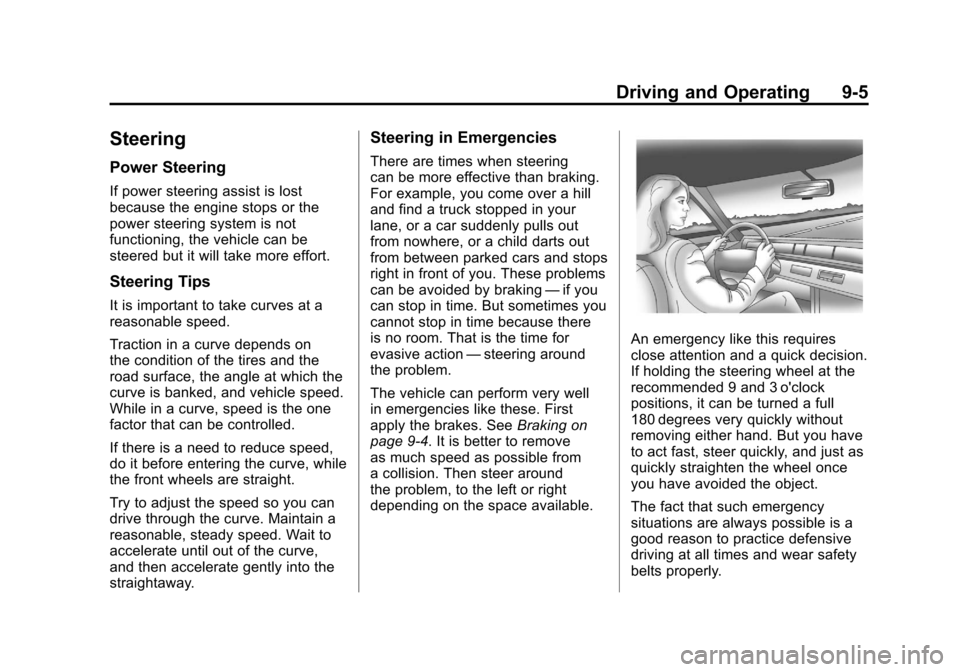
An emergency like this requires
close attention and a quick decision.
If holding the steering wheel at the
recommended 9 and 3 o'clock
positions, it can be turned a full
180 degrees very quickly without
removing either hand. But you have
to act fast, steer quickly, and just as
quickly straighten the wheel once
you have avoided the object.
The fact that such emergency
situations are always possible is a
good reason to practice defensive
driving at all times and wear safety
belts properly.