seats CADILLAC SRX 2011 2.G Owners Manual
[x] Cancel search | Manufacturer: CADILLAC, Model Year: 2011, Model line: SRX, Model: CADILLAC SRX 2011 2.GPages: 498, PDF Size: 7.62 MB
Page 1 of 498

Black plate (1,1)Cadillac SRX Owner Manual - 2011
2011 Cadillac SRX Owner ManualM
In Brief. . . . . . . . . . . . . . . . . . . . . . . . 1-1
Instrument Panel . . . . . . . . . . . . . . 1-2
Initial Drive Information . . . . . . . . 1-4
Vehicle Features . . . . . . . . . . . . . 1-17
Performance and Maintenance . . . . . . . . . . . . . . . . 1-23
Keys, Doors and Windows . . . 2-1
Keys and Locks . . . . . . . . . . . . . . . 2-2
Doors . . . . . . . . . . . . . . . . . . . . . . . . 2-14
Vehicle Security . . . . . . . . . . . . . . 2-19
Exterior Mirrors . . . . . . . . . . . . . . . 2-21
Interior Mirrors . . . . . . . . . . . . . . . . 2-23
Windows . . . . . . . . . . . . . . . . . . . . . 2-24
Roof . . . . . . . . . . . . . . . . . . . . . . . . . . 2-28
Seats and Restraints . . . . . . . . . 3-1
Head Restraints . . . . . . . . . . . . . . . 3-2
Front Seats . . . . . . . . . . . . . . . . . . . . 3-4
Rear Seats . . . . . . . . . . . . . . . . . . . 3-12
Safety Belts . . . . . . . . . . . . . . . . . . 3-14
Airbag System . . . . . . . . . . . . . . . . 3-30
Child Restraints . . . . . . . . . . . . . . 3-47 Storage
. . . . . . . . . . . . . . . . . . . . . . . 4-1
Storage Compartments . . . . . . . . 4-1
Additional Storage Features . . . 4-3
Roof Rack System . . . . . . . . . . . . 4-11
Instruments and Controls . . . . 5-1
Controls . . . . . . . . . . . . . . . . . . . . . . . 5-2
Warning Lights, Gauges, and
Indicators . . . . . . . . . . . . . . . . . . . 5-10
Information Displays . . . . . . . . . . 5-28
Vehicle Messages . . . . . . . . . . . . 5-32
Vehicle Personalization . . . . . . . 5-40
Universal Remote System . . . . 5-46
Lighting . . . . . . . . . . . . . . . . . . . . . . . 6-1
Exterior Lighting . . . . . . . . . . . . . . . 6-1
Interior Lighting . . . . . . . . . . . . . . . . 6-6
Lighting Features . . . . . . . . . . . . . . 6-7
Infotainment System . . . . . . . . . 7-1
Introduction . . . . . . . . . . . . . . . . . . . . 7-1
Radio . . . . . . . . . . . . . . . . . . . . . . . . . 7-12 Audio Players . . . . . . . . . . . . . . . . 7-20
Rear Seat Infotainment . . . . . . . 7-38
Phone . . . . . . . . . . . . . . . . . . . . . . . . 7-51
Climate Controls . . . . . . . . . . . . . 8-1
Climate Control Systems . . . . . . 8-1
Air Vents . . . . . . . . . . . . . . . . . . . . . . . 8-6
Maintenance . . . . . . . . . . . . . . . . . . . 8-6
Driving and Operating . . . . . . . . 9-1
Driving Information . . . . . . . . . . . . . 9-2
Starting and Operating . . . . . . . 9-17
Engine Exhaust . . . . . . . . . . . . . . 9-24
Automatic Transmission . . . . . . 9-26
Drive Systems . . . . . . . . . . . . . . . . 9-30
Brakes . . . . . . . . . . . . . . . . . . . . . . . 9-30
Ride Control Systems . . . . . . . . 9-34
Cruise Control . . . . . . . . . . . . . . . . 9-38
Object Detection Systems . . . . 9-40
Fuel . . . . . . . . . . . . . . . . . . . . . . . . . . 9-47
Towing . . . . . . . . . . . . . . . . . . . . . . . 9-54
Conversions and Add-Ons . . . 9-62
Page 7 of 498
Black plate (1,1)Cadillac SRX Owner Manual - 2011
In Brief 1-1
In Brief
Instrument Panel
Instrument Panel . . . . . . . . . . . . . . 1-2
Initial Drive Information
Initial Drive Information . . . . . . . . 1-4
Remote Keyless Entry (RKE)System . . . . . . . . . . . . . . . . . . . . . . 1-4
Remote Vehicle Start . . . . . . . . . 1-5
Door Locks . . . . . . . . . . . . . . . . . . . 1-5
Liftgate . . . . . . . . . . . . . . . . . . . . . . . . 1-6
Windows . . . . . . . . . . . . . . . . . . . . . . 1-7
Seat Adjustment . . . . . . . . . . . . . . 1-7
Memory Features . . . . . . . . . . . . . 1-8
Heated and Ventilated Seats . . . . . . . . . . . . . . . . . . . . . . . 1-10
Head Restraint Adjustment . . . . . . . . . . . . . . . . . 1-10
Safety Belts . . . . . . . . . . . . . . . . . . 1-10
Sensing System for Passenger Airbag . . . . . . . . . . 1-11
Mirror Adjustment . . . . . . . . . . . . 1-11
Steering Wheel Adjustment . . . . . . . . . . . . . . . . . 1-12 Throttle and Brake Pedal
Adjustment . . . . . . . . . . . . . . . . . 1-13
Interior Lighting . . . . . . . . . . . . . . 1-13
Exterior Lighting . . . . . . . . . . . . . 1-14
Windshield Wiper/Washer . . . . 1-14
Climate Controls . . . . . . . . . . . . . 1-16
Transmission . . . . . . . . . . . . . . . . 1-16Vehicle Features
Radio(s) . . . . . . . . . . . . . . . . . . . . . 1-17
Satellite Radio . . . . . . . . . . . . . . . 1-19
Portable Audio Devices . . . . . . 1-19
Bluetooth
®. . . . . . . . . . . . . . . . . . . 1-19
Steering Wheel Controls . . . . . 1-20
Cruise Control . . . . . . . . . . . . . . . 1-20
Navigation System . . . . . . . . . . . 1-21
Driver Information Center (DIC) . . . . . . . . . . . . . . . 1-21
Vehicle Personalization . . . . . . 1-21
Rear Vision Camera (RVC) . . . . . . . . . . . . . 1-22
Ultrasonic Parking Assist . . . . 1-22
Storage Compartments . . . . . . 1-22
Power Outlets . . . . . . . . . . . . . . . 1-23
Universal Remote System . . . 1-23
Performance and Maintenance
Traction Control System (TCS) . . . . . . . . . . . . . . 1-23
StabiliTrak
®System . . . . . . . . . 1-24
Tire Pressure Monitor . . . . . . . . 1-24
Tire Sealant and Compressor Kit . . . . . . . . . . . . . 1-24
Engine Oil Life System . . . . . . 1-25
Fuel E85 (85% Ethanol) . . . . . 1-25
Driving for Better Fuel Economy . . . . . . . . . . . . . . . . . . . 1-25
Roadside Service . . . . . . . . . . . . 1-26
OnStar
®. . . . . . . . . . . . . . . . . . . . . 1-26
Page 9 of 498

Black plate (3,1)Cadillac SRX Owner Manual - 2011
In Brief 1-3
A.Air Vents on page 8‑6.
B. Turn and Lane‐Change Lever. See Turn and Lane-Change
Signals on page 6‑5.
Driver Information Center (DIC)
Controls. See Driver Information
Center (DIC) on page 5‑28.
C. Cruise Control on page 9‑38.
D. Instrument Cluster on
page 5‑11.
E. Steering Wheel Controls on
page 5‑2.
F. AM-FM Radio on page 7‑12.
Navigation System
(If Equipped). See Navigation
System Manual.
G. Driver Information Center (DIC) Display. See Driver Information
Center (DIC) on page 5‑28.
H. Clock (Analog Clock) on
page 5‑7 orClock (Digital
Clock) on page 5‑8. I.
Safety Locks on page 2‑13.
Power Door Locks on
page 2‑12.
Hazard Warning Flashers on
page 6‑5.
J. Exterior Lamp Controls on
page 6‑1.
Front Fog Lamps on page 6‑6
(If Equipped).
Instrument Panel Illumination
Control on page 6‑6.
K. Data Link Connector (DLC). See Malfunction Indicator Lamp
on page 5‑19.
L. Steering Wheel Adjustment on
page 5‑2.
M. Horn on page 5‑3.
N. Adjustable Pedal Control (If Equipped). See Adjustable
Throttle and Brake Pedal on
page 9‑17.
O. Start/Stop Button. See Ignition
Positions on page 9‑18. P.
Windshield Wiper/Washer on
page 5‑3.
Rear Window Wiper/Washer on
page 5‑5.
Q. Heated Front Seats on
page 3‑10 (If Equipped).
Heated and Ventilated
Front Seats on page 3‑11
(If Equipped).
R. Parking Brake on page 9‑31.
S. Shift Lever. See Shifting Into
Park on page 9‑22.
T. StabiliTrak
®System on
page 9‑35.
Ultrasonic Parking Assist on
page 9‑40 (If Equipped).
Economy Mode (If Equipped).
See Fuel Economy Mode on
page 9‑29.
U. Dual Automatic Climate Control
System on page 8‑1.
V. Glove Box on page 4‑1.
Page 13 of 498
Black plate (7,1)Cadillac SRX Owner Manual - 2011
In Brief 1-7
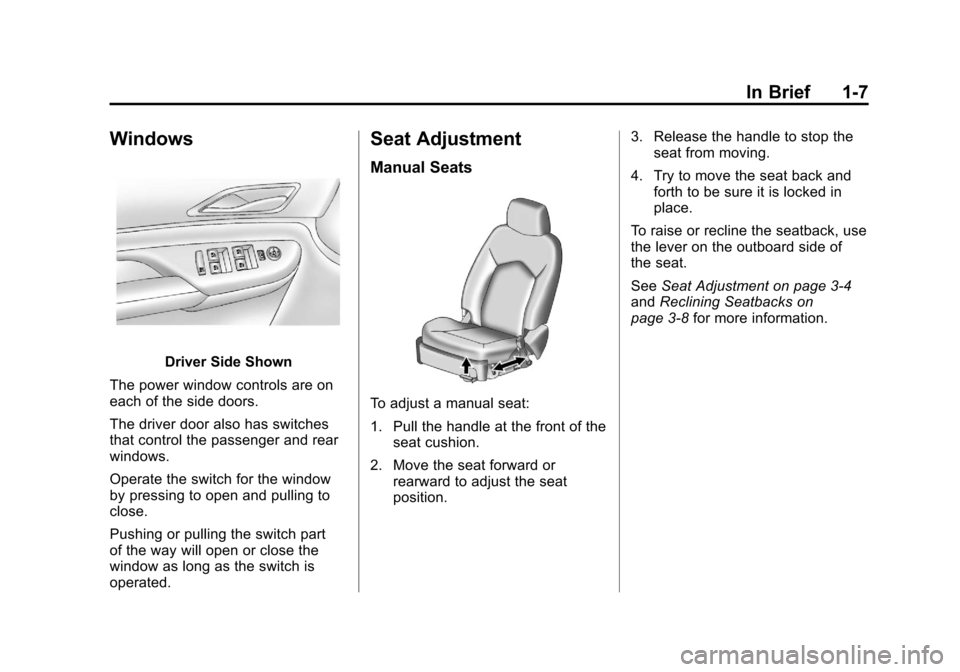
Windows
Driver Side Shown
The power window controls are on
each of the side doors.
The driver door also has switches
that control the passenger and rear
windows.
Operate the switch for the window
by pressing to open and pulling to
close.
Pushing or pulling the switch part
of the way will open or close the
window as long as the switch is
operated.
Seat Adjustment
Manual Seats
To adjust a manual seat:
1. Pull the handle at the front of the seat cushion.
2. Move the seat forward or rearward to adjust the seat
position. 3. Release the handle to stop the
seat from moving.
4. Try to move the seat back and forth to be sure it is locked in
place.
To raise or recline the seatback, use
the lever on the outboard side of
the seat.
See Seat Adjustment on page 3‑4
and Reclining Seatbacks on
page 3‑8 for more information.
Page 14 of 498
Black plate (8,1)Cadillac SRX Owner Manual - 2011
1-8 In Brief
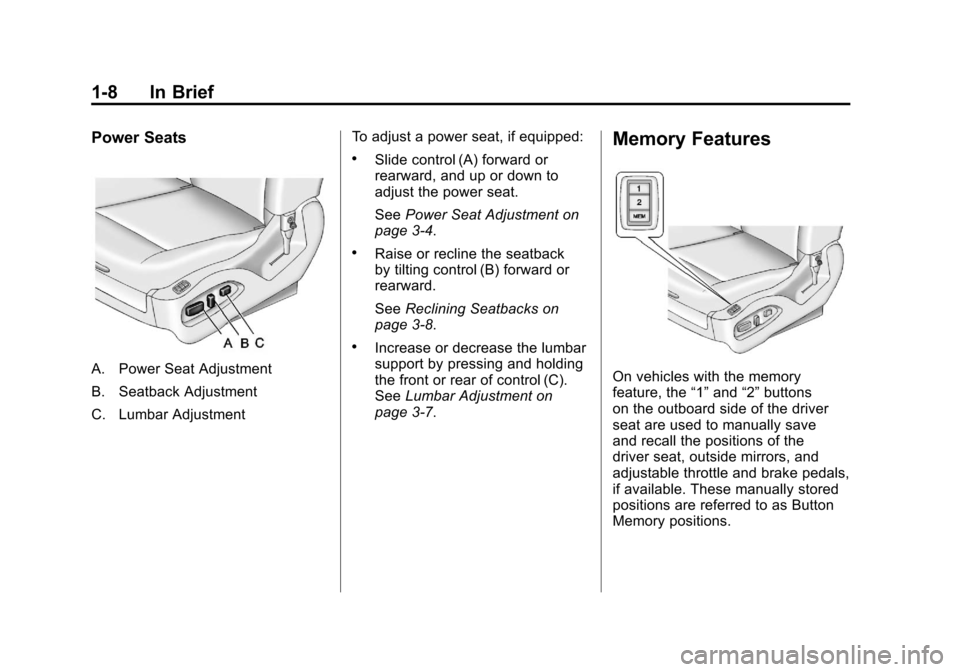
Power Seats
A. Power Seat Adjustment
B. Seatback Adjustment
C. Lumbar AdjustmentTo adjust a power seat, if equipped:
.Slide control (A) forward or
rearward, and up or down to
adjust the power seat.
See
Power Seat Adjustment on
page 3‑4.
.Raise or recline the seatback
by tilting control (B) forward or
rearward.
See Reclining Seatbacks on
page 3‑8.
.Increase or decrease the lumbar
support by pressing and holding
the front or rear of control (C).
See Lumbar Adjustment on
page 3‑7.
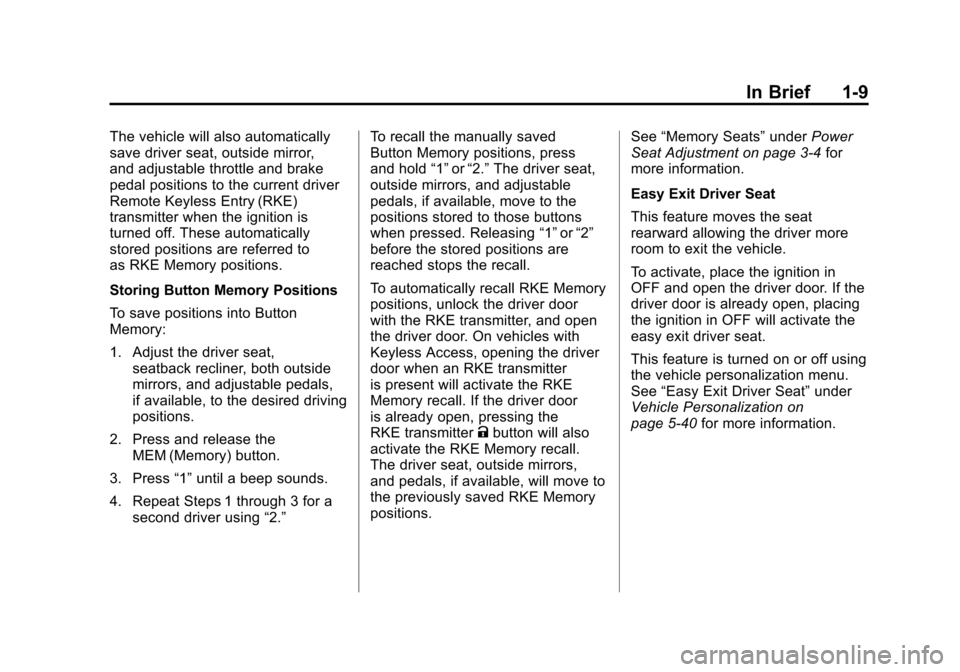
Memory Features
On vehicles with the memory
feature, the “1”and “2”buttons
on the outboard side of the driver
seat are used to manually save
and recall the positions of the
driver seat, outside mirrors, and
adjustable throttle and brake pedals,
if available. These manually stored
positions are referred to as Button
Memory positions.
Page 15 of 498
Black plate (9,1)Cadillac SRX Owner Manual - 2011
In Brief 1-9
The vehicle will also automatically
save driver seat, outside mirror,
and adjustable throttle and brake
pedal positions to the current driver
Remote Keyless Entry (RKE)
transmitter when the ignition is
turned off. These automatically
stored positions are referred to
as RKE Memory positions.
Storing Button Memory Positions
To save positions into Button
Memory:
1. Adjust the driver seat,seatback recliner, both outside
mirrors, and adjustable pedals,
if available, to the desired driving
positions.
2. Press and release the MEM (Memory) button.
3. Press “1”until a beep sounds.
4. Repeat Steps 1 through 3 for a second driver using “2.”To recall the manually saved
Button Memory positions, press
and hold
“1”or“2.” The driver seat,
outside mirrors, and adjustable
pedals, if available, move to the
positions stored to those buttons
when pressed. Releasing “1”or“2”
before the stored positions are
reached stops the recall.
To automatically recall RKE Memory
positions, unlock the driver door
with the RKE transmitter, and open
the driver door. On vehicles with
Keyless Access, opening the driver
door when an RKE transmitter
is present will activate the RKE
Memory recall. If the driver door
is already open, pressing the
RKE transmitter Kbutton will also
activate the RKE Memory recall.
The driver seat, outside mirrors,
and pedals, if available, will move to
the previously saved RKE Memory
positions. See
“Memory Seats” underPower
Seat Adjustment on page 3‑4 for
more information.
Easy Exit Driver Seat
This feature moves the seat
rearward allowing the driver more
room to exit the vehicle.
To activate, place the ignition in
OFF and open the driver door. If the
driver door is already open, placing
the ignition in OFF will activate the
easy exit driver seat.
This feature is turned on or off using
the vehicle personalization menu.
See “Easy Exit Driver Seat” under
Vehicle Personalization on
page 5‑40 for more information.
Page 16 of 498
Black plate (10,1)Cadillac SRX Owner Manual - 2011
1-10 In Brief
Heated and Ventilated
Seats
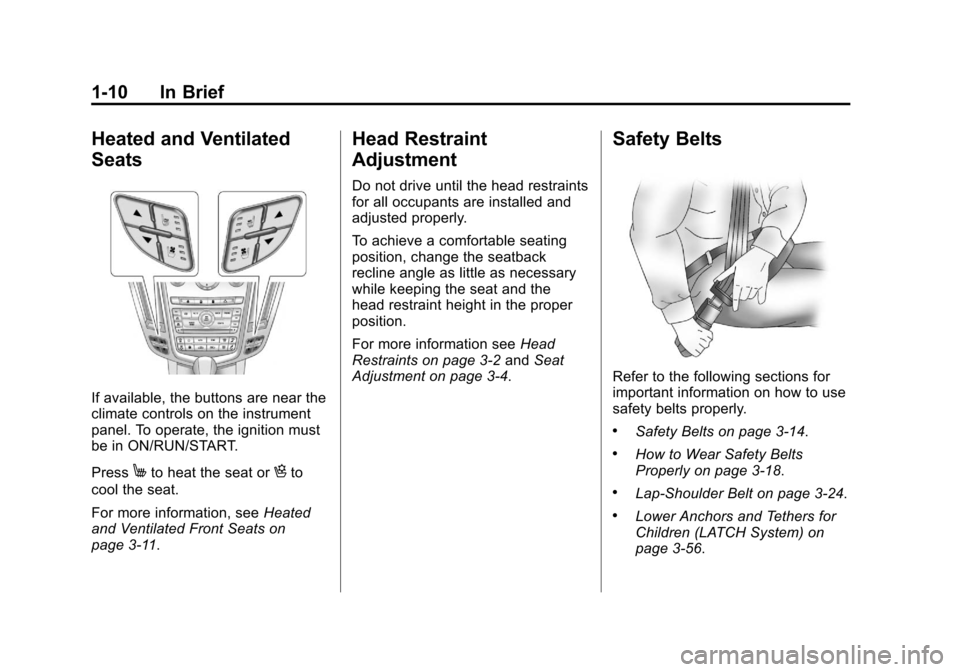
If available, the buttons are near the
climate controls on the instrument
panel. To operate, the ignition must
be in ON/RUN/START.
Press
Mto heat the seat orHto
cool the seat.
For more information, see Heated
and Ventilated Front Seats on
page 3‑11.
Head Restraint
Adjustment
Do not drive until the head restraints
for all occupants are installed and
adjusted properly.
To achieve a comfortable seating
position, change the seatback
recline angle as little as necessary
while keeping the seat and the
head restraint height in the proper
position.
For more information see Head
Restraints on page 3‑2 andSeat
Adjustment on page 3‑4.
Safety Belts
Refer to the following sections for
important information on how to use
safety belts properly.
.Safety Belts on page 3‑14.
.How to Wear Safety Belts
Properly on page 3‑18.
.Lap-Shoulder Belt on page 3‑24.
.Lower Anchors and Tethers for
Children (LATCH System) on
page 3‑56.
Page 22 of 498
Black plate (16,1)Cadillac SRX Owner Manual - 2011
1-16 In Brief
Climate Controls
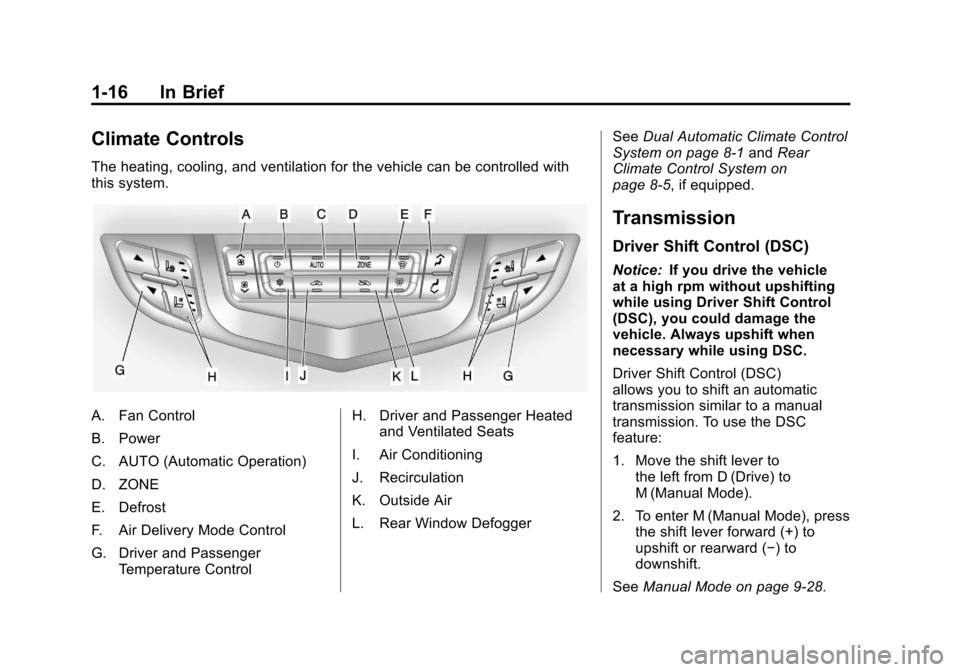
The heating, cooling, and ventilation for the vehicle can be controlled with
this system.
A. Fan Control
B. Power
C. AUTO (Automatic Operation)
D. ZONE
E. Defrost
F. Air Delivery Mode Control
G. Driver and PassengerTemperature Control H. Driver and Passenger Heated
and Ventilated Seats
I. Air Conditioning
J. Recirculation
K. Outside Air
L. Rear Window Defogger See
Dual Automatic Climate Control
System on page 8‑1 andRear
Climate Control System on
page 8‑5, if equipped.
Transmission
Driver Shift Control (DSC)
Notice: If you drive the vehicle
at a high rpm without upshifting
while using Driver Shift Control
(DSC), you could damage the
vehicle. Always upshift when
necessary while using DSC.
Driver Shift Control (DSC)
allows you to shift an automatic
transmission similar to a manual
transmission. To use the DSC
feature:
1. Move the shift lever to the left from D (Drive) to
M (Manual Mode).
2. To enter M (Manual Mode), press the shift lever forward (+) to
upshift or rearward (−) to
downshift.
See Manual Mode on page 9‑28.
Page 41 of 498
Black plate (7,1)Cadillac SRX Owner Manual - 2011
Keys, Doors and Windows 2-7
Programming with a Recognized
Transmitter (Keyless Access
Vehicles Only)
A new transmitter can be
programmed to the vehicle when
there is one recognized transmitter.
To program, the vehicle must be
off and all of the transmitters, both
currently recognized and new, must
be with you.
1. Place the recognizedtransmitter(s) in the cupholder.
2. Insert the vehicle key of the new transmitter into the key lock
cylinder located on the outside
of the driver door and turn the
key to the unlock position five
times within ten seconds.
The Driver Information
Center (DIC) displays READY
TO LEARN ELECTRONIC
KEY #2, 3, 4, ETC.
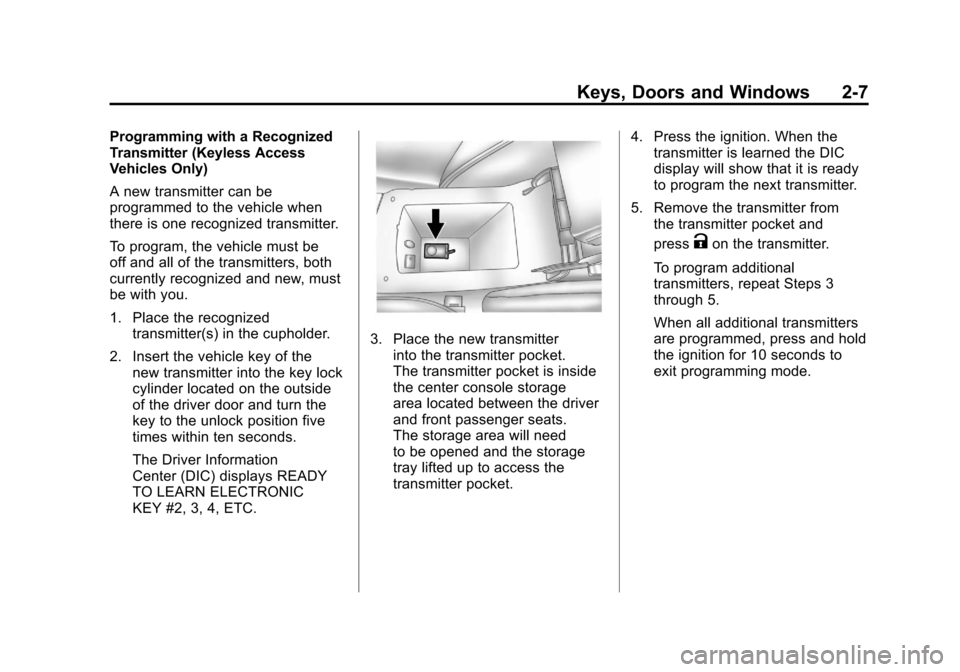
3. Place the new transmitterinto the transmitter pocket.
The transmitter pocket is inside
the center console storage
area located between the driver
and front passenger seats.
The storage area will need
to be opened and the storage
tray lifted up to access the
transmitter pocket. 4. Press the ignition. When the
transmitter is learned the DIC
display will show that it is ready
to program the next transmitter.
5. Remove the transmitter from the transmitter pocket and
press
Kon the transmitter.
To program additional
transmitters, repeat Steps 3
through 5.
When all additional transmitters
are programmed, press and hold
the ignition for 10 seconds to
exit programming mode.
Page 42 of 498
Black plate (8,1)Cadillac SRX Owner Manual - 2011
2-8 Keys, Doors and Windows
Programming without a
Recognized Transmitter
(Keyless Access Vehicles Only)
If there are no currently recognized
transmitters available, follow this
procedure to program up to eight
transmitters. This feature is not
available in Canada. This procedure
will take approximately 30 minutes
to complete. The vehicle must be off
and all of the transmitters you wish
to program must be with you.
1. Insert the vehicle key of thetransmitter into the key lock
cylinder located on the outside
of the driver door and turn the
key to the unlock position five
times within ten seconds.
The Driver Information Center
(DIC) displays REMOTE LEARN
PENDING, PLEASE WAIT. 2. Wait for ten minutes until the
DIC displays PRESS ENGINE
START BUTTON TO LEARN
and then press the ignition.
The DIC displays will again
show REMOTE LEARN
PENDING, PLEASE WAIT.
3. Repeat Step 2 two additional times. After the third time all
previously known transmitters
will no longer work with the
vehicle. Remaining transmitters
can be relearned during the next
steps.
The DIC display should
now show READY FOR
REMOTE # 1.
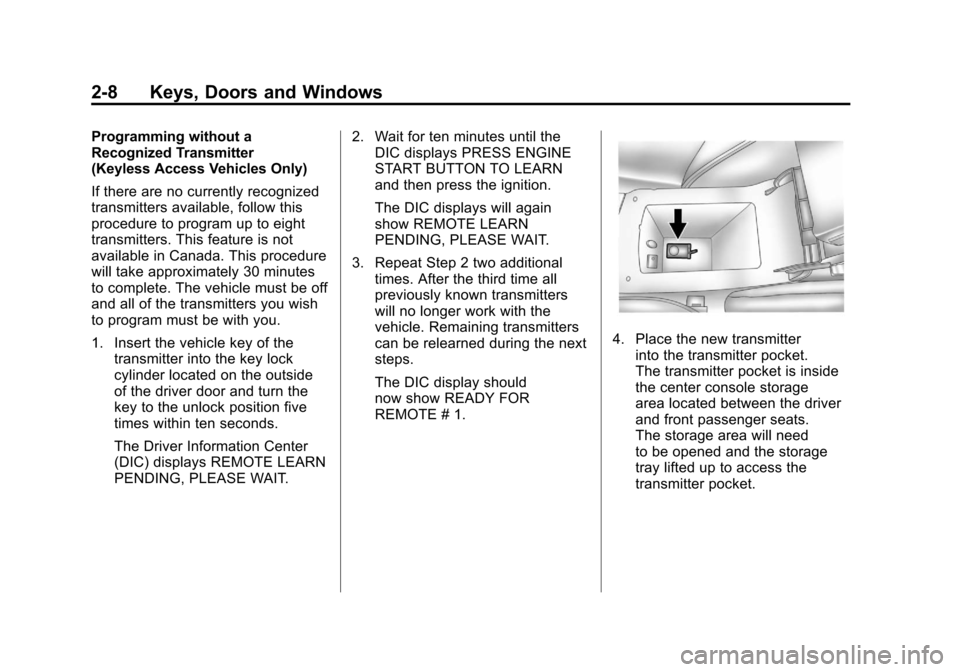
4. Place the new transmitter
into the transmitter pocket.
The transmitter pocket is inside
the center console storage
area located between the driver
and front passenger seats.
The storage area will need
to be opened and the storage
tray lifted up to access the
transmitter pocket.