ECO mode CADILLAC SRX 2012 2.G Owner's Manual
[x] Cancel search | Manufacturer: CADILLAC, Model Year: 2012, Model line: SRX, Model: CADILLAC SRX 2012 2.GPages: 502, PDF Size: 6.23 MB
Page 291 of 502
Black plate (19,1)Cadillac SRX Owner Manual (Include Mex) - 2012
Driving and Operating 9-19
3. Come to a complete stop, shiftto P (Park), and turn the ignition
to OFF. On vehicles with an
automatic transmission, the shift
lever must be in P (Park) to
turn the ignition switch to the
OFF position.
4. Set the parking brake. See Parking Brake on page 9‑31.
{WARNING
Turning off the vehicle while
moving may cause loss of power
assist in the brake and steering
systems and disable the airbags.
While driving, only shut the
vehicle off in an emergency.
If the vehicle cannot be pulled
over, and must be shut off while
driving, switch the ignition to
ACC/ACCESSORY. ACC/ACCESSORY (Amber LED
Light):
This mode allows you to
use some electrical accessories
when the engine is off.
With the ignition off, pressing the
button one time without the brake
pedal applied, will place the ignition
system in ACC/ACCESSORY.
The ignition will switch from
ACC/ACCESSORY to OFF after
ten minutes to prevent battery
run down.
ON/RUN/START (Green LED
Light): This mode is for driving and
starting. With the ignition off, and
the brake pedal applied, pressing
the button once will place the
ignition system in ON/RUN/START.
Once engine cranking begins,
release the button. Engine cranking
will continue until the engine starts.
See Starting the Gasoline Engine
on page 9‑20 for more information.
The ignition will then remain in
ON/RUN. Service Only Mode
This power mode is available for
service and diagnostics, and to
verify the proper operation of the
malfunction indicator lamp as may
be required for emission inspection
purposes. With the vehicle off,
and the brake pedal not applied,
pressing and holding the button for
more than five seconds will place
the vehicle in Service Only Mode.
The instruments and audio systems
will operate as they do in ON/RUN,
but the vehicle will not be able to be
driven. The engine will not start in
Service Only Mode. Push the button
again to turn the vehicle off.
Page 301 of 502
Black plate (29,1)Cadillac SRX Owner Manual (Include Mex) - 2012
Driving and Operating 9-29
The transmission will only allow you
to shift into gears appropriate for
the vehicle speed and engine
revolutions per minute (rpm).
The transmission will not
automatically shift to the next lower
gear if the engine rpm is too high,
nor to the next higher gear when the
maximum engine rpm is reached.
If shifting is prevented for any
reason, the currently selected
gear will flash multiple times,
indicating that the transmission
has not shifted gears.
While in the DSC mode, the
transmission will automatically
downshift when the vehicle comes
to a stop. This will allow for more
power during take-off.
When accelerating the vehicle from
a stop in snowy and icy conditions,
you may want to shift into second
gear. A higher gear ratio allows you
to gain more traction on slippery
surfaces.Fuel Economy Mode
The vehicle may have a fuel
economy mode. When engaged,
fuel economy mode can improve
the vehicle's fuel economy.
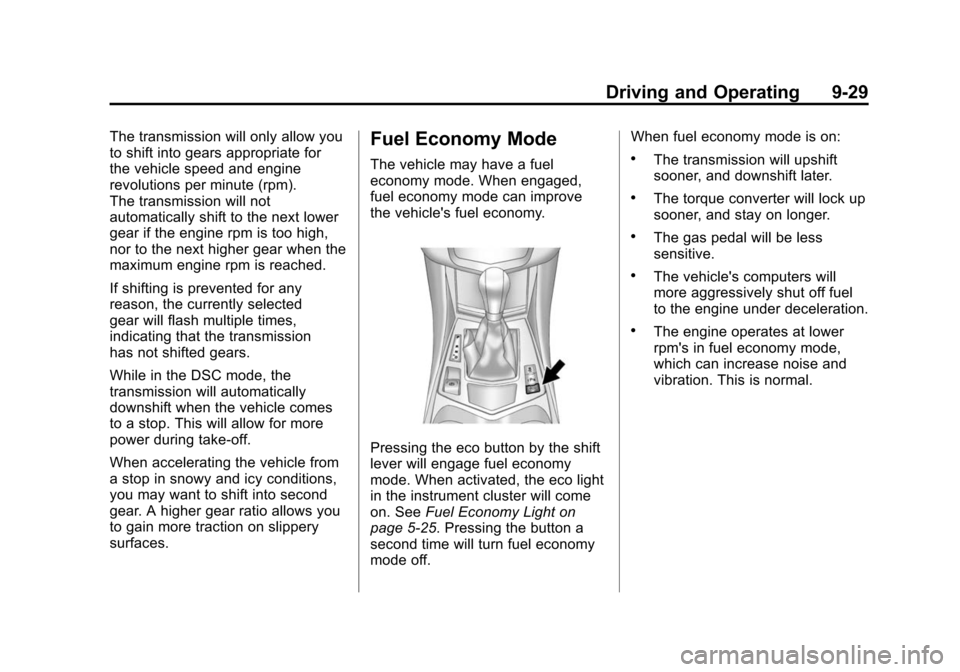
Pressing the eco button by the shift
lever will engage fuel economy
mode. When activated, the eco light
in the instrument cluster will come
on. SeeFuel Economy Light on
page 5‑25. Pressing the button a
second time will turn fuel economy
mode off. When fuel economy mode is on:
.The transmission will upshift
sooner, and downshift later.
.The torque converter will lock up
sooner, and stay on longer.
.The gas pedal will be less
sensitive.
.The vehicle's computers will
more aggressively shut off fuel
to the engine under deceleration.
.The engine operates at lower
rpm's in fuel economy mode,
which can increase noise and
vibration. This is normal.
Page 326 of 502
Black plate (54,1)Cadillac SRX Owner Manual (Include Mex) - 2012
9-54 Driving and Operating
.The vehicle can tow in D (Drive).
Use a lower gear if the
transmission shifts too often.
.Do not use the Fuel Economy
Mode when towing.
.Obey speed limit restrictions.
Do not drive faster than the
maximum posted speed for
trailers, or no more than
90 km/h (55 mph), to reduce
wear on the vehicle.
Driving with a Trailer
Towing a trailer requires experience.
Get familiar with handling and
braking with the added trailer
weight. The vehicle is now longer
and not as responsive as the
vehicle is by itself.
Check all trailer hitch parts and
attachments, safety chains,
electrical connectors, lamps, tires
and mirror adjustments. If the trailer
has electric brakes, start the vehicleand trailer moving and then apply
the trailer brake controller by hand
to be sure the brakes are working.
During the trip, check regularly to be
sure that the load is secure, and the
lamps and trailer brakes are working
properly.
Towing with a Stability
Control System
When towing, the sound of the
stability control system might be
heard. The system is reacting to the
vehicle movement caused by the
trailer, which mainly occurs during
cornering. This is normal when
towing heavier trailers.
Following Distance
Stay at least twice as far behind the
vehicle ahead as you would when
driving the vehicle without a trailer.
This can help to avoid situations
that require heavy braking and
sudden turns.
Passing
More passing distance is needed
when towing a trailer. Because the
rig is longer, it is necessary to go
farther beyond the passed vehicle
before returning to the lane.
Backing Up
Hold the bottom of the steering
wheel with one hand. To move the
trailer to the left, move that hand to
the left. To move the trailer to the
right, move your hand to the right.
Always back up slowly and,
if possible, have someone
guide you.
Making Turns
Notice:
Making very sharp turns
while trailering could cause the
trailer to come in contact with the
vehicle. The vehicle could be
damaged. Avoid making very
sharp turns while trailering.
Page 386 of 502

Black plate (54,1)Cadillac SRX Owner Manual (Include Mex) - 2012
10-54 Vehicle Care
GAWR FRT:Gross Axle
Weight Rating for the front axle.
See Vehicle Load Limits on
page 9‑12.
GAWR RR
:Gross Axle
Weight Rating for the rear axle.
See Vehicle Load Limits on
page 9‑12.
Intended Outboard Sidewall
:
The side of an asymmetrical tire,
that must always face outward
when mounted on a vehicle.
Kilopascal (kPa)
:The metric
unit for air pressure.
Light Truck (LT‐Metric) Tire
:
A tire used on light duty trucks
and some multipurpose
passenger vehicles.
Load Index
:An assigned
number ranging from 1 to 279
that corresponds to the load
carrying capacity of a tire. Maximum Inflation Pressure
:
The maximum air pressure to
which a cold tire can be inflated.
The maximum air pressure is
molded onto the sidewall.
Maximum Load Rating
:
The load rating for a tire at the
maximum permissible inflation
pressure for that tire.
Maximum Loaded Vehicle
Weight
:The sum of curb
weight, accessory weight,
vehicle capacity weight, and
production options weight.
Normal Occupant Weight
:
The number of occupants a
vehicle is designed to seat
multiplied by 68 kg (150 lbs).
See Vehicle Load Limits on
page 9‑12.
Occupant Distribution
:
Designated seating positions. Outward Facing Sidewall
:
The side of an asymmetrical tire
that has a particular side that
faces outward when mounted on
a vehicle. The side of the tire
that contains a whitewall,
bears white lettering, or bears
manufacturer, brand, and/or
model name molding that is
higher or deeper than the same
moldings on the other sidewall
of the tire.
Passenger (P-Metric) Tire
:
A tire used on passenger cars
and some light duty trucks and
multipurpose vehicles.
Recommended Inflation
Pressure
:Vehicle
manufacturer's recommended
tire inflation pressure as shown
on the tire placard. See Tire
Pressure on page 10‑56
andVehicle Load Limits on
page 9‑12.
Page 394 of 502
Black plate (62,1)Cadillac SRX Owner Manual (Include Mex) - 2012
10-62 Vehicle Care
There are two minutes to match
the first tire/wheel position, and
five minutes overall to match all
four tire/wheel positions. If it takes
longer, the matching process stops
and must be restarted.
The TPMS sensor matching
process is:
1. Set the parking brake.
2. Place the vehicle power mode inON/RUN/START. See Ignition
Positions on page 9‑18.
3. Select the vehicle information menu using the menu button.
4. Select the tire pressure screen using the up/down thumbwheel.
5. Press and hold SET to begin the sensor matching process. 6. Press SET to confirm selection.
The horn sounds twice to signal
the receiver is in relearn mode
and TIRE LEARNING ACTIVE
message displays on the DIC
screen.
7. Start with the driver side front tire.
8. Place the relearn tool against the tire sidewall, near the valve
stem. Then press the button to
activate the TPMS sensor.
A horn chirp confirms that the
sensor identification code has
been matched to this tire and
wheel position.
9. Proceed to the passenger side front tire, and repeat the
procedure in Step 8. 10. Proceed to the passenger side
rear tire, and repeat the
procedure in Step 8.
11. Proceed to the driver side rear tire, and repeat the procedure
in Step 8. The horn sounds
two times to indicate the
sensor identification code has
been matched to the driver
side rear tire, and the TPMS
sensor matching process is
no longer active. The TIRE
LEARNING ACTIVE message
on the DIC display screen
goes off.
12. Press STOP to turn the ignition off.
13. Set all four tires to the recommended air pressure
level as indicated on the Tire
and Loading Information label.
Page 462 of 502
Black plate (4,1)Cadillac SRX Owner Manual (Include Mex) - 2012
13-4 Customer Information
However, we recognize that
despite the good intentions of all
parties involved, sometimes a
misunderstanding may occur.
If you have a problem that has
not been satisfactorily handled
through the normal means, we
suggest the following steps:
STEP ONE
Explain your case to your dealer
service agent, service manager,
dealer sales agent, or sales
manager, depending on your case.
Make sure that they have all
necessary information. They are
interested in your continual
satisfaction.
STEP TWO
If you are not satisfied, please
contact the general manager or your
dealership owner to ask for their
help. If they are not able to resolve
your case, ask them to contact the
right people at General Motors for
support, if needed.STEP THREE
If your case is not resolved in a
reasonable amount of time by your
dealer, please call the General
Motors Customer Assistance
Center (CAC) and provide the
following information:
.Name
.Address
.Phone number
.Model year
.Brand
.Vehicle Identification
Number (VIN)
.Mileage
.Delivery date
.Description of the problem
.Dealership name
.Dealership address
See Customer Assistance Offices
(U.S. and Canada) on page 13‑4 or
Customer Assistance Offices
(Mexico) on page 13‑5 for more
information.
Customer Assistance
Offices (U.S. and Canada)
Cadillac encourages customers
to call the toll-free number for
assistance. However, if a customer
wishes to write or e-mail Cadillac,
the letter should be addressed to:
United States
Cadillac Customer Assistance
Center
Cadillac Motor Car Division
P.O. Box 33169
Detroit, MI 48232-5169
www.Cadillac.com
1-800-458-8006
1-800-833-2622 (For Text
Telephone devices (TTYs))
Roadside Assistance:
1-800-882-1112
Page 474 of 502
Black plate (16,1)Cadillac SRX Owner Manual (Include Mex) - 2012
13-16 Customer Information
Many insurance policies provide
reduced protection to the GM
vehicle by limiting compensation
for damage repairs by using
aftermarket collision parts. Some
insurance companies will not
specify aftermarket collision parts.
When purchasing insurance, we
recommend that you ensure that the
vehicle will be repaired with GM
original equipment collision parts.
If such insurance coverage is not
available from your current
insurance carrier, consider switching
to another insurance carrier.
If the vehicle is leased, the leasing
company may require you to have
insurance that ensures repairs with
Genuine GM Original Equipment
Manufacturer (OEM) parts or
Genuine Manufacturer replacement
parts. Read the lease carefully, as
you may be charged at the end of
the lease for poor quality repairs.If a Crash Occurs
If there has been an injury, call
emergency services for help. Do not
leave the scene of a crash until all
matters have been taken care of.
Move the vehicle only if its position
puts you in danger, or you are
instructed to move it by a police
officer.
Give only the necessary information
to police and other parties involved
in the crash.
For emergency towing see
Roadside Service (U.S. and
Canada) on page 13‑7orRoadside
Service (Mexico) on page 13‑9.
Gather the following information:
.Driver name, address, and
telephone number.
.Driver license number.
.Owner name, address, and
telephone number.
.Vehicle license plate number.
.Vehicle make, model, and
model year.
.Vehicle Identification
Number (VIN).
.Insurance company and policy
number.
.General description of the
damage to the other vehicle.
Choose a reputable repair facility
that uses quality replacement parts.
See “Collision Parts” earlier in this
section.
If the airbag has inflated, see
What Will You See after an Airbag
Inflates? on page 3‑28.
Page 492 of 502

Black plate (4,1)Cadillac SRX Owner Manual (Include Mex) - 2012
i-4 INDEX
DrivingCharacteristics and
Towing Tips . . . . . . . . . . . . . . . . . 9-53
Defensive . . . . . . . . . . . . . . . . . . . . . . 9-3
Drunk . . . . . . . . . . . . . . . . . . . . . . . . . . 9-3
For Better Fuel Economy . . . . . 1-23
Highway Hypnosis . . . . . . . . . . . . . 9-8
Hill and Mountain Roads . . . . . . . 9-8
If the Vehicle is Stuck . . . . . . . . . 9-11
Loss of Control . . . . . . . . . . . . . . . . 9-5
Off-Road Recovery . . . . . . . . . . . . 9-5
Vehicle Load Limits . . . . . . . . . . . 9-12
Wet Roads . . . . . . . . . . . . . . . . . . . . 9-6
Winter . . . . . . . . . . . . . . . . . . . . . . . . . 9-9
Dual Automatic Climate Control System . . . . . . . . . . . . . . . . 8-1
DVD Rear Seat EntertainmentSystem . . . . . . . . . . . . . . . . . . . . . . 7-35
DVD/CD Player . . . . . . . . . . . . . . . . 7-21E
E85 Fuel . . . . . . . . . . . . . . . . . . . . . . . 9-49
ECO Button . . . . . . . . . . . . . . . . . . . 9-29
Economy Mode Fuel . . . . . . . . . . . . . . . . . . . . . . . . . . 9-29
Electric Parking Brake Light . . . 5-21
Electrical Equipment, Add-On . . . . . . . . . . . . . . . . . . . . . . 9-60
Electrical System Engine CompartmentFuse Block . . . . . . . . . . . . . . . . 10-42
Fuses and Circuit Breakers . . . . . . . . . . . . . . . . . . 10-41
Instrument Panel Fuse Block . . . . . . . . . . . . . . . . . . . . . . 10-44
Overload . . . . . . . . . . . . . . . . . . . 10-41
Rear Compartment Fuse
Block . . . . . . . . . . . . . . . . . . . . . . 10-46
Emergency, OnStar
®. . . . . . . . . . 14-2
Engine
Air Cleaner/Filter . . . . . . . . . . . 10-12
Check and Service EngineSoon Light . . . . . . . . . . . . . . . . . . 5-18
Compartment Overview . . . . . . . 10-6
Coolant . . . . . . . . . . . . . . . . . . . . . 10-15 Engine (cont.)
Coolant Temperature
Gauge . . . . . . . . . . . . . . . . . . . . . . 5-14
Cooling System . . . . . . . . . . . . . 10-14
Cooling System Messages . . . 5-34
Cover . . . . . . . . . . . . . . . . . . . . . . . . . 10-8
Drive Belt Routing . . . . . . . . . . . . 12-3
Exhaust . . . . . . . . . . . . . . . . . . . . . . 9-24
Gasoline Starting . . . . . . . . . . . . . 9-20
Heater . . . . . . . . . . . . . . . . . . . . . . . . 9-22
Overheating . . . . . . . . . . . . . . . . 10-18
Power Messages . . . . . . . . . . . . . 5-35
Pressure Light . . . . . . . . . . . . . . . . 5-25
Running While Parked . . . . . . . . 9-25
Engine Oil Life System . . . . . . . . . . . . . . . . . 10-10
Messages . . . . . . . . . . . . . . . . . . . . 5-35
Entry Lighting . . . . . . . . . . . . . . . . . . . 6-8
Equipment, Towing . . . . . . . . . . . . 9-59
Event Data Recorders . . . . . . . . 13-20
Exit Lighting . . . . . . . . . . . . . . . . . . . . 6-8
Extender, Safety Belt . . . . . . . . . . 3-21
Exterior Lamp Controls . . . . . . . . . 6-1
Page 493 of 502

Black plate (5,1)Cadillac SRX Owner Manual (Include Mex) - 2012
INDEX i-5
F
FeaturesMemory . . . . . . . . . . . . . . . . . . . . . . . . 1-8
Filter, Engine Air Cleaner . . . . . . . . . 10-12
Flash-to-Pass . . . . . . . . . . . . . . . . . . . 6-2
Flashers, Hazard Warning . . . . . . 6-5
Flat Tire . . . . . . . . . . . . . . . . . . . . . . 10-71 Changing . . . . . . . . . . . . . . . . . . . 10-81
Floor Mats . . . . . . . . . . . . . . . . . . .10-102
Fluid Automatic Transmission . . . . 10-12
Brakes . . . . . . . . . . . . . . . . . . . . . . 10-22
Power Steering . . . . . . . . . . . . . 10-20
Washer . . . . . . . . . . . . . . . . . . . . . 10-20
Fog Lamps
Bulb Replacement . . . . . . . . . . 10-37
Front . . . . . . . . . . . . . . . . . . . . . . . . . . 6-6
Folding Mirrors . . . . . . . . . . . . . . . . 2-21
Front Fog Lamp Light . . . . . . . . . . . . . . . . . . . . . . . . . . 5-27 Front Seats
Adjustment . . . . . . . . . . . . . . . . . . . . 3-4
Heated and Ventilated . . . . . . . . 3-10
Front Storage . . . . . . . . . . . . . . . . . . . 4-2
Fuel . . . . . . . . . . . . . . . . . . . . . . . . . . . 9-46 Additives . . . . . . . . . . . . . . . . . . . . . 9-48
E85 (85% Ethanol) . . . . . . . . . . . 9-49
Economy Light . . . . . . . . . . . . . . . 5-25
Filling a Portable FuelContainer . . . . . . . . . . . . . . . . . . . 9-52
Filling the Tank . . . . . . . . . . . . . . . 9-50
Fuels in Foreign Countries . . . . 9-48
Gasoline Specifications . . . . . . . 9-47
Gauge . . . . . . . . . . . . . . . . . . . . . . . . 5-12
Low Fuel Warning Light . . . . . . . 5-26
Recommended . . . . . . . . . . . . . . . 9-47
Requirements, California . . . . . 9-48
System Messages . . . . . . . . . . . . 5-36
Fuel Economy Driving . . . . . . . . . . . . . . . . . . . . . . . . 1-23
Fuel Economy Gauge . . . . . . . . . 5-13
Fuel Economy Mode . . . . . . . . . . . 9-29 Fuses
Engine Compartment
Fuse Block . . . . . . . . . . . . . . . . 10-42
Fuses and Circuit Breakers . . . . . . . . . . . . . . . . . . 10-41
Instrument Panel Fuse Block . . . . . . . . . . . . . . . . . . . . . . 10-44
Rear Compartment Fuse Block . . . . . . . . . . . . . . . . . . . . . . 10-46
G
Garage Door Opener . . . . . . . . . . 5-46Programming . . . . . . . . . . . . . . . . . 5-46
Gasoline Specifications . . . . . . . . . . . . . . . . . 9-47
Gasoline Engine, Starting . . . . . . 9-20
Gauges Engine Coolant
Temperature . . . . . . . . . . . . . . . . 5-14
Fuel . . . . . . . . . . . . . . . . . . . . . . . . . . 5-12
Fuel Economy . . . . . . . . . . . . . . . . 5-13
Odometer . . . . . . . . . . . . . . . . . . . . . 5-12
Speedometer . . . . . . . . . . . . . . . . . 5-12
Tachometer . . . . . . . . . . . . . . . . . . . 5-12
Warning Lights and Indicators . . . . . . . . . . . . . . . . . . . 5-10
Page 496 of 502

Black plate (8,1)Cadillac SRX Owner Manual (Include Mex) - 2012
i-8 INDEX
M
MaintenanceRecords . . . . . . . . . . . . . . . . . . . . .11-16
Maintenance Schedule Recommended Fluidsand Lubricants . . . . . . . . . . . . .11-13
Malfunction Indicator Lamp . . . . 5-18
Manual Mode . . . . . . . . . . . . . . . . . . 9-28
Mass Storage Media (MEM) . . . 7-24
Memory Features . . . . . . . . . . . . . . . 1-8
Memory Seats . . . . . . . . . . . . . . . . . . 3-7
Messages
Airbag System . . . . . . . . . . . . . . . . 5-38
Anti-theft Alarm System . . . . . . . 5-38
Battery Voltage andCharging . . . . . . . . . . . . . . . . . . . . 5-33
Brake System . . . . . . . . . . . . . . . . 5-33
Compass . . . . . . . . . . . . . . . . . . . . . 5-34
Door Ajar . . . . . . . . . . . . . . . . . . . . . 5-34
Engine Cooling System . . . . . . . 5-34
Engine Oil . . . . . . . . . . . . . . . . . . . . 5-35
Engine Power . . . . . . . . . . . . . . . . 5-35
Fuel System . . . . . . . . . . . . . . . . . . 5-36
Key and Lock . . . . . . . . . . . . . . . . . 5-36
Lamp . . . . . . . . . . . . . . . . . . . . . . . . . 5-36
Object Detection System . . . . . 5-37 Messages (cont.)
Ride Control System . . . . . . . . . . 5-37
Safety Belt . . . . . . . . . . . . . . . . . . . . 5-38
Service Vehicle . . . . . . . . . . . . . . . 5-38
Starting the Vehicle . . . . . . . . . . . 5-38
Tire . . . . . . . . . . . . . . . . . . . . . . . . . . . 5-38
Transmission . . . . . . . . . . . . . . . . . 5-39
Vehicle . . . . . . . . . . . . . . . . . . . . . . . 5-32
Vehicle Reminder . . . . . . . . . . . . . 5-40
Vehicle Speed . . . . . . . . . . . . . . . . 5-40
Washer Fluid . . . . . . . . . . . . . . . . . 5-40
Mirrors Automatic Dimming . . . . . . . . . . . 2-21
Automatic DimmingRearview . . . . . . . . . . . . . . . . . . . . 2-22
Convex . . . . . . . . . . . . . . . . . . . . . . . 2-20
Folding . . . . . . . . . . . . . . . . . . . . . . . 2-21
Heated . . . . . . . . . . . . . . . . . . . . . . . 2-21
Manual Rearview . . . . . . . . . . . . . 2-22
Power . . . . . . . . . . . . . . . . . . . . . . . . 2-20
Tilt in Reverse . . . . . . . . . . . . . . . . 2-22
Monitor System, Tire Pressure . . . . . . . . . . . . . . . . . . . . 10-58
Multi-band Antenna . . . . . . . . . . . . 7-18
N
Navigation Vehicle Data Recordingand Privacy . . . . . . . . . . . . . . . 13-21
Navigation, OnStar
®. . . . . . . . . . . 14-2
Net Cargo . . . . . . . . . . . . . . . . . . . . . . . . . . 4-9
Net, Convenience . . . . . . . . . . . . . 4-10
New Vehicle Break-In . . . . . . . . . . 9-16
O
Object Detection System Messages . . . . . . . . . . . . . . . . . . . . 5-37
Odometer . . . . . . . . . . . . . . . . . . . . . . 5-12
Off-Road Recovery . . . . . . . . . . . . . . . . . . . . . . 9-5
Oil Engine . . . . . . . . . . . . . . . . . . . . . . . . 10-8
Engine Oil Life System . . . . . 10-10
Messages . . . . . . . . . . . . . . . . . . . . 5-35
Pressure Light . . . . . . . . . . . . . . . . 5-25
Older Children, Restraints . . . . . 3-36
Online Owner Center . . . . . . . . . . 13-6