wheel CADILLAC SRX 2012 2.G Owner's Manual
[x] Cancel search | Manufacturer: CADILLAC, Model Year: 2012, Model line: SRX, Model: CADILLAC SRX 2012 2.GPages: 502, PDF Size: 6.23 MB
Page 153 of 502
Black plate (23,1)Cadillac SRX Owner Manual (Include Mex) - 2012
Instruments and Controls 5-23
If the regular brake system warning
light is not on, the vehicle still has
brakes, but not antilock brakes.
If the regular brake system warning
light is also on, the vehicle does not
have antilock brakes and there is a
problem with the regular brakes.
SeeBrake System Warning Light on
page 5‑21.
See Brake System Messages on
page 5‑33 for all brake‐related DIC
messages.
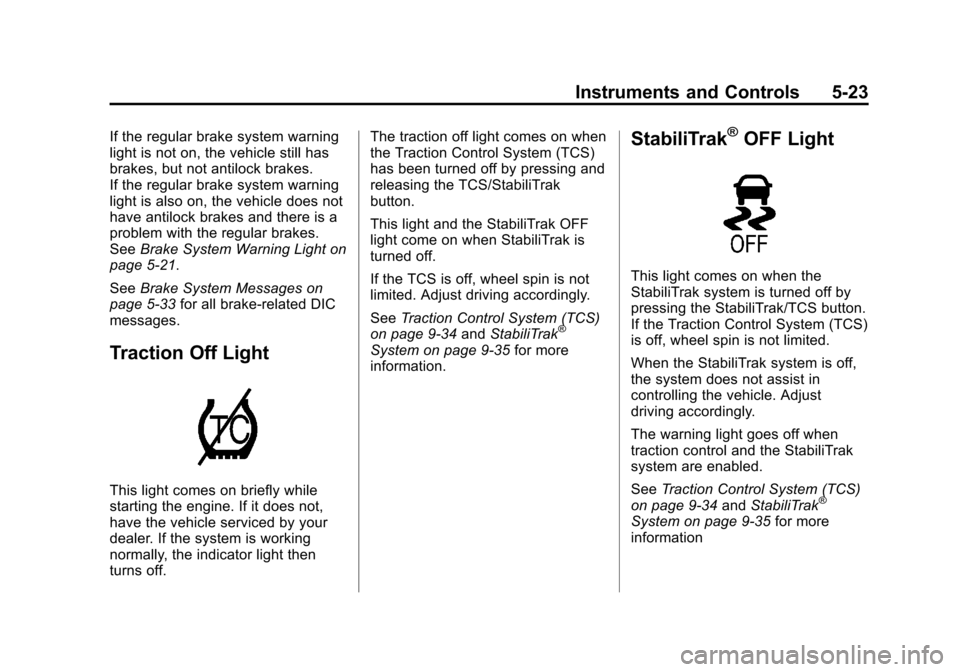
Traction Off Light
This light comes on briefly while
starting the engine. If it does not,
have the vehicle serviced by your
dealer. If the system is working
normally, the indicator light then
turns off. The traction off light comes on when
the Traction Control System (TCS)
has been turned off by pressing and
releasing the TCS/StabiliTrak
button.
This light and the StabiliTrak OFF
light come on when StabiliTrak is
turned off.
If the TCS is off, wheel spin is not
limited. Adjust driving accordingly.
See
Traction Control System (TCS)
on page 9‑34 andStabiliTrak
®
System on page 9‑35 for more
information.
StabiliTrak®OFF Light
This light comes on when the
StabiliTrak system is turned off by
pressing the StabiliTrak/TCS button.
If the Traction Control System (TCS)
is off, wheel spin is not limited.
When the StabiliTrak system is off,
the system does not assist in
controlling the vehicle. Adjust
driving accordingly.
The warning light goes off when
traction control and the StabiliTrak
system are enabled.
See Traction Control System (TCS)
on page 9‑34 andStabiliTrak
®
System on page 9‑35 for more
information
Page 158 of 502
Black plate (28,1)Cadillac SRX Owner Manual (Include Mex) - 2012
5-28 Instruments and Controls
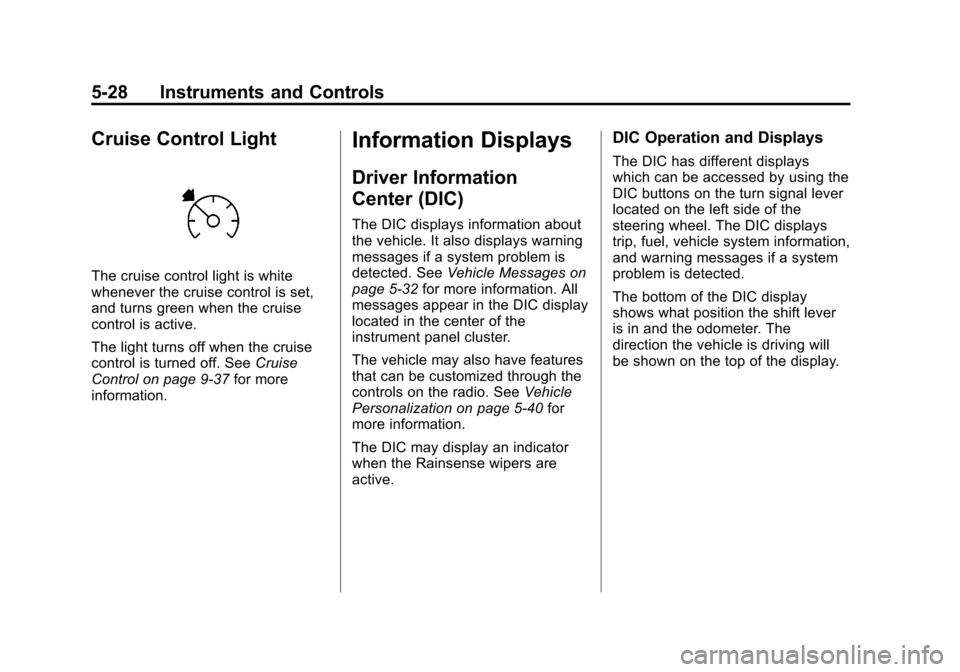
Cruise Control Light
The cruise control light is white
whenever the cruise control is set,
and turns green when the cruise
control is active.
The light turns off when the cruise
control is turned off. SeeCruise
Control on page 9‑37 for more
information.
Information Displays
Driver Information
Center (DIC)
The DIC displays information about
the vehicle. It also displays warning
messages if a system problem is
detected. See Vehicle Messages on
page 5‑32 for more information. All
messages appear in the DIC display
located in the center of the
instrument panel cluster.
The vehicle may also have features
that can be customized through the
controls on the radio. See Vehicle
Personalization on page 5‑40 for
more information.
The DIC may display an indicator
when the Rainsense wipers are
active.
DIC Operation and Displays
The DIC has different displays
which can be accessed by using the
DIC buttons on the turn signal lever
located on the left side of the
steering wheel. The DIC displays
trip, fuel, vehicle system information,
and warning messages if a system
problem is detected.
The bottom of the DIC display
shows what position the shift lever
is in and the odometer. The
direction the vehicle is driving will
be shown on the top of the display.
Page 159 of 502
Black plate (29,1)Cadillac SRX Owner Manual (Include Mex) - 2012
Instruments and Controls 5-29
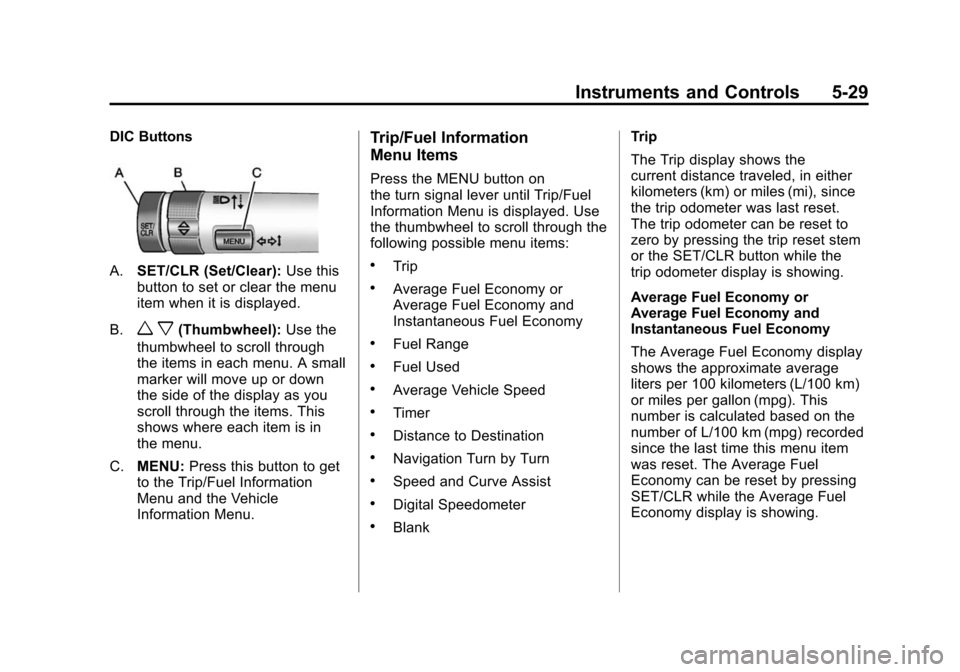
DIC Buttons
A.SET/CLR (Set/Clear): Use this
button to set or clear the menu
item when it is displayed.
B.
w x(Thumbwheel): Use the
thumbwheel to scroll through
the items in each menu. A small
marker will move up or down
the side of the display as you
scroll through the items. This
shows where each item is in
the menu.
C. MENU: Press this button to get
to the Trip/Fuel Information
Menu and the Vehicle
Information Menu.
Trip/Fuel Information
Menu Items
Press the MENU button on
the turn signal lever until Trip/Fuel
Information Menu is displayed. Use
the thumbwheel to scroll through the
following possible menu items:
.Trip
.Average Fuel Economy or
Average Fuel Economy and
Instantaneous Fuel Economy
.Fuel Range
.Fuel Used
.Average Vehicle Speed
.Timer
.Distance to Destination
.Navigation Turn by Turn
.Speed and Curve Assist
.Digital Speedometer
.Blank Trip
The Trip display shows the
current distance traveled, in either
kilometers (km) or miles (mi), since
the trip odometer was last reset.
The trip odometer can be reset to
zero by pressing the trip reset stem
or the SET/CLR button while the
trip odometer display is showing.
Average Fuel Economy or
Average Fuel Economy and
Instantaneous Fuel Economy
The Average Fuel Economy display
shows the approximate average
liters per 100 kilometers (L/100 km)
or miles per gallon (mpg). This
number is calculated based on the
number of L/100 km (mpg) recorded
since the last time this menu item
was reset. The Average Fuel
Economy can be reset by pressing
SET/CLR while the Average Fuel
Economy display is showing.
Page 160 of 502
Black plate (30,1)Cadillac SRX Owner Manual (Include Mex) - 2012
5-30 Instruments and Controls
The Instantaneous Fuel Economy
display shows the current fuel
economy in either liters per
100 kilometers (L/100 km) or miles
per gallon (mpg). This number
reflects only the fuel economy that
the vehicle has right now and
changes frequently as driving
conditions change. Unlike average
economy, this display cannot be
reset.
Fuel Range
The Fuel Range display shows the
approximate distance the vehicle
can be driven without refueling.
The fuel range estimate is based on
an average of the vehicle's fuel
economy over recent driving history
and the amount of fuel remaining in
the fuel tank. Fuel range cannot be
reset.
Fuel Used
The Fuel Used display shows
the approximate liters (L) or
gallons (gal) of fuel that have been
used since last reset.The fuel used can be reset by
pressing the SET/CLR button while
the Fuel Used display is showing.
Average Vehicle Speed
The Average Vehicle Speed display
shows the average speed of the
vehicle in kilometers per hour (km/h)
or miles per hour (mph). This
average is calculated based on the
various vehicle speeds recorded
since the last reset of this value.
The average speed can be reset by
pressing the SET/CLR button while
the Average Vehicle Speed display
is showing.
Timer
This display can be used as a timer.
To start the timer, press SET/CLR
while Timer is displayed. The
display will show the amount of time
that has passed since the timer was
last reset. To stop the timer, press
SET/CLR briefly while Elapsed Time
is displayed. To reset the timer to
zero, press and hold SET/CLR.
Distance to Destination
This display will show the vehicle
distance with estimated time of
arrival to destination. The value can
be cleared or reset by pressing
the SET/CLR button. Move the
thumbwheel up or down to increase
or decrease the destination distance
value. Once the distance value is
set, press SET/CLR to confirm
the value.
Turn-by-Turn
This display is used for the OnStar
or Navigation System Turn-by-Turn
guidance. See
OnStar Overview on
page 14‑1 or the navigation manual,
if the vehicle has navigation, for
more information.
Speed and Curve Assist
This display will show the speed
limit or the advised speed as
determined by the information
provided by the navigation system.
The map database loaded in the
navigation system may need
to be updated periodically to
Page 161 of 502
Black plate (31,1)Cadillac SRX Owner Manual (Include Mex) - 2012
Instruments and Controls 5-31
display accurate information. See
“Maps”in the navigation manual for
information on updating the map
database.
Digital Speedometer
The speedometer shows how fast
the vehicle is moving in either
kilometers per hour (km/h) or miles
per hour (mph). The speedometer
cannot be reset.
Blank Display
This display shows no information.
Vehicle Information
Menu Items
Press the MENU button on the turn
signal lever until Vehicle Information
Menu is displayed. Use the
thumbwheel to scroll through the
following possible menu items:
.Unit
.Speed Warning
.Battery Voltage
.Remaining Oil Life
.Tire Pressure
.Blank
Unit
Move the thumbwheel up or down to
switch between metric or English
when the Unit display is active.
Press SET/CLR to confirm the
setting. This will change the
displays on the cluster and DIC to
either metric or English
measurements.
Speed Warning
Speed Warning allows the driver to
set a speed that they do not want to
exceed. To set the Speed Warning,
press SET/CLR when Speed
Warning is displayed. After selecting
ON, use the thumbwheel to increase
or decrease the desired speed limit.
The value can be set from
0-250 km/h (0-160 mph). Press
SET/CLR to confirm. If the selected
speed limit is exceeded, a pop-up
warning is displayed with a chime. Battery Voltage
This display, available on some
vehicles, shows the current battery
voltage. If the voltage is in the
normal range, the value will display.
For example, the display may read
BATTERY VOLTAGE 15.0 VOLTS.
The vehicle's charging system
regulates voltage based on the state
of the battery. The battery voltage
can fluctuate while viewing this
information on the DIC. This is
normal. See
Charging System Light
on page 5‑18 for more information.
If there is a problem with the battery
charging system, the DIC will
display a message. See Battery
Voltage and Charging Messages on
page 5‑33.
Remaining Oil Life
This display shows an estimate of
the oil's remaining useful life.
If REMAINING OIL LIFE 99% is
displayed, that means 99% of the
current oil life remains.
Page 167 of 502
Black plate (37,1)Cadillac SRX Owner Manual (Include Mex) - 2012
Instruments and Controls 5-37
XXX TURN INDICATOR
FAILURE
When one of the turn signals is out,
this message displays to show
which bulb needs to be replaced.
SeeBulb Replacement on
page 10‑31 andReplacement Bulbs
on page 10‑40 for more information
on the turn signal bulb replacement.
TURN SIGNAL ON
This message is displayed if the
turn signal has been left on. Turn off
the turn signal.
Object Detection System
Messages
PARK ASSIST OFF
This message displays when the
park assist system has been turned
off or when there is a temporary
condition causing the system to be
disabled. See Ultrasonic Parking
Assist on page 9‑40.
SERVICE PARKING ASSIST
This message displays if there is a
problem with the Ultrasonic Front
and Rear Parking Assist (UFRPA)
system. Do not use this system to
help you park. See Ultrasonic
Parking Assist on page 9‑40 for
more information. See your dealer
for service.
Ride Control System
Messages
SERVICE REAR AXLE
This message displays when there
is a problem with the All-Wheel
Drive (AWD) System. See your
dealer for service.
SERVICE STABILITRAK
This message displays if there is a
problem with the StabiliTrak system.
See StabiliTrak
®System on
page 9‑35.
SERVICE SUSPENSION
SYSTEM
This message displays if there is a
problem with the selective ride
control. See Selective Ride Control
on page 9‑37.
SERVICE TRACTION
CONTROL
This message displays when there
is a problem with the Traction
Control System (TCS). See Traction
Control System (TCS) on
page 9‑34.
SPORT MODE ON
This message displays when Sport
Mode has been activated. See
Selective Ride Control on page 9‑37
and Manual Mode on page 9‑28 for
more information.
Page 172 of 502
Black plate (42,1)Cadillac SRX Owner Manual (Include Mex) - 2012
5-42 Instruments and Controls
Remote Start Auto Heated Seats
When on, this feature will turn the
heated seats on when using remote
start on cold days.
Press the MENU/SELECT knob
when Remote Start Auto Heated
Seats is highlighted. Turn the knob
to select On or Off. Press the knob
to confirm and go back to the
last menu.
Auto Defog
This will allow you to turn the auto
defog on or off.
Press the MENU/SELECT knob
when Auto Defog is highlighted to
open the menu. Turn the knob to
highlight On or Off. Press the knob
to confirm the selection and move
back to the last menu.
Auto Rear Defog
This will allow you to turn the auto
rear defog on or off.
Press the MENU/SELECT knob
when Auto Rear Defog is
highlighted to open the menu.Turn the knob to highlight On or Off.
Press the knob to confirm the
selection and move back to the
last menu.
Comfort and Convenience
Select the Comfort and
Convenience menu and the
following will be displayed:
.Easy Exit Driver Seat
.Chime Volume
.Reverse Tilt Mirror
.Auto Wipe in Reverse Gear
Easy Exit Driver Seat
This allows you to turn the easy exit
driver seat feature on or off. When
on, this feature will move the driver
seat rearward upon turning the
ignition off and the driver door
opened. This may be performed to
make it easier to exit the vehicle.
See Power Seat Adjustment on
page 3‑4 for more information. Press the MENU/SELECT knob
when Easy Exit Driver Seat is
highlighted. Turn the knob to select
On or Off. Press the knob to confirm
and go back to the last menu.
Chime Volume
This allows the selection of the
chime volume level.
Press the MENU/SELECT knob
when Chime Volume is highlighted.
Turn the knob to select Normal or
High. Press the knob to confirm and
go back to the last menu.
Reverse Tilt Mirror
This allows you to turn the reverse
tilt mirror feature on or off. When on,
both the driver and passenger
mirrors will tilt downward when
vehicle is shifted to R (Reverse) to
improve visibility of the ground near
the rear wheels. They will return to
their previous driving position
when the vehicle is shifted out of
R (Reverse), the ignition is turned to
OFF, or the vehicle is left in reverse.
Page 184 of 502
Black plate (4,1)Cadillac SRX Owner Manual (Include Mex) - 2012
6-4 Lighting
Curve Lighting
The light beam pivots based on the
steering wheel position and vehicle
speed of at least 10 km/h (6 mph).
The headlamps shine at an angle of
up to 15 degrees to the right or left
of the direction of travel.
Highway Lighting
If the vehicle is traveling straight
continuously at high speeds, the
light beam automatically raises
slightly to increase the headlamp
range.
City Lighting
If the vehicle speed is less than
50 km/h (31 mph), the headlamp
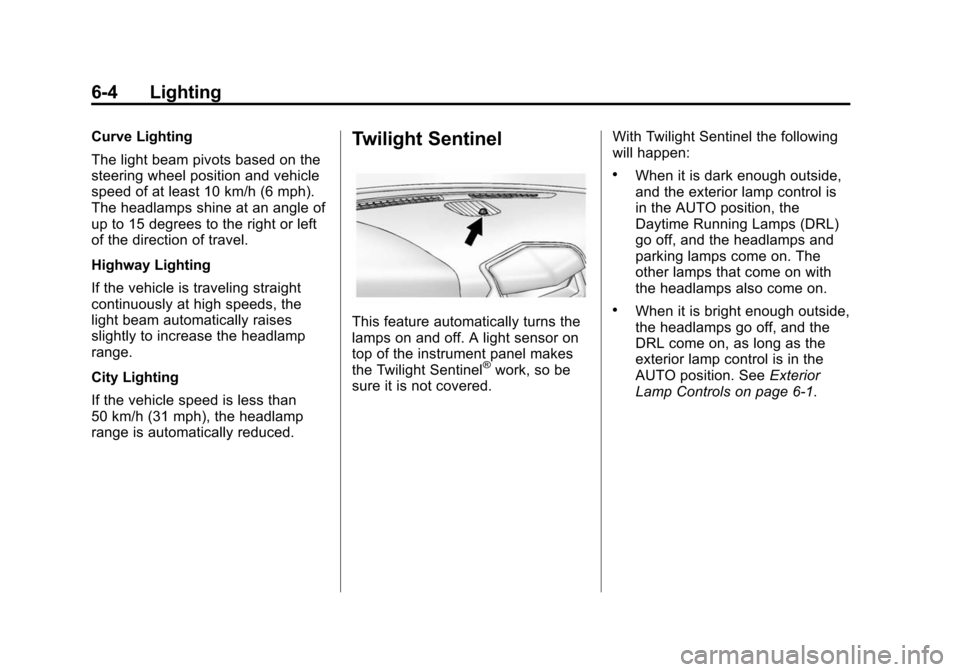
range is automatically reduced.Twilight Sentinel
This feature automatically turns the
lamps on and off. A light sensor on
top of the instrument panel makes
the Twilight Sentinel
®work, so be
sure it is not covered. With Twilight Sentinel the following
will happen:
.When it is dark enough outside,
and the exterior lamp control is
in the AUTO position, the
Daytime Running Lamps (DRL)
go off, and the headlamps and
parking lamps come on. The
other lamps that come on with
the headlamps also come on.
.When it is bright enough outside,
the headlamps go off, and the
DRL come on, as long as the
exterior lamp control is in the
AUTO position. See
Exterior
Lamp Controls on page 6‑1.
Page 186 of 502
Black plate (6,1)Cadillac SRX Owner Manual (Include Mex) - 2012
6-6 Lighting
Turn and Lane-Change
Signals
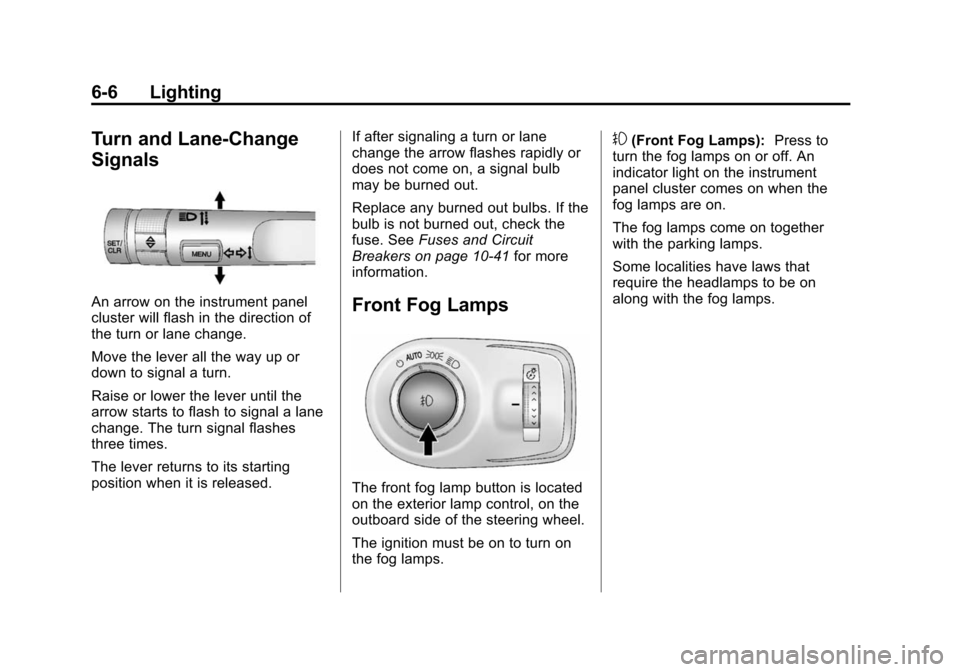
An arrow on the instrument panel
cluster will flash in the direction of
the turn or lane change.
Move the lever all the way up or
down to signal a turn.
Raise or lower the lever until the
arrow starts to flash to signal a lane
change. The turn signal flashes
three times.
The lever returns to its starting
position when it is released.If after signaling a turn or lane
change the arrow flashes rapidly or
does not come on, a signal bulb
may be burned out.
Replace any burned out bulbs. If the
bulb is not burned out, check the
fuse. See
Fuses and Circuit
Breakers on page 10‑41 for more
information.Front Fog Lamps
The front fog lamp button is located
on the exterior lamp control, on the
outboard side of the steering wheel.
The ignition must be on to turn on
the fog lamps.
#(Front Fog Lamps): Press to
turn the fog lamps on or off. An
indicator light on the instrument
panel cluster comes on when the
fog lamps are on.
The fog lamps come on together
with the parking lamps.
Some localities have laws that
require the headlamps to be on
along with the fog lamps.
Page 187 of 502
Black plate (7,1)Cadillac SRX Owner Manual (Include Mex) - 2012
Lighting 6-7
Interior Lighting
Instrument Panel
Illumination Control
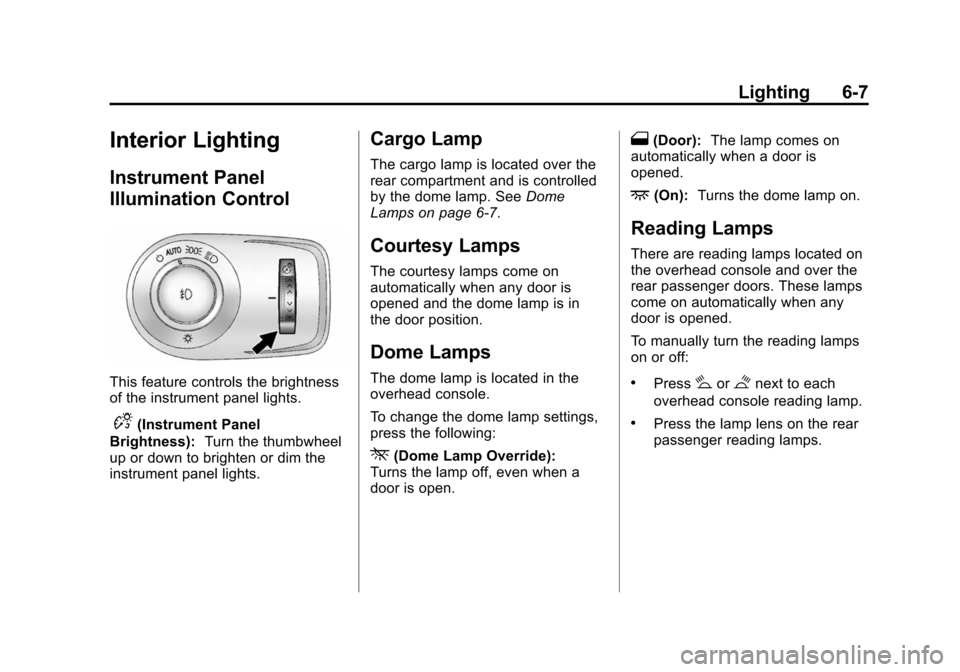
This feature controls the brightness
of the instrument panel lights.
D(Instrument Panel
Brightness): Turn the thumbwheel
up or down to brighten or dim the
instrument panel lights.
Cargo Lamp
The cargo lamp is located over the
rear compartment and is controlled
by the dome lamp. See Dome
Lamps on page 6‑7.
Courtesy Lamps
The courtesy lamps come on
automatically when any door is
opened and the dome lamp is in
the door position.
Dome Lamps
The dome lamp is located in the
overhead console.
To change the dome lamp settings,
press the following:
*(Dome Lamp Override):
Turns the lamp off, even when a
door is open.
1(Door): The lamp comes on
automatically when a door is
opened.
+(On): Turns the dome lamp on.
Reading Lamps
There are reading lamps located on
the overhead console and over the
rear passenger doors. These lamps
come on automatically when any
door is opened.
To manually turn the reading lamps
on or off:
.Press#or$next to each
overhead console reading lamp.
.Press the lamp lens on the rear
passenger reading lamps.