Sound CADILLAC SRX 2012 2.G Owners Manual
[x] Cancel search | Manufacturer: CADILLAC, Model Year: 2012, Model line: SRX, Model: CADILLAC SRX 2012 2.GPages: 502, PDF Size: 6.23 MB
Page 10 of 502
Black plate (4,1)Cadillac SRX Owner Manual (Include Mex) - 2012
1-4 In Brief
Initial Drive
Information
This section provides a brief
overview about some of the
important features that may or may
not be on your specific vehicle.
For more detailed information, refer
to each of the features which can be
found later in this owner manual.
Remote Keyless Entry
(RKE) System
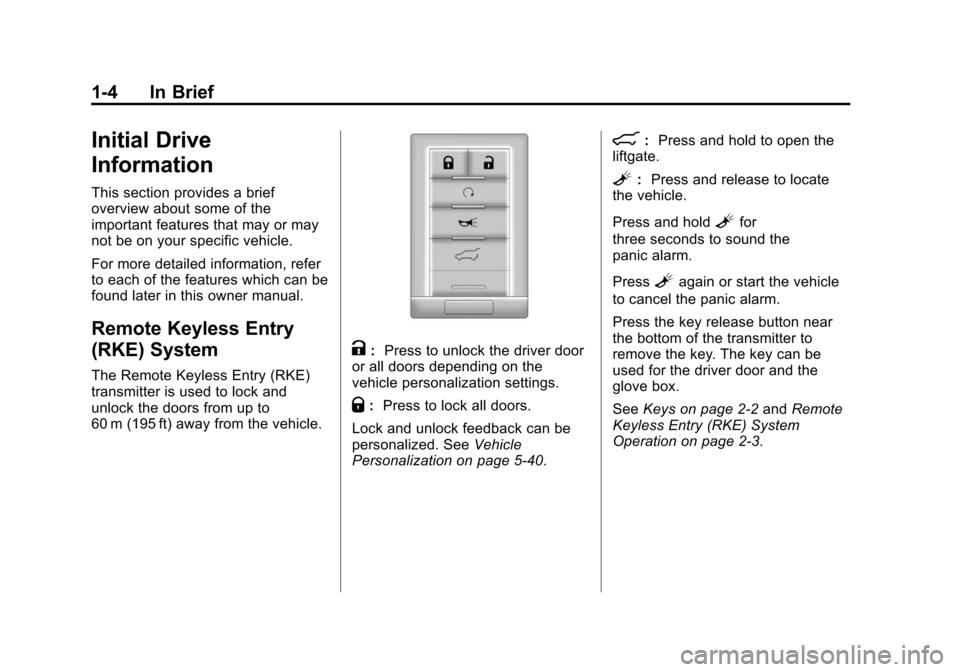
The Remote Keyless Entry (RKE)
transmitter is used to lock and
unlock the doors from up to
60 m (195 ft) away from the vehicle.
K:Press to unlock the driver door
or all doors depending on the
vehicle personalization settings.
Q: Press to lock all doors.
Lock and unlock feedback can be
personalized. See Vehicle
Personalization on page 5‑40.
8: Press and hold to open the
liftgate.
L: Press and release to locate
the vehicle.
Press and hold
Lfor
three seconds to sound the
panic alarm.
Press
Lagain or start the vehicle
to cancel the panic alarm.
Press the key release button near
the bottom of the transmitter to
remove the key. The key can be
used for the driver door and the
glove box.
See Keys on page 2‑2 andRemote
Keyless Entry (RKE) System
Operation on page 2‑3.
Page 14 of 502
Black plate (8,1)Cadillac SRX Owner Manual (Include Mex) - 2012
1-8 In Brief
Memory Features
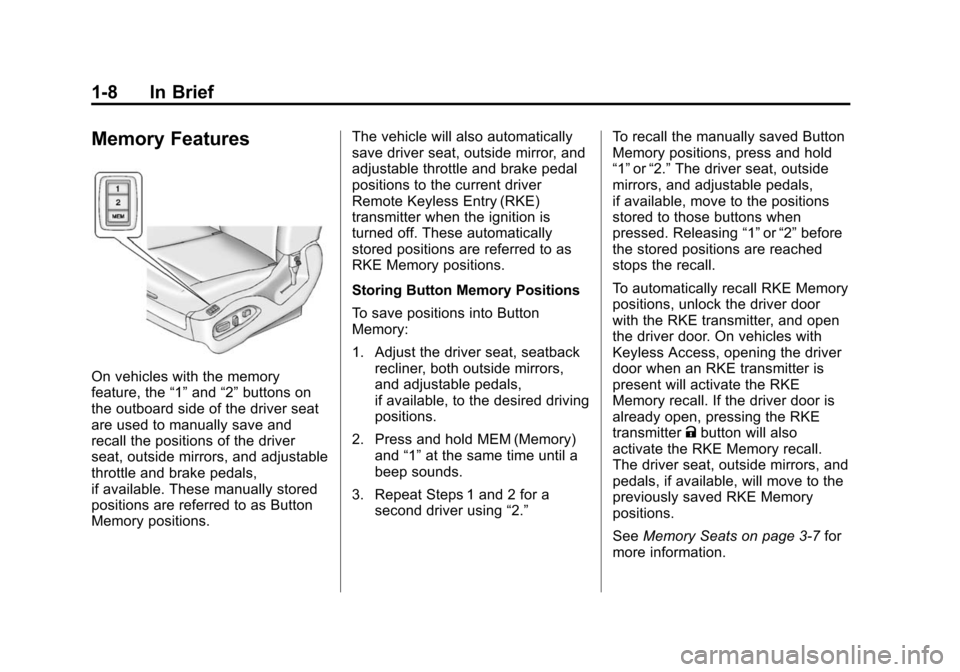
On vehicles with the memory
feature, the“1”and “2”buttons on
the outboard side of the driver seat
are used to manually save and
recall the positions of the driver
seat, outside mirrors, and adjustable
throttle and brake pedals,
if available. These manually stored
positions are referred to as Button
Memory positions. The vehicle will also automatically
save driver seat, outside mirror, and
adjustable throttle and brake pedal
positions to the current driver
Remote Keyless Entry (RKE)
transmitter when the ignition is
turned off. These automatically
stored positions are referred to as
RKE Memory positions.
Storing Button Memory Positions
To save positions into Button
Memory:
1. Adjust the driver seat, seatback
recliner, both outside mirrors,
and adjustable pedals,
if available, to the desired driving
positions.
2. Press and hold MEM (Memory) and “1”at the same time until a
beep sounds.
3. Repeat Steps 1 and 2 for a second driver using “2.”To recall the manually saved Button
Memory positions, press and hold
“1”
or“2.” The driver seat, outside
mirrors, and adjustable pedals,
if available, move to the positions
stored to those buttons when
pressed. Releasing “1”or“2” before
the stored positions are reached
stops the recall.
To automatically recall RKE Memory
positions, unlock the driver door
with the RKE transmitter, and open
the driver door. On vehicles with
Keyless Access, opening the driver
door when an RKE transmitter is
present will activate the RKE
Memory recall. If the driver door is
already open, pressing the RKE
transmitter Kbutton will also
activate the RKE Memory recall.
The driver seat, outside mirrors, and
pedals, if available, will move to the
previously saved RKE Memory
positions.
See Memory Seats on page 3‑7 for
more information.
Page 23 of 502
Black plate (17,1)Cadillac SRX Owner Manual (Include Mex) - 2012
In Brief 1-17
Setting the 12/24 Hour Format
1. Press the CONFIG button.
2. Select Time and Date Settings.
3. Highlight 12/24 Hour Format.
4. Press the MENU/SELECTbutton to select the 12 hour or
24 hour display format.
Setting the Month & Day Format
1. Press the CONFIG button.
2. Select Time and Date Settings.
3. Highlight Month & Day Format.
4. Press the MENU/SELECT knob to select MM/DD (month/day) or
DD/MM (day/month).
Setting the Auto Time Adjust
(If Equipped)
1. Press the CONFIG button.
2. Select Time and Date Settings.
3. Highlight Auto Time Adjust.
4. Press the MENU/SELECT knob to turn Auto Time Adjust on
or off.Satellite Radio
Vehicles with an XM™ satellite radio
tuner and a valid XM satellite radio
subscription can receive XM
programming.
XM Satellite Radio Service
XM is a satellite radio service based
in the 48 contiguous United States
and 10 Canadian provinces. XM
satellite radio has a wide variety of
programming and commercial-free
music, coast to coast, and in
digital-quality sound. A fee is
required to receive the XM service.
For more information refer to:
.www.xmradio.com or call
1-800-929-2100 (U.S.).
.www.xmradio.ca or call
1-877-438-9677 (Canada).
For more information, see Satellite
Radio on page 7‑14.
Portable Audio Devices
Some vehicles have a 3.5 mm
(1/8 in) auxiliary input and a USB
port located in the center console.
External devices such as iPods
®,
laptop computers, MP3 players, CD
changers, and USB storage devices
may be connected, depending on
the audio system.
For more information, see Auxiliary
Devices (Radio with CD) on
page 7‑28 orAuxiliary Devices
(Radio with CD/DVD and MEM) on
page 7‑33.
Page 25 of 502
Black plate (19,1)Cadillac SRX Owner Manual (Include Mex) - 2012
In Brief 1-19
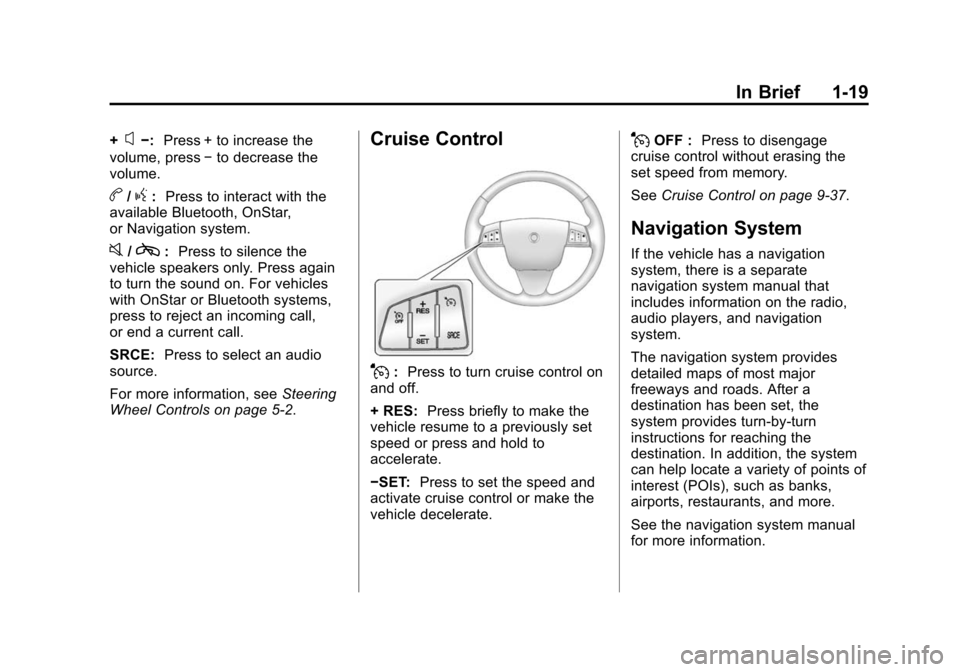
+x−:Press + to increase the
volume, press −to decrease the
volume.
b/g: Press to interact with the
available Bluetooth, OnStar,
or Navigation system.
0/c: Press to silence the
vehicle speakers only. Press again
to turn the sound on. For vehicles
with OnStar or Bluetooth systems,
press to reject an incoming call,
or end a current call.
SRCE: Press to select an audio
source.
For more information, see Steering
Wheel Controls on page 5‑2.
Cruise Control
J: Press to turn cruise control on
and off.
+ RES: Press briefly to make the
vehicle resume to a previously set
speed or press and hold to
accelerate.
−SET: Press to set the speed and
activate cruise control or make the
vehicle decelerate.
JOFF : Press to disengage
cruise control without erasing the
set speed from memory.
See Cruise Control on page 9‑37.
Navigation System
If the vehicle has a navigation
system, there is a separate
navigation system manual that
includes information on the radio,
audio players, and navigation
system.
The navigation system provides
detailed maps of most major
freeways and roads. After a
destination has been set, the
system provides turn-by-turn
instructions for reaching the
destination. In addition, the system
can help locate a variety of points of
interest (POIs), such as banks,
airports, restaurants, and more.
See the navigation system manual
for more information.
Page 34 of 502
Black plate (4,1)Cadillac SRX Owner Manual (Include Mex) - 2012
2-4 Keys, Doors, and Windows
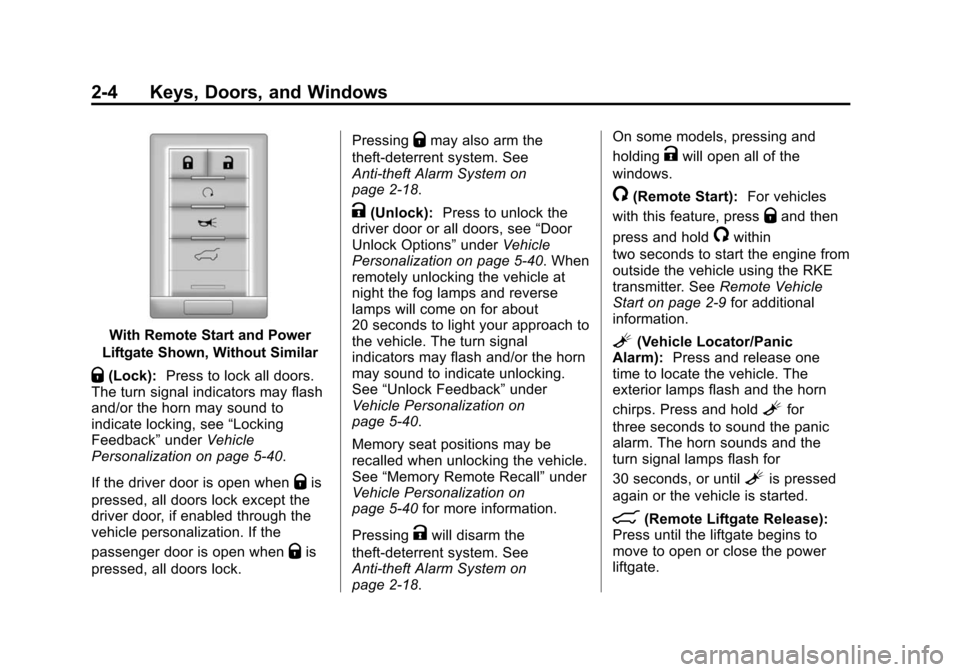
With Remote Start and Power
Liftgate Shown, Without Similar
Q(Lock): Press to lock all doors.
The turn signal indicators may flash
and/or the horn may sound to
indicate locking, see “Locking
Feedback” underVehicle
Personalization on page 5‑40.
If the driver door is open when
Qis
pressed, all doors lock except the
driver door, if enabled through the
vehicle personalization. If the
passenger door is open when
Qis
pressed, all doors lock. Pressing
Qmay also arm the
theft-deterrent system. See
Anti-theft Alarm System on
page 2‑18.
K(Unlock): Press to unlock the
driver door or all doors, see “Door
Unlock Options” underVehicle
Personalization on page 5‑40. When
remotely unlocking the vehicle at
night the fog lamps and reverse
lamps will come on for about
20 seconds to light your approach to
the vehicle. The turn signal
indicators may flash and/or the horn
may sound to indicate unlocking.
See “Unlock Feedback” under
Vehicle Personalization on
page 5‑40.
Memory seat positions may be
recalled when unlocking the vehicle.
See “Memory Remote Recall” under
Vehicle Personalization on
page 5‑40 for more information.
Pressing
Kwill disarm the
theft-deterrent system. See
Anti-theft Alarm System on
page 2‑18. On some models, pressing and
holding
Kwill open all of the
windows.
/(Remote Start): For vehicles
with this feature, press
Qand then
press and hold
/within
two seconds to start the engine from
outside the vehicle using the RKE
transmitter. See Remote Vehicle
Start on page 2‑9 for additional
information.
L(Vehicle Locator/Panic
Alarm): Press and release one
time to locate the vehicle. The
exterior lamps flash and the horn
chirps. Press and hold
Lfor
three seconds to sound the panic
alarm. The horn sounds and the
turn signal lamps flash for
30 seconds, or until
Lis pressed
again or the vehicle is started.
8(Remote Liftgate Release):
Press until the liftgate begins to
move to open or close the power
liftgate.
Page 43 of 502
Black plate (13,1)Cadillac SRX Owner Manual (Include Mex) - 2012
Keys, Doors, and Windows 2-13
Delayed Locking
When this feature is enabled and
the doors are locked with the power
lock switch on the instrument panel,
three chimes sound to signal that
the delayed locking feature is in
use. All doors lock five seconds
after the last door is closed.
When the delayed locking feature
is in use, pressing
Qon the
instrument panel or
Qon the
RKE transmitter will override the
feature and lock all doors
immediately.
This feature can be programmed by
using the Driver Information Center
(DIC). See “Delayed Door Lock” in
Vehicle Personalization on
page 5‑40. The delayed locking
feature is only available if “Unlocked
Door Anti-Lockout” is disabled.
Safety Locks
Rear door safety locks prevent
passengers from opening the rear
doors from the inside.
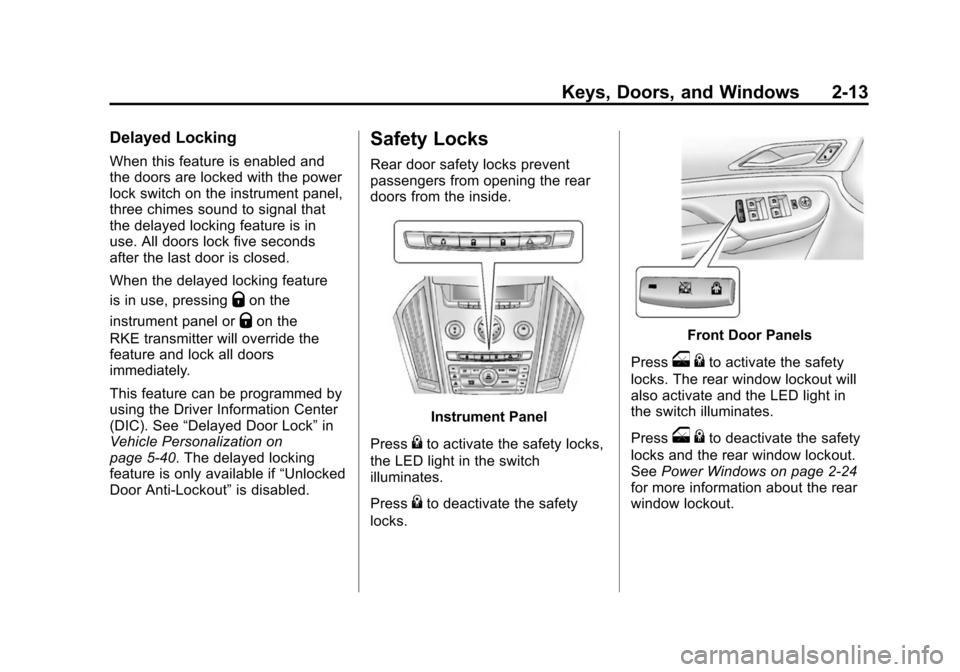
Instrument Panel
Press
{to activate the safety locks,
the LED light in the switch
illuminates.
Press
{to deactivate the safety
locks.
Front Door Panels
Press
o {to activate the safety
locks. The rear window lockout will
also activate and the LED light in
the switch illuminates.
Press
o {to deactivate the safety
locks and the rear window lockout.
See Power Windows on page 2‑24
for more information about the rear
window lockout.
Page 46 of 502
Black plate (16,1)Cadillac SRX Owner Manual (Include Mex) - 2012
2-16 Keys, Doors, and Windows
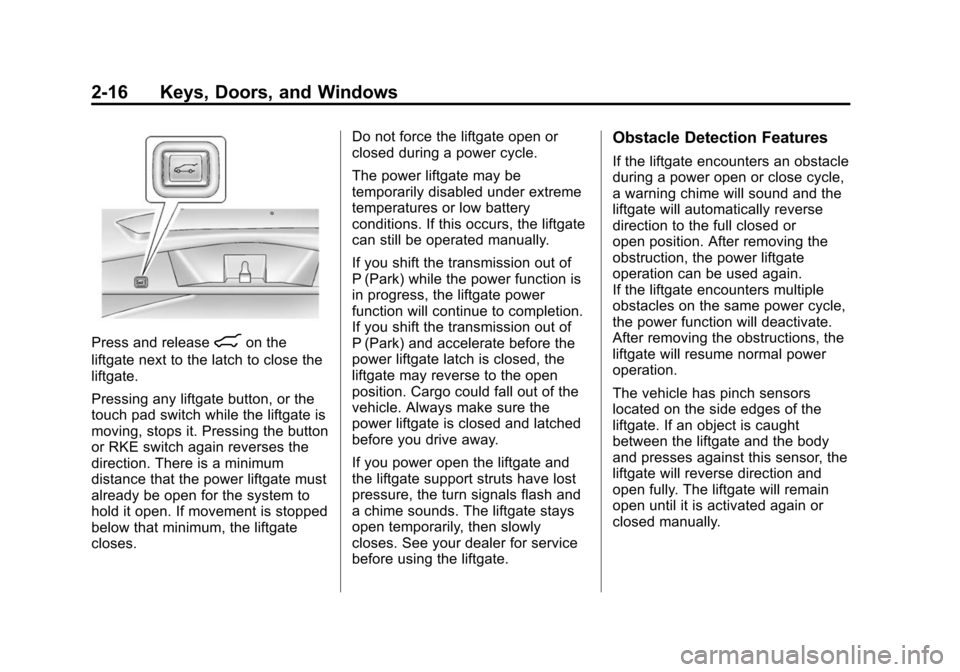
Press and release8on the
liftgate next to the latch to close the
liftgate.
Pressing any liftgate button, or the
touch pad switch while the liftgate is
moving, stops it. Pressing the button
or RKE switch again reverses the
direction. There is a minimum
distance that the power liftgate must
already be open for the system to
hold it open. If movement is stopped
below that minimum, the liftgate
closes. Do not force the liftgate open or
closed during a power cycle.
The power liftgate may be
temporarily disabled under extreme
temperatures or low battery
conditions. If this occurs, the liftgate
can still be operated manually.
If you shift the transmission out of
P (Park) while the power function is
in progress, the liftgate power
function will continue to completion.
If you shift the transmission out of
P (Park) and accelerate before the
power liftgate latch is closed, the
liftgate may reverse to the open
position. Cargo could fall out of the
vehicle. Always make sure the
power liftgate is closed and latched
before you drive away.
If you power open the liftgate and
the liftgate support struts have lost
pressure, the turn signals flash and
a chime sounds. The liftgate stays
open temporarily, then slowly
closes. See your dealer for service
before using the liftgate.
Obstacle Detection Features
If the liftgate encounters an obstacle
during a power open or close cycle,
a warning chime will sound and the
liftgate will automatically reverse
direction to the full closed or
open position. After removing the
obstruction, the power liftgate
operation can be used again.
If the liftgate encounters multiple
obstacles on the same power cycle,
the power function will deactivate.
After removing the obstructions, the
liftgate will resume normal power
operation.
The vehicle has pinch sensors
located on the side edges of the
liftgate. If an object is caught
between the liftgate and the body
and presses against this sensor, the
liftgate will reverse direction and
open fully. The liftgate will remain
open until it is activated again or
closed manually.
Page 47 of 502
Black plate (17,1)Cadillac SRX Owner Manual (Include Mex) - 2012
Keys, Doors, and Windows 2-17
Setting the Power Liftgate
3/4 Mode
To change the liftgate stop position.
1. Turn the liftgate switch to eitherthe MAX, or the 3/4 mode
position and power open the
liftgate.
2. Stop the liftgate movement at the desired height by pressing
any liftgate switch. Manually
adjust the liftgate position if
required.
3. Press and hold the button on the liftgate next to the latch until the
turn signals flash and a beep
sounds to indicate that the new
setting is recorded.
When power opened with the
3/4 mode selected, the liftgate stops
at the new set position. If you do not receive the audible and
visual feedback when setting the
intermediate stop position, you are
attempting to set the height below
the 3/4 open height minimum
(approximately 1.52 m or 5 ft).
The liftgate cannot be set below
that minimum and the new setting
will not be recorded.
Manual Operation of Power
Liftgate
To change the liftgate to manual
operation, turn the mode switch to
the OFF position.
With the power liftgate disabled and
all of the doors unlocked, the liftgate
can be manually opened and
closed. The effort required to
operate a power liftgate is greater
than the effort required to operate a
non-power liftgate.To open the liftgate, press the touch
pad on the handle on the outside of
the liftgate, and lift the gate open. To
close the liftgate, use the pull cup to
lower the liftgate and close. With the
power liftgate disabled, the liftgate
electric latch will still power latch
once contact is made with the
striker. Always close the liftgate
before driving.
If the RKE button is pressed while
power operation is disabled, the turn
signals flash and the liftgate will
not move.
The liftgate has an electric latch.
If the battery is disconnected or has
low voltage, the liftgate will not
open. The liftgate will resume
operation when the battery is
reconnected and charged.
Page 48 of 502
Black plate (18,1)Cadillac SRX Owner Manual (Include Mex) - 2012
2-18 Keys, Doors, and Windows
Vehicle Security
This vehicle has theft-deterrent
features; however, they do not make
it impossible to steal.
Anti-theft Alarm System
This vehicle has an anti-theft alarm
system.
The LED light, located on the
instrument panel near the
windshield, indicates the status of
the system.
Arming the System
1. Close all doors, liftgate,and hood.
2. Lock the vehicle using the transmitter or the power door
lock button. The LED on the
instrument panel should come
on and stay on for about
30 seconds.
3. After 30 seconds, the alarm system will arm, and the LED
will begin to slowly flash
indicating the alarm is operating. If a door, the hood, or liftgate is
opened without first unlocking with
the transmitter, the turn signals will
flash and the horn will sound for
about 30 seconds. The alarm
system will then re-arm to monitor
for the next unauthorized event.
The theft-deterrent alarm system will
not activate if the doors are locked
with the key. You can start the
vehicle with a recognized transmitter
in the vehicle if the alarm has been
set off.
Disarming the System
To disarm the system, either unlock
the doors using the transmitter,
or start the vehicle with a
recognized transmitter in the
vehicle.
To avoid setting off the alarm by
accident:
.Lock the vehicle with the
transmitter after all occupants
have left the vehicle and all
doors are closed.
.Always unlock a door with the
transmitter. Unlocking a door any
other way will not disarm the
alarm.
If you set off the alarm by accident,
turn off the alarm by pressing
Kon
the transmitter. The alarm will not
stop if you try to unlock a door any
other way.
How to Detect a Tamper
Condition
IfKis pressed and the horn chirps
three times, an attempted break-in
has occurred while the system was
armed.
If the alarm has been activated, the
THEFT ATTEMPTED message will
appear on the DIC. See Key and
Lock Messages on page 5‑36 for
additional information.
Page 51 of 502
Black plate (21,1)Cadillac SRX Owner Manual (Include Mex) - 2012
Keys, Doors, and Windows 2-21
Folding Mirrors
Power Foldaway Mirrors
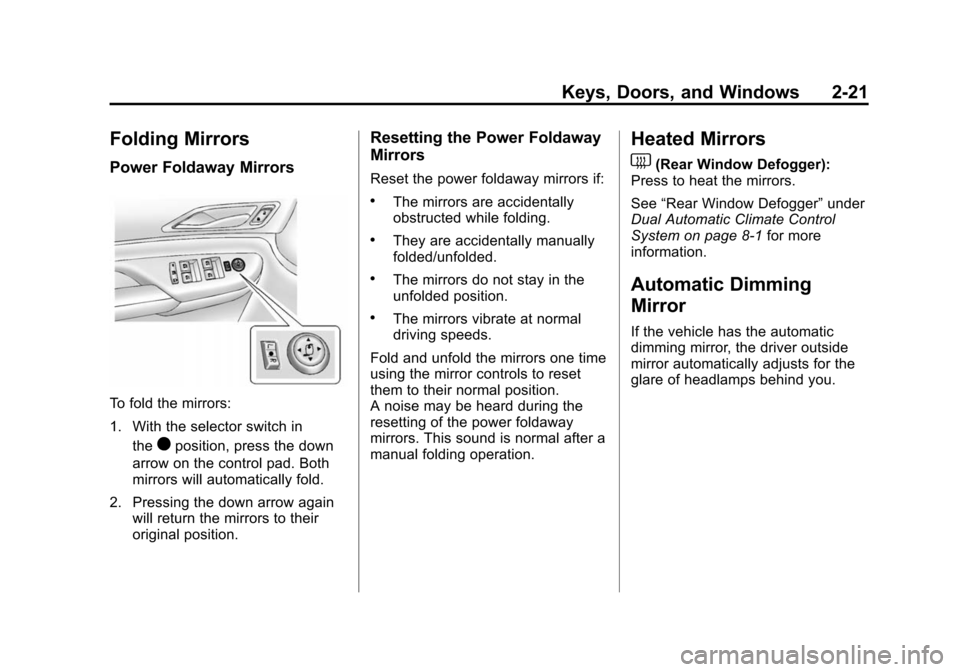
To fold the mirrors:
1. With the selector switch inthe
)position, press the down
arrow on the control pad. Both
mirrors will automatically fold.
2. Pressing the down arrow again will return the mirrors to their
original position.
Resetting the Power Foldaway
Mirrors
Reset the power foldaway mirrors if:
.The mirrors are accidentally
obstructed while folding.
.They are accidentally manually
folded/unfolded.
.The mirrors do not stay in the
unfolded position.
.The mirrors vibrate at normal
driving speeds.
Fold and unfold the mirrors one time
using the mirror controls to reset
them to their normal position.
A noise may be heard during the
resetting of the power foldaway
mirrors. This sound is normal after a
manual folding operation.
Heated Mirrors
1
(Rear Window Defogger):
Press to heat the mirrors.
See “Rear Window Defogger” under
Dual Automatic Climate Control
System on page 8‑1 for more
information.
Automatic Dimming
Mirror
If the vehicle has the automatic
dimming mirror, the driver outside
mirror automatically adjusts for the
glare of headlamps behind you.