change time CADILLAC SRX 2013 2.G User Guide
[x] Cancel search | Manufacturer: CADILLAC, Model Year: 2013, Model line: SRX, Model: CADILLAC SRX 2013 2.GPages: 432, PDF Size: 7.13 MB
Page 179 of 432
Black plate (5,1)Cadillac SRX Owner Manual - 2013 - CRC - 11/9/12
Lighting 6-5
Lights On with Wipers
If the windshield wipers are
activated in daylight with the
engine on, and the exterior lamp
control is in AUTO, the headlamps,
parking lamps, and other exterior
lamps come on. The transition time
for the lamps coming on varies
based on wiper speed. When the
wipers are not operating, these
lamps turn off. Move the exterior
lamp control to
Por;to disable
this feature.
Hazard Warning Flashers
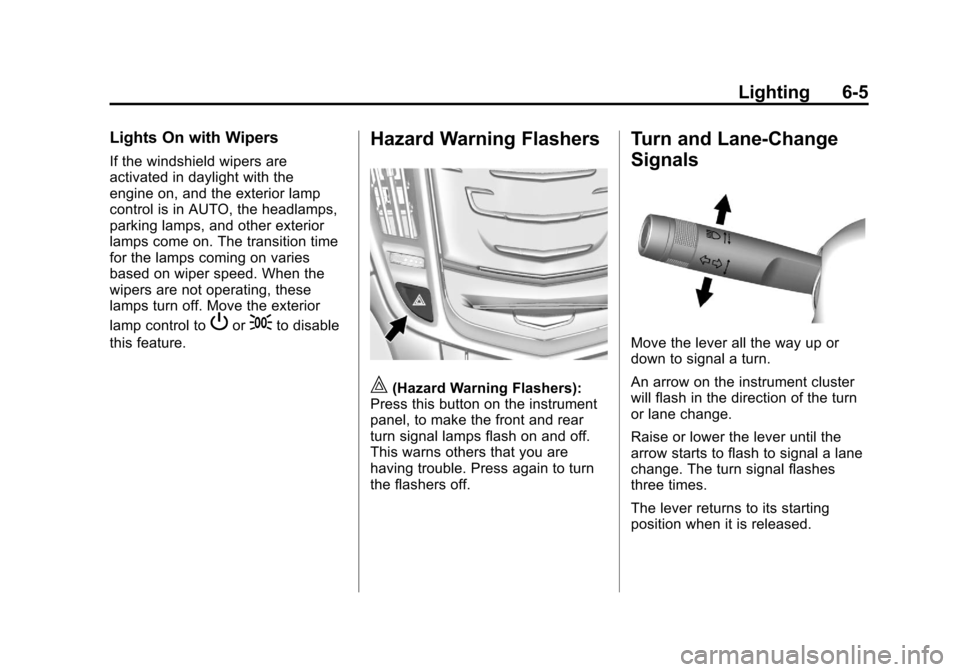
|(Hazard Warning Flashers):
Press this button on the instrument
panel, to make the front and rear
turn signal lamps flash on and off.
This warns others that you are
having trouble. Press again to turn
the flashers off.
Turn and Lane-Change
Signals
Move the lever all the way up or
down to signal a turn.
An arrow on the instrument cluster
will flash in the direction of the turn
or lane change.
Raise or lower the lever until the
arrow starts to flash to signal a lane
change. The turn signal flashes
three times.
The lever returns to its starting
position when it is released.
Page 182 of 432
Black plate (8,1)Cadillac SRX Owner Manual - 2013 - CRC - 11/9/12
6-8 Lighting
Lighting Features
Entry Lighting
The headlamps, taillamps, license
plate lamps, back-up lamps, dome
lamps, and most of the interior lights
turn on briefly, when
Kis pressed
on the Remote Keyless Entry (RKE)
transmitter. After about 30 seconds
the exterior lamps turn off, and then
the dome and remaining interior
lights dim to off. The entry lighting
can be manually turned off by
changing the ignition out of the off
position, or by pressing
Qon the
RKE transmitter.
This feature can be changed. See
Vehicle Personalization on
page 5‑40.
Exit Lighting
The headlamps, taillamps, parking
lamps, back-up lamps, and license
plate lamps come on at night, or in
areas with limited lighting, when a
door is opened after the ignition is
turned off. The dome lamps also
come on when the driver door is
opened after the ignition is changed
to the off position.
The exterior lights and dome lamp
remain on after the door is closed
for a set amount of time, then
automatically turn off.
The exterior lights turn off
immediately by turning the exterior
lamps control to off.
This feature can be changed. See
Vehicle Personalization on
page 5‑40.
Battery Load
Management
The vehicle has Electric Power
Management (EPM) that estimates
the battery's temperature and state
of charge. It then adjusts the voltage
for best performance and extended
life of the battery.
When the battery's state of charge
is low, the voltage is raised slightly
to quickly bring the charge back up.
When the state of charge is high,
the voltage is lowered slightly to
prevent overcharging. If the vehicle
has a voltmeter gauge or a voltage
display on the Driver Information
Center (DIC), you may see the
voltage move up or down. This is
normal. If there is a problem, an
alert will be displayed.
Page 189 of 432
Black plate (3,1)Cadillac SRX Owner Manual - 2013 - CRC - 11/9/12
Climate Controls 8-3
Automatic Operation
The system automatically controls
the fan speed, air delivery, air
conditioning, and recirculation in
order to heat or cool the vehicle to
the desired temperature.
When the indicator light is on or
AUTO is displayed on the touch
screen, the system is in full
automatic operation. If the air
delivery mode or fan setting is
manually adjusted, the auto
indicator turns off and the display
will show the selected settings.
Auto operation can be turned off
individually for climate settings.
For automatic operation:
1. Press AUTO.
2. Set the temperature. Allow thesystem time to stabilize. Then
adjust the temperature as
needed for best comfort. To improve fuel efficiency and to
cool the vehicle faster, recirculation
may be automatically selected in
warm weather. The recirculation
light will not come on. Press
^
to select recirculation; press it again
to select outside air.
OFF (Fan):
Press to turn the fan on
or off. The temperature control and
air delivery mode can still be
adjusted.
w/x(Driver and Passenger
Temperature Controls): The
temperature can be adjusted
separately for the driver and the
passenger. Press to increase or
decrease the temperature. Press
and hold to rapidly increase or
decrease the temperature. SYNC (Synchronized
Temperature):
Press SYNC on the
touch screen to link all climate zone
settings to the driver settings. Adjust
the driver side temperature control
to change the linked temperature.
When the passenger settings are
adjusted, the SYNC button is
displayed when the temperatures
are unlinked.
Manual Operationz 9or9 y(Fan Control):
Press the fan control buttons or the
touch screen fan control, to increase
or decrease the fan speed. Press
and hold the buttons or the touch
screen control to adjust speed more
quickly. The fan speed setting
displays. Pressing either button
cancels automatic fan control and
the fan can be controlled manually.
Press AUTO to return to automatic
operation. To turn off the fan and
climate control system, press and
hold the fan down button or touch
screen fan control until it is off.
Page 215 of 432
Black plate (19,1)Cadillac SRX Owner Manual - 2013 - CRC - 11/9/12
Driving and Operating 9-19
Notice:If you add electrical parts
or accessories, you could change
the way the engine operates. Any
resulting damage would not be
covered by the vehicle warranty.
See Add-On Electrical Equipment
on page 9‑72.
Engine Heater
The engine coolant heater,
if available, can help in cold weather
conditions at or below −18°C (0°F)
for easier starting and better fuel
economy during engine warm-up.
Plug in the coolant heater at least
four hours before starting the
vehicle. An internal thermostat in
the plug end of the cord will prevent
engine coolant heater operation at
temperatures above −18°C (0°F).
To Use the Engine Coolant
Heater
1. Turn off the engine.
2. Open the hood and unwrap the
electrical cord. The cord is
located near the air cleaner.
3. Plug it into a normal, grounded 110-volt AC outlet.
{WARNING
Plugging the cord into an
ungrounded outlet could cause an
electrical shock. Also, the wrong
kind of extension cord could
overheat and cause a fire. You
could be seriously injured. Plug
the cord into a properly grounded
three-prong 110-volt AC outlet.
If the cord will not reach, use a
heavy-duty three-prong extension
cord rated for at least 15 amps. 4. Before starting the engine, be
sure to unplug and store the
cord as it was before to keep it
away from moving engine parts.
If you do not it could be
damaged.
The length of time the heater should
remain plugged in depends on
several factors. Ask a dealer in the
area where you will be parking the
vehicle for the best advice on this.Retained Accessory
Power (RAP)
These accessories can be used
after the engine is turned off:
.Infotainment system (up to
10 minutes or driver door is
opened).
.Power windows, sunroof
(if equipped), and power outlets
(up to 10 minutes or any door is
opened).
Page 224 of 432
Black plate (28,1)Cadillac SRX Owner Manual - 2013 - CRC - 11/9/12
9-28 Driving and Operating
Remember: ABS does not change
the time needed to get a foot up to
the brake pedal or always decrease
stopping distance. If you get too
close to the vehicle in front of you,
there will not be enough time to
apply the brakes if that vehicle
suddenly slows or stops. Always
leave enough room up ahead to
stop, even with ABS.
Using ABS
Do not pump the brakes. Just hold
the brake pedal down firmly and let
ABS work. You might hear the ABS
pump or motor operating and feel
the brake pedal pulsate, but this is
normal.
Braking in Emergencies
ABS allows you to steer and brake
at the same time. In many
emergencies, steering can help
more than even the very best
braking.
Parking Brake
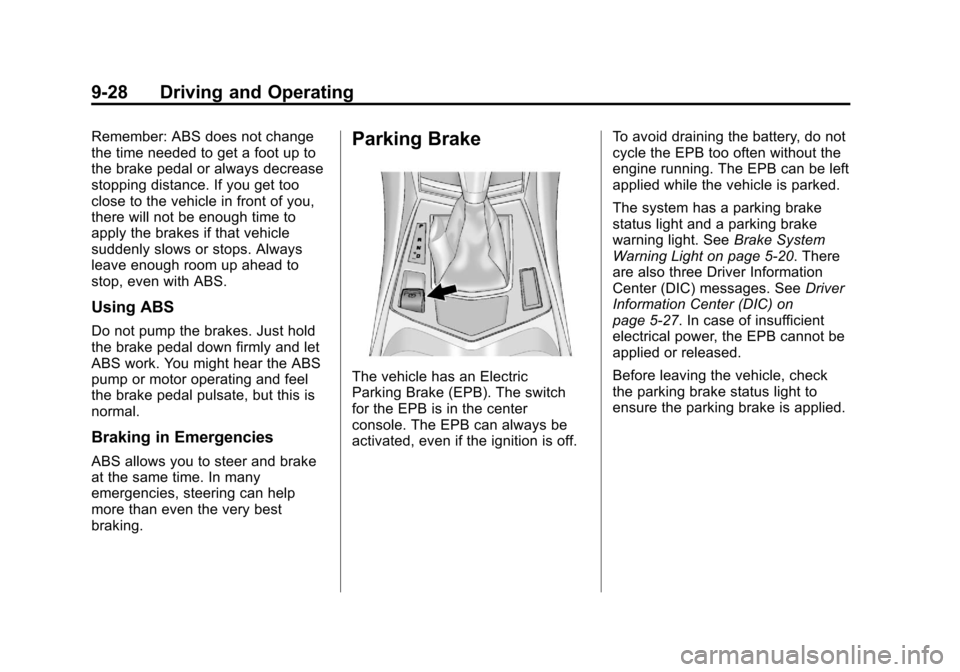
The vehicle has an Electric
Parking Brake (EPB). The switch
for the EPB is in the center
console. The EPB can always be
activated, even if the ignition is off.To avoid draining the battery, do not
cycle the EPB too often without the
engine running. The EPB can be left
applied while the vehicle is parked.
The system has a parking brake
status light and a parking brake
warning light. See
Brake System
Warning Light on page 5‑20. There
are also three Driver Information
Center (DIC) messages. See Driver
Information Center (DIC) on
page 5‑27. In case of insufficient
electrical power, the EPB cannot be
applied or released.
Before leaving the vehicle, check
the parking brake status light to
ensure the parking brake is applied.
Page 230 of 432
Black plate (34,1)Cadillac SRX Owner Manual - 2013 - CRC - 11/9/12
9-34 Driving and Operating
Both StabiliTrak and Traction
Control can be turned off if needed
by pressing and holding
guntilg
andiilluminate in the instrument
cluster. This will also disable the
TSC feature. When StabiliTrak is
turned off, the system will not assist
with directional control of the vehicle
or limit wheel spin. Driving should
be adjusted accordingly. The
Traction Control Off message is
displayed in the DIC. See Ride
Control System Messages on
page 5‑37.
Press and release
gagain to turn
the systems back on.
gandigo
out in the instrument cluster. The
Traction Control On message is
displayed in the DIC. See Ride
Control System Messages on
page 5‑37. If cruise control is being used when
StabiliTrak activates, the cruise
control will automatically disengage.
Press the cruise control button to
re-engage when road conditions
allow. See
Cruise Control on
page 9‑35.
Limited-Slip Rear Axle
Vehicles with a limited-slip rear axle
can give more traction on snow,
mud, ice, sand, or gravel. When
traction is low, this feature allows
the drive wheel with the most
traction to move the vehicle. The
limited-slip rear axle also gives the
driver enhanced control when
cornering hard or completing a
maneuver, such as a lane change.
Selective Ride Control
The vehicle may have a ride control
system called Selective Ride
Control. The setting can be changed
at any time. Based on road
conditions, steering wheel angle,
and the vehicle speed, the system
automatically adjusts to provide the
best handling while providing a
smooth ride. The Tour and Sport
modes will feel similar on a
smooth road.
Tour: Use for normal city and
highway driving. This setting
provides a smooth, soft ride.
Sport: Use where road conditions
or personal preference demand
more control. This setting provides
more “feel,” or response to road
conditions through increased
steering effort and suspension
control. Transmission shift points
and shift firmness are also
enhanced.
Page 234 of 432
Black plate (38,1)Cadillac SRX Owner Manual - 2013 - CRC - 11/9/12
9-38 Driving and Operating
If a vehicle is detected in your path,
ACC can apply acceleration or
limited, moderate braking to
maintain the selected following gap.
To disengage ACC, apply the brake.
If ACC is controlling your vehicle
speed when the traction control
system (TCS) activates, the ACC
will automatically disengage. See
Traction Control System (TCS) on
page 9‑31. When road conditions
allow ACC to be safely used, the
ACC can be turned back on.{WARNING
ACC has limited braking ability
and may not have time to slow
the vehicle down enough to avoid
a collision with another vehicle
you are following. This can occur
when vehicles suddenly slow or
stop ahead, or enter your lane.
Also see“Alerting the Driver” in
this section. Complete attention is
always required while driving and
you should be ready to take
action and apply the brakes. See
Defensive Driving on page 9‑3.
{WARNING
Adaptive Cruise Control will not
detect or brake for children,
pedestrians, animals, or other
objects.
Do not use Adaptive Cruise
Control when:
.On winding and hilly roads or
when the sensors are
blocked by snow, ice, or dirt.
The system may not detect a
vehicle ahead. Keep the
entire front of the vehicle
clean.
.Visibility is low, such as in
fog, rain, or snow conditions.
Adaptive Cruise Control
performance is limited under
these conditions.
.On slippery roads where fast
changes in tire traction can
cause excessive wheel slip.
Page 236 of 432
Black plate (40,1)Cadillac SRX Owner Manual - 2013 - CRC - 11/9/12
9-40 Driving and Operating
To begin using ACC again, move
the control up toward +RES briefly.
The vehicle returns to the previous
set speed.
Increasing Speed While ACC is at
a Set Speed
If ACC is already activated, do one
of the following:
.Use the accelerator to get to the
higher speed. Move the control
toward SET–, then release it and
the accelerator pedal. The
vehicle will now cruise at the
higher speed.
When the accelerator pedal is
pressed, ACC will not brake
because it is overridden.
A warning message will appear
on the Driver Information Center
(DIC). SeeCruise Control
Messages on page 5‑31.
.Move the control toward +RES
and hold until the desired set
speed appears on the display,
then release it.
.To increase vehicle speed in
small amounts, move the control
toward +RES and then release
it. Each time this is done, the
vehicle goes 1.6 km/h (1 mph)
faster.
When it is determined that there is
no vehicle in front of your vehicle
slower than the set speed, then the
vehicle speed will increase to the
set speed.
Reducing Speed While ACC is at a
Set Speed
If ACC is already activated, do one
of the following:
.Use the brake to get to the
desired lower speed. Move the
control toward SET– and release
the accelerator pedal. The
vehicle will now cruise at the
lower speed.
.Move the control toward
SET− and hold until the desired
lower speed is reached, then
release it.
.To decrease the vehicle speed in
small amounts, move the control
toward SET− briefly. Each time
this is done, the vehicle goes
about 1.6 km/h (1 mph) slower.
Selecting the Follow Distance
When a slower moving vehicle is
detected ahead, ACC will adjust the
vehicle's speed and attempt to
maintain the follow distance gap
selected.
Press
3on the steering wheel to
adjust the following gap. Each press
cycles the gap button through three
settings: Far, Medium, or Near.
When pressed, the current gap
setting displays briefly on the
instrument cluster. The gap setting
will be maintained until it is
changed.
Page 237 of 432
Black plate (41,1)Cadillac SRX Owner Manual - 2013 - CRC - 11/9/12
Driving and Operating 9-41
Since each gap setting corresponds
to a following time (Far, Medium,
or Near), the following distance will
vary based on vehicle speed. The
faster the vehicle speed, the further
back your vehicle will follow a
vehicle detected ahead. Consider
traffic and weather conditions when
selecting the following gap. The
range of selectable gaps may not be
appropriate for all drivers and
driving conditions.
Changing the gap setting
automatically changes the alert
timing sensitivity (Far, Medium,
or Near) for the Forward Collision
Alert (FCA) feature. SeeForward
Collision Alert (FCA) System on
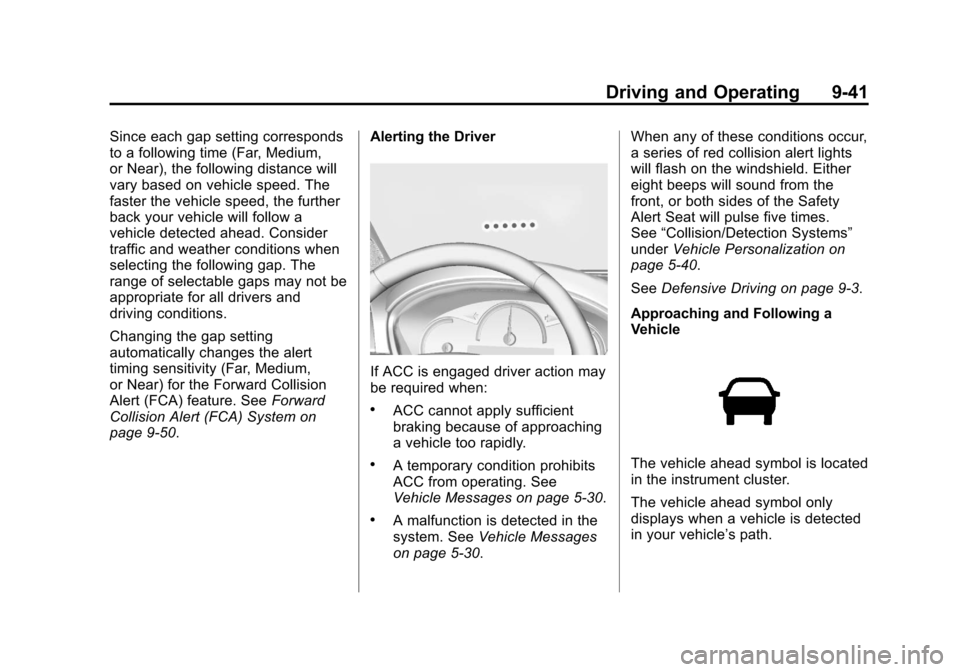
page 9‑50. Alerting the Driver
If ACC is engaged driver action may
be required when:
.ACC cannot apply sufficient
braking because of approaching
a vehicle too rapidly.
.A temporary condition prohibits
ACC from operating. See
Vehicle Messages on page 5‑30.
.A malfunction is detected in the
system. See
Vehicle Messages
on page 5‑30. When any of these conditions occur,
a series of red collision alert lights
will flash on the windshield. Either
eight beeps will sound from the
front, or both sides of the Safety
Alert Seat will pulse five times.
See
“Collision/Detection Systems”
under Vehicle Personalization on
page 5‑40.
See Defensive Driving on page 9‑3.
Approaching and Following a
Vehicle
The vehicle ahead symbol is located
in the instrument cluster.
The vehicle ahead symbol only
displays when a vehicle is detected
in your vehicle’s path.
Page 242 of 432
Black plate (46,1)Cadillac SRX Owner Manual - 2013 - CRC - 11/9/12
9-46 Driving and Operating
Driver Assistance
Systems
This vehicle may have features that
work together to help avoid crashes
or reduce crash damage while
driving, backing, and parking. Read
this entire section before using
these systems.
{WARNING
Do not rely on the Driver
Assistance Systems. These
systems do not replace the need
for paying attention and driving
safely. You may not hear or feel
alerts or warnings provided by
these systems. Failure to use
proper care when driving may
result in injury, death, or vehicle
damage. SeeDefensive Driving
on page 9‑3.
(Continued)
WARNING (Continued)
Under many conditions, these
systems will not:
.Detect children, pedestrians,
bicyclists, or animals.
.Detect vehicles or objects
outside the area monitored by
the system.
.Work at all driving speeds.
.Warn you or provide you with
enough time to avoid a crash.
.Work under poor visibility or
bad weather conditions.
.Work if the detection sensor
is not cleaned or is covered
by ice, snow, mud, or dirt.
Complete attention is always
required while driving, and you
should be ready to take action
and apply the brakes and/or steer
the vehicle to avoid crashes. Audible or Safety Alert Seat
Some driver assistance features
alert the driver of obstacles by
beeping. To change the volume of
the warning chime, see
“Comfort
and Convenience” underVehicle
Personalization on page 5‑40.
If equipped with the Safety Alert
Seat, the driver seat cushion may
provide a vibrating pulse alert
instead of beeping. To change this,
see “Collision/Detection Systems”
under Vehicle Personalization on
page 5‑40.
Assistance Systems for
Parking or Backing
When the vehicle is in R (Reverse),
the Rear Vision Camera (RVC) and
Rear Parking Assist may help the
driver to avoid a crash or to reduce
crash damage while backing and
parking. Some models may also
have the Rear Automatic Braking
and Backing Warning System, Rear
Cross Traffic Alert (RCTA), and/or
Front Parking Assist.