heating CADILLAC SRX 2013 2.G User Guide
[x] Cancel search | Manufacturer: CADILLAC, Model Year: 2013, Model line: SRX, Model: CADILLAC SRX 2013 2.GPages: 432, PDF Size: 7.13 MB
Page 284 of 432
Black plate (16,1)Cadillac SRX Owner Manual - 2013 - CRC - 11/9/12
10-16 Vehicle Care
Checking Coolant
The vehicle must be on a level
surface when checking the coolant
level.
Check to see if coolant is visible in
the coolant surge tank. If the coolant
inside the coolant surge tank is
boiling, do not do anything else until
it cools down. If coolant is visible
but the coolant level is not at the
indicated mark, add a 50/50 mixture
of clean, drinkable water and
DEX-COOL coolant at the coolant
surge tank, but be sure the cooling
system is cool before this is done.
SeeEngine Overheating on
page 10‑18.
The coolant surge tank is located in
the engine compartment on the
driver side of the vehicle. See
Engine Compartment Overview on
page 10‑6.
How to Add Coolant to the
Coolant Surge Tank
Notice: This vehicle has a
specific coolant fill procedure.
Failure to follow this procedure
could cause the engine to
overheat and be severely
damaged.
If no problem is found, check to
see if coolant is visible in the
coolant surge tank. If coolant is
visible but the coolant level is not
at the indicated level mark, add a
50/50 mixture of clean, drinkable
water and DEX-COOL coolant at
the coolant surge tank, but be sure
the cooling system, including the
coolant surge tank pressure cap, is
cool before you do it.
{WARNING
Steam and scalding liquids from a
hot cooling system can blow out
and burn you badly. Never turn
the cap when the cooling system,
(Continued)
WARNING (Continued)
including the surge tank pressure
cap, is hot. Wait for the cooling
system and surge tank pressure
cap to cool.
{WARNING
Adding only plain water or some
other liquid to the cooling system
can be dangerous. Plain water
and other liquids, can boil before
the proper coolant mixture will.
The coolant warning system is set
for the proper coolant mixture.
With plain water or the wrong
mixture, the engine could get too
hot but you would not get the
overheat warning. The engine
could catch fire and you or
others could be burned. Use a
50/50 mixture of clean, drinkable
water and DEX-COOL coolant.
Page 286 of 432
Black plate (18,1)Cadillac SRX Owner Manual - 2013 - CRC - 11/9/12
10-18 Vehicle Care
Notice:If the pressure cap is not
tightly installed, coolant loss and
possible engine damage may
occur. Be sure the cap is properly
and tightly secured.
Engine Overheating
The vehicle has an indicator to warn
of engine overheating.
There is an engine coolant
temperature warning light on the
vehicle's instrument panel. See
Engine Coolant Temperature Gauge
on page 5‑13.
If the decision is made not to lift the
hood when this warning appears,
but instead get service help right
away. See Roadside Service
(Mexico) on page 13‑7 orRoadside
Service (U.S. and Canada) on
page 13‑11.
If the decision is made to lift the
hood, make sure the vehicle is
parked on a level surface. Then check to see if the engine
cooling fans are running. If the
engine is overheating, both fans
should be running. If they are not,
do not continue to run the engine
and have the vehicle serviced.
Notice:
Running the engine
without coolant may cause
damage or a fire. Vehicle damage
would not be covered by the
warranty.
If Steam Is Coming from the
Engine Compartment
{WARNING
Steam from an overheated engine
can burn you badly, even if you
just open the hood. Stay away
from the engine if you see or hear
steam coming from it. Just turn it
off and get everyone away from
the vehicle until it cools down.
(Continued)
WARNING (Continued)
Wait until there is no sign of
steam or coolant before you open
the hood.
If you keep driving when the
engine is overheated, the liquids
in it can catch fire. You or others
could be badly burned. Stop the
engine if it overheats, and get out
of the vehicle until the engine
is cool.
If No Steam Is Coming from
the Engine Compartment
If an engine overheat warning is
displayed but no steam can be seen
or heard, the problem may not be
too serious. Sometimes the engine
can get a little too hot when the
vehicle:
.Climbs a long hill on a hot day
.Stops after high-speed driving
Page 307 of 432
Black plate (39,1)Cadillac SRX Owner Manual - 2013 - CRC - 11/9/12
Vehicle Care 10-39
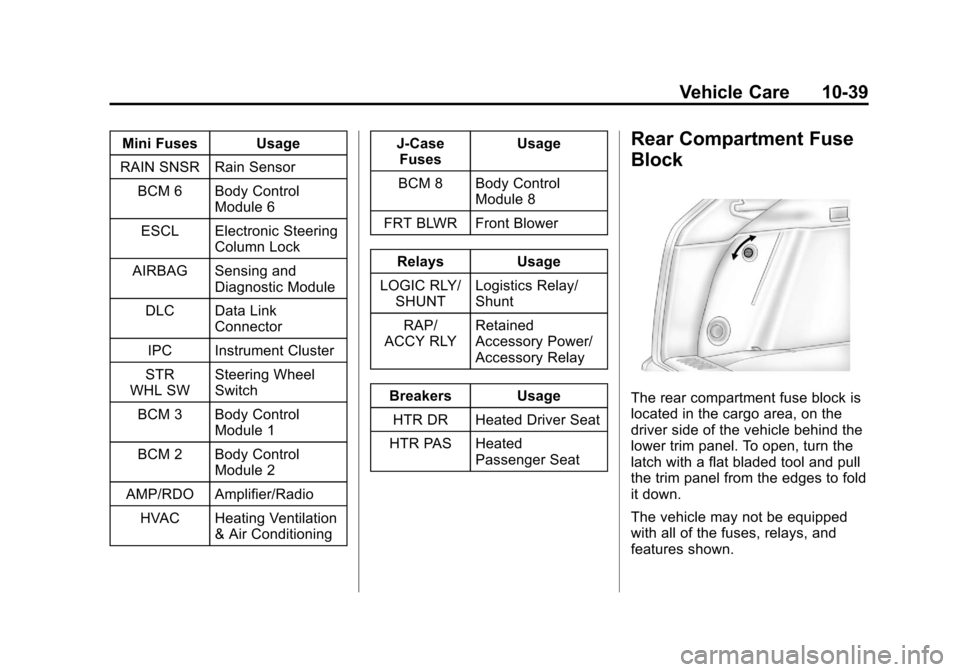
Mini Fuses Usage
RAIN SNSR Rain Sensor BCM 6 Body Control Module 6
ESCL Electronic Steering Column Lock
AIRBAG Sensing and Diagnostic Module
DLC Data Link Connector
IPC Instrument Cluster
STR
WHL SW Steering Wheel
Switch
BCM 3 Body Control Module 1
BCM 2 Body Control Module 2
AMP/RDO Amplifier/Radio HVAC Heating Ventilation & Air Conditioning J-Case
Fuses Usage
BCM 8 Body Control Module 8
FRT BLWR Front Blower
Relays Usage
LOGIC RLY/ SHUNT Logistics Relay/
Shunt
RAP/
ACCY RLY Retained
Accessory Power/
Accessory Relay
Breakers Usage HTR DR Heated Driver Seat
HTR PAS Heated Passenger SeatRear Compartment Fuse
Block
The rear compartment fuse block is
located in the cargo area, on the
driver side of the vehicle behind the
lower trim panel. To open, turn the
latch with a flat bladed tool and pull
the trim panel from the edges to fold
it down.
The vehicle may not be equipped
with all of the fuses, relays, and
features shown.
Page 310 of 432
Black plate (42,1)Cadillac SRX Owner Manual - 2013 - CRC - 11/9/12
10-42 Vehicle Care
RelaysUsage
LOGIC Logistic Relay (Export)
DEFOG REAR Rear Window
Defogger
*Denotes uplevel content.Wheels and Tires
Tires
Every new GM vehicle has
high-quality tires made by a
leading tire manufacturer. See
the warranty manual for
information regarding the tire
warranty and where to get
service. For additional
information refer to the tire
manufacturer.
{WARNING
.Poorly maintained and
improperly used tires are
dangerous.
.Overloading the tires can
cause overheating as a
result of too much flexing.
There could be a blowout
and a serious crash. See
Vehicle Load Limits on
page 9‑10.
.Underinflated tires pose
the same danger as
overloaded tires. The
resulting crash could
cause serious injury.
Check all tires frequently
to maintain the
recommended pressure.
Tire pressure should be
checked when the tires
are cold.
(Continued)
Page 319 of 432
Black plate (51,1)Cadillac SRX Owner Manual - 2013 - CRC - 11/9/12
Vehicle Care 10-51
See“Tire and Loading
Information Label” underVehicle
Load Limits on page 9‑10.
Tire Pressure
Tires need the correct amount of
air pressure to operate
effectively.
Notice: Neither tire
underinflation nor
overinflation is good.
Underinflated tires, or tires
that do not have enough air,
can result in:
.Tire overloading and
overheating which could
lead to a blowout.
.Premature or
irregular wear.
.Poor handling.
.Reduced fuel economy. Overinflated tires, or tires that
have too much air, can
result in:
.Unusual wear.
.Poor handling.
.Rough ride.
.Needless damage from
road hazards.
The Tire and Loading
Information label on the
vehicle indicates the original
equipment tires and the correct
cold tire inflation pressures. The
recommended pressure is the
minimum air pressure needed to
support the vehicle's maximum
load carrying capacity. See
Vehicle Load Limits on
page 9‑10. How the vehicle is loaded
affects vehicle handling and ride
comfort. Never load the vehicle
with more weight than it was
designed to carry.
When to Check
Check the tires once a month or
more. Do not forget the compact
spare, if the vehicle has one.
The cold compact spare tire
pressure should be at 420 kPa
(60 psi). See
Compact Spare
Tire on page 10‑81.
How to Check
Use a good quality pocket-type
gauge to check tire pressure.
Proper tire inflation cannot be
determined by looking at the tire.
Check the tire inflation pressure
when the tires are cold, meaning
the vehicle has not been driven
for at least three hours or no
more than 1.6 km (1 mi).
Page 422 of 432

Black plate (4,1)Cadillac SRX Owner Manual - 2013 - CRC - 11/9/12
i-4 INDEX
Driving (cont'd)Vehicle Load Limits . . . . . . . . . . . 9-10
Wet Roads . . . . . . . . . . . . . . . . . . . . 9-6
Winter . . . . . . . . . . . . . . . . . . . . . . . . . 9-8
Dual Automatic Climate Control System . . . . . . . . . . . . . . . . 8-1
E
E85 Fuel . . . . . . . . . . . . . . . . . . . . . . . 9-61
ECO Button . . . . . . . . . . . . . . . . . . . 9-26
Economy ModeFuel . . . . . . . . . . . . . . . . . . . . . . . . . . 9-26
Electric Parking Brake Light . . . 5-20
Electrical Equipment, Add-On . . . . . . . . . . . . . . . . . . . . . . 9-72
Electrical System
Engine CompartmentFuse Block . . . . . . . . . . . . . . . . 10-35
Fuses and Circuit Breakers . . . . . . . . . . . . . . . . . . 10-34
Instrument Panel Fuse Block . . . . . . . . . . . . . . . . . . . . . . 10-37
Overload . . . . . . . . . . . . . . . . . . . 10-34
Rear Compartment Fuse Block . . . . . . . . . . . . . . . . . . . . . . 10-39 Emergency
OnStar
®. . . . . . . . . . . . . . . . . . . . . . 14-2
Engine Air Cleaner/Filter . . . . . . . . . . . .10-11
Check and Service EngineSoon Light . . . . . . . . . . . . . . . . . . 5-17
Compartment Overview . . . . . . . 10-6
Coolant . . . . . . . . . . . . . . . . . . . . . 10-14
Coolant Temperature
Gauge . . . . . . . . . . . . . . . . . . . . . . 5-13
Coolant Temperature
Warning Light . . . . . . . . . . . . . . . 5-23
Cooling System . . . . . . . . . . . . . 10-13
Cooling System Messages . . . 5-32
Cover . . . . . . . . . . . . . . . . . . . . . . . . . 10-7
Drive Belt Routing . . . . . . . . . . . . 12-3
Exhaust . . . . . . . . . . . . . . . . . . . . . . 9-22
Gasoline Starting . . . . . . . . . . . . . 9-17
Heater . . . . . . . . . . . . . . . . . . . . . . . . 9-19
Oil Life System . . . . . . . . . . . . . 10-10
Oil Messages . . . . . . . . . . . . . . . . . 5-33
Overheating . . . . . . . . . . . . . . . . 10-18
Power Messages . . . . . . . . . . . . . 5-33
Pressure Light . . . . . . . . . . . . . . . . 5-24
Running While Parked . . . . . . . . 9-22 Entry Lighting . . . . . . . . . . . . . . . . . . . 6-8
Equipment, Towing . . . . . . . . . . . . 9-70
Event Data Recorders . . . . . . . . 13-20
Exit Lighting . . . . . . . . . . . . . . . . . . . . 6-8
Extender, Safety Belt . . . . . . . . . . 3-19
Exterior Lamp Controls . . . . . . . . . 6-1
F
Features
Memory . . . . . . . . . . . . . . . . . . . . . . . . 1-9
Filter, Engine Air Cleaner . . . . . . . . . .10-11
Flash-to-Pass . . . . . . . . . . . . . . . . . . . 6-2
Flashers, Hazard Warning . . . . . . 6-5
Flat Tire . . . . . . . . . . . . . . . . . . . . . . 10-65
Changing . . . . . . . . . . . . . . . . . . . 10-75
Floor Mats . . . . . . . . . . . . . . . . . . . . 10-95
Fluid Automatic Transmission . . . . .10-11
Brakes . . . . . . . . . . . . . . . . . . . . . . 10-21
Power Steering . . . . . . . . . . . . . 10-19
Washer . . . . . . . . . . . . . . . . . . . . . 10-20
Fog Lamps
Front . . . . . . . . . . . . . . . . . . . . . . . . . . 6-6
Folding Mirrors . . . . . . . . . . . . . . . . 2-20
Page 426 of 432

Black plate (8,1)Cadillac SRX Owner Manual - 2013 - CRC - 11/9/12
i-8 INDEX
Messages (cont'd)Service Vehicle . . . . . . . . . . . . . . . 5-38
Starting the Vehicle . . . . . . . . . . . 5-38
Tire . . . . . . . . . . . . . . . . . . . . . . . . . . . 5-38
Transmission . . . . . . . . . . . . . . . . . 5-39
Vehicle . . . . . . . . . . . . . . . . . . . . . . . 5-30
Vehicle Reminder . . . . . . . . . . . . . 5-40
Vehicle Speed . . . . . . . . . . . . . . . . 5-40
Washer Fluid . . . . . . . . . . . . . . . . . 5-40
Mirrors Automatic Dimming . . . . . . . . . . . 2-21
Automatic DimmingRearview . . . . . . . . . . . . . . . . . . . . 2-21
Convex . . . . . . . . . . . . . . . . . . . . . . . 2-19
Folding . . . . . . . . . . . . . . . . . . . . . . . 2-20
Heated . . . . . . . . . . . . . . . . . . . . . . . 2-21
Manual Rearview . . . . . . . . . . . . . 2-21
Power . . . . . . . . . . . . . . . . . . . . . . . . 2-20
Tilt in Reverse . . . . . . . . . . . . . . . . 2-21
Monitor System, Tire Pressure . . . . . . . . . . . . . . . . . . . . 10-53N
NavigationOnStar®. . . . . . . . . . . . . . . . . . . . . . 14-2
Net Cargo . . . . . . . . . . . . . . . . . . . . . . . . . . 4-9
Net, Convenience . . . . . . . . . . . . . 4-10
New Vehicle Break-In . . . . . . . . . . 9-14
O
Object Detection System Messages . . . . . . . . . . . . . . . . . . . . 5-35
Odometer . . . . . . . . . . . . . . . . . . . . . . 5-12 Trip . . . . . . . . . . . . . . . . . . . . . . . . . . . 5-12
Off-Road Recovery . . . . . . . . . . . . . . . . . . . . . . 9-4
Oil Engine . . . . . . . . . . . . . . . . . . . . . . . . 10-8
Engine Oil Life System . . . . . 10-10
Messages . . . . . . . . . . . . . . . . . . . . 5-33
Pressure Light . . . . . . . . . . . . . . . . 5-24
Older Children, Restraints . . . . . 3-34
Online Owner Center . . . . . . . . . . 13-6
OnStar
®
System, In Brief . . . . . . . . . . . . . . 1-23
OnStar®Additional
Information . . . . . . . . . . . . . . . . . . . 14-5 OnStar
®Connections . . . . . . . . . . 14-4
OnStar®Diagnostics . . . . . . . . . . . 14-5
OnStar®Emergency . . . . . . . . . . . 14-2
OnStar®Navigation . . . . . . . . . . . . 14-2
OnStar®Overview . . . . . . . . . . . . . 14-1
OnStar®Security . . . . . . . . . . . . . . 14-2
Ordering
Service Publications . . . . . . . . 13-17
Outlets Power . . . . . . . . . . . . . . . . . . . . . . . . . 5-7
Overheating, Engine . . . . . . . . . . 10-18
P
Park
Shifting Into . . . . . . . . . . . . . . . . . . . 9-20
Shifting Out of . . . . . . . . . . . . . . . . 9-21
Parking Brake . . . . . . . . . . . . . . . . . . . . . . . . . 9-28
Brake and P (Park)
Mechanism Check . . . . . . . . 10-24
Over Things That Burn . . . . . . . 9-21
Parking or Backing Assistance Systems . . . . . . . . . . 9-46
Passenger Airbag Status Indicator . . . . . . . . . . . . . . . . . . . . . 5-16