instrument panel CADILLAC SRX 2013 2.G Owner's Manual
[x] Cancel search | Manufacturer: CADILLAC, Model Year: 2013, Model line: SRX, Model: CADILLAC SRX 2013 2.GPages: 432, PDF Size: 7.13 MB
Page 179 of 432
Black plate (5,1)Cadillac SRX Owner Manual - 2013 - CRC - 11/9/12
Lighting 6-5
Lights On with Wipers
If the windshield wipers are
activated in daylight with the
engine on, and the exterior lamp
control is in AUTO, the headlamps,
parking lamps, and other exterior
lamps come on. The transition time
for the lamps coming on varies
based on wiper speed. When the
wipers are not operating, these
lamps turn off. Move the exterior
lamp control to
Por;to disable
this feature.
Hazard Warning Flashers
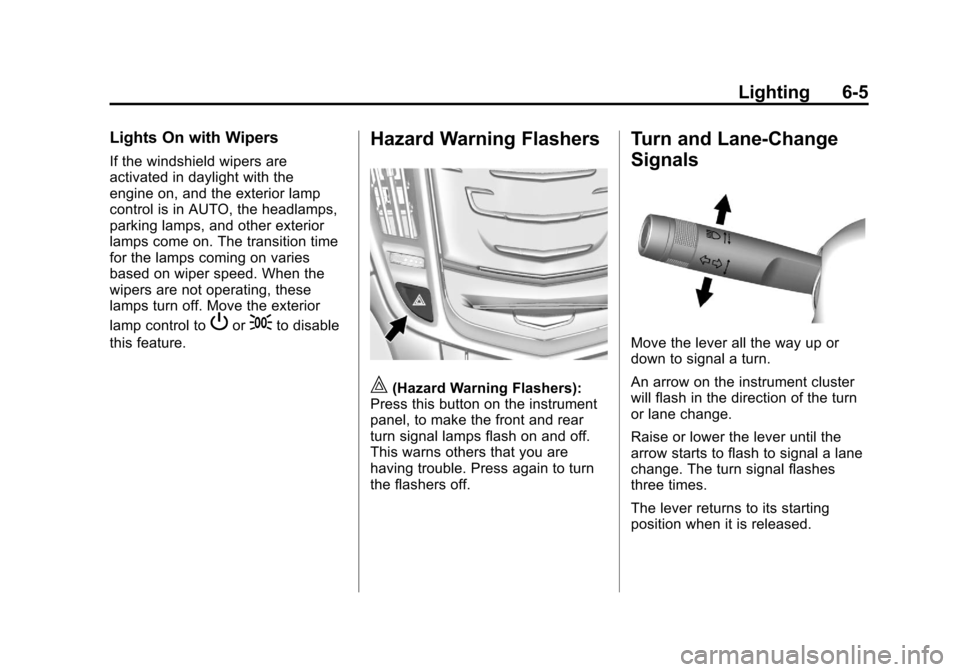
|(Hazard Warning Flashers):
Press this button on the instrument
panel, to make the front and rear
turn signal lamps flash on and off.
This warns others that you are
having trouble. Press again to turn
the flashers off.
Turn and Lane-Change
Signals
Move the lever all the way up or
down to signal a turn.
An arrow on the instrument cluster
will flash in the direction of the turn
or lane change.
Raise or lower the lever until the
arrow starts to flash to signal a lane
change. The turn signal flashes
three times.
The lever returns to its starting
position when it is released.
Page 180 of 432
Black plate (6,1)Cadillac SRX Owner Manual - 2013 - CRC - 11/9/12
6-6 Lighting
If after signaling a turn or lane
change the arrow flashes rapidly or
does not come on, a signal bulb
may be burned out.
Replace any burned out bulbs. If a
bulb is not burned out, check the
fuse. SeeFuses and Circuit
Breakers on page 10‑34.
Front Fog Lamps
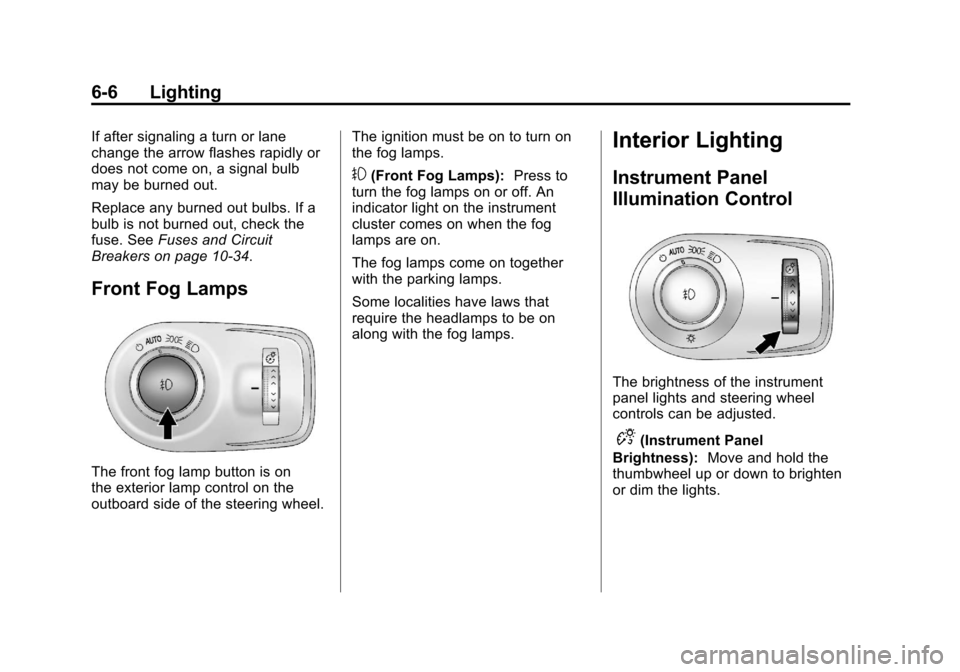
The front fog lamp button is on
the exterior lamp control on the
outboard side of the steering wheel. The ignition must be on to turn on
the fog lamps.
#(Front Fog Lamps):
Press to
turn the fog lamps on or off. An
indicator light on the instrument
cluster comes on when the fog
lamps are on.
The fog lamps come on together
with the parking lamps.
Some localities have laws that
require the headlamps to be on
along with the fog lamps.
Interior Lighting
Instrument Panel
Illumination Control
The brightness of the instrument
panel lights and steering wheel
controls can be adjusted.
D(Instrument Panel
Brightness): Move and hold the
thumbwheel up or down to brighten
or dim the lights.
Page 190 of 432

Black plate (4,1)Cadillac SRX Owner Manual - 2013 - CRC - 11/9/12
8-4 Climate Controls
Air Delivery Mode Control:When
the climate information is displayed,
press the desired air delivery mode
on the touch screen to change the
direction of the airflow. The selected
air delivery mode button is lit.
Pressing any of the air delivery
buttons cancels automatic air
delivery control and the direction
of the airflow can be controlled
manually. Press AUTO to return to
automatic operation.
To change the current mode, select
one of the following:
Y(Vent): Air is directed to the
instrument panel outlets.
\(Bi-Level): Air is divided
between the instrument panel
outlets and the floor outlets.
[(Floor): Air is directed to the
floor outlets.
-(Defog): Clears the windows of
fog or moisture. Air is directed to the
windshield and floor outlets.
0(Defrost): Clears the
windshield of fog or frost more
quickly. Air is directed to the
windshield. Press the
0button to
turn on or off. Changing the air
delivery mode also turns the
defrost off.
AC Mode (Air Conditioning):
Press the AC Mode touch screen
control to turn the automatic air
conditioning on or off. If the fan
is turned off or the outside
temperature falls below freezing,
the air conditioner will not run.
Press AUTO to return to automatic
operation and the air conditioner
runs as needed.
Automatic Air Recirculation:
When the AUTO indicator light is
on, the air inside the vehicle may
automatically recirculate as needed
to help quickly cool the inside of the
vehicle. If equipped, an air quality sensor
may also activate recirculation when
it detects increasing levels of poor
quality air outside the vehicle. The
air quality sensor will not maintain
recirculation for an extended period
and may not activate during cold
weather. To adjust the sensitivity of
the air quality sensor, see
“Climate
and Air Quality” underVehicle
Personalization on page 5‑40.
The air quality sensor system does
not protect against carbon monoxide
(CO), which cannot be seen or
smelled. See Engine Exhaust on
page 9‑22.
^(Recirculation): Press to
alternate between recirculating air
inside the vehicle or pulling in
outside air. The indicator light on the
button is lit when recirculation mode
is active. This helps to quickly cool
the air inside the vehicle or prevent
outside air and odors from entering.
Page 192 of 432
Black plate (6,1)Cadillac SRX Owner Manual - 2013 - CRC - 11/9/12
8-6 Climate Controls
Remote Start Climate Control
Operation:For vehicles with the
remote vehicle start feature, the
climate control system may run
when the vehicle is started remotely.
The system uses the driver ’s
previous settings to heat or cool the
inside of the vehicle. The rear defog
may come on during remote start
based on cold ambient conditions.
The rear defog indicator light does
not come on during a remote
start. If the vehicle has heated or
ventilated seats, they may come on
during a remote start. See Remote
Vehicle Start on page 2‑9 and
Heated and Ventilated Seats on
page 1‑9.
The rear window defogger turns on
if it is cold outside.Sensor
The solar sensor, located on top
of the instrument panel near the
windshield, monitors the solar heat.
The climate control system uses
the sensor information to adjust
the temperature, fan speed,
recirculation, and air delivery mode
for best comfort.
If the sensor is covered, the
automatic climate control system
may not work properly.
Rear Climate Control
System
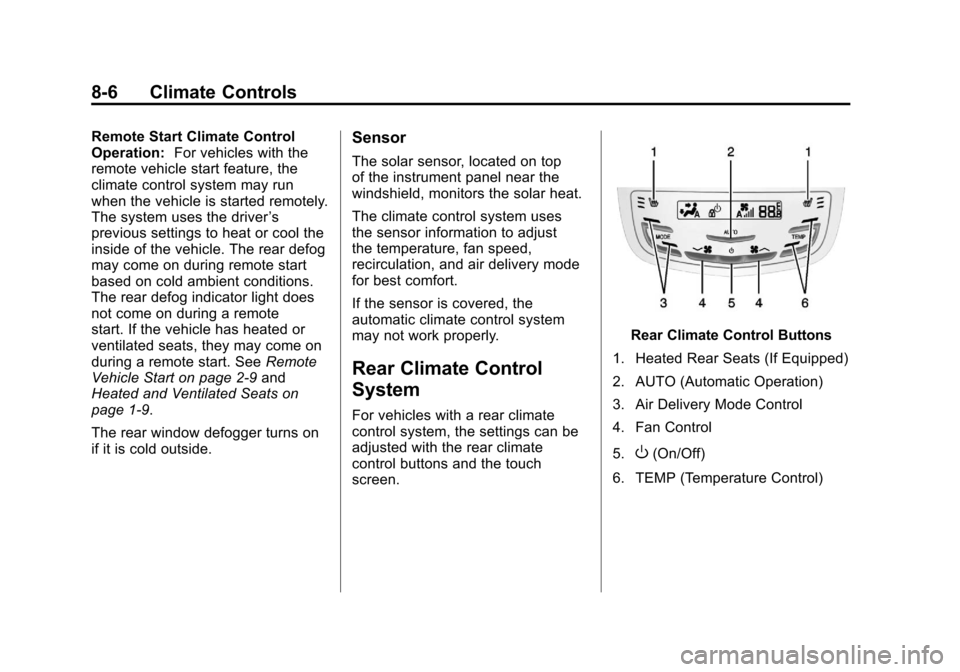
For vehicles with a rear climate
control system, the settings can be
adjusted with the rear climate
control buttons and the touch
screen.
Rear Climate Control Buttons
1. Heated Rear Seats (If Equipped)
2. AUTO (Automatic Operation)
3. Air Delivery Mode Control
4. Fan Control
5.
O(On/Off)
6. TEMP (Temperature Control)
Page 205 of 432
Black plate (9,1)Cadillac SRX Owner Manual - 2013 - CRC - 11/9/12
Driving and Operating 9-9
WARNING (Continued)
If the vehicle is stuck in the snow:
.Clear away snow from around
the base of your vehicle,
especially any that is blocking
the exhaust pipe.
.Check again from time to
time to be sure snow does
not collect there.
.Open a window about 5 cm
(2 in) on the side of the
vehicle that is away from the
wind to bring in fresh air.
.Fully open the air outlets on
or under the instrument
panel.
.Adjust the climate control
system to a setting that
circulates the air inside the
vehicle and set the fan speed
to the highest setting. See
“Climate Control Systems”in
the Index.
(Continued)
WARNING (Continued)
For more information about
carbon monoxide, see Engine
Exhaust on page 9‑22.
To save fuel, run the engine for only
short periods as needed to warm
the vehicle and then shut the engine
off and close the window most of
the way to save heat. Repeat this
until help arrives but only when you
feel really uncomfortable from the
cold. Moving about to keep warm
also helps.
If it takes some time for help to
arrive, now and then when you run
the engine, push the accelerator
pedal slightly so the engine runs
faster than the idle speed. This
keeps the battery charged to restart
the vehicle and to signal for help
with the headlamps. Do this as little
as possible to save fuel.
If the Vehicle Is Stuck
Slowly and cautiously spin the
wheels to free the vehicle when
stuck in sand, mud, ice, or snow.
If stuck too severely for the traction
system to free the vehicle, turn the
traction system off and use the
rocking method. See Traction
Control System (TCS) on
page 9‑31.
{WARNING
If the vehicle's tires spin at high
speed, they can explode, and you
or others could be injured. The
vehicle can overheat, causing an
engine compartment fire or other
damage. Spin the wheels as little
as possible and avoid going
above 56 km/h (35 mph).
Page 214 of 432
Black plate (18,1)Cadillac SRX Owner Manual - 2013 - CRC - 11/9/12
9-18 Driving and Operating
Cell phone chargers can interfere
with the operation of the Keyless
Access System. Battery chargers
should not be plugged in when
starting or turning off the engine.
To start the vehicle:
Starting Procedure
1. With the brake pedal applied,press the START button located
on the instrument panel. See
Ignition Positions on page 9‑16.
2. When the engine begins cranking, let go of the button and
the engine cranks automatically
until it starts.
If the transmitter is not in the
vehicle or something is
interfering with the transmitter,
the Driver Information Center
(DIC) will display NO REMOTE
DETECTED. See Driver
Information Center (DIC) on
page 5‑27.
If the battery in the keyless
access transmitter needs
replacing, the DIC displays REPLACE BATTERY IN
REMOTE KEY. The vehicle can
still be driven. See
Remote
Keyless Entry (RKE) System
Operation on page 2‑3.
3. Do not race the engine immediately after starting it.
Operate the engine and
transmission gently until the oil
warms up and lubricates all
moving parts.
4. If the engine does not start and no DIC message is displayed,
wait 15 seconds before trying
again to let the cranking motor
cool down.
If the engine does not start after
5-10 seconds, especially in very
cold weather (below −18°C or
0°F), it could be flooded with too
much gasoline. Try pushing the
accelerator pedal all the way to
the floor while cranking for up to
15 seconds. Notice:
Cranking the engine for
long periods of time, by pressing
the START button immediately
after cranking has ended, can
overheat and damage the
cranking motor, and drain the
battery. Wait at least 15 seconds
between each try, to allow the
cranking motor to cool down.
When the engine starts, let go of the
accelerator. If the vehicle starts
briefly but then stops again, do the
same thing. This clears the extra
gasoline from the engine.
The vehicle has a
Computer-Controlled Cranking
System. This feature assists in
starting the engine and protects
components. Once cranking has
been initiated, the engine continues
cranking for a few seconds or until
the vehicle starts. If the engine does
not start, cranking automatically
stops after 15 seconds to prevent
cranking motor damage. To prevent
gear damage, this system also
prevents cranking if the engine is
already running.
Page 229 of 432
Black plate (33,1)Cadillac SRX Owner Manual - 2013 - CRC - 11/9/12
Driving and Operating 9-33
StabiliTrak®System
The vehicle has a vehicle stability
enhancement system called
StabiliTrak. It is an advanced
computer controlled system that
assists with directional control of the
vehicle in difficult driving conditions.
StabiliTrak activates when the
computer senses a difference
between the intended path and the
direction the vehicle is actually
traveling. StabiliTrak selectively
applies braking pressure to the
vehicle's brakes to help steer the
vehicle in the intended direction.
StabiliTrak is on automatically
whenever the vehicle is started. To
assist with directional control of the
vehicle, the system should always
be left on. Trailer Sway Control
(TSC) is also on automatically when
the vehicle is started. SeeTrailer
Sway Control (TSC) on page 9‑71.
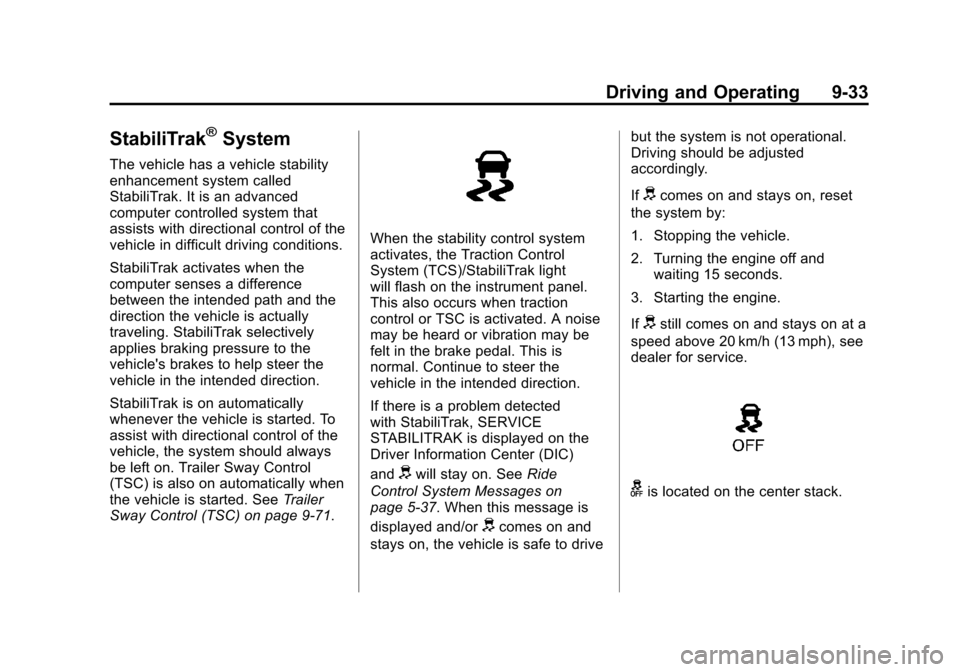
When the stability control system
activates, the Traction Control
System (TCS)/StabiliTrak light
will flash on the instrument panel.
This also occurs when traction
control or TSC is activated. A noise
may be heard or vibration may be
felt in the brake pedal. This is
normal. Continue to steer the
vehicle in the intended direction.
If there is a problem detected
with StabiliTrak, SERVICE
STABILITRAK is displayed on the
Driver Information Center (DIC)
and
dwill stay on. See Ride
Control System Messages on
page 5‑37. When this message is
displayed and/or
dcomes on and
stays on, the vehicle is safe to drive but the system is not operational.
Driving should be adjusted
accordingly.
If
dcomes on and stays on, reset
the system by:
1. Stopping the vehicle.
2. Turning the engine off and waiting 15 seconds.
3. Starting the engine.
If
dstill comes on and stays on at a
speed above 20 km/h (13 mph), see
dealer for service.
gis located on the center stack.
Page 261 of 432
Black plate (65,1)Cadillac SRX Owner Manual - 2013 - CRC - 11/9/12
Driving and Operating 9-65
Towing
General Towing
Information
Only use towing equipment that
has been designed for the vehicle.
Contact your dealer or trailering
dealer for assistance with preparing
the vehicle for towing a trailer. Read
the entire section before towing a
trailer.
For towing a disabled vehicle, see
Towing the Vehicle on page 10‑85.
For towing the vehicle behind
another vehicle such as a motor
home, seeRecreational Vehicle
Towing on page 10‑85.
Driving Characteristics
and Towing Tips
Driving with a Trailer
When towing a trailer:
.Become familiar with the state
and local laws that apply
specifically to trailer towing.
.Do not tow a trailer during the
first 800 km (500 miles), to
prevent damage to the engine,
axle or other parts.
.Then, during the first 800 km
(500 miles) trailer towing, do not
drive over 80 km/h (50 mph) and
do not make starts at full throttle.
.The vehicle can tow in D (Drive).
Use a lower gear if the
transmission shifts too often.
.Do not use the Fuel Economy
Mode when towing.
.Do not use Adaptive Cruise
Control when towing.
.The Automatic Collision
Preparation System should be
set to “Off”when towing. See
Active Emergency Braking
System on page 9‑53.
{WARNING
When towing a trailer, exhaust
gases may collect at the rear of
the vehicle and enter if the
liftgate, trunk/hatch, or rear-most
window is open.
When towing a trailer:
.Do not drive with the liftgate,
trunk/hatch, or rear-most
window open.
.Fully open the air outlets on
or under the instrument
panel.
.Also adjust the Climate
Control system to a setting
that brings in only outside air.
See “Climate Control
Systems” in the Index.
For more information about
Carbon Monoxide, see Engine
Exhaust on page 9‑22.
Page 263 of 432
Black plate (67,1)Cadillac SRX Owner Manual - 2013 - CRC - 11/9/12
Driving and Operating 9-67
Turn Signals When Towing a
Trailer
The turn signal indicators on the
instrument panel flash whenever
signaling a turn or lane change.
Properly hooked up, the trailer
lamps also flash, telling other
drivers the vehicle is turning,
changing lanes or stopping.
When towing a trailer, the arrows on
the instrument panel flash for turns
even if the bulbs on the trailer are
burned out. Check occasionally to
be sure the trailer bulbs are still
working.
Driving on Grades
Reduce speed and shift to a
lower gear before starting down a
long or steep downgrade. If the
transmission is not shifted down, the
brakes might have to be used so
much that they would get hot and no
longer work well.
The vehicle can tow in D (Drive).
Use a lower gear if the transmission
shifts too often.When towing at high altitude on
steep uphill grades, engine coolant
boils at a lower temperature than at
normal altitudes. If the engine is
turned off immediately after towing
at high altitude on steep uphill
grades, the vehicle could show
signs similar to engine overheating.
To avoid this, let the engine run
while parked, preferably on level
ground, with the transmission in
P (Park) for a few minutes before
turning the engine off. If the
overheat warning comes on, see
Engine Overheating on page 10‑18.
Parking on Hills
{WARNING
Parking the vehicle on a hill with
the trailer attached can be
dangerous. If something goes
wrong, the rig could start to move.
People can be injured, and both
the vehicle and the trailer can be
damaged. When possible, always
park the rig on a flat surface.
If parking the rig on a hill:
1. Press the brake pedal, but do
not shift into P (Park) yet. Turn
the wheels into the curb if facing
downhill or into traffic if facing
uphill.
2. Have someone place chocks under the trailer wheels.
3. When the wheel chocks are in place, release the brake pedal
until the chocks absorb the load.
4. Reapply the brake pedal. Then apply the parking brake and shift
into P (Park).
5. Release the brake pedal.
Leaving After Parking on a Hill
1. Apply and hold the brake pedal while you:
.Start the engine.
.Shift into a gear.
.Release the parking brake.
2. Let up on the brake pedal.
Page 269 of 432
Black plate (1,1)Cadillac SRX Owner Manual - 2013 - CRC - 11/9/12
Vehicle Care 10-1
Vehicle Care
General Information
General Information . . . . . . . . . . 10-2
California Proposition65 Warning . . . . . . . . . . . . . . . . . 10-3
California Perchlorate Materials Requirements . . . . 10-3
Accessories and Modifications . . . . . . . . . . . . . . . 10-3
Vehicle Checks
Doing Your OwnService Work . . . . . . . . . . . . . . . 10-4
Hood . . . . . . . . . . . . . . . . . . . . . . . . 10-5
Engine Compartment Overview . . . . . . . . . . . . . . . . . . . 10-6
Engine Cover . . . . . . . . . . . . . . . . 10-7
Engine Oil . . . . . . . . . . . . . . . . . . . 10-8
Engine Oil Life System . . . . . 10-10
Automatic Transmission Fluid . . . . . . . . . . . . . . . . . . . . . . 10-11
Engine Air Cleaner/Filter . . . . 10-11
Cooling System . . . . . . . . . . . . 10-13
Engine Coolant . . . . . . . . . . . . . 10-14 Engine Overheating . . . . . . . . 10-18
Power Steering Fluid . . . . . . . 10-19
Washer Fluid . . . . . . . . . . . . . . . 10-20
Brakes . . . . . . . . . . . . . . . . . . . . . 10-20
Brake Fluid . . . . . . . . . . . . . . . . . 10-21
Battery . . . . . . . . . . . . . . . . . . . . . 10-23
All-Wheel Drive . . . . . . . . . . . . . 10-23
Starter Switch Check . . . . . . . 10-23
Automatic Transmission Shift
Lock Control Function
Check . . . . . . . . . . . . . . . . . . . . . 10-24
Park Brake and P (Park) Mechanism Check . . . . . . . . 10-24
Wiper Blade Replacement . . . . . . . . . . . . . . 10-25
Headlamp Aiming
Headlamp Aiming . . . . . . . . . . 10-26
Bulb Replacement
Bulb Replacement . . . . . . . . . . 10-27
Halogen Bulbs . . . . . . . . . . . . . . 10-27
High Intensity Discharge(HID) Lighting . . . . . . . . . . . . . 10-27
Headlamps . . . . . . . . . . . . . . . . . 10-27
Turn Signal Lamps . . . . . . . . . 10-31 Back-Up Lamps . . . . . . . . . . . . 10-32
License Plate Lamp . . . . . . . . 10-33
Replacement Bulbs . . . . . . . . . 10-33
Electrical System
Electrical System
Overload . . . . . . . . . . . . . . . . . . 10-34
Fuses and Circuit Breakers . . . . . . . . . . . . . . . . . . 10-34
Engine Compartment Fuse Block . . . . . . . . . . . . . . . . . . . . . 10-35
Instrument Panel Fuse Block . . . . . . . . . . . . . . . . . . . . . 10-37
Rear Compartment Fuse Block . . . . . . . . . . . . . . . . . . . . . 10-39
Wheels and Tires
Tires . . . . . . . . . . . . . . . . . . . . . . . . 10-42
All-Season Tires . . . . . . . . . . . . 10-43
Winter Tires . . . . . . . . . . . . . . . . 10-44
Summer Tires . . . . . . . . . . . . . . 10-44
Tire Sidewall Labeling . . . . . . 10-44
Tire Designations . . . . . . . . . . . 10-47
Tire Terminology andDefinitions . . . . . . . . . . . . . . . . 10-48
Tire Pressure . . . . . . . . . . . . . . . 10-51