mirror CADILLAC SRX 2013 2.G Owners Manual
[x] Cancel search | Manufacturer: CADILLAC, Model Year: 2013, Model line: SRX, Model: CADILLAC SRX 2013 2.GPages: 432, PDF Size: 7.13 MB
Page 1 of 432

Black plate (1,1)Cadillac SRX Owner Manual - 2013 - CRC - 11/9/12
2013 Cadillac SRX Owner ManualM
In Brief. . . . . . . . . . . . . . . . . . . . . . . . 1-1
Instrument Panel . . . . . . . . . . . . . . 1-2
Initial Drive Information . . . . . . . . 1-4
Vehicle Features . . . . . . . . . . . . . 1-16
Performance and Maintenance . . . . . . . . . . . . . . . . 1-21
Keys, Doors, and Windows . . . . . . . . . . . . . . . . . . . . 2-1
Keys and Locks . . . . . . . . . . . . . . . 2-2
Doors . . . . . . . . . . . . . . . . . . . . . . . . 2-13
Vehicle Security . . . . . . . . . . . . . . 2-17
Exterior Mirrors . . . . . . . . . . . . . . . 2-19
Interior Mirrors . . . . . . . . . . . . . . . . 2-21
Windows . . . . . . . . . . . . . . . . . . . . . 2-22
Roof . . . . . . . . . . . . . . . . . . . . . . . . . . 2-25
Seats and Restraints . . . . . . . . . 3-1
Head Restraints . . . . . . . . . . . . . . . 3-2
Front Seats . . . . . . . . . . . . . . . . . . . . 3-4
Rear Seats . . . . . . . . . . . . . . . . . . . 3-10
Safety Belts . . . . . . . . . . . . . . . . . . 3-13
Airbag System . . . . . . . . . . . . . . . . 3-20
Child Restraints . . . . . . . . . . . . . . 3-34 Storage
. . . . . . . . . . . . . . . . . . . . . . . 4-1
Storage Compartments . . . . . . . . 4-1
Additional Storage Features . . . 4-3
Roof Rack System . . . . . . . . . . . . 4-11
Instruments and Controls . . . . 5-1
Controls . . . . . . . . . . . . . . . . . . . . . . . 5-2
Warning Lights, Gauges, and
Indicators . . . . . . . . . . . . . . . . . . . . 5-9
Information Displays . . . . . . . . . . 5-27
Vehicle Messages . . . . . . . . . . . . 5-30
Vehicle Personalization . . . . . . . 5-40
Universal Remote System . . . . 5-45
Lighting . . . . . . . . . . . . . . . . . . . . . . . 6-1
Exterior Lighting . . . . . . . . . . . . . . . 6-1
Interior Lighting . . . . . . . . . . . . . . . . 6-6
Lighting Features . . . . . . . . . . . . . . 6-8
Infotainment System . . . . . . . . . 7-1
Introduction . . . . . . . . . . . . . . . . . . . . 7-1 Climate Controls
. . . . . . . . . . . . . 8-1
Climate Control Systems . . . . . . 8-1
Air Vents . . . . . . . . . . . . . . . . . . . . . . . 8-8
Maintenance . . . . . . . . . . . . . . . . . . . 8-8
Driving and Operating . . . . . . . . 9-1
Driving Information . . . . . . . . . . . . . 9-2
Starting and Operating . . . . . . . 9-14
Engine Exhaust . . . . . . . . . . . . . . 9-22
Automatic Transmission . . . . . . 9-23
Drive Systems . . . . . . . . . . . . . . . . 9-27
Brakes . . . . . . . . . . . . . . . . . . . . . . . 9-27
Ride Control Systems . . . . . . . . 9-31
Cruise Control . . . . . . . . . . . . . . . . 9-35
Driver Assistance Systems . . . 9-46
Fuel . . . . . . . . . . . . . . . . . . . . . . . . . . 9-59
Towing . . . . . . . . . . . . . . . . . . . . . . . 9-65
Conversions and Add-Ons . . . 9-72
Page 5 of 432

Black plate (5,1)Cadillac SRX Owner Manual - 2013 - CRC - 11/9/12
Introduction v
Vehicle Symbol Chart
Here are some additional symbols
that may be found on the vehicle
and what they mean. For more
information on the symbol, refer to
the Index.
9:Airbag Readiness Light
#:Air Conditioning
!:Antilock Brake System (ABS)
g:Audio Steering Wheel Controls
or OnStar®
$: Brake System Warning Light
":Charging System
I:Cruise Control
B: Engine Coolant Temperature
O:Exterior Lamps
#:Fog Lamps
.: Fuel Gauge
+:Fuses
3: Headlamp High/Low-Beam
Changer
(: Heated Steering Wheel
j:LATCH System Child
Restraints
*: Malfunction Indicator Lamp
::Oil Pressure
g:Outside Power Foldaway
Mirrors
O: Power
/:Remote Vehicle Start
>:Safety Belt Reminders
7:Tire Pressure Monitor
d:Traction Control/StabiliTrak®
M:Windshield Washer Fluid
Page 7 of 432
Black plate (1,1)Cadillac SRX Owner Manual - 2013 - CRC - 11/9/12
In Brief 1-1
In Brief
Instrument Panel
Instrument Panel . . . . . . . . . . . . . . 1-2
Initial Drive Information
Initial Drive Information . . . . . . . . 1-4
Remote Keyless Entry (RKE)System . . . . . . . . . . . . . . . . . . . . . . 1-4
Remote Vehicle Start . . . . . . . . . 1-5
Door Locks . . . . . . . . . . . . . . . . . . . 1-5
Liftgate . . . . . . . . . . . . . . . . . . . . . . . . 1-6
Windows . . . . . . . . . . . . . . . . . . . . . . 1-7
Seat Adjustment . . . . . . . . . . . . . . 1-8
Memory Features . . . . . . . . . . . . . 1-9
Heated and Ventilated Seats . . . . . . . . . . . . . . . . . . . . . . . . 1-9
Head Restraint Adjustment . . . . . . . . . . . . . . . . . 1-10
Safety Belts . . . . . . . . . . . . . . . . . . 1-10
Passenger Sensing System . . . . . . . . . . . . . . . . . . . . . 1-10 Mirror Adjustment . . . . . . . . . . . . 1-11
Steering Wheel
Adjustment . . . . . . . . . . . . . . . . . 1-11
Throttle and Brake Pedal Adjustment . . . . . . . . . . . . . . . . . 1-12
Interior Lighting . . . . . . . . . . . . . . 1-12
Exterior Lighting . . . . . . . . . . . . . 1-13
Windshield Wiper/Washer . . . . 1-13
Climate Controls . . . . . . . . . . . . . 1-15
Transmission . . . . . . . . . . . . . . . . 1-16
Vehicle Features
Steering Wheel Controls . . . . . 1-16
Cruise Control . . . . . . . . . . . . . . . 1-17
Infotainment System . . . . . . . . . 1-17
Driver Information Center (DIC) . . . . . . . . . . . . . . . 1-18
Forward Collision Alert (FCA) System . . . . . . . . . . . . . . . . . . . . . 1-18
Lane Departure Warning (LDW) . . . . . . . . . . . . . 1-18
Side Blind Zone Alert (SBZA) . . . . . . . . . . . . . . . 1-19 Rear Vision
Camera (RVC) . . . . . . . . . . . . . 1-19
Ultrasonic Parking Assist . . . . 1-19
Active Emergency Braking System . . . . . . . . . . . . . . . . . . . . . 1-19
Storage Compartments . . . . . . 1-19
Power Outlets . . . . . . . . . . . . . . . 1-20
Universal Remote System . . . 1-20
Performance and Maintenance
Traction Control System (TCS) . . . . . . . . . . . . . . 1-21
StabiliTrak
®System . . . . . . . . . 1-21
Tire Pressure Monitor . . . . . . . . 1-21
Tire Sealant and Compressor Kit . . . . . . . . . . . . . 1-22
Engine Oil Life System . . . . . . 1-22
Fuel E85 (85% Ethanol) . . . . . 1-23
Driving for Better Fuel
Economy . . . . . . . . . . . . . . . . . . . 1-23
Roadside Service . . . . . . . . . . . . 1-23
OnStar
®. . . . . . . . . . . . . . . . . . . . . 1-23
Page 15 of 432
Black plate (9,1)Cadillac SRX Owner Manual - 2013 - CRC - 11/9/12
In Brief 1-9
Memory Features
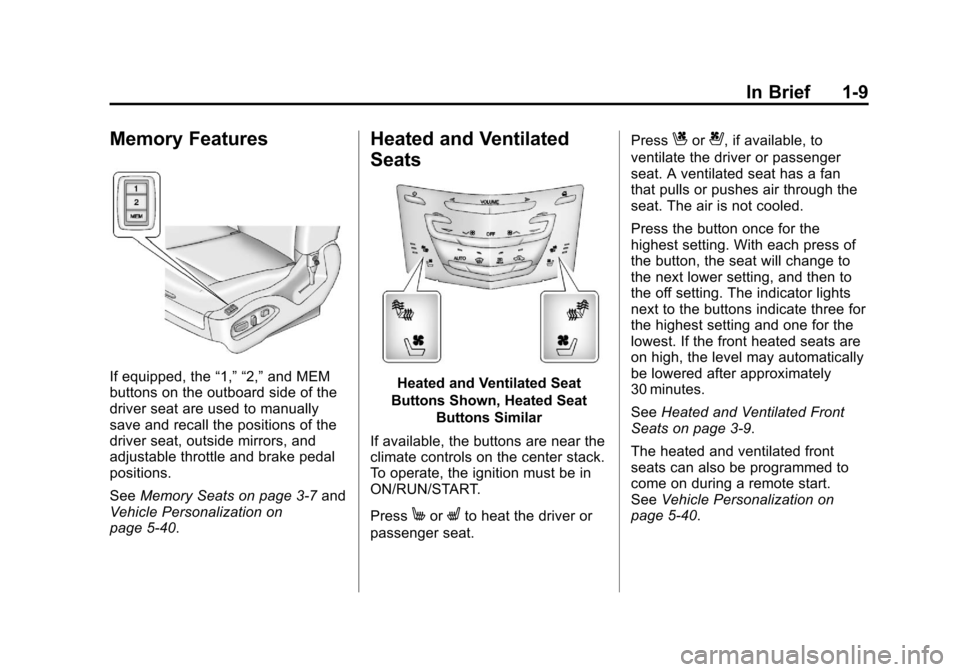
If equipped, the“1,” “2,”and MEM
buttons on the outboard side of the
driver seat are used to manually
save and recall the positions of the
driver seat, outside mirrors, and
adjustable throttle and brake pedal
positions.
See Memory Seats on page 3‑7 and
Vehicle Personalization on
page 5‑40.
Heated and Ventilated
Seats
Heated and Ventilated Seat
Buttons Shown, Heated Seat Buttons Similar
If available, the buttons are near the
climate controls on the center stack.
To operate, the ignition must be in
ON/RUN/START.
Press
MorLto heat the driver or
passenger seat. Press
Cor{, if available, to
ventilate the driver or passenger
seat. A ventilated seat has a fan
that pulls or pushes air through the
seat. The air is not cooled.
Press the button once for the
highest setting. With each press of
the button, the seat will change to
the next lower setting, and then to
the off setting. The indicator lights
next to the buttons indicate three for
the highest setting and one for the
lowest. If the front heated seats are
on high, the level may automatically
be lowered after approximately
30 minutes.
See Heated and Ventilated Front
Seats on page 3‑9.
The heated and ventilated front
seats can also be programmed to
come on during a remote start.
See Vehicle Personalization on
page 5‑40.
Page 17 of 432
Black plate (11,1)Cadillac SRX Owner Manual - 2013 - CRC - 11/9/12
In Brief 1-11
The passenger airbag status
indicator will be visible on the
overhead console when the vehicle
is started. SeePassenger Sensing
System on page 3‑27.
Mirror Adjustment
Exterior
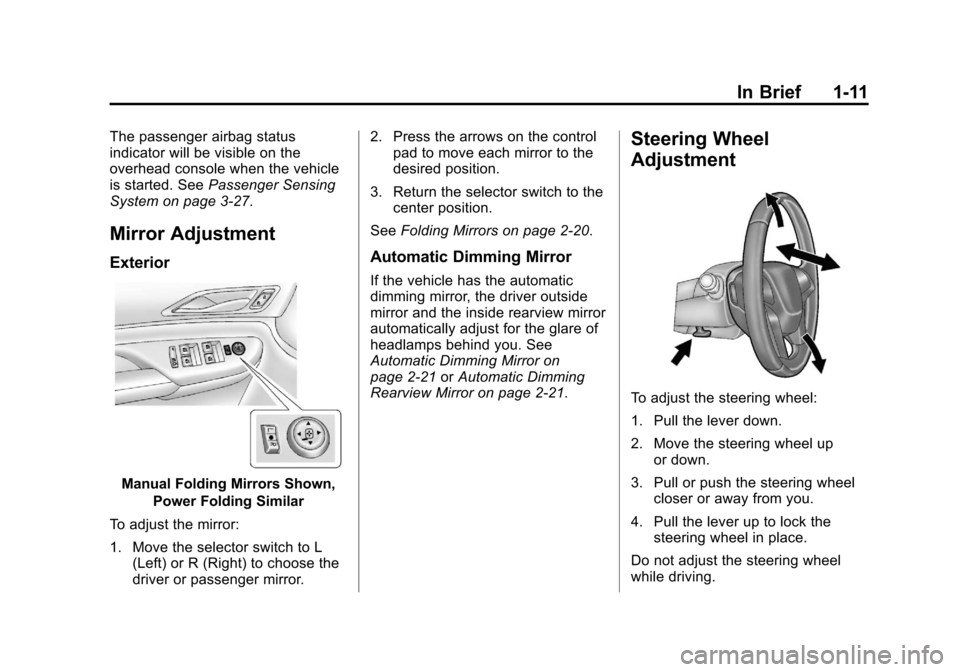
Manual Folding Mirrors Shown,
Power Folding Similar
To adjust the mirror:
1. Move the selector switch to L (Left) or R (Right) to choose the
driver or passenger mirror. 2. Press the arrows on the control
pad to move each mirror to the
desired position.
3. Return the selector switch to the center position.
See Folding Mirrors on page 2‑20.
Automatic Dimming Mirror
If the vehicle has the automatic
dimming mirror, the driver outside
mirror and the inside rearview mirror
automatically adjust for the glare of
headlamps behind you. See
Automatic Dimming Mirror on
page 2‑21 orAutomatic Dimming
Rearview Mirror on page 2‑21.
Steering Wheel
Adjustment
To adjust the steering wheel:
1. Pull the lever down.
2. Move the steering wheel up
or down.
3. Pull or push the steering wheel closer or away from you.
4. Pull the lever up to lock the steering wheel in place.
Do not adjust the steering wheel
while driving.
Page 25 of 432
Black plate (19,1)Cadillac SRX Owner Manual - 2013 - CRC - 11/9/12
In Brief 1-19
Side Blind Zone
Alert (SBZA)
If equipped, SBZA will alert the
driver to vehicles in the vehicle's
side blind zone. When the system
detects a vehicle in the side blind
zone, the SBZA display will light up
in the corresponding outside side
mirror and will flash if the turn signal
is on.
SeeSide Blind Zone Alert (SBZA)
on page 9‑55.
Rear Vision
Camera (RVC)
If equipped, RVC displays a view of
the area behind the vehicle, on the
center stack display, when the
vehicle is shifted into R (Reverse).
See Assistance Systems for Parking
or Backing on page 9‑46.
Ultrasonic Parking Assist
URPA uses sensors on the rear
bumper to assist with parking
and avoiding objects while in
R (Reverse). It operates at speeds
less than 8 km/h (5 mph). URPA
may display a warning triangle on
the Rear Vision Camera screen and
a graphic on the instrument cluster
to provide the object distance. In
addition, multiple beeps or pulses
may occur if very close to an object.
The vehicle may also have the Front
Parking Assist system, a higher
speed Backing Warning System,
and the Rear Automatic Braking
system.
See Driver Assistance Systems on
page 9‑46.
Active Emergency
Braking System
If the vehicle has Adaptive Cruise
Control (ACC) it also has the
Active Emergency Braking System,
which includes Intelligent Brake
Assist (IBA) and the Automatic
Collision Preparation (ACP) System.
These systems can provide a boost
to braking or automatically brake the
vehicle to help avoid crashes.
See Active Emergency Braking
System on page 9‑53.
Storage Compartments
The glove box is air conditioned and
can be used to store items at a
lower temperature. Move the slide
control to open or close the opening
to adjust the air flow. See Glove Box
on page 4‑1.
Page 31 of 432
Black plate (1,1)Cadillac SRX Owner Manual - 2013 - CRC - 11/9/12
Keys, Doors, and Windows 2-1
Keys, Doors, and
Windows
Keys and Locks
Keys . . . . . . . . . . . . . . . . . . . . . . . . . . 2-2
Remote Keyless Entry (RKE)System . . . . . . . . . . . . . . . . . . . . . . 2-3
Remote Keyless Entry (RKE) System Operation . . . . . . . . . . . 2-3
Remote Vehicle Start . . . . . . . . . 2-9
Door Locks . . . . . . . . . . . . . . . . . . 2-10
Power Door Locks . . . . . . . . . . . 2-11
Automatic Door Locks . . . . . . . 2-12
Safety Locks . . . . . . . . . . . . . . . . . 2-12
Doors
Liftgate . . . . . . . . . . . . . . . . . . . . . . 2-13
Vehicle Security
Vehicle Security . . . . . . . . . . . . . . 2-17
Vehicle Alarm System . . . . . . . 2-17
Immobilizer . . . . . . . . . . . . . . . . . . 2-18
Immobilizer Operation . . . . . . . 2-18
Exterior Mirrors
Convex Mirrors . . . . . . . . . . . . . . 2-19
Power Mirrors . . . . . . . . . . . . . . . . 2-20
Folding Mirrors . . . . . . . . . . . . . . . 2-20
Heated Mirrors . . . . . . . . . . . . . . . 2-21
Automatic Dimming Mirror . . . 2-21
Reverse Tilt Mirrors . . . . . . . . . . 2-21
Interior Mirrors
Manual Rearview Mirror . . . . . . 2-21
Automatic Dimming Rearview Mirror . . . . . . . . . . . . . . . . . . . . . . . 2-21
Windows
Windows . . . . . . . . . . . . . . . . . . . . . 2-22
Power Windows . . . . . . . . . . . . . 2-22
Sun Visors . . . . . . . . . . . . . . . . . . . 2-25
Roof
Sunroof . . . . . . . . . . . . . . . . . . . . . . 2-25
Page 49 of 432
Black plate (19,1)Cadillac SRX Owner Manual - 2013 - CRC - 11/9/12
Keys, Doors, and Windows 2-19
If the engine does not start and the
security light stays on, there is a
problem with the system. Turn the
ignition off and try again.
If the vehicle will not change
ignition modes (ACC/ACCESSORY,
ON/RUN/START, OFF), and the
RKE transmitter appears to be
undamaged, try another transmitter.
Or, you may try placing the
transmitter in the transmitter pocket
located in the center console. See
“NO REMOTE DETECTED”under
Key and Lock Messages on
page 5‑34. If the ignition modes will not change
with the other transmitter, your
vehicle needs service. If the ignition
does change modes, the first
transmitter may be faulty. See
your dealer who can service the
theft-deterrent system and have a
new RKE transmitter programmed to
the vehicle.
It is possible for the immobilizer
system to learn new or replacement
RKE transmitters. Up to eight
transmitters can be programmed for
the vehicle. To program additional
transmitters, see
“Programming
Transmitters to the Vehicle” under
Remote Keyless Entry (RKE)
System Operation on page 2‑3.
Do not leave the key or device
that disarms or deactivates the
theft-deterrent system in the vehicle.Exterior Mirrors
Convex Mirrors
{WARNING
A convex mirror can make things,
like other vehicles, look farther
away than they really are. If you
cut too sharply into the right lane,
you could hit a vehicle on the
right. Check the inside mirror or
glance over your shoulder before
changing lanes.
The passenger side mirror is convex
shaped. A convex mirror's surface is
curved so more can be seen from
the driver seat.
Page 50 of 432
Black plate (20,1)Cadillac SRX Owner Manual - 2013 - CRC - 11/9/12
2-20 Keys, Doors, and Windows
Power Mirrors
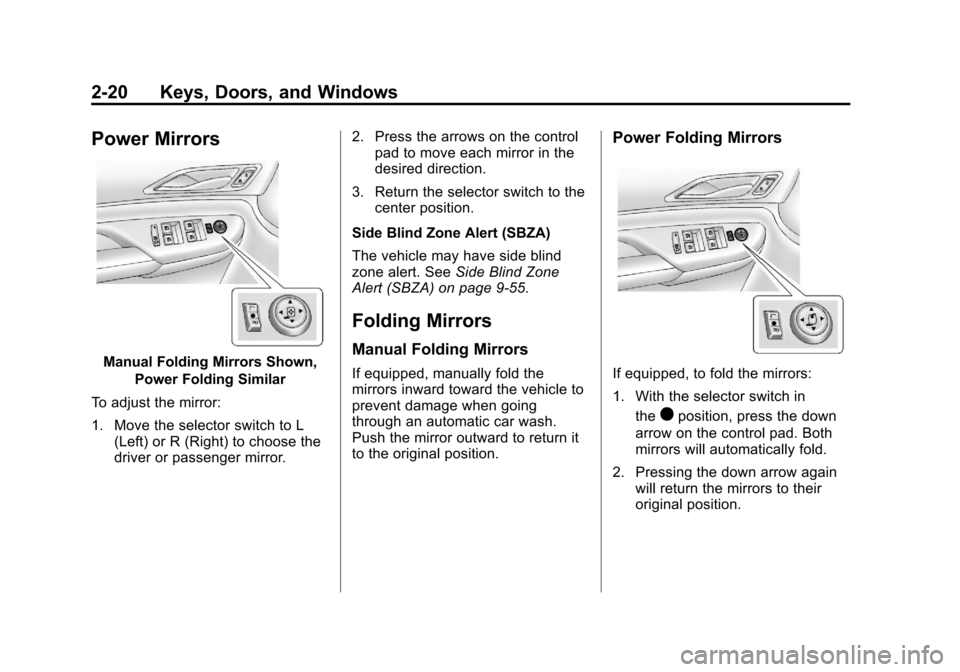
Manual Folding Mirrors Shown,Power Folding Similar
To adjust the mirror:
1. Move the selector switch to L (Left) or R (Right) to choose the
driver or passenger mirror. 2. Press the arrows on the control
pad to move each mirror in the
desired direction.
3. Return the selector switch to the center position.
Side Blind Zone Alert (SBZA)
The vehicle may have side blind
zone alert. See Side Blind Zone
Alert (SBZA) on page 9‑55.
Folding Mirrors
Manual Folding Mirrors
If equipped, manually fold the
mirrors inward toward the vehicle to
prevent damage when going
through an automatic car wash.
Push the mirror outward to return it
to the original position.
Power Folding Mirrors
If equipped, to fold the mirrors:
1. With the selector switch in
the
)position, press the down
arrow on the control pad. Both
mirrors will automatically fold.
2. Pressing the down arrow again will return the mirrors to their
original position.
Page 51 of 432
Black plate (21,1)Cadillac SRX Owner Manual - 2013 - CRC - 11/9/12
Keys, Doors, and Windows 2-21
Resetting the Power Folding
Mirrors
Reset the power folding mirrors if:
.The mirrors are accidentally
obstructed while folding.
.They are accidentally manually
folded/unfolded.
.The mirrors do not stay in the
unfolded position.
.The mirrors vibrate at normal
driving speeds.
Fold and unfold the mirrors one time
using the mirror controls to reset
them to their normal position.
A noise may be heard during the
resetting of the power folding
mirrors. This sound is normal after a
manual folding operation.
Heated Mirrors
1
(Rear Window Defogger):
Press to heat the mirrors.
See “Rear Window Defogger” under
Dual Automatic Climate Control
System on page 8‑1.
Automatic Dimming
Mirror
If the vehicle has the automatic
dimming mirror, the driver outside
mirror automatically adjusts for the
glare of headlamps behind you.
Reverse Tilt Mirrors
If the vehicle is equipped with
memory mirrors, there is an option
to have the mirrors tilt down, when
in R (Reverse), to more easily see
the ground near the vehicle.
When the vehicle is shifted to
R (Reverse), both the driver and
passenger mirrors will tilt downward.
They will return to their previous
position when the vehicle is shifted
out of R (Reverse), the ignition is
turned to OFF, or the vehicle is left
in R (Reverse) for an extended
period of time.
This feature can be turned on or off.
See Vehicle Personalization on
page 5‑40.
Interior Mirrors
Manual Rearview Mirror
Adjust the inside rearview mirror
for a clear view of the area behind
your vehicle. To avoid glare of the
headlamps from behind, push the
tab forward for daytime and pull it
for nighttime use.
Vehicles with OnStar
®have three
control buttons at the bottom of the
mirror. See your dealer for more
information about OnStar and how
to subscribe to it. See OnStar
Overview on page 14‑1.
Automatic Dimming
Rearview Mirror
The vehicle may have an automatic
dimming inside rearview mirror.
Automatic dimming reduces the
glare from the headlamps of the
vehicle behind you. The dimming
feature and the indicator light come
on each time the vehicle is started.