turn signal CADILLAC SRX 2013 2.G Owners Manual
[x] Cancel search | Manufacturer: CADILLAC, Model Year: 2013, Model line: SRX, Model: CADILLAC SRX 2013 2.GPages: 432, PDF Size: 7.13 MB
Page 9 of 432

Black plate (3,1)Cadillac SRX Owner Manual - 2013 - CRC - 11/9/12
In Brief 1-3
1.Air Vents on page 8‑8.
2. Turn and Lane-Change Lever. See Turn and Lane-Change
Signals on page 6‑5.
3. Cruise Control on page 9‑35.
4. Instrument Cluster on page 5‑10.
5. Steering Wheel Controls on
page 5‑2.
Driver Information Center (DIC)
Controls. See Driver Information
Center (DIC) on page 5‑27.
6. Windshield Wiper/Washer on
page 5‑3.
Rear Window Wiper/Washer on
page 5‑5.
7. AM-FM Radio. See the CUE infotainment manual.
Navigation System (If Equipped).
See the CUE infotainment
manual. 8. Light Sensor. See
Twilight
Sentinel on page 6‑4.
9. Dual Automatic Climate Control
System on page 8‑1.
10. Exterior Lamp Controls on
page 6‑1.
Front Fog Lamps on page 6‑6
(If Equipped).
Instrument Panel Illumination
Control on page 6‑6.
11. Hood Release. See Hood on
page 10‑5.
12. Data Link Connector (DLC) (Out of View). See Malfunction
Indicator Lamp on page 5‑17.
13. Steering Wheel Adjustment on
page 5‑2.
14. Horn on page 5‑3. 15. Pedal Adjust Control (Out of
View). See Adjustable Throttle
and Brake Pedal on page 9‑15
(If Equipped).
16. Start/Stop Button. See Ignition
Positions on page 9‑16.
17. Hazard Warning Flashers on
page 6‑5.
18. Heated and Ventilated Front
Seats on page 3‑9
(If Equipped).
19. CD Player. See the CUE infotainment manual.
Blu Ray Optical Drive (If
Equipped). See the CUE
infotainment manual.
20. Parking Brake on page 9‑28.
21. Shift Lever. See Automatic
Transmission on page 9‑23.
Page 11 of 432
Black plate (5,1)Cadillac SRX Owner Manual - 2013 - CRC - 11/9/12
In Brief 1-5
Press and holdLfor
three seconds to sound the panic
alarm.
Press
Lagain or start the vehicle
to cancel the panic alarm.
8: Press and hold to open or
close the liftgate.
Press the key release button near
the bottom of the transmitter to
remove the key. The key can be
used for the driver door and the
glove box.
See Keys on page 2‑2 andRemote
Keyless Entry (RKE) System
Operation on page 2‑3.
Remote Vehicle Start
If available, this feature allows the
engine to be started from outside of
the vehicle.
Starting the Vehicle
1. Press and releaseQon the
RKE transmitter. 2. Immediately press and hold
/
for at least two seconds until the
turn signal lamps flash.
When the vehicle starts, the parking
lamps will remain on as long as the
engine is running. The doors will be
locked and the climate control
system may come on.
The engine will continue to run for
10 minutes. Repeat the steps for a
10-minute time extension. Remote
start can be extended only once.
Canceling a Remote Start
To cancel a remote start, do any of
the following:
.Press and hold/until the
parking lamps turn off.
.Turn on the hazard warning
flashers.
.Turn the vehicle on and then off.
See Remote Vehicle Start on
page 2‑9.
Door Locks
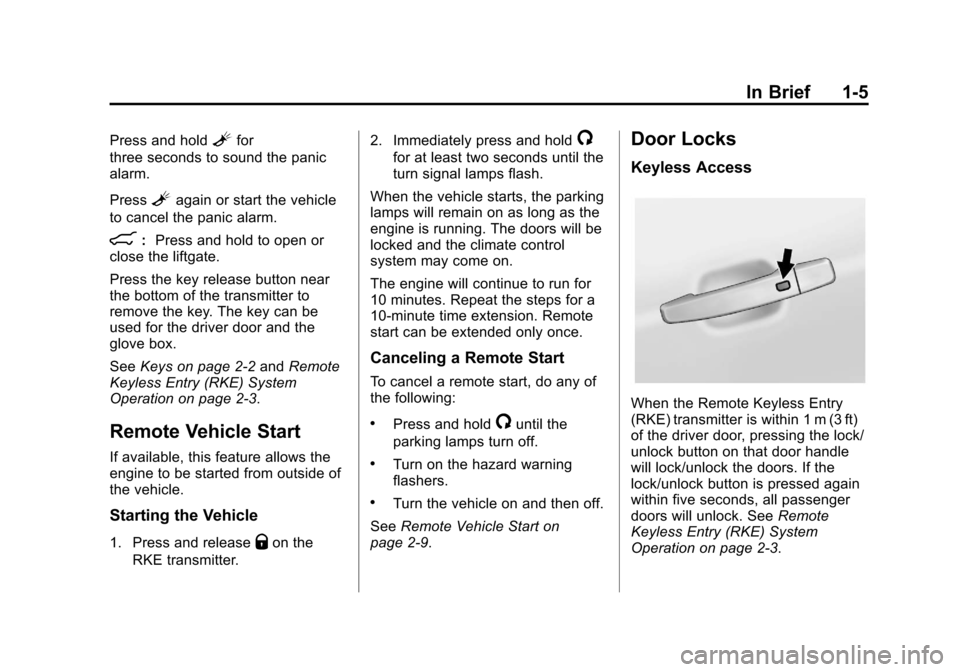
Keyless Access
When the Remote Keyless Entry
(RKE) transmitter is within 1 m (3 ft)
of the driver door, pressing the lock/
unlock button on that door handle
will lock/unlock the doors. If the
lock/unlock button is pressed again
within five seconds, all passenger
doors will unlock. See Remote
Keyless Entry (RKE) System
Operation on page 2‑3.
Page 25 of 432
Black plate (19,1)Cadillac SRX Owner Manual - 2013 - CRC - 11/9/12
In Brief 1-19
Side Blind Zone
Alert (SBZA)
If equipped, SBZA will alert the
driver to vehicles in the vehicle's
side blind zone. When the system
detects a vehicle in the side blind
zone, the SBZA display will light up
in the corresponding outside side
mirror and will flash if the turn signal
is on.
SeeSide Blind Zone Alert (SBZA)
on page 9‑55.
Rear Vision
Camera (RVC)
If equipped, RVC displays a view of
the area behind the vehicle, on the
center stack display, when the
vehicle is shifted into R (Reverse).
See Assistance Systems for Parking
or Backing on page 9‑46.
Ultrasonic Parking Assist
URPA uses sensors on the rear
bumper to assist with parking
and avoiding objects while in
R (Reverse). It operates at speeds
less than 8 km/h (5 mph). URPA
may display a warning triangle on
the Rear Vision Camera screen and
a graphic on the instrument cluster
to provide the object distance. In
addition, multiple beeps or pulses
may occur if very close to an object.
The vehicle may also have the Front
Parking Assist system, a higher
speed Backing Warning System,
and the Rear Automatic Braking
system.
See Driver Assistance Systems on
page 9‑46.
Active Emergency
Braking System
If the vehicle has Adaptive Cruise
Control (ACC) it also has the
Active Emergency Braking System,
which includes Intelligent Brake
Assist (IBA) and the Automatic
Collision Preparation (ACP) System.
These systems can provide a boost
to braking or automatically brake the
vehicle to help avoid crashes.
See Active Emergency Braking
System on page 9‑53.
Storage Compartments
The glove box is air conditioned and
can be used to store items at a
lower temperature. Move the slide
control to open or close the opening
to adjust the air flow. See Glove Box
on page 4‑1.
Page 33 of 432
Black plate (3,1)Cadillac SRX Owner Manual - 2013 - CRC - 11/9/12
Keys, Doors, and Windows 2-3
Contact Roadside Service if locked
out of the vehicle. SeeRoadside
Service (Mexico) on page 13‑7 or
Roadside Service (U.S. and
Canada) on page 13‑11.
With an active OnStar subscription,
an OnStar Advisor may remotely
unlock the vehicle. See OnStar
Overview on page 14‑1.
Remote Keyless Entry
(RKE) System
See Radio Frequency Statement on
page 13‑21 for information
regarding Part 15 of the Federal
Communications Commission (FCC)
rules and Industry Canada
Standards RSS-GEN/210/220/310.
If there is a decrease in the RKE
operating range:
.Check the distance. The
transmitter may be too far from
the vehicle.
.Check the location. Other
vehicles or objects may be
blocking the signal.
.Check the transmitter's battery.
See “Battery Replacement” later
in this section.
.If the transmitter is still not
working correctly, see your
dealer or a qualified technician
for service.
Remote Keyless Entry
(RKE) System Operation
The Remote Keyless Entry (RKE)
transmitter functions may work up to
60 m (195 ft) away from the vehicle.
Keep in mind that other conditions,
such as those previously stated, can
impact the performance of the
transmitter.
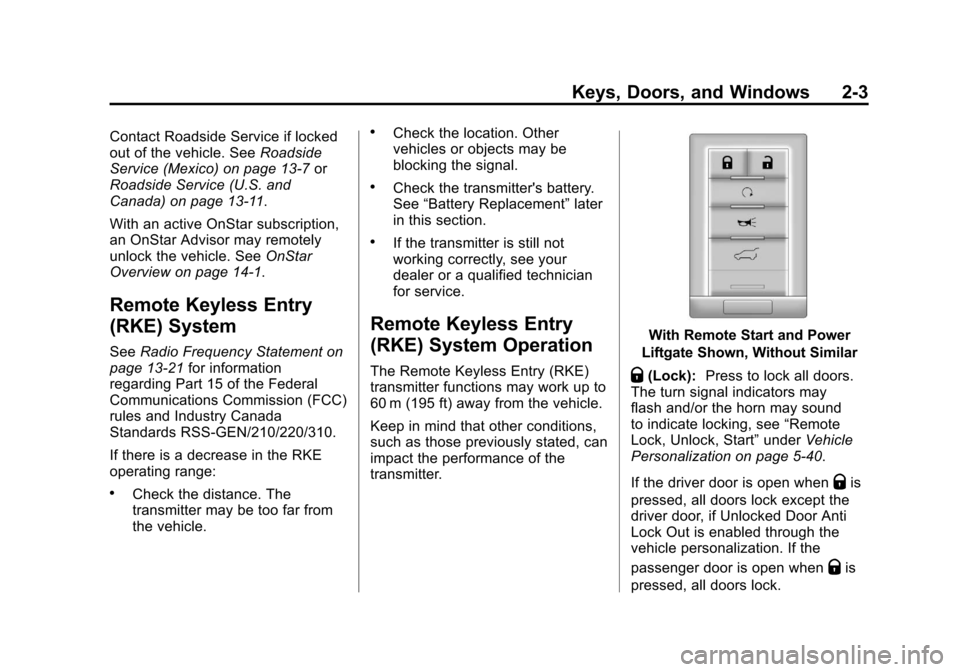
With Remote Start and Power
Liftgate Shown, Without Similar
Q(Lock): Press to lock all doors.
The turn signal indicators may
flash and/or the horn may sound
to indicate locking, see “Remote
Lock, Unlock, Start” underVehicle
Personalization on page 5‑40.
If the driver door is open when
Qis
pressed, all doors lock except the
driver door, if Unlocked Door Anti
Lock Out is enabled through the
vehicle personalization. If the
passenger door is open when
Qis
pressed, all doors lock.
Page 34 of 432
Black plate (4,1)Cadillac SRX Owner Manual - 2013 - CRC - 11/9/12
2-4 Keys, Doors, and Windows
PressingQmay also arm the
theft-deterrent system. See Vehicle
Alarm System on page 2‑17.
K(Unlock): Press to unlock the
driver door or all doors. See
“Remote Lock, Unlock, Start” under
Vehicle Personalization on
page 5‑40. When remotely
unlocking the vehicle at night the
fog lamps and reverse lamps will
come on for about 20 seconds to
light your approach to the vehicle.
The turn signal indicators may flash
and/or the horn may sound to
indicate unlocking. See “Remote
Lock, Unlock, Start” underVehicle
Personalization on page 5‑40.
Memory seat positions may be
recalled when unlocking the vehicle.
See “Remote Lock, Unlock, Start”
under Vehicle Personalization on
page 5‑40.
Pressing
Kwill disarm the
theft-deterrent system. See Vehicle
Alarm System on page 2‑17. On some models, pressing and
holding
Kwill open all of the
windows.
/(Remote Start): For vehicles
with this feature, press and
release
Qand then press and
hold
/for at least two seconds to
start the engine from outside the
vehicle using the RKE transmitter.
See Remote Vehicle Start on
page 2‑9 for additional information.
L(Vehicle Locator/Panic
Alarm): Press and release one
time to initiate vehicle locator. The
exterior lamps flash and the horn
chirps three times. Press and hold
Lfor three seconds to sound the
panic alarm. The horn sounds and
the turn signal lamps flash for
30 seconds, or until
Lis pressed
again or the vehicle is started.
8(Remote Liftgate Release):
Press and hold to open or close the
power liftgate.
Keyless Access Operation
With the keyless access system,
you can lock and unlock the doors
and access the hatch without
removing the RKE transmitter from
your pocket, purse, briefcase, etc.
The RKE transmitter should be
within 1 m (3 ft) of the door or hatch
being opened.
The keyless access can be
programmed to unlock all doors
on the first lock/unlock press from
the driver door. See Vehicle
Personalization on page 5‑40.
Keyless Unlocking/Locking from
the Driver Door
When the doors are locked and the
RKE transmitter is within 1 m (3 ft) of
the driver door handle, pressing the
lock/unlock button on the driver door
handle will unlock the driver door.
If the lock/unlock button is pressed
again within five seconds, all
passenger doors will unlock.
Page 39 of 432
Black plate (9,1)Cadillac SRX Owner Manual - 2013 - CRC - 11/9/12
Keys, Doors, and Windows 2-9
4. Insert the new battery on theback housing, positive side
facing down. Replace with a
CR2032 or equivalent battery.
5. Align the key release button and snap the transmitter back
together.
Remote Vehicle Start
If available, this feature allows the
engine to be started from outside of
the vehicle.
/(Remote Vehicle Start): This
button will be on the RKE
transmitter if the vehicle has remote
start.
The climate control system will use
the previous settings during a
remote start. The rear defog may
come on during remote start based
on cold ambient conditions. The
rear fog indicator light does not
come on during remote start. If the vehicle has heated seats, they
may come on during a remote start.
See
Heated and Ventilated Front
Seats on page 3‑9
Laws in some local communities
may restrict the use of remote
starters. For example, some laws
may require a person using remote
start to have the vehicle in view.
Check local regulations for any
requirements.
Other conditions can affect the
performance of the transmitter. See
Remote Keyless Entry (RKE)
System on page 2‑3 for additional
information.
Starting the Engine Using Remote
Start
1. Press and release
Qon the
RKE transmitter. 2. Immediately press and hold
/
for at least two seconds until the
turn signal lamps flash. The turn
signal lamps flashing confirms
the request to remote start the
vehicle has been received.
During the remote start the
doors will be locked and the
parking lamps will remain on as
long as the engine is running.
The engine will shut off after
10 minutes unless a time
extension is done or the ignition
is put in ON/RUN/START.
3. Press the brake pedal and select the ON/RUN/START ignition
mode to drive the vehicle.
Extending Engine Run Time
For a 10-minute extension, repeat
Steps 1 and 2 while the engine is
still running. The remote start can
only be extended once.
When the remote start is extended,
the second 10-minute period will
start immediately.
Page 45 of 432
Black plate (15,1)Cadillac SRX Owner Manual - 2013 - CRC - 11/9/12
Keys, Doors, and Windows 2-15
OFF:The liftgate only operates
manually in this position.
Manual operation of a liftgate that
also has power operation requires
more effort than with a standard
manual liftgate.
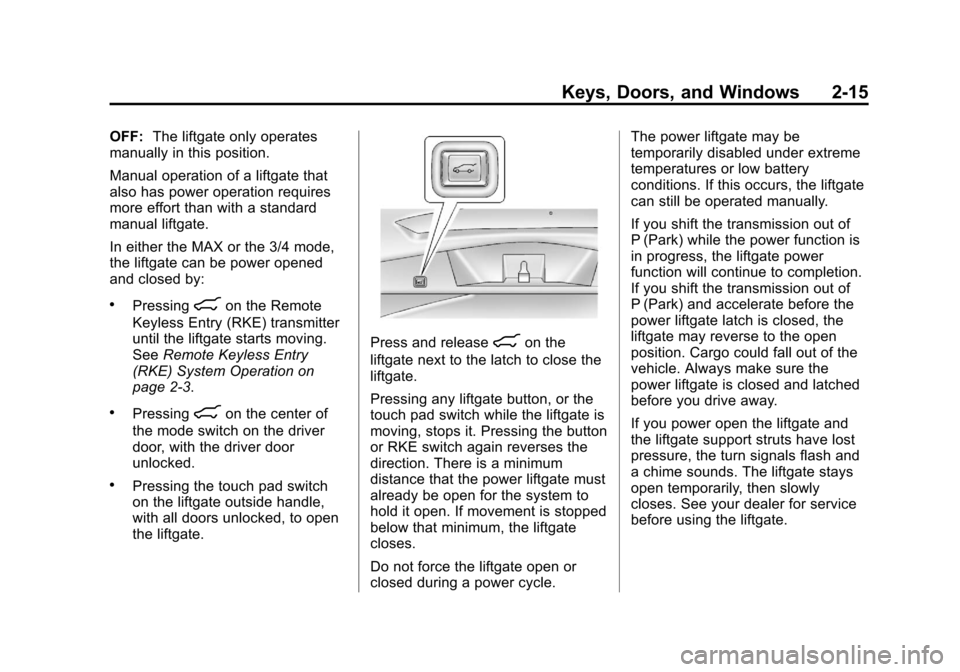
In either the MAX or the 3/4 mode,
the liftgate can be power opened
and closed by:
.Pressing8on the Remote
Keyless Entry (RKE) transmitter
until the liftgate starts moving.
See Remote Keyless Entry
(RKE) System Operation on
page 2‑3.
.Pressing8on the center of
the mode switch on the driver
door, with the driver door
unlocked.
.Pressing the touch pad switch
on the liftgate outside handle,
with all doors unlocked, to open
the liftgate.
Press and release8on the
liftgate next to the latch to close the
liftgate.
Pressing any liftgate button, or the
touch pad switch while the liftgate is
moving, stops it. Pressing the button
or RKE switch again reverses the
direction. There is a minimum
distance that the power liftgate must
already be open for the system to
hold it open. If movement is stopped
below that minimum, the liftgate
closes.
Do not force the liftgate open or
closed during a power cycle. The power liftgate may be
temporarily disabled under extreme
temperatures or low battery
conditions. If this occurs, the liftgate
can still be operated manually.
If you shift the transmission out of
P (Park) while the power function is
in progress, the liftgate power
function will continue to completion.
If you shift the transmission out of
P (Park) and accelerate before the
power liftgate latch is closed, the
liftgate may reverse to the open
position. Cargo could fall out of the
vehicle. Always make sure the
power liftgate is closed and latched
before you drive away.
If you power open the liftgate and
the liftgate support struts have lost
pressure, the turn signals flash and
a chime sounds. The liftgate stays
open temporarily, then slowly
closes. See your dealer for service
before using the liftgate.
Page 46 of 432
Black plate (16,1)Cadillac SRX Owner Manual - 2013 - CRC - 11/9/12
2-16 Keys, Doors, and Windows
Obstacle Detection Features
If the liftgate encounters an obstacle
during a power open or close cycle,
a warning chime will sound and the
liftgate will automatically reverse
direction to the full closed or open
position. After removing the
obstruction, the power liftgate
operation can be used again.
If the liftgate encounters multiple
obstacles on the same power cycle,
the power function will deactivate.
After removing the obstructions, the
liftgate will resume normal power
operation.
The vehicle has pinch sensors
located on the side edges of the
liftgate. If an object is caught
between the liftgate and the body
and presses against this sensor, the
liftgate will reverse direction and
open fully. The liftgate will remain
open until it is activated again or
closed manually.
Setting the Power Liftgate
3/4 Mode
To change the liftgate stop position.
1. Turn the liftgate switch to eitherthe MAX, or the 3/4 mode
position and power open the
liftgate.
2. Stop the liftgate movement at the desired height by pressing
any liftgate switch. Manually
adjust the liftgate position if
required.
3. Press and hold the button on the liftgate next to the latch until the
turn signals flash and a beep
sounds to indicate that the new
setting is recorded.
When power opened with the
3/4 mode selected, the liftgate stops
at the new set position. If you do not receive the audible and
visual feedback when setting the
intermediate stop position, you are
attempting to set the height below
the 3/4 open height minimum
(approximately 1.52 m or 5 ft).
The liftgate cannot be set below that
minimum and the new setting will
not be recorded.
Manual Operation of Power
Liftgate
To change the liftgate to manual
operation, turn the mode switch to
the OFF position.
With the power liftgate disabled
and all of the doors unlocked, the
liftgate can be manually opened
and closed. The effort required to
operate a power liftgate is greater
than the effort required to operate a
non-power liftgate.
Page 47 of 432
Black plate (17,1)Cadillac SRX Owner Manual - 2013 - CRC - 11/9/12
Keys, Doors, and Windows 2-17
To open the liftgate, press the touch
pad on the handle on the outside of
the liftgate, and lift the gate open. To
close the liftgate, use the pull cup to
lower the liftgate and close. With the
power liftgate disabled, the liftgate
electric latch will still power latch
once contact is made with the
striker. Always close the liftgate
before driving.
If the RKE button is pressed while
power operation is disabled, the turn
signals flash and the liftgate will
not move.
The liftgate has an electric latch.
If the battery is disconnected or has
low voltage, the liftgate will not
open. The liftgate will resume
operation when the battery is
reconnected and charged.Vehicle Security
This vehicle has theft-deterrent
features; however, they do not make
the vehicle impossible to steal.
Vehicle Alarm System
This vehicle has an anti-theft alarm
system.
The indicator light, on the
instrument panel near the
windshield, indicates the status of
the system.
Arming the System
1. Close all doors, liftgate,and hood.
2. Lock the vehicle using the transmitter or the power door
lock button. The indicator light
on the instrument panel should
come on and stay on for about
30 seconds. 3. After 30 seconds, the alarm
system will arm, and the
indicator light will begin to slowly
flash indicating the alarm is
operating.
If a door, the hood, or liftgate is
opened without first unlocking with
the transmitter, the turn signals will
flash and the horn will sound for
about 30 seconds. The alarm
system will then re-arm to monitor
for the next unauthorized event.
The theft-deterrent alarm system will
not activate if the doors are locked
with the key. You can start the
vehicle with a recognized transmitter
in the vehicle if the alarm has been
set off.
Disarming the System
To disarm the system, either unlock
the doors using the transmitter,
or start the vehicle with a
recognized transmitter in the
vehicle.
Page 131 of 432
Black plate (7,1)Cadillac SRX Owner Manual - 2013 - CRC - 11/9/12
Instruments and Controls 5-7
Compass
The vehicle may have a compass
display on the Driver Information
Center (DIC). The compass
receives its heading and other
information from the Global
Positioning System (GPS) antenna,
StabiliTrak
®, and vehicle speed
information.
The compass system is designed to
operate for a certain number of
miles or degrees of turn before
needing a signal from the GPS
satellites. When the compass
display shows CAL, drive the
vehicle for a short distance in an
open area where it can receive a
GPS signal. The compass system
will automatically determine when a
GPS signal is restored and provide
a heading again. See Compass
Messages on page 5‑31 for the
messages that may be displayed for
the compass.
Clock
The infotainment system controls
are used to access the time and
date settings through the menu
system. See “Home Page” in the
infotainment manual for information
about how to use the menu system.
Setting the Time
To set the time:
1. From the Home Page, press the SETTINGS screen button and
press Time and Date.
2. Press Set Time and press + or−to increase or decrease
hours, minutes, and AM or PM.
Press 12Hr or 24Hr for 12 or
24 hour clock.
3. Press
}to go back to the
previous menu. To set the date:
1. Press the SETTINGS screen
button and press Time and Date.
2. Press Set Date and press + or−to increase or decrease
month, day, or year.
3. Press
}to go back to the
previous menu.
Power Outlets
The accessory power outlets can be
used to plug in electrical equipment,
such as a cell phone or MP3 player.
The vehicle may have five
accessory power outlets.
The accessory power outlets are:
.Below the climate control system
inside the front storage bin.
.Inside the center floor console.