liftgate CADILLAC SRX 2015 2.G Owners Manual
[x] Cancel search | Manufacturer: CADILLAC, Model Year: 2015, Model line: SRX, Model: CADILLAC SRX 2015 2.GPages: 417, PDF Size: 4.59 MB
Page 8 of 417
Black plate (1,1)Cadillac SRX Owner Manual (GMNA-Localizing-U.S./Canada/Mexico-
7707476) - 2015 - crc - 4/8/14
In Brief 1-1
In Brief
Instrument Panel
Instrument Panel . . . . . . . . . . . . . . 1-2
Initial Drive Information
Initial Drive Information . . . . . . . . 1-4
Remote Keyless Entry (RKE)System . . . . . . . . . . . . . . . . . . . . . . 1-4
Remote Vehicle Start . . . . . . . . . 1-4
Door Locks . . . . . . . . . . . . . . . . . . . 1-5
Liftgate . . . . . . . . . . . . . . . . . . . . . . . . 1-6
Windows . . . . . . . . . . . . . . . . . . . . . . 1-6
Seat Adjustment . . . . . . . . . . . . . . 1-7
Memory Features . . . . . . . . . . . . . 1-8
Heated and Ventilated Seats . . . . . . . . . . . . . . . . . . . . . . . . 1-8
Head Restraint Adjustment . . . . 1-9
Safety Belts . . . . . . . . . . . . . . . . . . . 1-9
Passenger Sensing System . . . . . . . . . . . . . . . . . . . . . 1-10
Mirror Adjustment . . . . . . . . . . . . 1-10 Steering Wheel
Adjustment . . . . . . . . . . . . . . . . . 1-11
Throttle and Brake Pedal Adjustment . . . . . . . . . . . . . . . . . 1-11
Interior Lighting . . . . . . . . . . . . . . 1-11
Exterior Lighting . . . . . . . . . . . . . 1-12
Windshield Wiper/Washer . . . . 1-12
Climate Controls . . . . . . . . . . . . . 1-14
Transmission . . . . . . . . . . . . . . . . 1-15
Vehicle Features
Infotainment System . . . . . . . . . 1-15
Steering Wheel Controls . . . . . 1-15
Cruise Control . . . . . . . . . . . . . . . 1-15
Driver Information
Center (DIC) . . . . . . . . . . . . . . . 1-16
Forward Collision Alert (FCA)
System . . . . . . . . . . . . . . . . . . . . . 1-16
Lane Departure Warning (LDW) . . . . . . . . . . . . . 1-16
Side Blind Zone Alert (SBZA) . . . . . . . . . . . . . . . 1-17 Rear Vision
Camera (RVC) . . . . . . . . . . . . . 1-17
Rear Cross Traffic Alert (RCTA) System . . . . . . . . . . . . 1-17
Parking Assist . . . . . . . . . . . . . . . 1-17
Rear Automatic Braking (RAB)
System . . . . . . . . . . . . . . . . . . . . . 1-17
Active Emergency Braking System . . . . . . . . . . . . . . . . . . . . . 1-18
Storage Compartments . . . . . . 1-18
Power Outlets . . . . . . . . . . . . . . . 1-18
Universal Remote System . . . 1-18
Performance and Maintenance
Traction Control/Electronic Stability Control . . . . . . . . . . . . 1-19
Tire Pressure Monitor . . . . . . . . 1-19
Engine Oil Life System . . . . . . 1-20
Driving for Better Fuel
Economy . . . . . . . . . . . . . . . . . . . 1-20
Roadside Service . . . . . . . . . . . . 1-21
OnStar
®. . . . . . . . . . . . . . . . . . . . . 1-21
Page 11 of 417
Black plate (4,1)Cadillac SRX Owner Manual (GMNA-Localizing-U.S./Canada/Mexico-
7707476) - 2015 - crc - 4/8/14
1-4 In Brief
Initial Drive
Information
This section provides a brief
overview about some of the
important features that may or may
not be on your specific vehicle.
For more detailed information, refer
to each of the features which can be
found later in this owner manual.
Remote Keyless Entry
(RKE) System
The RKE transmitter may be used
to lock and unlock the doors from up
to 60 m (197 ft) away from the
vehicle.
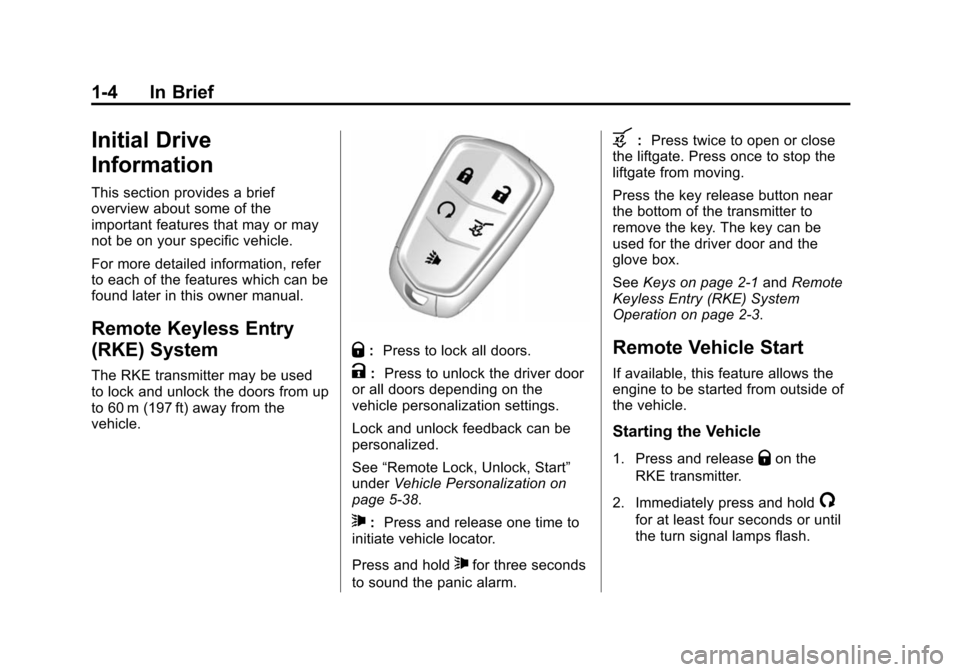
Q:Press to lock all doors.
K: Press to unlock the driver door
or all doors depending on the
vehicle personalization settings.
Lock and unlock feedback can be
personalized.
See “Remote Lock, Unlock, Start”
under Vehicle Personalization on
page 5-38.
7: Press and release one time to
initiate vehicle locator.
Press and hold
7for three seconds
to sound the panic alarm.
b: Press twice to open or close
the liftgate. Press once to stop the
liftgate from moving.
Press the key release button near
the bottom of the transmitter to
remove the key. The key can be
used for the driver door and the
glove box.
See Keys on page 2-1 andRemote
Keyless Entry (RKE) System
Operation on page 2-3.
Remote Vehicle Start
If available, this feature allows the
engine to be started from outside of
the vehicle.
Starting the Vehicle
1. Press and releaseQon the
RKE transmitter.
2. Immediately press and hold
/
for at least four seconds or until
the turn signal lamps flash.
Page 13 of 417
Black plate (6,1)Cadillac SRX Owner Manual (GMNA-Localizing-U.S./Canada/Mexico-
7707476) - 2015 - crc - 4/8/14
1-6 In Brief
SeePower Door Locks on
page 2-12.
Liftgate
Manual Liftgate Operation
For vehicles without Keyless
Access, unlock the vehicle before
opening the liftgate.
Press the touch pad in the handle of
the liftgate above the license plate
and lift up to open.
Do not press the touch pad while
closing the liftgate. This will cause
the liftgate to be unlatched.
Power Liftgate Operation
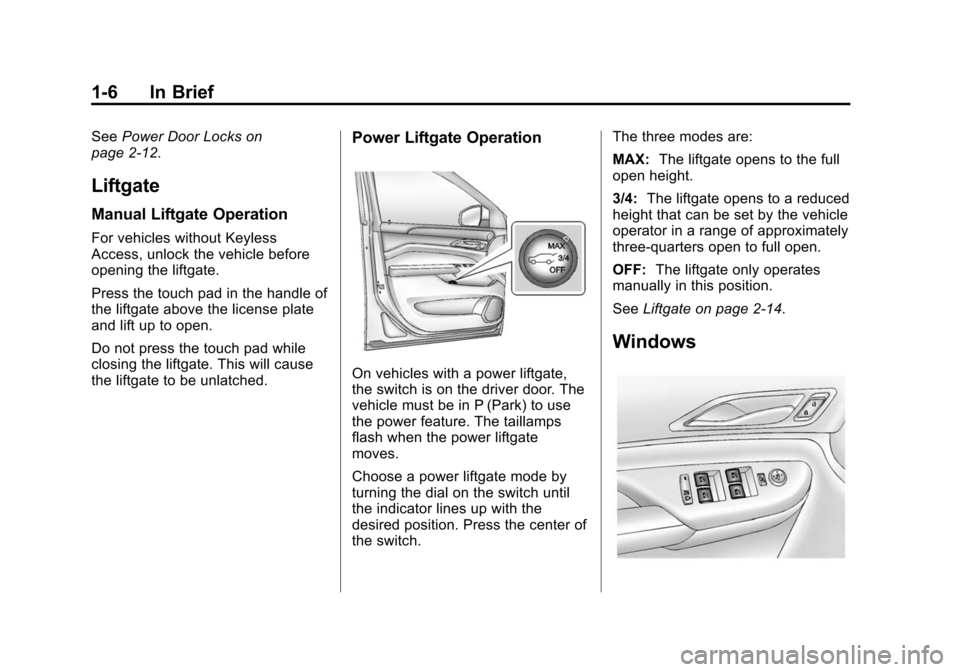
On vehicles with a power liftgate,
the switch is on the driver door. The
vehicle must be in P (Park) to use
the power feature. The taillamps
flash when the power liftgate
moves.
Choose a power liftgate mode by
turning the dial on the switch until
the indicator lines up with the
desired position. Press the center of
the switch. The three modes are:
MAX:
The liftgate opens to the full
open height.
3/4: The liftgate opens to a reduced
height that can be set by the vehicle
operator in a range of approximately
three-quarters open to full open.
OFF: The liftgate only operates
manually in this position.
See Liftgate on page 2-14.
Windows
Page 30 of 417

Black plate (1,1)Cadillac SRX Owner Manual (GMNA-Localizing-U.S./Canada/Mexico-
7707476) - 2015 - crc - 4/8/14
Keys, Doors, and Windows 2-1
Keys, Doors, and
Windows
Keys and Locks
Keys . . . . . . . . . . . . . . . . . . . . . . . . . . 2-1
Remote Keyless Entry (RKE)System . . . . . . . . . . . . . . . . . . . . . . 2-2
Remote Keyless Entry (RKE) System Operation . . . . . . . . . . . 2-3
Remote Vehicle Start . . . . . . . . . 2-9
Door Locks . . . . . . . . . . . . . . . . . . 2-11
Power Door Locks . . . . . . . . . . . 2-12
Delayed Locking . . . . . . . . . . . . . 2-12
Automatic Door Locks . . . . . . . 2-12
Lockout Protection . . . . . . . . . . . 2-13
Safety Locks . . . . . . . . . . . . . . . . . 2-13
Doors
Liftgate . . . . . . . . . . . . . . . . . . . . . . 2-14
Vehicle Security
Vehicle Security . . . . . . . . . . . . . . 2-17
Vehicle Alarm System . . . . . . . 2-17
Immobilizer . . . . . . . . . . . . . . . . . . 2-19
Immobilizer Operation . . . . . . . 2-19
Exterior Mirrors
Convex Mirrors . . . . . . . . . . . . . . 2-20
Power Mirrors . . . . . . . . . . . . . . . . 2-21
Folding Mirrors . . . . . . . . . . . . . . . 2-21
Heated Mirrors . . . . . . . . . . . . . . . 2-22
Automatic Dimming Mirror . . . 2-22
Reverse Tilt Mirrors . . . . . . . . . . 2-22
Interior Mirrors
Interior Rearview Mirrors . . . . . 2-22
Manual Rearview Mirror . . . . . . 2-22
Automatic Dimming Rearview Mirror . . . . . . . . . . . . . . . . . . . . . . . 2-23
Windows
Windows . . . . . . . . . . . . . . . . . . . . . 2-23
Power Windows . . . . . . . . . . . . . 2-23
Sun Visors . . . . . . . . . . . . . . . . . . . 2-26
Roof
Sunroof . . . . . . . . . . . . . . . . . . . . . . 2-26
Keys and Locks
Keys
{Warning
Leaving children in a vehicle with
a Remote Keyless Entry (RKE)
transmitter is dangerous and
children or others could be
seriously injured or killed. They
could operate the power windows
or other controls or make the
vehicle move. The windows will
function with the RKE transmitter
in the vehicle, and children or
others could be caught in the path
of a closing window. Do not leave
children in a vehicle with an RKE
transmitter.
Page 32 of 417
Black plate (3,1)Cadillac SRX Owner Manual (GMNA-Localizing-U.S./Canada/Mexico-
7707476) - 2015 - crc - 4/8/14
Keys, Doors, and Windows 2-3
Remote Keyless Entry
(RKE) System Operation
The Keyless Access system allows
for vehicle entry when the
transmitter is within range. See
“Keyless Access Operation”
following.
The RKE transmitter functions may
work up to 60 m (197 ft) away from
the vehicle.
Keep in mind that other conditions,
such as those previously stated, can
impact the performance of the
transmitter.
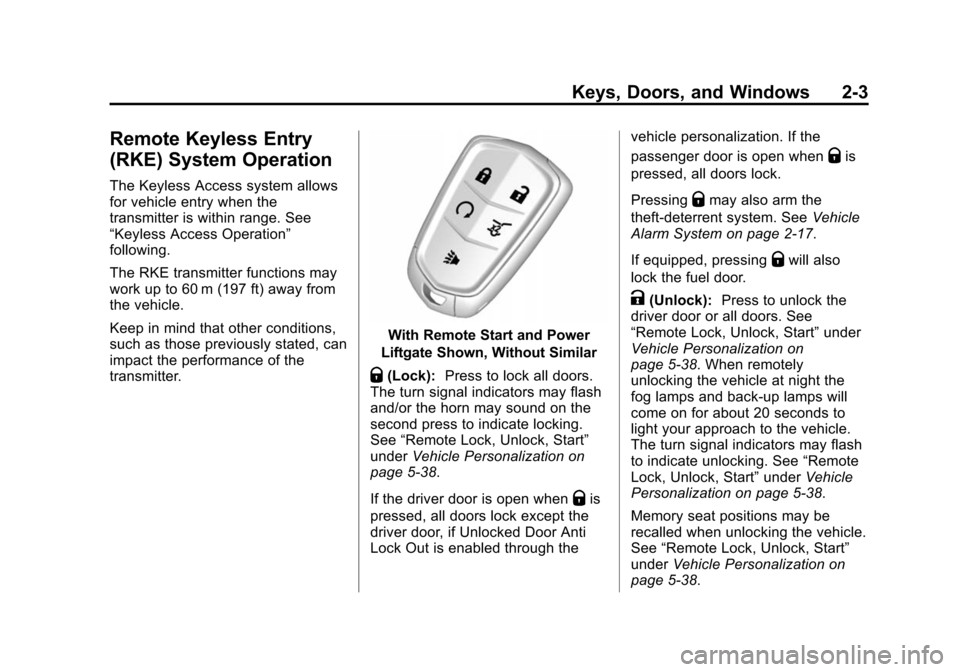
With Remote Start and Power
Liftgate Shown, Without Similar
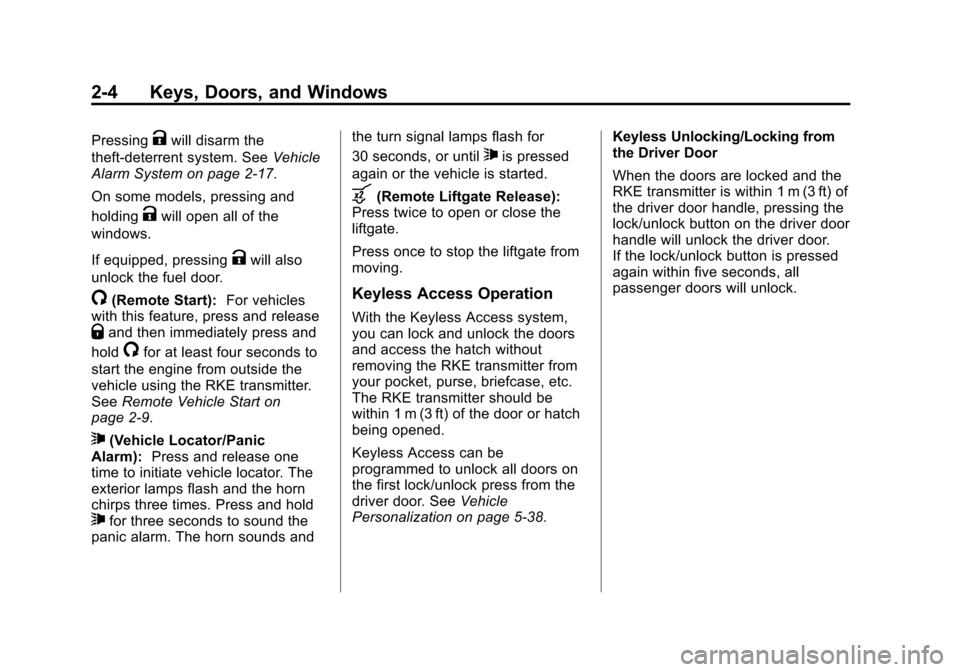
Q(Lock): Press to lock all doors.
The turn signal indicators may flash
and/or the horn may sound on the
second press to indicate locking.
See “Remote Lock, Unlock, Start”
under Vehicle Personalization on
page 5-38.
If the driver door is open when
Qis
pressed, all doors lock except the
driver door, if Unlocked Door Anti
Lock Out is enabled through the vehicle personalization. If the
passenger door is open when
Qis
pressed, all doors lock.
Pressing
Qmay also arm the
theft-deterrent system. See Vehicle
Alarm System on page 2-17.
If equipped, pressing
Qwill also
lock the fuel door.
K(Unlock): Press to unlock the
driver door or all doors. See
“Remote Lock, Unlock, Start” under
Vehicle Personalization on
page 5-38. When remotely
unlocking the vehicle at night the
fog lamps and back-up lamps will
come on for about 20 seconds to
light your approach to the vehicle.
The turn signal indicators may flash
to indicate unlocking. See “Remote
Lock, Unlock, Start” underVehicle
Personalization on page 5-38.
Memory seat positions may be
recalled when unlocking the vehicle.
See “Remote Lock, Unlock, Start”
under Vehicle Personalization on
page 5-38.
Page 33 of 417
Black plate (4,1)Cadillac SRX Owner Manual (GMNA-Localizing-U.S./Canada/Mexico-
7707476) - 2015 - crc - 4/8/14
2-4 Keys, Doors, and Windows
PressingKwill disarm the
theft-deterrent system. See Vehicle
Alarm System on page 2-17.
On some models, pressing and
holding
Kwill open all of the
windows.
If equipped, pressing
Kwill also
unlock the fuel door.
/(Remote Start): For vehicles
with this feature, press and release
Qand then immediately press and
hold
/for at least four seconds to
start the engine from outside the
vehicle using the RKE transmitter.
See Remote Vehicle Start on
page 2-9.
7(Vehicle Locator/Panic
Alarm): Press and release one
time to initiate vehicle locator. The
exterior lamps flash and the horn
chirps three times. Press and hold
7for three seconds to sound the
panic alarm. The horn sounds and the turn signal lamps flash for
30 seconds, or until
7is pressed
again or the vehicle is started.
b(Remote Liftgate Release):
Press twice to open or close the
liftgate.
Press once to stop the liftgate from
moving.
Keyless Access Operation
With the Keyless Access system,
you can lock and unlock the doors
and access the hatch without
removing the RKE transmitter from
your pocket, purse, briefcase, etc.
The RKE transmitter should be
within 1 m (3 ft) of the door or hatch
being opened.
Keyless Access can be
programmed to unlock all doors on
the first lock/unlock press from the
driver door. See Vehicle
Personalization on page 5-38. Keyless Unlocking/Locking from
the Driver Door
When the doors are locked and the
RKE transmitter is within 1 m (3 ft) of
the driver door handle, pressing the
lock/unlock button on the driver door
handle will unlock the driver door.
If the lock/unlock button is pressed
again within five seconds, all
passenger doors will unlock.
Page 35 of 417
Black plate (6,1)Cadillac SRX Owner Manual (GMNA-Localizing-U.S./Canada/Mexico-
7707476) - 2015 - crc - 4/8/14
2-6 Keys, Doors, and Windows
Keyless Liftgate Opening
Press the touch pad on the liftgate
handle to open the liftgate if the
RKE transmitter is within 1 m (3 ft).
Programming Transmitters to
the Vehicle
Only RKE transmitters programmed
to the vehicle will work. If a
transmitter is lost or stolen, a
replacement can be purchased and
programmed through your dealer.
The vehicle can be reprogrammed
so that lost or stolen transmitters no
longer work. Each vehicle can have
up to eight transmitters matched
to it.
Programming with a Recognized
Transmitter
A new transmitter can be
programmed to the vehicle when
there is one recognized transmitter.
To program, the vehicle must be off
and all of the transmitters, both
currently recognized and new, must
be with you.1. Place the recognized
transmitter(s) in the cupholder.
2. Insert the vehicle key of the transmitter into the key lock
cylinder on the driver door
handle and turn the key,
counterclockwise, to the unlock
position five times within
10 seconds.
The Driver Information Center
(DIC) displays READY FOR
REMOTE #2, 3, 4, ETC.
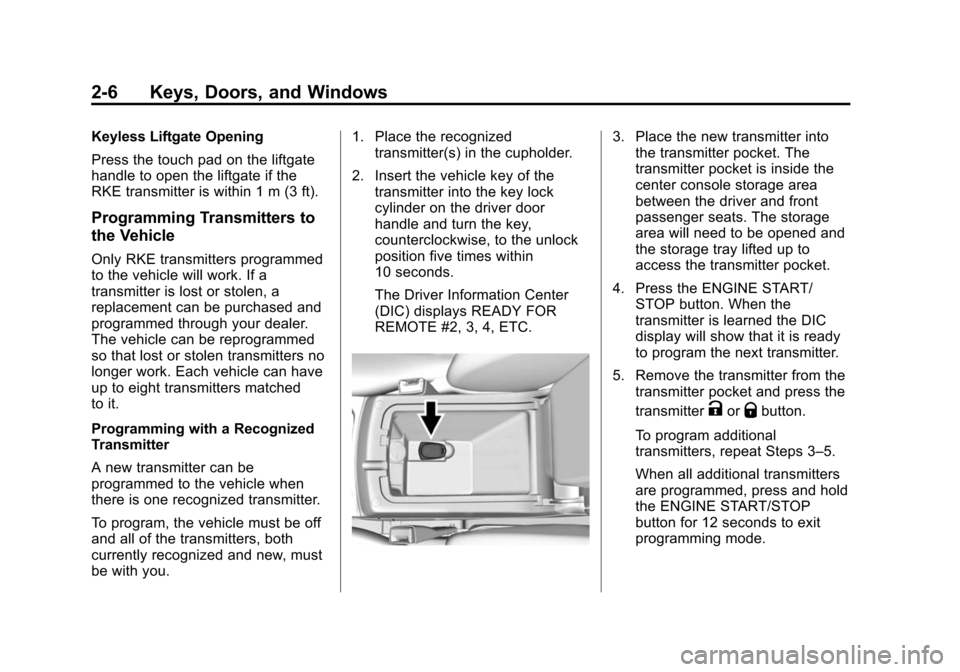
3. Place the new transmitter intothe transmitter pocket. The
transmitter pocket is inside the
center console storage area
between the driver and front
passenger seats. The storage
area will need to be opened and
the storage tray lifted up to
access the transmitter pocket.
4. Press the ENGINE START/ STOP button. When the
transmitter is learned the DIC
display will show that it is ready
to program the next transmitter.
5. Remove the transmitter from the transmitter pocket and press the
transmitter
KorQbutton.
To program additional
transmitters, repeat Steps 3–5.
When all additional transmitters
are programmed, press and hold
the ENGINE START/STOP
button for 12 seconds to exit
programming mode.
Page 43 of 417
Black plate (14,1)Cadillac SRX Owner Manual (GMNA-Localizing-U.S./Canada/Mexico-
7707476) - 2015 - crc - 4/8/14
2-14 Keys, Doors, and Windows
Doors
Liftgate
{Warning
Exhaust gases can enter the
vehicle if it is driven with the
liftgate or trunk/hatch open,
or with any objects that pass
through the seal between the
body and the trunk/hatch or
liftgate. Engine exhaust contains
carbon monoxide (CO) which
cannot be seen or smelled. It can
cause unconsciousness and even
death.
If the vehicle must be driven with
the liftgate or trunk/hatch open:
.Close all of the windows.
.Fully open the air outlets on
or under the instrument
panel.(Continued)
Warning (Continued)
.Adjust the climate control
system to a setting that
brings in only outside air and
set the fan speed to the
highest setting. See “Climate
Control Systems” in the
Index.
.If the vehicle is equipped with
a power liftgate, disable the
power liftgate function.
See Engine Exhaust on
page 9-21.
{Caution
To avoid damage to the liftgate or
liftgate glass, make sure the area
above and behind the liftgate is
clear before opening it.
Manual Liftgate
For vehicles without Keyless
Access, unlock the vehicle before
opening the liftgate.
Press the touch pad in the handle of
the liftgate, above the license plate,
and lift up to open.
Do not press the touch pad while
closing the liftgate. This will cause
the liftgate to be unlatched.
Always close the liftgate before
driving.
Page 44 of 417
Black plate (15,1)Cadillac SRX Owner Manual (GMNA-Localizing-U.S./Canada/Mexico-
7707476) - 2015 - crc - 4/8/14
Keys, Doors, and Windows 2-15
Power Liftgate
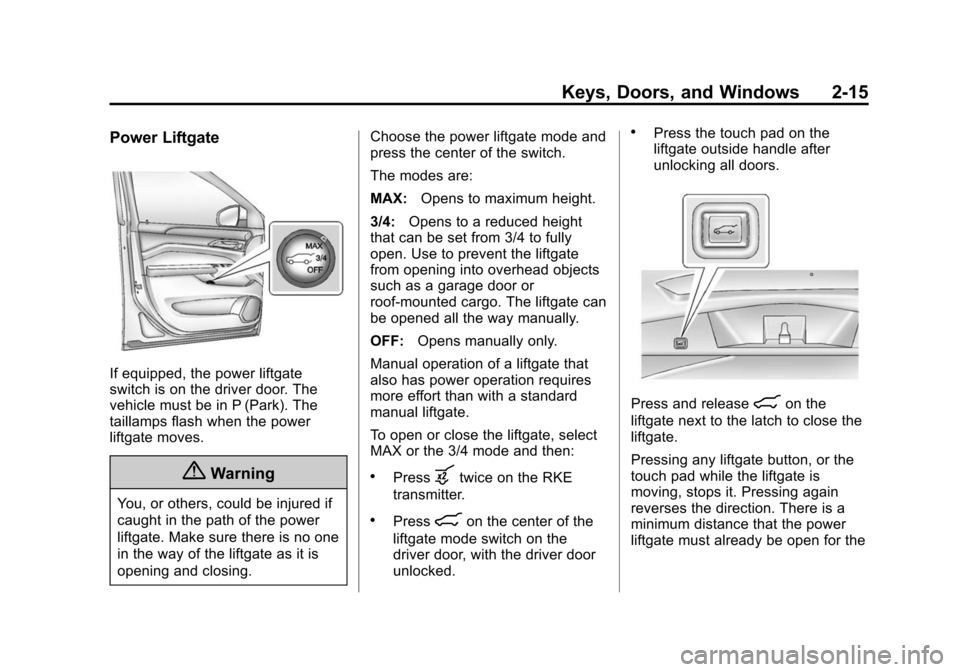
If equipped, the power liftgate
switch is on the driver door. The
vehicle must be in P (Park). The
taillamps flash when the power
liftgate moves.
{Warning
You, or others, could be injured if
caught in the path of the power
liftgate. Make sure there is no one
in the way of the liftgate as it is
opening and closing.Choose the power liftgate mode and
press the center of the switch.
The modes are:
MAX:
Opens to maximum height.
3/4: Opens to a reduced height
that can be set from 3/4 to fully
open. Use to prevent the liftgate
from opening into overhead objects
such as a garage door or
roof-mounted cargo. The liftgate can
be opened all the way manually.
OFF: Opens manually only.
Manual operation of a liftgate that
also has power operation requires
more effort than with a standard
manual liftgate.
To open or close the liftgate, select
MAX or the 3/4 mode and then:
.Pressbtwice on the RKE
transmitter.
.Press8on the center of the
liftgate mode switch on the
driver door, with the driver door
unlocked.
.Press the touch pad on the
liftgate outside handle after
unlocking all doors.
Press and release8on the
liftgate next to the latch to close the
liftgate.
Pressing any liftgate button, or the
touch pad while the liftgate is
moving, stops it. Pressing again
reverses the direction. There is a
minimum distance that the power
liftgate must already be open for the
Page 45 of 417
Black plate (16,1)Cadillac SRX Owner Manual (GMNA-Localizing-U.S./Canada/Mexico-
7707476) - 2015 - crc - 4/8/14
2-16 Keys, Doors, and Windows
system to hold it open. If movement
is stopped below that minimum, the
liftgate closes.
Do not force the liftgate open or
closed during a power cycle.
The power liftgate may be
temporarily disabled under extreme
temperatures or low battery
conditions. If this occurs, the liftgate
can still be operated manually.
If you shift the transmission out of
P (Park) while the power function is
in progress, the liftgate power
function will continue to completion.
If you shift the transmission out of
P (Park) and accelerate before the
power liftgate latch is closed, the
liftgate may reverse to the open
position. Cargo could fall out of the
vehicle. Always make sure the
power liftgate is closed and latched
before you drive away.
If you power open the liftgate and
the liftgate support struts have lost
pressure, the turn signals flash and
a chime sounds. The liftgate staysopen temporarily, then slowly
closes. See your dealer for service
before using the liftgate.
Obstacle Detection Features
If the liftgate encounters an obstacle
during a power open or close cycle,
a warning chime will sound and the
liftgate will automatically reverse
direction to the full closed or open
position. After removing the
obstruction, the power liftgate
operation can be used again. If the
liftgate encounters multiple
obstacles on the same power cycle,
the power function will deactivate.
After removing the obstructions, the
liftgate will resume normal power
operation.
The vehicle has pinch sensors on
the side edges of the liftgate. If an
object is caught between the liftgate
and the body and presses against
one of these sensors, the liftgate will
reverse direction and open fully. The
liftgate will remain open until it is
activated again or closed manually.
Setting the 3/4 Mode
To change the liftgate stop position:
1. Select MAX or 3/4 mode and
open the liftgate.
2. Stop the liftgate movement at the desired height by pressing
any liftgate switch. Manually
adjust the liftgate position if
needed.
3. Press and hold
8on the
liftgate next to the latch until the
turn signals flash and a beep
sounds. This indicates the
setting has been recorded.
The liftgate cannot be set below a
minimum programmable height.
If there is no light flash or sound,
then the height adjustment may be
too low.
Manual Operation of Power
Liftgate
To change the liftgate to manual
operation, turn the mode switch to
the OFF position.