fog light CADILLAC SRX 2016 2.G User Guide
[x] Cancel search | Manufacturer: CADILLAC, Model Year: 2016, Model line: SRX, Model: CADILLAC SRX 2016 2.GPages: 319, PDF Size: 3.29 MB
Page 149 of 319
Cadillac SRX Owner Manual (GMNA-Localizing-MidEast-9369636) - 2016 -
crc - 6/1/15
148 Lighting
Turn and Lane-Change
Signals
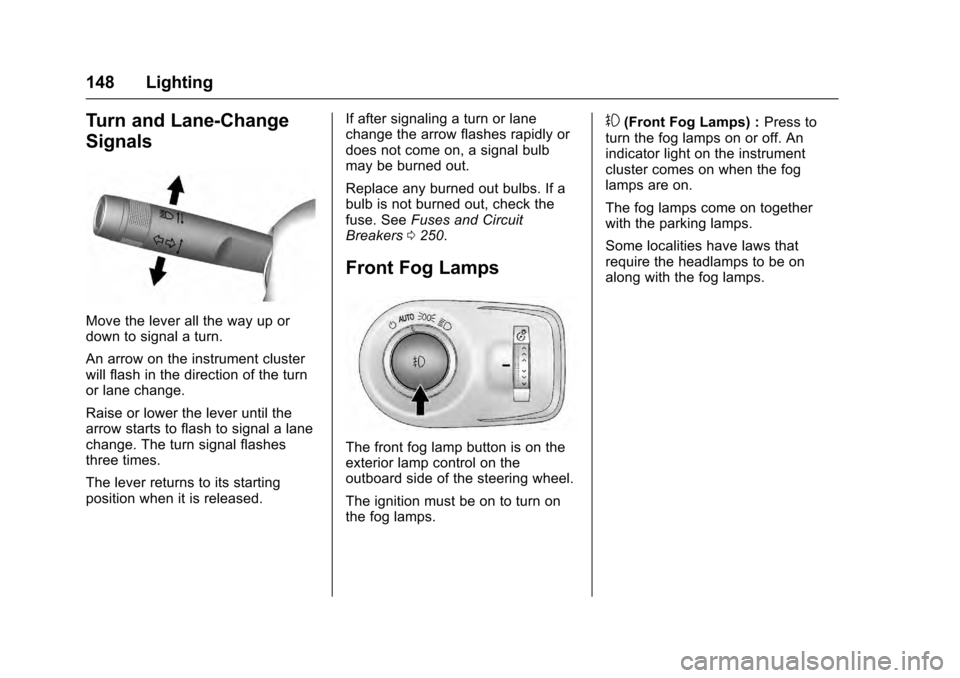
Move the lever all the way up or
down to signal a turn.
An arrow on the instrument cluster
will flash in the direction of the turn
or lane change.
Raise or lower the lever until the
arrow starts to flash to signal a lane
change. The turn signal flashes
three times.
The lever returns to its starting
position when it is released.If after signaling a turn or lane
change the arrow flashes rapidly or
does not come on, a signal bulb
may be burned out.
Replace any burned out bulbs. If a
bulb is not burned out, check the
fuse. See
Fuses and Circuit
Breakers 0250.
Front Fog Lamps
The front fog lamp button is on the
exterior lamp control on the
outboard side of the steering wheel.
The ignition must be on to turn on
the fog lamps.
#(Front Fog Lamps) : Press to
turn the fog lamps on or off. An
indicator light on the instrument
cluster comes on when the fog
lamps are on.
The fog lamps come on together
with the parking lamps.
Some localities have laws that
require the headlamps to be on
along with the fog lamps.
Page 151 of 319
Cadillac SRX Owner Manual (GMNA-Localizing-MidEast-9369636) - 2016 -
crc - 6/1/15
150 Lighting
Lighting Features
Entry Lighting
Some exterior lamps and interior
lights turn on briefly at night, or in
areas with limited lighting, when
K
is pressed on the Remote Keyless
Entry (RKE) transmitter. After about
30 seconds the exterior lamps turn
off, and then the dome and
remaining interior lights dim to off.
The entry lighting can be manually
turned off by changing the ignition
out of the off position, or by pressing
Qon the RKE transmitter.
This feature can be changed. See
Vehicle Personalization 0136.
Exit Lighting
Some exterior lamps and interior
lamps come on at night, or in areas
with limited lighting, when the driver
door is opened after the ignition is
turned off. The exterior lamps and
interior lamps remain on for a set
amount of time, then automatically
turn off. The exterior lamps turn off
immediately by turning the exterior
lamp control off.
This feature can be changed. See
Vehicle Personalization
0136.
Battery Load
Management
The vehicle has Electric Power
Management (EPM) that estimates
the battery's temperature and state
of charge. It then adjusts the voltage
for best performance and extended
life of the battery.
When the battery's state of charge
is low, the voltage is raised slightly
to quickly bring the charge back up.
When the state of charge is high,
the voltage is lowered slightly to
prevent overcharging. If the vehicle
has a voltmeter gauge or a voltage
display on the Driver Information
Center (DIC), you may see the
voltage move up or down. This is
normal. If there is a problem, an
alert will be displayed. The battery can be discharged at
idle if the electrical loads are very
high. This is true for all vehicles.
This is because the generator
(alternator) may not be spinning fast
enough at idle to produce all of the
power needed for very high
electrical loads.
A high electrical load occurs when
several of the following are on, such
as: headlamps, high beams, fog
lamps, rear window defogger,
climate control fan at high speed,
heated seats, engine cooling fans,
trailer loads, and loads plugged into
accessory power outlets.
EPM works to prevent excessive
discharge of the battery. It does this
by balancing the generator's output
and the vehicle's electrical needs.
It can increase engine idle speed to
generate more power whenever
needed. It can temporarily reduce
the power demands of some
accessories.
Normally, these actions occur in
steps or levels, without being
noticeable. In rare cases at the
highest levels of corrective action,
Page 156 of 319
Cadillac SRX Owner Manual (GMNA-Localizing-MidEast-9369636) - 2016 -
crc - 6/1/15
Climate Controls 155
To improve fuel efficiency and to
cool the vehicle faster, recirculation
may be automatically selected in
warm weather. The recirculation
light will not come on. Press
/
to select recirculation; press it again
to select outside air.
OFF (Fan) :Press to turn the fan on
or off. The temperature control and
air delivery mode can still be
adjusted.
w/x(Driver and Passenger
Temperature Controls) : The
temperature can be adjusted
separately for the driver and the
passenger. Press to increase or
decrease the temperature. Press
and hold to rapidly increase or
decrease the temperature.
The driver and passenger
temperatures can also be adjusted
by pressing the controls on the
touch screen.
SYNC (Synchronized
Temperature) : Press SYNC on the
touch screen to link all climate zone
settings to the driver settings. Adjust
the driver side temperature control
to change the linked temperature. When the passenger settings are
adjusted, the SYNC button is
displayed when the temperatures
are unlinked.
Manual Operation
z 9or9 y(Fan Control) :
Press the fan control buttons or the
touch screen fan control, to increase
or decrease the fan speed. Press
and hold the buttons or the touch
screen control to adjust speed more
quickly. The fan speed setting
displays. Pressing either button
cancels automatic fan control and
the fan can be controlled manually.
Press AUTO to return to automatic
operation. To turn off the fan and
climate control system, press and
hold the fan down button or touch
screen fan control until it is off.
Air Delivery Mode Control : When
the climate information is displayed,
press the desired air delivery mode
on the touch screen to change the
direction of the airflow. The selected
air delivery mode button is lit.
Pressing any of the air delivery
buttons cancels automatic air
delivery control and the direction of the airflow can be controlled
manually. Press AUTO to return to
automatic operation.
To change the current mode, select
one of the following:Y(Vent) :
Air is directed to the
instrument panel outlets.
\(Bi-Level) : Air is divided
between the instrument panel
outlets and the floor outlets.
[(Floor) : Air is directed to the
floor outlets.
-(Defog) : Clears the windows of
fog or moisture. Air is directed to the
windshield and floor outlets.
0(Defrost) : Clears the
windshield of fog or frost more
quickly. Air is directed to the
windshield. Press the
0button to
turn on or off. Changing the air
delivery mode also turns the
defrost off.
AC Mode (Air Conditioning) :
Press the AC Mode touch screen
control to turn the automatic air
conditioning on or off. If the fan is
Page 157 of 319
Cadillac SRX Owner Manual (GMNA-Localizing-MidEast-9369636) - 2016 -
crc - 6/1/15
156 Climate Controls
turned off or the outside
temperature falls below freezing, the
air conditioner will not run.
Press AUTO to return to automatic
operation and the air conditioner
runs as needed.
Automatic Air Recirculation :
When the AUTO indicator light is
on, the air inside the vehicle may
automatically recirculate as needed
to help quickly cool the inside of the
vehicle.
If equipped, an air quality sensor
may also activate recirculation when
it detects increasing levels of poor
quality air outside the vehicle. The
air quality sensor will not maintain
recirculation for an extended period
and may not activate during cold
weather. To adjust the sensitivity of
the air quality sensor, see“Climate
and Air Quality” underVehicle
Personalization 0136.
The air quality sensor system does
not protect against carbon monoxide
(CO), which cannot be seen or
smelled. See Engine Exhaust 0177./(Recirculation) : Press to
alternate between recirculating air
inside the vehicle or pulling in
outside air. The indicator light on the
button is lit when recirculation mode
is active. This helps to quickly cool
the air inside the vehicle or reduce
the outside air and odors that may
enter.
Pressing this button cancels
automatic recirculation. Press AUTO
to return to automatic operation;
recirculation runs automatically as
needed.
Manual recirculation mode is not
available when in Defrost or Defog
modes.
Auto Defog : The climate control
system may have a sensor to
automatically detect high humidity
inside the vehicle. When high
humidity is detected, the climate
control system may adjust to
outside air supply and turn on the
air conditioner. If the climate control
system does not detect possible
window fogging, it returns to normal
operation. To turn Auto Defog off or on, see
“Climate and Air Quality”
under Vehicle Personalization
0 136.
Rear Window Defogger
=(Rear Window Defogger) :
Press to turn the rear window
defogger on or off. An indicator light
on the button comes on to show that
the rear window defogger is on.
The rear window defogger can be
set to automatic operation. See
“Climate and Air Quality” under
Vehicle Personalization 0136.
When Auto Rear Defog is selected,
the rear window defogger turns on
automatically when the interior
temperature is cold and the outside
temperature is about 4 °C (40 °F)
and below.
The heated outside mirrors turn on
when the rear window defogger
button is on and help to clear fog or
frost from the surface of the mirrors.
Page 158 of 319
Cadillac SRX Owner Manual (GMNA-Localizing-MidEast-9369636) - 2016 -
crc - 6/1/15
Climate Controls 157
Caution
Do not try to clear frost or other
material from the inside of the
front windshield and rear window
with a razor blade or anything
else that is sharp. This may
damage the rear window
defogger grid and affect the
radio's ability to pick up stations
clearly. The repairs would not be
covered by the vehicle warranty.
Manual Heated and Ventilated
Seats (If Equipped) : Press
Jor
zto heat the driver or passenger
seat cushion and seatback.
Press
Cor{to ventilate the driver
or passenger seat. See Heated and
Ventilated Seats 012.
Auto Heated Seats (If Equipped) :
When the vehicle is on, the heated
seats are automatically activated at
the level required by the vehicle’ s
interior temperature. The active
high, medium, low, or off heated
seat level will be indicated by the
manual heated seat buttons. Use the manual heated seat buttons to
turn auto heated seats off. See
Heated and Ventilated Seats
012
and Vehicle Personalization 0136.
Remote Start Climate Control
Operation : If equipped, the climate
control system may run when the
vehicle is started remotely. The
system uses the driver ’s previous
settings to heat or cool the inside of
the vehicle. The rear defog may
come on during remote start based
on cold ambient conditions. The
rear defog indicator light does not
come on during a remote start. If the
vehicle has heated or ventilated
seats, they may come on during a
remote start. See Remote Vehicle
Start 030 and Heated and
Ventilated Seats 012.
The rear window defogger turns on
if it is cold outside.
Sensor
The solar sensor, located on top of
the instrument panel near the
windshield, monitors the solar heat. The climate control system uses the
sensor information to adjust the
temperature, fan speed,
recirculation, and air delivery mode
for best comfort.
If the sensor is covered, the
automatic climate control system
may not work properly.
Rear Climate Control
System
If equipped with a rear climate
control system, the settings can be
adjusted with the rear climate
control buttons and the touch
screen.
Page 253 of 319
Cadillac SRX Owner Manual (GMNA-Localizing-MidEast-9369636) - 2016 -
crc - 6/1/15
252 Vehicle Care
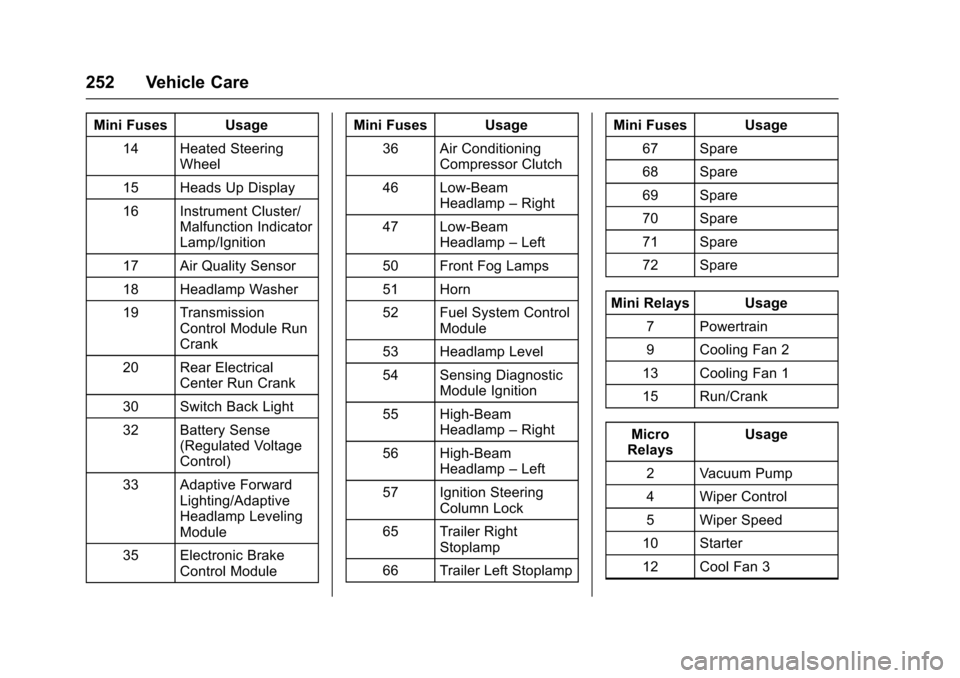
Mini Fuses Usage14 Heated Steering Wheel
15 Heads Up Display
16 Instrument Cluster/ Malfunction Indicator
Lamp/Ignition
17 Air Quality Sensor
18 Headlamp Washer
19 Transmission Control Module Run
Crank
20 Rear Electrical Center Run Crank
30 Switch Back Light
32 Battery Sense (Regulated Voltage
Control)
33 Adaptive Forward Lighting/Adaptive
Headlamp Leveling
Module
35 Electronic Brake Control Module Mini Fuses Usage
36 Air Conditioning Compressor Clutch
46 Low-Beam Headlamp –Right
47 Low-Beam Headlamp –Left
50 Front Fog Lamps
51 Horn
52 Fuel System Control Module
53 Headlamp Level
54 Sensing Diagnostic Module Ignition
55 High-Beam Headlamp –Right
56 High-Beam Headlamp –Left
57 Ignition Steering Column Lock
65 Trailer Right Stoplamp
66 Trailer Left Stoplamp Mini Fuses Usage
67 Spare
68 Spare
69 Spare
70 Spare
71 Spare
72 Spare
Mini Relays Usage 7 Powertrain
9 Cooling Fan 2
13 Cooling Fan 1
15 Run/Crank
Micro
Relays Usage
2 Vacuum Pump
4 Wiper Control
5 Wiper Speed
10 Starter
12 Cool Fan 3
Page 293 of 319
Cadillac SRX Owner Manual (GMNA-Localizing-MidEast-9369636) - 2016 -
crc - 6/1/15
292 Vehicle Care
Before using cleaners, read and
follow all safety instructions on the
label. While cleaning the interior,
open the doors and windows to get
proper ventilation.
To prevent damage, do not clean
the interior using the following
cleaners or techniques:
.Never use a razor or any other
sharp object to remove soil from
any interior surface.
. Never use a brush with stiff
bristles.
. Never rub any surface
aggressively or with too much
pressure.
. Do not use laundry detergents or
dishwashing soaps with
degreasers. For liquid cleaners,
use approximately 20 drops per
3.8 L (1 gal) of water.
A concentrated soap solution will
create streaks and attract dirt.
Do not use solutions that contain
strong or caustic soap.
. Do not heavily saturate the
upholstery when cleaning. .
Do not use solvents or cleaners
containing solvents.
Interior Glass
To clean, use a terry cloth fabric
dampened with water. Wipe droplets
left behind with a clean dry cloth.
If necessary, use a commercial
glass cleaner after cleaning with
plain water.
Caution
To prevent scratching, never use
abrasive cleaners on automotive
glass. Abrasive cleaners or
aggressive cleaning may damage
the rear window defogger.
Cleaning the windshield with water
during the first three to six months
of ownership will reduce tendency
to fog.
Speaker Covers
Vacuum around a speaker cover
gently, so that the speaker will not
be damaged. Clean spots with water
and mild soap.
Coated Moldings
Coated moldings should be cleaned.
. When lightly soiled, wipe with a
sponge or soft, lint-free cloth
dampened with water.
. When heavily soiled, use warm
soapy water.
Fabric/Carpet/Suede
Start by vacuuming the surface
using a soft brush attachment. If a
rotating vacuum brush attachment is
being used, only use it on the floor
carpet. Before cleaning, gently
remove as much of the soil as
possible:
.Gently blot liquids with a paper
towel. Continue blotting until no
more soil can be removed.
. For solid soils, remove as much
as possible prior to vacuuming.
To clean:
1. Saturate a clean, lint-free colorfast cloth with water.
Microfiber cloth is
recommended to prevent lint
transfer to the fabric or carpet.
Page 300 of 319
Cadillac SRX Owner Manual (GMNA-Localizing-MidEast-9369636) - 2016 -
crc - 6/1/15
Service and Maintenance 299
the hold open ability of the gas
strut. Contact your dealer if
service is required.
. Engine air cleaner filter
replacement or every 20 000 km/
12,500 Miles. If driving in dusty
conditions, inspect the filter at
each oil change or more often as
needed. See Engine Air Cleaner/
Filter 0229.
Every 40 000 km/25,000 Miles
. Passenger compartment air filter
replacement (or every
24 months, whichever occurs
first). More frequent replacement
may be needed if you drive in
areas with heavy traffic, areas
with poor air quality, or areas
with high dust levels.
Replacement may also be
needed if you notice reduced air
flow, windows fogging up,
or odors. Your dealer can help
you determine when it is the
right time to replace the filter. Every 72 000 km/45,000 Miles
.
Evaporative control system
inspection. Check all fuel and
vapor lines and hoses for proper
hook-up, routing, and condition.
Every 80 000 km/50,000 Miles
. Evaporative control system
inspection. Check all fuel and
vapor lines and hoses for proper
hook-up, routing, and condition.
Every 160 000 km/100,000 Miles
. Spark plug replacement and
spark plug wire inspection. An
Emission Control Service.
Every 240 000 km/150,000 Miles
. Engine cooling system drain and
refill (or every five years,
whichever occurs first). See
Cooling System 0231. An
Emission Control Service.
. Engine drive belts inspection for
fraying, excessive cracks,
or obvious damage (or every
10 years, whichever occurs
first). Replace, if needed.
. Flush brake fluid.Severe Conditions Requiring
More Frequent Maintenance*
.Public service, military,
or commercial use vehicles to
include the following:
‐Ambulances, police cars and
emergency rescue vehicles.
‐ Civilian vehicles such as light
duty pick-up trucks, SUVs and
passenger cars that are used
in military applications.
‐ Recovery vehicles such as
tow trucks and flatbed single
vehicle carriers or any vehicle
that is consistently used in
towing trailers or other loads.
‐ High use commercial vehicles
such as courier delivery
vehicles, private security patrol
vehicles or any vehicles that
operate on a 24 hour basis.
‐ Any vehicle consistently
operated in a high sand or
dust environment such as
those used on oil pipelines
and similar applications.
Page 313 of 319

Cadillac SRX Owner Manual (GMNA-Localizing-MidEast-9369636) - 2016 -
crc - 6/1/15
312 Index
Engine (cont'd)Check and Service Engine
Soon Light . . . . . . . . . . . . . . . . . . .115
Compartment Overview . . . . . . . 224
Coolant . . . . . . . . . . . . . . . . . . . . . . . 231
Coolant Temperature
Gauge . . . . . . . . . . . . . . . . . . . . . . . 111
Coolant Temperature Warning Light . . . . . . . . . . . . . . . 120
Cooling System . . . . . . . . . . . . . . . 231
Cooling System Messages . . . 128
Cover . . . . . . . . . . . . . . . . . . . . . . . . . 225
Drive Belt Routing . . . . . . . . . . . . 306
Exhaust . . . . . . . . . . . . . . . . . . . . . . 177
Gasoline Starting . . . . . . . . . . . . . 174
Oil Life System . . . . . . . . . . . . . . . 228
Oil Messages . . . . . . . . . . . . . . . . . 128
Oil Pressure Light . . . . . . . . . . . . 120
Overheating . . . . . . . . . . . . . . . . . . 235
Power Messages . . . . . . . . . . . . . 129
Running While Parked . . . . . . . . 178
Entry Lighting . . . . . . . . . . . . . . . . . . . 150
Equipment, Towing . . . . . . . . . . . . . 218
Event Data Recorders . . . . . . . . . . 307
Exit Lighting . . . . . . . . . . . . . . . . . . . . 150
Exterior Lamp Controls . . . . . . . . . 143
Exterior Lighting Battery Saver . . . . . . . . . . . . . . . . . . . . . . . . . 151F
Features
Memory . . . . . . . . . . . . . . . . . . . . . . . . . 11
Filter, Engine Air Cleaner . . . . . . . . . . . 229
Flash-to-Pass . . . . . . . . . . . . . . . . . . . 145
Flashers, Hazard Warning . . . . . . 147
Flat Tire . . . . . . . . . . . . . . . . . . . . . . . . 271 Changing . . . . . . . . . . . . . . . . . . . . . 272
Floor Mats . . . . . . . . . . . . . . . . . . . . . . 294
Fluid
Automatic Transmission . . . . . . 229
Brakes . . . . . . . . . . . . . . . . . . . . . . . . 238
Power Steering . . . . . . . . . . . . . . . 236
Washer . . . . . . . . . . . . . . . . . . . . . . . 237
Fog Lamps Front . . . . . . . . . . . . . . . . . . . . . . . . . 148
Folding Mirrors . . . . . . . . . . . . . . . . . . 40
Forward Collision Alert (FCA) System . . . . . . . . . . . . . . . . . 202
Front Automatic Braking (FAB) System . . . . . . . . . . . . . . . . . 205
Front Fog Lamp Light . . . . . . . . . . . . . . . . . . . . . . . . . . 122
Front Seats Heated and Ventilated . . . . . . . . . . 53
Front Storage . . . . . . . . . . . . . . . . . . . . 91
Fuel . . . . . . . . . . . . . . . . . . . . . . . . . . . . 209 Fuel (cont'd)
Additives . . . . . . . . . . . . . . . . . . . . . 210
Economy Driving . . . . . . . . . . . . . . . 23
Economy Light . . . . . . . . . . . . . . . 121
Filling a Portable Fuel
Container . . . . . . . . . . . . . . . . . . . 212
Filling the Tank . . . . . . . . . . . . . . . 210
Gauge . . . . . . . . . . . . . . . . . . . . . . . . .110
Low Fuel Warning Light . . . . . . . 121
System Messages . . . . . . . . . . . . 129
Fuel Economy Mode . . . . . . . . . . . . 181
Fuses Engine Compartment FuseBlock . . . . . . . . . . . . . . . . . . . . . . . . 250
Fuses and Circuit Breakers . . . 250
Instrument Panel Fuse Block . . . . . . . . . . . . . . . . . . . . . . . . 253
Rear Compartment Fuse
Block . . . . . . . . . . . . . . . . . . . . . . . . 255
G
Gasoline Engine, Starting . . . . . . . 174
GaugesEngine Coolant
Temperature . . . . . . . . . . . . . . . . . 111
Fuel . . . . . . . . . . . . . . . . . . . . . . . . . . .110
Odometer . . . . . . . . . . . . . . . . . . . . . 109
Speedometer . . . . . . . . . . . . . . . . . 109
Tachometer . . . . . . . . . . . . . . . . . . . .110
Page 314 of 319

Cadillac SRX Owner Manual (GMNA-Localizing-MidEast-9369636) - 2016 -
crc - 6/1/15
Index 313
Gauges (cont'd)Trip Odometer . . . . . . . . . . . . . . . . .110
Warning Lights and
Indicators . . . . . . . . . . . . . . . . . . . 107
General Information Service and Maintenance . . . . . 296
Towing . . . . . . . . . . . . . . . . . . . . . . . . 212
Vehicle Care . . . . . . . . . . . . . . . . . . 222
Glove Box . . . . . . . . . . . . . . . . . . . . . . . 90
H
Halogen Bulbs . . . . . . . . . . . . . . . . . . 243
Hazard Warning Flashers . . . . . . . 147
Head Restraints . . . . . . . . . . . . . . . . . 48
Headlamps . . . . . . . . . . . . . . . . . . . . . 244
Adaptive ForwardLighting (AFL) . . . . . . . . . . . . . . . 146
Aiming . . . . . . . . . . . . . . . . . . . . . . . . 243
Bulb Replacement . . . . . . . . . . . . 243
Daytime Running Lamps (DRL) . . . . . . . . . . . . . . . . 145
Flash-to-Pass . . . . . . . . . . . . . . . . . 145
High Intensity Discharge (HID) Lighting . . . . . . . . . . . . . . . 243
High-Beam On Light . . . . . . . . . . 122
High/Low Beam Changer . . . . . 145
Lamps On Reminder . . . . . . . . . 122
Turn Signal Lamps . . . . . . . . . . . 247
Twilight Sentinel . . . . . . . . . . . . . . 146 Headlamps (cont'd)
Washer . . . . . . . . . . . . . . . . . . . . . . . 105
Heated Rear Seats . . . . . . . . . . . . . . . . . . . . . 56
Steering Wheel . . . . . . . . . . . . . . . 102
Heated and Ventilated Front Seats . . . . . . . . . . . . . . . . . . . . . . . . . . 53
Heated Mirrors . . . . . . . . . . . . . . . . . . . 41
High-Beam On Light . . . . . . . . . . . . 122
High-Speed Operation . . . . . . . . . . 261
Hill and Mountain Roads . . . . . . . . 166
Hill Start Assist (HSA) . . . . . . . . . . 185
Hood . . . . . . . . . . . . . . . . . . . . . . . . . . . 223
Horn . . . . . . . . . . . . . . . . . . . . . . . . . . . . 103
How to Wear Safety Belts Properly . . . . . . . . . . . . . . . . . . . . . . . . 58
I
Ignition Positions . . . . . . . . . . . . . . . 173
IndicatorVehicle Ahead . . . . . . . . . . . . . . . . .118
Infants and Young Children, Restraints . . . . . . . . . . . . . . . . . . . . . . 74
Infotainment . . . . . . . . . . . . . . . . . . . . 152
Infotainment System . . . . . . . . . . . . 308
Instrument Cluster . . . . . . . . . . . . . . 108
Interior Rearview Mirrors . . . . . . . . . 42
Introduction . . . . . . . . . . . . . . . . . . . . . . . 2
J
Jump Starting . . . . . . . . . . . . . . . . . . . 279
K
Key and Lock Messages . . . . . . . . 129
Keyless Entry
Remote (RKE) System . . . . . . . . . 25
Keys . . . . . . . . . . . . . . . . . . . . . . . . . . . . . 24
L
Lamps Cargo . . . . . . . . . . . . . . . . . . . . . . . . . 149
Courtesy . . . . . . . . . . . . . . . . . . . . . . 149
Daytime Running (DRL) . . . . . . 145
Dome . . . . . . . . . . . . . . . . . . . . . . . . . 149
Exterior Controls . . . . . . . . . . . . . . 143
Exterior Lighting BatterySaver . . . . . . . . . . . . . . . . . . . . . . . 151
Front Fog . . . . . . . . . . . . . . . . . . . . . 148
License Plate . . . . . . . . . . . . . . . . . 248
Malfunction Indicator . . . . . . . . . .115
Messages . . . . . . . . . . . . . . . . . . . . 130
On Reminder . . . . . . . . . . . . . . . . . 122
Reading . . . . . . . . . . . . . . . . . . . . . . 149
Lane Departure
Warning (LDW) . . . . . . . . . . . . . . . . 208
Lane Departure Warning Light . . . . . . . . . . . . . . . . . . . . . . . . . . 118
Lap-Shoulder Belt . . . . . . . . . . . . . . . 59