drive mode CADILLAC SRX 2016 2.G Owner's Manual
[x] Cancel search | Manufacturer: CADILLAC, Model Year: 2016, Model line: SRX, Model: CADILLAC SRX 2016 2.GPages: 319, PDF Size: 3.29 MB
Page 156 of 319
Cadillac SRX Owner Manual (GMNA-Localizing-MidEast-9369636) - 2016 -
crc - 6/1/15
Climate Controls 155
To improve fuel efficiency and to
cool the vehicle faster, recirculation
may be automatically selected in
warm weather. The recirculation
light will not come on. Press
/
to select recirculation; press it again
to select outside air.
OFF (Fan) :Press to turn the fan on
or off. The temperature control and
air delivery mode can still be
adjusted.
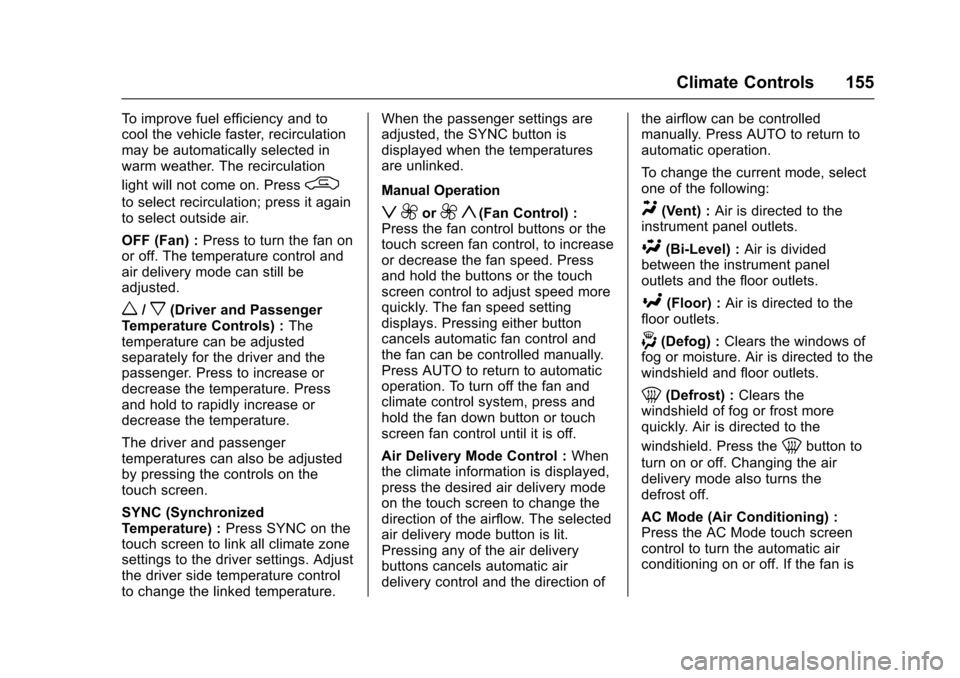
w/x(Driver and Passenger
Temperature Controls) : The
temperature can be adjusted
separately for the driver and the
passenger. Press to increase or
decrease the temperature. Press
and hold to rapidly increase or
decrease the temperature.
The driver and passenger
temperatures can also be adjusted
by pressing the controls on the
touch screen.
SYNC (Synchronized
Temperature) : Press SYNC on the
touch screen to link all climate zone
settings to the driver settings. Adjust
the driver side temperature control
to change the linked temperature. When the passenger settings are
adjusted, the SYNC button is
displayed when the temperatures
are unlinked.
Manual Operation
z 9or9 y(Fan Control) :
Press the fan control buttons or the
touch screen fan control, to increase
or decrease the fan speed. Press
and hold the buttons or the touch
screen control to adjust speed more
quickly. The fan speed setting
displays. Pressing either button
cancels automatic fan control and
the fan can be controlled manually.
Press AUTO to return to automatic
operation. To turn off the fan and
climate control system, press and
hold the fan down button or touch
screen fan control until it is off.
Air Delivery Mode Control : When
the climate information is displayed,
press the desired air delivery mode
on the touch screen to change the
direction of the airflow. The selected
air delivery mode button is lit.
Pressing any of the air delivery
buttons cancels automatic air
delivery control and the direction of the airflow can be controlled
manually. Press AUTO to return to
automatic operation.
To change the current mode, select
one of the following:Y(Vent) :
Air is directed to the
instrument panel outlets.
\(Bi-Level) : Air is divided
between the instrument panel
outlets and the floor outlets.
[(Floor) : Air is directed to the
floor outlets.
-(Defog) : Clears the windows of
fog or moisture. Air is directed to the
windshield and floor outlets.
0(Defrost) : Clears the
windshield of fog or frost more
quickly. Air is directed to the
windshield. Press the
0button to
turn on or off. Changing the air
delivery mode also turns the
defrost off.
AC Mode (Air Conditioning) :
Press the AC Mode touch screen
control to turn the automatic air
conditioning on or off. If the fan is
Page 158 of 319
Cadillac SRX Owner Manual (GMNA-Localizing-MidEast-9369636) - 2016 -
crc - 6/1/15
Climate Controls 157
Caution
Do not try to clear frost or other
material from the inside of the
front windshield and rear window
with a razor blade or anything
else that is sharp. This may
damage the rear window
defogger grid and affect the
radio's ability to pick up stations
clearly. The repairs would not be
covered by the vehicle warranty.
Manual Heated and Ventilated
Seats (If Equipped) : Press
Jor
zto heat the driver or passenger
seat cushion and seatback.
Press
Cor{to ventilate the driver
or passenger seat. See Heated and
Ventilated Seats 012.
Auto Heated Seats (If Equipped) :
When the vehicle is on, the heated
seats are automatically activated at
the level required by the vehicle’ s
interior temperature. The active
high, medium, low, or off heated
seat level will be indicated by the
manual heated seat buttons. Use the manual heated seat buttons to
turn auto heated seats off. See
Heated and Ventilated Seats
012
and Vehicle Personalization 0136.
Remote Start Climate Control
Operation : If equipped, the climate
control system may run when the
vehicle is started remotely. The
system uses the driver ’s previous
settings to heat or cool the inside of
the vehicle. The rear defog may
come on during remote start based
on cold ambient conditions. The
rear defog indicator light does not
come on during a remote start. If the
vehicle has heated or ventilated
seats, they may come on during a
remote start. See Remote Vehicle
Start 030 and Heated and
Ventilated Seats 012.
The rear window defogger turns on
if it is cold outside.
Sensor
The solar sensor, located on top of
the instrument panel near the
windshield, monitors the solar heat. The climate control system uses the
sensor information to adjust the
temperature, fan speed,
recirculation, and air delivery mode
for best comfort.
If the sensor is covered, the
automatic climate control system
may not work properly.
Rear Climate Control
System
If equipped with a rear climate
control system, the settings can be
adjusted with the rear climate
control buttons and the touch
screen.
Page 159 of 319
Cadillac SRX Owner Manual (GMNA-Localizing-MidEast-9369636) - 2016 -
crc - 6/1/15
158 Climate Controls
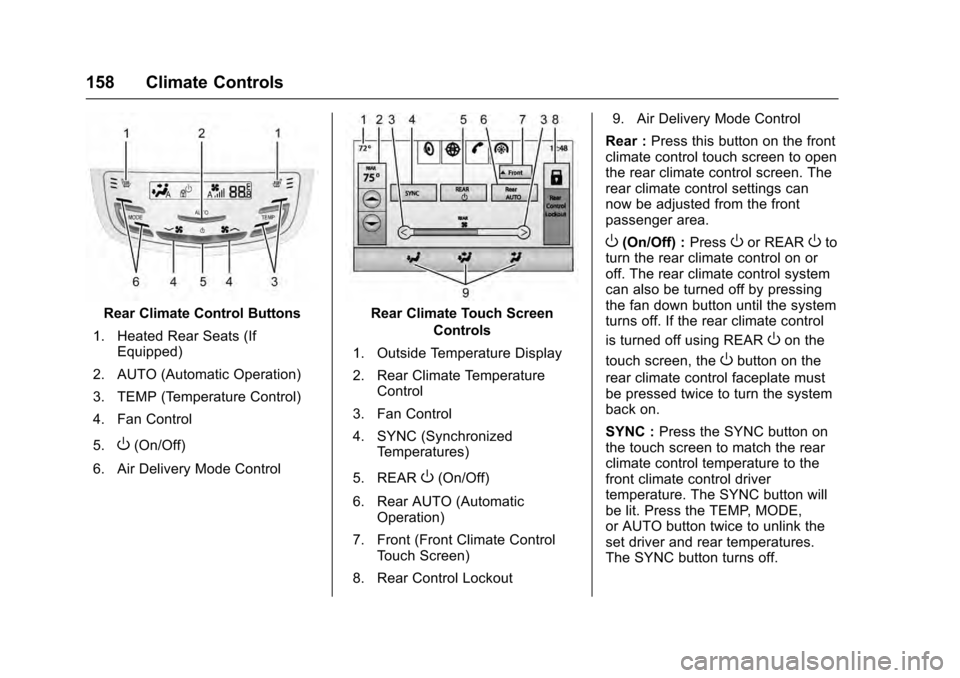
Rear Climate Control Buttons
1. Heated Rear Seats (If Equipped)
2. AUTO (Automatic Operation)
3. TEMP (Temperature Control)
4. Fan Control
5.
O(On/Off)
6. Air Delivery Mode Control
Rear Climate Touch Screen Controls
1. Outside Temperature Display
2. Rear Climate Temperature Control
3. Fan Control
4. SYNC (Synchronized Temperatures)
5. REAR
O(On/Off)
6. Rear AUTO (Automatic Operation)
7. Front (Front Climate Control Touch Screen)
8. Rear Control Lockout 9. Air Delivery Mode Control
Rear : Press this button on the front
climate control touch screen to open
the rear climate control screen. The
rear climate control settings can
now be adjusted from the front
passenger area.
O(On/Off) : PressOor REAROto
turn the rear climate control on or
off. The rear climate control system
can also be turned off by pressing
the fan down button until the system
turns off. If the rear climate control
is turned off using REAR
Oon the
touch screen, the
Obutton on the
rear climate control faceplate must
be pressed twice to turn the system
back on.
SYNC : Press the SYNC button on
the touch screen to match the rear
climate control temperature to the
front climate control driver
temperature. The SYNC button will
be lit. Press the TEMP, MODE,
or AUTO button twice to unlink the
set driver and rear temperatures.
The SYNC button turns off.
Page 162 of 319
Cadillac SRX Owner Manual (GMNA-Localizing-MidEast-9369636) - 2016 -
crc - 6/1/15
Driving and Operating 161
Driving and
Operating
Driving Information
Distracted Driving . . . . . . . . . . . . 162
Defensive Driving . . . . . . . . . . . . . 163
Control of a Vehicle . . . . . . . . . . . 163
Braking . . . . . . . . . . . . . . . . . . . . . . . 163
Steering . . . . . . . . . . . . . . . . . . . . . . 163
Off-Road Recovery . . . . . . . . . . . 164
Loss of Control . . . . . . . . . . . . . . . 164
Driving on Wet Roads . . . . . . . . 165
Hill and Mountain Roads . . . . . 166
Winter Driving . . . . . . . . . . . . . . . . 166
If the Vehicle Is Stuck . . . . . . . . 167
Vehicle Load Limits . . . . . . . . . . . 168
Starting and Operating
New Vehicle Break-In . . . . . . . . . 172
Adjustable Throttle and BrakePedal . . . . . . . . . . . . . . . . . . . . . . . 172
Ignition Positions . . . . . . . . . . . . . 173
Starting the Gasoline Engine . . . . . . . . . . . . . . . . . . . . . . 174
Retained Accessory Power (RAP) . . . . . . . . . . . . . . . . 175
Shifting Into Park . . . . . . . . . . . . . 176
Shifting out of Park . . . . . . . . . . . 176 Parking over Things
That Burn . . . . . . . . . . . . . . . . . . . 177
Engine Exhaust
Engine Exhaust . . . . . . . . . . . . . . 177
Running the Vehicle WhileParked . . . . . . . . . . . . . . . . . . . . . . 178
Automatic Transmission
Automatic Transmission . . . . . . 178
Manual Mode . . . . . . . . . . . . . . . . . 180
Fuel Economy Mode . . . . . . . . . 181
Drive Systems
All-Wheel Drive . . . . . . . . . . . . . . . 182
Brakes
Antilock BrakeSystem (ABS) . . . . . . . . . . . . . . . 182
Parking Brake . . . . . . . . . . . . . . . . 183
Brake Assist . . . . . . . . . . . . . . . . . . 185
Hill Start Assist (HSA) . . . . . . . . 185
Ride Control Systems
Traction Control/Electronic
Stability Control . . . . . . . . . . . . . 186
Limited-Slip Rear Axle . . . . . . . . 187
Selective Ride Control . . . . . . . . 188
Cruise Control
Cruise Control . . . . . . . . . . . . . . . . 188
Adaptive Cruise Control . . . . . . 190
Driver Assistance Systems
Driver Assistance Systems . . . 198
Assistance Systems for Parking or Backing . . . . . . . . . . 198
Assistance Systems for Driving . . . . . . . . . . . . . . . . . . . . . . 202
Forward Collision Alert (FCA) System . . . . . . . . . . . . . . . . . . . . . . 202
Front Automatic Braking (FAB) System . . . . . . . . . . . . . . . . . . . . . . 205
Side Blind Zone Alert (SBZA) . . . . . . . . . . . . . . . . 206
Lane Departure Warning (LDW) . . . . . . . . . . . . . 208
Fuel
Fuel . . . . . . . . . . . . . . . . . . . . . . . . . . 209
Fuel Additives . . . . . . . . . . . . . . . . 210
Filling the Tank . . . . . . . . . . . . . . . 210
Filling a Portable FuelContainer . . . . . . . . . . . . . . . . . . . 212
Trailer Towing
General TowingInformation . . . . . . . . . . . . . . . . . . 212
Driving Characteristics and Towing Tips . . . . . . . . . . . . . . . . . 212
Trailer Towing . . . . . . . . . . . . . . . . 215
Towing Equipment . . . . . . . . . . . . 218
Trailer Sway Control (TSC) . . . 219
Page 174 of 319
Cadillac SRX Owner Manual (GMNA-Localizing-MidEast-9369636) - 2016 -
crc - 6/1/15
Driving and Operating 173
Ignition Positions
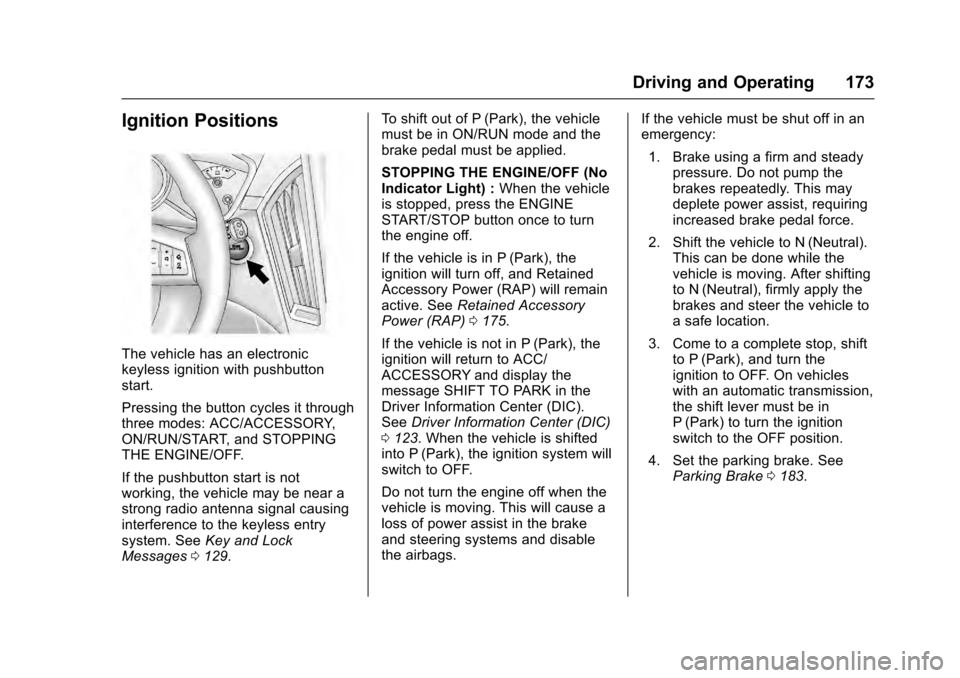
The vehicle has an electronic
keyless ignition with pushbutton
start.
Pressing the button cycles it through
three modes: ACC/ACCESSORY,
ON/RUN/START, and STOPPING
THE ENGINE/OFF.
If the pushbutton start is not
working, the vehicle may be near a
strong radio antenna signal causing
interference to the keyless entry
system. SeeKey and Lock
Messages 0129. To shift out of P (Park), the vehicle
must be in ON/RUN mode and the
brake pedal must be applied.
STOPPING THE ENGINE/OFF (No
Indicator Light) :
When the vehicle
is stopped, press the ENGINE
START/STOP button once to turn
the engine off.
If the vehicle is in P (Park), the
ignition will turn off, and Retained
Accessory Power (RAP) will remain
active. See Retained Accessory
Power (RAP) 0175.
If the vehicle is not in P (Park), the
ignition will return to ACC/
ACCESSORY and display the
message SHIFT TO PARK in the
Driver Information Center (DIC).
See Driver Information Center (DIC)
0 123. When the vehicle is shifted
into P (Park), the ignition system will
switch to OFF.
Do not turn the engine off when the
vehicle is moving. This will cause a
loss of power assist in the brake
and steering systems and disable
the airbags. If the vehicle must be shut off in an
emergency:
1. Brake using a firm and steady pressure. Do not pump the
brakes repeatedly. This may
deplete power assist, requiring
increased brake pedal force.
2. Shift the vehicle to N (Neutral). This can be done while the
vehicle is moving. After shifting
to N (Neutral), firmly apply the
brakes and steer the vehicle to
a safe location.
3. Come to a complete stop, shift to P (Park), and turn the
ignition to OFF. On vehicles
with an automatic transmission,
the shift lever must be in
P (Park) to turn the ignition
switch to the OFF position.
4. Set the parking brake. See Parking Brake 0183.
Page 175 of 319

Cadillac SRX Owner Manual (GMNA-Localizing-MidEast-9369636) - 2016 -
crc - 6/1/15
174 Driving and Operating
{Warning
Turning off the vehicle while
moving may cause loss of power
assist in the brake and steering
systems and disable the airbags.
While driving, only shut the
vehicle off in an emergency.
If the vehicle cannot be pulled over
and must be shut off while driving,
press and hold the ENGINE START/
STOP button for longer than
two seconds, or press twice in
five seconds.
ACC/ACCESSORY (Amber
Indicator Light) : This mode allows
you to use some electrical
accessories when the engine is off.
With the ignition off, pressing the
button one time without the brake
pedal applied will place the ignition
system in ACC/ACCESSORY.
The ignition will switch from ACC/
ACCESSORY to OFF after
10 minutes to prevent battery
rundown. ON/RUN/START (Green Indicator
Light) :
This mode is for driving and
starting. With the ignition off and the
brake pedal applied, pressing the
button once will place the ignition
system in ON/RUN/START. Once
engine cranking begins, release the
button. Engine cranking will
continue until the engine starts. See
Starting the Gasoline Engine 0174.
The ignition will then remain in
ON/RUN.
Service Only Mode
This power mode is available for
service and diagnostics, and to
verify the proper operation of the
malfunction indicator lamp as may
be required for emission inspection
purposes. With the vehicle off, and
the brake pedal not applied,
pressing and holding the button for
more than five seconds will place
the vehicle in Service Only Mode.
The instruments and audio systems
will operate as they do in ON/RUN,
but the vehicle will not be able to be
driven. The engine will not start in
Service Only Mode. Press the
button again to turn the vehicle off.
Starting the Gasoline
Engine
Place the transmission in the proper
gear by moving the shift lever to
P (Park) or N (Neutral). To restart
the engine when the vehicle is
already moving, use N (Neutral).
Caution
Do not try to shift to P (Park) if the
vehicle is moving. If you do, you
could damage the transmission.
Shift to P (Park) only when the
vehicle is stopped.
Caution
If the steering wheel is turned
until it reaches the end of its
travel, and is held in that position
while starting the vehicle, damage
may occur to the hydraulic power
steering system and there may be
loss of power steering assist.
Page 181 of 319

Cadillac SRX Owner Manual (GMNA-Localizing-MidEast-9369636) - 2016 -
crc - 6/1/15
180 Driving and Operating
D :This position is for normal
driving. It provides the best fuel
economy. If you need more power
for passing, and you are:
. Going less than 35 mph
(55 km/h), push the accelerator
pedal about halfway down.
. Going about 35 mph (55 km/h)
or more, push the accelerator all
the way down.
The transmission will shift down
to a lower gear and have more
power.
Downshifting the transmission in
slippery road conditions could result
in skidding. See “Skidding”under
Loss of Control 0164
Caution
Spinning the tires or holding the
vehicle in one place on a hill
using only the accelerator pedal
may damage the transmission.
The repair will not be covered by
the vehicle warranty. If you are
(Continued)
Caution (Continued)
stuck, do not spin the tires. When
stopping on a hill, use the brakes
to hold the vehicle in place.
Manual Mode
Driver Shift Control (DSC)
Caution
Driving with the engine at a high
rpm without upshifting while using
Driver Shift Control (DSC), could
damage the vehicle. Always
upshift when necessary while
using DSC.
DSC allows you to shift an
automatic transmission similar to a
manual transmission. To use the
DSC feature: 1. Move the shift lever to the left from D (Drive) to
M (Manual Mode). If you do not move the shift
lever forward or rearward, the
vehicle will be in Sport Mode.
When you are in Sport Mode
the vehicle will still shift
automatically. The transmission
may remain in a gear longer
than it would in the normal
driving mode based on braking,
throttle input, and vehicle
lateral acceleration.
SPORT MODE ON will be
displayed in the DIC. See
Ride
Control System Messages
0 133. The word “sport”will
display below the odometer.
The gear position will also be
indicated in the tachometer.
Within Sport Mode there is a
further performance feature
called Performance Mode Lift
Foot (PMLF) Mode. The
feature is activated
automatically when sports
oriented driving is detected,
based on cornering and on/off
throttle application. PMLF
allows the transmission to hold
Page 183 of 319

Cadillac SRX Owner Manual (GMNA-Localizing-MidEast-9369636) - 2016 -
crc - 6/1/15
182 Driving and Operating
on. SeeFuel Economy Light 0121.
Pressing the button a second time
will turn fuel economy mode off.
When fuel economy mode is on:
. The transmission will upshift
sooner, and downshift later.
. The torque converter will lock up
sooner, and stay on longer.
. The gas pedal will be less
sensitive.
. The vehicle's computers will
more aggressively shut off fuel
to the engine under deceleration.
. The engine operates at lower
rpm's in fuel economy mode,
which can increase noise and
vibration. This is normal.Drive Systems
All-Wheel Drive
Vehicles with this feature transfer
torque as required to the rear
wheels. It is fully automatic, and
adjusts itself as needed for road
conditions.
AWD system performance will be
automatically reduced when you use
the compact spare. To restore full
AWD operation and prevent
excessive wear on the system,
replace the compact spare with a
full-size tire as soon as possible.
See Compact Spare Tire 0278.
Brakes
Antilock Brake
System (ABS)
This vehicle has ABS, an advanced
electronic braking system that helps
prevent a braking skid.
When the vehicle begins to drive
away, ABS checks itself.
A momentary motor or clicking noise
might be heard while this test is
going on, and it might even be
noticed that the brake pedal moves
a little. This is normal.
If there is a problem with ABS, this
warning light stays on. See Antilock
Brake System (ABS) Warning Light
0 118.
If driving safely on a wet road and it
becomes necessary to slam on the
brakes and continue braking to
Page 189 of 319

Cadillac SRX Owner Manual (GMNA-Localizing-MidEast-9369636) - 2016 -
crc - 6/1/15
188 Driving and Operating
Selective Ride Control
The vehicle may have a ride control
system called Selective Ride
Control. The setting can be changed
at any time. Based on road
conditions, steering wheel angle,
and the vehicle speed, the system
automatically adjusts to provide the
best handling while providing a
smooth ride. The Tour and Sport
modes will feel similar on a
smooth road.
Tour :Use for normal city and
highway driving. This setting
provides a smooth, soft ride.
Sport : Use where road conditions
or personal preference demand
more control. This setting provides
more “feel,” or response to road
conditions through increased
steering effort and suspension
control. Transmission shift points
and shift firmness are also
enhanced.
The vehicle is normally in the Tour
Mode. To switch from Tour Mode to
Sport Mode, move the shift lever to
the left while the transmission is in
D (Drive). Sport Mode is automatically engaged when the
shift lever is moved to the left.
Moving the shift lever forward or
rearward will put the transmission in
the M (Manual) Mode.
The Driver Information Center (DIC)
will display SPORT MODE ON
when the Sport Mode has been
activated. When the shift lever is
moved to the right in D (Drive), the
system will revert back to Tour
Mode. See
Manual Mode 0180.
If there is a problem detected with
Selective Ride Control, SERVICE
SUSPENSION SYSTEM displays
on the DIC. See Ride Control
System Messages 0133. Driving
should be adjusted accordingly.
Cruise Control
With cruise control, a speed of
about 40 km/h (25 mph) or more can
be maintained without keeping your
foot on the accelerator. Cruise
control does not work at speeds
below about 40 km/h (25 mph).
{Warning
Cruise control can be dangerous
where you cannot drive safely at
a steady speed. Do not use
cruise control on winding roads or
in heavy traffic.
Cruise control can be dangerous
on slippery roads. On such roads,
fast changes in tire traction can
cause excessive wheel slip, and
you could lose control. Do not use
cruise control on slippery roads.
If the StabiliTrak
®system begins to
limit wheel spin while using cruise
control, the cruise control
automatically disengages. See
Traction Control/Electronic Stability
Control 0186. If a collision alert
Page 191 of 319
Cadillac SRX Owner Manual (GMNA-Localizing-MidEast-9369636) - 2016 -
crc - 6/1/15
190 Driving and Operating
.To increase vehicle speed in
small increments, press +RES
up briefly. For each press, the
vehicle goes about 1.6 km/h
(1 mph) faster.
The speedometer reading can be
displayed in either English or metric
units. See Instrument Cluster 0108.
The increment value used depends
on the units displayed.
Reducing Speed While Cruise
Control is at a Set Speed
If the cruise control system is
already activated:
. Press and hold SET− down until
the desired lower speed is
reached, then release it.
. To slow down in small
increments, press SET− down
briefly. For each press, the
vehicle goes about 1.6 km/h
(1 mph) slower.
The speedometer reading can be
displayed in either English or metric
units. See Instrument Cluster 0108.
The increment value used depends
on the units displayed. Passing Another Vehicle While
Using Cruise Control
Use the accelerator pedal to
increase the vehicle speed. When
you take your foot off the pedal, the
vehicle will slow down to the
previously set cruise speed. While
pressing the accelerator pedal or
shortly following the release to
override cruise control, briefly
pressing SET−
will result in cruise
set to the current vehicle speed.
Using Cruise Control on Hills
How well the cruise control will work
on hills depends upon the vehicle
speed, load, and the steepness of
the hills. When going up steep hills,
you might have to step on the
accelerator pedal to maintain your
speed. When going downhill, you
might have to brake or shift to a
lower gear to keep your speed
down. If the brake pedal is applied,
the cruise control will disengage.
Ending Cruise Control
There are four ways to end cruise
control:
. Step lightly on the brake pedal. .
Press*.
. Shift the transmission to
N (Neutral).
. To turn off the cruise control,
press
J.
Erasing Speed Memory
The cruise control set speed is
erased from memory if
Jis
pressed or if the ignition is
turned off.
Adaptive Cruise Control
If equipped with Adaptive Cruise
Control (ACC), it allows the driver to
select the cruise control set speed
and following gap. Read this entire
section before using this system.
The following gap is the following
time between your vehicle and a
vehicle detected directly ahead in
your path. If no vehicle is detected
in your path, ACC works like regular
cruise control. ACC uses camera
and radar sensors.
If a vehicle is detected in your path,
ACC can apply acceleration or
limited, moderate braking to