ECU CADILLAC SRX 2016 2.G Owner's Guide
[x] Cancel search | Manufacturer: CADILLAC, Model Year: 2016, Model line: SRX, Model: CADILLAC SRX 2016 2.GPages: 319, PDF Size: 3.29 MB
Page 122 of 319
Cadillac SRX Owner Manual (GMNA-Localizing-MidEast-9369636) - 2016 -
crc - 6/1/15
Instruments and Controls 121
Caution (Continued)
and the oil pressure is still low,
have the vehicle serviced. Always
follow the maintenance schedule
for changing engine oil.
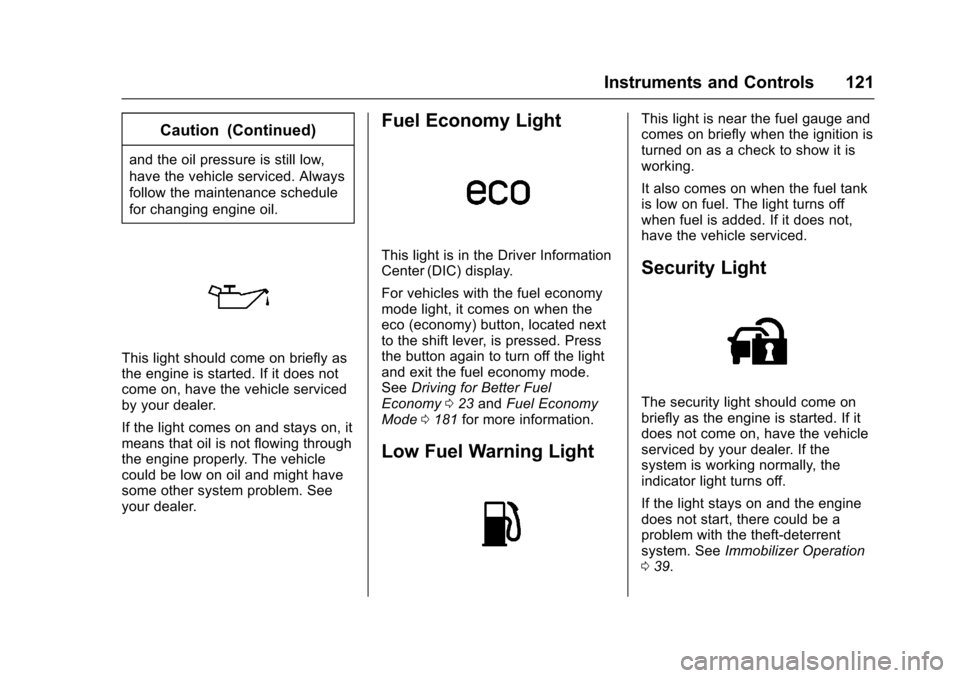
This light should come on briefly as
the engine is started. If it does not
come on, have the vehicle serviced
by your dealer.
If the light comes on and stays on, it
means that oil is not flowing through
the engine properly. The vehicle
could be low on oil and might have
some other system problem. See
your dealer.
Fuel Economy Light
This light is in the Driver Information
Center (DIC) display.
For vehicles with the fuel economy
mode light, it comes on when the
eco (economy) button, located next
to the shift lever, is pressed. Press
the button again to turn off the light
and exit the fuel economy mode.
SeeDriving for Better Fuel
Economy 023 and Fuel Economy
Mode 0181 for more information.
Low Fuel Warning Light
This light is near the fuel gauge and
comes on briefly when the ignition is
turned on as a check to show it is
working.
It also comes on when the fuel tank
is low on fuel. The light turns off
when fuel is added. If it does not,
have the vehicle serviced.
Security Light
The security light should come on
briefly as the engine is started. If it
does not come on, have the vehicle
serviced by your dealer. If the
system is working normally, the
indicator light turns off.
If the light stays on and the engine
does not start, there could be a
problem with the theft-deterrent
system. See Immobilizer Operation
0 39.
Page 135 of 319
Cadillac SRX Owner Manual (GMNA-Localizing-MidEast-9369636) - 2016 -
crc - 6/1/15
134 Instruments and Controls
TRACTION CONTROL ON
This message displays when the
Traction Control System (TCS) has
been turned on. SeeTraction
Control/Electronic Stability Control
0 186.
Airbag System Messages
SERVICE AIRBAG
This message displays if there is a
problem with the airbag system. See
your dealer for service.
Security Messages
THEFT ATTEMPTED
This message displays if the vehicle
detects a tamper condition.
Service Vehicle Messages
SERVICE POWER STEERING
This message displays and a chime
may sound when there may be a
problem with the power steering
system. If this message displays
and a reduction in steering performance or loss of power
steering assistance is noticed, see
your dealer.
SERVICE VEHICLE SOON
This message is displayed if there is
a problem with the vehicle. Take the
vehicle to your dealer for service.
Starting the Vehicle
Messages
PRESS BRAKE TO START
This message is displayed when
attempting to start the vehicle
without first pressing the brake
pedal.
SERVICE KEYLESS START
SYSTEM
This message is displayed if there is
a problem with the pushbutton start
system. Take the vehicle to your
dealer for service.
Tire Messages
SERVICE TIRE MONITOR
SYSTEM
This message displays if there is a
problem with the Tire Pressure
Monitor System (TPMS). See
Tire
Pressure Monitor Operation 0263.
TIRE LEARNING ACTIVE
This message displays when the
system is learning new tires. See
Tire Pressure Monitor Operation
0263.
TIRE LOW ADD AIR TO TIRE
This message displays when the
pressure in one or more of the tires
is low.
This message also displays LEFT
FRONT, RIGHT FRONT, LEFT
REAR, or RIGHT REAR to indicate
the location of the low tire.
The low tire pressure warning light
will also come on. See Tire
Pressure Light 0120.
If a tire pressure message appears
on the DIC, stop as soon as you
can. Inflate the tires by adding air
Page 172 of 319
Cadillac SRX Owner Manual (GMNA-Localizing-MidEast-9369636) - 2016 -
crc - 6/1/15
Driving and Operating 171
weight of the driver, passengers,
and cargo should never exceed
the vehicle's capacity weight.
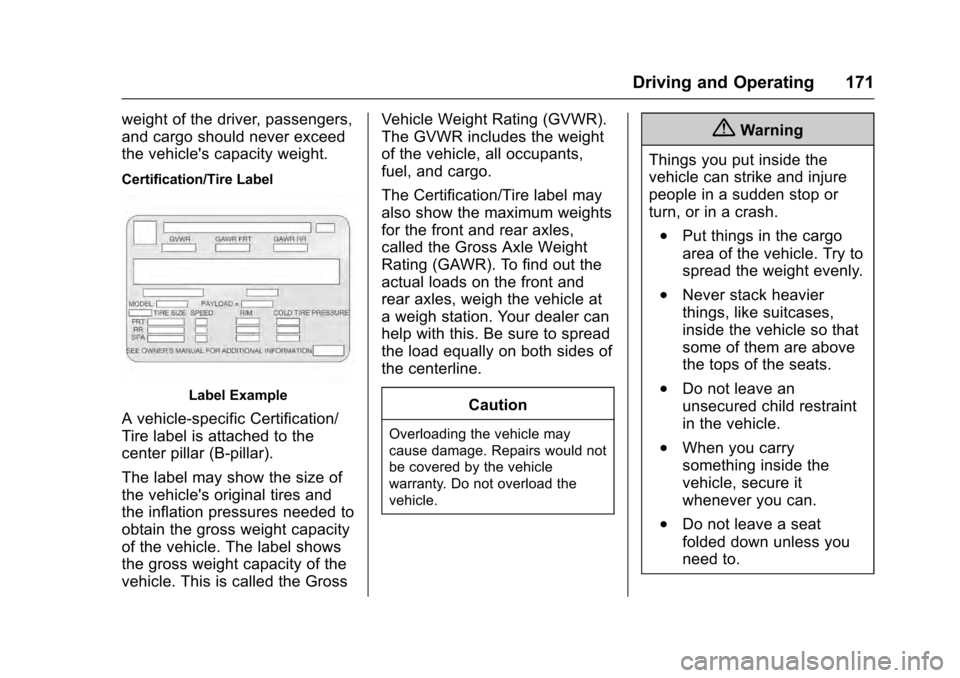
Certification/Tire Label
Label Example
A vehicle-specific Certification/
Tire label is attached to the
center pillar (B-pillar).
The label may show the size of
the vehicle's original tires and
the inflation pressures needed to
obtain the gross weight capacity
of the vehicle. The label shows
the gross weight capacity of the
vehicle. This is called the GrossVehicle Weight Rating (GVWR).
The GVWR includes the weight
of the vehicle, all occupants,
fuel, and cargo.
The Certification/Tire label may
also show the maximum weights
for the front and rear axles,
called the Gross Axle Weight
Rating (GAWR). To find out the
actual loads on the front and
rear axles, weigh the vehicle at
a weigh station. Your dealer can
help with this. Be sure to spread
the load equally on both sides of
the centerline.
CautionOverloading the vehicle may
cause damage. Repairs would not
be covered by the vehicle
warranty. Do not overload the
vehicle.
{Warning
Things you put inside the
vehicle can strike and injure
people in a sudden stop or
turn, or in a crash.
.Put things in the cargo
area of the vehicle. Try to
spread the weight evenly.
.Never stack heavier
things, like suitcases,
inside the vehicle so that
some of them are above
the tops of the seats.
.Do not leave an
unsecured child restraint
in the vehicle.
.When you carry
something inside the
vehicle, secure it
whenever you can.
.Do not leave a seat
folded down unless you
need to.
Page 214 of 319
Cadillac SRX Owner Manual (GMNA-Localizing-MidEast-9369636) - 2016 -
crc - 6/1/15
Driving and Operating 213
.Do not tow a trailer during the
first 800 km (500 mi), to prevent
damage to the engine, axle,
or other parts.
. Then, during the first 800 km
(500 mi) of trailer towing, do not
drive over 80 km/h (50 mph) and
do not make starts at full throttle.
. The vehicle can tow in D (Drive).
Use a lower gear if the
transmission shifts too often.
. Do not use Adaptive Cruise
Control when towing.
. The Front Automatic Braking
System should be set to “Off”
when towing. See Front
Automatic Braking (FAB) System
0 205.
. Turn off Parking Assist when
towing.{Warning
When towing a trailer, exhaust
gases may collect at the rear of
the vehicle and enter if the
liftgate, trunk/hatch, or rear-most
window is open.
When towing a trailer:
. Do not drive with the
liftgate, trunk/hatch,
or rear-most window open.
. Fully open the air outlets on
or under the instrument
panel.
. Also adjust the Climate
Control system to a setting
that brings in only outside
air. See “Climate Control
Systems” in the Index.
For information about carbon
monoxide, see Engine Exhaust
0 177.
Towing a trailer requires a certain
amount of experience. The
combination you are driving is
longer and not as responsive as the vehicle itself. Get acquainted with
the handling and braking of the rig
before setting out for the open road.
Before starting, check all trailer hitch
parts and attachments, safety
chains, electrical connectors, lamps,
tires, and mirrors. If the trailer has
electric brakes, start the
combination moving and then apply
the trailer brake controller by hand
to be sure the brakes work.
During the trip, check occasionally
to be sure that the load is secure
and the lamps and any trailer
brakes still work.
Towing with a Stability Control
System
When towing, the sound of the
stability control system might be
heard. The system is reacting to the
vehicle movement caused by the
trailer, which mainly occurs during
cornering. This is normal when
towing heavier trailers.
Page 236 of 319
Cadillac SRX Owner Manual (GMNA-Localizing-MidEast-9369636) - 2016 -
crc - 6/1/15
Vehicle Care 235
Caution
If the pressure cap is not tightly
installed, coolant loss and
possible engine damage may
occur. Be sure the cap is properly
and tightly secured.
Engine Overheating
The vehicle has an indicator to warn
of engine overheating.
There is an engine coolant
temperature warning light on the
vehicle instrument cluster. See
Engine Coolant Temperature Gauge
0111.
If the decision is made not to lift the
hood when this warning appears,
get help right away.
If the decision is made to lift the
hood, make sure the vehicle is
parked on a level surface.
Then check to see if the engine
cooling fans are running. If the
engine is overheating, both fans should be running. If they are not,
do not continue to run the engine
and have the vehicle serviced.
Caution
Running the engine without
coolant may cause damage or a
fire. Vehicle damage would not be
covered by the vehicle warranty.
If Steam Is Coming from the
Engine Compartment
{Warning
Steam from an overheated engine
can burn you badly, even if you
just open the hood. Stay away
from the engine if you see or hear
steam coming from it. Just turn it
off and get everyone away from
the vehicle until it cools down.
Wait until there is no sign of
steam or coolant before you open
the hood.
(Continued)
Warning (Continued)
If you keep driving when the
engine is overheated, the liquids
in it can catch fire. You or others
could be badly burned. Stop the
engine if it overheats, and get out
of the vehicle until the engine
is cool.
If No Steam Is Coming from
the Engine Compartment
If an engine overheat warning is
displayed but no steam can be seen
or heard, the problem may not be
too serious. Sometimes the engine
can get a little too hot when the
vehicle:
.Climbs a long hill on a hot day.
. Stops after high-speed driving.
. Idles for long periods in traffic.
. Tows a trailer.
If the overheat warning displays with
no sign of steam: 1. Turn the air conditioning off.
Page 243 of 319
Cadillac SRX Owner Manual (GMNA-Localizing-MidEast-9369636) - 2016 -
crc - 6/1/15
242 Vehicle Care
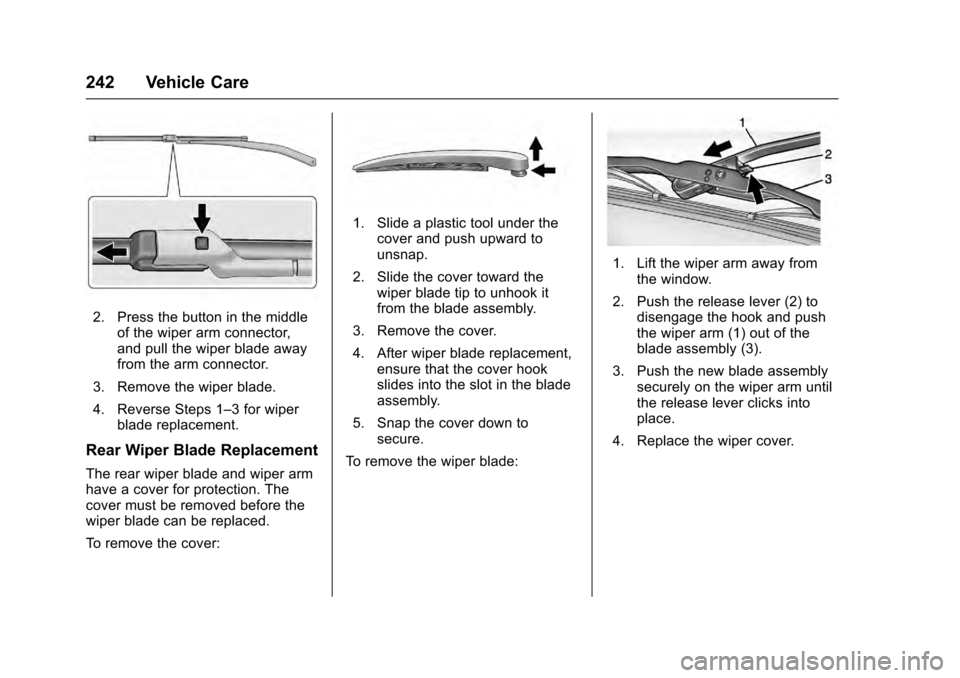
2. Press the button in the middleof the wiper arm connector,
and pull the wiper blade away
from the arm connector.
3. Remove the wiper blade.
4. Reverse Steps 1–3 for wiper blade replacement.
Rear Wiper Blade Replacement
The rear wiper blade and wiper arm
have a cover for protection. The
cover must be removed before the
wiper blade can be replaced.
To remove the cover:
1. Slide a plastic tool under thecover and push upward to
unsnap.
2. Slide the cover toward the wiper blade tip to unhook it
from the blade assembly.
3. Remove the cover.
4. After wiper blade replacement, ensure that the cover hook
slides into the slot in the blade
assembly.
5. Snap the cover down to secure.
To remove the wiper blade:
1. Lift the wiper arm away from the window.
2. Push the release lever (2) to disengage the hook and push
the wiper arm (1) out of the
blade assembly (3).
3. Push the new blade assembly securely on the wiper arm until
the release lever clicks into
place.
4. Replace the wiper cover.
Page 247 of 319
Cadillac SRX Owner Manual (GMNA-Localizing-MidEast-9369636) - 2016 -
crc - 6/1/15
246 Vehicle Care
8. Install the cap with the downarrow pointing down in the
back of the headlamp
assembly.
9. For the driver side, reinstall the underhood electrical center
cover by latching the three
clips.
10. For the passenger side, reinstall the air filter/cleaner
assembly base by pushing to
seat. Verify the base is seated
securely, then install the engine
air filter/cleaner assembly.
High/Low-Beam Headlamps
(Uplevel)
The high/low-beam headlamps on
the uplevel are High Intensity
Discharge (HID) and should be
replaced by your dealer.
Daytime Running Lamp (DRL)
(Uplevel)
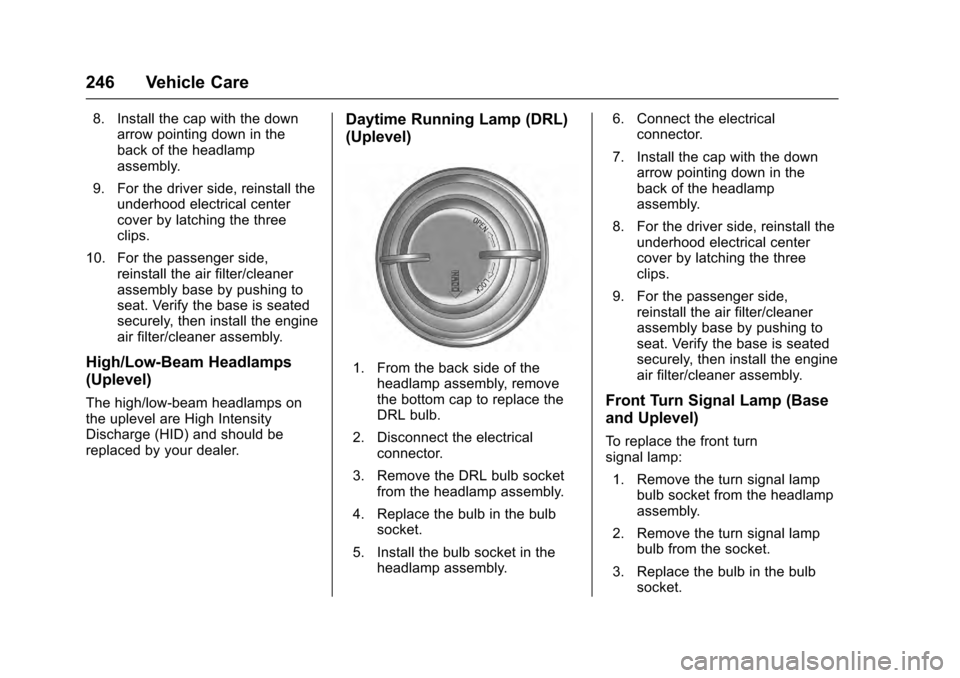
1. From the back side of theheadlamp assembly, remove
the bottom cap to replace the
DRL bulb.
2. Disconnect the electrical connector.
3. Remove the DRL bulb socket from the headlamp assembly.
4. Replace the bulb in the bulb socket.
5. Install the bulb socket in the headlamp assembly. 6. Connect the electrical
connector.
7. Install the cap with the down arrow pointing down in the
back of the headlamp
assembly.
8. For the driver side, reinstall the underhood electrical center
cover by latching the three
clips.
9. For the passenger side, reinstall the air filter/cleaner
assembly base by pushing to
seat. Verify the base is seated
securely, then install the engine
air filter/cleaner assembly.
Front Turn Signal Lamp (Base
and Uplevel)
To replace the front turn
signal lamp:
1. Remove the turn signal lamp bulb socket from the headlamp
assembly.
2. Remove the turn signal lamp bulb from the socket.
3. Replace the bulb in the bulb socket.
Page 248 of 319
Cadillac SRX Owner Manual (GMNA-Localizing-MidEast-9369636) - 2016 -
crc - 6/1/15
Vehicle Care 247
4. Install the bulb socket in theheadlamp assembly.
5. For the driver side, reinstall the underhood electrical center
cover by latching the three
clips.
6. For the passenger side, reinstall the air filter/cleaner
assembly base by pushing to
seat. Verify the base is seated
securely, then install the engine
air filter/cleaner assembly.
Turn Signal Lamps
To replace one of these bulbs:
1. Open the liftgate. See Liftgate
0 33.
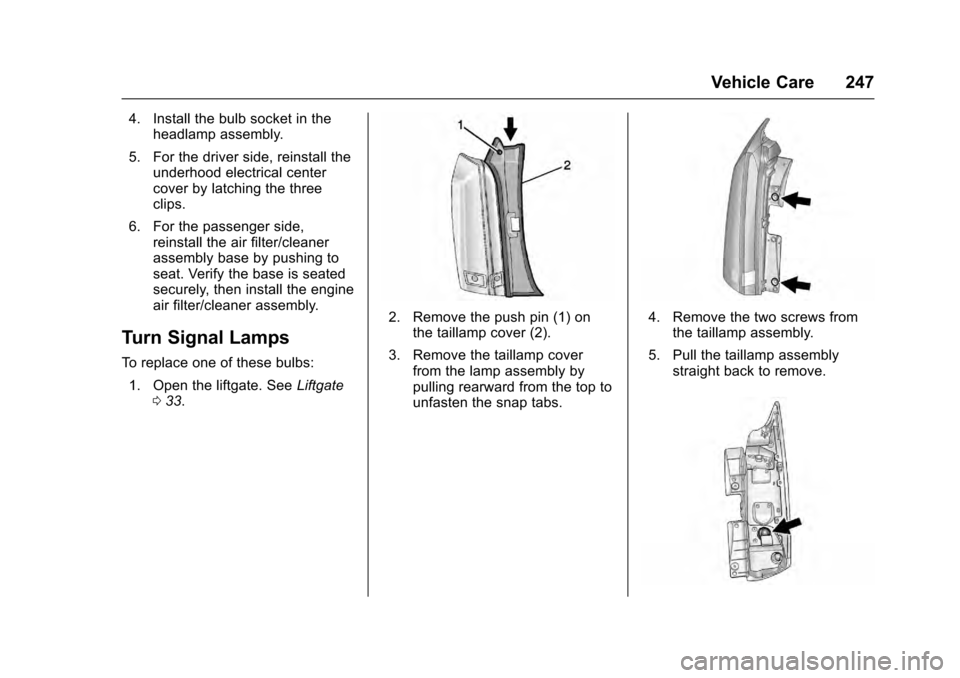
2. Remove the push pin (1) on
the taillamp cover (2).
3. Remove the taillamp cover from the lamp assembly by
pulling rearward from the top to
unfasten the snap tabs.4. Remove the two screws fromthe taillamp assembly.
5. Pull the taillamp assembly straight back to remove.
Page 249 of 319
Cadillac SRX Owner Manual (GMNA-Localizing-MidEast-9369636) - 2016 -
crc - 6/1/15
248 Vehicle Care
6. Turn the turn signal lamp bulbsocket counterclockwise to
remove it from the taillamp
assembly.
7. Pull the bulb straight out from the socket.
8. Press a new bulb into the socket, insert it into the taillamp
assembly, and turn the bulb
socket clockwise until it clicks.
9. Reinstall the taillamp assembly and tighten the screws.
10. Reinstall the taillamp cover by snapping it into place.
11. Push the push pin to secure the taillamp cover.
Back-Up Lamps
This vehicle has LED back‐up and
rear fog lamps. For replacement of
these lamps, contact your dealer.
License Plate Lamp
To replace one of these bulbs:
1. Open the liftgate. See Liftgate
0 33.
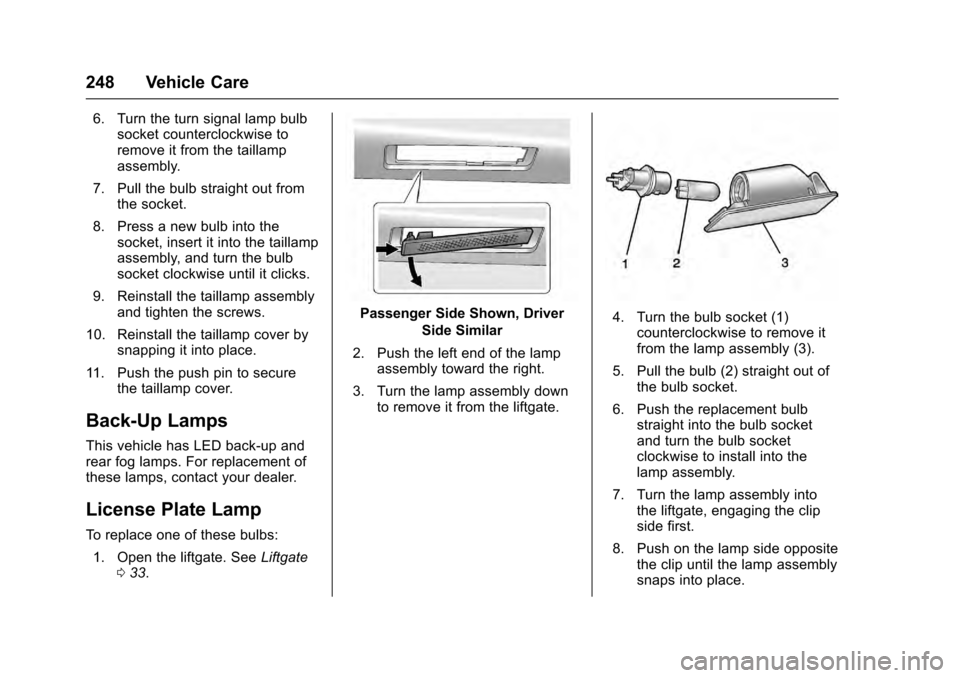
Passenger Side Shown, Driver
Side Similar
2. Push the left end of the lamp assembly toward the right.
3. Turn the lamp assembly down to remove it from the liftgate.4. Turn the bulb socket (1)counterclockwise to remove it
from the lamp assembly (3).
5. Pull the bulb (2) straight out of the bulb socket.
6. Push the replacement bulb straight into the bulb socket
and turn the bulb socket
clockwise to install into the
lamp assembly.
7. Turn the lamp assembly into the liftgate, engaging the clip
side first.
8. Push on the lamp side opposite the clip until the lamp assembly
snaps into place.
Page 258 of 319
Cadillac SRX Owner Manual (GMNA-Localizing-MidEast-9369636) - 2016 -
crc - 6/1/15
Vehicle Care 257
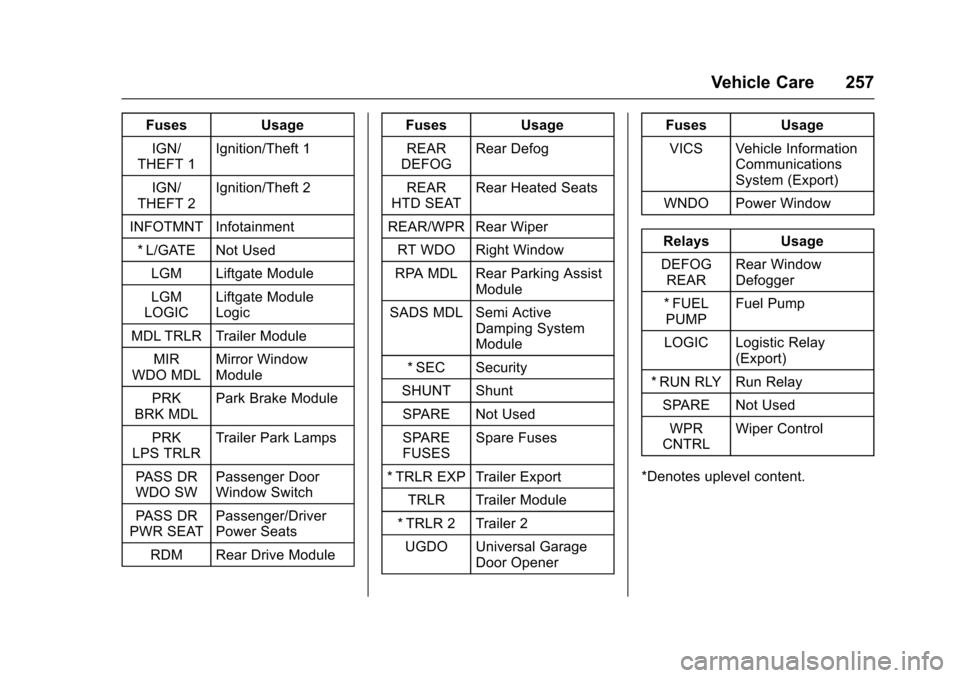
FusesUsage
IGN/
THEFT 1 Ignition/Theft 1
IGN/
THEFT 2 Ignition/Theft 2
INFOTMNT Infotainment * L/GATE Not Used LGM Liftgate Module
LGM
LOGIC Liftgate Module
Logic
MDL TRLR Trailer Module MIR
WDO MDL Mirror Window
Module
PRK
BRK MDL Park Brake Module
PRK
LPS TRLR Trailer Park Lamps
PASS DR
WDO SW Passenger Door
Window Switch
PASS DR
PWR SEAT Passenger/Driver
Power Seats
RDM Rear Drive Module Fuses
Usage
REAR
DEFOG Rear Defog
REAR
HTD SEAT Rear Heated Seats
REAR/WPR Rear Wiper RT WDO Right Window
RPA MDL Rear Parking Assist Module
SADS MDL Semi Active Damping System
Module
* SEC Security
SHUNT Shunt
SPARE Not Used
SPARE
FUSES Spare Fuses
* TRLR EXP Trailer Export TRLR Trailer Module
* TRLR 2 Trailer 2 UGDO Universal Garage Door Opener Fuses
Usage
VICS Vehicle Information Communications
System (Export)
WNDO Power Window
Relays Usage
DEFOG REAR Rear Window
Defogger
* FUEL PUMP Fuel Pump
LOGIC Logistic Relay (Export)
* RUN RLY Run Relay SPARE Not Used
WPR
CNTRL Wiper Control
*Denotes uplevel content.