ECU CADILLAC STS 2005 1.G Owner's Manual
[x] Cancel search | Manufacturer: CADILLAC, Model Year: 2005, Model line: STS, Model: CADILLAC STS 2005 1.GPages: 446, PDF Size: 2.58 MB
Page 77 of 446
The rear doors on your vehicle cannot be opened from
the inside when this feature is in use.
When you want to open a rear door when the security
lock is on, do the following:
1. Unlock the door using the remote keyless entry
transmitter, the front door power lock switch or
by lifting the rear door manual lock.
2. Then open the door from the outside.
To cancel the rear door security lock, do the following:
1. Unlock the door and open it from the outside.
2. Insert your key into the slot next to the rear
door security lock label and turn it to disengage
the lock.
3. Repeat the steps for the other lock.
The rear door locks will now work normally.Lockout Protection
Your vehicle can be programmed to sound the horn
three times and unlock the driver’s door when both
doors are closed and there is a keyless access
transmitter inside the interior of the vehicle. When the
driver’s door is reopened, the key in reminder chime will
sound continuously. The vehicle will remain locked
only when at least one transmitter has been removed
from the vehicle and both doors are closed. SeeVehicle
Personalization on page 2-47.
2-13
Page 79 of 446

Squeeze the trunk release button located on the
rear of the trunk lid above the license plate, as
long as you have your keyless access transmitter
with you. Entry occurs when the button is being
pressed and the vehicle recognizes the transmitter.
The vehicle must be in PARK (P) and the valet
mode turned off.
If your vehicle has lost battery power, you can still
access the trunk by unlocking and lowering the rear seat
pass-through door and pulling the emergency trunk
release handle.
Rear Seat Pass-Through Door
This feature allows you to access the trunk without
opening the trunk lid.
To open the door, do the following:
1. Pull down the rear seat armrest.
2. If it is locked, insert and turn the key
counterclockwise in the lock on the door.
3. Press the button above the lock.
4. Lower the door.
To open the trunk lid, pull down the emergency trunk
release handle located in the trunk. See “Emergency
Trunk Release Handle” following.
Emergency Trunk Release Handle
Notice:Using the emergency trunk release handle
as a tie-down or anchor point when securing
items in the trunk may damage it. Use the
emergency trunk release handle only to help you
open the trunk lid.
There is a glow-in-the-dark trunk release handle located
inside the trunk near the back of the rear seats. This
handle will glow following exposure to light. Pull
down the release handle to open the trunk from the
inside of the vehicle.
2-15
Page 83 of 446

Theft-Deterrent Systems
Vehicle theft is big business, especially in some cities.
Although your vehicle has a number of theft-deterrent
features, we know that nothing we put on it can make it
impossible to steal.
Theft-Deterrent System
Your vehicle has a theft-deterrent alarm system.
The security light
is located on the
instrument panel
cluster.
If the ignition is off and a door is open, the security light
will ash, reminding you to arm the theft-deterrent
system.
To arm the system, do one of the following:
Press the lock button on the keyless access
transmitter. If the door is closed when the lock button
is pressed, the security light will stay illuminated for
30 seconds. After the security light goes off, the
theft-deterrent system is armed. Pressing the lock
button twice will arm the system immediately.If the vehicle is locked using the keyless access
transmitter and the trunk lid, hood or a door is open
or not closed completely, the security light will ash
for 60 seconds and then turn off. At this time, the
theft-deterrent system is armed but the alarm will not
sound if the trunk lid, hood or door that was not
closed completely is tampered with or opened. The
alarm will sound for the trunk lid, hood or a door that
was completely closed at the time the vehicle was
locked using the keyless access transmitter.
Open the door. Lock the door with the power door
lock switch or lock button on the keyless access
transmitter. The security light should ash. Close the
door. The security light will stop ashing and stay on.
After 30 seconds the light should turn off, the
theft-deterrent system is armed.
Passive Arming, if activated through the vehicle
personalization feature, will arm the system
automatically after you close the door and take at
least one keyless access transmitter with you. The
security light will turn on. After 60 seconds the light
should turn off. The theft-deterrent system is armed.
SeeVehicle Personalization on page 2-47.
If a door, hood, or the trunk is opened without the
keyless access transmitter, the horn will sound for
30 seconds and the lamps will ash for two minutes.
The vehicle cannot be started without a keyless access
transmitter.
2-19
Page 84 of 446
The Theft-Deterrent system will not arm if:
The key is used to lock the driver’s door.
The driver’s door is locked using the power door
lock switch after the doors are closed.
If the vehicle is locked using the keyless access
transmitter and the trunk lid, hood or a door is open or
not closed completely, the security light will ash for
60 seconds and then turn off. At this time, the
theft-deterrent system is armed but the alarm will not
sound if the trunk lid, hood or door that was not closed
completely is tampered with or opened. The alarm
will sound for the trunk lid, hood or a door that was
completely closed at the time the vehicle was locked
using the keyless access transmitter.
The vehicle can be programmed to automatically unlock
the doors and disarm the theft-deterrent system when
you approach the vehicle and the keyless access
transmitter is with you. SeeVehicle Personalization
on page 2-47.
Pressing the unlock button on the keyless access
transmitter or using the key to unlock the driver’s door
disarms the theft-deterrent system. Unlocking a door
any other way while the system is armed will activate
the alarm.
Testing the Alarm
1. From inside the vehicle, roll down the window, then
get out of the vehicle, keeping the door open.
2. From outside of the vehicle, with the door open,
lock the vehicle using the power door lock switch
or the keyless access transmitter and close the
door. Wait approximately 30 seconds until the
security light goes off.
3. Reach in and open the door using the inside door
handle. The horn will sound and the exterior lamps
will ash.
You can turn off the alarm by pressing the unlock
button on the keyless access transmitter or by starting
the car.
If the alarm does not sound when it should, check to
see if the horn works. The horn fuse may be blown.
To replace the fuse, seeFuses and Circuit Breakers on
page 5-95. If the fuse does not need to be replaced,
you may need to have your vehicle serviced.
To reduce the possibility of theft, always arm the
Theft-Deterrent system when leaving your vehicle.
2-20
Page 85 of 446

Valet Lockout Switch
The valet lockout switch
is located inside the
glove box.
9(Off):Press the left side of the valet lockout switch
to turn the lockout feature off. When the lockout
feature is off, you can open the trunk using either the
keyless access transmitter or the trunk release
button located on the driver’s door.
R(On):Press the right side of the valet lockout switch
to turn the lockout feature on. When the lockout
feature is turned on, the trunk cannot be unlocked with
the keyless access transmitter or the trunk release
button located on the driver’s door. If the valet lockout
feature is on it will also disable the remote start
feature and the HomeLink
®transmitter, if equipped.
Locking the glove box with your key will also help
to secure your vehicle.
SeeKeyless Access System Operation on page 2-4and
Trunk on page 2-14for additional information.
2-21
Page 103 of 446
If further mirror adjustment is needed press the arrows
located on the outside mirror control pad. If the
outside mirror selector switch is in the middle position,
neither outside mirror will move.
When the vehicle is shifted out of REVERSE (R), and a
ve-second delay has occurred, the mirror will return to
its original position. The delay prevents movement of
the mirror if multiple gear transitions REVERSE (R) to
AUTOMATIC OVERDRIVE (D) to REVERSE (R) occur
during a parallel parking maneuver.
OnStar®System
OnStar®uses global positioning system (GPS) satellite
technology, wireless communications, and call centers
to provide you with a wide range of safety, security,
information, and convenience services.
A complete OnStar
®user’s guide and the terms and
conditions of the OnStar®Subscription Service
Agreement are included in the vehicle’s glove box
literature. For more information, visit www.onstar.com or
www.onstarcanada.com. Contact OnStar
®at
1-888-4-ONSTAR (1-888-466-7827), or press the
OnStar
®button to speak to an OnStar®advisor
24 hours a day, 7 days a week.
Terms and conditions of the Subscription Service
Agreement can be found at www.onstar.com or
www.onstarcanada.com.
OnStar®Services
The Directions and Connections Plan is included on
new vehicles for one year from the date of purchase.
The OnStar
®subscription can be extended for time
beyond the rst year to meet your needs. For more
information, press the OnStar
®button to speak with
an advisor.
Directions and Connections Plan
Advanced Automatic Collision Notication
Automatic Notication of Airbag Deployment
Emergency Services
Roadside Assistance
Stolen Vehicle Tracking
AccidentAssist
Remote Door Unlock/Vehicle Alert
Remote Diagnostics
Online Concierge
Driving Directions
RideAssist
Information and Convenience Services
2-39
Page 105 of 446
HomeLink®Wireless Control
System
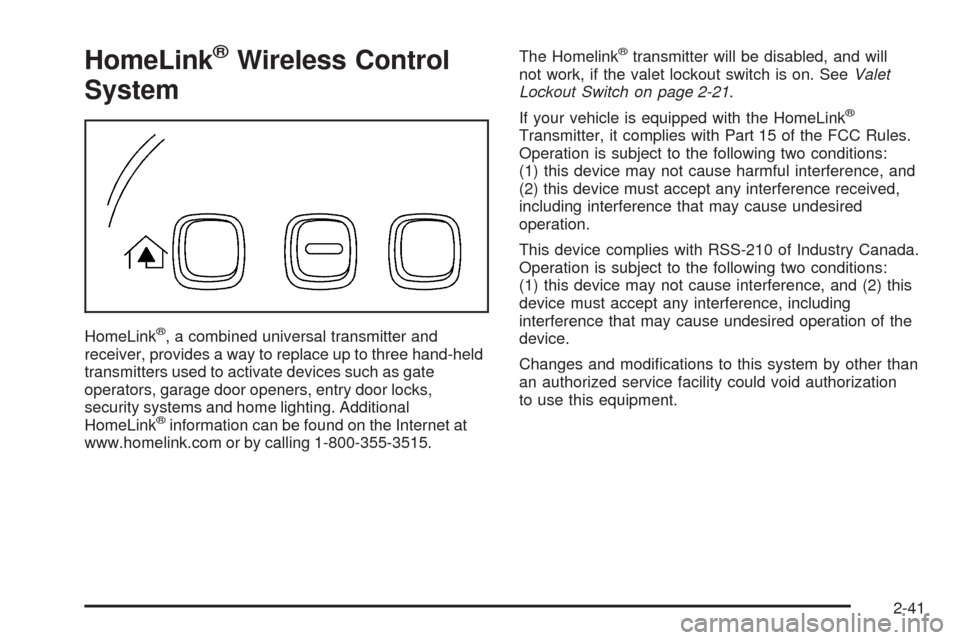
HomeLink®, a combined universal transmitter and
receiver, provides a way to replace up to three hand-held
transmitters used to activate devices such as gate
operators, garage door openers, entry door locks,
security systems and home lighting. Additional
HomeLink
®information can be found on the Internet at
www.homelink.com or by calling 1-800-355-3515.The Homelink
®transmitter will be disabled, and will
not work, if the valet lockout switch is on. SeeValet
Lockout Switch on page 2-21.
If your vehicle is equipped with the HomeLink
®
Transmitter, it complies with Part 15 of the FCC Rules.
Operation is subject to the following two conditions:
(1) this device may not cause harmful interference, and
(2) this device must accept any interference received,
including interference that may cause undesired
operation.
This device complies with RSS-210 of Industry Canada.
Operation is subject to the following two conditions:
(1) this device may not cause interference, and (2) this
device must accept any interference, including
interference that may cause undesired operation of the
device.
Changes and modications to this system by other than
an authorized service facility could void authorization
to use this equipment.
2-41
Page 106 of 446
HomeLink®Wireless Control
System Operation
Do not use the HomeLink®Transmitter with any garage
door opener that does not have the “stop and reverse”
feature. This includes any garage door opener model
manufactured before April 1, 1982. If you have a newer
garage door opener with rolling codes, please be
sure to follow Steps 6 through 8 to complete the
programming of your HomeLink
®Transmitter.
Read the instructions completely before attempting to
program the HomeLink
®Transmitter. Because of
the steps involved, it may be helpful to have another
person available to assist you in programming the
transmitter.
Keep the original transmitter for use in other vehicles as
well as for future HomeLink
®programming. It is also
recommended that upon the sale of the vehicle, the
programmed HomeLink
®buttons should be erased for
security purposes. Refer to “Erasing HomeLink®Buttons”
or, for assistance, contact HomeLink®on the Internet
at: www.homelink.com or by calling 1-800-355-3515.
Be sure that people and objects are clear of the garage
door or gate operator you are programming. When
programming a garage door, it is advised to park outside
of the garage.It is recommended that a new battery be installed in
your hand-held transmitter for quicker and more
accurate transmission of the radio frequency.
Programming HomeLink®
Your vehicle’s engine should be turned off while
programming the transmitter. Follow these steps to
program up to three channels:
1. Press and hold down the two outside buttons,
releasing only when the indicator light begins to
ash, after 20 seconds. Do not hold down the
buttons for longer than 30 seconds and do not
repeat this step to program a second and/or third
transmitter to the remaining two HomeLink
®buttons.
2. Position the end of your hand-held transmitter about
1 to 3 inches (3 to 8 cm) away from the HomeLink
®
buttons while keeping the indicator light in view.
3. Simultaneously press and hold both the desired
button on HomeLink
®and the hand-held transmitter
button. Do not release the buttons until Step 4
has been completed.
Some entry gates and garage door openers may
require you to substitute Step 3 with the procedure
noted in “Gate Operator and Canadian
Programming” later in this section.
2-42
Page 136 of 446
Engine Coolant Temperature Warning Light......3-67
Engine Coolant Temperature Gage..................3-67
Malfunction Indicator Lamp.............................3-68
Oil Pressure Light.........................................3-70
Security Light...............................................3-71
Fog Lamp Light............................................3-71
Lights On Reminder......................................3-71
Cruise Control Light......................................3-72
Highbeam On Light.......................................3-72
Fuel Gage...................................................3-72
Driver Information Center (DIC).......................3-73
DIC Controls and Displays.............................3-74
DIC Warnings and Messages.........................3-78
Other Messages...........................................3-91Audio System(s).............................................3-92
Setting the Time...........................................3-93
Radio with CD..............................................3-94
Navigation/Radio System..............................3-111
Radio Personalization..................................3-112
Theft-Deterrent Feature................................3-115
Audio Steering Wheel Controls......................3-116
Radio Reception.........................................3-117
Care of Your CDs.......................................3-118
Care of the CD Player.................................3-118
Diversity Antenna System.............................3-118
XM™ Satellite Radio Antenna System............3-118
Section 3 Instrument Panel
3-2
Page 139 of 446
The main components of your instrument panel are the following:
A. Instrument Panel Brightness Control. SeeInstrument
Panel Brightness on page 3-41. Driver Information
Center (DIC) Buttons. SeeDIC Controls and
Displays on page 3-74. HUD Controls (If Equipped).
SeeHead-Up Display (HUD) on page 3-43.
B. Turn Signal/Multifunction Lever. SeeTurn
Signal/Multifunction Lever on page 3-8. Headlamp
Controls. SeeHeadlamps on page 3-33. Cruise
Control. SeeCruise Control on page 3-16. Adaptive
Cruise Control (If Equipped). SeeAdaptive Cruise
Control on page 3-20. Forward Collision Alert (FCA)
(If Equipped). SeeForward Collision Alert (FCA)
System on page 3-9.
C. Instrument Panel Cluster. SeeInstrument Panel
Cluster on page 3-61.
D. Windshield Wiper/Washer Lever. SeeWindshield
Wipers on page 3-13.
E. Navigation/Radio System. SeeAudio System(s) on
page 3-92andNavigation/Radio System on
page 3-111.F. Audio Steering Wheel Controls (If Equipped). See
Audio Steering Wheel Controls on page 3-116.
Adaptive Cruise Control Gap Button (If Equipped).
SeeAdaptive Cruise Control on page 3-20.
Heated Steering Wheel Button (If Equipped). See
Heated Steering Wheel on page 3-7.
G. Horn. SeeHorn on page 3-6.
H. Ignition Switch. SeeIgnition Positions on page 2-22.
I. Climate Control System. SeeDual Climate Control
System on page 3-50.
J. Hazard Warning Flasher Button. SeeHazard
Warning Flashers on page 3-6.
K. Cupholders. SeeCupholder(s) on page 2-45.
L. Traction Control System Button. SeeTraction Control
System (TCS) on page 4-8.
M. Shift Lever. SeeAutomatic Transmission Operation
on page 2-26.
N. Glove Box. SeeGlove Box on page 2-45.
3-5