warning CADILLAC STS 2005 1.G Owner's Manual
[x] Cancel search | Manufacturer: CADILLAC, Model Year: 2005, Model line: STS, Model: CADILLAC STS 2005 1.GPages: 446, PDF Size: 2.58 MB
Page 163 of 446
Deactivation When Head-Up Display is
Turned Off
If you turn the HUD off when Adaptive Cruise Control is
engaged, it will begin to disengage. A warning beep will
sound and the message RADAR CRUISE NOT READY
will appear on the Driver Information Center (DIC).
SeeDIC Warnings and Messages on page 3-78for
additional information. If Adaptive Cruise Control was
braking when the HUD is turned off, the braking will
continue briey.
Passing a Vehicle/Adaptive Cruise Control
Override
If you need to increase speed to pass a vehicle, use the
accelerator pedal. While you are doing this, the
system will not automatically apply the brakes. A PEDAL
APPLIED ACC OVERRIDE message will appear on
the HUD. SeeHead-Up Display (HUD) on page 3-43for
additional information. Once you pass the vehicle and
remove your foot from the accelerator pedal, Adaptive
Cruise Control will return to normal operation and
be able to apply the brakes, if needed.
{CAUTION:
If you rest your foot on the accelerator pedal,
the system will not automatically apply the
brakes. You could crash into a vehicle ahead
of you. Do not rest your foot on the accelerator
pedal when using Adaptive Cruise Control.
3-29
Page 166 of 446
Other Vehicle Lane Changes
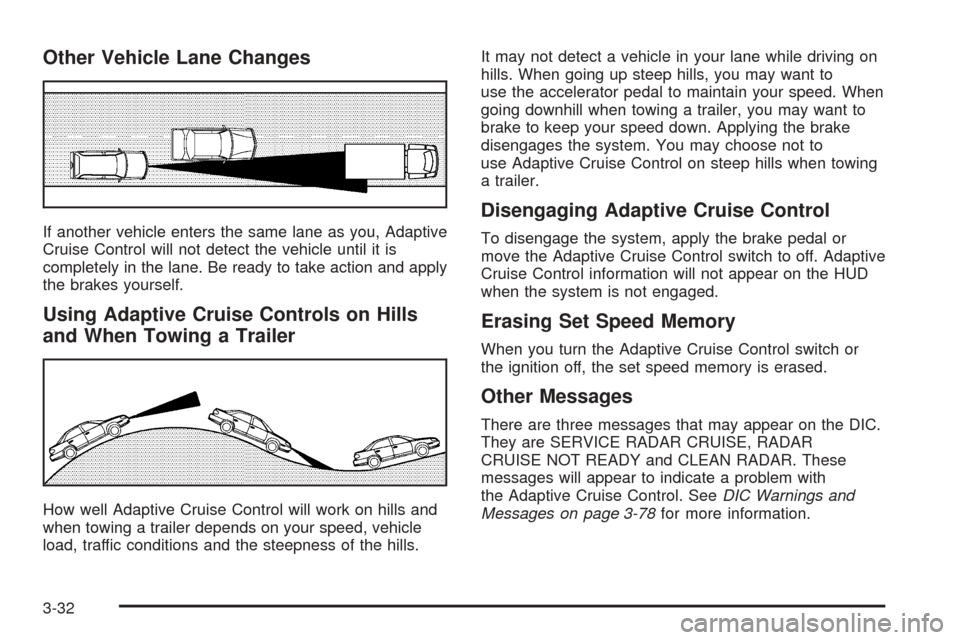
If another vehicle enters the same lane as you, Adaptive
Cruise Control will not detect the vehicle until it is
completely in the lane. Be ready to take action and apply
the brakes yourself.
Using Adaptive Cruise Controls on Hills
and When Towing a Trailer
How well Adaptive Cruise Control will work on hills and
when towing a trailer depends on your speed, vehicle
load, traffic conditions and the steepness of the hills.It may not detect a vehicle in your lane while driving on
hills. When going up steep hills, you may want to
use the accelerator pedal to maintain your speed. When
going downhill when towing a trailer, you may want to
brake to keep your speed down. Applying the brake
disengages the system. You may choose not to
use Adaptive Cruise Control on steep hills when towing
a trailer.
Disengaging Adaptive Cruise Control
To disengage the system, apply the brake pedal or
move the Adaptive Cruise Control switch to off. Adaptive
Cruise Control information will not appear on the HUD
when the system is not engaged.
Erasing Set Speed Memory
When you turn the Adaptive Cruise Control switch or
the ignition off, the set speed memory is erased.
Other Messages
There are three messages that may appear on the DIC.
They are SERVICE RADAR CRUISE, RADAR
CRUISE NOT READY and CLEAN RADAR. These
messages will appear to indicate a problem with
the Adaptive Cruise Control. SeeDIC Warnings and
Messages on page 3-78for more information.
3-32
Page 171 of 446

Cleaning the Intellibeam™ Light Sensor
The light sensor is located
on the inside of the vehicle
in front of the inside
rearview mirror.
Clean the light sensor window, periodically, using glass
cleaner on a soft cloth. Gently wipe the sensor
window. Do not spray glass cleaner directly on the
surface of the sensor window.
Wiper Activated Headlamps
This feature activates the headlamps and parking lamps
after the windshield wipers have been in use for
about six seconds. For this feature to work, automatic
lighting must be enabled. SeeHeadlamps on page 3-33
for additional information.
When the ignition is turned off, the wiper-activated
headlamps will immediately turn off. They will also turn
off if the windshield wiper control is turned off.
Headlamps on Reminder
A warning chime will sound if the exterior lamp control
is left on in either the headlamp or parking lamp position
and the driver’s door is opened with the ignition off.
SeeLights On Reminder on page 3-71for additional
information.
3-37
Page 177 of 446
If the battery continues to discharge, even with the
engine idling at a higher rpm setting, some electrical
loads will automatically be reduced. When this occurs,
the rear window defogger may take slightly longer
to clear the glass and the fan may cut back to a lower
speed. For more battery saving information, see “Battery
Saver Active Message” underDIC Warnings and
Messages on page 3-78.
Inadvertent Power Battery Saver
This feature is designed to protect your vehicle’s battery
against drainage from the interior lamps, trunk lamp,
glove box lamp, or the garage door opener. When the
ignition is turned off, the power to these features will
automatically turn off after 10 minutes (three minutes if
a new car has 15 miles (24 km) or less). Power will
be restored for an additional 10 minutes if any door is
opened, the trunk is opened or the courtesy lamp switch
is turned on.
Head-Up Display (HUD)
{CAUTION:
If the HUD image is too bright, or too high in
your eld of view, it may take you more time to
see things you need to see when it is dark
outside. Be sure to keep the HUD image dim
and placed low in your eld of view.
The Head-Up Display (HUD) allows you to see some of
the driver information that appears on your instrument
panel cluster on the windshield.
The information may be displayed in English or metric
units and appears as an image focused out toward
the front of your vehicle. To change from English
to metric units, seeDIC Controls and Displays on
page 3-74.
3-43
Page 178 of 446
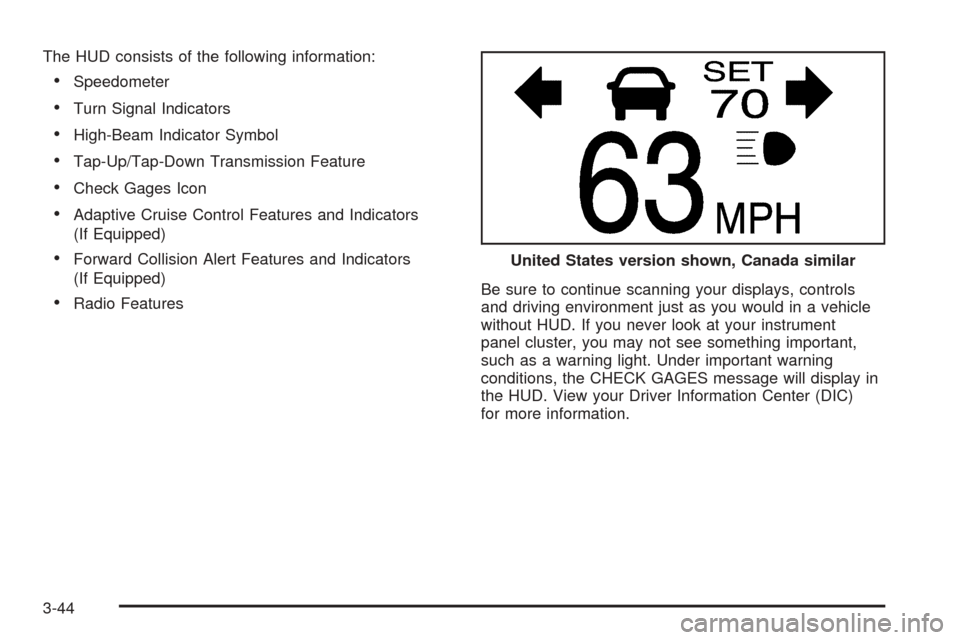
The HUD consists of the following information:
Speedometer
Turn Signal Indicators
High-Beam Indicator Symbol
Tap-Up/Tap-Down Transmission Feature
Check Gages Icon
Adaptive Cruise Control Features and Indicators
(If Equipped)
Forward Collision Alert Features and Indicators
(If Equipped)
Radio FeaturesBe sure to continue scanning your displays, controls
and driving environment just as you would in a vehicle
without HUD. If you never look at your instrument
panel cluster, you may not see something important,
such as a warning light. Under important warning
conditions, the CHECK GAGES message will display in
the HUD. View your Driver Information Center (DIC)
for more information.United States version shown, Canada similar
3-44
Page 194 of 446

Warning Lights, Gages, and
Indicators
This part describes the warning lights and gages that
may be on your vehicle. The pictures will help you
locate them.
Warning lights and gages can signal that something is
wrong before it becomes serious enough to cause
an expensive repair or replacement. Paying attention to
your warning lights and gages could also save you
or others from injury.
Warning lights come on when there may be or is a
problem with one of your vehicle’s functions. As you
will see in the details on the next few pages, some
warning lights come on briey when you start the engine
just to let you know they’re working. If you are familiar
with this section, you should not be alarmed when
this happens.Gages can indicate when there may be or is a problem
with one of your vehicle’s functions. Often gages
and warning lights work together to let you know when
there’s a problem with your vehicle.
When one of the warning lights comes on and stays on
when you are driving, or when one of the gages
shows there may be a problem, check the section that
tells you what to do about it. Follow this manual’s
advice. Waiting to do repairs can be costly – and even
dangerous. So please get to know your warning
lights and gages. They’re a big help.
Your vehicle also has a Driver Information Center (DIC)
that works along with the warning lights and gages.
SeeDriver Information Center (DIC) on page 3-73for
more information.
3-60
Page 197 of 446

Airbag Readiness Light
There is an airbag readiness light on the instrument
panel, which shows the airbag symbol. The system
checks the airbag’s electrical system for malfunctions.
The light tells you if there is an electrical problem.
The system check includes the airbag sensors, the
airbag modules, the wiring and the diagnostic module.
For more information on the airbag system, see
Airbag System on page 1-45.
This light will come on
when you start your
vehicle, and it will ash
for a few seconds.
Then the light should go
out. This means the
system is ready.
If the airbag readiness light stays on after you start
the vehicle or comes on when you are driving,
your airbag system may not work properly. Have your
vehicle serviced right away.{CAUTION:
If the airbag readiness light stays on after you
start your vehicle, it means the airbag system
may not be working properly. The airbags in
your vehicle may not inate in a crash, or they
could even inate without a crash. To help
avoid injury to yourself or others, have your
vehicle serviced right away if the airbag
readiness light stays on after you start your
vehicle.
The airbag readiness light should ash for a few
seconds when you turn the vehicle on. If the light does
not come on then, have it xed so it will be ready to
warn you if there is a problem.
If there is a problem with the airbag system in your
vehicle, the Service airbag message will appear on the
DIC display. SeeDIC Warnings and Messages on
page 3-78for more information.
3-63
Page 198 of 446

Charging System Light
When you turn the engine
on, this light will come on
briey to show that the
generator and battery
charging systems
are working properly.
If this light stays on, your vehicle needs service. You
should take your vehicle to the dealer at once. To save
your battery until you get there, turn off all accessories.
SeeDIC Controls and Displays on page 3-74for
more information.
Brake System Warning Light
Your vehicle’s hydraulic brake system is divided into two
parts. If one part isn’t working, the other part can still
work and stop you. For good braking, though, you need
both parts working well.
If the warning light comes on, there is a brake problem.
Have your brake system inspected right away.
This light should come on briey when you turn the
engine on. If it does not come on then, have it xed so
it will be ready to warn you if there is a problem.
When the ignition is on, the brake system warning light
will also come on when you set your parking brake.
The light will stay on if your parking brake does
not release fully. If it stays on after your parking brake is
fully released, it means you have a brake problem.
United StatesCanada
3-64
Page 199 of 446

If the light comes on while you are driving, pull off the
road and stop carefully. You may notice that the pedal is
harder to push, or the pedal may go closer to the
oor. It may take longer to stop. If the light is still on,
have the vehicle towed for service. SeeTowing
Your Vehicle on page 4-35.
{CAUTION:
Your brake system may not be working
properly if the brake system warning light is
on. Driving with the brake system warning light
on can lead to an accident. If the light is still
on after you have pulled off the road and
stopped carefully, have the vehicle towed for
service.
Anti-Lock Brake System Warning
Light
With the anti-lock brake
system, the light will come
on when your engine is
started and may stay on for
several seconds. That is
normal.
If the ABS warning light comes on and stays on, there
may be a problem with the antilock portion of the
brake system. If the red BRAKE light is not on, you still
have brakes, but you do not have antilock brakes.
SeeBrake System Warning Light on page 3-64.
If the light stays on, turn the ignition to OFF/ACC. If the
light comes on when you are driving, stop as soon
as possible and turn the ignition off. Then start
the engine again to reset the system. If the light still
stays on, or comes on again while you are driving, your
vehicle needs service. If the regular brake system
warning light is not on, you still have brakes, but you do
not have anti-lock brakes. If the regular brake system
warning light is also on, you do not have anti-lock brakes
and there is a problem with your regular brakes. See
Brake System Warning Light on page 3-64.
3-65
Page 200 of 446

Low Tire Pressure Warning Light
This light will come on
briey as you start the
engine, for vehicles
equipped with the Tire
Pressure Monitor System.
It will then come on only when a at or low tire pressure
condition exists.
SeeTire Pressure Monitor System on page 5-62for
more information.
Traction Control System (TCS)
Warning Light
If the TC (traction control)
warning light comes on
and stays on, there may be
a problem with the
traction control system.
The TC (traction control) warning light will come on
briey when you turn the engine on. If it does not come
on then, have it xed so it will be ready to warn you
if there is a problem.
The light will also come on if you turn the traction
control system off using the TC (traction control) on/off
button located on the console.
If the TC (traction control) warning light stays on or
comes on while you are driving, pull off the road as soon
as possible and stop carefully. Turn your engine off
and then restart it. If the light still stays on or comes
back on again while you are driving, your vehicle needs
service. Have the traction control system inspected
as soon as possible. SeeTraction Control System (TCS)
on page 4-8for more information.
3-66