battery CADILLAC STS 2005 1.G Owner's Guide
[x] Cancel search | Manufacturer: CADILLAC, Model Year: 2005, Model line: STS, Model: CADILLAC STS 2005 1.GPages: 446, PDF Size: 2.58 MB
Page 333 of 446
Replacing Brake System Parts
The braking system on a vehicle is complex. Its many
parts have to be of top quality and work well together if
the vehicle is to have really good braking. Your
vehicle was designed and tested with top-quality GM
brake parts. When you replace parts of your braking
system — for example, when your brake linings
wear down and you need new ones put in — be sure
you get new approved replacement parts. If you do not,
your brakes may no longer work properly. For
example, if someone puts in brake linings that are
wrong for your vehicle, the balance between your front
and rear brakes can change — for the worse. The
braking performance you have come to expect
can change in many other ways if someone puts in the
wrong replacement brake parts.
Battery
Your vehicle has a maintenance free battery. When it is
time for a new battery, get one that has the replacement
number shown on the original battery’s label. We
recommend an ACDelco
®replacement battery. See
Engine Compartment Overview on page 5-12for battery
location and access.Warning:Battery posts, terminals and related
accessories contain lead and lead compounds,
chemicals known to the State of California to cause
cancer and reproductive harm. Wash hands after
handling.
Vehicle Storage
If you are not going to drive your vehicle for 25 days
or more, remove the black, negative (−) cable from the
battery. This will help keep your battery from
running down.
{CAUTION:
Batteries have acid that can burn you and gas
that can explode. You can be badly hurt if you
are not careful. SeeJump Starting on
page 5-38for tips on working around a battery
without getting hurt.
5-37
Page 334 of 446
Jump Starting
If your battery has run down, you may want to use
another vehicle and some jumper cables to start your
vehicle. Be sure to use the following steps to do it safely.
{CAUTION:
Batteries can hurt you. They can be dangerous
because:
They contain acid that can burn you.
They contain gas that can explode or
ignite.
They contain enough electricity to
burn you.
If you do not follow these steps exactly, some
or all of these things can hurt you.
Notice:Ignoring these steps could result in costly
damage to your vehicle that would not be covered
by your warranty.
Trying to start your vehicle by pushing or pulling it
will not work, and it could damage your vehicle.
1. Check the other vehicle. It must have a 12-volt
battery with a negative ground system.Notice:If the other vehicle’s system is not a 12-volt
system with a negative ground, both vehicles can
be damaged. Only use vehicles with 12-volt systems
with negative grounds to jump start your vehicle.
2. Get the vehicles close enough so the jumper cables
can reach, but be sure the vehicles are not touching
each other. If they are, it could cause a ground
connection you do not want. You would not be able
to start your vehicle and the bad grounding could
damage the electrical systems.
To avoid the possibility of the vehicles rolling, set
the parking brake rmly on both vehicles involved in
the jump start procedure. Put an automatic
transmission in PARK (P) or a manual transmission
in NEUTRAL before setting the parking brake.
Notice:If you leave your radio or other accessories
on during the jump starting procedure, they could
be damaged. The repairs would not be covered
by your warranty. Always turn off your radio and
other accessories when jump starting your vehicle.
3. Turn off the ignition on both vehicles. Unplug
unnecessary accessories plugged into the cigarette
lighter or the accessory power outlets. Turn off
the radio and all lamps that are not needed. This
will avoid sparks and help save both batteries. And
it could save the radio!
5-38
Page 335 of 446
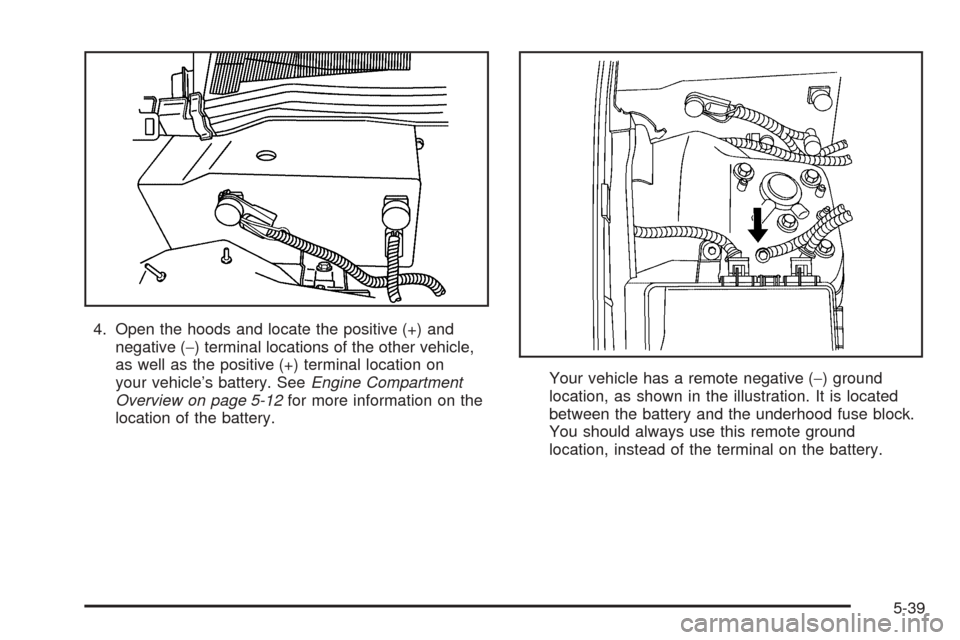
4. Open the hoods and locate the positive (+) and
negative (−) terminal locations of the other vehicle,
as well as the positive (+) terminal location on
your vehicle’s battery. SeeEngine Compartment
Overview on page 5-12for more information on the
location of the battery.Your vehicle has a remote negative (−) ground
location, as shown in the illustration. It is located
between the battery and the underhood fuse block.
You should always use this remote ground
location, instead of the terminal on the battery.
5-39
Page 336 of 446
{CAUTION:
An electric fan can start up even when the
engine is not running and can injure you. Keep
hands, clothing and tools away from any
underhood electric fan.
{CAUTION:
Using a match near a battery can cause battery
gas to explode. People have been hurt doing
this, and some have been blinded. Use a
ashlight if you need more light.
Be sure the battery has enough water. You do
not need to add water to the battery installed
in your new vehicle. But if a battery has ller
caps, be sure the right amount of uid is there.
CAUTION: (Continued)
CAUTION: (Continued)
If it is low, add water to take care of that rst.
If you do not, explosive gas could be present.
Battery uid contains acid that can burn you.
Do not get it on you. If you accidentally get it
in your eyes or on your skin, ush the place
with water and get medical help immediately.
{CAUTION:
Fans or other moving engine parts can injure
you badly. Keep your hands away from moving
parts once the engine is running.
5. Check that the jumper cables do not have loose or
missing insulation. If they do, you could get a
shock. The vehicles could be damaged too.
5-40
Page 337 of 446
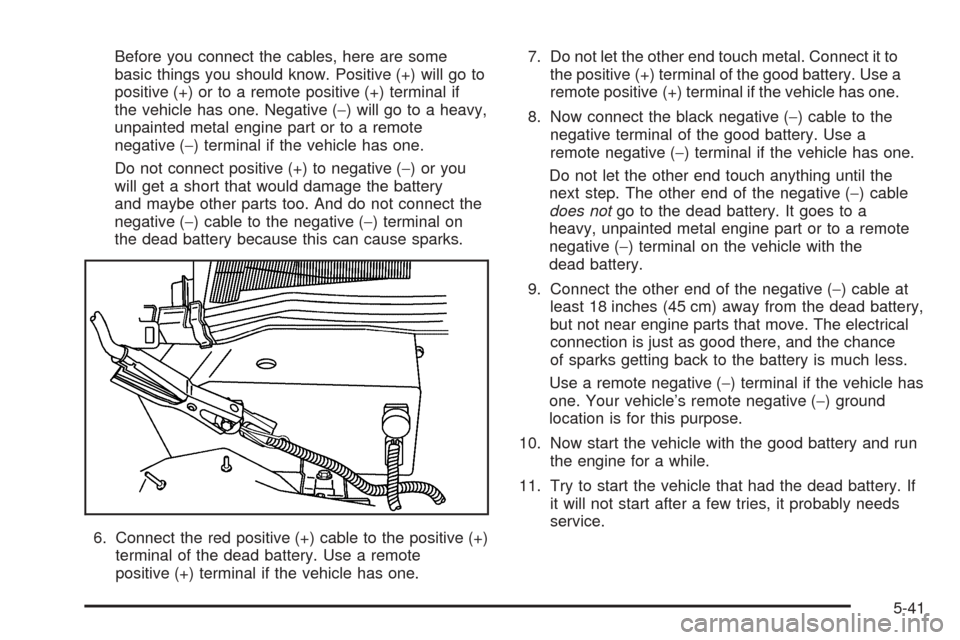
Before you connect the cables, here are some
basic things you should know. Positive (+) will go to
positive (+) or to a remote positive (+) terminal if
the vehicle has one. Negative (−) will go to a heavy,
unpainted metal engine part or to a remote
negative (−) terminal if the vehicle has one.
Do not connect positive (+) to negative (−)oryou
will get a short that would damage the battery
and maybe other parts too. And do not connect the
negative (−) cable to the negative (−) terminal on
the dead battery because this can cause sparks.
6. Connect the red positive (+) cable to the positive (+)
terminal of the dead battery. Use a remote
positive (+) terminal if the vehicle has one.7. Do not let the other end touch metal. Connect it to
the positive (+) terminal of the good battery. Use a
remote positive (+) terminal if the vehicle has one.
8. Now connect the black negative (−) cable to the
negative terminal of the good battery. Use a
remote negative (−) terminal if the vehicle has one.
Do not let the other end touch anything until the
next step. The other end of the negative (−) cable
does notgo to the dead battery. It goes to a
heavy, unpainted metal engine part or to a remote
negative (−) terminal on the vehicle with the
dead battery.
9. Connect the other end of the negative (−) cable at
least 18 inches (45 cm) away from the dead battery,
but not near engine parts that move. The electrical
connection is just as good there, and the chance
of sparks getting back to the battery is much less.
Use a remote negative (−) terminal if the vehicle has
one. Your vehicle’s remote negative (−) ground
location is for this purpose.
10. Now start the vehicle with the good battery and run
the engine for a while.
11. Try to start the vehicle that had the dead battery. If
it will not start after a few tries, it probably needs
service.
5-41
Page 338 of 446
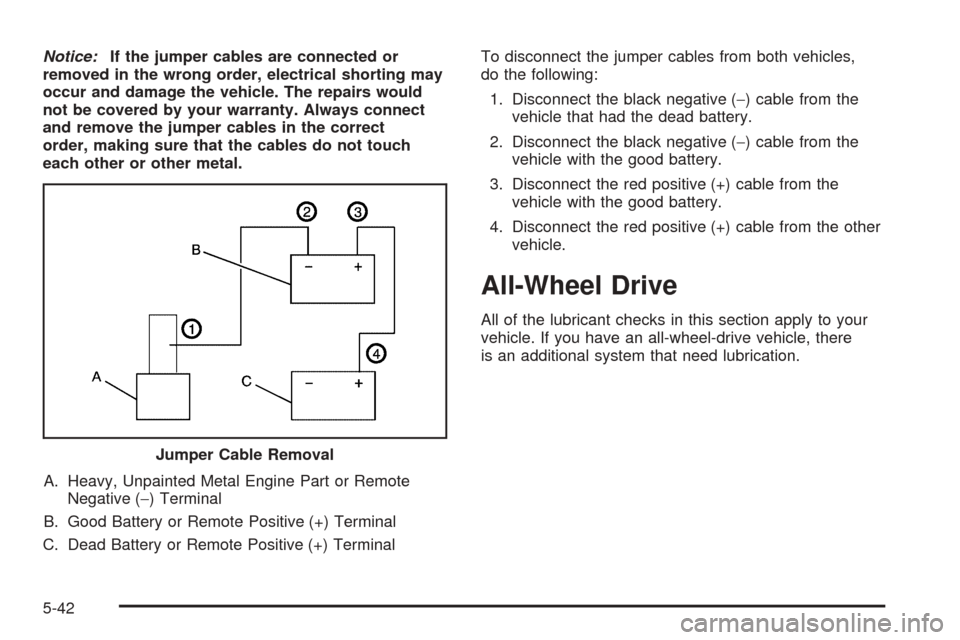
Notice:If the jumper cables are connected or
removed in the wrong order, electrical shorting may
occur and damage the vehicle. The repairs would
not be covered by your warranty. Always connect
and remove the jumper cables in the correct
order, making sure that the cables do not touch
each other or other metal.
A. Heavy, Unpainted Metal Engine Part or Remote
Negative (−) Terminal
B. Good Battery or Remote Positive (+) Terminal
C. Dead Battery or Remote Positive (+) TerminalTo disconnect the jumper cables from both vehicles,
do the following:
1. Disconnect the black negative (−) cable from the
vehicle that had the dead battery.
2. Disconnect the black negative (−) cable from the
vehicle with the good battery.
3. Disconnect the red positive (+) cable from the
vehicle with the good battery.
4. Disconnect the red positive (+) cable from the other
vehicle.
All-Wheel Drive
All of the lubricant checks in this section apply to your
vehicle. If you have an all-wheel-drive vehicle, there
is an additional system that need lubrication.
Jumper Cable Removal
5-42
Page 395 of 446
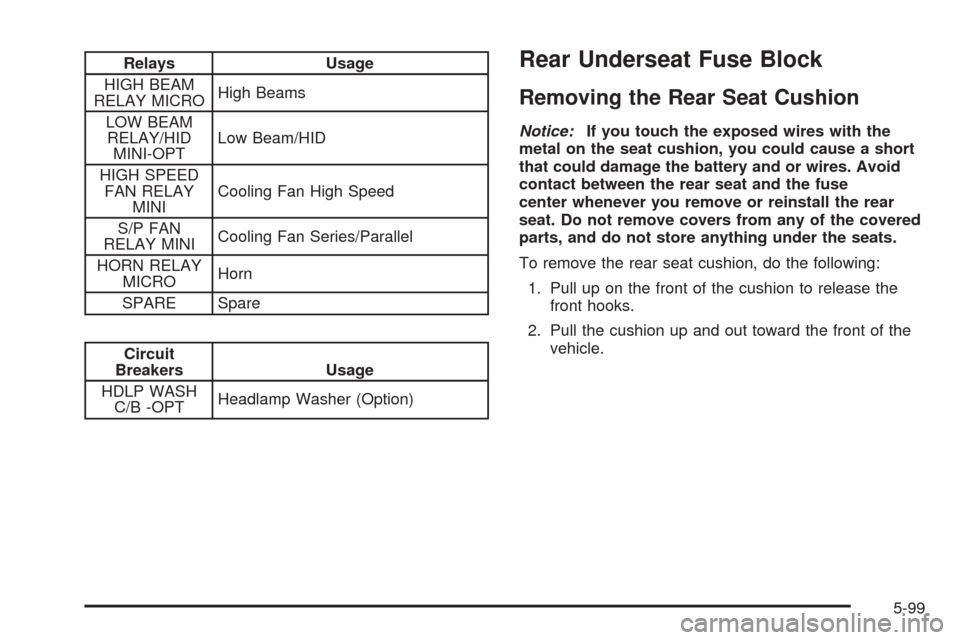
Relays Usage
HIGH BEAM
RELAY MICROHigh Beams
LOW BEAM
RELAY/HID
MINI-OPTLow Beam/HID
HIGH SPEED
FAN RELAY
MINICooling Fan High Speed
S/P FAN
RELAY MINICooling Fan Series/Parallel
HORN RELAY
MICROHorn
SPARE Spare
Circuit
Breakers Usage
HDLP WASH
C/B -OPTHeadlamp Washer (Option)
Rear Underseat Fuse Block
Removing the Rear Seat Cushion
Notice:If you touch the exposed wires with the
metal on the seat cushion, you could cause a short
that could damage the battery and or wires. Avoid
contact between the rear seat and the fuse
center whenever you remove or reinstall the rear
seat. Do not remove covers from any of the covered
parts, and do not store anything under the seats.
To remove the rear seat cushion, do the following:
1. Pull up on the front of the cushion to release the
front hooks.
2. Pull the cushion up and out toward the front of the
vehicle.
5-99
Page 400 of 446
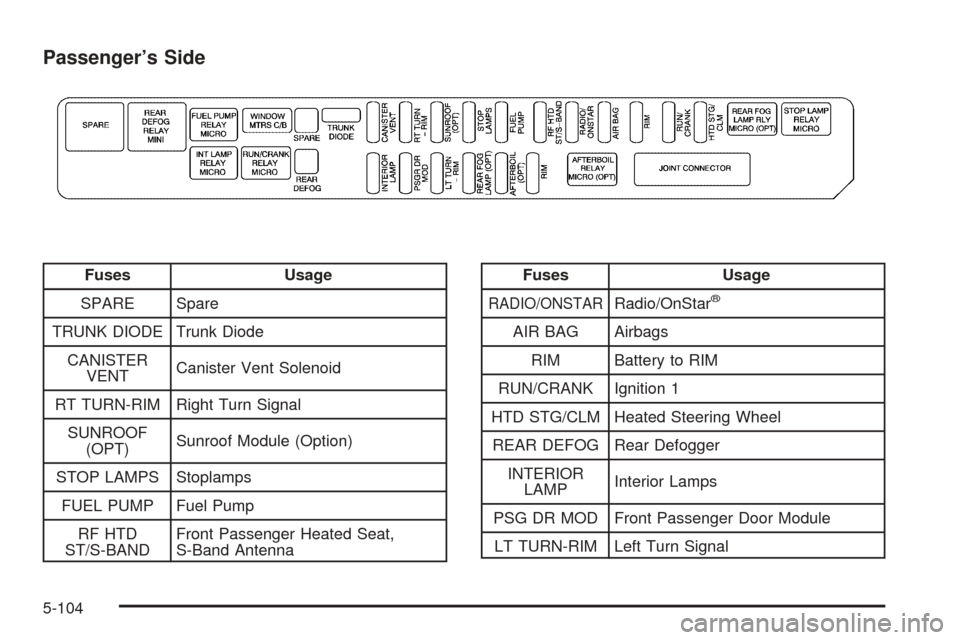
Passenger’s Side
Fuses Usage
SPARE Spare
TRUNK DIODE Trunk Diode
CANISTER
VENTCanister Vent Solenoid
RT TURN-RIM Right Turn Signal
SUNROOF
(OPT)Sunroof Module (Option)
STOP LAMPS Stoplamps
FUEL PUMP Fuel Pump
RF HTD
ST/S-BANDFront Passenger Heated Seat,
S-Band AntennaFuses Usage
RADIO/ONSTARRadio/OnStar®
AIR BAG Airbags
RIM Battery to RIM
RUN/CRANK Ignition 1
HTD STG/CLM Heated Steering Wheel
REAR DEFOG Rear Defogger
INTERIOR
LAMPInterior Lamps
PSG DR MOD Front Passenger Door Module
LT TURN-RIM Left Turn Signal
5-104
Page 426 of 446
Emergency Road Service is performed on site for the
following situations:
Towing Service
Battery Jump Starting
Lock Out Assistance
Fuel Delivery
Flat Tire Change (Covers change only)
Trip Interruption — If your trip is interrupted due to
a warranty failure, incidental expenses may be
reimbursed during the 48 months/50,000 miles
(80 000 km) warranty period. Items covered
are hotel, meals, and rental car.
Roadside Service Availability
Wherever you drive in the United States or Canada, an
advisor is available to assist you over the phone. A
dealer technician, if available, can travel to your location
within a 30 mile (50 km) radius of a participating
Cadillac dealership. If beyond this radius, we will
arrange to have your car towed to the nearest
Cadillac dealership.
Reaching Roadside Service
Dial the toll-free Roadside Service number:
1-800-882-1112. A Roadside Service Advisor will assist
you and request the following information:
A description of the problem
Name, home address, home telephone number
Location of your Cadillac and number you are
calling from
The model year, Vehicle Identication Number
(VIN), mileage, and date of delivery
Roadside Service for the Hearing or
Speech Impaired
Roadside Service is prepared to assist owners who
have hearing difficulties or are speech impaired. Cadillac
has installed special telecommunication devices
called Text Telephone (TTY) in the Roadside Service
Center.
Any customer who has access to a (TTY) or a
conventional teletypewriter can communicate with
Cadillac by dialing from the United States or Canada
1-888-889-2438 — daily, 24 hours.
7-6
Page 434 of 446

Audio System(s) (cont.)
Theft-Deterrent Feature...............................3-115
Understanding Radio Reception...................3-117
XM™ Satellite Radio Antenna System...........3-118
Automatic Transmission
Fluid..........................................................5-21
Operation...................................................2-26
B
Battery..........................................................5-37
Exterior Lighting Battery Saver......................3-41
Inadvertent Power Saver..............................3-43
Load Management.......................................3-42
Before Leaving on a Long Trip.........................4-22
Brake
Anti-Lock Brake System (ABS)........................ 4-6
Emergencies................................................ 4-8
Panic Assist................................................4-10
Parking......................................................2-29
System Warning Light..................................3-64
Brakes..........................................................5-34
Braking........................................................... 4-5
Braking in Emergencies..................................... 4-8
Break-In, New Vehicle.....................................2-22
Bulb Replacement...........................................5-48
Back-Up Lamps...........................................5-50
Front Turn Signal Lamps..............................5-49
Halogen Bulbs............................................5-49Bulb Replacement (cont.)
Headlamp Aiming........................................5-46
High Intensity Discharge (HID) Lighting...........5-48
Replacement Bulbs......................................5-51
Sidemarker Lamps.......................................5-50
Buying New Tires...........................................5-68
C
California Fuel.................................................. 5-6
Canadian Owners................................................ ii
Capacities and Specications..........................5-106
Carbon Monoxide...................2-14, 2-33, 4-25, 4-37
Care of
Safety Belts................................................5-88
Your CD Player.........................................3-118
Your CDs .................................................3-118
Center Console Storage Area...........................2-45
Chains, Tire...................................................5-73
Charging System Light....................................3-64
Check
Engine Light...............................................3-68
Checking Things Under the Hood......................5-10
Chemical Paint Spotting...................................5-92
Child Restraints
Child Restraint Systems...............................1-32
Infants and Young Children...........................1-28
Lower Anchorages and Top Tethers for
Children (LATCH System)..........................1-38
2