fuel CADILLAC STS 2007 1.G User Guide
[x] Cancel search | Manufacturer: CADILLAC, Model Year: 2007, Model line: STS, Model: CADILLAC STS 2007 1.GPages: 560, PDF Size: 2.92 MB
Page 259 of 560
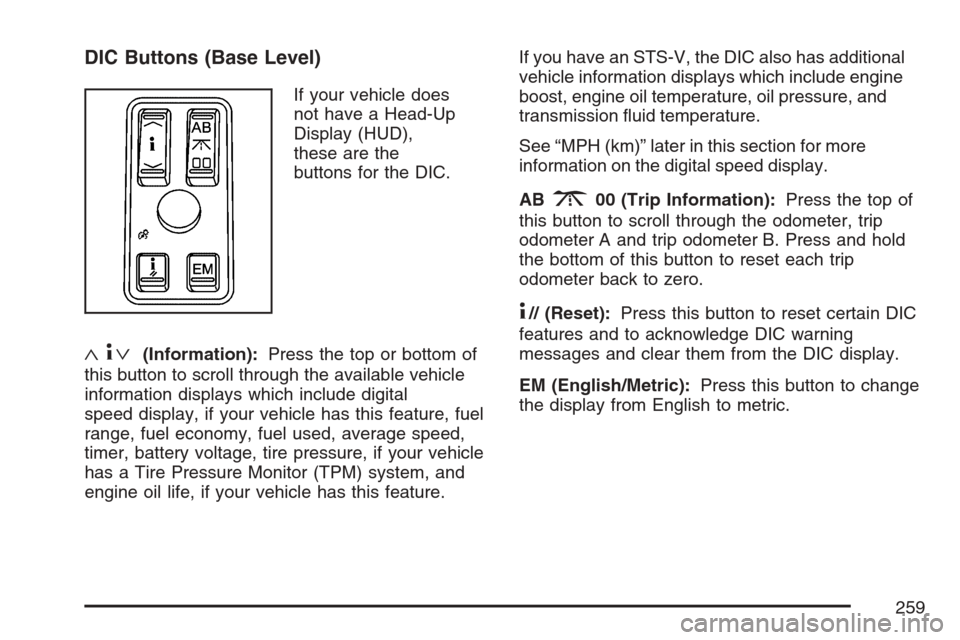
DIC Buttons (Base Level)
If your vehicle does
not have a Head-Up
Display (HUD),
these are the
buttons for the DIC.
«4ª(Information):Press the top or bottom of
this button to scroll through the available vehicle
information displays which include digital
speed display, if your vehicle has this feature, fuel
range, fuel economy, fuel used, average speed,
timer, battery voltage, tire pressure, if your vehicle
has a Tire Pressure Monitor (TPM) system, and
engine oil life, if your vehicle has this feature.If you have an STS-V, the DIC also has additional
vehicle information displays which include engine
boost, engine oil temperature, oil pressure, and
transmission uid temperature.
See “MPH (km)” later in this section for more
information on the digital speed display.
AB
300 (Trip Information):Press the top of
this button to scroll through the odometer, trip
odometer A and trip odometer B. Press and hold
the bottom of this button to reset each trip
odometer back to zero.
4// (Reset):Press this button to reset certain DIC
features and to acknowledge DIC warning
messages and clear them from the DIC display.
EM (English/Metric):Press this button to change
the display from English to metric.
259
Page 260 of 560
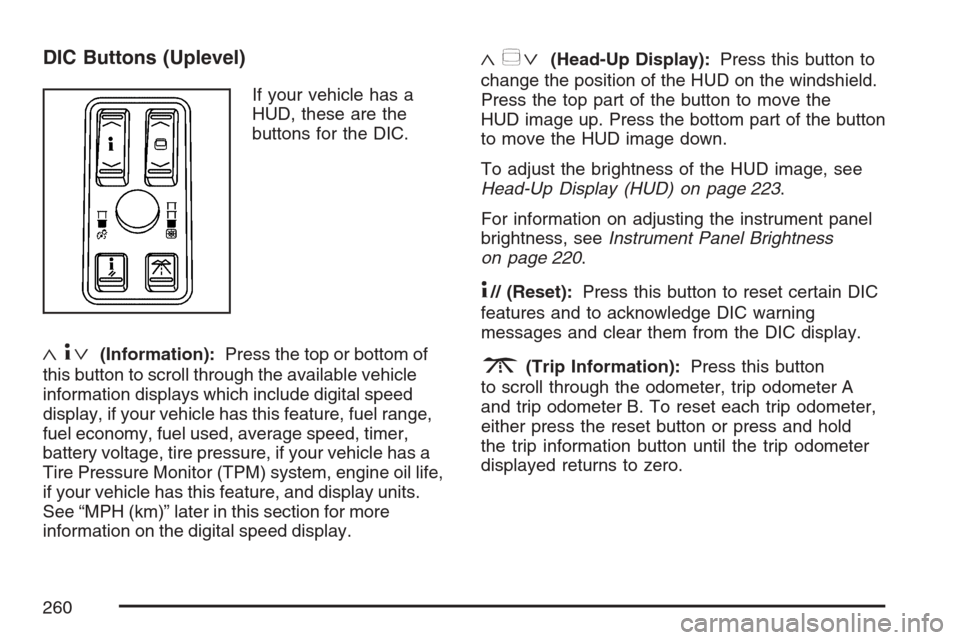
DIC Buttons (Uplevel)
If your vehicle has a
HUD, these are the
buttons for the DIC.
«4ª(Information):Press the top or bottom of
this button to scroll through the available vehicle
information displays which include digital speed
display, if your vehicle has this feature, fuel range,
fuel economy, fuel used, average speed, timer,
battery voltage, tire pressure, if your vehicle has a
Tire Pressure Monitor (TPM) system, engine oil life,
if your vehicle has this feature, and display units.
See “MPH (km)” later in this section for more
information on the digital speed display.
«~ª(Head-Up Display):Press this button to
change the position of the HUD on the windshield.
Press the top part of the button to move the
HUD image up. Press the bottom part of the button
to move the HUD image down.
To adjust the brightness of the HUD image, see
Head-Up Display (HUD) on page 223.
For information on adjusting the instrument panel
brightness, seeInstrument Panel Brightness
on page 220.
4// (Reset):Press this button to reset certain DIC
features and to acknowledge DIC warning
messages and clear them from the DIC display.
3(Trip Information):Press this button
to scroll through the odometer, trip odometer A
and trip odometer B. To reset each trip odometer,
either press the reset button or press and hold
the trip information button until the trip odometer
displayed returns to zero.
260
Page 261 of 560

Information Display Menu Items
The following display menu items can be displayed
by pressing the information button.
MPH (km/h)
If your vehicle has this display, it shows the
vehicle’s speed digitally in either miles per
hour (mph) or kilometers per hour (km/h).
MILES RANGE (km RANGE)
This display shows the approximate number of
remaining miles (mi) or kilometers (km) you
can drive without relling the fuel tank. This
estimate is based on the current driving conditions
and will change if the driving conditions change.
For example, if you are driving in traffic making
frequent stops, the display may read one number,
but if you enter the freeway, the number may
change even though you still have the same
amount of fuel in the fuel tank. This is because
different driving conditions produce different
fuel economies. Generally, freeway driving
produces better fuel economy than city driving.
Once the range drops below about 40 miles
(64 km) remaining, the display will show
LOW RANGE.If your vehicle is low on fuel, the Fuel Level Low
message will be displayed. See “Fuel Level
Low” underDIC Warnings and Messages on
page 264for more information.
MPG AVG (L/100 km AVG)
This display shows the approximate average
miles per gallon (mpg) or liters per 100 kilometers
(L/100 km). This number is calculated based
on the number of mpg (L/100 km) recorded since
the last time this display was reset. To reset
MPG AVG, press the reset button. The display
will return to zero.
MPG INST (L/100 km INST)
This display shows the current fuel economy. This
number reects only the fuel economy that the
vehicle has right now and will change frequently as
driving conditions change. Unlike average fuel
economy, this display cannot be reset.
GAL FUEL USED (L FUEL USED)
This display shows the number of gallons (gal) or
liters (L) of fuel used since the last reset of this
display. To reset GAL FUEL USED, press
the reset button. The display will return to zero.
261
Page 267 of 560
To help the generator recharge the battery quickly,
you can reduce the load on the electrical system
by turning off the accessories.
The normal battery voltage range is
11.5 to 15.5 volts. You can monitor battery voltage
on the DIC by pressing the information button
until you nd BATTERY VOLTS.
CHANGE ENGINE OIL SOON
This message displays when service is required
for your vehicle. See your dealer. SeeEngine
Oil on page 380andScheduled Maintenance on
page 505for more information.
When you reset the CHANGE ENGINE OIL
SOON message by clearing it from the display,
you still must reset the engine oil life system
separately. For more information on resetting the
engine oil life system, seeEngine Oil Life
System on page 383.
CHECK BRAKE FLUID
This message displays if the ignition is on to
inform the driver that the brake uid level is low.
Have the brake system serviced by your dealer as
soon as possible. SeeBrake System Warning
Light on page 248for more information.
CHECK GAS CAP
This message displays when the fuel cap has not
been fully tightened. Recheck the fuel cap to
ensure that it is on and tightened properly.
CHECK TIRE PRESSURE
If your vehicle has a Tire Pressure Monitor (TPM)
system, this message displays when the tire
pressure in one of the tires needs to be checked.
SeeDIC Controls and Displays on page 258
for more information on checking your vehicle’s
tire pressures. If a tire pressure message appears
on the DIC, stop as soon as you can. Have the
tire pressures checked and set to those shown on
the Tire Loading Information label. SeeTire
Pressure Monitor System on page 433and
Ination - Tire Pressure on page 431for more
information. If the tire pressure is low, the low tire
pressure warning light comes on. SeeLow Tire
Pressure Warning Light on page 249.
267
Page 271 of 560

FUEL LEVEL LOW
This symbol appears
with this message.
This message displays when your vehicle is low
on fuel. Rell the fuel tank as soon as possible.
A single chime sounds when this message is
displayed.
HOOD AJAR
This symbol appears
with this message.
This message displays if the hood was not closed
completely. Make sure that the hood is closed
completely.
ICE POSSIBLE
This message displays when the outside
temperature is cold enough to create icy road
conditions. Adjust your driving accordingly.
KEY FOB BATTERY LOW
This message displays when the battery in the
keyless access transmitter is low. Replace
the battery in the transmitter. See “Battery
Replacement” underKeyless Access System
Operation on page 88.
LEFT REAR DOOR AJAR
This symbol appears
with this message.
This message displays if the driver’s side rear
door was not closed completely. Make sure that
the door is closed completely.
271
Page 341 of 560

Here are some things you can check before a trip:
Windshield Washer Fluid:Is the reservoir
full? Are all windows clean inside and outside?
Wiper Blades:Are they in good shape?
Fuel, Engine Oil, Other Fluids:Have you
checked all levels?
Lamps:Are they all working? Are the
lenses clean?
Tires:They are vitally important to a safe,
trouble-free trip. Is the tread good enough
for long-distance driving? Are the tires
all inated to the recommended pressure?
Weather Forecasts:What is the weather
outlook along your route? Should you
delay your trip a short time to avoid a major
storm system?
Maps:Do you have up-to-date maps?
Highway Hypnosis
Is there actually such a condition as highway
hypnosis? Or is it just plain falling asleep at the
wheel? Call it highway hypnosis, lack of
awareness, or whatever.
There is something about an easy stretch of road
with the same scenery, along with the hum of the
tires on the road, the drone of the engine, and the
rush of the wind against the vehicle that can make
you sleepy. Do not let it happen to you! If it does,
your vehicle can leave the road in less than a
second, and you could crash and be injured.
What can you do about highway hypnosis?
First, be aware that it can happen.
Then here are some tips:
Make sure your vehicle is well ventilated, with
a comfortably cool interior.
Keep your eyes moving. Scan the road ahead
and to the sides. Check your rearview mirrors
and your instruments frequently.
If you get sleepy, pull off the road into a rest,
service, or parking area and take a nap, get
some exercise, or both. For safety, treat
drowsiness on the highway as an emergency.
341
Page 347 of 560

You can run the engine to keep warm, but be
careful.
{CAUTION:
Snow can trap exhaust gases under your
vehicle. This can cause deadly CO
(carbon monoxide) gas to get inside. CO
could overcome you and kill you. You
cannot see it or smell it, so you might not
know it is in your vehicle. Clear away
snow from around the base of your
vehicle, especially any that is blocking the
exhaust pipe. And check around again
from time to time to be sure snow does
not collect there.
Open a window just a little on the side of
the vehicle that is away from the wind.
This will help keep CO out.
Run your engine only as long as you must. This
saves fuel. When you run the engine, make it go a
little faster than just idle. That is, push the
accelerator slightly. This uses less fuel for the
heat that you get and it keeps the battery charged.
347
Page 348 of 560

You will need a well-charged battery to restart the
vehicle, and possibly for signaling later on with
your headlamps. Let the heater run for a while.
Then, shut the engine off and close the window
almost all the way to preserve the heat. Start
the engine again and repeat this only when you
feel really uncomfortable from the cold. But do it as
little as possible. Preserve the fuel as long as
you can. To help keep warm, you can get out of
the vehicle and do some fairly vigorous exercises
every half hour or so until help comes.
If Your Vehicle is Stuck in Sand,
Mud, Ice, or Snow
In order to free your vehicle when it is stuck,
you need to spin the wheels, but you do not
want to spin the wheels too fast. The method
known as rocking can help you get out when you
are stuck, but you must use caution.
{CAUTION:
If you let your vehicle’s tires spin at high
speed, they can explode, and you or
others could be injured. And, the
transmission or other parts of the vehicle
can overheat. That could cause an engine
compartment re or other damage. When
you are stuck, spin the wheels as little as
possible. Do not spin the wheels above
35 mph (55 km/h) as shown on the
speedometer.
Notice:Spinning the wheels can destroy
parts of your vehicle as well as the tires. If you
spin the wheels too fast while shifting the
transmission back and forth, you can destroy
the transmission.
For information about using tire chains on your
vehicle, seeTire Chains on page 447.
348
Page 354 of 560

The GVWR includes the weight of the vehicle, all
occupants, fuel, and cargo. The Certication
label also shows the maximum weights for the
front and rear axles, called the Gross Axle Weight
Rating (GAWR). Never exceed the GVWR or
the GAWR for either the front or rear axle.
{CAUTION:
Do not load your vehicle any heavier than
the Gross Vehicle Weight Rating (GVWR),
or either the maximum front or rear Gross
Axle Weight Rating (GAWR). If you do,
parts on your vehicle can break, and it
can change the way your vehicle handles.
These could cause you to lose control
and crash. Also, overloading can shorten
the life of your vehicle.
Notice:Overloading your vehicle may cause
damage. Repairs would not be covered by your
warranty. Do not overload your vehicle.If you put things inside your vehicle, like suitcases,
tools, packages, or anything else, they will go
as fast as the vehicle goes. If you have to stop or
turn quickly, or if there is a crash, they will
keep going.
{CAUTION:
Things you put inside your vehicle can
strike and injure people in a sudden stop
or turn, or in a crash.
Put things in the trunk of your vehicle.
In a trunk, put them as far forward as
you can. Try to spread the weight
evenly.
Never stack heavier things, like
suitcases, inside the vehicle so that
some of them are above the tops of
the seats.
Do not leave an unsecured child
restraint in your vehicle.
When you carry something inside the
vehicle, secure it whenever you can.
Do not leave a seat folded down unless
you need to.
354
Page 359 of 560
Service........................................................ 362
Accessories and Modications................... 363
California Proposition 65 Warning.............. 363
Doing Your Own Service Work.................. 364
Adding Equipment to the Outside of Your
Vehicle................................................... 365
Fuel............................................................. 365
Gasoline Octane........................................ 365
Gasoline Specications.............................. 366
California Fuel........................................... 366
Additives................................................... 367
Fuels in Foreign Countries........................ 368
Filling the Tank......................................... 368
Filling a Portable Fuel Container............... 371
Checking Things Under the Hood.............. 372
Hood Release........................................... 372
Engine Compartment Overview.................. 373
Engine Oil................................................. 380
Engine Oil Life System.............................. 383
Supercharger Oil....................................... 385
Engine Air Cleaner/Filter............................ 386
Automatic Transmission Fluid.................... 388Engine Coolant.......................................... 389
Coolant Surge Tank Pressure Cap............ 393
Engine Overheating................................... 393
Overheated Engine Protection
Operating Mode..................................... 395
Cooling System......................................... 396
Power Steering Fluid ................................. 403
Windshield Washer Fluid........................... 404
Brakes...................................................... 405
Battery...................................................... 408
Jump Starting............................................ 408
All-Wheel Drive........................................... 414
Rear Axle.................................................... 416
Front Axle................................................... 417
Bulb Replacement....................................... 417
High Intensity Discharge (HID) Lighting..... 418
Halogen Bulbs........................................... 418
Back-Up Lamps......................................... 418
Replacement Bulbs................................... 419
Windshield Replacement............................ 419
Windshield Wiper Blade Replacement....... 419
Section 5 Service and Appearance Care
359