maintenance CADILLAC STS 2007 1.G User Guide
[x] Cancel search | Manufacturer: CADILLAC, Model Year: 2007, Model line: STS, Model: CADILLAC STS 2007 1.GPages: 560, PDF Size: 2.92 MB
Page 267 of 560
To help the generator recharge the battery quickly,
you can reduce the load on the electrical system
by turning off the accessories.
The normal battery voltage range is
11.5 to 15.5 volts. You can monitor battery voltage
on the DIC by pressing the information button
until you nd BATTERY VOLTS.
CHANGE ENGINE OIL SOON
This message displays when service is required
for your vehicle. See your dealer. SeeEngine
Oil on page 380andScheduled Maintenance on
page 505for more information.
When you reset the CHANGE ENGINE OIL
SOON message by clearing it from the display,
you still must reset the engine oil life system
separately. For more information on resetting the
engine oil life system, seeEngine Oil Life
System on page 383.
CHECK BRAKE FLUID
This message displays if the ignition is on to
inform the driver that the brake uid level is low.
Have the brake system serviced by your dealer as
soon as possible. SeeBrake System Warning
Light on page 248for more information.
CHECK GAS CAP
This message displays when the fuel cap has not
been fully tightened. Recheck the fuel cap to
ensure that it is on and tightened properly.
CHECK TIRE PRESSURE
If your vehicle has a Tire Pressure Monitor (TPM)
system, this message displays when the tire
pressure in one of the tires needs to be checked.
SeeDIC Controls and Displays on page 258
for more information on checking your vehicle’s
tire pressures. If a tire pressure message appears
on the DIC, stop as soon as you can. Have the
tire pressures checked and set to those shown on
the Tire Loading Information label. SeeTire
Pressure Monitor System on page 433and
Ination - Tire Pressure on page 431for more
information. If the tire pressure is low, the low tire
pressure warning light comes on. SeeLow Tire
Pressure Warning Light on page 249.
267
Page 360 of 560

Tires............................................................ 421
Winter Tires.............................................. 422
Tire Sidewall Labeling............................... 423
Tire Terminology and Denitions............... 426
Run-Flat Tires (STS-V).............................. 429
Ination - Tire Pressure............................. 431
High-Speed Operation............................... 432
Tire Pressure Monitor System................... 433
Tire Inspection and Rotation...................... 438
When It Is Time for New Tires.................. 440
Buying New Tires...................................... 441
Different Size Tires and Wheels................ 443
Uniform Tire Quality Grading..................... 444
Wheel Alignment and Tire Balance............ 445
Wheel Replacement.................................. 445
Tire Chains............................................... 447
Lifting Your Vehicle (STS-V)...................... 448
If a Tire Goes Flat.................................... 451
Tire Inator Kit.......................................... 452
Changing a Flat Tire................................. 464
Removing the Spare Tire and Tools.......... 465
Removing the Flat Tire and Installing
the Spare Tire....................................... 466Storing a Flat or Spare Tire and Tools...... 473
Compact Spare Tire.................................. 475
Appearance Care........................................ 476
Cleaning the Inside of Your Vehicle.......... 476
Fabric/Carpet............................................. 477
Leather...................................................... 478
Instrument Panel, Vinyl, and Other
Plastic Surfaces..................................... 479
Wood Panels............................................. 479
Speaker Covers........................................ 479
Care of Safety Belts.................................. 479
Weatherstrips............................................ 480
Washing Your Vehicle............................... 480
Cleaning Exterior Lamps/Lenses................ 480
Finish Care............................................... 481
Windshield and Wiper Blades.................... 481
Aluminum or Chrome-Plated Wheels......... 482
Tires......................................................... 483
Sheet Metal Damage................................. 483
Finish Damage.......................................... 483
Underbody Maintenance............................ 483
Chemical Paint Spotting............................ 484
Vehicle Care/Appearance Materials............ 484
Section 5 Service and Appearance Care
360
Page 364 of 560
Doing Your Own Service Work
{CAUTION:
You can be injured and your vehicle could
be damaged if you try to do service work
on a vehicle without knowing enough
about it.
Be sure you have sufficient knowledge,
experience, the proper replacement
parts, and tools before you attempt any
vehicle maintenance task.
Be sure to use the proper nuts, bolts,
and other fasteners. English and metric
fasteners can be easily confused. If you
use the wrong fasteners, parts can later
break or fall off. You could be hurt.If you want to do some of your own service work,
you should use the proper service manual. It
tells you much more about how to service your
vehicle than this manual can. To order the proper
service manual, seeService Publications
Ordering Information on page 543.
Your vehicle has an airbag system. Before
attempting to do your own service work, see
Servicing Your Airbag-Equipped Vehicle on
page 78.
You should keep a record with all parts receipts
and list the mileage and the date of any service
work you perform. SeeMaintenance Record
on page 521.
364
Page 365 of 560

Adding Equipment to the Outside
of Your Vehicle
Things you might add to the outside of your
vehicle can affect the airow around it. This may
cause wind noise and affect windshield washer
performance. Check with your dealer before
adding equipment to the outside of your vehicle.
Fuel
Use of the recommended fuel is an important part
of the proper maintenance of your vehicle. To
help keep your engine clean and maintain optimum
vehicle performance, GM recommends the use
of gasoline advertised as TOP TIER Detergent
Gasoline.
The 8th digit of your Vehicle Identication
Number (VIN) shows the code letter or number
that identies your engine. You will nd the VIN at
the top left of the instrument panel. SeeVehicle
Identication Number (VIN) on page 485.
Gasoline Octane
If your vehicle has the 3.6L V6 engine
(VIN Code 7), use regular unleaded gasoline with
a posted octane rating of 87 or higher. For
best performance or trailer towing, you may
choose to use middle grade 89 octane unleaded
gasoline. If the octane rating is less than 87,
you may notice an audible knocking noise when
you drive, commonly referred to as spark knock. If
this occurs, use a gasoline rated at 87 octane
or higher as soon as possible. If you are using
gasoline rated at 87 octane or higher and you hear
heavy knocking, your engine needs service.
If your vehicle has the 4.6L V8 engine
(VIN Code A), use premium unleaded gasoline with
a posted octane rating of 91 or higher. You may
also use regular unleaded gasoline rated at
87 octane or higher, but your vehicle’s acceleration
may be slightly reduced, and you may notice a
slight audible knocking noise, commonly referred to
as spark knock.
365
Page 385 of 560

What to Do with Used Oil
Used engine oil contains certain elements that may
be unhealthy for your skin and could even cause
cancer. Do not let used oil stay on your skin for very
long. Clean your skin and nails with soap and
water, or a good hand cleaner. Wash or properly
dispose of clothing or rags containing used engine
oil. See the manufacturer’s warnings about the use
and disposal of oil products.
Used oil can be a threat to the environment. If you
change your own oil, be sure to drain all the oil from
the lter before disposal. Never dispose of oil by
putting it in the trash, pouring it on the ground, into
sewers, or into streams or bodies of water. Instead,
recycle it by taking it to a place that collects used
oil. If you have a problem properly disposing of your
used oil, ask your dealer, a service station, or a
local recycling center for help.
Supercharger Oil
Because they are technically qualied and have
the proper tools, you should have your dealer
perform this maintenance.
When to Check
SeeAdditional Required Services on page 508for
when the oil level should be checked.
What Kind of Oil to Use
Use only the recommended supercharger oil. See
Recommended Fluids and Lubricants on
page 516.
385
Page 386 of 560
Engine Air Cleaner/Filter
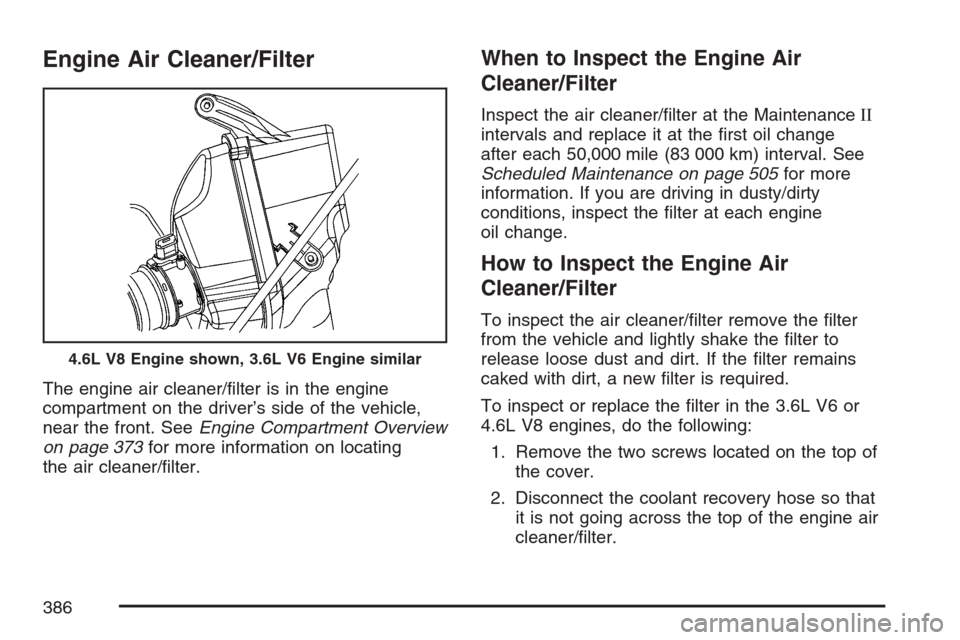
The engine air cleaner/lter is in the engine
compartment on the driver’s side of the vehicle,
near the front. SeeEngine Compartment Overview
on page 373for more information on locating
the air cleaner/lter.
When to Inspect the Engine Air
Cleaner/Filter
Inspect the air cleaner/lter at the MaintenanceII
intervals and replace it at the rst oil change
after each 50,000 mile (83 000 km) interval. See
Scheduled Maintenance on page 505for more
information. If you are driving in dusty/dirty
conditions, inspect the lter at each engine
oil change.
How to Inspect the Engine Air
Cleaner/Filter
To inspect the air cleaner/lter remove the lter
from the vehicle and lightly shake the lter to
release loose dust and dirt. If the lter remains
caked with dirt, a new lter is required.
To inspect or replace the lter in the 3.6L V6 or
4.6L V8 engines, do the following:
1. Remove the two screws located on the top of
the cover.
2. Disconnect the coolant recovery hose so that
it is not going across the top of the engine air
cleaner/lter.
4.6L V8 Engine shown, 3.6L V6 Engine similar
386
Page 387 of 560

3. Loosen the clamp and remove the duct from
the passenger’s side of the engine air
cleaner/lter.
4. The two sides of the airbox are hinged at the
bottom. Open the airbox by pushing the top of
the airbox cover toward the engine.
5. Remove the air lter by lifting it straight up
through the opening in the airbox.
6. Inspect or replace the engine air cleaner/lter.
SeeNormal Maintenance Replacement Parts
on page 518for the correct part number
for the lter.
7. Reinstall the cover by reversing
Steps 1 through 4.
If your vehicle has the 4.4L V8 STS-V engine,
there is a special procedure for checking
and changing the air cleaner/lter. Because this
procedure is difficult, you should have this done at
the dealership service department. Contact your
dealer for additional information or the procedure
can be found in the service manual. To purchase
a service manual, seeService Publications
Ordering Information on page 543.
{CAUTION:
Operating the engine with the air cleaner/
lter off can cause you or others to be
burned. The air cleaner not only cleans the
air; it helps to stop ames if the engine
backres. If it is not there and the engine
backres, you could be burned. Do not
drive with it off, and be careful working on
the engine with the air cleaner/lter off.
Notice:If the air cleaner/lter is off, a backre
can cause a damaging engine re. And, dirt
can easily get into your engine, which will
damage it. Always have the air cleaner/lter in
place when you are driving.
387
Page 389 of 560
Engine Coolant
The cooling system in your vehicle is lled with
DEX-COOL®engine coolant. This coolant is
designed to remain in your vehicle for ve years or
150,000 miles (240 000 km), whichever occurs
rst, if you add only DEX-COOL
®extended
life coolant.
The following explains your cooling system and
how to add coolant when it is low. If you have
a problem with engine overheating, seeEngine
Overheating on page 393.
A 50/50 mixture of clean, drinkable water and
DEX-COOL
®coolant will:
Give freezing protection down to
−34°F (−37°C).
Give boiling protection up to 265°F (129°C).
Protect against rust and corrosion.
Help keep the proper engine temperature.
Let the warning lights and gages work as
they should.
Notice:Using coolant other than
DEX-COOL
®may cause premature engine,
heater core, or radiator corrosion. In addition,
the engine coolant may require changing
sooner, at the rst maintenance service after
each 30,000 miles (50 000 km) or 24 months,
whichever occurs rst. Any repairs
would not be covered by your warranty.
Always use DEX-COOL
®(silicate-free)
coolant in your vehicle.
389
Page 406 of 560

What to Add
When you do need brake uid, DOT-3 brake uid
is recommended for use. DOT-4 brake uid is
also compatible with your vehicle’s brake system
parts. However, if you choose to use DOT-4
uid, it is recommended that you ush your brake
hydraulic system and rell it with new DOT-4
uid at a regular maintenance service every
two years. SeeAdditional Required Services on
page 508. Use new brake uid from a sealed
container only. SeeRecommended Fluids
and Lubricants on page 516.
Always clean the brake uid reservoir cap and the
area around the cap before removing it. This
will help keep dirt from entering the reservoir.
{CAUTION:
With the wrong kind of uid in the brake
system, the brakes may not work well, or
they may not even work at all. This could
cause a crash. Always use the proper
brake uid.Notice:
Using the wrong uid can badly damage
brake system parts. For example, just a
few drops of mineral-based oil, such
as engine oil, in the brake system can
damage brake system parts so badly that
they will have to be replaced. Do not
let someone put in the wrong kind of uid.
If you spill brake uid on your vehicle’s
painted surfaces, the paint nish can
be damaged. Be careful not to spill brake
uid on your vehicle. If you do, wash it
off immediately. SeeWashing Your Vehicle
on page 480.
Brake Wear
Your vehicle has four-wheel disc brakes.
Disc brake pads have built-in wear indicators that
make a high-pitched warning sound when the
brake pads are worn and new pads are needed.
The sound may come and go or be heard all
the time your vehicle is moving, except when you
are pushing on the brake pedal rmly.
406
Page 408 of 560

Battery
Your vehicle has a maintenance free battery.
When it is time for a new battery, get one that has
the replacement number shown on the original
battery’s label. We recommend an ACDelco
®
replacement battery. SeeEngine Compartment
Overview on page 373for battery location
and access.
Warning:Battery posts, terminals, and related
accessories contain lead and lead compounds,
chemicals known to the State of California
to cause cancer and reproductive harm. Wash
hands after handling.
Vehicle Storage
If you are not going to drive your vehicle for
25 days or more, remove the black, negative (−)
cable from the battery. This will help keep
your battery from running down.
{CAUTION:
Batteries have acid that can burn you and
gas that can explode. You can be badly
hurt if you are not careful. SeeJump
Starting on page 408for tips on working
around a battery without getting hurt.
Jump Starting
If your vehicle’s battery has run down, you may
want to use another vehicle and some jumper
cables to start your vehicle. Be sure to use
the following steps to do it safely.
408