automatic transmission CADILLAC STS 2008 1.G User Guide
[x] Cancel search | Manufacturer: CADILLAC, Model Year: 2008, Model line: STS, Model: CADILLAC STS 2008 1.GPages: 500, PDF Size: 5.81 MB
Page 228 of 500
Driver Information Center (DIC)
The Driver Information Center (DIC) gives you the
status of many of your vehicle’s systems. The DIC is
also used to display warning/status messages. All
messages will appear in the DIC display located at the
bottom of the instrument panel cluster, below the
tachometer and speedometer. The DIC buttons are
located on the instrument panel, to the left of the
steering wheel.
The DIC comes on when the ignition is on. After a short
delay, the DIC will display the current driver and the
information that was last displayed before the engine
was turned off.
The top line of the DIC display shows the vehicle
system information and the warning/status messages.
The bottom line of the DIC display shows either the
odometer, the trip odometer A or the trip odometer B
information on the left side. Only one odometer
can appear at a time. See “Trip Information” underDIC
Operation and Displays on page 3-74for information
on changing the display to show the odometer or
trip odometer information. The bottom line of the DIC
display also shows the outside temperature on the right
side and the shift lever position indicator in the center.
SeeAutomatic Transmission Operation on page 2-32
for more information on the shift lever positions.When the sport mode is active, an S will appear next
to the shift position indicator on the center of the
DIC display. When the manual mode is active, an M
will appear on the DIC display. When the normal mode
is active, only the shift position indicator will appear.
While the Driver Shift Control (DSC) feature is active,
the DIC will change to show the selected gear.
See “Driver Shift Control (DSC)” underAutomatic
Transmission Operation on page 2-32for more
information.
If a problem is detected, a warning message will appear
on the display. Be sure to take any message that
appears on the display seriously and remember that
clearing the message will only make the message
disappear, not correct the problem.
DIC Operation and Displays
The Driver Information Center (DIC) has different modes
which can be accessed by pressing the four DIC buttons
located on the instrument panel, to the left of the
steering wheel.
3-74
Page 293 of 500
Try to adjust your speed so you can drive through the
curve. Maintain a reasonable, steady speed. Wait
to accelerate until you are out of the curve, and then
accelerate gently into the straightaway.
To help you steer in the direction you want to go, during
certain sharp or sudden cornering maneuvers, gear
selection is controlled. This will maximize the available
drive wheel torque and minimize the transmission
response time and shift activity. During this kind of
maneuver, the transmission shifts automatically
as vehicle speed changes.
Adding non-dealer/non-retailer accessories can affect
your vehicle’s performance. SeeAccessories and
Modifications on page 5-3.
Steering in Emergencies
There are times when steering can be more effective
than braking. For example, you come over a hill and nd
a truck stopped in your lane, or a car suddenly pulls out
from nowhere, or a child darts out from between parked
cars and stops right in front of you. You can avoid these
problems by braking — if you can stop in time. But
sometimes you cannot; there is not room. That is the time
for evasive action — steering around the problem.
Your vehicle can perform very well in emergencies like
these. First apply the brakes. SeeBraking on
page 4-4. It is better to remove as much speed as youcan from a possible collision. Then steer around the
problem, to the left or right depending on the space
available.
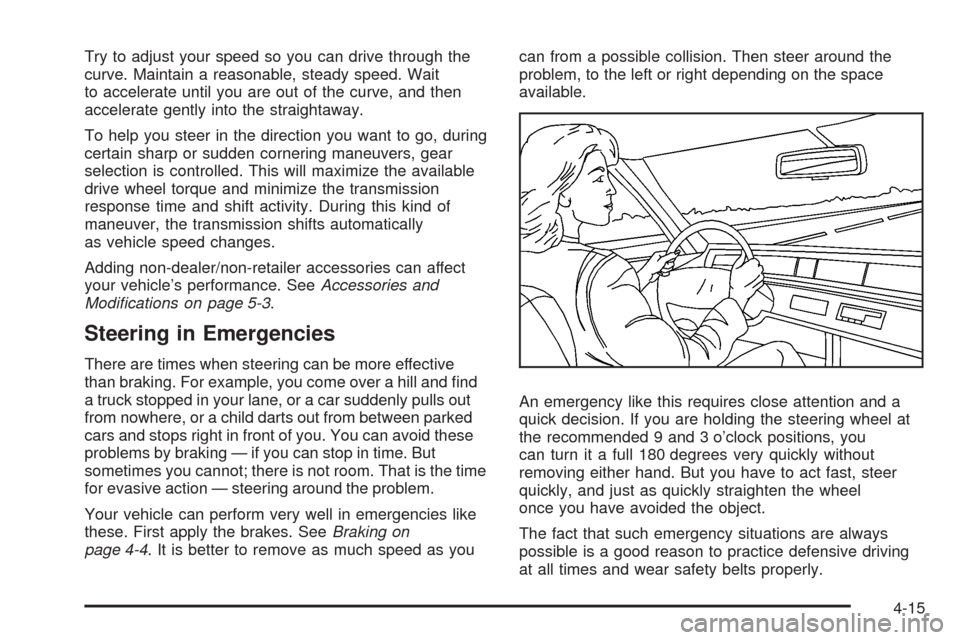
An emergency like this requires close attention and a
quick decision. If you are holding the steering wheel at
the recommended 9 and 3 o’clock positions, you
can turn it a full 180 degrees very quickly without
removing either hand. But you have to act fast, steer
quickly, and just as quickly straighten the wheel
once you have avoided the object.
The fact that such emergency situations are always
possible is a good reason to practice defensive driving
at all times and wear safety belts properly.
4-15
Page 318 of 500
3. When the wheel chocks are in place, release the
regular brakes until the chocks absorb the load.
4. Reapply the regular brakes. Then apply your
parking brake, and then shift to PARK (P).
5. Release the regular brakes.
When You Are Ready to Leave After
Parking on a Hill
1. Apply your regular brakes and hold the pedal down
while you:
Start your engine.
Shift into a gear.
Release the parking brake.
2. Let up on the brake pedal.
3. Drive slowly until the trailer is clear of the chocks.
4. Stop and have someone pick up and store the
chocks.
Maintenance When Trailer Towing
Your vehicle will need service more often when you’re
pulling a trailer. See the Maintenance Schedule for more
on this. Things that are especially important in trailer
operation are automatic transmission uid (don’t overll),
engine oil, drive belt, cooling system and brake
system. Each of these is covered in this manual, and
the Index will help you nd them quickly. If you’re
trailering, it’s a good idea to review this information
before you start your trip.
Check periodically to see that all hitch nuts and bolts
are tight.
Engine Cooling When Trailer Towing
Your cooling system may temporarily overheat during
severe operating conditions. SeeEngine Overheating on
page 5-29.
Towing a Trailer (Vehicles Without
Heavy Duty Cooling)
Vehicles without heavy duty cooling are neither designed
nor intended to tow a trailer.
4-40
Page 319 of 500
Service............................................................5-3
Accessories and Modications..........................5-3
California Proposition 65 Warning.....................5-3
California Perchlorate Materials Requirements.....5-4
Doing Your Own Service Work.........................5-4
Adding Equipment to the Outside
of Your Vehicle...........................................5-4
Fuel................................................................5-5
Gasoline Octane............................................5-5
Gasoline Specications....................................5-6
California Fuel...............................................5-6
Additives.......................................................5-6
Fuels in Foreign Countries...............................5-7
Filling the Tank..............................................5-7
Filling a Portable Fuel Container.......................5-9
Checking Things Under the Hood....................5-10
Hood Release..............................................5-10
Engine Compartment Overview.......................5-11
Engine Oil...................................................5-18
Engine Oil Life System..................................5-21
Engine Air Cleaner/Filter................................5-23
Automatic Transmission Fluid.........................5-25
Engine Coolant.............................................5-25
Coolant Surge Tank Pressure Cap..................5-29
Engine Overheating.......................................5-29
Overheated Engine Protection Operating Mode . . .5-31Cooling System............................................5-32
Power Steering Fluid.....................................5-39
Windshield Washer Fluid................................5-40
Brakes........................................................5-41
Battery........................................................5-44
Jump Starting...............................................5-45
All-Wheel Drive..............................................5-50
Rear Axle.......................................................5-51
Front Axle......................................................5-52
Headlamp Aiming...........................................5-53
Bulb Replacement..........................................5-54
High Intensity Discharge (HID) Lighting............5-54
Halogen Bulbs..............................................5-54
Back-Up Lamps............................................5-54
Replacement Bulbs.......................................5-55
Windshield Replacement.................................5-55
Windshield Wiper Blade Replacement..............5-55
Tires..............................................................5-57
Winter Tires.................................................5-58
Tire Sidewall Labeling...................................5-59
Tire Terminology and Denitions.....................5-62
Run-Flat Tires (STS-V)..................................5-65
Ination - Tire Pressure.................................5-66
High-Speed Operation...................................5-68
Section 5 Service and Appearance Care
5-1
Page 343 of 500
Automatic Transmission Fluid
How to Check Automatic
Transmission Fluid
It is not necessary to check the transmission uid level.
A transmission uid leak is the only reason for uid
loss. If a leak occurs, take the vehicle to the
dealer/retailer service department and have it repaired
as soon as possible.
There is a special procedure for checking and changing
the transmission uid. Because this procedure is
difficult, you should have this done at the dealership
service department. Contact your dealer for additional
information or the procedure can be found in the service
manual. To purchase a service manual, seeService
Publications Ordering Information on page 7-15.
Notice:Use of the incorrect automatic transmission
uid may damage your vehicle, and the damages
may not be covered by your warranty. Always
use the automatic transmission uid listed in
Recommended Fluids and Lubricants on page 6-13.
Change the uid and lter at the intervals listed in
Additional Required Services on page 6-6, and be sure
to use the uid listed inRecommended Fluids and
Lubricants on page 6-13.
Engine Coolant
The cooling system in your vehicle is lled with
DEX-COOL®engine coolant. This coolant is designed
to remain in your vehicle for ve years or 150,000 miles
(240 000 km), whichever occurs rst, if you add only
DEX-COOL
®extended life coolant.
The following explains your cooling system and how to
add coolant when it is low. If you have a problem
with engine overheating, seeEngine Overheating on
page 5-29.
A 50/50 mixture of clean, drinkable water and
DEX-COOL
®coolant will:
Give freezing protection down to−34°F (−37°C).
Give boiling protection up to 265°F (129°C).
Protect against rust and corrosion.
Help keep the proper engine temperature.
Let the warning lights and gages work as
they should.
Notice:Using coolant other than DEX-COOL
®may
cause premature engine, heater core, or radiator
corrosion. In addition, the engine coolant may
require changing sooner, at the rst maintenance
service after each 30,000 miles (50 000 km) or
24 months, whichever occurs rst. Any repairs
would not be covered by your warranty. Always use
DEX-COOL
®(silicate-free) coolant in your vehicle.
5-25
Page 363 of 500
Jump Starting
If your vehicle’s battery has run down, you may want to
use another vehicle and some jumper cables to start your
vehicle. Be sure to use the following steps to do it safely.
{CAUTION:
Batteries can hurt you. They can be dangerous
because:
They contain acid that can burn you.
They contain gas that can explode or
ignite.
They contain enough electricity to
burn you.
If you do not follow these steps exactly, some
or all of these things can hurt you.Notice:Ignoring these steps could result in costly
damage to your vehicle that would not be covered
by your warranty.
Trying to start your vehicle by pushing or pulling it
will not work, and it could damage your vehicle.
1. Check the other vehicle. It must have a 12-volt
battery with a negative ground system.
Notice:If the other vehicle’s system is not a 12-volt
system with a negative ground, both vehicles can
be damaged. Only use vehicles with 12-volt systems
with negative grounds to jump start your vehicle.
2. Get the vehicles close enough so the jumper cables
can reach, but be sure the vehicles are not touching
each other. If they are, it could cause a ground
connection you do not want. You would not be able
to start your vehicle and the bad grounding could
damage the electrical systems.
To avoid the possibility of the vehicles rolling, set
the parking brake rmly on both vehicles involved in
the jump start procedure. Put an automatic
transmission in PARK (P) or a manual transmission
in NEUTRAL before setting the parking brake.
5-45
Page 380 of 500
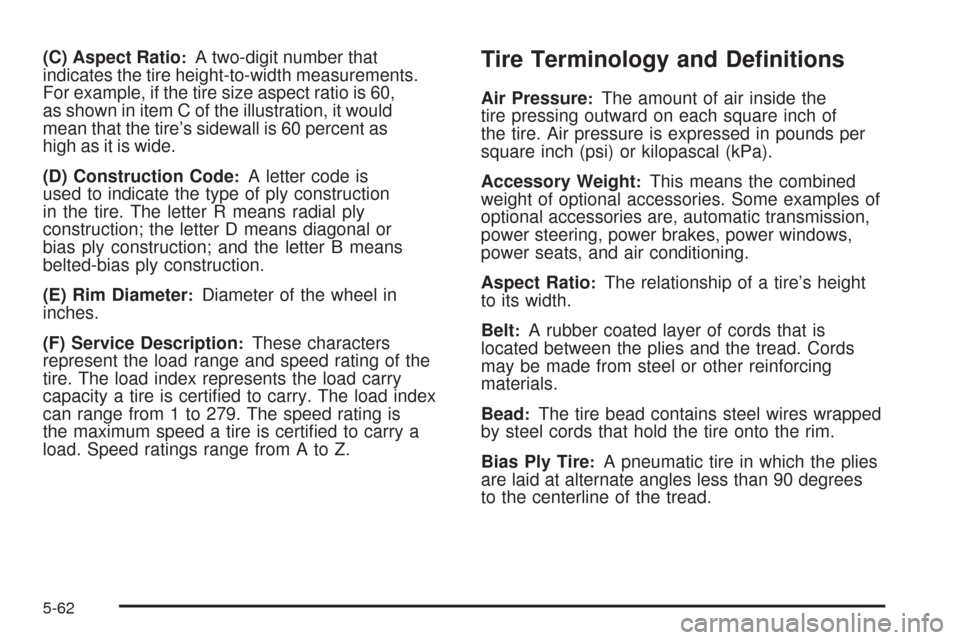
(C) Aspect Ratio:A two-digit number that
indicates the tire height-to-width measurements.
For example, if the tire size aspect ratio is 60,
as shown in item C of the illustration, it would
mean that the tire’s sidewall is 60 percent as
high as it is wide.
(D) Construction Code
:A letter code is
used to indicate the type of ply construction
in the tire. The letter R means radial ply
construction; the letter D means diagonal or
bias ply construction; and the letter B means
belted-bias ply construction.
(E) Rim Diameter
:Diameter of the wheel in
inches.
(F) Service Description
:These characters
represent the load range and speed rating of the
tire. The load index represents the load carry
capacity a tire is certied to carry. The load index
can range from 1 to 279. The speed rating is
the maximum speed a tire is certied to carry a
load. Speed ratings range from A to Z.
Tire Terminology and Denitions
Air Pressure:The amount of air inside the
tire pressing outward on each square inch of
the tire. Air pressure is expressed in pounds per
square inch (psi) or kilopascal (kPa).
Accessory Weight
:This means the combined
weight of optional accessories. Some examples of
optional accessories are, automatic transmission,
power steering, power brakes, power windows,
power seats, and air conditioning.
Aspect Ratio
:The relationship of a tire’s height
to its width.
Belt
:A rubber coated layer of cords that is
located between the plies and the tread. Cords
may be made from steel or other reinforcing
materials.
Bead
:The tire bead contains steel wires wrapped
by steel cords that hold the tire onto the rim.
Bias Ply Tire
:A pneumatic tire in which the plies
are laid at alternate angles less than 90 degrees
to the centerline of the tread.
5-62
Page 447 of 500
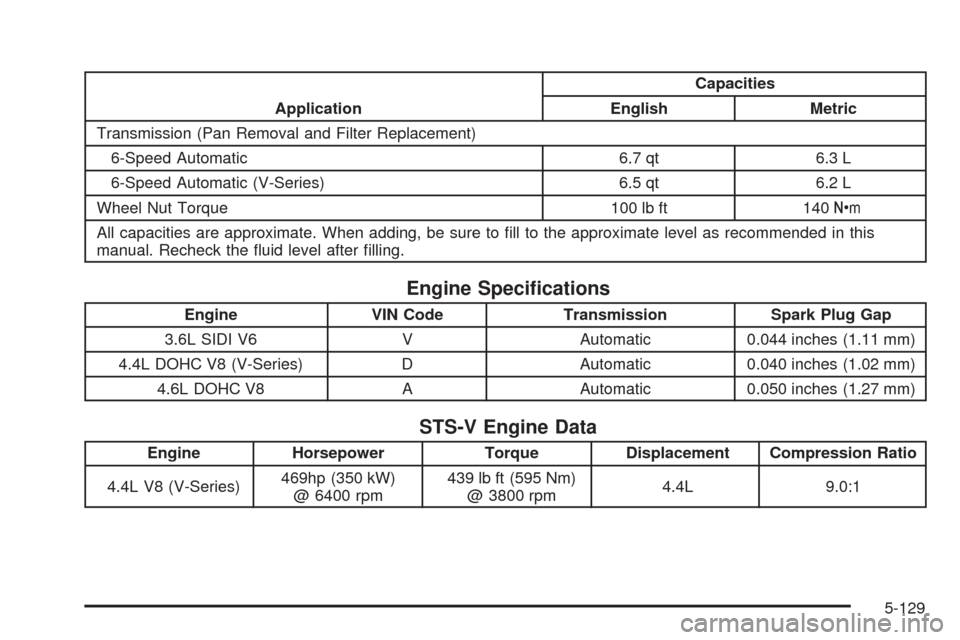
ApplicationCapacities
English Metric
Transmission (Pan Removal and Filter Replacement)
6-Speed Automatic 6.7 qt 6.3 L
6-Speed Automatic (V-Series) 6.5 qt 6.2 L
Wheel Nut Torque 100 lb ft 140Y
All capacities are approximate. When adding, be sure to ll to the approximate level as recommended in this
manual. Recheck the uid level after lling.
Engine Specications
Engine VIN Code Transmission Spark Plug Gap
3.6L SIDI V6 V Automatic 0.044 inches (1.11 mm)
4.4L DOHC V8 (V-Series) D Automatic 0.040 inches (1.02 mm)
4.6L DOHC V8 A Automatic 0.050 inches (1.27 mm)
STS-V Engine Data
Engine Horsepower Torque Displacement Compression Ratio
4.4L V8 (V-Series)469hp (350 kW)
@ 6400 rpm439 lb ft (595 Nm)
@ 3800 rpm4.4L 9.0:1
5-129
Page 454 of 500
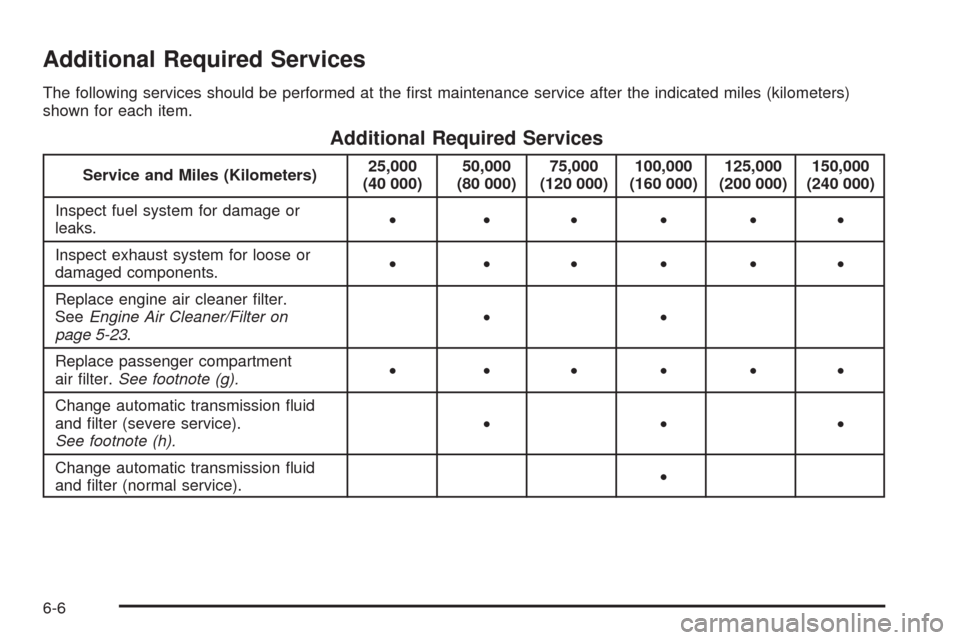
Additional Required Services
The following services should be performed at the rst maintenance service after the indicated miles (kilometers)
shown for each item.
Additional Required Services
Service and Miles (Kilometers)25,000
(40 000)50,000
(80 000)75,000
(120 000)100,000
(160 000)125,000
(200 000)150,000
(240 000)
Inspect fuel system for damage or
leaks.• •••••
Inspect exhaust system for loose or
damaged components.• •••••
Replace engine air cleaner lter.
SeeEngine Air Cleaner/Filter on
page 5-23.••
Replace passenger compartment
air lter.See footnote (g).• •••••
Change automatic transmission uid
and lter (severe service).
See footnote (h).•••
Change automatic transmission uid
and lter (normal service).•
6-6
Page 456 of 500
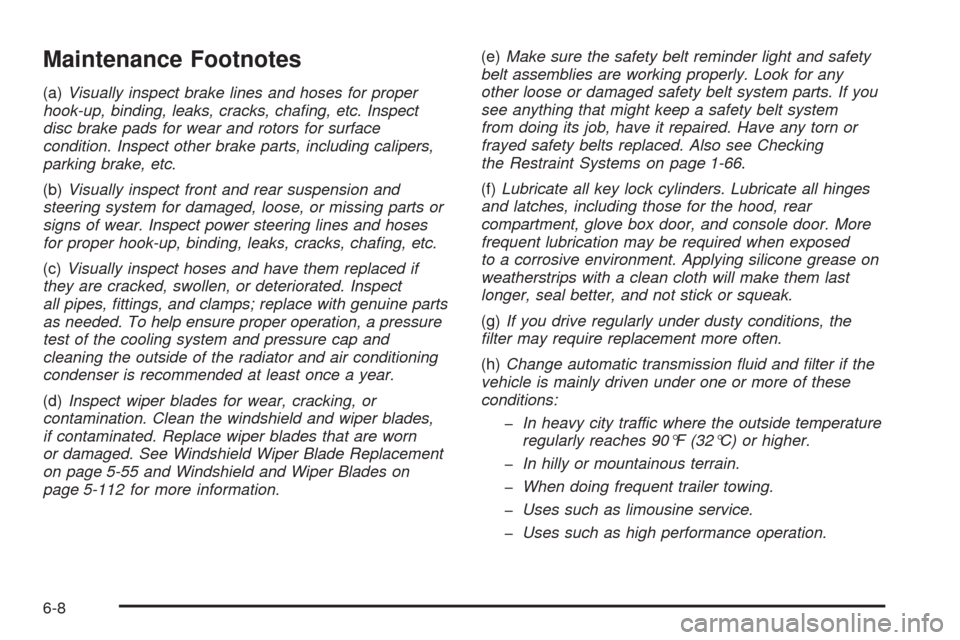
Maintenance Footnotes
(a)Visually inspect brake lines and hoses for proper
hook-up, binding, leaks, cracks, chafing, etc. Inspect
disc brake pads for wear and rotors for surface
condition. Inspect other brake parts, including calipers,
parking brake, etc.
(b)Visually inspect front and rear suspension and
steering system for damaged, loose, or missing parts or
signs of wear. Inspect power steering lines and hoses
for proper hook-up, binding, leaks, cracks, chafing, etc.
(c)Visually inspect hoses and have them replaced if
they are cracked, swollen, or deteriorated. Inspect
all pipes, fittings, and clamps; replace with genuine parts
as needed. To help ensure proper operation, a pressure
test of the cooling system and pressure cap and
cleaning the outside of the radiator and air conditioning
condenser is recommended at least once a year.
(d)Inspect wiper blades for wear, cracking, or
contamination. Clean the windshield and wiper blades,
if contaminated. Replace wiper blades that are worn
or damaged. See Windshield Wiper Blade Replacement
on page 5-55 and Windshield and Wiper Blades on
page 5-112 for more information.(e)Make sure the safety belt reminder light and safety
belt assemblies are working properly. Look for any
other loose or damaged safety belt system parts. If you
see anything that might keep a safety belt system
from doing its job, have it repaired. Have any torn or
frayed safety belts replaced. Also see Checking
the Restraint Systems on page 1-66.
(f)Lubricate all key lock cylinders. Lubricate all hinges
and latches, including those for the hood, rear
compartment, glove box door, and console door. More
frequent lubrication may be required when exposed
to a corrosive environment. Applying silicone grease on
weatherstrips with a clean cloth will make them last
longer, seal better, and not stick or squeak.
(g)If you drive regularly under dusty conditions, the
filter may require replacement more often.
(h)Change automatic transmission fluid and filter if the
vehicle is mainly driven under one or more of these
conditions:
In heavy city traffic where the outside temperature
regularly reaches 90°F (32°C) or higher.
In hilly or mountainous terrain.
When doing frequent trailer towing.
Uses such as limousine service.
Uses such as high performance operation.
6-8