buttons CADILLAC STS 2008 1.G User Guide
[x] Cancel search | Manufacturer: CADILLAC, Model Year: 2008, Model line: STS, Model: CADILLAC STS 2008 1.GPages: 500, PDF Size: 5.81 MB
Page 159 of 500
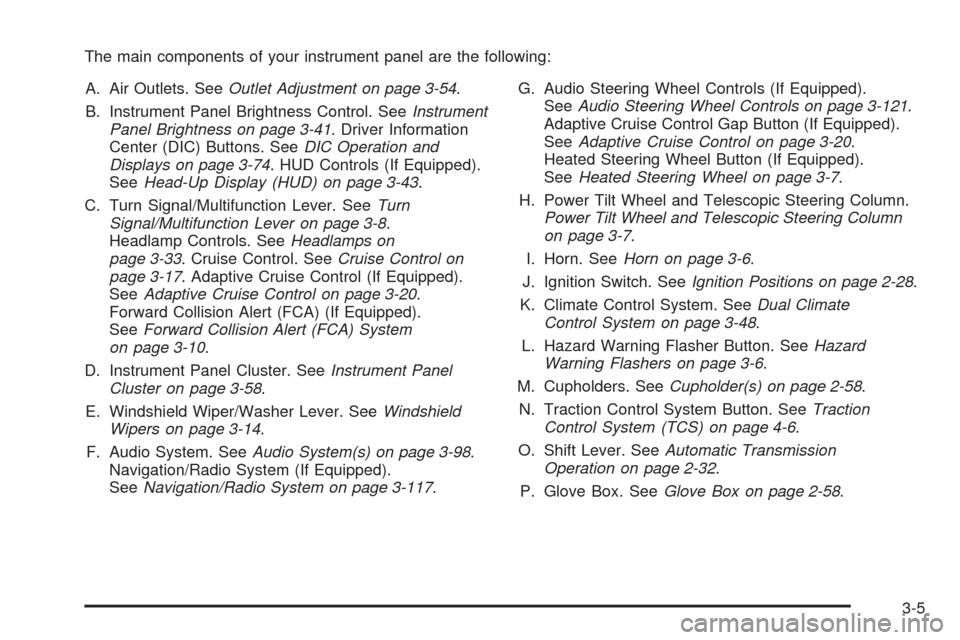
The main components of your instrument panel are the following:
A. Air Outlets. SeeOutlet Adjustment on page 3-54.
B. Instrument Panel Brightness Control. SeeInstrument
Panel Brightness on page 3-41. Driver Information
Center (DIC) Buttons. SeeDIC Operation and
Displays on page 3-74. HUD Controls (If Equipped).
SeeHead-Up Display (HUD) on page 3-43.
C. Turn Signal/Multifunction Lever. SeeTurn
Signal/Multifunction Lever on page 3-8.
Headlamp Controls. SeeHeadlamps on
page 3-33. Cruise Control. SeeCruise Control on
page 3-17. Adaptive Cruise Control (If Equipped).
SeeAdaptive Cruise Control on page 3-20.
Forward Collision Alert (FCA) (If Equipped).
SeeForward Collision Alert (FCA) System
on page 3-10.
D. Instrument Panel Cluster. SeeInstrument Panel
Cluster on page 3-58.
E. Windshield Wiper/Washer Lever. SeeWindshield
Wipers on page 3-14.
F. Audio System. SeeAudio System(s) on page 3-98.
Navigation/Radio System (If Equipped).
SeeNavigation/Radio System on page 3-117.G. Audio Steering Wheel Controls (If Equipped).
SeeAudio Steering Wheel Controls on page 3-121.
Adaptive Cruise Control Gap Button (If Equipped).
SeeAdaptive Cruise Control on page 3-20.
Heated Steering Wheel Button (If Equipped).
SeeHeated Steering Wheel on page 3-7.
H. Power Tilt Wheel and Telescopic Steering Column.
Power Tilt Wheel and Telescopic Steering Column
on page 3-7.
I. Horn. SeeHorn on page 3-6.
J. Ignition Switch. SeeIgnition Positions on page 2-28.
K. Climate Control System. SeeDual Climate
Control System on page 3-48.
L. Hazard Warning Flasher Button. SeeHazard
Warning Flashers on page 3-6.
M. Cupholders. SeeCupholder(s) on page 2-58.
N. Traction Control System Button. SeeTraction
Control System (TCS) on page 4-6.
O. Shift Lever. SeeAutomatic Transmission
Operation on page 2-32.
P. Glove Box. SeeGlove Box on page 2-58.
3-5
Page 165 of 500
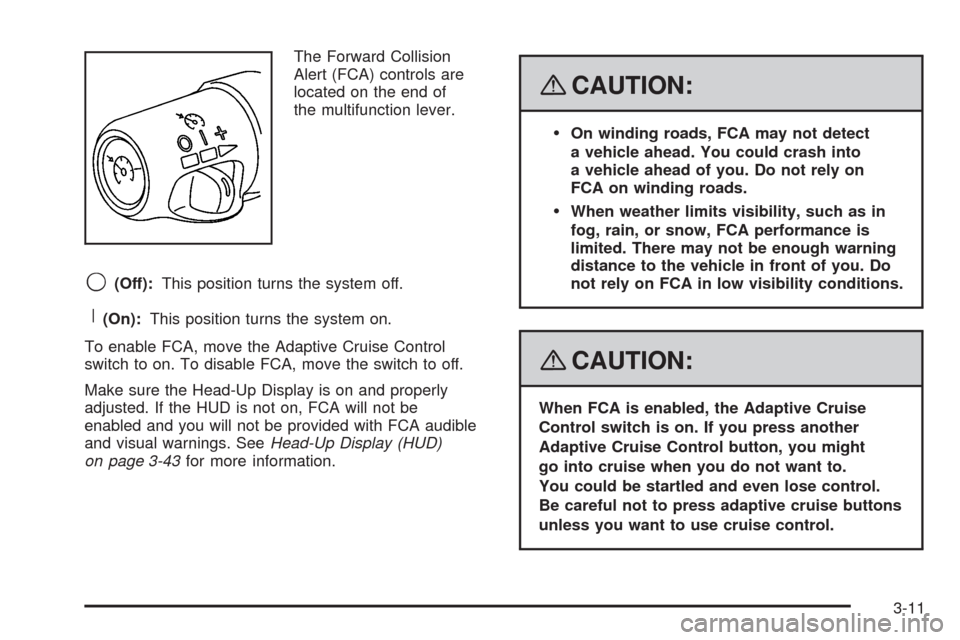
The Forward Collision
Alert (FCA) controls are
located on the end of
the multifunction lever.
9(Off):This position turns the system off.
R(On):This position turns the system on.
To enable FCA, move the Adaptive Cruise Control
switch to on. To disable FCA, move the switch to off.
Make sure the Head-Up Display is on and properly
adjusted. If the HUD is not on, FCA will not be
enabled and you will not be provided with FCA audible
and visual warnings. SeeHead-Up Display (HUD)
on page 3-43for more information.
{CAUTION:
On winding roads, FCA may not detect
a vehicle ahead. You could crash into
a vehicle ahead of you. Do not rely on
FCA on winding roads.
When weather limits visibility, such as in
fog, rain, or snow, FCA performance is
limited. There may not be enough warning
distance to the vehicle in front of you. Do
not rely on FCA in low visibility conditions.
{CAUTION:
When FCA is enabled, the Adaptive Cruise
Control switch is on. If you press another
Adaptive Cruise Control button, you might
go into cruise when you do not want to.
You could be startled and even lose control.
Be careful not to press adaptive cruise buttons
unless you want to use cruise control.
3-11
Page 209 of 500
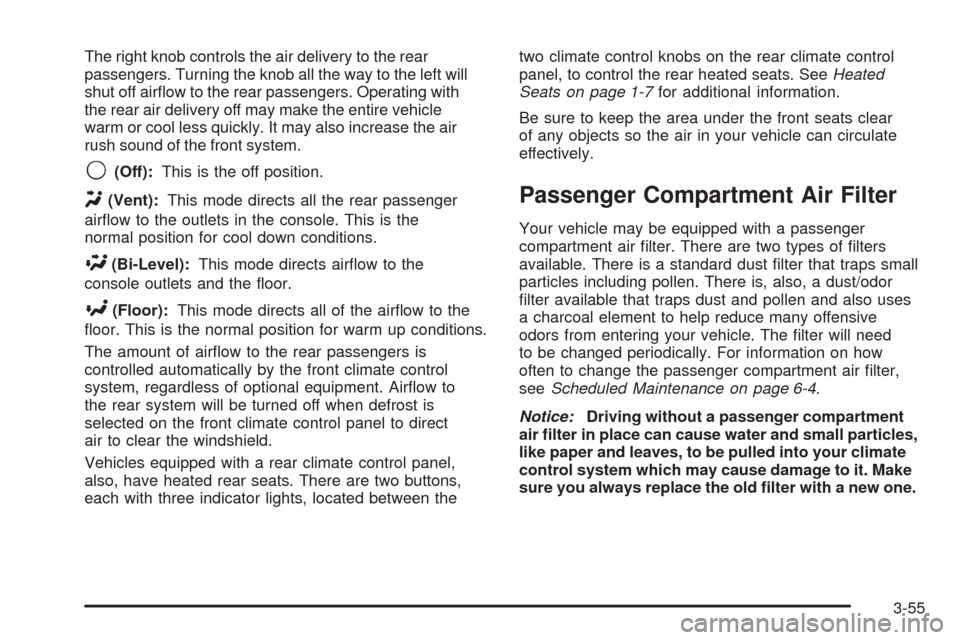
The right knob controls the air delivery to the rear
passengers. Turning the knob all the way to the left will
shut off airow to the rear passengers. Operating with
the rear air delivery off may make the entire vehicle
warm or cool less quickly. It may also increase the air
rush sound of the front system.
9(Off):This is the off position.
Y(Vent):This mode directs all the rear passenger
airow to the outlets in the console. This is the
normal position for cool down conditions.
\(Bi-Level):This mode directs airow to the
console outlets and the oor.
[(Floor):This mode directs all of the airow to the
oor. This is the normal position for warm up conditions.
The amount of airow to the rear passengers is
controlled automatically by the front climate control
system, regardless of optional equipment. Airow to
the rear system will be turned off when defrost is
selected on the front climate control panel to direct
air to clear the windshield.
Vehicles equipped with a rear climate control panel,
also, have heated rear seats. There are two buttons,
each with three indicator lights, located between thetwo climate control knobs on the rear climate control
panel, to control the rear heated seats. SeeHeated
Seats on page 1-7for additional information.
Be sure to keep the area under the front seats clear
of any objects so the air in your vehicle can circulate
effectively.
Passenger Compartment Air Filter
Your vehicle may be equipped with a passenger
compartment air lter. There are two types of lters
available. There is a standard dust lter that traps small
particles including pollen. There is, also, a dust/odor
lter available that traps dust and pollen and also uses
a charcoal element to help reduce many offensive
odors from entering your vehicle. The lter will need
to be changed periodically. For information on how
often to change the passenger compartment air lter,
seeScheduled Maintenance on page 6-4.
Notice:Driving without a passenger compartment
air lter in place can cause water and small particles,
like paper and leaves, to be pulled into your climate
control system which may cause damage to it. Make
sure you always replace the old lter with a new one.
3-55
Page 228 of 500
Driver Information Center (DIC)
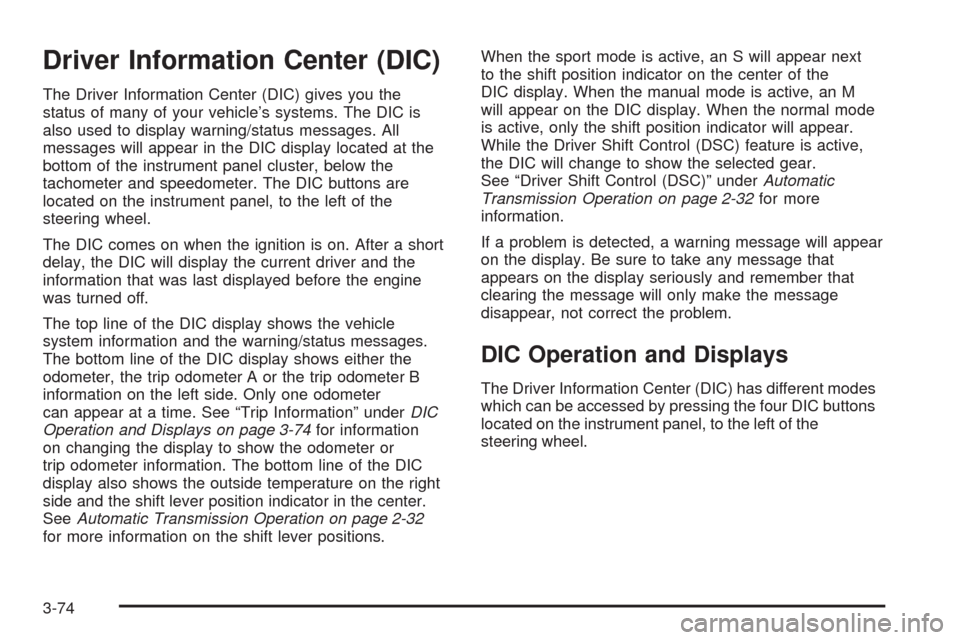
The Driver Information Center (DIC) gives you the
status of many of your vehicle’s systems. The DIC is
also used to display warning/status messages. All
messages will appear in the DIC display located at the
bottom of the instrument panel cluster, below the
tachometer and speedometer. The DIC buttons are
located on the instrument panel, to the left of the
steering wheel.
The DIC comes on when the ignition is on. After a short
delay, the DIC will display the current driver and the
information that was last displayed before the engine
was turned off.
The top line of the DIC display shows the vehicle
system information and the warning/status messages.
The bottom line of the DIC display shows either the
odometer, the trip odometer A or the trip odometer B
information on the left side. Only one odometer
can appear at a time. See “Trip Information” underDIC
Operation and Displays on page 3-74for information
on changing the display to show the odometer or
trip odometer information. The bottom line of the DIC
display also shows the outside temperature on the right
side and the shift lever position indicator in the center.
SeeAutomatic Transmission Operation on page 2-32
for more information on the shift lever positions.When the sport mode is active, an S will appear next
to the shift position indicator on the center of the
DIC display. When the manual mode is active, an M
will appear on the DIC display. When the normal mode
is active, only the shift position indicator will appear.
While the Driver Shift Control (DSC) feature is active,
the DIC will change to show the selected gear.
See “Driver Shift Control (DSC)” underAutomatic
Transmission Operation on page 2-32for more
information.
If a problem is detected, a warning message will appear
on the display. Be sure to take any message that
appears on the display seriously and remember that
clearing the message will only make the message
disappear, not correct the problem.
DIC Operation and Displays
The Driver Information Center (DIC) has different modes
which can be accessed by pressing the four DIC buttons
located on the instrument panel, to the left of the
steering wheel.
3-74
Page 229 of 500
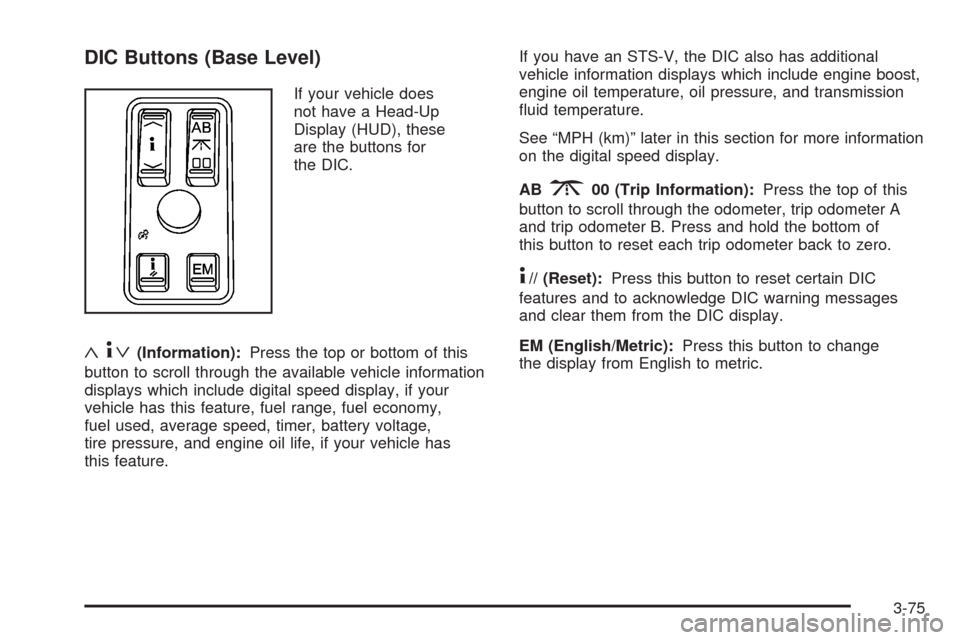
DIC Buttons (Base Level)
If your vehicle does
not have a Head-Up
Display (HUD), these
are the buttons for
the DIC.
«4ª(Information):Press the top or bottom of this
button to scroll through the available vehicle information
displays which include digital speed display, if your
vehicle has this feature, fuel range, fuel economy,
fuel used, average speed, timer, battery voltage,
tire pressure, and engine oil life, if your vehicle has
this feature.If you have an STS-V, the DIC also has additional
vehicle information displays which include engine boost,
engine oil temperature, oil pressure, and transmission
uid temperature.
See “MPH (km)” later in this section for more information
on the digital speed display.
AB
300 (Trip Information):Press the top of this
button to scroll through the odometer, trip odometer A
and trip odometer B. Press and hold the bottom of
this button to reset each trip odometer back to zero.
4// (Reset):Press this button to reset certain DIC
features and to acknowledge DIC warning messages
and clear them from the DIC display.
EM (English/Metric):Press this button to change
the display from English to metric.
3-75
Page 230 of 500
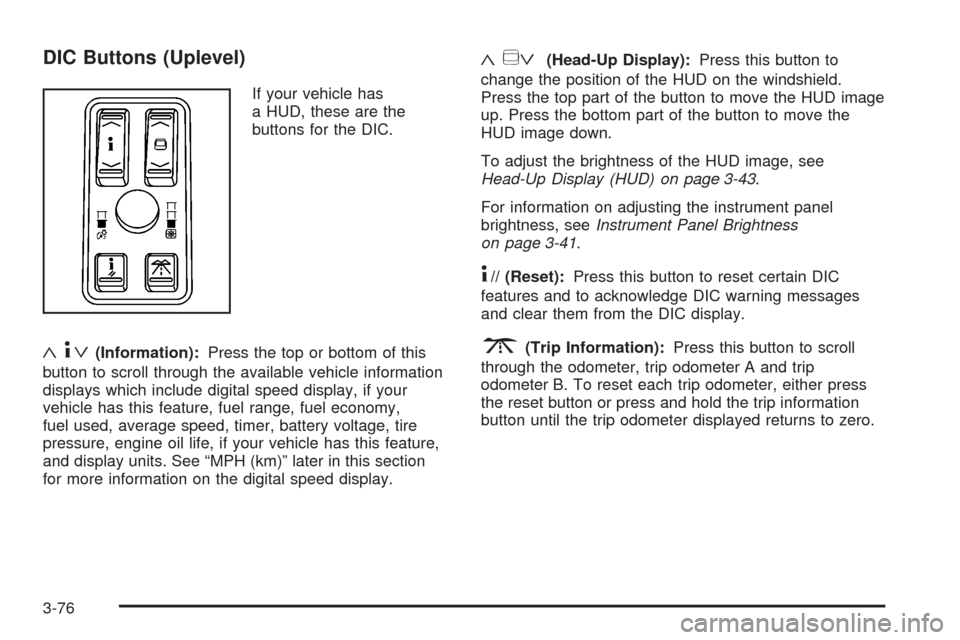
DIC Buttons (Uplevel)
If your vehicle has
a HUD, these are the
buttons for the DIC.
«4ª(Information):Press the top or bottom of this
button to scroll through the available vehicle information
displays which include digital speed display, if your
vehicle has this feature, fuel range, fuel economy,
fuel used, average speed, timer, battery voltage, tire
pressure, engine oil life, if your vehicle has this feature,
and display units. See “MPH (km)” later in this section
for more information on the digital speed display.
«~ª(Head-Up Display):Press this button to
change the position of the HUD on the windshield.
Press the top part of the button to move the HUD image
up. Press the bottom part of the button to move the
HUD image down.
To adjust the brightness of the HUD image, see
Head-Up Display (HUD) on page 3-43.
For information on adjusting the instrument panel
brightness, seeInstrument Panel Brightness
on page 3-41.
4// (Reset):Press this button to reset certain DIC
features and to acknowledge DIC warning messages
and clear them from the DIC display.
3(Trip Information):Press this button to scroll
through the odometer, trip odometer A and trip
odometer B. To reset each trip odometer, either press
the reset button or press and hold the trip information
button until the trip odometer displayed returns to zero.
3-76
Page 242 of 500
NO FOBS DETECTED
This message displays if the vehicle does not detect
the presence of a keyless access transmitter when you
have attempted to start the vehicle or a vehicle door
has just closed. The following conditions may cause
this message to appear:
Driver-added equipment plugged into the accessory
power outlet on the center console is causing
interference. Examples of these devices are cell
phones and cell phone chargers, two-way radios,
power inverters, or similar items. Try moving
the keyless access transmitter away from these
devices when starting the vehicle. In addition,
PDA devices and remote garage and gate openers
may also generate Electromagnetic Interference
(EMI) that may interfere with the keyless access
transmitter. Do not carry the keyless access
transmitter in the same pocket or bag as these
devices.
The vehicle is experiencing Electromagnetic
Interference (EMI). Some locations, such as
airports, automatic toll booths, and some gas
stations, have EMI elds which may interfere
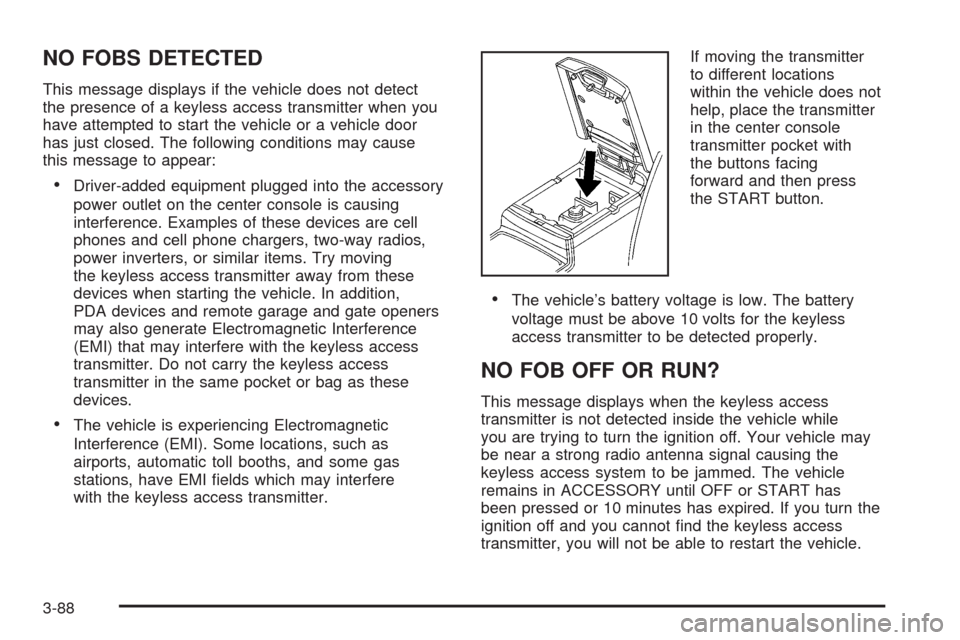
with the keyless access transmitter.If moving the transmitter
to different locations
within the vehicle does not
help, place the transmitter
in the center console
transmitter pocket with
the buttons facing
forward and then press
the START button.
The vehicle’s battery voltage is low. The battery
voltage must be above 10 volts for the keyless
access transmitter to be detected properly.
NO FOB OFF OR RUN?
This message displays when the keyless access
transmitter is not detected inside the vehicle while
you are trying to turn the ignition off. Your vehicle may
be near a strong radio antenna signal causing the
keyless access system to be jammed. The vehicle
remains in ACCESSORY until OFF or START has
been pressed or 10 minutes has expired. If you turn the
ignition off and you cannot nd the keyless access
transmitter, you will not be able to restart the vehicle.
3-88
Page 256 of 500
To set this feature to LOCAL or DISTANT, perform the
following steps:
1. Press the
wknob to enter the main menu.
2. Turn this knob until SEEK LOCAL or SEEK
DISTANT displays.
3. Press the same knob to select either LOCAL
or DISTANT.
4. Press the BACK (F6) button to exit the display. To
return to the original display, repeatedly press the
BACK (F6) button or wait for the display to time out.
To search for stations, press either
©¨seek arrow.
If the system is set to LOCAL, SEEK displays and
seeks to stations only with strong signals. If the system
is set to DISTANT, D-SEEK displays and seeks to
stations with weak and strong signals.
This feature does not function with the XM™ radio
stations.
4(Information):Press this button while in XM mode
to retrieve three different categories of information
related to the current song or channel: Artist, Song Title,
Category or PTY. To view this information, perform
the following:
1. Press the
wknob to enter the main menu.
2. Turn this knob until INFO displays.
3. Press the same knob to select INFO. The display
changes to show the additional XM™ information.4. Press the BACK (F6) button to exit the display. To
return to the original display, repeatedly press the
BACK (F6) button or wait for the display to time out.
Setting Preset Stations
Up to 30 stations (six FM1, six FM2, and six AM,
six XM1 and six XM2 (if equipped)), can be programmed
on the six numbered pushbuttons, by performing the
following steps:
1. Turn the radio on.
2. Press BAND to select FM1, FM2, or AM, or XM1
or XM2.
3. Tune in the desired station.
4. Press and hold one of the six numbered pushbuttons
for two seconds until a beep sounds. The set preset
station number displays above the set pushbutton.
When that numbered pushbutton is pressed for less
than two seconds, the station that was set, returns.
5. Repeat the steps for each pushbutton.
To set the preset stations with an equalization
setting, DSP setting, or a PTY (program type) setting,
see each of these features later in this section.
When a preset station is selected, once one of these
additional settings is selected, the preset station
remembers each setting and it remains active, until
the setting is selected off for that preset station.
3-102
Page 257 of 500
AUTOSTORE PRESETS:To set the preset stations
automatically, perform the following steps:
1. Turn the radio on.
2. Press BAND to select FM1, FM2, or AM.
3. Press the
wknob to enter the main menu.
4. Turn this knob until AUTOSTORE PRESETS
displays.
5. Press the same knob to select. AUTOSTORE
displays. The radio automatically searches the band
and selects and stores the six radio stations with the
strongest signal. The stations are stored by signal
strength, not sequential order. The set preset station
number displays above the set pushbutton. When
that numbered pushbutton is pressed for less than
two seconds, the station that was set, returns.
6. Press the BACK (F6) button to exit the display. To
return to the original display, repeatedly press the
BACK (F6) button or wait for the display to time out.
This feature does not function with the XM™ radio
stations.
The radio presets do not have to be reset when the
vehicle is started, or when the battery power is removed.PRESETS HOME/AWAY:This feature stores two
different kinds of station presets. HOME can be used for
local stations and AWAY for stations outside of the
local broadcasting area. To set preset stations for home
and away perform the following steps:
1. Press thewknob to enter the main menu.
2. Turn this knob until PRESETS HOME/AWAY
displays.
3. Press the same knob to select. HOME or AWAY
displays.
4. Press the BACK (F6) button to exit the display.
To return to the original display, repeatedly press
the BACK (F6) button or wait for the display to
time out.
This feature does not function with the XM™ radio
stations.
Follow the manual or automatic steps previously
listed for setting the preset pushbuttons for both home
and away.
3-103
Page 260 of 500
The radio plays traffic announcements if the volume is
low. The radio interrupts the play of a CD if the last
tuned station broadcasts traffic announcements.
To turn TA on or off, perform the following steps:
1. Press the
wknob to enter the main menu.
2. Turn this knob until TRAFFIC ANNOUNCE displays.
3. Press the same knob to select ON or OFF.
An X appears in the box when ON is selected.
4. Press the BACK (F6) button to exit the display. To
return to the original display, repeatedly press the
BACK (F6) button or wait for the display to time out.
Activating Program Type (PTY)
Stations (RDS and XM™)
PTY lets you search for stations with specic types of
music. The selectable PTYs are POP, EASY, TALK,
CNTRY (Country), CLASS (Classical), and JAZZ.
To activate program types, perform the following steps:
1. Press the
wknob to enter the main menu.
2. Turn this knob until PROGRAM TYPE MODE
displays.
3. Press the same knob to select ON or OFF.
An X appears in the box when ON is selected.4. Press the BACK (F6) button to exit the display. To
return to the original display, repeatedly press the
BACK (F6) button or wait for the display to time out.
Once program type is activated the PTYs display
above the pushbuttons, in place of the preset stations
(if programmed). Press the pushbutton for the
desired PTY. Not all stations support PTYs. The radio
might not go to all of the stations with that music
type when pressing the pushbutton.
AF (Alternate Frequency):Alternate frequency lets
the radio switch to a stronger station with the same
program type.
To turn AF on or off, perform the following steps:
1. Press the
wknob to enter the main menu.
2. Turn this knob until ALTERNATE FREQ. displays.
3. Press the same knob to select AF OFF, AF ON,
or AF REG. An X appears in the box when ON is
selected.
4. Press the BACK (F6) button to exit the display. To
return to the original display, repeatedly press the
BACK (F6) button or wait for the display to time out.
This feature does not function with the XM™ radio
stations.
3-106