instrument panel CADILLAC STS 2008 1.G User Guide
[x] Cancel search | Manufacturer: CADILLAC, Model Year: 2008, Model line: STS, Model: CADILLAC STS 2008 1.GPages: 500, PDF Size: 5.81 MB
Page 94 of 500
Window Lockout
o
(Window Lockout):Press to disable the rear
window controls. The light on the button illuminates,
indicating that the feature is in use. The rear windows
can still be raised or lowered using the driver’s window
switches. To restore power to the rear windows, press the
button again. The light on the button will go out.
The front passenger window can be programmed to be
disabled using the window lockout button. SeeVehicle
Personalization on page 2-60.
Secure Car Feature
The windows can be closed by pressing the lock button
on the keyless access transmitter. SeeKeyless Access
System Operation on page 2-6for more information.
If any window is unable to close completely, it reverses
and the horn chirps. See “Anti-Pinch Feature” previously.
The engine must be off to operate this feature.
Sun Visors
Swing down the visor or detach it from the center mount
and move to the side to block out glare. The visors also
have side-to-side slide capability for greater coverage.
Pull the visor down and lift the cover. Move the slide
switch up or down to brighten or dim the lamp.
Theft-Deterrent Systems
Vehicle theft is big business, especially in some cities.
Although your vehicle has a number of theft-deterrent
features, we know that nothing we put on it can make it
impossible to steal.
Theft-Deterrent System
Your vehicle has a theft-deterrent alarm system.
The security light is
located on the instrument
panel cluster.
If the ignition is off and a door is open, the security light
will ash, reminding you to arm the theft-deterrent
system.
2-22
Page 101 of 500
Retained Accessory Power (RAP)
These vehicle accessories can be used for up to
20 minutes after the engine is turned off:
Audio System
Audio Steering Wheel Controls
Power Windows
Power to these accessories will work up to 20 minutes
or until one of the front doors is opened. For an
additional 20 minutes of operation, close all the doors
and press Acc. to place the vehicle in accessory mode.
Press the button again to return to RAP.
Starting the Engine
To place the transmission in the proper gear:
Move the shift lever to PARK (P) or NEUTRAL (N).
To restart when you are already moving, use
NEUTRAL (N).
Notice:Do not try to shift to PARK (P) if your
vehicle is moving. If you do, you could damage the
transmission. Shift to PARK (P) only when your
vehicle is stopped.
The keyless access transmitter must be inside the
vehicle for the ignition to work.Cell phone chargers can interfere with the operation of
the Keyless Access System. Battery chargers should
not be plugged in when starting or turning off the engine.
To start your vehicle, do the following:
Starting Procedure
1. With your foot on the brake pedal, press the
START button located on the instrument panel.
If there is not a keyless access transmitter in
the vehicle or if there is something causing
interference with it, the DIC will display NO FOBS
DETECTED. SeeDIC Warnings and Messages
on page 3-80for more information.
2. When the engine begins cranking, let go of the
button and the engine cranks automatically until
it starts. If the battery in the keyless access
transmitter is weak, the DIC displays KEY FOB
BATTERY LOW. You can still drive the vehicle.
See “Battery Replacement” underKeyless Access
System Operation on page 2-6for more information.
If the fob battery is dead, you need to insert the
fob into the fob slot to enable engine starting.
See “No Fobs Detected” underDIC Warnings and
Messages on page 3-80.
3. Do not race the engine immediately after starting it.
Operate the engine and transmission gently until
the oil warms up and lubricates all moving parts.
2-29
Page 102 of 500
4. If the engine does not start and no DIC message is
displayed, wait 15 seconds before trying again to let
the cranking motor cool down.
If the engine does not start after 5-10 seconds,
especially in very cold weather (below 0°F or−18°C),
it could be ooded with too much gasoline.
Try pushing the accelerator pedal all the way to the
oor while cranking for up to 15 seconds maximum.
Wait at least 15 seconds between each try, to allow
the cranking motor to cool down. When the engine
starts, let go of the accelerator. If the vehicle starts
briey but then stops again, do the same thing.
This clears the extra gasoline from the engine.
Notice:Cranking the engine for long periods of
time, by pressing the START button immediately
after cranking has ended, can overheat and damage
the cranking motor, and drain the battery. Wait at
least 15 seconds between each try, to allow the
cranking motor to cool down.
Your vehicle has a Computer-Controlled Cranking
System. This feature assists in starting the engine
and protects components. Once cranking has
been initiated, the engine continues cranking for a
few seconds or until the vehicle starts. If the engine
does not start, cranking automatically stops after
15 seconds to prevent cranking motor damage.To prevent gear damage, this system also prevents
cranking if the engine is already running.
Notice:The engine is designed to work with the
electronics in your vehicle. If you add electrical
parts or accessories, you could change the way the
engine operates. Before adding electrical equipment,
check with your dealer/retailer. If you do not, your
engine might not perform properly. Any resulting
damage would not be covered by your vehicle’s
warranty.
Stopping Your Engine
Move the shift lever to PARK (P) and press the Acc.
button located on the instrument panel. If the shifter is
not in PARK (P), the engine shuts off and the vehicle
goes into the Accessory Mode. The DIC displays SHIFT
TO PARK. Once the shifter is moved to PARK (P),
the vehicle turns off.
The DIC displays NO FOB, OFF OR RUN?, if the
keyless access transmitter is not detected inside the
vehicle when it is turned off.
SeeDIC Warnings and Messages on page 3-80for
more information.
2-30
Page 107 of 500
The transmission will only allow you to shift into gears
appropriate for the vehicle speed and engine
Revolutions Per Minute (RPM). The transmission will
not automatically shift to the next higher gear if the
engine RPM is too high.
If shifting is prevented for any reason, the selected gear
will ash multiple times, indicating that the transmission
has not shifted gears.
The transmission will allow you to shift to the gear
selected and will automatically downshift when
the vehicle comes to a stop. This will allow for more
power during take-off and passing.
Parking Brake
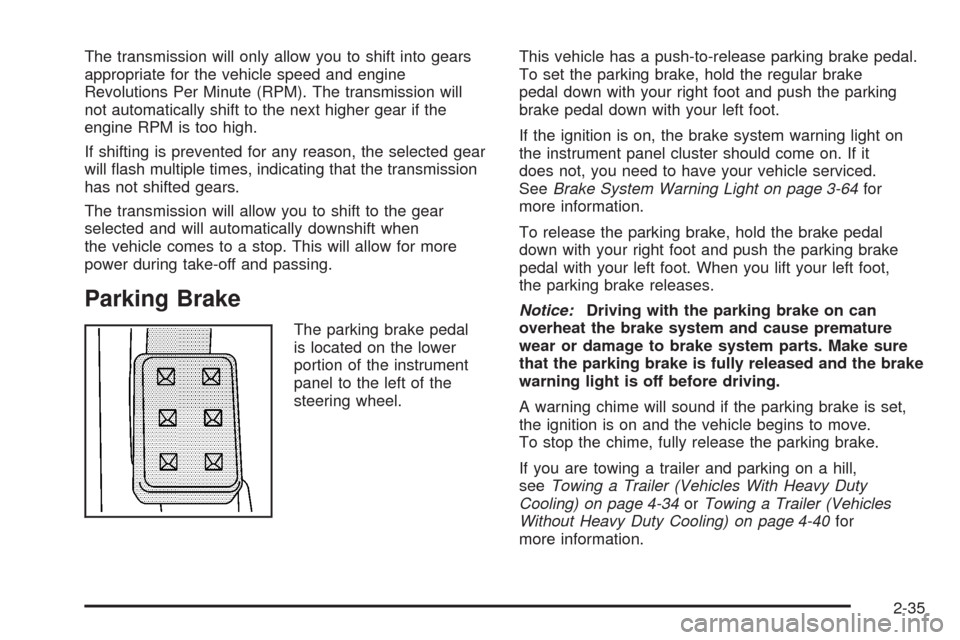
The parking brake pedal
is located on the lower
portion of the instrument
panel to the left of the
steering wheel.This vehicle has a push-to-release parking brake pedal.
To set the parking brake, hold the regular brake
pedal down with your right foot and push the parking
brake pedal down with your left foot.
If the ignition is on, the brake system warning light on
the instrument panel cluster should come on. If it
does not, you need to have your vehicle serviced.
SeeBrake System Warning Light on page 3-64for
more information.
To release the parking brake, hold the brake pedal
down with your right foot and push the parking brake
pedal with your left foot. When you lift your left foot,
the parking brake releases.
Notice:Driving with the parking brake on can
overheat the brake system and cause premature
wear or damage to brake system parts. Make sure
that the parking brake is fully released and the brake
warning light is off before driving.
A warning chime will sound if the parking brake is set,
the ignition is on and the vehicle begins to move.
To stop the chime, fully release the parking brake.
If you are towing a trailer and parking on a hill,
seeTowing a Trailer (Vehicles With Heavy Duty
Cooling) on page 4-34orTowing a Trailer (Vehicles
Without Heavy Duty Cooling) on page 4-40for
more information.
2-35
Page 155 of 500
Instrument Panel Overview...............................3-4
Hazard Warning Flashers................................3-6
Other Warning Devices...................................3-6
Horn.............................................................3-6
Power Tilt Wheel and Telescopic
Steering Column.........................................3-7
Heated Steering Wheel...................................3-7
Turn Signal/Multifunction Lever.........................3-8
Turn and Lane-Change Signals........................3-8
Headlamp High/Low-Beam Changer..................3-9
Forward Collision Alert (FCA) System..............3-10
Flash-to-Pass...............................................3-13
Windshield Wipers........................................3-14
Rainsense™ II Wipers...................................3-15
Windshield Washer.......................................3-16
Headlamp Washer........................................3-16
Cruise Control..............................................3-17
Adaptive Cruise Control.................................3-20
Headlamps..................................................3-33
Wiper Activated Headlamps............................3-37Headlamps on Reminder................................3-37
Daytime Running Lamps (DRL).......................3-37
Fog Lamps..................................................3-39
Twilight Sentinel
®..........................................3-39
Exterior Lighting Battery Saver........................3-40
Instrument Panel Brightness...........................3-41
Entry Lighting...............................................3-41
Parade Dimming...........................................3-41
Reading Lamps............................................3-42
Battery Load Management.............................3-42
Electric Power Management...........................3-42
Inadvertent Power Battery Saver.....................3-43
Head-Up Display (HUD).................................3-43
Accessory Power Outlet(s).............................3-46
Ashtray(s) and Cigarette Lighter......................3-47
Climate Controls............................................3-48
Dual Climate Control System..........................3-48
Outlet Adjustment.........................................3-54
Rear Climate Control System.........................3-54
Passenger Compartment Air Filter...................3-55
Section 3 Instrument Panel
3-1
Page 156 of 500
Warning Lights, Gages, and Indicators............3-57
Instrument Panel Cluster................................3-58
Speedometer and Odometer...........................3-59
Tachometer.................................................3-59
Safety Belt Reminders...................................3-59
Airbag Readiness Light..................................3-60
Passenger Airbag Status Indicator...................3-61
Charging System Light..................................3-63
Brake System Warning Light..........................3-64
Antilock Brake System Warning Light...............3-65
Traction Control System (TCS)
Warning Light...........................................3-65
Lane Departure Warning Light........................3-66
Engine Coolant Temperature Warning Light......3-66
Engine Coolant Temperature Gage..................3-67
Tire Pressure Light.......................................3-67
Malfunction Indicator Lamp.............................3-68
Oil Pressure Light.........................................3-70
Security Light...............................................3-71
Fog Lamp Light............................................3-72
Lights On Reminder......................................3-72Cruise Control Light......................................3-72
Highbeam On Light.......................................3-72
Fuel Gage...................................................3-73
Driver Information Center (DIC).......................3-74
DIC Operation and Displays...........................3-74
DIC Warnings and Messages.........................3-80
Other Messages...........................................3-97
Audio System(s).............................................3-98
Setting the Time...........................................3-99
Radio(s) (MP3)...........................................3-100
Using an MP3............................................3-112
XM Radio Messages...................................3-116
Navigation/Radio System..............................3-117
Radio Personalization
..................................3-117
Theft-Deterrent Feature................................3-121
Audio Steering Wheel Controls......................3-121
Radio Reception.........................................3-123
Backglass Antenna......................................3-124
XM™ Satellite Radio Antenna System............3-124
Section 3 Instrument Panel
3-2
Page 158 of 500
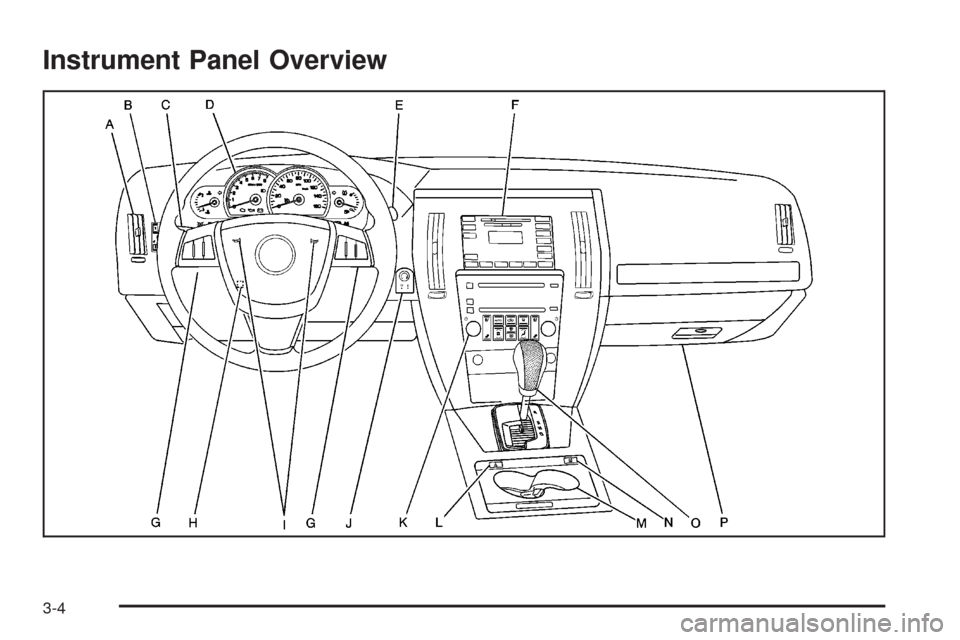
Instrument Panel Overview
3-4
Page 159 of 500
The main components of your instrument panel are the following:
A. Air Outlets. SeeOutlet Adjustment on page 3-54.
B. Instrument Panel Brightness Control. SeeInstrument
Panel Brightness on page 3-41. Driver Information
Center (DIC) Buttons. SeeDIC Operation and
Displays on page 3-74. HUD Controls (If Equipped).
SeeHead-Up Display (HUD) on page 3-43.
C. Turn Signal/Multifunction Lever. SeeTurn
Signal/Multifunction Lever on page 3-8.
Headlamp Controls. SeeHeadlamps on
page 3-33. Cruise Control. SeeCruise Control on
page 3-17. Adaptive Cruise Control (If Equipped).
SeeAdaptive Cruise Control on page 3-20.
Forward Collision Alert (FCA) (If Equipped).
SeeForward Collision Alert (FCA) System
on page 3-10.
D. Instrument Panel Cluster. SeeInstrument Panel
Cluster on page 3-58.
E. Windshield Wiper/Washer Lever. SeeWindshield
Wipers on page 3-14.
F. Audio System. SeeAudio System(s) on page 3-98.
Navigation/Radio System (If Equipped).
SeeNavigation/Radio System on page 3-117.G. Audio Steering Wheel Controls (If Equipped).
SeeAudio Steering Wheel Controls on page 3-121.
Adaptive Cruise Control Gap Button (If Equipped).
SeeAdaptive Cruise Control on page 3-20.
Heated Steering Wheel Button (If Equipped).
SeeHeated Steering Wheel on page 3-7.
H. Power Tilt Wheel and Telescopic Steering Column.
Power Tilt Wheel and Telescopic Steering Column
on page 3-7.
I. Horn. SeeHorn on page 3-6.
J. Ignition Switch. SeeIgnition Positions on page 2-28.
K. Climate Control System. SeeDual Climate
Control System on page 3-48.
L. Hazard Warning Flasher Button. SeeHazard
Warning Flashers on page 3-6.
M. Cupholders. SeeCupholder(s) on page 2-58.
N. Traction Control System Button. SeeTraction
Control System (TCS) on page 4-6.
O. Shift Lever. SeeAutomatic Transmission
Operation on page 2-32.
P. Glove Box. SeeGlove Box on page 2-58.
3-5
Page 160 of 500
Hazard Warning Flashers
Your hazard warning ashers let you warn others.
They also let police know you have a problem. Your
front and rear turn signal lamps will ash on and off.
The hazard warning
asher button is
located on the console,
near the shift lever.
SeeInstrument Panel
Overview on page 3-4.
Your hazard warning ashers work no matter what
position your key is in, and even if the key is not in.Press the button to make the front and rear turn signal
lamps ash on and off. Press the button again to
turn the ashers off.
When the hazard warning ashers are on, your turn
signals will not work.
Other Warning Devices
If you carry reective triangles, you can set them up
at the side of the road about 300 feet (100 m) behind
your vehicle.
Horn
Press near or on the horn symbols on the steering
wheel pad to sound the horn.
3-6
Page 162 of 500
Turn Signal/Multifunction Lever
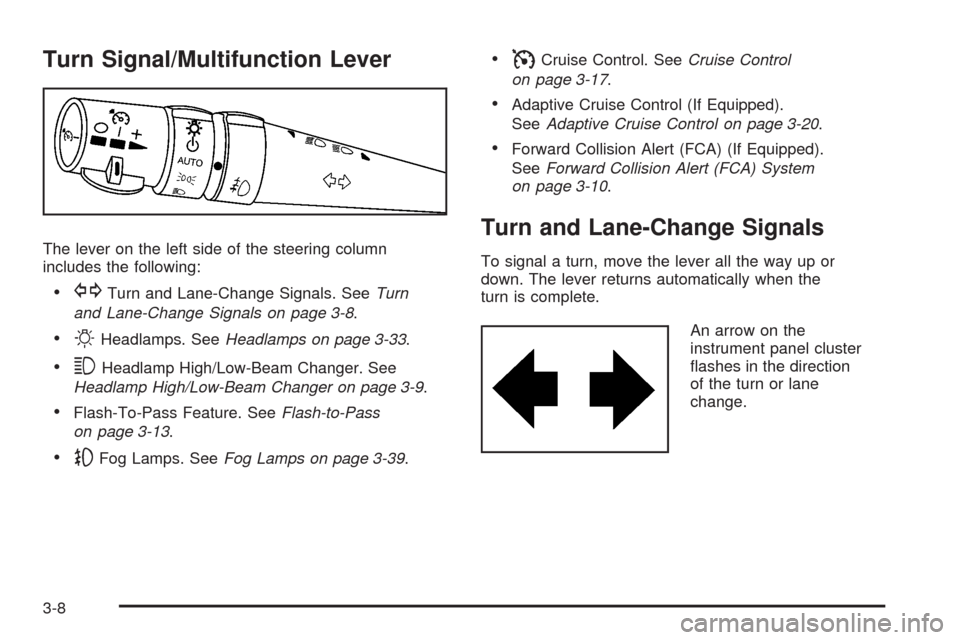
The lever on the left side of the steering column
includes the following:
GTurn and Lane-Change Signals. SeeTurn
and Lane-Change Signals on page 3-8.
OHeadlamps. SeeHeadlamps on page 3-33.
3Headlamp High/Low-Beam Changer. See
Headlamp High/Low-Beam Changer on page 3-9.
Flash-To-Pass Feature. SeeFlash-to-Pass
on page 3-13.
-Fog Lamps. SeeFog Lamps on page 3-39.
ICruise Control. SeeCruise Control
on page 3-17.
Adaptive Cruise Control (If Equipped).
SeeAdaptive Cruise Control on page 3-20.
Forward Collision Alert (FCA) (If Equipped).
SeeForward Collision Alert (FCA) System
on page 3-10.
Turn and Lane-Change Signals
To signal a turn, move the lever all the way up or
down. The lever returns automatically when the
turn is complete.
An arrow on the
instrument panel cluster
ashes in the direction
of the turn or lane
change.
3-8