wheel CADILLAC STS 2008 1.G Owner's Guide
[x] Cancel search | Manufacturer: CADILLAC, Model Year: 2008, Model line: STS, Model: CADILLAC STS 2008 1.GPages: 500, PDF Size: 5.81 MB
Page 208 of 500
Outlet Adjustment
Use the lever located in the center of each outlet to
change the direction of the airow, either side-to-side
or up and down. Use the thumbwheels to open or close
the outlets to adjust the airow.
Turn the thumbwheel towards the vehicle door to open
the outlets and allow the maximum amount of air to
enter your vehicle. Turn the thumbwheel towards
the center console to close the outlets and minimize
the amount of air entering the vehicle.
Operation Tips
Clear away any ice, snow or leaves from the air
inlets at the base of the windshield that may
block the ow of air into your vehicle.
Use of non-GM approved hood deectors may
adversely affect the performance of the system.
Keep the path under the front seats clear of
objects to help circulate the air inside of your
vehicle more effectively.
If the airow seems low when the fan speed is at the
highest setting, the passenger compartment air lter
may need to be replaced. For more information, see
Passenger Compartment Air Filter on page 3-55.
Rear Climate Control System
Your vehicle has a rear climate control system.
The base model includes air outlets in the rear of
the center console for cooling and under-seat air
outlets for heating. The temperature, quantity, and
air delivery location is controlled automatically by
the front climate control system.
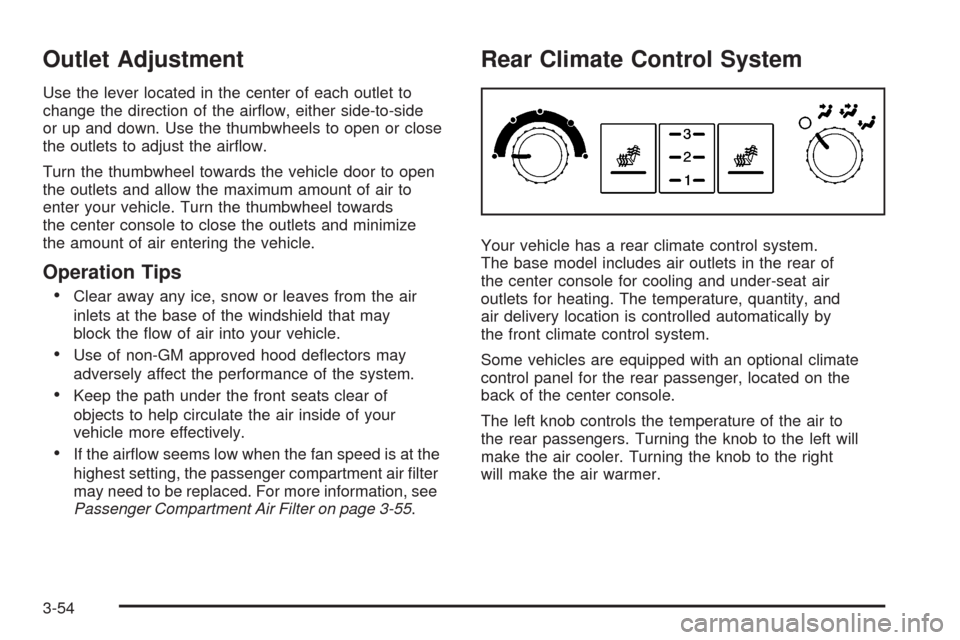
Some vehicles are equipped with an optional climate
control panel for the rear passenger, located on the
back of the center console.
The left knob controls the temperature of the air to
the rear passengers. Turning the knob to the left will
make the air cooler. Turning the knob to the right
will make the air warmer.
3-54
Page 228 of 500
Driver Information Center (DIC)
The Driver Information Center (DIC) gives you the
status of many of your vehicle’s systems. The DIC is
also used to display warning/status messages. All
messages will appear in the DIC display located at the
bottom of the instrument panel cluster, below the
tachometer and speedometer. The DIC buttons are
located on the instrument panel, to the left of the
steering wheel.
The DIC comes on when the ignition is on. After a short
delay, the DIC will display the current driver and the
information that was last displayed before the engine
was turned off.
The top line of the DIC display shows the vehicle
system information and the warning/status messages.
The bottom line of the DIC display shows either the
odometer, the trip odometer A or the trip odometer B
information on the left side. Only one odometer
can appear at a time. See “Trip Information” underDIC
Operation and Displays on page 3-74for information
on changing the display to show the odometer or
trip odometer information. The bottom line of the DIC
display also shows the outside temperature on the right
side and the shift lever position indicator in the center.
SeeAutomatic Transmission Operation on page 2-32
for more information on the shift lever positions.When the sport mode is active, an S will appear next
to the shift position indicator on the center of the
DIC display. When the manual mode is active, an M
will appear on the DIC display. When the normal mode
is active, only the shift position indicator will appear.
While the Driver Shift Control (DSC) feature is active,
the DIC will change to show the selected gear.
See “Driver Shift Control (DSC)” underAutomatic
Transmission Operation on page 2-32for more
information.
If a problem is detected, a warning message will appear
on the display. Be sure to take any message that
appears on the display seriously and remember that
clearing the message will only make the message
disappear, not correct the problem.
DIC Operation and Displays
The Driver Information Center (DIC) has different modes
which can be accessed by pressing the four DIC buttons
located on the instrument panel, to the left of the
steering wheel.
3-74
Page 245 of 500
SERVICE LANE DEPARTURE SYSTEM
If your vehicle has the Lane Departure Warning
(LDW) system, this message may display to
indicate that the LDW system is not working properly.
If this message remains on after continued driving,
the system needs service. See your dealer/retailer.
See the Index in the Navigation manual for more
information.
SERVICE RADAR CRUISE
This message displays when the Adaptive Cruise
Control system is disabled and needs service.
See your dealer/retailer.
SERVICE SIDE BLIND ZONE ALERT
SYSTEM
If your vehicle has the Side Blind Zone Alert (SBZA)
system and this message displays, both SBZA
displays will remain on indicating there is a problem
with the SBZA system. If these displays remain on
after continued driving, the system needs service.
See your dealer/retailer. See the Index in the
Navigation manual for more information.
SERVICE STABILITY SYS (System)
Your vehicle has a vehicle stability enhancement system
called StabiliTrak®. All-Wheel Drive (AWD) vehicle
with the Active Steering with Enhanced StabiliTrak®
option have a stability enhancement system called
Enhanced StabiliTrak®.
This message displays if there has been a problem
detected with the stability system.
If this message comes on while driving, pull off the road
as soon as possible and stop carefully. Try resetting
the system by turning the ignition off then back on. If this
message still stays on or comes back on again while
driving, your vehicle needs service. Have the stability
system inspected by your dealer/retailer as soon
as possible. SeeStabiliTrak
®System on page 4-8or
Enhanced StabiliTrak®on page 4-9for more information.
For vehicles with the Active Steering with Enhanced
StabiliTrak
®option, in some cases when the SERVICE
STABILITY SYS message is displayed, a larger
degree of steering wheel input at low vehicle speeds
and a smaller degree of steering wheel input at higher
vehicle speeds may be required.
3-91
Page 246 of 500
SERVICE STEERING SYS (System)
Your vehicle has a speed variable assist steering
system. Your All-Wheel Drive (AWD) vehicle may
have the Active Steering with Enhanced StabiliTrak
®
option. See “Active Steering” underSteering on
page 4-13.
This message displays if a problem is detected with
the speed variable assist steering system or the
Active Steering system. When this message is
displayed, you may notice that the effort required to
steer the vehicle increases or feels heavier, but you
will still be able to steer the vehicle. SeeSteering
on page 4-13for more information. Have the steering
system inspected by your dealer/retailer as soon
as possible.
If the SERVICE STEERING SYS message appears
because the Active Steering system needs service,
normal power steering is still operational. However,
compared to Active Steering, normal power steering
requires a larger degree of steering wheel input at
low vehicle speeds and a smaller degree of steering
wheel input at high vehicle speeds. The center position
of the steering wheel may be different. You may
continue to drive your vehicle with normal power
steering, but have the steering system inspected by
your dealer/retailer as soon as possible.If the Active Steering system needs service, the system
may be operating in the Stability Secure Mode and
the STABILITY SECURE MODE message will display.
SeeEnhanced StabiliTrak
®on page 4-9.
When certain steering faults are present, the vehicle
speed may be limited. If vehicle speed is limited,
the SPEED LIMITED TO XXX message will display.
See “Active Steering” underSteering on page 4-13.
SERVICE SUSPENSION SYS (System)
This message displays when the suspension system
is not operating properly. Have your vehicle serviced
by your dealer/retailer.
If your All-Wheel Drive (AWD) vehicle has the Active
Steering with Enhanced StabiliTrak
®option and
the suspension system needs service, the Enhanced
StabiliTrak
®system may be operating in the Stability
Secure Mode and the STABILITY SECURE MODE
message will display. SeeEnhanced StabiliTrak
®
on page 4-9.
3-92
Page 248 of 500
STABILITY COMPETITIVE MODE
If your All-Wheel Drive (AWD) vehicle has the
Active Steering with Enhanced StabiliTrak®option,
this message displays when the Competitive Mode
for stability control has been turned on using the
TC (traction control) button. SeeEnhanced StabiliTrak
®
on page 4-9. When the Enhanced StabiliTrak®
Competitive Mode has been activated, traction control
operates in competitive mode and cannot be turned
off. Also, the Active Steering and the Magnetic
Ride Control systems operate in the Performance
Mode. For more information, see “Active Steering
and Magnetic Ride Control” in the Index in the
Navigation manual.
STABILITY SECURE MODE
If your All-Wheel Drive (AWD) vehicle has the
Active Steering with Enhanced StabiliTrak®option,
this message displays when the stability control system
is in the secure mode. Stability Secure Mode is set
automatically when certain system faults or vehicle
conditions are detected. When the Stability Secure
Mode is activated, the stability control system will
not respond to driver requests to change the stability
mode until the next ignition cycle or until the vehicle
condition or fault is returned to normal. SeeEnhanced
StabiliTrak
®on page 4-9.
STABILITY SYS (System) ACTIVE
This message displays any time the StabiliTrak®system
or Enhanced StabiliTrak®system is actively assisting
with directional control of the vehicle. Slippery road
conditions may exist when this message is displayed,
so adjust your driving accordingly. This message
may stay on for a few seconds after StabiliTrak
®
stops assisting with directional control of the vehicle.
SeeStabiliTrak®System on page 4-8orEnhanced
StabiliTrak®on page 4-9for more information.
STABILITY SYS (System) NOT READY
This message displays if the StabiliTrak®system is
not ready. Two conditions may cause this message
to display:
The vehicle needs to be driven in a straight line
until the sensors are centered. Once the sensors
are centered, the StabiliTrak
®system is ready and
the STABILITY SYS READY message displays.
The system needs to warm up. This may occur
when rst starting your vehicle and driving away
during cold winter weather. This is normal. To
acknowledge this message, press the reset button.
The StabiliTrak
®performance is affected until the
STABILITY SYS READY message is displayed in the
DIC. SeeStabiliTrak
®System on page 4-8for more
information.
3-94
Page 249 of 500
STABILITY SYS (System) OFF
This message displays any time StabiliTrak®or
Enhanced StabiliTrak®is turned off using the TC
(traction control) on/off button. SeeTraction Control
System (TCS) on page 4-6and “Enhanced StabiliTrak
®
and Traction Control Mode Selection” underEnhanced
StabiliTrak®on page 4-9for more information. When
this message has been displayed, StabiliTrak®or
Enhanced StabiliTrak®is no longer available to assist
with directional control of the vehicle. Adjust your driving
accordingly. SeeStabiliTrak
®System on page 4-8or
Enhanced StabiliTrak®on page 4-9for more information.
STABILITY SYS (System) READY
This message displays any time StabiliTrak®is turned
back on using the TC (traction control) on/off button.
SeeTraction Control System (TCS) on page 4-6
for more information. When this message has been
displayed, StabiliTrak
®is ready to assist with directional
control of the vehicle, if needed. SeeStabiliTrak®
System on page 4-8for more information.
STABILITY TOURING MODE
If your All-Wheel Drive (AWD) vehicle has the
Active Steering with Enhanced StabiliTrak®option,
this message displays when the Stability Touring
Mode is re-activated by using the traction control
button after:
Driving in the Stability Competitive Mode.
The stability control system is turned off
by the driver.
This message may also display after exiting
STABILITY SECURE MODE when certain system
faults or vehicle conditions have been cleared.
SeeEnhanced StabiliTrak
®on page 4-9.
STARTING DISABLED THEFT
PROBLEM
This message displays when incorrect conditions
exist within the theft-deterrent system. See your
dealer/retailer for service.
3-95
Page 250 of 500
STARTING DISABLED THROTTLE
PROBLEM
This message displays when your vehicle’s throttle
system is not functioning properly. Have your vehicle
serviced by your dealer/retailer.
THEFT ATTEMPTED
This symbol appears
with this message.
This message displays if the theft-deterrent system
has detected a break-in attempt while you were away
from your vehicle.
TRACTION ACTIVE
This message displays when the Traction Control
System (TCS) is actively limiting wheel spin. Slippery
road conditions may exist if this message is displayed,
so adjust your driving accordingly. The message
stays on for a few seconds after the TCS stops limiting
wheel spin. SeeTraction Control System (TCS)
on page 4-6for more information.
TRANS (Transmission) HOT IDLE
ENGINE
Notice:If you drive your vehicle while the
transmission uid is overheating and the
transmission temperature warning is displayed
on the instrument panel cluster and/or DIC, you
can damage the transmission. This could lead
to costly repairs that would not be covered by
your warranty. Do not drive your vehicle with
overheated transmission uid or while the
transmission temperature warning is displayed.
This message displays when the transmission uid
in your vehicle is too hot. Stop the vehicle and allow
it to idle until the transmission cools down or until
this message is removed.
3-96
Page 252 of 500
Audio System(s)
Determine which radio your vehicle has and then
read the pages following to familiarize yourself with
its features.
{CAUTION:
This system provides you with far greater
access to audio stations and song listings.
Giving extended attention to entertainment
tasks while driving can cause a crash and you
or others can be injured or killed. Always keep
your eyes on the road and your mind on the
drive — avoid engaging in extended searching
while driving.
Keeping your mind on the drive is important for
safe driving. SeeDefensive Driving on page 4-2.
Here are some ways in which you can help avoid
distraction while driving.While your vehicle is parked:
Familiarize yourself with all of its controls.
Familiarize yourself with its operation.
Set up your audio system by presetting your
favorite radio stations, setting the tone, and
adjusting the speakers. Then, when driving
conditions permit, you can tune to your favorite
radio stations using the presets and steering
wheel controls if the vehicle has them.
Notice:Before adding any sound equipment to
your vehicle, such as an audio system, CD player,
CB radio, mobile telephone, or two-way radio, make
sure that it can be added by checking with your
dealer/retailer. Also, check federal rules covering
mobile radio and telephone units. If sound equipment
can be added, it is very important to do it properly.
Added sound equipment may interfere with the
operation of your vehicle’s engine, radio, or other
systems, and even damage them. Your vehicle’s
systems may interfere with the operation of sound
equipment that has been added.
Your vehicle has a feature called Retained Accessory
Power (RAP). With RAP, the audio system can be
played even after the ignition is turned off. SeeRetained
Accessory Power (RAP) on page 2-29for more
information.
3-98
Page 274 of 500
SETUP Submenu Items
The following choices are available for programming
using the Base audio system.
PERSONAL SETTINGS MENU
This item turns the entire list of personalization features
on or off. This item allows you to program certain
features to a preferred setting for up to two people.
The number of available features varies depending
upon which options are purchased. While this item is
on, a check mark appears after it. For more information
on the PERSONAL SETTINGS MENU item, see
Vehicle Personalization on page 2-60.
DRIVER SELECTION
When you select this item, the following submenu
displays:
DRIVER 1
DRIVER 2
RECALL DRIVER SETTINGS
STORE DRIVER SETTINGSFor more information on the DRIVER SELECTION
submenu item, see “Recalling Driver Settings”
and “Storing Driver Settings” underMemory Seat,
Mirrors and Steering Wheel on page 2-77.
DRIVER EXIT SETTINGS
When you select this item, the following submenu
displays:
RECALL EXIT SETTINGS
STORE EXIT SETTINGS
For more information on the DRIVER EXIT SETTINGS
submenu item, see “Recalling Exit Settings” and
“Storing Exit Settings” underMemory Seat, Mirrors
and Steering Wheel on page 2-77.
CONFIGURE DISPLAY KEYS
(Base Audio System)
This item lets you customize the functions of the
four congurable keys located to the left and right of the
audio display. See “Congurable Radio Display Keys”
underRadio(s) (MP3) on page 3-100for programming
information.
3-120
Page 275 of 500
Theft-Deterrent Feature
THEFTLOCK®is designed to discourage theft of your
vehicle’s radio. The feature works automatically by
learning a portion of the Vehicle Identication Number
(VIN). If the radio is moved to a different vehicle, it does
not operate and LOC, LOCK, or LOCKED could display.
With THEFTLOCK
®activated, the radio does not
operate if stolen.
Audio Steering Wheel Controls
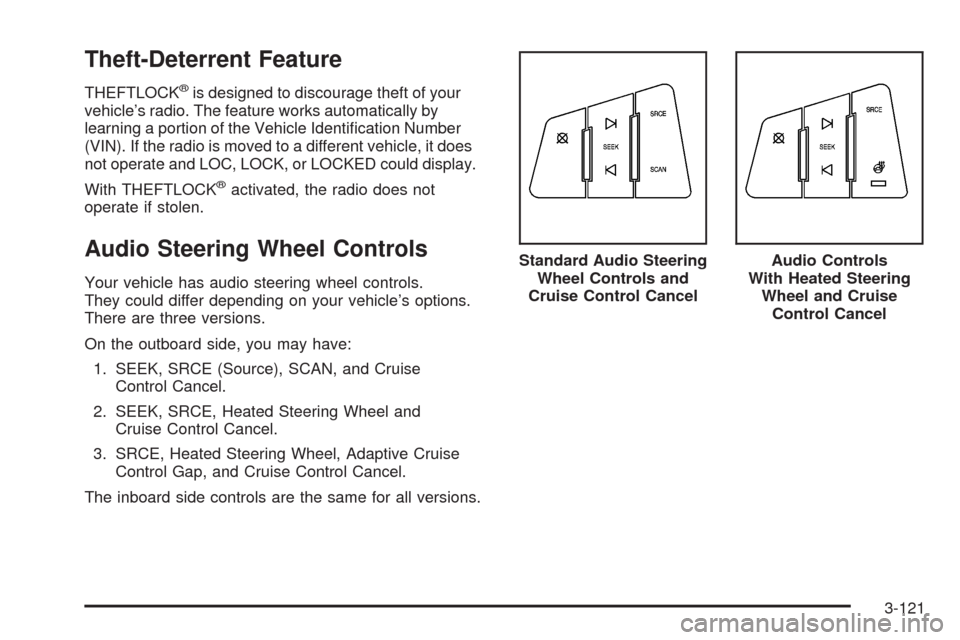
Your vehicle has audio steering wheel controls.
They could differ depending on your vehicle’s options.
There are three versions.
On the outboard side, you may have:
1. SEEK, SRCE (Source), SCAN, and Cruise
Control Cancel.
2. SEEK, SRCE, Heated Steering Wheel and
Cruise Control Cancel.
3. SRCE, Heated Steering Wheel, Adaptive Cruise
Control Gap, and Cruise Control Cancel.
The inboard side controls are the same for all versions.Standard Audio Steering
Wheel Controls and
Cruise Control Cancel
Audio Controls
With Heated Steering
Wheel and Cruise
Control Cancel
3-121