mirror controls CADILLAC STS 2008 1.G Owners Manual
[x] Cancel search | Manufacturer: CADILLAC, Model Year: 2008, Model line: STS, Model: CADILLAC STS 2008 1.GPages: 500, PDF Size: 5.81 MB
Page 1 of 500
Seats and Restraint Systems........................... 1-1
Front Seats
............................................... 1-2
Rear Seats
............................................... 1-7
Safety Belts
.............................................. 1-8
Child Restraints
.......................................1-28
Airbag System
.........................................1-51
Restraint System Check
............................1-66
Features and Controls..................................... 2-1
Keys
........................................................ 2-3
Doors and Locks
......................................2-14
Windows
.................................................2-19
Theft-Deterrent Systems
............................2-22
Starting and Operating Your Vehicle
...........2-27
Mirrors
....................................................2-40
Object Detection Systems
..........................2-45
OnStar
®System
......................................2-48
Universal Home Remote System
................2-51
Storage Areas
.........................................2-58
Sunroof
..................................................2-58
Vehicle Personalization
.............................2-60
Instrument Panel............................................. 3-1
Instrument Panel Overview
.......................... 3-4
Climate Controls
......................................3-48
Warning Lights, Gages, and Indicators
........3-57
Driver Information Center (DIC)
..................3-74
Audio System(s)
.......................................3-98Driving Your Vehicle....................................... 4-1
Your Driving, the Road, and Your Vehicle
..... 4-2
Towing
...................................................4-31
Service and Appearance Care.......................... 5-1
Service
..................................................... 5-3
Fuel
......................................................... 5-5
Checking Things Under the Hood
...............5-10
All-Wheel Drive
........................................5-50
Rear Axle
...............................................5-51
Front Axle
...............................................5-52
Headlamp Aiming
.....................................5-53
Bulb Replacement
....................................5-54
Windshield Replacement
...........................5-55
Windshield Wiper Blade Replacement
.........5-55
Tires
......................................................5-57
Appearance Care
...................................5-107
Vehicle Identication
...............................5-116
Electrical System
....................................5-116
Capacities and Specications
...................5-128
Maintenance Schedule..................................... 6-1
Maintenance Schedule
................................ 6-2
Customer Assistance Information.................... 7-1
Customer Assistance and Information
........... 7-2
Reporting Safety Defects
...........................7-14
Vehicle Data Recording and Privacy
...........7-16
Index................................................................ 1
2008 Cadillac STS/STS-V Owner ManualM
Page 6 of 500
Front Seats
Power Seats
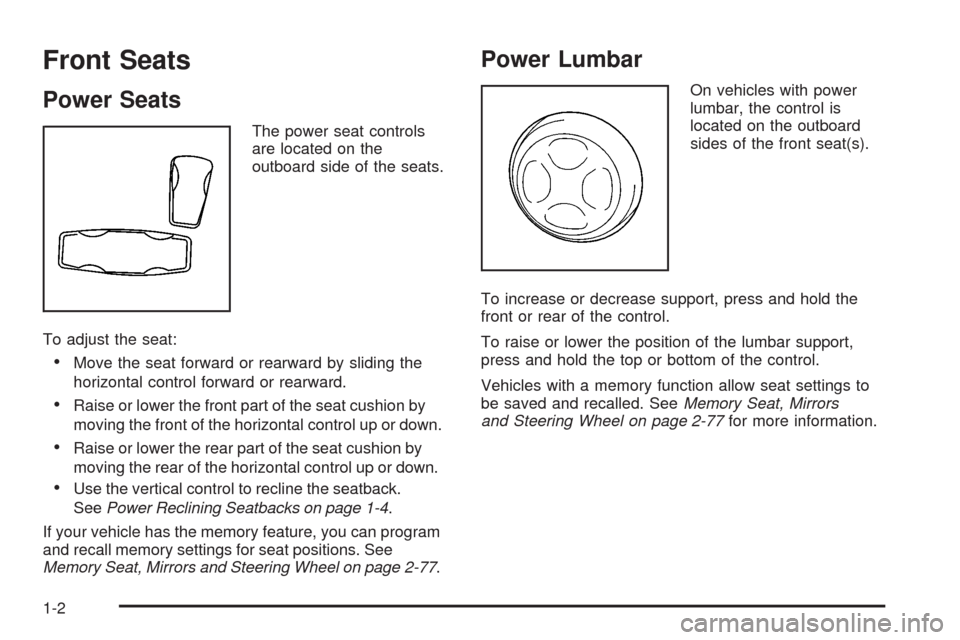
The power seat controls
are located on the
outboard side of the seats.
To adjust the seat:
Move the seat forward or rearward by sliding the
horizontal control forward or rearward.
Raise or lower the front part of the seat cushion by
moving the front of the horizontal control up or down.
Raise or lower the rear part of the seat cushion by
moving the rear of the horizontal control up or down.
Use the vertical control to recline the seatback.
SeePower Reclining Seatbacks on page 1-4.
If your vehicle has the memory feature, you can program
and recall memory settings for seat positions. See
Memory Seat, Mirrors and Steering Wheel on page 2-77.
Power Lumbar
On vehicles with power
lumbar, the control is
located on the outboard
sides of the front seat(s).
To increase or decrease support, press and hold the
front or rear of the control.
To raise or lower the position of the lumbar support,
press and hold the top or bottom of the control.
Vehicles with a memory function allow seat settings to
be saved and recalled. SeeMemory Seat, Mirrors
and Steering Wheel on page 2-77for more information.
1-2
Page 73 of 500
Keys...............................................................2-3
Keyless Access System...................................2-5
Keyless Access System Operation....................2-6
Remote Vehicle Start....................................2-12
Doors and Locks............................................2-14
Door Locks..................................................2-14
Power Door Locks........................................2-14
Programmable Automatic Door Locks..............2-15
Rear Door Security Locks..............................2-15
Lockout Protection........................................2-16
Trunk..........................................................2-16
Windows........................................................2-19
Power Windows............................................2-20
Sun Visors...................................................2-22
Theft-Deterrent Systems..................................2-22
Theft-Deterrent System..................................2-22
Valet Lockout Switch.....................................2-25
Immobilizer..................................................2-26
Immobilizer Operation....................................2-26Starting and Operating Your Vehicle................2-27
New Vehicle Break-In....................................2-27
Ignition Positions..........................................2-28
Retained Accessory Power (RAP)...................2-29
Starting the Engine.......................................2-29
Engine Coolant Heater..................................2-31
Automatic Transmission Operation...................2-32
Parking Brake..............................................2-35
Shifting Into PARK (P)...................................2-36
Shifting Out of PARK (P)...............................2-37
Parking Over Things That Burn.......................2-38
Engine Exhaust............................................2-38
Running the Engine While Parked...................2-39
Mirrors...........................................................2-40
Automatic Dimming Rearview Mirror
with Intellibeam™ and OnStar
®...................2-40
Automatic Dimming Rearview Mirror................2-40
Automatic Dimming Rearview Mirror
with OnStar
®............................................2-40
Section 2 Features and Controls
2-1
Page 74 of 500
Automatic Dimming Rearview Mirror
with OnStar®and Compass........................2-41
Outside Power Heated Mirrors........................2-43
Outside Automatic Dimming Mirror..................2-44
Outside Convex Mirror...................................2-44
Outside Parallel Park Assist Mirror..................2-44
Object Detection Systems...............................2-45
Ultrasonic Rear Parking Assist (URPA)............2-45
Side Blind Zone Alert....................................2-47
Lane Departure Warning................................2-47
OnStar
®System.............................................2-48
Universal Home Remote System......................2-51
Universal Home Remote System.....................2-51
Universal Home Remote System Operation
(With Three Round LED)............................2-52Storage Areas................................................2-58
Glove Box...................................................2-58
Cupholder(s)................................................2-58
Center Console Storage.................................2-58
Convenience Net..........................................2-58
Sunroof.........................................................2-58
Vehicle Personalization...................................2-60
Memory Seat, Mirrors and Steering Wheel.......2-77
Section 2 Features and Controls
2-2
Page 112 of 500
Mirrors
Automatic Dimming Rearview Mirror
with Intellibeam™ and OnStar
®
Your vehicle may have an Intellibeam™ inside rearview
mirror with OnStar®controls. For more information
about OnStar®, seeOnStar®System on page 2-48.
To turn on and enable Intellibeam™, press and release
the Intellibeam™ button on the inside rear view
mirror. If the vehicle has the IntelliBeam™ Intelligent
High-Beam Headlamp Control System, the on/off button
can also be used to turn off or reset this system.
See “IntelliBeam™ Intelligent High-Beam Headlamp
Control System” underHeadlamps on page 3-33.
Automatic Dimming Rearview Mirror
Your vehicle may have an automatic dimming rearview
mirror.
AUTO/
((On/Off):Press and hold the AUTO button
located on the lower center of the mirror for about
three seconds to turn automatic dimming on.
The indicator light will illuminate when this feature is
active. The automatic dimming feature is active each
time the vehicle is started. Press and hold the
((off)
button located next to the AUTO button for about three
seconds to turn the automatic dimming feature off.
Automatic Dimming Rearview Mirror
with OnStar
®
Your vehicle may have an automatic dimming rearview
mirror that also contains OnStar®controls. For more
information on OnStar®, seeOnStar®System on
page 2-48.
Mirror Operation
O
(On/Off):Press and hold the button, located on the
lower left side of the mirror face, for about three seconds
to turn the automatic dimming feature on or off.
The indicator light will illuminate when this feature is
active. The automatic dimming feature is active each time
the vehicle is started.
Cleaning the Mirror
When cleaning the mirror, use a paper towel or similar
material dampened with glass cleaner. Do not spray
glass cleaner directly on the mirror as that may cause
the liquid cleaner to enter the mirror housing.
2-40
Page 113 of 500
Automatic Dimming Rearview Mirror
with OnStar
®and Compass
Your vehicle may have an automatic dimming rearview
mirror with a compass display. The mirror also
contains OnStar
®controls. For more information see
OnStar®System on page 2-48.
The mirror includes an eight-point compass display in
the upper right corner of the mirror face. When on,
the compass automatically calibrates as the vehicle
is driven.
Mirror Operation
O
(On/Off):Press and hold the button, located on
the lower left side of the mirror face, for about
three seconds to turn the automatic dimming feature on
or off. The indicator light will illuminate when this
feature is active. The automatic dimming feature is
active each time the vehicle is started.
Compass Operation
Press the on/off button once to turn the compass
on or off.
When the ignition and the compass feature are on,
the compass will show two character boxes for about
two seconds. After two seconds, the mirror will display
the compass heading.
Compass Calibration
If after two seconds, the display does not show a
compass heading (for example, N for North), there may
be a strong magnetic eld interfering with the compass.
Such interference may be caused by a magnetic
antenna mount, magnetic note pad holder or a similar
magnetic item. If the letter C should ever appear in the
compass window, the compass may need calibration.
The mirror can be calibrated by driving the vehicle in
circles at 5 mph (8 km/h) or less until the display reads
a direction.
The compass can be placed in calibration mode
manually by pressing and holding the on/off button
untilaCisshown in the compass display.
2-41
Page 115 of 500
Cleaning the Mirror
When cleaning the mirror, use a paper towel or similar
material dampened with glass cleaner. Do not spray
glass cleaner directly on the mirror as that may cause
the liquid cleaner to enter the mirror housing.
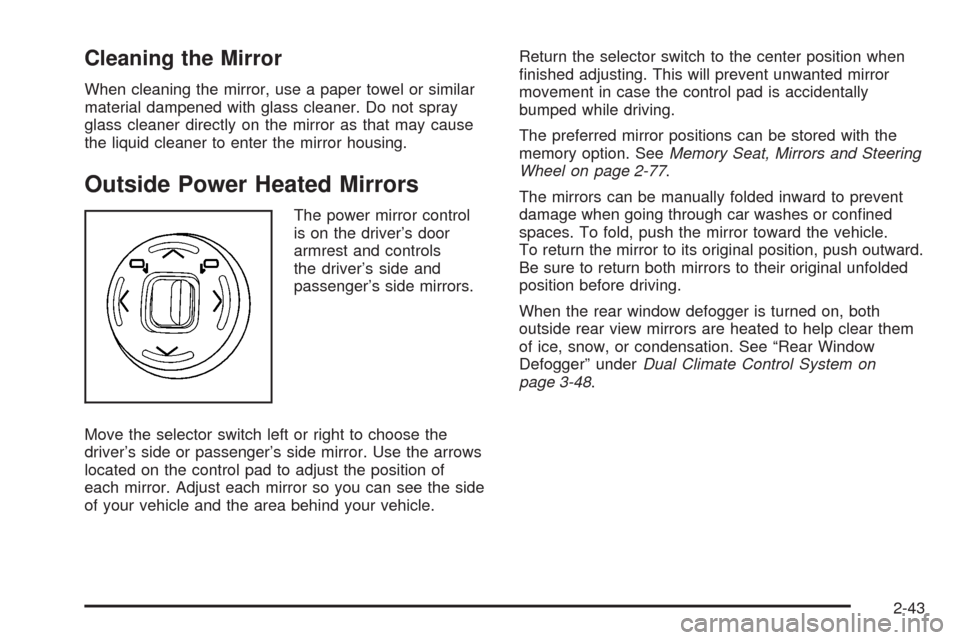
Outside Power Heated Mirrors
The power mirror control
is on the driver’s door
armrest and controls
the driver’s side and
passenger’s side mirrors.
Move the selector switch left or right to choose the
driver’s side or passenger’s side mirror. Use the arrows
located on the control pad to adjust the position of
each mirror. Adjust each mirror so you can see the side
of your vehicle and the area behind your vehicle.Return the selector switch to the center position when
nished adjusting. This will prevent unwanted mirror
movement in case the control pad is accidentally
bumped while driving.
The preferred mirror positions can be stored with the
memory option. SeeMemory Seat, Mirrors and Steering
Wheel on page 2-77.
The mirrors can be manually folded inward to prevent
damage when going through car washes or conned
spaces. To fold, push the mirror toward the vehicle.
To return the mirror to its original position, push outward.
Be sure to return both mirrors to their original unfolded
position before driving.
When the rear window defogger is turned on, both
outside rear view mirrors are heated to help clear them
of ice, snow, or condensation. See “Rear Window
Defogger” underDual Climate Control System on
page 3-48.
2-43
Page 152 of 500
STORE DRIVER SETTINGS
To store driver settings:
1. Adjust your settings for the driver’s seat, the outside
rearview mirrors, and the steering column to a
comfortable driving position.
2. Enter the memory programming mode for your
driver settings by following the instructions listed
previously under “Entering the Driver Selection
Submenu.”
3. From the DRIVER SELECTION submenu, turn the
tune/select knob to scroll to STORE DRIVER
SETTINGS and press in the knob. Two beeps will
sound to conrm that your driver settings are saved.
4. Set the HUD position, if your vehicle has this
feature, the climate control temperature, fan
speed and mode settings, the radio presets, tone,
volume, playback mode (AM/FM, XM™, or CD), and
compact disc position.
Your memory settings are now programmed.
Any changes that are made to the HUD, audio
system, and climate controls while driving will be
automatically stored when the ignition is turned off.
5. Repeat the procedure for a second driver by
programming the other driver number.
Entering the Driver Exit Settings
Submenu
To enter the memory programming mode for your
exit settings:
1. Be sure the ignition is either on, in ACCESSORY,
or in RAP and place the transmission in PARK (P)
or make sure that the vehicle speed is less than
6 mph (9 km/h).
2. Press any button on the appropriate keyless access
transmitter to identify yourself as Driver 1 or Driver 2.
3. Turn on the radio by pressing the
power/volume knob.
4. Press the CNFG radio button to enter the main
menu of the radio.
5. Turn the tune/select knob and scroll to SETUP.
6. Press the tune/select knob to enter the SETUP menu.
7. Turn the tune/select knob and scroll to DRIVER
EXIT SETTINGS.
8. Press the tune/select knob to enter the DRIVER
EXIT SETTINGS submenu. The following items
will appear:
RECALL EXIT SETTINGS
STORE EXIT SETTINGS
2-80
Page 190 of 500
Disabling and Resetting IntelliBeam™
at the Rearview Mirror
IntelliBeam™ can be disabled and reset to the original
factory setting by using the controls on the inside
rearview mirror.
AUTO
3(IntelliBeam™ On/Off):To disable the
system, press this button on the inside rearview
mirror. The IntelliBeam™ indicator turns off and does
not come back on until the IntelliBeam™ button is
pressed again.
When IntelliBeam™ has turned on the high-beams,
pull or push the high-beam stalk. This disables
IntelliBeam™ and the IntelliBeam™ indicator on the
rearview mirror turns off. To re-enable IntelliBeam™,
press the IntelliBeam™ button on the mirror.
A different sensitivity setting is available for dealer
diagnostics. This is done by pushing and holding this
button for 20 seconds until the light ashes three times.
If you accidentally activate this, the vehicle’s setting
automatically resets each time the ignition is turned off
and then on again; otherwise, refer to the text above
for resetting the system.
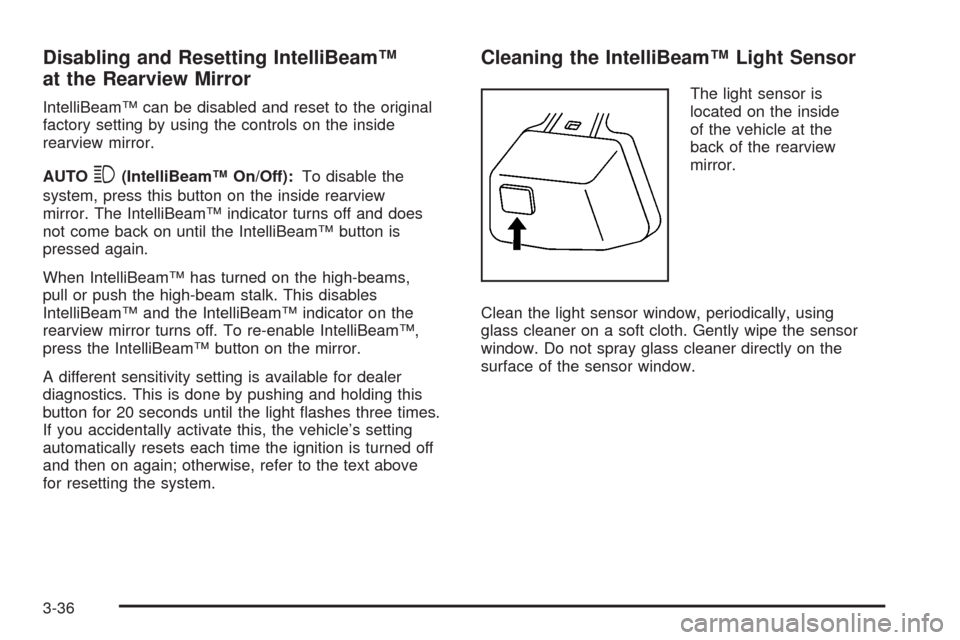
Cleaning the IntelliBeam™ Light Sensor
The light sensor is
located on the inside
of the vehicle at the
back of the rearview
mirror.
Clean the light sensor window, periodically, using
glass cleaner on a soft cloth. Gently wipe the sensor
window. Do not spray glass cleaner directly on the
surface of the sensor window.
3-36
Page 494 of 500
M
Magnetic Ride Control....................................... 4-8
Maintenance Schedule
Additional Required Services........................... 6-6
At Each Fuel Fill........................................... 6-9
At Least Once a Month................................6-10
At Least Once a Year..................................6-11
Introduction.................................................. 6-2
Maintenance Footnotes.................................. 6-8
Maintenance Record....................................6-18
Maintenance Requirements............................. 6-2
Normal Maintenance Replacement Parts.........6-15
Owner Checks and Services........................... 6-9
Recommended Fluids and Lubricants.............6-13
Scheduled Maintenance................................. 6-4
Using.......................................................... 6-3
Your Vehicle and the Environment................... 6-2
Malfunction Indicator Light................................3-68
Manual, Using.................................................... iii
Memory Mirrors..............................................2-77
Memory Seat.................................................2-77
Memory Steering Wheel Controls......................2-77
Message
DIC Warnings and Messages........................3-80
Mirrors
Automatic Dimming Rearview........................2-40
Automatic Dimming Rearview Mirror with
Intellibeam™ and OnStar
®.........................2-40
Automatic Dimming Rearview with OnStar®.....2-40Mirrors (cont.)
Automatic Dimming Rearview with
OnStar
®and Compass..............................2-41
Manual Rearview Mirror with Compass
and Temperature........................................ 1-7
Memory.....................................................2-77
Outside Automatic Dimming Mirror.................2-44
Outside Convex Mirror.................................2-44
Outside Parallel Park Assist Mirror.................2-44
Outside Power Heated Mirrors.......................2-43
MP3 ............................................................3-112
MyGMLink.com................................................ 7-4
N
Navigation System, Privacy..............................7-17
Navigation/Radio System, see
Navigation Manual.....................................3-117
New Vehicle Break-In......................................2-27
Normal Maintenance Replacement Parts............6-15
O
Odometer......................................................3-59
Off-Road Recovery..........................................4-16
Oil
Engine.......................................................5-18
Pressure Light.............................................3-70
8