brake CADILLAC STS 2009 1.G User Guide
[x] Cancel search | Manufacturer: CADILLAC, Model Year: 2009, Model line: STS, Model: CADILLAC STS 2009 1.GPages: 514, PDF Size: 2.73 MB
Page 107 of 514
Torque Lock
Torque lock is when the weight of the vehicle puts
too much force on the parking pawl in the transmission.
This happens when parking on a hill and shifting the
transmission into P (Park) is not done properly and then it
is difficult to shift out of P (Park). To prevent torque lock,
set the parking brake and then shift into P (Park). To nd
out how, see “Shifting Into P (Park)” listed previously.
If torque lock does occur, your vehicle may need to be
pushed uphill by another vehicle to relieve the parking
pawl pressure, so you can shift out of P (Park).
Shifting Out of Park
Shift lock release prevents shifting out of P (Park)
unless the vehicle is running or in Accessory mode
and the brake pedal is applied.
The shift lock release is always functional except
in the case of an uncharged or low voltage (less than
9-volt) battery. SeeJump Starting on page 5-42for
more information.To shift out of P (Park) use the following:
1. Apply the brake pedal.
2. Press the shift lever button.
3. Move the shift lever to the desired position.
If you still are unable to shift out of P (Park):
1. Fully release the shift lever button.
2. While holding down the brake pedal, press the shift
lever button again.
3. Move the shift lever to the desired position.
If you still cannot move the shift lever from P (Park),
consult your dealer/retailer or a professional towing
service.
Parking Over Things That Burn
{CAUTION:
Things that can burn could touch hot exhaust
parts under the vehicle and ignite. Do not park
over papers, leaves, dry grass, or other things
that can burn.
2-35
Page 109 of 514
Running the Vehicle While Parked
It is better not to park with the engine running. But if you
ever have to, here are some things to know.
{CAUTION:
Idling a vehicle in an enclosed area with poor
ventilation is dangerous. Engine exhaust may
enter the vehicle. Engine exhaust contains Carbon
Monoxide (CO) which cannot be seen or smelled.
It can cause unconsciousness and even death.
Never run the engine in an enclosed area that has
no fresh air ventilation. For more information, see
Engine ExhaustEngine Exhaust on page 2-36.
{CAUTION:
It can be dangerous to get out of the vehicle if
the automatic transmission shift lever is not fully
in P (Park) with the parking brake rmly set. The
vehicle can roll. Do not leave the vehicle when the
engine is running unless you have to. If you have
left the engine running, the vehicle can move
suddenly. You or others could be injured. To be
sure the vehicle will not move, even when you are
on fairly level ground, always set the parking brake
after you move the shift lever to P (Park).
Follow the proper steps to be sure the vehicle will not
move. SeeShifting Into Park on page 2-34.
If parking on a hill and pulling a trailer, seeTowing
a Trailer (Vehicles Without Heavy Duty Cooling)
on page 4-31orTowing a Trailer (Vehicles With
Heavy Duty Cooling) on page 4-32.
2-37
Page 116 of 514
When the System Does Not Seem to
Work Properly
If the URPA system will not activate due to a temporary
condition a red light will be shown on the rear URPA
display when the shift lever is moved into R (Reverse).
This occurs under the following conditions:
The ultrasonic sensors are not clean. Keep your
rear bumper free of mud, dirt, snow, ice and slush.
For cleaning instructions, seeWashing Your Vehicle
on page 5-118.
The ultrasonic sensors are not clean. Keep the
vehicle’s rear bumper free of mud, dirt, snow,
ice and slush. For cleaning instructions, see
Washing Your Vehicle on page 5-118.
A trailer was attached to the vehicle, or a bicycle or
an object was hanging out of the trunk during the
last drive cycle, the red light may illuminate in the
rear display. Once the attached object is removed,
URPA will return to normal operation.
The vehicle’s bumper is damaged. Take the vehicle
to your dealer/retailer to repair the system.
Other conditions may affect system performance,
such as vibrations from a jackhammer or the
compression of air brakes on a very large truck.
If the system is still disabled, after driving forward at
least 15 mph (25 km/h), take the vehicle to your
dealer/retailer.
Side Blind Zone Alert (SBZA)
For vehicles with the SBZA system. Read this entire
section before using the system.
The SBZA system operates on a radio frequency
subject to Federal Communications Commission (FCC)
Rules and with Industry Canada.
This device complies with Part 15 of the FCC Rules.
Operation is subject to the following two conditions:
1. This device may not cause harmful interference.
2. This device must accept any interference received,
including interference that may cause undesired
operation.
This device complies with RSS-310 of Industry Canada.
Operation is subject to the following two conditions:
1. This device may not cause harmful interference.
2. This device must accept any interference received,
including interference that may cause undesired
operation.
Frequency of operation: 24.05GHz – 24.25GHz
Field Strength: Not greater than 2.5V/m peak
(0.25V/m average) at a distance of 3m
The manufacturer is not responsible for any radio or TV
interference caused by unauthorized modications to
this equipment. Such modications could void the user’s
authority to operate the equipment.
2-44
Page 155 of 514
Instrument Panel Overview...............................3-4
Hazard Warning Flashers................................3-6
Horn .............................................................3-6
Power Tilt Wheel and Telescopic
Steering Column.........................................3-6
Heated Steering Wheel...................................3-7
Turn Signal/Multifunction Lever.........................3-7
Turn and Lane-Change Signals........................3-8
Headlamp High/Low-Beam Changer..................3-9
Forward Collision Alert (FCA) System................3-9
Flash-to-Pass...............................................3-13
Windshield Wipers........................................3-13
Rainsense™ II Wipers...................................3-14
Windshield Washer.......................................3-15
Headlamp Washer........................................3-16
Cruise Control..............................................3-16
Adaptive Cruise Control.................................3-20
Headlamps..................................................3-32
Wiper Activated Headlamps............................3-36
Headlamps on Reminder................................3-36
Daytime Running Lamps (DRL).......................3-36
Fog Lamps ..................................................3-38
Twilight Sentinel
®..........................................3-38
Exterior Lighting Battery Saver........................3-40Instrument Panel Brightness...........................3-40
Entry Lighting...............................................3-41
Parade Dimming...........................................3-41
Reading Lamps............................................3-41
Battery Load Management.............................3-41
Electric Power Management...........................3-42
Inadvertent Power Battery Saver.....................3-42
Head-Up Display (HUD).................................3-43
Accessory Power Outlet(s).............................3-46
Ashtray(s) and Cigarette Lighter......................3-47
Climate Controls............................................3-48
Dual Climate Control System..........................3-48
Outlet Adjustment.........................................3-52
Rear Climate Control System.........................3-53
Passenger Compartment Air Filter...................3-54
Warning Lights, Gages, and Indicators............3-55
Instrument Panel Cluster................................3-56
Speedometer and Odometer...........................3-57
Tachometer.................................................3-57
Safety Belt Reminders...................................3-57
Airbag Readiness Light..................................3-58
Passenger Airbag Status Indicator...................3-59
Charging System Light..................................3-61
Brake System Warning Light..........................3-62
Section 3 Instrument Panel
3-1
Page 156 of 514
Antilock Brake System (ABS)
Warning Light...........................................3-63
Traction Control System (TCS)
Warning Light...........................................3-63
Lane Departure Warning Light........................3-64
Engine Coolant Temperature
Warning Light...........................................3-64
Engine Coolant Temperature Gage..................3-65
Tire Pressure Light.......................................3-65
Malfunction Indicator Lamp.............................3-66
Oil Pressure Light.........................................3-69
Security Light...............................................3-69
Fog Lamp Light............................................3-70
Lights On Reminder......................................3-70
Cruise Control Light......................................3-70
Highbeam On Light.......................................3-70
Fuel Gage...................................................3-71Driver Information Center (DIC).......................3-72
DIC Operation and Displays...........................3-72
DIC Warnings and Messages.........................3-79
Other Messages...........................................3-96
Audio System(s).............................................3-97
Setting the Clock..........................................3-98
Radio(s)......................................................3-98
Using an MP3............................................3-111
XM Radio Messages...................................3-114
Navigation/Radio System..............................3-116
Bluetooth
®.................................................3-116
Radio Personalization..................................3-126
Theft-Deterrent Feature................................3-130
Audio Steering Wheel Controls......................3-131
Radio Reception.........................................3-133
Backglass Antenna......................................3-134
XM™ Satellite Radio Antenna System............3-134
Section 3 Instrument Panel
3-2
Page 164 of 514
The Forward Collision Alert (FCA) system provides an
audible and visual warning if you approach a vehicle
too rapidly. FCA also provides a visual warning with no
audible warning if you are following another vehicle much
too closely. FCA uses the Adaptive Cruise Control radar
to detect a vehicle directly ahead, in your path, within a
distance of 328 ft (100 m) and operates at speeds above
20 mph (32 km/h).
{CAUTION:
FCA is only a warning system and does not apply
the brakes. When you are approaching a vehicle
or object too rapidly or when you are following a
vehicle too closely that is ahead of you, FCA may
not provide you with enough time to avoid a
collision. FCA is not designed to warn the driver
of pedestrians or animals. Your complete attention
is always required while driving and you should
be ready to take action and apply the brakes.
For more information, seeDefensive Driving
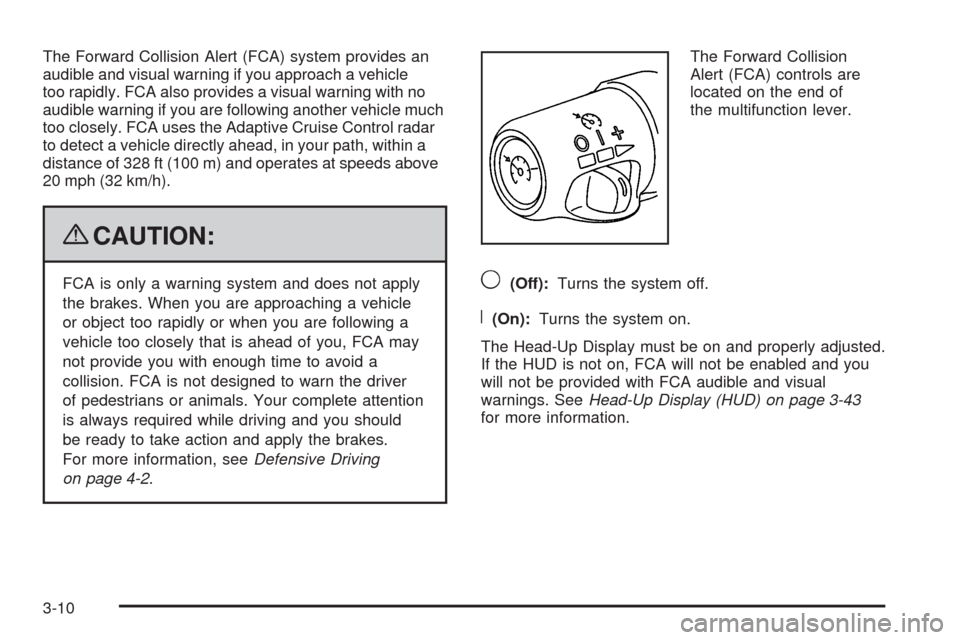
on page 4-2.The Forward Collision
Alert (FCA) controls are
located on the end of
the multifunction lever.9(Off):Turns the system off.
R(On):Turns the system on.
The Head-Up Display must be on and properly adjusted.
If the HUD is not on, FCA will not be enabled and you
will not be provided with FCA audible and visual
warnings. SeeHead-Up Display (HUD) on page 3-43
for more information.
3-10
Page 170 of 514

Headlamp Washer
For vehicles with headlamp washers, they are located to
the inside of the headlamps.
Press
Llocated at the end of the windshield wiper
lever, to wash the headlamps and windshield. After the
rst wash, the headlamps will be washed after the
fth press of the windshield washer button.
The headlamps must be on to be washed. If the washer
uid is low, the headlamp washers will not work.
SeeWindshield Washer on page 3-15for additional
information.
Cruise Control
With cruise control, a speed of about 25 mph (40 km/h)
or more can be maintained without keeping your foot
on the accelerator. Cruise control does not work
at speeds below about 25 mph (40 km/h).
If the brakes are applied, the cruise control shuts off.
{CAUTION:
Cruise control can be dangerous where you cannot
drive safely at a steady speed. So, do not use the
cruise control on winding roads or in heavy traffic.
Cruise control can be dangerous on slippery roads.
On such roads, fast changes in tire traction can
cause excessive wheel slip, and you could lose
control. Do not use cruise control on slippery roads.
If the vehicle is in cruise control when the Traction
Control System (TCS) begins to limit wheel spin or the
stability control system activates, the cruise control
automatically disengages. SeeTraction Control System
(TCS) on page 4-10andStabiliTrak
®System on page 4-6
orEnhanced StabiliTrak®on page 4-6. When road
conditions allow you to safely use it again, the cruise
control can be turned back on.
3-16
Page 172 of 514
Resuming a Set Speed
If the cruise control is at the set speed desired and then
the brake is applied, the cruise control is disengaged.
But it does not need to be reset.
Once the vehicle speed reaches about 25 mph
(40 km/h) or more, move the cruise control switch
briey from
RtoS.
The vehicle will go back up to your chosen speed and
stay there.
If the switch is held at resume/accelerate the vehicle
keeps going faster until the switch is released or the
brake is applied. Do not hold the switch at resume/
accelerate, unless you want the vehicle to go faster.
Increasing Speed While Using Cruise
Control
There are two ways to go to a higher speed:
Use the accelerator pedal to get to the higher
speed. Press
Tat the end of the lever, then
release the button and the accelerator pedal.
The vehicle will cruise at the higher speed.
Move the cruise switch fromRtoS. Hold it there
until the desired speed is reached, and then release
the switch. To increase the vehicle speed in very
small amounts, move the switch briey to
S.
Each time this is done, the vehicle goes about
1 mph (1.6 km/h) faster.
If using the accelerator pedal and the set button at end
of the lever to increase cruise set speed, the new
set speed must be at least 5 mph higher than current
speed for this method to work. If it is not 5 mph higher,
move the cruise switch to off, then on, and then reset
the speed using the set button.
3-18
Page 173 of 514
Reducing Speed While Using Cruise
Control
There are two ways to reduce your speed while using
cruise control:
PressTat the end of the lever until the lower
speed desired is reached, then release it.
To slow down in very small amounts, briey
press
T. Each time this is done, the vehicle
goes about 1 mph (1.6 km/h) slower.
Passing Another Vehicle While Using
Cruise Control
Use the accelerator pedal to increase your vehicle
speed. When you take your foot off the pedal, the
vehicle slows down to the cruise control speed you
set earlier.
Using Cruise Control on Hills
How well the cruise control works on hills depends upon
the vehicle speed, load, and the steepness of the hills.
When going up steep hills, you might have to step on the
accelerator pedal to maintain the vehicle’s speed. When
going downhill, you might have to brake to keep the
vehicle’s speed down. Applying the brake will turn off the
cruise control. If you need to apply the brake due to the
grade of the downhill slope, you might not want to attempt
to use the cruise control feature.
Ending Cruise Control
There are three ways to end cruise control.
Step lightly on the brake pedal. This will end the
current cruise control session.
Move the cruise control switch to9to turn off the
system completely.
Press the[button on the steering wheel.
Erasing Speed Memory
The cruise control set speed memory is erased when
the cruise control or the ignition is turned off.
3-19
Page 174 of 514
Adaptive Cruise Control
If the vehicle has adaptive cruise control, read this
entire section before using this feature.
The system operates on a radio frequency subject to
Federal Communications Commission (FCC) Rules and
with Industry Canada.
This device complies with Part 15 of the FCC Rules.
Operation is subject to the following two conditions:
1. This device may not cause interference.
2. This device must accept any interference received,
including interference that may cause undesired
operation of the device.
This device complies with RSS-210 of Industry Canada.
Operation is subject to the following two conditions:
1. This device may not cause interference.
2. This device must accept any interference received,
including interference that may cause undesired
operation of the device.
Changes or modications to this system by other than
an authorized service facility could void authorization to
use this equipment.
Adaptive Cruise Control is an enhancement to traditional
cruise control and is not a safety system. It allows
you to keep cruise control engaged in moderate traffic
conditions without having to constantly be reset.Adaptive Cruise Control uses radar to detect a
vehicle directly ahead in your path, within a distance
of 328 ft (100 m), and operates at speeds above
30 mph (48 km/h). When it is engaged by the driver,
the system can apply limited braking or acceleration
of the vehicle, automatically, to maintain a selected
following distance to the vehicle ahead. The vehicle’s
braking during Adaptive Cruise Control is comparable
to a person applying moderate pressure to the vehicle’s
brake pedal. To disengage Adaptive Cruise Control,
apply the brake. If no vehicle is in your path, your
vehicle will react like traditional cruise control.
{CAUTION:
Adaptive Cruise Control will not apply hard braking
or bring the vehicle to a complete stop. It will not
respond to stopped vehicles, pedestrians or
animals. When you are approaching a vehicle or
object, Adaptive Cruise Control may not have time
to slow your vehicle enough to avoid a collision.
Your complete attention is always required while
driving and you should be ready to take action
and apply the brakes. For more information,
seeDefensive Driving on page 4-2.
3-20