buttons CADILLAC STS 2009 1.G User Guide
[x] Cancel search | Manufacturer: CADILLAC, Model Year: 2009, Model line: STS, Model: CADILLAC STS 2009 1.GPages: 514, PDF Size: 2.73 MB
Page 202 of 514
Climate Controls
Dual Climate Control System
The heating, cooling, and ventilation can be controlled
for the vehicle with this system.
Automatic Operation
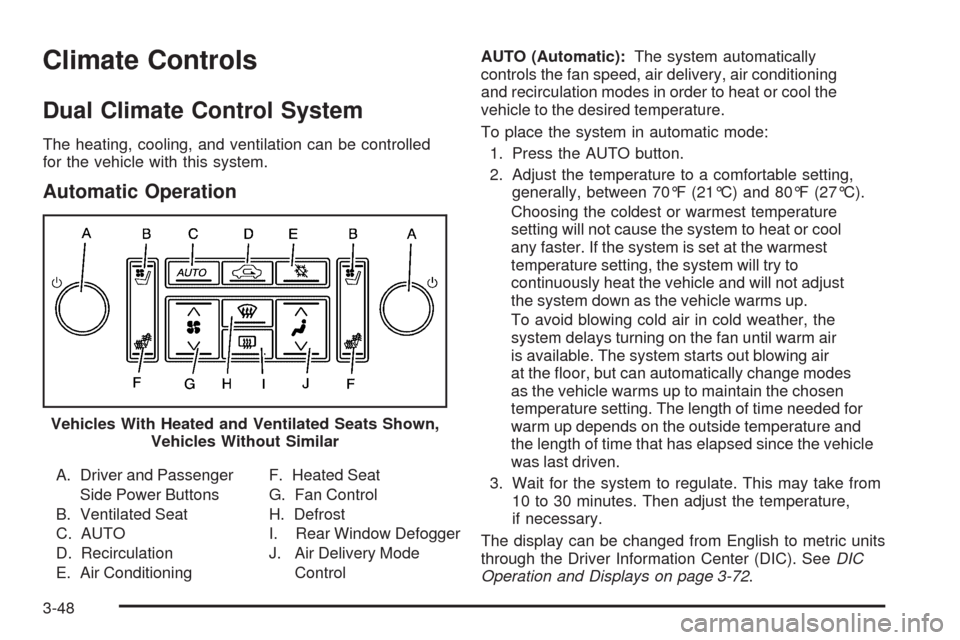
A. Driver and Passenger
Side Power Buttons
B. Ventilated Seat
C. AUTO
D. Recirculation
E. Air ConditioningF. Heated Seat
G. Fan Control
H. Defrost
I. Rear Window Defogger
J. Air Delivery Mode
ControlAUTO (Automatic):The system automatically
controls the fan speed, air delivery, air conditioning
and recirculation modes in order to heat or cool the
vehicle to the desired temperature.
To place the system in automatic mode:
1. Press the AUTO button.
2. Adjust the temperature to a comfortable setting,
generally, between 70°F (21°C) and 80°F (27°C).
Choosing the coldest or warmest temperature
setting will not cause the system to heat or cool
any faster. If the system is set at the warmest
temperature setting, the system will try to
continuously heat the vehicle and will not adjust
the system down as the vehicle warms up.
To avoid blowing cold air in cold weather, the
system delays turning on the fan until warm air
is available. The system starts out blowing air
at the oor, but can automatically change modes
as the vehicle warms up to maintain the chosen
temperature setting. The length of time needed for
warm up depends on the outside temperature and
the length of time that has elapsed since the vehicle
was last driven.
3. Wait for the system to regulate. This may take from
10 to 30 minutes. Then adjust the temperature,
if necessary.
The display can be changed from English to metric units
through the Driver Information Center (DIC). SeeDIC
Operation and Displays on page 3-72. Vehicles With Heated and Ventilated Seats Shown,
Vehicles Without Similar
3-48
Page 207 of 514
Rear Climate Control System
The vehicle has a rear climate control system. The base
model includes air outlets in the rear of the center console
for cooling and under-seat air outlets for heating. The
temperature, amount of airow, and the air delivery mode
is controlled automatically by the front climate control
system.
Some vehicles may have an optional climate control
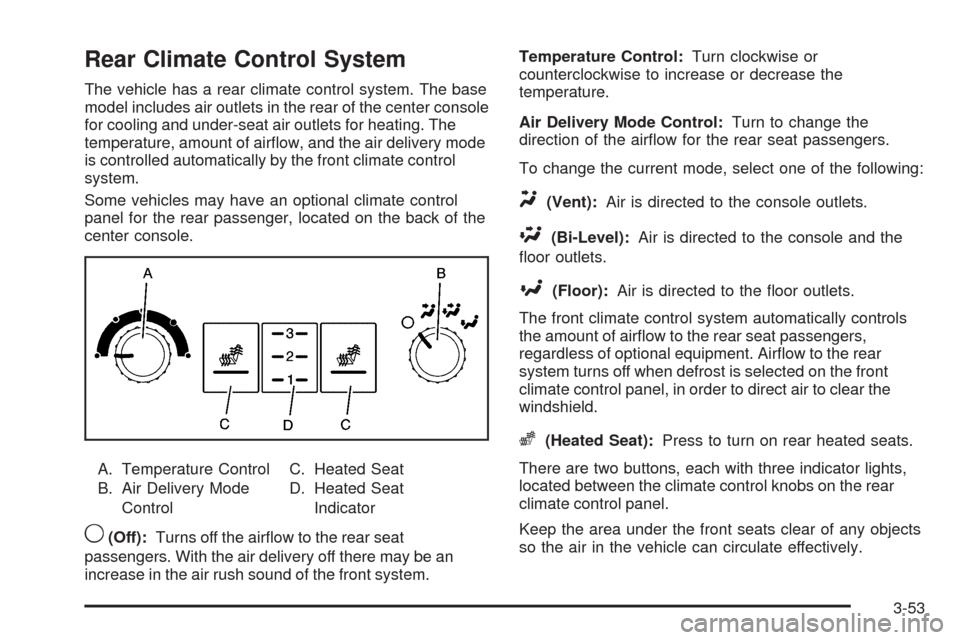
panel for the rear passenger, located on the back of the
center console.
A. Temperature Control
B. Air Delivery Mode
ControlC. Heated Seat
D. Heated Seat
Indicator
9(Off):Turns off the airow to the rear seat
passengers. With the air delivery off there may be an
increase in the air rush sound of the front system.Temperature Control:Turn clockwise or
counterclockwise to increase or decrease the
temperature.
Air Delivery Mode Control:Turn to change the
direction of the airow for the rear seat passengers.
To change the current mode, select one of the following:
Y(Vent):Air is directed to the console outlets.
\(Bi-Level):Air is directed to the console and the
oor outlets.
[(Floor):Air is directed to the oor outlets.
The front climate control system automatically controls
the amount of airow to the rear seat passengers,
regardless of optional equipment. Airow to the rear
system turns off when defrost is selected on the front
climate control panel, in order to direct air to clear the
windshield.
z(Heated Seat):Press to turn on rear heated seats.
There are two buttons, each with three indicator lights,
located between the climate control knobs on the rear
climate control panel.
Keep the area under the front seats clear of any objects
so the air in the vehicle can circulate effectively.
3-53
Page 226 of 514
Driver Information Center (DIC)
The Driver Information Center (DIC) gives you the status
of many of your vehicle’s systems. The DIC is also used
to display warning/status messages. All messages will
appear in the DIC display located at the bottom of the
instrument panel cluster, below the tachometer and
speedometer. The DIC buttons are located on the
instrument panel, to the left of the steering wheel.
The DIC comes on when the ignition is on. After a short
delay, the DIC will display the current driver and the
information that was last displayed before the engine
was turned off.
The top line of the DIC display shows the vehicle
system information and the warning/status messages.
The bottom line of the DIC display shows either the
odometer, the trip odometer A or the trip odometer B
information on the left side. Only one odometer can
appear at a time. See “Trip Information” underDIC
Operation and Displays on page 3-72for information
on changing the display to show the odometer or trip
odometer information. The bottom line of the DIC display
also shows the outside temperature on the right side
and the shift lever position indicator in the center.
SeeAutomatic Transmission Operation on page 2-30
for more information on the shift lever positions.When the sport mode is active, an S will appear next
to the shift position indicator on the center of the DIC
display. When the manual mode is active, an M will
appear on the DIC display. When the normal mode is
active, only the shift position indicator will appear. While
the Driver Shift Control (DSC) feature is active, the DIC
will change to show the selected gear. See “Driver Shift
Control (DSC)” underAutomatic Transmission Operation
on page 2-30for more information.
If a problem is detected, a warning message will appear
on the display. Be sure to take any message that
appears on the display seriously and remember that
clearing the message will only make the message
disappear, not correct the problem.
DIC Operation and Displays
The Driver Information Center (DIC) has different modes
which can be accessed by pressing the four DIC buttons
located on the instrument panel, to the left of the steering
wheel.
3-72
Page 227 of 514
DIC Buttons (Base Level)
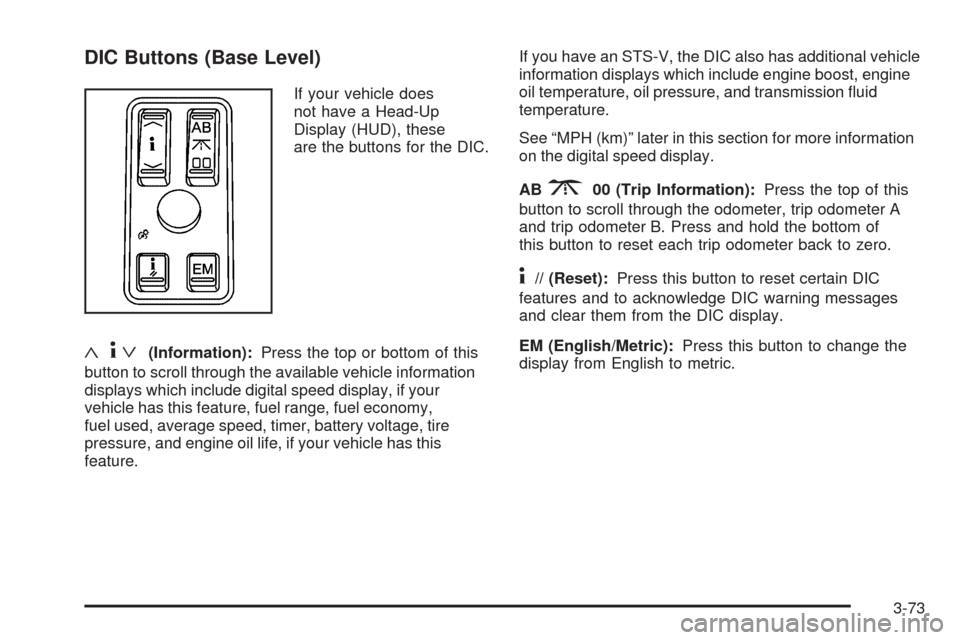
If your vehicle does
not have a Head-Up
Display (HUD), these
are the buttons for the DIC.
«4ª(Information):Press the top or bottom of this
button to scroll through the available vehicle information
displays which include digital speed display, if your
vehicle has this feature, fuel range, fuel economy,
fuel used, average speed, timer, battery voltage, tire
pressure, and engine oil life, if your vehicle has this
feature.If you have an STS-V, the DIC also has additional vehicle
information displays which include engine boost, engine
oil temperature, oil pressure, and transmission uid
temperature.
See “MPH (km)” later in this section for more information
on the digital speed display.
AB
300 (Trip Information):Press the top of this
button to scroll through the odometer, trip odometer A
and trip odometer B. Press and hold the bottom of
this button to reset each trip odometer back to zero.
4// (Reset):Press this button to reset certain DIC
features and to acknowledge DIC warning messages
and clear them from the DIC display.
EM (English/Metric):Press this button to change the
display from English to metric.
3-73
Page 228 of 514
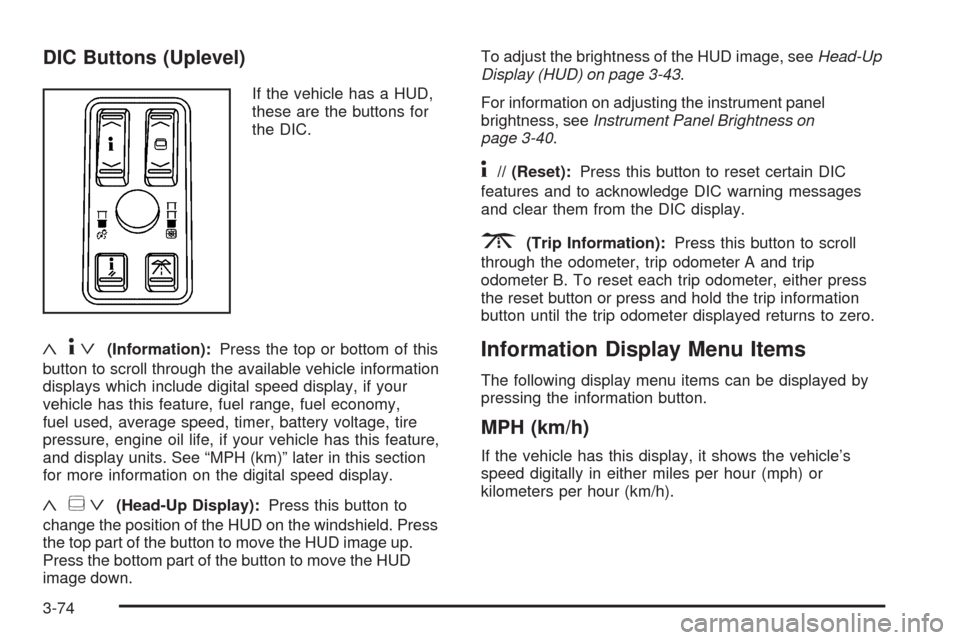
DIC Buttons (Uplevel)
If the vehicle has a HUD,
these are the buttons for
the DIC.
«4ª(Information):Press the top or bottom of this
button to scroll through the available vehicle information
displays which include digital speed display, if your
vehicle has this feature, fuel range, fuel economy,
fuel used, average speed, timer, battery voltage, tire
pressure, engine oil life, if your vehicle has this feature,
and display units. See “MPH (km)” later in this section
for more information on the digital speed display.
«~ª(Head-Up Display):Press this button to
change the position of the HUD on the windshield. Press
the top part of the button to move the HUD image up.
Press the bottom part of the button to move the HUD
image down.To adjust the brightness of the HUD image, seeHead-Up
Display (HUD) on page 3-43.
For information on adjusting the instrument panel
brightness, seeInstrument Panel Brightness on
page 3-40.
4// (Reset):Press this button to reset certain DIC
features and to acknowledge DIC warning messages
and clear them from the DIC display.
3(Trip Information):Press this button to scroll
through the odometer, trip odometer A and trip
odometer B. To reset each trip odometer, either press
the reset button or press and hold the trip information
button until the trip odometer displayed returns to zero.
Information Display Menu Items
The following display menu items can be displayed by
pressing the information button.
MPH (km/h)
If the vehicle has this display, it shows the vehicle’s
speed digitally in either miles per hour (mph) or
kilometers per hour (km/h).
3-74
Page 241 of 514
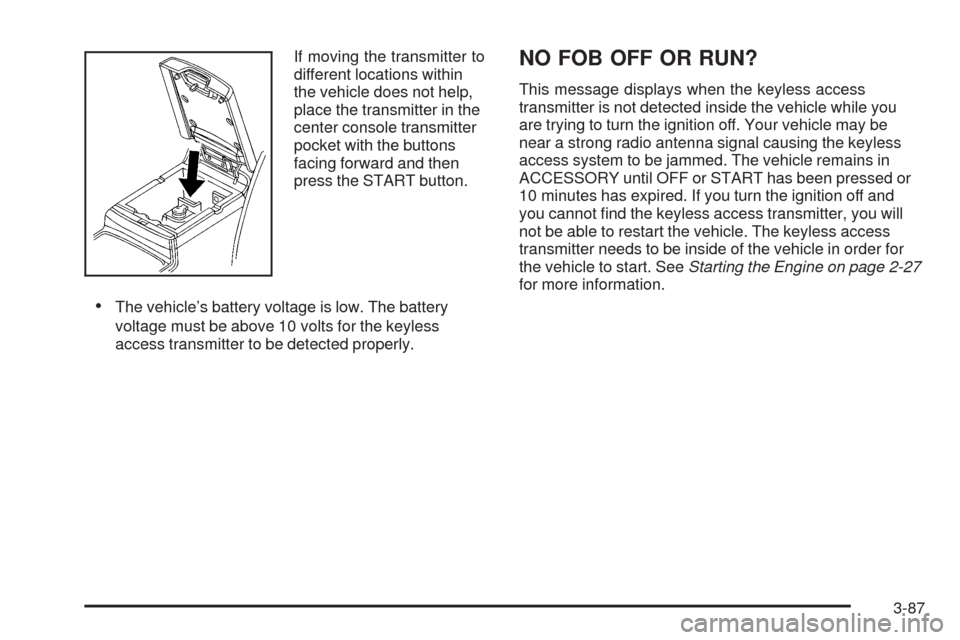
If moving the transmitter to
different locations within
the vehicle does not help,
place the transmitter in the
center console transmitter
pocket with the buttons
facing forward and then
press the START button.
The vehicle’s battery voltage is low. The battery
voltage must be above 10 volts for the keyless
access transmitter to be detected properly.
NO FOB OFF OR RUN?
This message displays when the keyless access
transmitter is not detected inside the vehicle while you
are trying to turn the ignition off. Your vehicle may be
near a strong radio antenna signal causing the keyless
access system to be jammed. The vehicle remains in
ACCESSORY until OFF or START has been pressed or
10 minutes has expired. If you turn the ignition off and
you cannot nd the keyless access transmitter, you will
not be able to restart the vehicle. The keyless access
transmitter needs to be inside of the vehicle in order for
the vehicle to start. SeeStarting the Engine on page 2-27
for more information.
3-87
Page 254 of 514
ALOCAL/DISTANT Selection:The radio can be set
to search for local stations or stations that are further
away for a larger selection.
To select between LOCAL or DISTANT:
1. Press
wto enter the main menu.
2. Turn
wuntil SEEK LOCAL or SEEK DISTANT
displays.
3. Press
wto select either LOCAL or DISTANT.
4. Press F6 to exit the display. To return to the original
display, repeatedly press F6 or wait for the display
to time out.
To search for stations, press
©or¨. If the system
is set to LOCAL, SEEK displays and seeks to stations
only with strong signals. If the system is set to DISTANT,
D-SEEK displays and seeks to stations with weak and
strong signals.
This feature does not function with the XM™ radio
stations.
4(Information):Press while in XM mode to retrieve
three different categories of information related to the
current song or channel: Artist, Song Title, Category or
PTY. To view this information:
1. Press
wto enter the main menu.
2. Turn
wuntil INFO displays.
3. Press
wto select INFO. The display changes
to show the additional XM information.
4. Press F6 to exit the display. To return to the
original display, repeatedly press F6 or wait for
the display to time out.
Setting Preset Stations
Up to 30 stations (six FM1, six FM2, six AM, six XM1
and six XM2), can be programmed on the six numbered
pushbuttons.
To program preset stations:
1. Tune to a station and select the equalization, DSP,
or PTY (program type) setting if desired.
2. Press and hold one of the six numbered
pushbuttons for two seconds until a beep sounds.
The set preset station number displays above the set
pushbutton. If the numbered pushbutton is pressed
for less then two seconds, the radio tunes to the
station set to that pushbutton.
3. Repeat the steps for each pushbutton.
3-100
Page 259 of 514
Activating Program Type (PTY)
Stations (RDS and XM™)
PTY lets the radio search for stations with specic
types of music. When this feature is turned on, the
PTYs display above the pushbuttons in place of the
programmed preset stations. Not all stations support
PTYs and the radio may not go to all of the stations with
that music type when pressing the pushbutton.
The selectable PTYs are:
CNTRY (Country)
CLASS (Classical)
EASY
JAZZ
POP
TALK
To turn PTY on or off:
1. Press
wto enter the main menu.
2. Turn
wuntil PROGRAM TYPE MODE displays.3. Press
wto select ON or OFF. An X appears in
the box when ON is selected.
4. Press F6 to exit the display. To return to the
original display, repeatedly press F6 or wait for
the display to time out.
AF (Alternate Frequency):Alternate frequency lets
the radio switch to a stronger station with the same
program type.
This feature does not function with XM radio stations.
To turn AF on or off:
1. Press
wto enter the main menu.
2. Turn
wuntil ALTERNATE FREQ. displays.
3. Press
wto select AF OFF, AF ON, or AF REG.
An X appears in the box when ON is selected.
4. Press F6 to exit the display. To return to the
original display, repeatedly press F6 or wait for
the display to time out.
3-105
Page 260 of 514
Radio Message
THEFTLOCK:Displays when the THEFTLOCK®
system has been activated. Take the vehicle to your
dealer/retailer for service.
XM Satellite Radio Service
XM is a satellite radio service that is based in the
48 contiguous United States and 10 Canadian provinces.
XM Satellite Radio has a wide variety of programming
and commercial-free music, coast-to-coast, and in
digital-quality sound. During your trial or when you
subscribe, you will get unlimited access to XM Radio
Online for when you are not in the vehicle. A service
fee is required to receive the XM service. For more
information, contact XM at xmradio.com or call
1-800-929-2100 in the U.S. and xmradio.ca or
call 1-877-438-9677 in Canada.
Radio Messages for XM Only
SeeXM Radio Messages on page 3-114XM Radio
Messages later in this section for further detail.
Using the Single CD Player
Load a CD partway into the slot, label side up.
The player pulls it in. The CD player can play the
smaller 3 inch (8 cm) single CDs with an adapter ring.
Full-size CDs and the smaller CDs are loaded in
the same manner.
The CD begins playing after it is loaded if the
ignition and the radio are on.
The CD starts to play where it was last stopped if it
was the last selected audio source when the radio
is turned on.
The CD stays in the player when the ignition or
radio is turned off.
A CD can be loaded with the radio off, but it does
not start playing until the radio is turned on.
When a CD is loaded, CD displays and the CD
functions display above the pushbuttons in place of the
programmed preset stations. The track number displays
as each new track starts to play.
F1
{(Reverse):Press and hold to reverse quickly
within a track. Release to resume playback. The elapsed
time of the track displays.
F2
|(Forward):Press and hold to advance quickly
within a track. Release to resume playback. The elapsed
time of the track displays.
3-106
Page 268 of 514
w(Tune):Turn to fast track reverse or advance
through the tracks in all folders or playlists. The
track number and le name displays for each track.
Turning
wwhile in random will fast track reverse
or advance the tracks in sequential order.
4(Information):Press to view the Title, Artist, Album,
or Folder names. To view this information:
1. Press
wto enter the main menu.
2. Turn
wuntil INFO displays.
3. Press
wto select INFO. The display changes
to show the additional MP3 information.
4. Press one of the following pushbuttons to view that
specic information.
F1 TTLE (Title):Displays the title name.
F2 ATST (Artist):Displays the artist name.
F3 ALBM (Album):Displays the album name.
F4 FLDR (Folder):Displays the folder name.
5. Press F6 to exit the display. To return to the original
display, repeatedly press F6 or wait for the display
to time out.
XM Radio Messages
XL (Explicit Language Channels):These channels,
or any others, can be blocked at a customer’s request,
by calling 1-800-852-XMXM (9696).
XM Updating:The encryption code in the receiver is
being updated, and no action is required. This process
should take no longer than 30 seconds.
No XM Signal:The system is functioning correctly, but
the vehicle is in a location that is blocking the XM™
signal. When the vehicle is moved into an open area,
the signal should return.
Loading XM:The audio system is acquiring and
processing audio and text data. No action is needed.
This message should disappear shortly.
Channel Off Air:This channel is not currently in
service. Tune in to another channel.
Channel Unauth:This channel is blocked or cannot be
received with your XM Subscription package.
3-114