low beam CADILLAC STS 2009 1.G User Guide
[x] Cancel search | Manufacturer: CADILLAC, Model Year: 2009, Model line: STS, Model: CADILLAC STS 2009 1.GPages: 514, PDF Size: 2.73 MB
Page 197 of 514
Head-Up Display (HUD)
{CAUTION:
If the HUD image is too bright, or too high in your
eld of view, it may take you more time to see
things you need to see when it is dark outside.
Be sure to keep the HUD image dim and placed
low in your eld of view.
For vehicles with the Head-Up Display (HUD), some of
the driver information that appears on the instrument
panel cluster is projected onto an image on the
windshield.
The information can be displayed in English or metric
units. To change from English to metric units, see
DIC Operation and Displays on page 3-72.
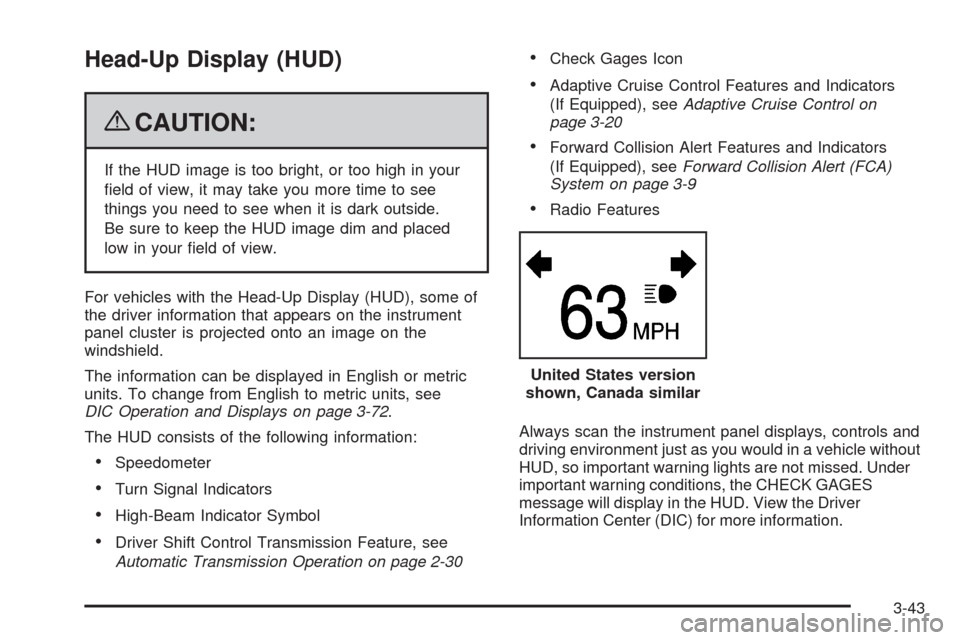
The HUD consists of the following information:
Speedometer
Turn Signal Indicators
High-Beam Indicator Symbol
Driver Shift Control Transmission Feature, see
Automatic Transmission Operation on page 2-30
Check Gages Icon
Adaptive Cruise Control Features and Indicators
(If Equipped), seeAdaptive Cruise Control on
page 3-20
Forward Collision Alert Features and Indicators
(If Equipped), seeForward Collision Alert (FCA)
System on page 3-9
Radio Features
Always scan the instrument panel displays, controls and
driving environment just as you would in a vehicle without
HUD, so important warning lights are not missed. Under
important warning conditions, the CHECK GAGES
message will display in the HUD. View the Driver
Information Center (DIC) for more information.United States version
shown, Canada similar
3-43
Page 224 of 514

Fog Lamp Light
The fog lamp light comes
on when the fog lamps are
in use.
The light goes out when the fog lamps are turned off.
SeeFog Lamps on page 3-38for more information.
Lights On Reminder
This light comes on
whenever the parking
lamps are on.
SeeHeadlamps on Reminder on page 3-36for more
information.
Cruise Control Light
This light comes on
whenever the cruise
control is set.
The light goes out when the cruise control is turned off.
SeeCruise Control on page 3-16andAdaptive Cruise
Control on page 3-20for more information.
Highbeam On Light
This light comes on when
the high-beam headlamps
are in use.
SeeHeadlamp High/Low-Beam Changer on page 3-9
for more information.
3-70
Page 376 of 514

How to Check Lubricant
A. Drain Plug
B. Filler Plug
To get an accurate reading, the vehicle should be on a
level surface.
If the level is below the bottom of the ller plug hole,
located on the front axle, you may need to add
some lubricant.
What to Use
Refer to the Maintenance Schedule to determine what
kind of lubricant to use. SeeRecommended Fluids
and Lubricants on page 6-13.
Headlamp Aiming
Headlamp aim has been preset at the factory and
should need no further adjustment.
However, if your vehicle is damaged in a crash, the
headlamp aim may be affected. Aim adjustment to the
low-beam headlamps may be necessary if oncoming
drivers ash their high-beam headlamps at you
(for vertical aim).
If the headlamps need to be re-aimed, it is
recommended that you take the vehicle to your
dealer/retailer for service.
5-50
Page 377 of 514
Bulb Replacement
For the proper type of replacement bulbs, see
Replacement Bulbs on page 5-52.
For any bulb changing procedure not listed in this
section, contact your dealer/retailer.
High Intensity Discharge (HID)
Lighting
{CAUTION:
The low beam high intensity discharge lighting
system operates at a very high voltage. If you try to
service any of the system components, you could
be seriously injured. Have your dealer/retailer or a
qualied technician service them.The vehicle may have HID headlamps. After the
vehicle’s HID headlamp bulb has been replaced,
you may notice that the beam is a slightly different
shade than it was originally. This is normal.
Halogen Bulbs
{CAUTION:
Halogen bulbs have pressurized gas inside and
can burst if you drop or scratch the bulb. You or
others could be injured. Be sure to read and follow
the instructions on the bulb package.
5-51
Page 452 of 514

Fuses Mini Usage
EKM/I/P MDLEasy Key Module (EKM), Instrument
Panel Module (I/P MDL)
EVEN COILSEven Ignition Coils, Even Fuel
Injectors
FOG LAMP Front Fog Lamps
FRT PWR
OUTLETFront Accessory Power Outlet
FUEL COOL Fuel Cooling
HORN Horn
HTD
WASH/AQSHeated Headlamp Washer,
Air Quality Sensor
HUDHeads-Up Display, Steering Column
Switch
I/BEAM IntelliBeam Relay
I/P MDL/ALDLInstrument Panel Module, Assembly
Line Data Link Connector
LIC DIMLicense Plate, Instrument Panel
Dimming
LT HI BEAM Driver Side High Beam Headlamp
LT LO BEAM Driver Side Low Beam Headlamp
LT PRKDriver Side Park Lamp/Driver Side
TaillampFuses Mini Usage
ODD COILSOdd Ignition Coils, Odd Fuel
Injectors
POST O2
SNSRPost Oxygen Sensor
PRE O2 SNSR Pre Oxygen Sensor, CAM Sensors
RAIN
SNSR/TPMRain Sensor, Relay Coil:
Headlamp Wash
RT HI BEAMPassenger Side High Beam
Headlamp
RT LO BEAMPassenger Side Low Beam
Headlamp
RT PRKPassenger Side Park Lamp,
Passenger Side Taillamp
SPARE Spare
SPARE Spare
SPARE Spare
SPARE Spare
SPARE Spare
SPARE Spare
SPARE Spare
5-126
Page 453 of 514
Fuses Mini Usage
V/CHKInstrument Panel Module-Voltage
Check
WPR Wipe/Wash Module Assembly
WPR SW/VICS Rain Sensor, Wiper Switch
Relays Usage
A/C CMPRSR
CLTCHAir Conditioning Compressor Clutch
ACCYAccessory, Rain Sensor, Headlamp
Washer Relay Coil, Windshield
Wiper/Washer Module
BRK VAC
PUMPBrake Vacuum Pump
FAN S/P Cooling Fan Series/Parallel
FOG LAMP Fog Lamps
FRT BLWR Front Blower Motor
FUEL COOL Fuel Cooling Pump
HI BEAM High Beam Headlamp
HI FAN SPD Cooling Fan High Speed
HORN Horn
Relays Usage
LO FAN SPD Cooling Fan Low Speed
LOW BEAM
W/O HID/HIDLow Beam Headlamp, High Intensity
Discharge (HID)
PRK LAMPParking Lamps, Instrument Panel
Dimming, Rear License Plate Lamps
PWR/TRN Engine Controls
RUN CRNKHeated Washer Nozzle, Air Quality,
Antilock Brake System, Climate
Control Panel, TCM, ECM,
Instrument Panel Cluster
SPARE Spare
SPARE Spare
SPARE Spare
STRTR Starter
WPR HI Windshield Wiper High Speed
Circuit
BreakersUsage
HDLP WASHHeadlamp Washer Motor
(Circuit Breaker)
5-127
Page 506 of 514

G
Gage
Engine Coolant Temperature.........................3-65
Fuel..........................................................3-71
Speedometer..............................................3-57
Tachometer.................................................3-57
Garage Door Opener.......................................2-53
Gasoline
Octane........................................................ 5-5
Specications............................................... 5-6
Glove Box.....................................................2-60
GM Mobility Reimbursement Program.................. 7-7
H
Hazard Warning Flashers................................... 3-6
Head Restraints............................................... 1-5
Headlamp
Aiming .......................................................5-50
Headlamp Wiring...........................................5-113
Headlamps....................................................3-32
Bulb Replacement.......................................5-51
Daytime Running Lamp................................3-36
Flash-to-Pass..............................................3-13
Halogen Bulbs............................................5-51
High Intensity Discharge (HID) Lighting...........5-51
High/Low Beam Changer................................ 3-9Headlamps (cont.)
On Reminder..............................................3-36
Washer......................................................3-16
Wiper Activated...........................................3-36
Head-Up Display (HUD)...................................3-43
Heated Seats................................................... 1-3
Heated Steering Wheel..................................... 3-7
Heater...........................................................3-48
Engine Coolant...........................................2-29
Highbeam On Light.........................................3-70
High-Speed Operation, Tires.............................5-65
Highway Hypnosis...........................................4-19
Hill and Mountain Roads..................................4-20
Hood
Checking Things Under................................5-10
Release.....................................................5-11
Horn ............................................................... 3-6
How to Wear Safety Belts Properly...................1-12
I
Ignition Positions.............................................2-26
Immobilizer....................................................2-24
Immobilizer Operation......................................2-24
Inadvertent Power Battery Saver.......................3-42
Infants and Young Children, Restraints...............1-31
Ination - Tire Pressure...................................5-64
Inator Kit, Tire...............................................5-87
6
Page 507 of 514

Instrument Panel
Brightness..................................................3-40
Cluster.......................................................3-56
Overview..................................................... 3-4
J
Jump Starting.................................................5-42
K
Keyless Access System..................................... 2-4
Keyless Access System, Operation...................... 2-5
Keys............................................................... 2-3
L
Labeling, Tire Sidewall.....................................5-56
Lamp
Malfunction Indicator....................................3-66
Lamps
Exterior Lighting Battery Saver......................3-40
Inadvertent Power Battery Saver....................3-42
Reading.....................................................3-41
Twilight Sentinel
®........................................3-38
Lane Departure Warning..................................2-48
Lane Departure Warning Light..........................3-64
Lap-Shoulder Belt...........................................1-21LATCH System for Child Restraints...................1-39
Lifting the Vehicle, Tires...................................5-82
Light
Airbag Readiness........................................3-58
Antilock Brake System (ABS) Warning............3-63
Brake System Warning.................................3-62
Charging System.........................................3-61
Cruise Control.............................................3-70
Engine Coolant Temperature Warning.............3-64
Fog Lamp ..................................................3-70
Highbeam On.............................................3-70
Lane Departure Warning...............................3-64
Lights On Reminder.....................................3-70
Oil Pressure...............................................3-69
Passenger Airbag Status Indicator..................3-59
Safety Belt Reminders..................................3-57
Security.....................................................3-69
TCS Warning Light......................................3-63
Tire Pressure..............................................3-65
Traction Control System (TCS) Warning..........3-63
Lighting
Entry.........................................................3-41
Parade Dimming..........................................3-41
Lights............................................................3-32
Flash-to-Pass..............................................3-13
High/Low Beam Changer................................ 3-9
On Reminder..............................................3-36
Limited-Slip Rear Axle.....................................4-12
Loading Your Vehicle.......................................4-24
Lockout Protection..........................................2-15
7