battery CADILLAC STS 2009 1.G Owner's Manual
[x] Cancel search | Manufacturer: CADILLAC, Model Year: 2009, Model line: STS, Model: CADILLAC STS 2009 1.GPages: 514, PDF Size: 2.73 MB
Page 234 of 514
BATTERY NOT CHARGING SERVICE
CHARGING SYS (System)
This symbol appears with
this message.
This message displays when a problem with the
charging system has been detected. Have your
vehicle serviced by your dealer/retailer.
BATTERY SAVER ACTIVE
This message displays when the system detects that the
battery voltage is dropping beyond a reasonable level.
The battery saver system starts reducing certain features
of the vehicle that may be noticeable. At the point that
the features are disabled, this message is displayed.
It means that the vehicle is trying to save the charge
in the battery.
Turn off all unnecessary accessories to allow the battery
to recharge.
The normal battery voltage range is 11.5 to 15.5 volts.
To monitor battery voltage on the DIC, press the
information button until BATTERY VOLTS displays.
BATTERY VOLTAGE HIGH
This symbol appears with
this message.
This message displays when the electrical charging
system is overcharging the battery. When the system
detects that the battery voltage is above an estimated
16 volts, this message displays.
To reduce the charging overload, use the vehicle’s
accessories:
Turn on the exterior lamps and radio.
Set the climate control on AUTO and the fan speed
on the highest setting.
Turn the rear window defogger on.
The normal battery voltage range is 11.5 to 15.5 volts
when the engine is running. To monitor battery voltage
on the DIC, press the information button until
BATTERY VOLTS displays.
3-80
Page 235 of 514

BATTERY VOLTAGE LOW
This symbol appears with
this message.
This message displays when the electrical system is
charging less than 10 volts or the battery has been
drained.
If this message appears immediately after starting the
engine, it is possible that the generator can still recharge
the battery. The battery should recharge while driving,
but may take a few hours to do so. Consider using
an auxiliary charger to boost the battery after returning
home or to a nal destination. Follow the manufacturer’s
instructions.If this message appears while driving or after starting
your vehicle and stays on, have it checked immediately
to determine the cause of this problem.
To help the generator recharge the battery quickly,
reduce the load on the electrical system by turning off
the accessories.
The normal battery voltage range is 11.5 to 15.5 volts.
To monitor battery voltage on the DIC, press the
information button until BATTERY VOLTS displays.
CHANGE ENGINE OIL SOON
This message displays when the engine oil needs to be
changed. See your dealer/retailer. SeeEngine Oil on
page 5-18andScheduled Maintenance on page 6-4for
more information.
After resetting the CHANGE ENGINE OIL SOON
message by clearing it from the display, reset the engine
oil life system separately. For more information on
resetting the engine oil life system, seeEngine Oil Life
System on page 5-21.
3-81
Page 239 of 514
ENGINE PROTECTION REDUCED
RPM’S (Revolutions Per Minute)
This message displays when your vehicle is in an
overheated engine operating mode. If this message
appears, the vehicle has determined that continued
operation at the existing engine speed may lead to
engine overheating. The vehicle automatically limits
engine RPMs to prevent engine overheating. You may
notice the vehicle upshifting early or reduced speeds
while this message is displayed. When the engine oil
returns to a safe operating temperature, this message
clears from the DIC and the vehicle returns to normal
operation. Your vehicle does not require service when
this message is displayed.
FUEL LEVEL LOW
This symbol appears with
this message.
This message displays and a chime sounds if the fuel
level is low. Refuel as soon as possible. SeeFuel Gage
on page 3-71andFuel on page 5-5for more information.
HOOD AJAR
This symbol appears with
this message.
This message displays when the hood is not closed
completely. Make sure that the hood is closed
completely. SeeHood Release on page 5-11.
ICE POSSIBLE
This message displays when the outside temperature
is cold enough to create icy road conditions. Adjust your
driving accordingly.
KEY FOB BATTERY LOW
This message displays when the battery in the keyless
access transmitter is low. Replace the battery in the
transmitter. See “Battery Replacement” underKeyless
Access System Operation on page 2-5.
3-85
Page 241 of 514
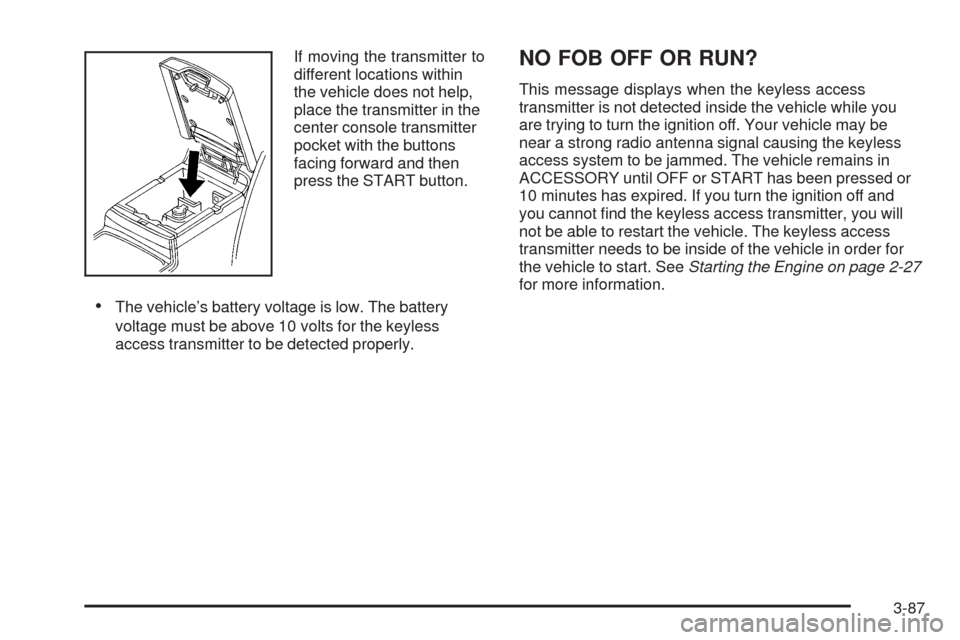
If moving the transmitter to
different locations within
the vehicle does not help,
place the transmitter in the
center console transmitter
pocket with the buttons
facing forward and then
press the START button.
The vehicle’s battery voltage is low. The battery
voltage must be above 10 volts for the keyless
access transmitter to be detected properly.
NO FOB OFF OR RUN?
This message displays when the keyless access
transmitter is not detected inside the vehicle while you
are trying to turn the ignition off. Your vehicle may be
near a strong radio antenna signal causing the keyless
access system to be jammed. The vehicle remains in
ACCESSORY until OFF or START has been pressed or
10 minutes has expired. If you turn the ignition off and
you cannot nd the keyless access transmitter, you will
not be able to restart the vehicle. The keyless access
transmitter needs to be inside of the vehicle in order for
the vehicle to start. SeeStarting the Engine on page 2-27
for more information.
3-87
Page 255 of 514
AUTOSTORE PRESETS:When Autostore is used, the
radio automatically searches the selected band and
stores the six radio stations with the strongest signal.
The stations are stored by signal strength, not sequential
order. This feature does not function with XM radio
stations.
To program autostore presets:
1. Press
wto enter the main menu.
2. Turn
wuntil AUTOSTORE PRESETS displays.
3. Press
wto select AUTOSTORE PRESETS.
The radio begins searching and AUTOSTORE
displays.
4. Press F6 to exit the display. To return to the
original display, repeatedly press F6 or wait for
the display to time out.
The radio presets do not have to be reset when the
vehicle is started, or when the battery power is removed.PRESETS HOME/AWAY:This feature stores two
different kinds of station presets. HOME can be used
for local stations and AWAY for stations outside of
the local broadcasting area. This feature does not
function with the XM radio stations.
To set preset stations for home and away:
1. Press
wto enter the main menu.
2. Turn
wuntil PRESETS HOME/AWAY displays.
3. Press
wto select HOME or AWAY.
4. Press F6 to exit the display. To return to the
original display, repeatedly press F6 or wait for
the display to time out.
5. Follow the steps for programming presets or
autostore presets.
3-101
Page 287 of 514
Radio Reception
Frequency interference and static can occur during
normal radio reception if items such as cell phone
chargers, vehicle convenience accessories, and external
electronic devices are plugged into the accessory power
outlet. If there is interference or static, unplug the item
from the accessory power outlet.
AM
The range for most AM stations is greater than for FM,
especially at night. The longer range can cause station
frequencies to interfere with each other. For better radio
reception, most AM radio stations boost the power levels
during the day, and then reduce these levels during the
night. Static can also occur when things like storms and
power lines interfere with radio reception. When this
happens, try reducing the treble on the radio.
FM Stereo
FM signals only reach about 10 to 40 miles
(16 to 65 km). Although the radio has a built-in electronic
circuit that automatically works to reduce interference,
some static can occur, especially around tall buildings
or hills, causing the sound to fade in and out.
XM Satellite Radio Service
XM Satellite Radio Service gives digital radio reception
from coast-to-coast in the 48 contiguous United States,
and in Canada. Just as with FM, tall buildings or hills can
interfere with satellite radio signals, causing the sound to
fade in and out. In addition, traveling or standing under
heavy foliage, bridges, garages, or tunnels may cause
loss of the XM signal for a period of time.
Cellular Phone Usage
Cellular phone usage may cause interference with the
vehicle’s radio. This interference may occur when making
or receiving phone calls, charging the phone’s battery,
or simply having the phone on. This interference causes
an increased level of static while listening to the radio.
If static is received while listening to the radio, unplug
the cellular phone and turn it off.
3-133
Page 301 of 514
During some operating conditions, the active steering
might deactivate to protect the system from damage. You
might notice that the center position of the steering wheel
is changed. Unless there is a SERVICE STEERING SYS
message, the system will return to normal operation as
soon as the condition ceases, usually within a very short
period of time.
At low speeds, the active steering system requires less
movement of the steering wheel to change vehicle
direction than the normal power steering system.
Adjust your driving accordingly.
When certain steering faults are present, the active
steering deactivates and vehicle speed might be limited.
The SERVICE STEERING SYS and SPEED LIMITED
TO XXX messages will be displayed. SeeDIC Warnings
and Messages on page 3-79. The normal power steering
system is still operational. You might notice that the
center position of the steering wheel is changed and that
more steering effort at low speeds and less steering effort
at high speeds is required. You can continue to drive your
vehicle with normal power steering but you should have
your dealer/retailer inspect the steering system as soon
as possible in order to have the problem corrected and
the steering wheel position centered.
When stability control activates, the system
automatically adjusts the front road wheel steering
angle, modies the suspension stiffness, and selectivelyapplies braking pressure at any one of the vehicle’s
brakes to help maintain directional control of the vehicle.
Adjustments to the steering will not be felt in the
steering wheel. SeeEnhanced StabiliTrak
®on page 4-6.
It is recommended that the battery not be disconnected
when the steering wheel is turned from the center
position. If this occurs, the center position of the steering
wheel could be temporarily changed a small amount.
You can continue to operate your vehicle and, after
a short time, the center position of the steering wheel
will return to normal.
Steering Tips
It is important to take curves at a reasonable speed.
Traction in a curve depends on the condition of the tires
and the road surface, the angle at which the curve is
banked, and your speed. While in a curve, speed is the
one factor you can control.
If you need to reduce speed, do it before you enter the
curve, while the front wheels are straight ahead.
Try to adjust the speed so you can drive through the
curve. Maintain a reasonable, steady speed. Wait
to accelerate until you are out of the curve, and then
accelerate gently into the straightaway.
4-13
Page 311 of 514

Repeat this until help arrives but only when you feel
really uncomfortable from the cold. Moving about
to keep warm also helps.
If it takes some time for help to arrive, now and then
when you run the engine, push the accelerator pedal
slightly so the engine runs faster than the idle speed.
This keeps the battery charged to restart the vehicle and
to signal for help with the headlamps. Do this as little as
possible to save fuel.
If Your Vehicle is Stuck in Sand,
Mud, Ice, or Snow
Slowly and cautiously spin the wheels to free the
vehicle when stuck in sand, mud, ice, or snow.
SeeRocking Your Vehicle to Get It Out on page 4-24.
If the vehicle has a traction system, it can often help
to free a stuck vehicle. Refer to the vehicle’s traction
system in the Index. If stuck too severely for the traction
system to free the vehicle, turn the traction system off
and use the rocking method.
{CAUTION:
If you let your vehicle’s tires spin at high speed,
they can explode, and you or others could be
injured. The vehicle can overheat, causing an
engine compartment re or other damage. Spin
the wheels as little as possible and avoid going
above 35 mph (55 km/h) as shown on the
speedometer.
For information about using tire chains on the vehicle,
seeTire Chains on page 5-81.
4-23
Page 327 of 514
Service............................................................5-3
Accessories and Modications..........................5-3
California Proposition 65 Warning.....................5-4
California Perchlorate Materials Requirements......5-4
Doing Your Own Service Work.........................5-4
Adding Equipment to the Outside of
the Vehicle.................................................5-5
Fuel................................................................5-5
Gasoline Octane............................................5-5
Gasoline Specications....................................5-6
California Fuel...............................................5-6
Additives.......................................................5-7
Fuels in Foreign Countries...............................5-7
Filling the Tank..............................................5-8
Filling a Portable Fuel Container.....................5-10
Checking Things Under the Hood....................5-10
Hood Release..............................................5-11
Engine Compartment Overview.......................5-12
Engine Oil...................................................5-18
Engine Oil Life System..................................5-21
Engine Air Cleaner/Filter................................5-23
Automatic Transmission Fluid.........................5-25
Cooling System............................................5-26
Engine Coolant.............................................5-27
Coolant Surge Tank Pressure Cap..................5-34
Engine Overheating.......................................5-34Overheated Engine Protection
Operating Mode........................................5-36
Power Steering Fluid.....................................5-37
Windshield Washer Fluid................................5-38
Brakes........................................................5-39
Battery........................................................5-42
Jump Starting...............................................5-42
All-Wheel Drive..............................................5-47
Rear Axle.......................................................5-48
Front Axle......................................................5-49
Headlamp Aiming...........................................5-50
Bulb Replacement..........................................5-51
High Intensity Discharge (HID) Lighting............5-51
Halogen Bulbs..............................................5-51
Back-Up Lamps............................................5-52
Replacement Bulbs.......................................5-52
Windshield Replacement.................................5-52
Windshield Wiper Blade Replacement..............5-52
Tires..............................................................5-54
Winter Tires.................................................5-55
Tire Sidewall Labeling...................................5-56
Tire Terminology and Denitions.....................5-59
Run-Flat Tires (STS-V)..................................5-62
Ination - Tire Pressure.................................5-64
High-Speed Operation...................................5-65
Tire Pressure Monitor System.........................5-66
Tire Pressure Monitor Operation.....................5-68
Section 5 Service and Appearance Care
5-1
Page 339 of 514
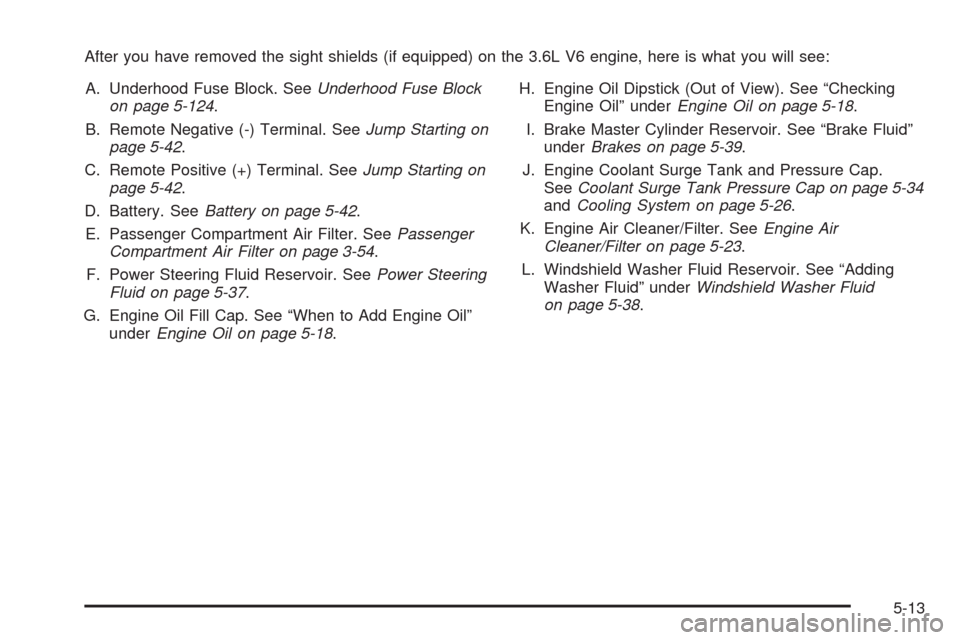
After you have removed the sight shields (if equipped) on the 3.6L V6 engine, here is what you will see:
A. Underhood Fuse Block. SeeUnderhood Fuse Block
on page 5-124.
B. Remote Negative (-) Terminal. SeeJump Starting on
page 5-42.
C. Remote Positive (+) Terminal. SeeJump Starting on
page 5-42.
D. Battery. SeeBattery on page 5-42.
E. Passenger Compartment Air Filter. SeePassenger
Compartment Air Filter on page 3-54.
F. Power Steering Fluid Reservoir. SeePower Steering
Fluid on page 5-37.
G. Engine Oil Fill Cap. See “When to Add Engine Oil”
underEngine Oil on page 5-18.H. Engine Oil Dipstick (Out of View). See “Checking
Engine Oil” underEngine Oil on page 5-18.
I. Brake Master Cylinder Reservoir. See “Brake Fluid”
underBrakes on page 5-39.
J. Engine Coolant Surge Tank and Pressure Cap.
SeeCoolant Surge Tank Pressure Cap on page 5-34
andCooling System on page 5-26.
K. Engine Air Cleaner/Filter. SeeEngine Air
Cleaner/Filter on page 5-23.
L. Windshield Washer Fluid Reservoir. See “Adding
Washer Fluid” underWindshield Washer Fluid
on page 5-38.
5-13