navigation CADILLAC STS 2009 1.G Owner's Manual
[x] Cancel search | Manufacturer: CADILLAC, Model Year: 2009, Model line: STS, Model: CADILLAC STS 2009 1.GPages: 514, PDF Size: 2.73 MB
Page 295 of 514
Stability control activates when the computer senses a
difference between the intended path and the direction
the vehicle is actually traveling. Stability control
automatically adjusts the front road wheel steering
angle, modies the suspension stiffness, and selectively
applies braking pressure at any one of the vehicle’s
brakes to help maintain directional control of the vehicle.
When the system activates, a STABILITY SYS
ACTIVE message displays on the Driver Information
Center (DIC). SeeDIC Warnings and Messages
on page 3-79. It is normal to hear a noise or feel
vibration in the brake pedal when the system is working.
Continue to steer the vehicle in the intended direction.
If cruise control is engaged when Enhanced StabiliTrak
activates, the cruise control will automatically disengage.
Cruise Control may be re-engaged when road conditions
allow. SeeCruise Control on page 3-16,orAdaptive
Cruise Control on page 3-20for more information.
Enhanced StabiliTrak comes on automatically in the
Stability Touring Mode, when the vehicle is started.
The Stability Touring Mode is recommended for normal
driving. Enhanced StabiliTrak also has Stability
Competitive Mode that is turned on by pressing the
Traction Control (TC) button twice quickly. This mode is
designed to be used by the performance consciousdriver who desires less stability control intervention.
SeeCompetitive Driving Mode on page 4-11. When the
Stability Control Competitive Mode has been activated,
traction control operates in competitive mode and
cannot be turned off. The STABILITY COMPETITIVE
MODE message will be displayed on the DIC.
SeeDIC Warnings and Messages on page 3-79.
When operating the vehicle in the Stability Competitive
Mode, the system provides less stability control
intervention. Driving should be adjusted accordingly.
When the Stability Competitive Mode has been selected,
the Active Steering and Magnetic Ride Control Touring
Mode is not available. These systems are automatically
changed to the Performance Mode, providing more
response to road conditions and quicker steering
response. For more information, see “Active Steering
and Magnetic Ride Control Mode” in the Index of
the vehicle’s Navigation Manual.
To assist with directional control of the vehicle, always
leave the system on. Stability control can be turned
off however, by using the TC button. SeeTraction
Control System (TCS) on page 4-10. The STABILITY
SYS OFF message will be displayed on the DIC.
SeeDIC Warnings and Messages on page 3-79.
4-7
Page 483 of 514
Customer Assistance and Information...............7-2
Customer Satisfaction Procedure......................7-2
Online Owner Center......................................7-5
Customer Assistance for Text Telephone
(TTY) Users...............................................7-6
Customer Assistance Offices............................7-6
GM Mobility Reimbursement Program................7-7
Roadside Service...........................................7-7
Scheduling Service Appointments....................7-10
Courtesy Transportation.................................7-10
Collision Damage Repair................................7-11Reporting Safety Defects................................7-14
Reporting Safety Defects to the
United States Government..........................7-14
Reporting Safety Defects to the
Canadian Government................................7-15
Reporting Safety Defects to
General Motors.........................................7-15
Service Publications Ordering Information.........7-15
Vehicle Data Recording and Privacy................7-16
Event Data Recorders...................................7-17
OnStar
®......................................................7-18
Navigation System........................................7-18
Radio Frequency
Identication (RFID)...................................7-18
Section 7 Customer Assistance Information
7-1
Page 500 of 514
OnStar®
If your vehicle has OnStar and you subscribe to the
OnStar services, please refer to the OnStar Terms and
Conditions for information on data collection and
use. See alsoOnStar
®System on page 2-50in this
manual for more information.
Navigation System
If your vehicle has a navigation system, use of the
system may result in the storage of destinations,
addresses, telephone numbers, and other trip
information. Refer to the navigation system operating
manual for information on stored data and for deletion
instructions.
Radio Frequency
Identication (RFID)
RFID technology is used in some vehicles for functions
such as tire pressure monitoring and ignition system
security, as well as in connection with conveniences
such as key fobs for remote door locking/unlocking and
starting, and in-vehicle transmitters for garage door
openers. RFID technology in GM vehicles does not use
or record personal information or link with any other
GM system containing personal information.
7-18
Page 501 of 514
A
Accessories and Modications............................ 5-3
Accessory Power Outlets.................................3-46
Adaptive Cruise Control...................................3-20
Adding Equipment to Your Airbag-Equipped
Vehicle.......................................................1-64
Additives, Fuel................................................. 5-7
Add-On Electrical Equipment...........................5-113
Air Cleaner/Filter, Engine.................................5-23
Air Conditioning..............................................3-48
Airbag
Passenger Status Indicator...........................3-59
Readiness Light..........................................3-58
Airbag System................................................1-51
Adding Equipment to Your
Airbag-Equipped Vehicle............................1-64
How Does an Airbag Restrain?......................1-57
Passenger Sensing System...........................1-59
Servicing Your Airbag-Equipped Vehicle..........1-64
What Makes an Airbag Inate?......................1-57
What Will You See After an Airbag
Inates?..................................................1-58
When Should an Airbag Inate?....................1-56
Where Are the Airbags?...............................1-53
All-Wheel Drive...............................................5-47
All-Wheel-Drive (AWD) System.........................4-12
Antenna, Backglass.......................................3-134
Antenna, XM™ Satellite Radio Antenna
System.....................................................3-134Antilock Brake System (ABS)............................. 4-4
Antilock Brake, System Warning Light................3-63
Appearance Care
Aluminum or Chrome-Plated Wheels.............5-110
Care of Safety Belts...................................5-108
Chemical Paint Spotting..............................5-112
Cleaning Exterior Lamps/Lenses..................5-109
Fabric/Carpet............................................5-106
Finish Care...............................................5-109
Finish Damage..........................................5-111
Instrument Panel, Vinyl, and Other
Plastic Surfaces
.....................................5-107
Interior Cleaning........................................5-105
Leather....................................................5-107
Sheet Metal Damage..................................5-111
Speaker Covers.........................................5-108
Tires........................................................5-111
Underbody Maintenance.............................5-111
Washing Your Vehicle.................................5-108
Weatherstrips............................................5-108
Windshield and Wiper Blades......................5-110
Wood Panels............................................5-107
Appointments, Scheduling Service.....................7-10
Ashtray.........................................................3-47
Audio System.................................................3-97
Audio Steering Wheel Controls....................3-131
Backglass Antenna.....................................3-134
Navigation/Radio System, see Navigation
Manual.................................................3-116
Radio Personalization.................................3-126
1
Page 508 of 514
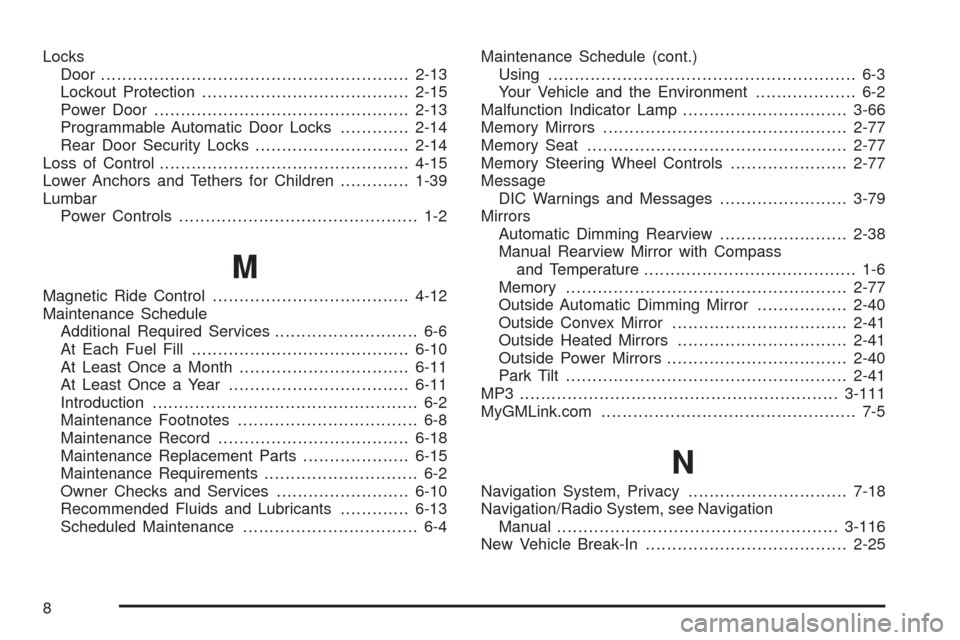
Locks
Door ..........................................................2-13
Lockout Protection.......................................2-15
Power Door ................................................2-13
Programmable Automatic Door Locks.............2-14
Rear Door Security Locks.............................2-14
Loss of Control...............................................4-15
Lower Anchors and Tethers for Children.............1-39
Lumbar
Power Controls............................................. 1-2
M
Magnetic Ride Control.....................................4-12
Maintenance Schedule
Additional Required Services........................... 6-6
At Each Fuel Fill.........................................6-10
At Least Once a Month................................6-11
At Least Once a Year..................................6-11
Introduction.................................................. 6-2
Maintenance Footnotes.................................. 6-8
Maintenance Record....................................6-18
Maintenance Replacement Parts....................6-15
Maintenance Requirements............................. 6-2
Owner Checks and Services.........................6-10
Recommended Fluids and Lubricants.............6-13
Scheduled Maintenance................................. 6-4Maintenance Schedule (cont.)
Using.......................................................... 6-3
Your Vehicle and the Environment................... 6-2
Malfunction Indicator Lamp...............................3-66
Memory Mirrors..............................................2-77
Memory Seat.................................................2-77
Memory Steering Wheel Controls......................2-77
Message
DIC Warnings and Messages........................3-79
Mirrors
Automatic Dimming Rearview........................2-38
Manual Rearview Mirror with Compass
and Temperature........................................ 1-6
Memory .....................................................2-77
Outside Automatic Dimming Mirror.................2-40
Outside Convex Mirror.................................2-41
Outside Heated Mirrors................................2-41
Outside Power Mirrors..................................2-40
Park Tilt.....................................................2-41
MP3 ............................................................3-111
MyGMLink.com................................................ 7-5
N
Navigation System, Privacy..............................7-18
Navigation/Radio System, see Navigation
Manual.....................................................3-116
New Vehicle Break-In......................................2-25
8
Page 510 of 514
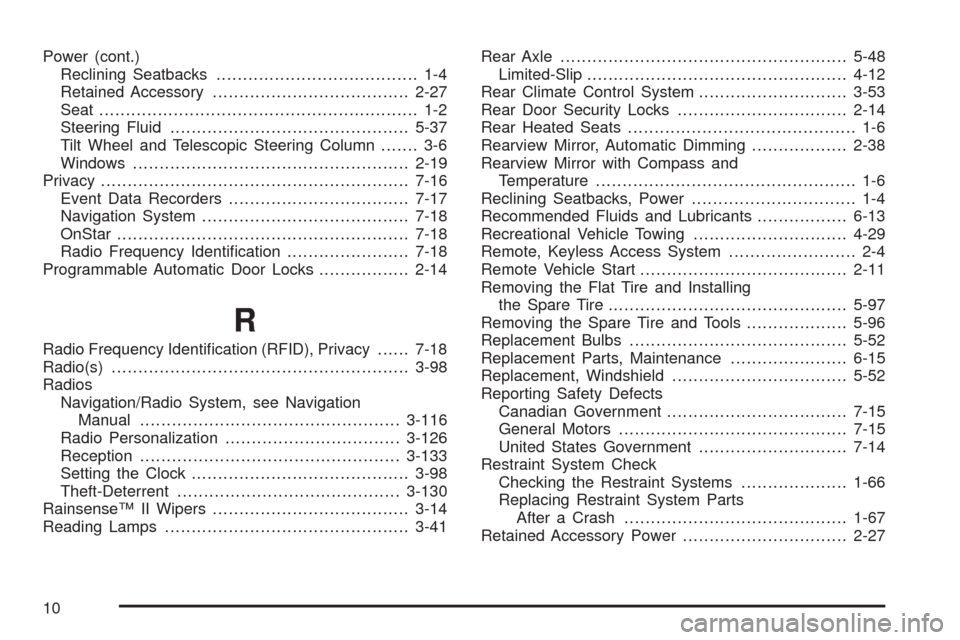
Power (cont.)
Reclining Seatbacks...................................... 1-4
Retained Accessory.....................................2-27
Seat ............................................................ 1-2
Steering Fluid.............................................5-37
Tilt Wheel and Telescopic Steering Column....... 3-6
Windows....................................................2-19
Privacy..........................................................7-16
Event Data Recorders..................................7-17
Navigation System.......................................7-18
OnStar .......................................................7-18
Radio Frequency Identication.......................7-18
Programmable Automatic Door Locks.................2-14
R
Radio Frequency Identication (RFID), Privacy......7-18
Radio(s)........................................................3-98
Radios
Navigation/Radio System, see Navigation
Manual.................................................3-116
Radio Personalization.................................3-126
Reception.................................................3-133
Setting the Clock.........................................3-98
Theft-Deterrent..........................................3-130
Rainsense™ II Wipers.....................................3-14
Reading Lamps..............................................3-41Rear Axle......................................................5-48
Limited-Slip.................................................4-12
Rear Climate Control System............................3-53
Rear Door Security Locks................................2-14
Rear Heated Seats........................................... 1-6
Rearview Mirror, Automatic Dimming..................2-38
Rearview Mirror with Compass and
Temperature................................................. 1-6
Reclining Seatbacks, Power............................... 1-4
Recommended Fluids and Lubricants.................6-13
Recreational Vehicle Towing.............................4-29
Remote, Keyless Access System........................ 2-4
Remote Vehicle Start.......................................2-11
Removing the Flat Tire and Installing
the Spare Tire.............................................5-97
Removing the Spare Tire and Tools...................5-96
Replacement Bulbs.........................................5-52
Replacement Parts, Maintenance......................6-15
Replacement, Windshield.................................5-52
Reporting Safety Defects
Canadian Government..................................7-15
General Motors...........................................7-15
United States Government............................7-14
Restraint System Check
Checking the Restraint Systems....................1-66
Replacing Restraint System Parts
After a Crash..........................................1-67
Retained Accessory Power...............................2-27
10